
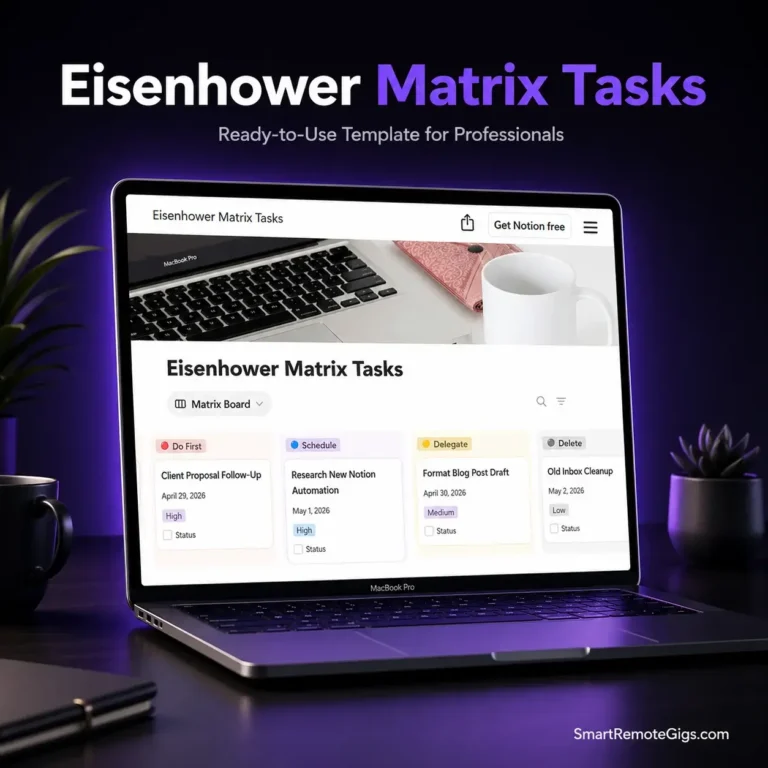
Being “busy” is the ultimate freelancer trap. You can sit at your desk for 10 hours a day answering emails, organizing folders, and tweaking font sizes, only to wake up on Friday realizing you haven’t completed a single billable project. If your to-do list looks like a chaotic CVS receipt, you don’t need to work harder. You need a system to ruthlessly separate what actually pays the bills from what is just digital noise. You need a strict eisenhower matrix template to stop playing pretend-CEO and start doing the needle-moving work. Let’s kill your bloated to-do list for good.
🛑 Why I Built This Template (The Backstory)
When I first started working remotely, I thought productivity meant crossing off as many tasks as possible. I would open my laptop at 8 AM, stare at a list of 42 random action items, and immediately tackle the easiest ones. I replied to Slack messages, redesigned my invoice template for the fifth time, and organized my Google Drive. By 5 PM, my brain was completely fried. I felt exhausted, but when I looked at my actual business progress, nothing had changed. The big, scary client proposal that would actually make me money? Pushed to tomorrow. Again.
I realized I wasn’t managing my time; my inbox was managing me. I was confusing urgency (someone else’s problem) with importance (my actual goals). I deleted my massive, linear to-do list and built this 2×2 matrix inside Notion. It forced me to face a brutal reality: 80% of what I did every day was completely useless. By forcing every single task into one of four distinct boxes—Do, Schedule, Delegate, or Delete—I essentially gamified my focus. I stopped doing $10/hour admin work during my peak morning hours, and my income skyrocketed while my stress plummeted. Now, I’m sharing the exact productivity dashboard that gave me my evenings back.
✨ What’s Inside?
We stripped out the complex productivity frameworks that take three hours to learn. This template is a ruthless, visual triage system for your daily tasks.
- ✅ The 4-Quadrant Kanban Board: A drag-and-drop visual interface that groups your tasks strictly by Do First, Schedule, Delegate, and Delete so you know exactly where to start your day.
- ✅ The “Brain Dump” Inbox: A holding zone where you can quickly log chaotic thoughts and incoming requests before you decide which quadrant they belong in.
- ✅ Impact Level Tags: Color-coded priority tags to ensure that even within your “Do First” quadrant, you are tackling the highest ROI tasks before lunchtime.
- ✅ The Zero-Friction Archive: A highly satisfying button to instantly clear completed (or deleted) tasks out of your view, keeping your workspace perfectly minimalist.
🚀 How to Use It
You don’t need a project management certification to prioritize your life. You can reset your entire workflow in under three minutes.
- Duplicate the Matrix: Click the link below, hit “Duplicate” in the top right corner, and pull the complete matrix into your private Notion workspace.
- The Great Brain Dump: Empty your head. Write down every single thing you think you need to do today, this week, and this month into the Inbox section without categorizing it yet.
- Sort and Destroy: Drag each task into the appropriate quadrant. If it’s urgent and important, it’s a “Do.” If it doesn’t actually move your business forward, drag it straight into “Delete” and never look back.
❓ Frequently Asked Questions (FAQ)
What if absolutely everything on my list feels “Urgent and Important”?
This is the most common trap for freelancers. If everything is important, nothing is. Force yourself to be ruthless. Will your business collapse if you don’t answer that non-client email today? No. Move it to “Schedule.” The matrix works because it applies artificial constraints. You are only allowed a maximum of 3 to 5 tasks in your “Do First” quadrant per day.
I work entirely solo. How can I use the “Delegate” quadrant?
Even if you don’t have a virtual assistant or subcontractors, the “Delegate” quadrant is incredibly useful. In 2026, delegation often means automation. If you put a task in the Delegate box (like onboarding a new client or sending invoice reminders), that is a signal that you need to set up a Zapier automation, a Notion workflow, or an AI tool to handle it for you.
Is this eisenhower matrix template totally free?
Yes, 100%. We believe that protecting your time and mental health shouldn’t be hidden behind an expensive monthly subscription. You can duplicate this Notion setup right now and use it forever without paying a dime.