

TickTick is a to-do list and calendar app with a habit tracker and a Pomodoro timer. This TickTick review covers its Free and Premium plans, the limits that matter and who should pay. Checked 2026-11-28 on public pages and our Free account, with prices in US dollars as shown.
Key Takeaways
- The upgrade page marks Filter, Calendar View and the AI Assistant as Premium only, while tags are on both plans.
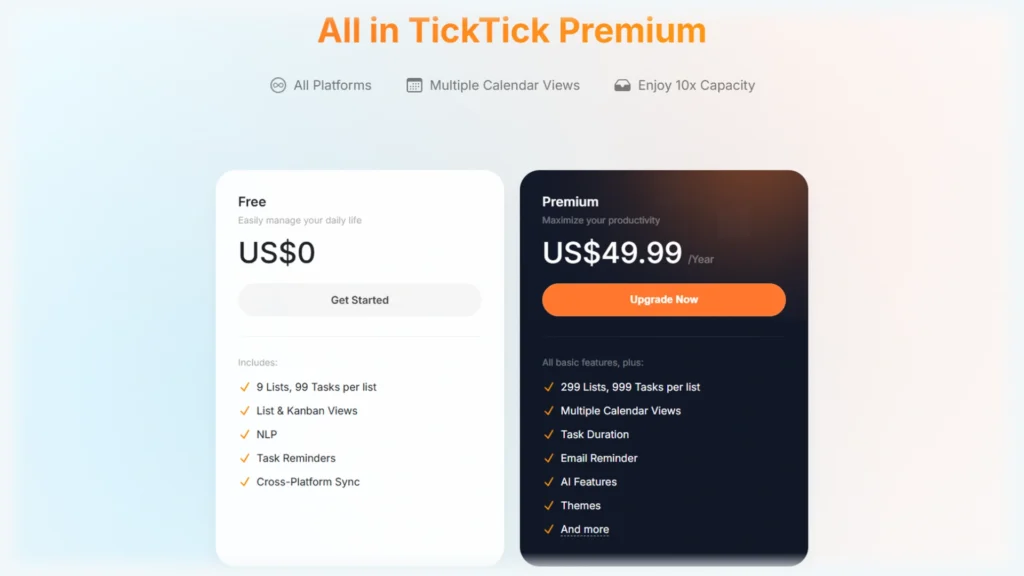
- The public upgrade page lists only a yearly Premium plan. A monthly price appears in the web app’s Settings, so check it inside the app.
- Twelve monthly payments of US$4.99 come to US$59.88, so the US$49.99 yearly price is US$9.89, or 16.5%, lower (our calculation, list prices, no tax added).
- Plans renew automatically. TickTick’s 14-day refund window does not cover App Store purchases or orders with invoices.
The Key Facts below list each price, and the sections after them cover limits, billing and GTD fit.
Free plan
US$0
Premium, yearly
US$49.99, one payment a year
Premium, monthly
US$4.99 a month, shown in the web app Settings
Billing basis
The yearly plan renews automatically; the US$4.17 a month figure is TickTick’s own division of the yearly price
Apps
Web, Windows, macOS, Linux, Android, iOS and iPadOS (see the download page)
- TickTick pricing: Free vs Premium
- Is TickTick free? Free plan limits
- Is TickTick Premium worth it? Pick a plan
- Trial, refunds, cancelling and discounts
- TickTick student discount
- TickTick focus timer (Pomodoro)
- TickTick habit tracker
- TickTick for GTD: lists, tags and filters
- Smart lists and folders
- Tags and filters
- Calendar views
- Pros and cons
- Verdict
- Sources and what we didn't check
- Frequently Asked Questions
TickTick pricing: Free vs Premium
TickTick’s upgrade page lists only a yearly Premium plan. The web app’s Settings screen adds a monthly button, and the App Store lists its own yearly and monthly prices.
| Where | Option | Price | Note |
|---|---|---|---|
| Public upgrade page | Premium, yearly | US$49.99 a year | The Premium plan card price |
| Upgrade page footer | Premium, yearly | Less than US$4.17 a month | TickTick’s division of the yearly price |
| Upgrade dialog, small print | Premium, yearly | US$4.17 a month | The same division, not a monthly plan |
| Web app Settings | Premium, monthly | US$4.99 a month | Not shown on the public page |
| Web app Settings | Premium, yearly | US$49.99 a year | Same as the public page |
| App Store listing (US) | Premium, yearly and monthly | $49.99 and $4.99 | Apple’s own prices; refunds go through Apple |
The upgrade page footer and the upgrade dialog divide the yearly payment by 12 and show about US$4.17 a month, which is not a monthly plan. The monthly button is in Settings.
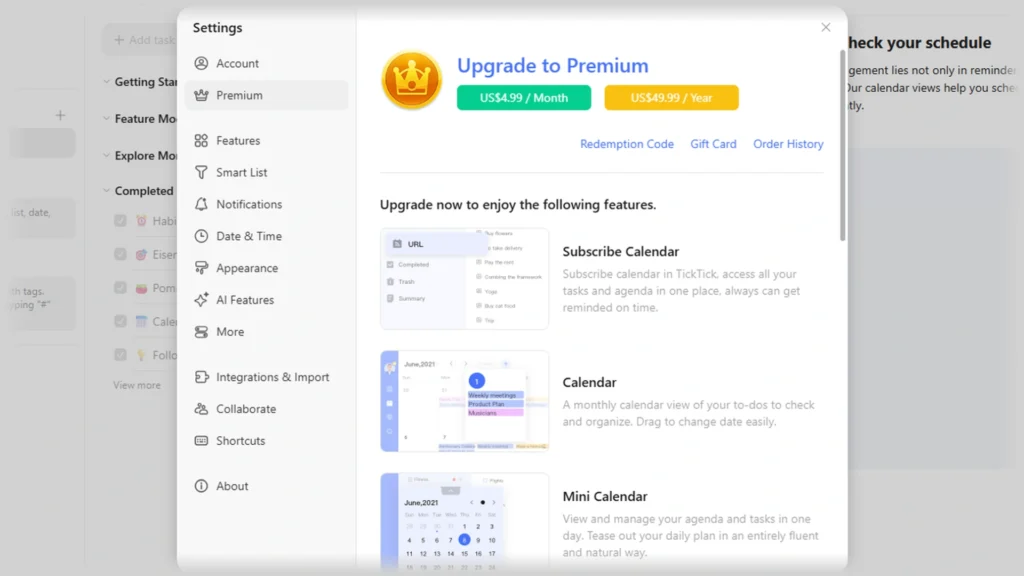
The upgrade page says US$49.99 a year, and it showed no sale or offer. If another site lists a different yearly price, check it in your account before you pay.
For price context, Todoist’s plans FAQ listed Pro at $60 a year on 2026-11-27. That is $10.01 more than TickTick Premium’s US$49.99 yearly price (our calculation).
Is TickTick free? Free plan limits
Yes, to a point: anyone can create a TickTick account for free, and Free runs on the caps in the table below.
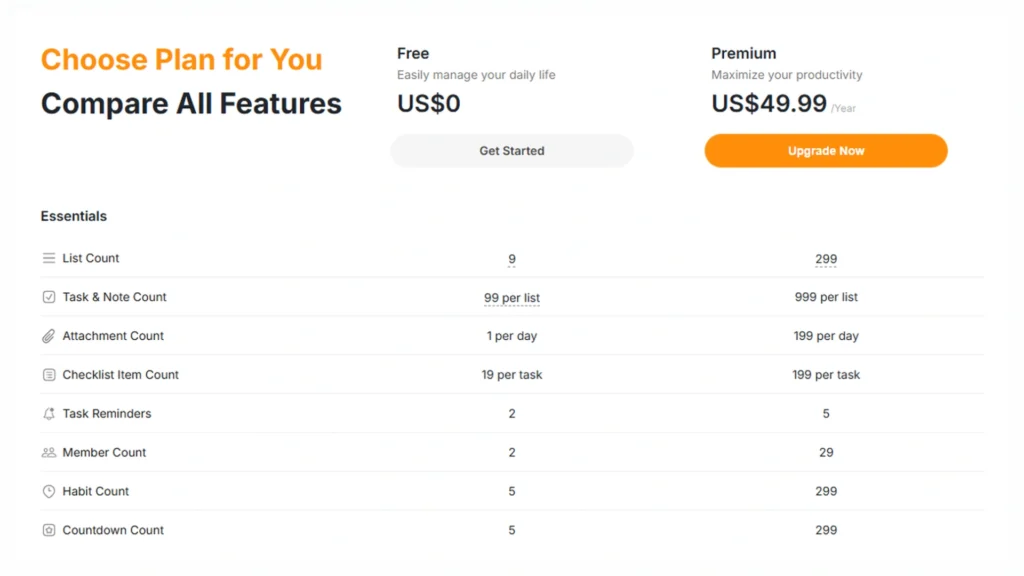
| Limit | Free | Premium |
|---|---|---|
| Lists | 9 | 299 |
| Tasks and notes per list | 99 | 999 |
| Checklist items per task | 19 | 199 |
| Task reminders | 2 | 5 |
| Attachments per day | 1 | 199 |
| Attachment size, each file | 10 MB | 20 MB |
| Member count | 2 | 29 |
| Habits | 5 | 299 |
| Countdowns | 5 | 299 |
| Statistics, Eisenhower Matrix, Widgets, Themes | Basic | Unlimited |
Figures come from the upgrade page, except attachment size, which comes from the help FAQ. The page does not say what Basic covers.
The help FAQ says Premium allows 99 uploads a day. The in-app Settings text says 199, as the upgrade page does, so we follow the app. Confirm it if uploads matter.
The upgrade page prints Task Reminders and Member Count with no unit. TickTick’s in-app text words the Premium 5 as per task. No page we checked words the Free 2.
The help FAQ says Free can add one shared member and Premium up to 29. No page we checked says whether the owner counts, so check a shared list before you count seats.
Is TickTick Premium worth it? Pick a plan
These rules use the caps above and the Premium-only rows on the upgrade page.
- If your setup needs more than 9 lists or 99 tasks in a list, pick Premium, which allows 299 lists and 999 tasks per list. Skip it if you stay under both.
- If you want custom filters that combine lists, tags and dates, pick Premium. Skip it if tags and lists are enough.
- If you plan your day in Calendar View, pick Premium. The Week view asked for an upgrade on Free. Skip it if you plan from lists.
- If you want to track more than 5 habits, pick Premium, which allows 299 habits. Skip it if five habits cover you.
- If you want the AI Assistant, AI Voice Capture or Recording Summary, pick Premium. Skip it if you do not need them.
Quick Verdict:
Best For: Solo planners wanting tasks, habits and a focus timer in one app.
Skip If: You need a team or family plan: TickTick lists none on the pages we checked.
Trial, refunds, cancelling and discounts
We saw no trial offer on the screens we captured: the two setup steps after sign-up, Settings and the upgrade dialog. A missing offer does not show that no trial exists, so look for one before you pay.
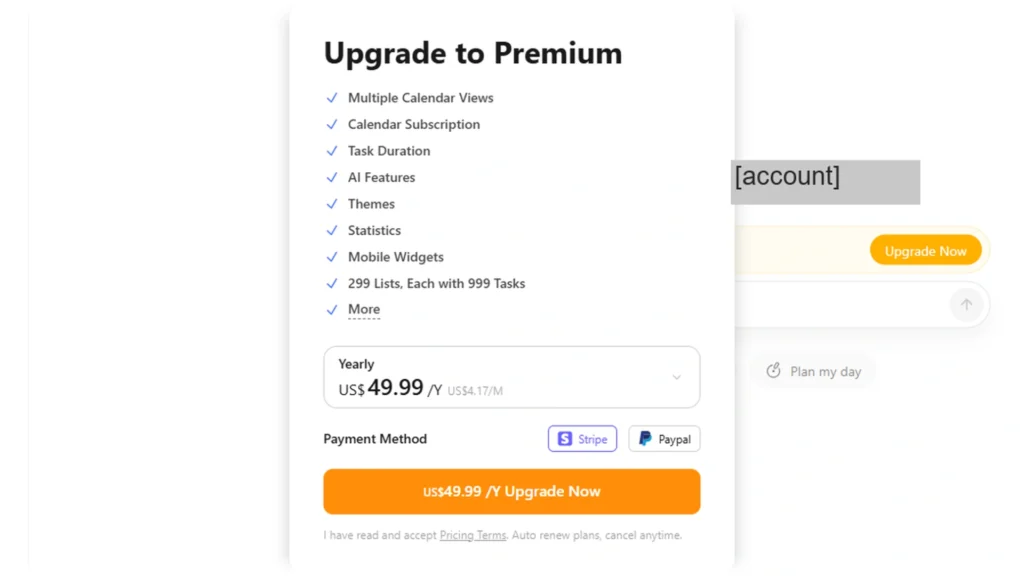
The upgrade dialog offers Stripe or PayPal and says plans auto renew and can be cancelled anytime. It shows no tax line, and TickTick publishes no web renewal timing on the pages we checked.
For Google Play, Stripe or PayPal subscriptions, the help article says to cancel in the web app with the Cancel Subscription button on the tab it calls Premium Account. TickTick cannot cancel App Store subscriptions, and Apple renews them unless you turn off auto-renew at least 24 hours before the period ends.
Red Flag: Refunds depend on where you pay
For Google Play, PayPal or Stripe purchases, TickTick says you can request a refund within 14 days. Its help article also says orders with invoices cannot be refunded. For App Store purchases, ask Apple Support.
After Premium ends, TickTick says your data is kept and the account works as Free. The pages we checked do not say what happens to items above the Free caps.
TickTick student discount
Eligible students, faculty and staff can get 25% off one year of Premium, and TickTick’s education page states the price as US$37.99. The discount covers the yearly plan only, and 25% off US$49.99 works out to US$37.49 (our calculation), so confirm the price on the link in your approval email. Apply with an education email; only Stripe is supported for this price.
The discount is valid for 1 year, and you must reapply to keep it. It cannot be applied to an active Premium plan.
TickTick focus timer (Pomodoro)
TickTick’s timer has a Pomodoro mode of 25 minutes of focus and a 5-minute break, and a Stopwatch mode that counts up. Switch it on under Settings, Features.
The focus timer help pages we checked do not say which plan the timer needs. On Free, the Pomodoro screen showed a running timer, and the screenshot below shows no upgrade prompt.
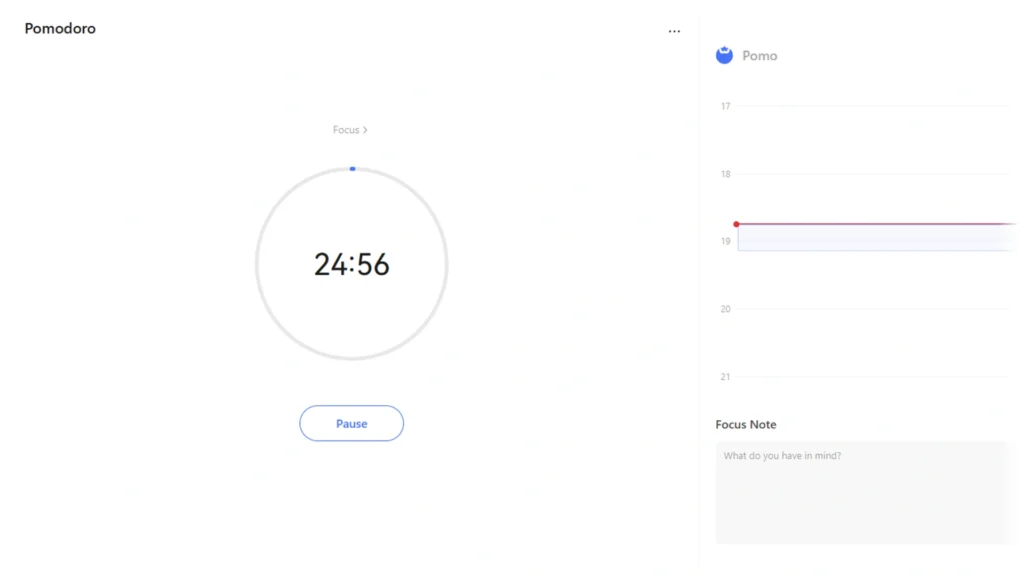
The upgrade page lists Statistics as Basic on Free and Unlimited on Premium, without saying what Basic covers. To run a session outside TickTick, use our free Pomodoro timer.
TickTick habit tracker
The habit tracker has a gallery of over 60 habits in four categories, and you can create your own. Each habit can have its own check-in frequency.
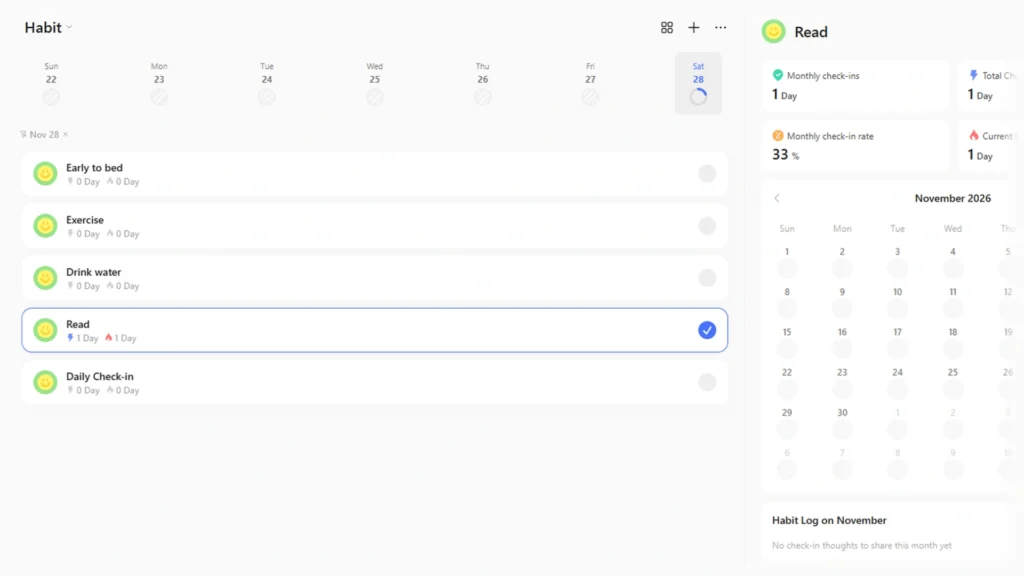
The Free habit cap in the table above comes from the upgrade page, not from this screenshot. No help page we checked names a Premium-only habit feature.
TickTick for GTD: lists, tags and filters
This table shows which GTD-style parts TickTick ties to a plan.
| GTD part | Free | Premium |
|---|---|---|
| Tags | Included | Included |
| Custom filters | Not included | Included |
| Calendar View | Not included | Included |
| Smart lists | No plan named | No plan named |
| Folders | No plan named | No plan named |
Included and Not included follow the upgrade page. No plan named means the help pages we checked describe the feature without naming a plan.
Smart lists and folders
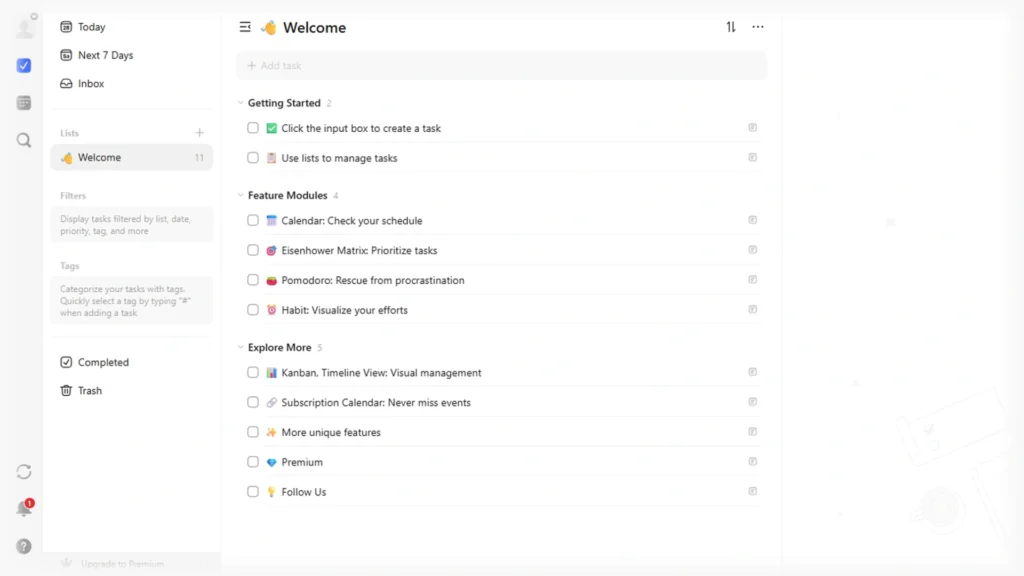
The Lists help article names five smart lists, and the help FAQ names eight. Neither names a plan. To choose which ones show in your account, open Settings, then Smart Lists.
Folders group lists as the list count grows.
Tags and filters
In the next screenshot, the left column of ticks is Free and the right is Premium; the crop has no headers. Tag has a tick in both, and Filter has a tick on the right only.
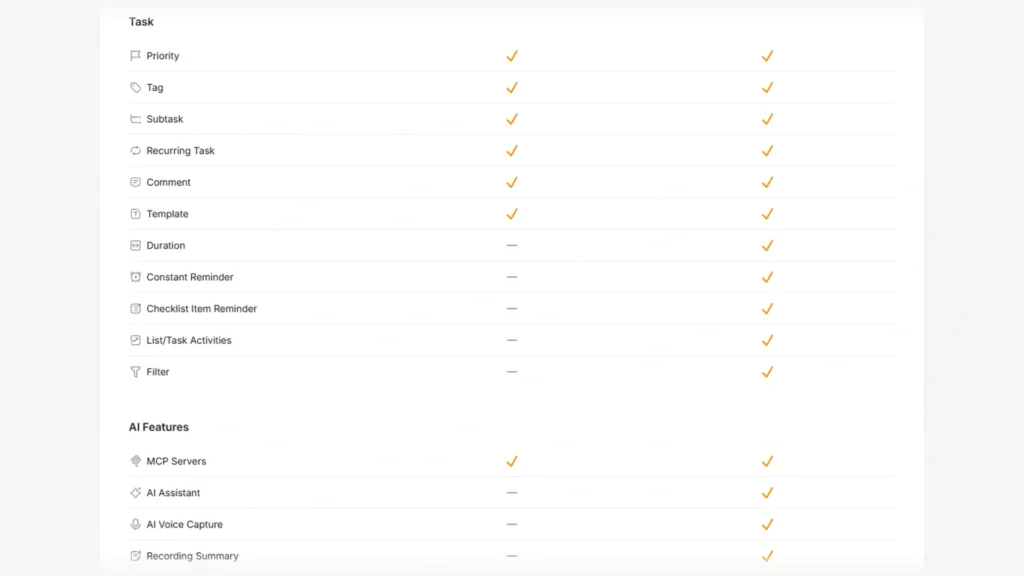
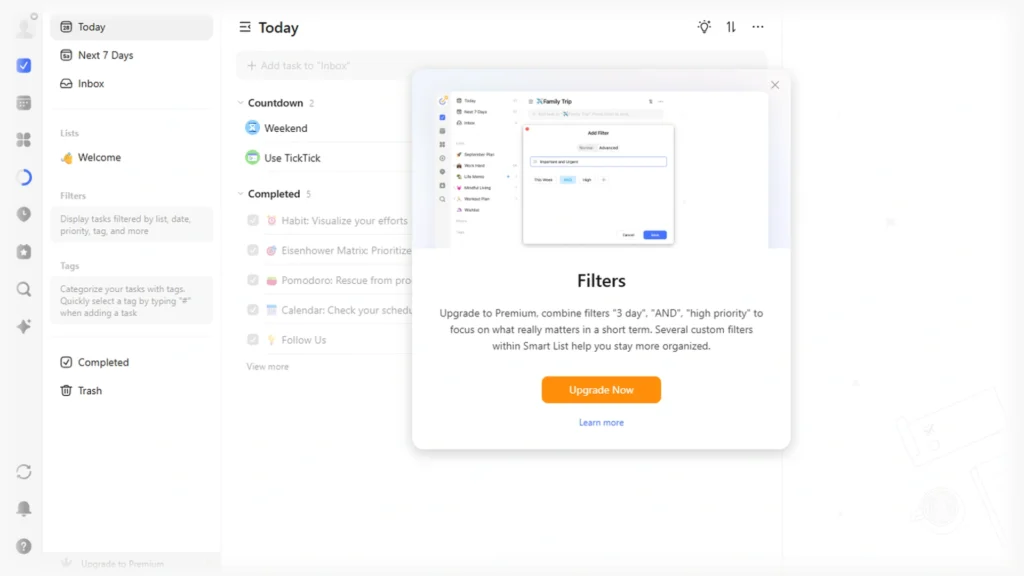
Filters can combine list, tags, date and other attributes, with AND and OR logic. Adding a filter on Free opened an upgrade prompt.
Calendar views
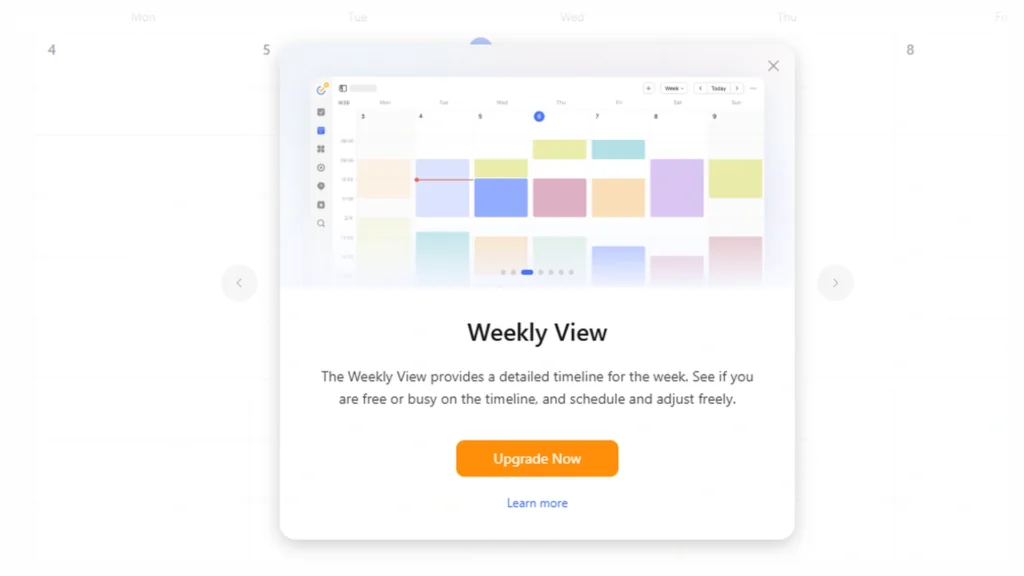
The upgrade page marks Calendar View as Premium only. The Week view opened an upgrade prompt on Free. The pages we checked, including the Calendar help article, do not spell out which other views Free includes, so open the ones you need before you pay.
To compare more apps, see our GTD app comparison.
Pros and cons
Pros
- Free plan available
- Tags on both plans
- Built-in Pomodoro timer
- Habit tracker included
- Web, desktop and mobile apps
Cons
- Filter is Premium only
- Calendar View is Premium only
- Free capped at 9 lists
- AI Assistant is Premium only
- Upgrade page lists yearly only
Verdict
Verdict: Start on the Free plan and move to Premium only when you pass the Free caps or need Filters, Calendar View or the AI Assistant.
Not a fit? Try: Todoist
Sources and what we didn’t check
- Education Offer help article: the yearly-only, reapply and active-plan rules for the student discount.
- Folders help article: how folders group lists.
- Account help article: anyone can create a free account.
Based on official sources and our own screenshots of the public upgrade page and the web app on a Free account, checked November 2026.
What we didn’t check:
- Paid features beyond their upgrade prompts
- Calendar views other than Week
- The final charged total and tax
- The Pricing Terms page linked in the upgrade dialog