
Getting Things Done (GTD): The 2026 Beginner’s Guide
 ·
Last Updated: February 12, 2026 ·
14 min read
·
Last Updated: February 12, 2026 ·
14 min read
Your brain has 47 browser tabs open right now.
You know the feeling. That low-level anxiety humming in the background. The constant mental whisper: What am I forgetting? You have tasks scattered across sticky notes, email flags, calendar reminders, Slack DMs, and that one text message you starred three weeks ago.
David Allen called these “open loops.” I call them browser tabs in your brain. Each one consuming a tiny bit of mental RAM until your entire system slows to a crawl.
Here’s the problem: in 2026, we have more inputs than when Allen wrote Getting Things Done in 2001. We’re drowning in Slack notifications, Teams messages, WhatsApp threads, email, and the endless scroll of social media. The number of things demanding our attention has multiplied by 100x.
Your brain wasn’t designed for this. It’s designed to have ideas, not hold them.
Getting Things Done (GTD) is a system for getting all those browser tabs out of your head and into an external system you actually trust. It works for Fortune 500 CEOs managing billion-dollar projects. It works for freelancers juggling five clients. It works for neurodivergent brains that struggle with traditional organization.
The methodology is the same. The context has changed.
This is your 2026 guide to “Mind Like Water.”
The GTD Methodology in 30 Seconds
Quick Definition:
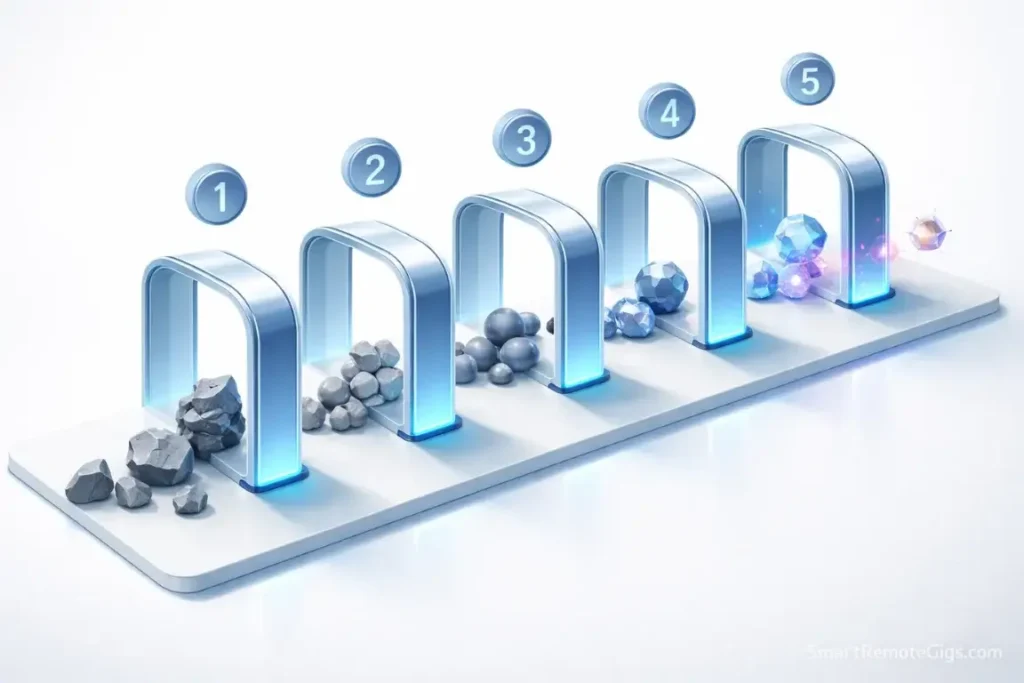
Getting Things Done (GTD) is a five-step workflow for managing commitments:
1. Capture – Collect everything that has your attention
2. Clarify – Process what each item means and what to do about it
3. Organize – Put items into the right buckets (Projects, Next Actions, Waiting For, Someday/Maybe)
4. Reflect – Review your system regularly to keep it current
5. Engage – Use your system to make trusted choices about what to do
The goal: Get everything out of your head so your brain is free to focus on doing the work, not remembering it.
That’s the whole system. Everything else is detail.
What is GTD? (And Why Your To-Do List is Failing)

Let’s start with what GTD is not.
It’s not a to-do list. To-do lists are graveyards of guilt—long scrolls of undone tasks that make you feel like a failure every time you look at them.
GTD is an external brain. It’s a system for capturing, organizing, and surfacing the right information at the right time so you can make trusted choices about what to do next.
Here’s the fundamental difference:
Standard To-Do List:
- One long list of everything
- No distinction between “buy milk” and “launch product”
- Tasks get added but rarely reviewed
- The longer the list, the more anxiety you feel
GTD System:
- Everything is captured and sorted into the right bucket
- Clear distinction between Projects (multi-step outcomes) and Next Actions (single physical steps)
- Regular review keeps the system current and trusted
- The more complete your system, the calmer you feel
The magic happens when you stop using your brain as a storage device and start using it as a processing device.
Trying to decide between paper and apps? Read our Analog vs. Digital GTD showdown first.
The 5 Steps of the GTD Workflow
Let’s break down the methodology step by step.
Step 1: Capture (Get It Out of Your Head)
The first rule of GTD: If it’s in your head, you lose.

Your brain is terrible at holding information. Every time you try to remember something, you’re burning cognitive energy. That reminder to “call the dentist” sitting in your head for three days? It’s consuming mental RAM every single time you think about it.
The solution: Capture everything.
What to capture:
- Tasks (“Reply to Sarah’s email”)
- Ideas (“Write article about productivity tools”)
- Commitments (“Pick up dry cleaning”)
- Things that bother you (“Squeaky door hinge”)
- Someday dreams (“Learn to play guitar”)
Where to capture:
- Physical inbox (notebook, pile on desk)
- Digital inbox (notes app, email to yourself, voice memos)
- Task manager inbox (Todoist, OmniFocus, etc.)
The key is zero friction. If it takes more than 5 seconds to capture something, you won’t do it consistently.
Don’t know where to start? Use our guided GTD Mind Sweep Guide to clear the mental static in 15 minutes.
This is called a “Mind Sweep”—a systematic brain dump of everything that has your attention. It’s the foundation of the entire system.
Pro Tip: Keep multiple capture tools in different locations. I have a notebook on my desk, voice memos on my phone, and a physical inbox tray for papers. The best capture tool is the one you have with you.
Step 2: Clarify (Processing)
Now you have an inbox full of stuff. Time to decide what it all means.
This is where most people fail. They capture everything, then never process it. The inbox becomes a black hole where tasks go to die.
Processing means answering one question about each item: What is it, and what do I do about it?
The GTD decision tree:
- Is it actionable?
- No → Trash it, file it as reference, or move it to Someday/Maybe
- Yes → Continue to step 2
- What’s the next action? (The single, specific physical step)
- Example: Don’t write “Taxes.” Write “Download W-2 from employer portal.”
- Will it take less than 2 minutes?
- Yes → Do it now
- No → Continue to step 4
- Can I delegate it?
- Yes → Delegate and track on “Waiting For” list
- No → Put it on your Next Actions list
- Does it require multiple steps?
- Yes → It’s a Project (create a project with next actions)
- No → It’s a single Next Action
The 2-Minute Trap: The “2-minute rule” says if something takes less than 2 minutes, do it immediately. This is brilliant for keeping small tasks from accumulating. But it’s also a trap. Don’t let 2-minute tasks derail your processing. If you’re in a flow state or have limited time, batch 2-minute tasks and do them all at once later.
The goal of processing is not to do everything. It’s to decide what everything is.
Step 3: Organize (The Buckets)
Once you’ve clarified what each item is, you put it in the right bucket.
GTD has seven core categories:
1. Projects List
- Any outcome requiring more than one action step
- Examples: “Plan vacation,” “Launch website,” “Organize garage”
- Keep this list as a simple roster—just the project names
2. Next Actions
- Single, specific physical actions you can do
- Organized by context (@Computer, @Calls, @Errands, @Home)
- Examples: “Email John proposal draft @Computer,” “Buy lightbulbs @Errands”
3. Waiting For
- Things you’ve delegated or are waiting for others to complete
- Include the person’s name and date delegated
- Example: “Waiting for Sarah to send Q4 report (delegated 1/15)”
4. Someday/Maybe
- Ideas and projects you might do in the future but not now
- This is your “idea parking lot”
- Review monthly, not weekly
5. Calendar
- Only for time-specific appointments and hard deadlines
- Don’t put tasks on your calendar unless they must happen at a specific time
6. Reference
- Information you need to keep but don’t need to act on
- Files, notes, documents, receipts
7. Trash
- Everything else
The power of this system is separation. Projects aren’t mixed with actions. Actions aren’t mixed with reference. Your brain doesn’t have to sort through noise to find signal.
Step 4: Reflect (The Weekly Review)
This is the heartbeat of the system. Without regular review, GTD dies.
The Weekly Review is when you:
- Process all inboxes to zero
- Review your Projects list (is it current and complete?)
- Review your Next Actions (are they still relevant?)
- Review your Waiting For list (follow up as needed)
- Review Someday/Maybe (anything ready to activate?)
- Look at the coming week (what needs attention?)
How long does it take? 30 minutes to 2 hours, depending on system size.
When should you do it? Same time every week. Friday afternoon works for most people.
This is where 90% of people fail. Don’t rely on willpower. Download our Weekly Review Checklist PDF to guide you through the process.
The review is what creates trust in your system. When you know you review everything weekly, you can let go of the anxiety that you’re forgetting something. Your system has it covered.
Step 5: Engage (Choosing What to Do)
Now comes the moment of truth: What do I actually do right now?
GTD uses a hierarchy of decision factors:
1. Context – Where are you and what tools do you have?
- If you’re at home without your laptop, you can’t do @Computer tasks
- If you’re running errands, look at your @Errands list
2. Time Available – How much time before your next commitment?
- Got 15 minutes? Look for quick wins
- Got 3 hours? Tackle a deep work project
3. Energy Available – What’s your mental state?
- Fried at 4 PM? Do mindless admin work
- Sharp in the morning? Do creative or strategic thinking
4. Priority – What’s most important given the above constraints?
Notice what’s NOT on this list: stress, guilt, or panic. When you trust your system, you can make calm, rational choices about what to do next.
Struggling to start? Combine GTD contexts with our Pomodoro Technique for ADHD guide for maximum focus.
The Tool Debate: How to Start in 2026
Here’s the question everyone obsesses over: What tool should I use?
The honest answer: It doesn’t matter as much as you think.
GTD is a methodology, not a piece of software. I’ve seen people run flawless GTD systems with nothing but index cards. I’ve also seen people with $100 apps whose systems are complete disasters.
That said, the right tool reduces friction. Here’s how to choose in 2026:
The All-Rounder (Best for Most People)
Todoist is the Swiss Army knife of GTD apps.
Why it works:
- Natural language input for fast capture (“Buy milk tomorrow @Errands”)
- Custom filters let you create context views
- Cross-platform (works on everything)
- Reasonable price ($4/month)
Best for: People who want flexibility without complexity. New GTD practitioners. Anyone who uses both Mac and PC.
If you want AI-powered capture and easy filters, read our 2026 Todoist Review.
The Power User (Apple Ecosystem Only)
OmniFocus is the professional-grade option.
Why it works:
- Built-in Review mode that forces you to look at projects regularly
- Defer dates separate from due dates (anxiety killer)
- Unlimited customization through Perspectives
- Automation and scripting support
Best for: Committed GTD practitioners on Apple devices. People managing complex projects with dependencies. Anyone who’s hit the ceiling with simpler tools.
Need strict control and custom scripts? Read our OmniFocus 4 Review.
The Visual Thinker
If you need to see your system spatially, try:
- Trello – Kanban boards for visual organization
- Tiimo – Color-coded time blocking (great for ADHD brains)
Best for: People who think in images and colors. Visual learners. Anyone who finds text-based lists overwhelming.
The Analog Purist
Paper works. Full stop.
- Bullet Journal – Flexible, customizable, tactile
- 43 Folders – Physical tickler file system
- Index cards – The original GTD tool
Best for: People who remember things better when they write them. Anyone who finds digital tools distracting. Minimalists who don’t want another app.
My recommendation: Start with whatever you have right now. Seriously. Use a notebook and a pen. Run GTD for two weeks. Then, if you need digital, upgrade.
The system matters more than the tool.
GTD for Different Brains
Here’s something David Allen’s book doesn’t address: GTD isn’t one-size-fits-all.
The methodology works for everyone, but the implementation needs to adapt to how your brain works.
Does GTD work for ADHD?
Yes, but you have to break the rules.
Standard GTD requires high executive function to maintain. The processing rules, the filing systems, the systematic reviews—all of that creates “admin debt” that ADHD brains struggle to sustain.
The fix: Simplify ruthlessly.
- Keep the Capture phase (it’s a lifesaver for working memory)
- Organize by energy level, not by project (e.g., @HighFocus, @LowFocus)
- Do 15-minute “Emergency Resets” instead of 2-hour Weekly Reviews
- Accept that the system will break and design it to be easily rebooted
If the standard rules feel overwhelming, check out GTD for ADHD: The Remix Method.
Does GTD work for visual thinkers?
Absolutely, but skip the text-heavy lists.
Use:
- Color coding for contexts
- Spatial organization (Kanban boards)
- Icons and symbols instead of words
- Mind maps for project planning
The core GTD principles (capture, clarify, organize, review, engage) still apply. You’re just translating them into a visual language.
Does GTD work for perfectionists?
GTD can trigger perfectionist tendencies. The system is so comprehensive that you can spend hours configuring it instead of actually doing work.
The antidote: Good enough is perfect.
Your first GTD system will be messy. That’s fine. Start with just the basics:
- One inbox
- One Next Actions list
- One Projects list
- A weekly review (even 10 minutes counts)
Resist the urge to build the perfect system. Build a working system, then iterate.
Frequently Asked Questions
How long does it take to set up GTD?
Initial setup: 1-2 days for a complete Mind Sweep and organizing your life.
Getting comfortable: 4-6 weeks of consistent use before the system feels natural.
Mastery: 3-6 months before you trust the system completely and stop using your brain as storage.
Don’t expect instant results. GTD is a skill that improves with practice.
Can I do GTD with just pen and paper?
Yes, and many people prefer it.
Paper advantages:
Tactile satisfaction of crossing items off
No digital distractions
Works anywhere, no battery required
Writing helps memory retention
Paper disadvantages:
Can’t easily reorganize or search
Hard to manage large numbers of tasks
No automatic reminders
Requires rewriting to update
Bullet Journaling is essentially GTD adapted for paper. It works beautifully.
What do I do with “Someday/Maybe” items?
The Someday/Maybe list is your pressure release valve. It’s where ideas go to be safe, not forgotten.
How to manage it:
Review monthly, not weekly (don’t create admin debt)
Accept that 90% will never happen (that’s fine)
When something feels urgent, promote it to Projects
Archive or delete items that no longer interest you
The point isn’t to do everything on the list. The point is to stop feeling guilty about not doing them.
What if I fall off the wagon and stop using GTD?
You will fall off. Everyone does.
The system breaks when life gets chaotic, when you get sick, when you go on vacation, or when you just get lazy for a few weeks.
How to recover:
1. Do a quick Mind Sweep (10 minutes)
2. Process just the urgent stuff
3. Declare inbox bankruptcy on the rest (archive it all)
4. Start fresh with a clean system
GTD isn’t about perfection. It’s about having a system you can return to when you need it.
Is GTD overkill for a simple life?
Maybe.
If you have:
Fewer than 10 active commitments
No major projects
A simple job with clear boundaries
No long-term goals requiring planning
Then GTD might be excessive. A simple to-do list might be enough.
But most people underestimate how many open loops they’re carrying. Try a Mind Sweep. You might be surprised.
Final Verdict: Start Messy, But Start Today

GTD is not a productivity hack. It’s a lifestyle.
You’re not going to read this guide, set up a perfect system this weekend, and achieve zen-like clarity by Monday. It doesn’t work that way.
GTD is a skill. Like learning an instrument or a language, it gets better with practice. Your first system will be clunky. Your first Weekly Review will feel awkward. You’ll forget to capture things and let your inbox overflow.
That’s normal. Everyone starts messy.
The people who succeed with GTD are the ones who:
- Start with the basics, not the perfect system
- Review consistently (even badly) rather than perfectly but rarely
- Forgive themselves when the system breaks
- Iterate and improve over time
The goal isn’t a pristine system. The goal is a quiet mind.
When you trust your external system to remember everything, your brain is free to do what it does best: think, create, and solve problems.
That’s the promise of Getting Things Done.
Your first step is the Mind Sweep. Get everything out of your head and onto paper. 15 minutes. Right now.
Download our Mind Sweep Guide and start today.
Your brain will thank you.

![Build AI Second Brain Assistant 2026: Local Setup [Guide]](https://smartremotegigs.com/wp-content/uploads/2026/09/build-your-second-brain-ai-assistant-local-rag-hero-1024x577.webp)
![Second Brain with Claude & Obsidian 2026 [My Setup]](https://smartremotegigs.com/wp-content/uploads/2026/08/claude-obsidian-second-brain-mcp-hero-1024x577.webp)
![Why Your Second Brain Fails 2026: Retrieval Fix [Fix]](https://smartremotegigs.com/wp-content/uploads/2026/08/why-your-second-brain-fails-hero-1024x576.webp)