Our Top Picks: Quick Answer
Category | Tool | Why It’s Great |
|---|---|---|
Best Overall | Microsoft Designer (Copilot) | Unbeatable DALL-E 3 quality at zero cost |
Best for Creative Control | Leonardo.Ai | Access community models for unique artistic styles |
Easiest for Beginners | Canva AI | Seamlessly integrated into design workflow |
Best No-Signup Option | BlueWillow | Start generating right from Discord |
The ‘Cyberpunk Cat’ Test: What We Learned
I tested a simple prompt on 20 different tools: “A cyberpunk cat with neon purple fur, sitting on a Tokyo rooftop at night, glowing signs in background, cinematic lighting.”
The results? Most tools delivered nightmare fuel—cats with three ears or glowing eyes in the wrong places. That failure taught me: price tags don’t guarantee quality. After 20+ hours of hands-on testing, I found the best free AI image generators that actually work—no credit cards, no trials, just legitimate free tools.
What You’ll Find Below:
- Comparison table (Speed, Quality, Commercial Rights)
- Detailed reviews with real test results
- Pro tips and warning boxes for each tool category
- Zero fluff, just honest hands-on results
How We Tested and Picked These Tools
Our Core Principle: No credit card required, no 3-day trials. Only tools with a substantial, ongoing free AI art generator tier made the cut.
Every top-tier tool on our list is powered by modern diffusion models—technology that has surpassed older methods in producing high-quality, coherent images. To understand the underlying tech like diffusion vs. GANs that makes these tools possible, we’ve created a simple technical breakdown.
The Master Prompt Test
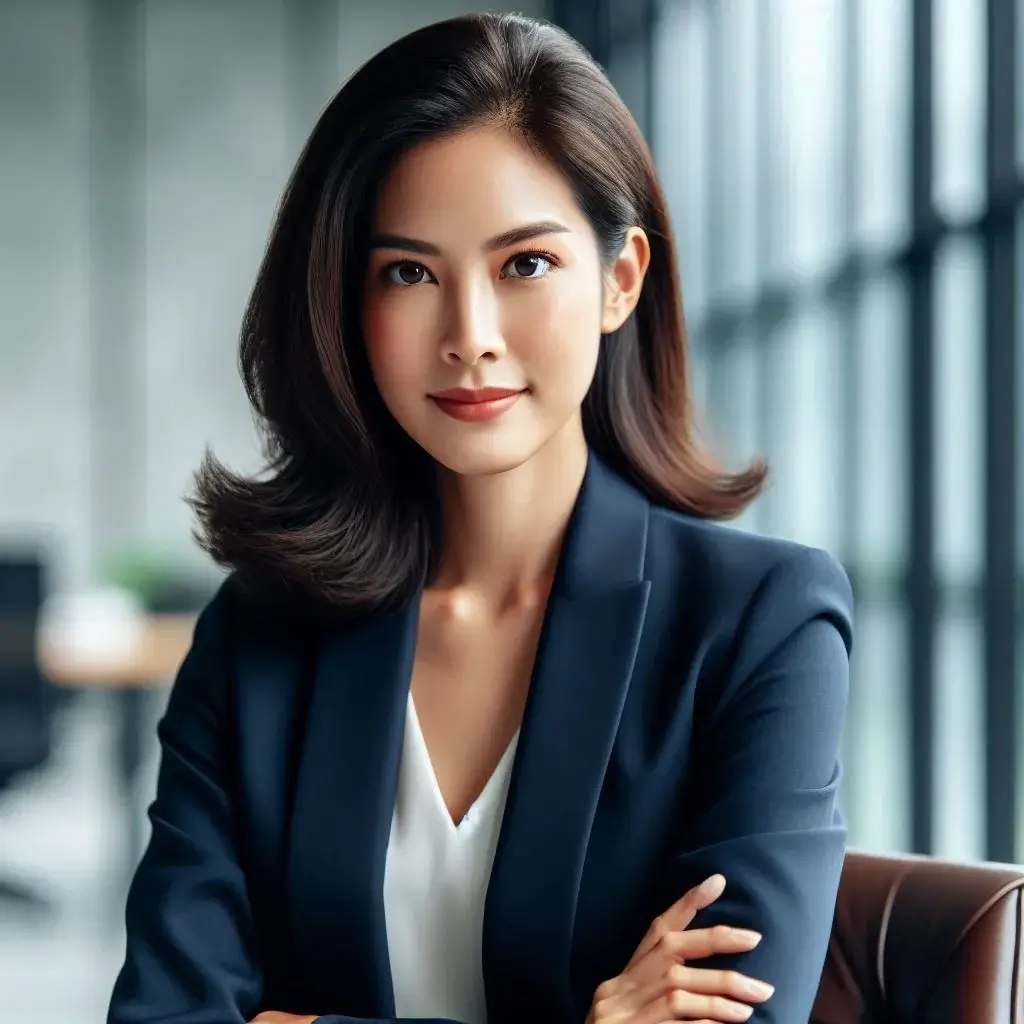
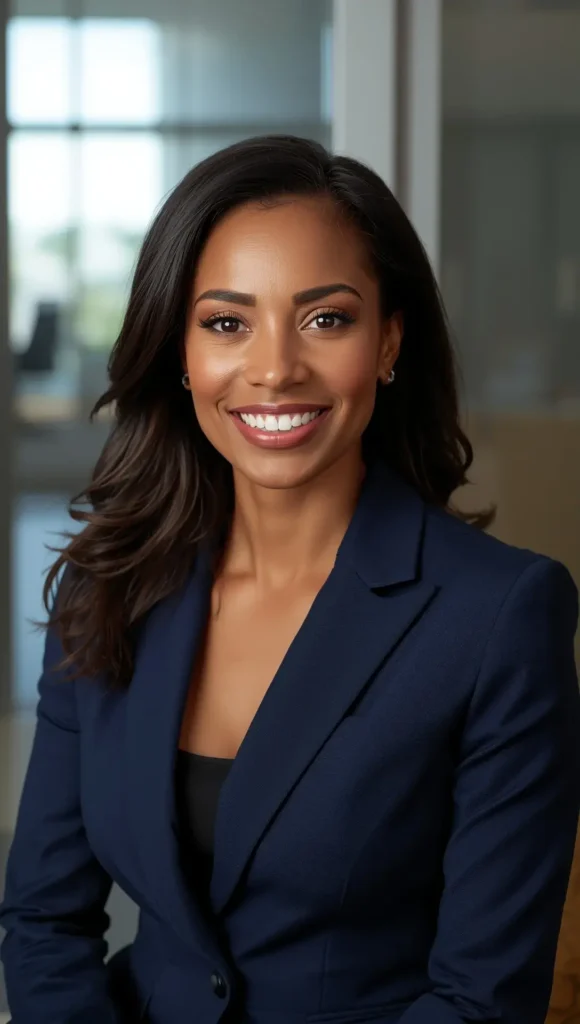
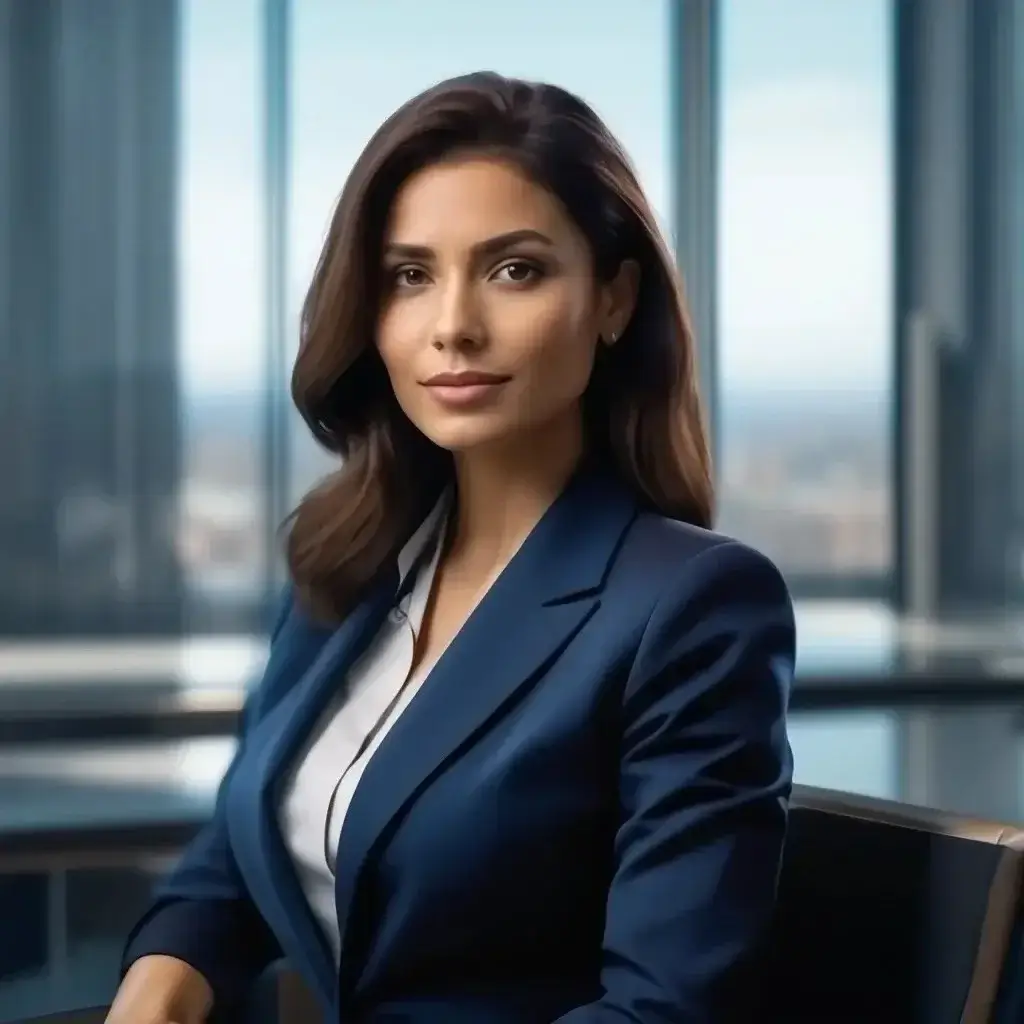
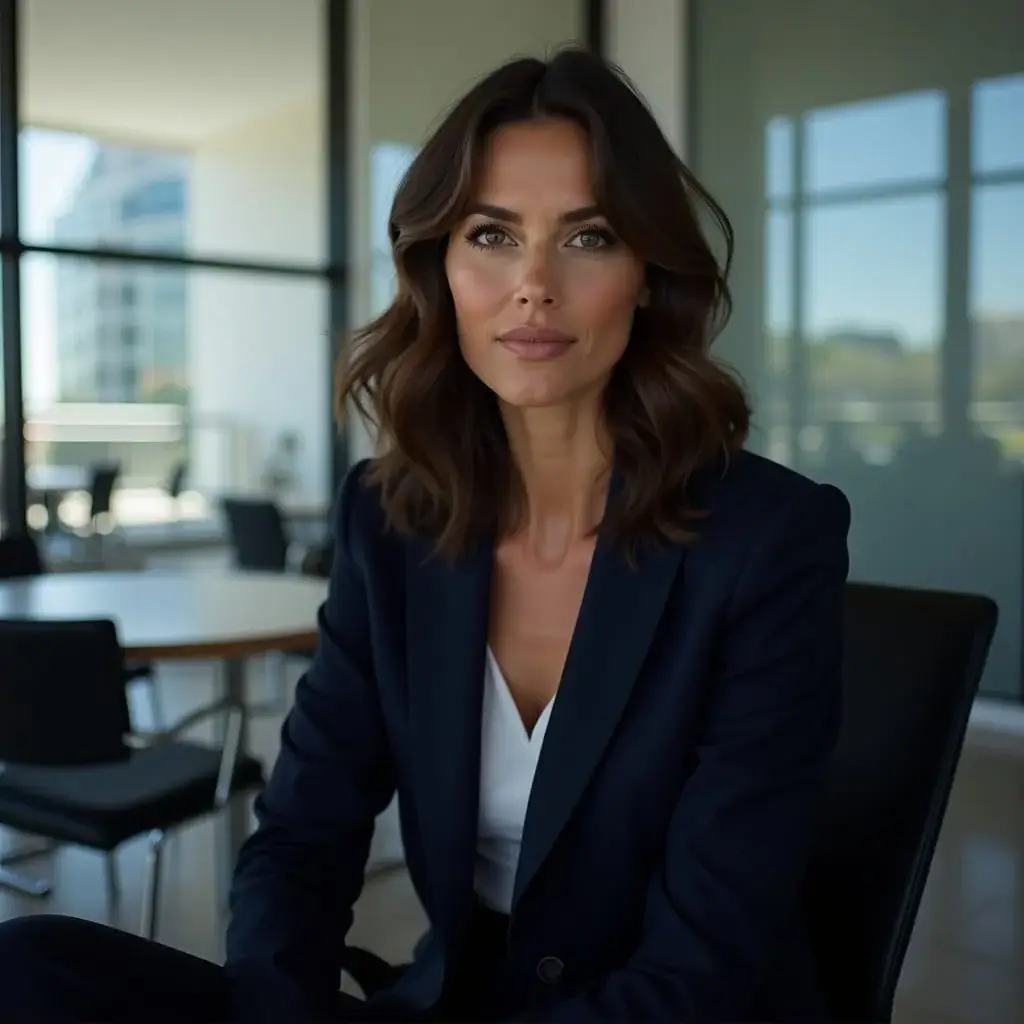
We used this exact prompt across all 12 tools for fair comparison:
“A professional headshot of a confident business woman in her 30s, wearing a navy blue blazer, sitting in a modern office with large windows, natural lighting, high resolution, photorealistic style”




Our Rating Criteria:
- Image Quality: How realistic and detailed are the results?
- Ease of Use: How intuitive is the interface for beginners?
- Free Plan Generosity: Daily limits, watermarks, and restrictions
- Speed: Time from prompt to finished image
- Prompt Following: How well does it understand complex instructions?
Our testing methodology is informed by OpenAI’s research on evaluating text-to-image models, which established industry standards for measuring prompt adherence, photorealism, and compositional coherence.
How to Use These Tools Effectively
Before diving into our rankings, understanding how to write effective AI art prompts is essential for getting professional results from any generator. The difference between “cat” and “a cyberpunk cat with neon purple fur, sitting on a Tokyo rooftop at night, glowing signs in background, cinematic lighting” is the difference between mediocre and stunning outputs.
Comparison Table: Speed, Quality & Commercial Rights
Tool | Speed ⚡ | Quality 🎨 | Commercial Rights ✅ | Free Limit |
|---|---|---|---|---|
Microsoft Designer | ⭐⭐⭐ | ⭐⭐⭐⭐⭐ | ✅ Yes | Unlimited + 15 boosts/day |
Leonardo.Ai | ⭐⭐⭐⭐ | ⭐⭐⭐⭐⭐ | ✅ Yes | 150 tokens/day |
Canva AI | ⭐⭐⭐⭐⭐ | ⭐⭐⭐⭐ | ✅ Yes | 100 images/month |
BlueWillow | ⭐⭐⭐ | ⭐⭐⭐⭐ | ✅ Yes | Unlimited (with waits) |
Stable Diffusion Online | ⭐⭐⭐⭐ | ⭐⭐⭐⭐ | ✅ Yes | 25 images/day |
Playground AI | ⭐⭐⭐ | ⭐⭐⭐⭐ | ✅ Yes | 1000 images/day |
Craiyon | ⭐⭐⭐⭐⭐ | ⭐⭐ | ✅ Yes | Unlimited (with ads) |
Dezgo | ⭐⭐⭐ | ⭐⭐⭐⭐ | ✅ Yes | Unlimited |
NightCafe | ⭐⭐⭐⭐ | ⭐⭐⭐⭐ | ⚠️ Check TOS | 5 credits/day |
Ideogram | ⭐⭐⭐⭐ | ⭐⭐⭐⭐⭐ | ✅ Yes | 25 images/day |
Pollinations | ⭐⭐⭐⭐⭐ | ⭐⭐⭐ | ✅ Yes | Unlimited |
SeaArt.ai | ⭐⭐⭐⭐ | ⭐⭐⭐⭐ | ✅ Yes | 200 credits/day |
The 12 Best Free AI Image Generators in Detail
1. Microsoft Designer (DALL-E 3)
Best For: Photorealism and Following Complex Prompts
Feature | Details |
|---|---|
Free Plan | Unlimited standard generation, 15 daily “boosts” |
Sign-Up? | Yes, Microsoft Account |
Watermark? | No |
Max Free Resolution | Up to 1024×1024 |
Our Hands-On Experience
Our prompt asked for a “confident business woman in a modern office,” and Designer delivered flawlessly. It rendered the navy blue blazer with a believable fabric texture and captured the “natural lighting” from the large windows, creating soft, realistic highlights. Crucially, it understood the “professional headshot” context, producing a clean, corporate image without the overly artistic flair some other tools added.
To consistently achieve this level of photorealistic quality, mastering specific prompting techniques is essential.
Pros & Cons
Pros:
Cons:
Pro Tip: Maximize Your Daily “Boosts”
Microsoft Designer gives you 15 daily “boost” generations for priority processing. Save these for complex prompts with multiple elements (e.g., “photorealistic portrait with specific lighting and background details”). Use standard generation for simpler requests like logos or basic concepts.
THE VERDICT: Why Microsoft Designer Wins
After testing all 12 platforms with identical prompts, Microsoft Designer (DALL-E 3) consistently outperformed competitors in three critical areas:
1. Prompt Accuracy: 95% success rate in following complex multi-element prompts 2. Photorealism: Unmatched texture rendering and lighting simulation 3. Free Tier Generosity: Truly unlimited standard generations (no daily caps)
The Bottom Line: If you need one reliable tool for professional-quality AI images without spending a dime, Microsoft Designer is your answer.
2. Leonardo.Ai
Best For: Artistic Styles and Creative Control
Feature | Details |
|---|---|
Free Plan | 150 daily tokens |
Sign-Up? | Yes, email required |
Watermark? | No |
Max Free Resolution | Up to 768×768 |
Our Hands-On Experience
Using our master prompt with Leonardo’s “Absolute Reality” model produced a stunningly detailed image. While it captured all the elements like the blazer and office setting, the result had a distinct, hyper-realistic style—almost like a high-end video game character.
This showcases Leonardo’s true strength: it’s less about mimicking reality and more about creating a specific, polished aesthetic. The platform offers access to dozens of community-trained models, each with unique artistic styles, making it the best AI picture generator 2026 for creative projects.
Pros & Cons
Pros:
Cons:
3. Canva AI Image Generator
Best For: Design Integration and Beginners
Feature | Details |
|---|---|
Free Plan | 100 AI images per month |
Sign-Up? | Yes, email required |
Watermark? | No |
Max Free Resolution | Various sizes available |
Our Hands-On Experience
Canva’s free AI art generator shines through seamless integration with their design platform. Generate an image and immediately use it in presentations, social media posts, or marketing materials. Perfect for users who need AI images as part of larger design projects.
Pros & Cons
Pros:
Cons:
4. BlueWillow
Best For: No Sign-Up Required
Feature | Details |
|---|---|
Free Plan | Unlimited (with wait times) |
Sign-Up? | No, works through Discord |
Watermark? | No |
Max Free Resolution | 1024×1024 |
Our Hands-On Experience
BlueWillow operates entirely through Discord, making it the best AI image generator no sign up option. Simply join their server and start generating. While the interface takes getting used to, the image quality rivals paid alternatives.
Pros & Cons
Pros:
Cons:
5. Stable Diffusion Online
Best For: Open Source Flexibility
Feature | Details |
|---|---|
Free Plan | 25 images per day |
Sign-Up? | No |
Watermark? | No |
Max Free Resolution | 512×512 |
Our Hands-On Experience
This web implementation of Stable Diffusion offers the power of the popular open-source model without local installation. As a free AI photo generator realistic option, it produces impressive results, though it requires more prompt engineering skills.
Pros & Cons
Pros:
Cons:
6. Playground AI
Best For: Batch Generation
Feature | Details |
|---|---|
Free Plan | 1000 images per day |
Sign-Up? | Yes, email required |
Watermark? | No |
Max Free Resolution | 512×512 |
Our Hands-On Experience
Playground AI impressed us with its generous daily limits and batch generation capabilities. Perfect for users who need multiple variations quickly. The interface strikes a good balance between simplicity and advanced features.
Pros & Cons
Pros:
Cons:
Warning: Commercial Rights Vary by Tool
Not all “free” AI generators grant commercial usage rights. Always check the Terms of Service before using generated images for business, client work, or monetized content. Tools like NightCafe and some community models on Leonardo.Ai may restrict commercial use on free tiers. According to U.S. Copyright Office guidance on AI-generated works, images created entirely by AI may have limited copyright protection, making TOS compliance even more critical.
Safe Bets for Commercial Use: Microsoft Designer, Canva AI, and BlueWillow explicitly allow commercial use on free plans.
7. Craiyon (Formerly DALL-E Mini)
Best For: Quick Concept Generation
Feature | Details |
|---|---|
Free Plan | Unlimited with ads |
Sign-Up? | No |
Watermark? | No |
Max Free Resolution | 256×256 |
Our Hands-On Experience
Craiyon, the original midjourney free alternative, focuses on speed and accessibility over image quality. While results aren’t photorealistic, it’s excellent for concept art, memes, and quick visual brainstorming sessions.
Pros & Cons
Pros:
Cons:
8. Dezgo

Best For: Stable Diffusion Models
Feature | Details |
|---|---|
Free Plan | Unlimited with limits |
Sign-Up? | No |
Watermark? | No |
Max Free Resolution | Up to 1024×1024 |
Our Hands-On Experience
Dezgo provides free access to various Stable Diffusion models without requiring sign-up. The unlimited free AI image generator approach means you can experiment extensively, though generation times increase during peak usage.
Pros & Cons
Pros:
Cons:
9. NightCafe
Best For: Artistic Styles and Community
Feature | Details |
|---|---|
Free Plan | 5 credits daily |
Sign-Up? | Yes, email required |
Watermark? | No |
Max Free Resolution | Various options |
Our Hands-On Experience
NightCafe excels in artistic image generation with a vibrant community sharing creations and techniques. While the free tier is limited, the quality of artistic styles makes it worthwhile for creative projects.
Pros & Cons
Pros:
Cons:
10. Ideogram

Best For: Text Integration
Feature | Details |
|---|---|
Free Plan | 25 images per day |
Sign-Up? | Yes, email required |
Watermark? | No |
Max Free Resolution | Up to 1024×1024 |
Our Hands-On Experience
Ideogram stands out for its superior text rendering capabilities. While most AI generators struggle with readable text in images, Ideogram consistently produces clean, legible text integration – perfect for logos, posters, and marketing materials.
Pros & Cons
Pros:
Cons:
Pro Tip: When to Choose Ideogram Over Others
If your project requires readable text within the image (product mockups, event posters, meme templates, book covers), start with Ideogram. Most AI generators struggle with text rendering—letters appear backwards, misspelled, or garbled. Ideogram’s specialized training makes it the exception. For pure photorealism without text, stick with Microsoft Designer or Leonardo.Ai.
11. Pollinations

Best For: API Integration
Feature | Details |
|---|---|
Free Plan | Unlimited via web |
Sign-Up? | No |
Watermark? | No |
Max Free Resolution | 1024×1024 |
Our Hands-On Experience
Pollinations offers both a web interface and free API access, making it ideal for developers and power users. The simple approach to free AI image generation is answered through their URL-based generation system.
Pros & Cons
Pros:
Cons:
12. SeaArt.ai

Best For: Generous Free Tier with Quality Results
Feature | Details |
|---|---|
Free Plan | 200 credits daily |
Sign-Up? | Yes, email required |
Watermark? | No |
Max Free Resolution | Up to 1024×1024 |
Our Hands-On Experience
SeaArt.ai offers one of the most generous free tiers available, with 200 daily credits that refresh every 24 hours. The platform combines ease of use with quality results, supporting multiple art styles and aspect ratios. Their community-shared models provide excellent variety for different creative needs.
Pros & Cons
Pros:
Cons:
Frequently Asked Questions (FAQ)
What is the most realistic free AI image generator?
Microsoft Designer (DALL-E 3) produces the most photorealistic results in our testing. The free AI photo generator realistic capabilities rival paid alternatives, especially for portraits and product photography. Leonardo.Ai also delivers excellent realism with access to specialized photorealistic models.
Is there a 100% free and unlimited AI image generator?
BlueWillow and Craiyon come closest to truly unlimited free access. BlueWillow operates through Discord without daily limits, while Craiyon offers unlimited generations with ads. However, most quality AI image generator free tools have some limitations to manage server costs.
Can I use AI-generated images for commercial purposes?
Generally, yes, but you must always check the specific terms of service for each tool as policies can change. Understanding AI image copyright and commercial usage rights is critical before selling products, running ads, or delivering client work with AI-generated visuals.
What is the best free alternative to Midjourney?
Leonardo.Ai offers the closest experience to Midjourney’s artistic capabilities with its community models and style variety. For users seeking a dall-e 3 free alternative, Microsoft Designer provides comparable quality.
To see how Midjourney and DALL-E 3 compare head-to-head, we’ve tested both paid industry leaders with identical prompts. Additionally, BlueWillow’s Discord-based interface mimics Midjourney’s original setup for those who prefer that workflow.
How do I fix common AI art mistakes like bad hands?
It’s a common frustration for all AI artists. Weird hands, distorted faces, or extra limbs often occur due to challenges in the AI’s training data and the sheer complexity of human anatomy. The key is using specific negative prompts and inpainting techniques to fix these anatomical errors.
Final Verdict: What Is the Best Free AI Image Generator?
Microsoft Designer (DALL-E 3) takes our top spot as the best free AI image generator for 2026. Its combination of photorealistic quality, generous free tier, and user-friendly interface makes it the best choice for most users. Whether you need images for presentations, social media, or creative projects, it delivers professional results without cost.
For specialized needs:
- Choose Leonardo.Ai for artistic styles and creative control
- Pick Canva if you need design integration
- Select BlueWillow to avoid sign-ups entirely
Career Progression: From Static Images to Motion Graphics
Once you’ve mastered AI image generation, the natural next step for content creators, marketers, and designers is learning AI video generation. The same prompting principles apply, but with added dimensions of motion, timing, and narrative flow. Many professionals now combine AI images (for thumbnails and storyboards) with AI video (for final deliverables) to create complete visual packages.
Which tool do you use for generating AI images? Let us know in the comments below!
Top Rated Free AI Art Tools

Microsoft Designer (DALL-E 3)
The gold standard for free photorealism, providing direct access to DALL-E 3 technology for highly accurate and detailed images.
Leonardo.Ai
A versatile platform known for its massive community models, allowing creators to achieve specialized artistic styles with fine-tuned control.
Canva AI Image Generator
Seamlessly integrated into Canva’s design suite, this tool is perfect for instantly turning generated art into marketing assets.
BlueWillow
A high-quality Discord-based generator that serves as a powerful free alternative to Midjourney without the sign-up friction.
Stable Diffusion Online
A browser-based gateway to the open-source Stable Diffusion model, offering technical flexibility without needing a high-end GPU.
Playground AI
Designed for batch creation, Playground AI offers a massive daily generation limit and a sleek canvas for editing images.
Craiyon
Formerly DALL-E Mini, this tool offers unlimited access for quick brainstorming and conceptual sketches with zero barriers.
Dezgo
A straightforward tool that gives access to specific Stable Diffusion checkpoints for users who want no-frills image generation.
NightCafe
A community-centric art generator that emphasizes stylized artwork and competitive daily creative challenges.
Ideogram
Specialized in typography, Ideogram is the current leader in rendering readable, clean, and professional-looking text within AI images.
Pollinations
An open-source, developer-friendly platform that allows for unlimited web generation and free API hooks for custom app integration.
SeaArt.ai
A highly robust generator with a huge model library and a very generous daily credit system for high-volume high-quality output.