
Imagine getting paid to tell a company their checkout button is in the wrong place, their font is unreadable, and their homepage loads like it’s 2003. At Smart Remote Gigs, we know this isn’t a fantasy. Thousands of people get paid to test websites every day without writing a single line of code, and we wanted to find the absolute best platforms for you.
We signed up for the top testing sites and ran them side by side for 30 days. Most are what we call “beer money,” but a few specific platforms paid out up to $60/hour for detailed bug reports. The difference between those two categories is what this guide is about.
We’re filtering out the survey scams, the points-for-prizes nonsense, and the “give us your opinion for a $2 Amazon gift card” offers. What’s left are the legitimate QA platforms that pay real cash into real accounts for real feedback.
Warning: Website testing is NOT the same as taking surveys. You are evaluating functionality — does this button work, does this form submit, does this navigation make sense to a real user? You’re providing professional feedback, not answering demographic questions. The pay reflects that difference.
The Tester’s Pay Grade: Platform Comparison
Platform | Avg. Pay | Introvert Score | Voice/Camera Required? | Payment Speed |
|---|---|---|---|---|
$10/20-min test | 🎙️ Medium (Talk Aloud required) | ✅ Microphone required | Fast (7 days via PayPal) | |
$5–$50/bug report | 🔇 High (Silent / Written only) | ❌ Never | Monthly (PayPal) | |
$5–$20/test | 🎙️ Medium (Talk Aloud) | ✅ Microphone + optional webcam | Bi-weekly (PayPal) | |
$10/test | 🎙️ Medium (Talk Aloud) | ✅ Microphone required | Bi-weekly (PayPal) | |
Variable ($5–$40) | 🔇 High (Written bug reports) | ❌ Rarely | Monthly (PayPal) |
The “Big Three” Platforms (Legit & Paying)

If you want to skip the survey scams and get straight to the platforms that actually pay cash for your feedback, these are the three you need to sign up for today:

UserTesting
Best for: Beginners looking for quick cash and high test volume.
UserTesting is the industry leader. You receive a test link, narrate your experience aloud as you navigate a website, and get paid a flat $10 for 20 minutes of work. The payout is incredibly reliable (exactly 7 days via PayPal). You must be comfortable speaking your thoughts into a microphone, but it remains the most accessible first paycheck in the space.

uTest
Best for: Introverts who want to earn $50+ per bug report in total silence.
uTest is where the real money lives for functional QA testing. It requires zero voice or video—every interaction is written. You get paid based on the bugs you find and the quality of your written reports. It has a steeper learning curve, but the skills you build here transfer directly to formal, high-paying QA roles.

Userlytics
Best for: Non-US testers and global residents wanting consistent volume.
Many testing platforms heavily favor US/UK demographics. Userlytics fills this gap by offering a broader global reach, testing both websites and mobile apps. Like UserTesting, it uses the “Talk Aloud” protocol, making it a perfect volume supplement for your testing routine.
The “Silent” Tester vs. The “Talker”: Which Type Are You?

This distinction is the most important practical filter in website testing — and most beginner guides completely ignore it.
Usability testing (UserTesting, TryMyUI, Userlytics) asks you to narrate your experience aloud into a microphone while you navigate. Your voice is recorded. Sometimes your face is too. Companies review the recordings to understand how real users feel while using their product.
Functional QA testing (uTest, Testbirds, direct QA contracting) asks you to find and document defects in writing. No narration. No recording. No voice. You interact with the software, you find what’s broken, and you file a structured written report.
Here’s the breakdown side by side:
Usability Testing (Talk Aloud) | Functional QA (Written Reports) | |
|---|---|---|
Voice Required? | ✅ Yes — microphone required | ❌ Never |
Camera Required? | Sometimes (varies by test) | ❌ Never |
Anxiety Level | 🟡 Medium (real-time self-narration) | 🟢 Low (pure written documentation) |
Payout Structure | Fixed rate per test ($10–$20) | Variable per approved bug ($5–$100+) |
Best Platforms | UserTesting, TryMyUI, Userlytics | uTest, Testbirds |
Earning Ceiling | Limited (fixed rate) | High (skill-dependent) |
Skills Required | Clear verbal communication, average user experience | Methodical thinking, precise written documentation |
The honest guidance: If narrating your thoughts into a microphone makes you uncomfortable, you don’t have to do it. The functional QA path (uTest, Testbirds) pays as well or better at higher skill levels, requires zero voice, and builds more transferable professional skills.
If the idea of recording your voice or being on camera stresses you out, stick entirely to Functional QA or explore our Non-Phone Remote Jobs guide for a full breakdown of text-only, async-first remote careers that pay real salaries.
How to Pass the Practice Test (The Gatekeeper)
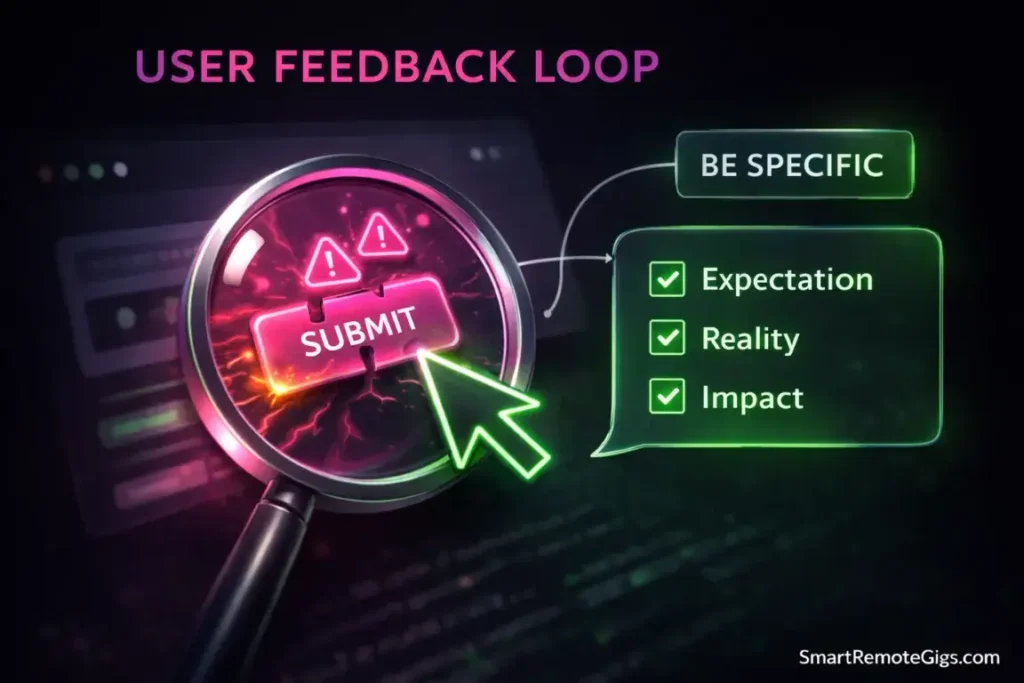
Every major platform requires you to complete a practice test before accessing paid work. This is the point where most beginners fail — not because they’re unqualified, but because they don’t understand what the evaluators are actually looking for.
What they’re NOT looking for: Positive feedback. Generic statements like “It looks good” or “Everything seems fine” are the fastest way to fail a practice evaluation.
What they ARE looking for: Specific, critical, user-perspective observations. The evaluators want to know that you can identify friction, name it precisely, and explain why it would cause a real user to struggle.
Pro Tip: Never say “It’s good.” Instead say: “I expected the menu to expand when I hovered over it, but it required a click — that’s not standard behavior and it confused me.” Or: “The ‘Add to Cart’ button is the same color as the background on mobile, which makes it nearly invisible — I almost missed it entirely.” That level of specificity is exactly what earns an “approved” rating. Be critical. Be specific. Explain the user impact.
A framework for better test narration:
- State your expectation first: “I would expect this button to be at the top of the page…”
- Describe what you actually found: “…but it’s buried at the bottom below the fold.”
- Name the user impact: “A first-time visitor would likely miss it entirely and abandon the page.”
That three-part structure — expect / actual / impact — is the skeleton of every strong usability observation. Drill it until it’s automatic.
Technical preparation:
- Use Screencastify or Loom to practice recording your screen with narration before your practice test. The act of talking while navigating feels awkward at first; practice removes that awkwardness before it costs you.
- Test your microphone quality. Muffled or choppy audio is a fast rejection even if your feedback is excellent.
- Use a desktop or laptop — mobile tests exist but most platforms evaluate more reliably from a full computer.
Detail orientation wins here. If you naturally notice things others miss — misaligned text, broken links, inconsistent button sizes — you’re already ahead of most testers. That same instinct applies directly to proofreading work too. If you enjoy hunting for errors on screens, you might also find How to Become a Freelance Proofreader worth a read — the skill sets overlap more than people expect.
Is This a Full-Time Job? (Managing Expectations)

Let’s be direct about this: for most testers, website testing is a side hustle, not a primary income source. The limiting factor isn’t skill or effort — it’s test availability. You don’t control how many test invitations you receive. That’s determined by how many companies are running studies that match your demographic profile this week.
Realistic earning expectations:
- Casual tester (1–2 platforms, passive): $50–$150/month
- Active tester (3–5 platforms, daily check-ins): $200–$500/month
- Specialized QA tester (uTest Gold/Platinum): $500–$1,500+/month, depending on cycle availability
- Full-time professional QA (formal roles, not platforms): $3,500–$8,000+/month
The platform-based income has a ceiling that professional QA skills don’t. The real financial opportunity in this space is using platform testing as a training ground for formal QA roles — which pay $25–$60/hour and require no coding degree.
🛠️ Tech Assist: Want to transition from a freelance platform tester to a $60/hr QA Engineer without learning Python or complex code? Explore the testing automation tools in our No-Code / Low-Code Directory to level up your career instantly.
Stacking Platforms for Maximum Earnings
The most reliable income strategy is signing up for multiple platforms simultaneously and treating all of them as a passive pipeline. You don’t log in and wait — you set up your profiles, complete your practice tests, and then go about your life. When invitations arrive, you take the ones that fit your schedule.
The recommended stack:
- UserTesting — highest volume, fastest payout. Sign up first.
- uTest — highest ceiling, requires more investment. Start building your rating now.
- Userlytics — good volume supplement, global availability.
- TryMyUI — additional volume filler.
- Testbirds — written-only option that runs alongside the others without adding any voice commitment.
Five platforms running simultaneously means you’re receiving invitations from multiple sources. When UserTesting is quiet, uTest might have an active cycle. The aggregate is more reliable than any single platform.
The income ceiling conversation: Most testers hit a wall around $300–$500/month and can’t get past it on platforms alone. For a more stable, scalable income, the smart move is combining platform testing with established freelance gigs — writing, data entry, virtual assistant work — that pay consistently regardless of client study schedules. Our Best Freelance Websites for Beginners guide covers exactly which platforms give you the most reliable and scam-free income base to build on.
Frequently Asked Questions About Website Testing
Do I need to know how to code?
No — and this is the most important misconception to clear up. Usability testing platforms specifically want average users, not technical experts. If you know how code works, your feedback is actually less useful for most usability studies because you’ll navigate and troubleshoot in ways a normal user wouldn’t.
For functional QA on platforms like uTest, basic technical literacy helps — understanding terms like “cache,” “browser console,” and “operating system version” makes your bug reports more useful. But you don’t need to read, write, or understand a single line of code. The job is finding what breaks, not understanding why it breaks at the code level.
How much money can I realistically make?
Most testers earn $200–$500/month as a side hustle with consistent platform stacking. That’s not a salary replacement — it’s a supplemental income stream that requires minimal active time once your profiles are set up.
Full-time income from platform testing alone is rare. The testers who reach $1,000+/month are typically at the top of uTest’s rating tiers, taking on specialized test cycles that require prior experience.
The real financial opportunity is the career ladder: platform testing → formal QA contractor → QA engineer. That path leads to $40–$70/hour and beyond — but it requires deliberately treating the platform work as skills development, not just an income source.
What equipment do I need?
The minimum viable setup:
Laptop or desktop computer (most tests require a full browser environment)
Working microphone (built-in laptop mic is acceptable; a $30 headset is better)
Reliable internet connection (you’re recording screen activity — a dropped connection mid-test wastes everyone’s time)
Modern browser (Chrome or Firefox, kept updated)
Optional but useful:
A second monitor — lets you view test instructions on one screen while testing on another
Mobile device — some platforms offer mobile-specific tests that pay separately and have less competition
Noise-cancelling headphones — for the focus and audio quality improvement during Talk Aloud tests
No special software purchase is required. Most platforms provide their own screen recording tools or browser extensions.
How long does approval take after signing up?
UserTesting typically processes new tester applications within 1–3 business days. You’ll be asked to complete a practice test during signup — that’s the real gatekeeper, not the application itself.
uTest approval is faster (often same day) but building a paying track record takes longer because you need approved bug reports to establish your rating.
Expect 1–2 weeks from “signed up” to “first paid test” on most platforms, assuming you pass the practice screening.
Which Platform Should You Join First?
Verdict:
Start with UserTesting: Highest volume of available tests, fastest payout, most accessible practice test. Your first $10 is achievable within a week of signup. Accept the voice requirement as part of the entry fee.
Graduate to uTest: Once you’ve completed 5–10 UserTesting tests and understand how to identify and describe UX problems, move your focus here. The earning ceiling is higher, the voice requirement disappears entirely, and the skills transfer directly to professional QA work.
Stack the rest: Add Userlytics, TryMyUI, and Testbirds to fill volume gaps. None of them require significant setup time once you’ve done the first two.
Ready to turn your browsing habit into actual cash? Sign up for UserTesting today. The practice test takes 15 minutes, and the first real test invitation often arrives within days.
At Smart Remote Gigs, we believe your detail-oriented, screen-comfortable skills have massive earning potential. Website testing is a great starting point, but the career map goes much further. While you wait for your first invite, browse our master guide on the 15 Best Remote Jobs for Introverts to find your next major career move.
Top Legit Website Testing Platforms
UserTesting
The industry leader with the highest volume of test invitations. It pays $10 per 20-minute test and sends money via PayPal exactly 7 days later.

uTest
The professional's choice for 'Silent' testing. You get paid for finding bugs (Functional QA) rather than talking, with pay rates reaching $50+ per approved bug.

Userlytics
A global-friendly platform that offers both website and app testing. It is less US-centric than competitors, making it a great option for international testers.
TryMyUI
Now known as Trymata, this platform pays $10 per test. It is excellent for 'stacking' alongside UserTesting to fill gaps in your schedule.