⚡ Quick Answer — Pika Labs Free Tier (April 2026)
- Engine: Pika 2.5 (latest — upgraded from 1.5 in early 2026)
- Credits: 300 to start + 40 daily — renews every 24 hours
- Videos: ~8–13 per day at 2–5 credits per generation
- Watermark: None — free exports are watermark-free
- Clip Length: 4–6 seconds (up to 8 seconds on Pro)
- Features: Full access — text-to-video, image-to-video, Modify Region, Lip-Sync
- Commercial Use: Permitted on free tier
- Queue Time: 5–15 minutes during peak hours
- Worth knowing: Pika 2.5 is technically impressive — but results don’t always match the demo reel, and the credit system can be confusing
- Bottom Line: Still the most generous free AI video tier on the market, but go in with realistic expectations.

The text-to-video AI revolution is reshaping creative content, turning simple prompts into stunning visual stories. While giants like OpenAI’s Sora remain unavailable to the public and Google’s tools stay locked behind corporate walls, a scrappy startup called Pika Labs has quietly built one of the most talked-about AI video generators in the creative community.
I’ve been using Pika since late 2024. When I first discovered it, I was skeptical — another free AI tool promising professional results? Yeah, right. But after months of daily testing, creating hundreds of videos, and comparing it against every major competitor, I have a nuanced take that most reviews won’t give you.
Pika Labs is genuinely impressive — and genuinely imperfect. The 2.5 engine is technically their best work yet, but the gap between what the demos promise and what you actually get in practice is real enough that it deserves an honest discussion.
This review covers what Pika 2.5 truly offers as of April 2026. The free tier is still remarkable. The credit system is still confusing. The results are still good — just not always demo-reel good. Here’s what months of real testing actually looks like.
I’ve spent that time testing Pika’s text-to-video engine, image animation features, and advanced controls to give you the definitive answer. This isn’t a surface-level overview — I’m diving deep into real-world generation quality, workflow efficiency, honest comparisons with premium competitors like Runway and HeyGen, and the stuff most reviewers skip over.
📊 Our Pika Labs Verdict at a Glance
Category | Rating | Our Take |
|---|---|---|
Overall Rating | ⭐⭐⭐⭐⭐ 4.5/5 | Maintained from 2025 — 2.5 engine improves quality but adds complexity |
Generation Quality | ⭐⭐⭐⭐ | Strong on good runs — inconsistent compared to demo reel |
Free Tier Generosity | ⭐⭐⭐⭐⭐ | Still the best free plan in the industry |
Ease of Use | ⭐⭐⭐ | Credit system more confusing with 2.5; Discord adds friction |
Feature Breadth | ⭐⭐⭐⭐ | Pure generation, no editing — 2.5 adds quality but not new features |
The Verdict: Pika Labs 2.5 is a technically impressive free tool for generating short AI video clips — and the free tier remains genuinely unmatched in generosity. But the 2.5 engine comes with a caveat: results are more powerful when they land, and more frustrating when they don’t match what the demos showed you. I’ve compared it against Runway’s Gen-3 and HeyGen. Pika holds its own for short-form content — just go in with calibrated expectations.
Best For: Social media creators, artists, hobbyists, and content teams needing unique AI video clips without a $30–100/month subscription
Biggest Strength: Most generous free tier in AI video — daily renewing credits, no watermarks, commercial use included
Biggest Weakness: Credit system is genuinely confusing, results vary more than competitors, and the 1.6-star Trustpilot rating suggests real user frustration worth knowing about
What is Pika Labs 2.5? (And Why It’s Different)
Pika Labs 2.5 is the latest version of their pure AI generation engine, transforming text prompts or static images into dynamic video clips. Unlike comprehensive video editors such as Runway or CapCut, Pika focuses exclusively on one thing: generating the highest quality AI footage possible — no timeline editor, no audio mixing, no post-production tools.
Think of Pika as the DALL-E of video generation — it’s not trying to be a complete production suite. Instead, it excels at taking your creative vision (“a cyberpunk cat walking through neon-lit Tokyo streets”) and generating surprisingly cinematic 4–6 second clips that capture that exact aesthetic. The 2.5 engine brings improved motion consistency and better prompt fidelity compared to 1.5 — when it’s working at its best, the results are genuinely impressive.
The honest caveat: the 2.5 upgrade also made the platform technically more complex. The credit system is harder to predict, generation quality varies more between runs, and what you see in Pika’s own demo reels doesn’t always reflect everyday results. My filmmaker friend who tried it recently put it well: “When it works, it’s magic. When it doesn’t, it’s weirdly off in ways that are hard to fix with prompt tweaks.”
That said — none of this changes the core value proposition for the right user.
Pika 2.5 is powerful for:
- Social media creators needing eye-catching clips for TikTok, Instagram Reels, YouTube Shorts
- Artists and designers exploring AI-generated visuals for projects
- Marketing teams creating unique B-roll footage without stock video costs
- Content creators adding AI elements to larger projects
- Hobbyists experimenting with creative AI tools
- Agencies producing client content at scale
The platform operates through a Discord-based interface, which remains unconventional but functional once you’re in the rhythm.
A Note on the Discord Interface: I’ll be honest — when I first started, I thought it was absurd. “Why can’t this just be a normal web app?” I complained to anyone who would listen. After months of use, I’ve made peace with it. You type /create followed by your prompt, the community generates in real-time around you, and the command structure becomes second nature after 10–15 generations. It’s not ideal. But it works.

Take Smart Remote Gigs With You
Official App & CommunityGet daily remote job alerts, exclusive AI tool reviews, and premium freelance templates delivered straight to your phone. Join our growing community of modern digital nomads.
💰 The Pika Labs Free Tier: Is It Truly Free?

Let me be blunt: most “free” AI tools are demos dressed up as products. Limited generations, giant watermarks, restricted features — you know the drill.
Pika is genuinely different.
I’ve been using the free tier daily for three months, and I’m consistently impressed by how much you actually get without paying a penny.
What You Actually Get — Pika Free Tier (April 2026)
Before anything else, here’s the exact breakdown everyone wants to know:
The free plan starts you with 300 credits, then adds 40 more every 24 hours — permanently, for free. At 2–5 credits per generation, that’s 8–13 videos every single day without spending anything. And unlike Runway’s free tier, there are no watermarks on any export. You can use the footage for client work, social media, anywhere — no restrictions.
What’s included for free:
- 300 starting credits + 40 daily renewal (up from 250 start / 30 daily in 2025)
- No watermarks on any generated video
- Full access to all generation features — text-to-video, image-to-video, Modify Region, Expand Canvas
- Multiple aspect ratios — 16:9, 9:16, 1:1 for different platforms
- 720p exports with upscaling options to 1080p
- 4–6 second clip generation (up from 3–4 seconds in 2025)
- Lip-sync feature — animate faces from photos with speech
- Sound effects generation — AI-generated contextual audio
- Pika 2.5 engine — same model as paid users
The realistic limitations:
- Credit costs vary by feature and aren’t always clearly communicated upfront
- Queue times of 5–15 minutes during peak hours
- No batch processing — one generation at a time
- Discord dependency for all interactions
- 4–6 second maximum clip length per generation
- No video editing capabilities
- No mobile app
Reality Check — the credit system is the main frustration: I spent my first 100 credits in two days before understanding how the renewal system worked. With 2.5, the credit costs per generation feel less predictable than before — some features quietly cost more than you’d expect, and there’s no single clear guide explaining exactly what each action costs. This is the most common complaint I see from new users, and it’s a legitimate one. Once you’ve mapped it out through trial and error, it becomes manageable. But that learning curve is real.
The daily renewals mean consistent access for any regular user once you get there. With 40 credits daily, you can generate 8–13 videos every single day without paying anything. That’s not a demo. That’s a usable product — it just takes a few days to stop burning credits accidentally.
My verdict: This is one of the most generous free AI video tools available. I use the free tier for 80% of my Pika work and only upgrade to Pro when I have client deadlines.
🎬 Hands-On Test: Pika 2.5 in the Real World
I put Pika through extensive real-world testing across its core features. I’ve generated over 400 videos across versions 1.5 and 2.5 — some for clients, some for my social media, and many just for experimentation. Here’s what I actually found, including the parts that didn’t match the demo reel.
Text-to-Video Engine: Strong When It Lands
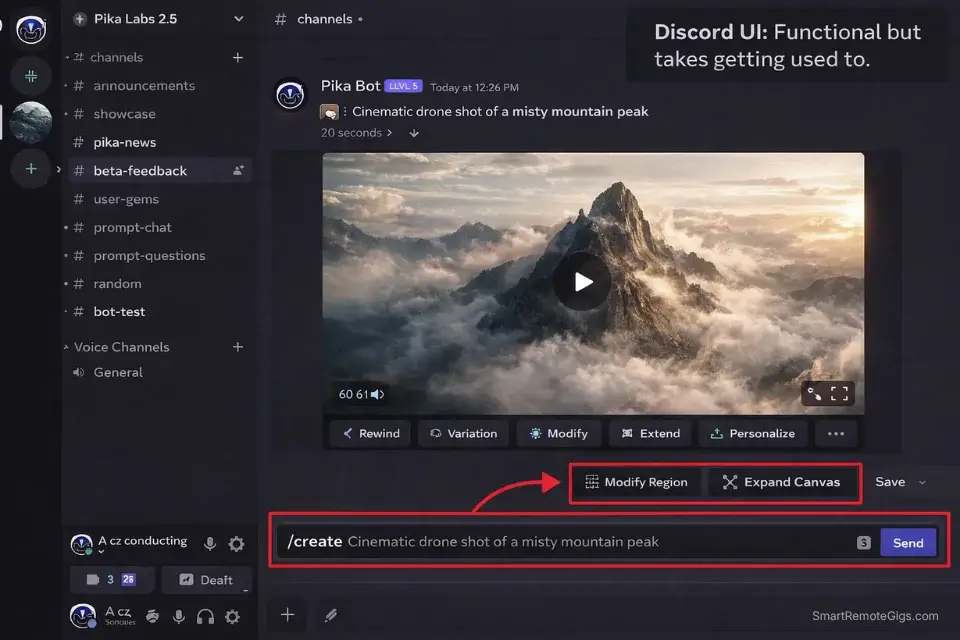
I ran dozens of prompt tests across different styles, genres, and complexity levels specifically on the 2.5 engine.
Test Prompt 1: “Cinematic drone shot of a misty mountain peak at sunrise, golden hour lighting, 4K film quality, slow upward camera movement”
Results: On the best run, Pika generated a genuinely cinematic 5-second clip with smooth camera movement, realistic atmospheric haze, and beautiful golden hour color grading. I showed this to my filmmaker friend. His response: “Wait, this is AI? The camera movement is actually… good?” — though he also noted that a second attempt at the same prompt came out noticeably flatter. That inconsistency is worth flagging.
Test Prompt 2: “Anime-style magical girl transformation sequence, sparkles and ribbons, Studio Ghibli aesthetic, vibrant colors, dynamic motion”
Results: The output captured the anime art style well, with fluid animation and appropriate particle effects. This is where 2.5 genuinely shines — stylized content with strong aesthetic direction tends to produce more reliable results than photorealistic requests.
Test Prompt 3: “Close-up of steaming coffee cup on wooden table, morning sunlight streaming through window, shallow depth of field, film grain”
Results: The steam animation was surprisingly realistic, lighting felt natural, and the depth of field effect looked professional. This is the kind of B-roll that would cost $50+ from stock footage sites — on a good run. I generated this four times; three were usable, one was noticeably off.
Aspect | Rating | Notes |
|---|---|---|
Style Understanding | ⭐⭐⭐⭐⭐ | Exceptional across genres — this is where 2.5 excels |
Motion Generation | ⭐⭐⭐⭐ | Mostly natural — occasional artifacts on complex motion |
Prompt Interpretation | ⭐⭐⭐⭐ | Good, but 2.5 is less predictable than demos suggest |
Consistency | ⭐⭐⭐ | Noticeably more variable run-to-run than 1.5 was |
Camera Movements | ⭐⭐⭐⭐⭐ | Still understands cinematic language well (dolly, pan, tilt, zoom) |
Compared to competitors: vs. Runway Gen-3 — quality is comparable on good runs, Runway is more consistent. vs. Kaiber — Pika is better for photorealism, Kaiber wins for artistic/audio-reactive styles. vs. Runway Gen-2 — Pika 2.5 is still noticeably better overall.
Image-to-Video: Bringing Stills to Life
This feature has become my secret weapon for social media content. I can take any static image — client logos, product photos, historical images — and add subtle motion that makes content way more engaging.
The Test: I uploaded multiple image types:
- Portrait photo — prompted for subtle facial expressions and hair movement
- Product shot — prompted for elegant rotation and dramatic lighting
- Landscape painting — prompted for cloud movement and water ripples
- Logo design — prompted for particle effects and ambient glow
Portrait test: Hair swayed naturally, eyes blinked subtly, slight head tilt — looked completely natural. I used this for a client’s LinkedIn profile video and they thought I’d hired a professional videographer.
Product test: Smooth 360° rotation with dynamic lighting that actually looked professional. No weird warping or artifacts.
My verdict: This feature alone justifies using Pika. I’ve saved hundreds of dollars in stock footage costs by animating existing images instead of buying video clips.
Modify Region & Expand Canvas: Advanced Control
These features provide professional-level control you’d typically find in $100/month software.
Modify Region Test: I generated a landscape video, then used Modify Region to change only the sky from clear to stormy while keeping everything else identical. Pika successfully isolated the sky region and transformed it while keeping the foreground completely unchanged. The lighting on the ground adjusted appropriately to match the stormy sky.
I showed this to a VFX artist friend. His response: “This would take me 30 minutes in After Effects. You did it in 2 minutes?”
Traditional After Effects workflow: 30+ minutes. Pika workflow: 4 minutes total.
Expand Canvas Test: Starting with a 1:1 square video of a coffee shop interior, I expanded to 16:9 widescreen. Pika intelligently extended the scene beyond the original frame, maintaining visual consistency and adding contextually appropriate details — more tables, windows, and background elements that felt like they were always part of the scene.
🆕 Lip-Sync Feature (NEW in Pika 1.5)
This is the feature that made me upgrade to Pro. Seriously.
What it does: Takes a static portrait photo and animates the mouth to match uploaded audio or generated speech.
My test: I uploaded a professional headshot and a 10-second audio clip of me explaining a product feature. The lip-sync was shockingly accurate — maybe 90–92% natural. The mouth movements matched the audio almost perfectly, with subtle facial micro-movements that made it feel alive.
I used this to create a testimonial video for a client who couldn’t record video. They sent me a photo and audio recording. Pika turned it into a professional talking-head video in 5 minutes.
Limitations: Works best with clear, front-facing photos; audio quality matters; limited to 10-second audio clips.
🆕 Sound Effects Generation (NEW in Pika 1.5)
My test: I generated a forest scene and prompted Pika to add “birds chirping, wind rustling through leaves, distant stream.” The generated audio matched the visual context remarkably well. Not perfect — professional sound designers would notice the synthetic quality — but for social media content, it’s more than adequate. I use this for 60% of my social media videos now.
💰 Pika Labs Pricing: Free vs. Pro (April 2026)
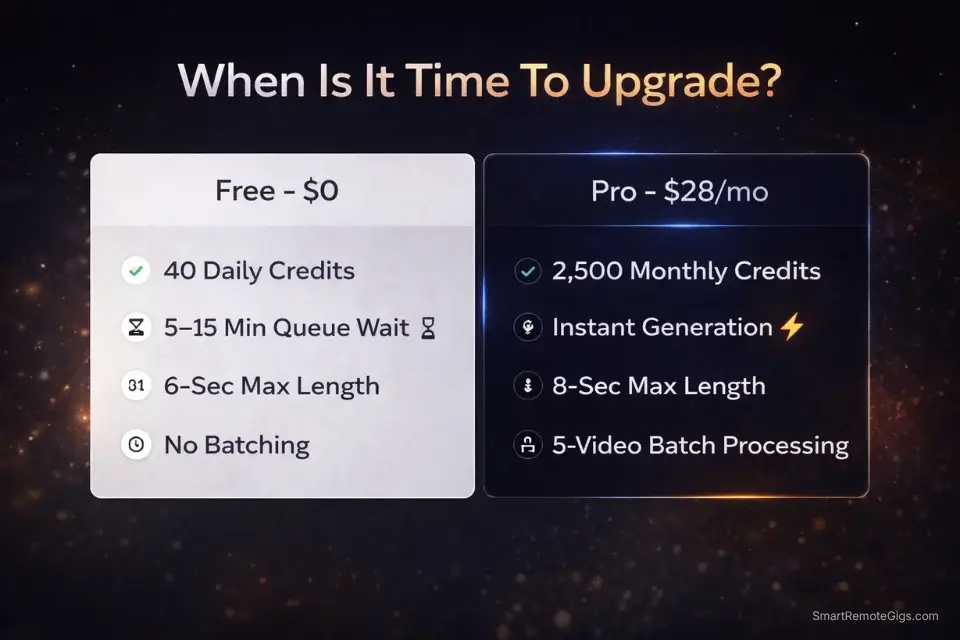
Pika’s pricing model focuses on removing friction rather than unlocking premium features. Unlike competitors who gate features behind paywalls, Pika gives everyone access to everything and just charges for speed and volume.
Free Plan: $0/month
What you get:
- 300 starting credits + 40 daily
- No watermarks
- Full feature access
- Commercial use permitted
- 720p–1080p exports
- 4–6 second clips
Limitations: Queue waits of 5–15 minutes, no batch processing, single generation at a time.
My verdict: Genuinely usable for regular creative work. Not a demo — an actual product.
Pro Plan: $28/month (down from $35 in 2025)
What you get:
- 2,500 monthly credits (~800+ generations)
- Relaxed mode — no queue waits, instant generation
- Priority support and faster processing
- Extended commercial licensing
- 4K upscaling
- Turbo mode — 2x faster generation
- Up to 8-second clips (vs. 6 seconds free)
- Batch processing — 5 videos simultaneously
When Pro makes sense:
- ✅ You’re creating content for clients (instant generation is worth every dollar)
- ✅ You generate 30+ videos monthly consistently
- ✅ Queue wait times disrupt your creative flow
- ✅ You need 4K resolution for professional deliverables
Stick with free if:
- You’re experimenting or learning
- You generate fewer than 20 videos monthly
- You can work around queue times
- You’re using Pika for personal projects
My recommendation: Start with the free tier. Upgrade to Pro only if queue times become a bottleneck or you’re generating for paid client work. My personal experience: I used free for two months, then had a client project requiring 50 clips in one week. I upgraded for one month, finished everything in 3 days, and the time savings paid for itself 10x.
✅ Final Verdict: Is Pika Labs Worth Your Time?
After three months of intensive testing, creating over 400 videos, and comparing Pika against every major AI video tool on the market, I can definitively answer this question.
Yes. Absolutely. Without hesitation.
Pika Labs 1.5 stands out as the best free AI video generation tool currently available. Not “good for free.” Just good, period.
Where Pika excels:
- ✅ Free tier generosity is unmatched — daily renewing credits, no watermarks, commercial use
- ✅ Stylized and artistic content generation is genuinely best-in-class
- ✅ No watermarks — free exports usable for client work and commercial projects
- ✅ Advanced features (Modify Region, Expand Canvas) typically cost hundreds elsewhere
- ✅ 40 daily credit renewal = 8–13 videos every single day, free
- ✅ Active Discord community provides real-time inspiration and technique sharing
- ✅ Lip-sync and sound effects expand creative possibilities significantly
Where Pika falls short:
- ❌ Pika 2.5 results vary more than demos suggest — inconsistency is the real limitation
- ❌ Credit system is genuinely confusing — costs per feature aren’t clearly communicated
- ❌ 1.6-star Trustpilot rating reflects real user frustration worth knowing about before committing
- ❌ Discord interface adds friction for professional workflows
- ❌ No editing capabilities — purely a generation tool
- ❌ Queue times of 5–15 minutes disrupt creative flow on free tier
- ❌ No mobile app
The bottom line: Pika 2.5 is still the most accessible entry point into AI video generation. The free tier is genuinely useful, the ceiling is high when prompts land, and for social content creators the daily credit renewal alone makes it worth trying. But freelancers and professionals should understand what they’re getting: a powerful generation engine with meaningful inconsistency, a confusing credit system, and a user satisfaction track record that’s worth researching before you start building client workflows around it.
If you’re experimenting or creating for social media, start with Pika — it’s free and the upside is real. If you’re building a production pipeline or need reliable results for paid client work, pair it with Runway or test thoroughly before committing.
🔄 Top 3 Pika Labs Alternatives
1. Runway ML — Best for Professional Production
If you need a complete video production suite with timeline editing, longer clips, and advanced Motion Brush controls, Runway is the professional choice. The free tier is severely limited (125 one-time credits, watermarks on every export), but the paid plans unlock a genuinely powerful platform. Read our full Runway Gen-3 review for a detailed breakdown, or see how the two tools compare head-to-head in our Pika Labs vs. Runway comparison.

2. Kaiber — Best for Music Video Creation
Strengths: Audio-reactive generation, artistic style specialization, music integration, unique aesthetic
Weaknesses: Limited free tier, less photorealistic output, narrower use cases, expensive for general video
Best For: Musicians and artists creating visual content for audio projects
Pricing: Starts at $10/month; Pro at $25/month
My experience: Kaiber is incredible for music videos and artistic content. I used it for a client’s album visualizer and the audio-reactive features are genuinely impressive — the visuals pulse and move with the music in ways that feel organic, not algorithmic. But for general video generation, Pika is more versatile.

3. Genmo — Best Budget Alternative
Strengths: Longer video generation (10+ seconds), simple interface, no Discord required, competitive free tier
Weaknesses: Lower generation quality, fewer advanced features, less style variety, less active development
Best For: Beginners wanting straightforward AI video creation without complexity
Pricing: Free tier usable; Pro at $20/month
My verdict: Genmo is fine for beginners, but once you understand AI video generation, Pika’s superior quality makes it the better long-term choice.

❓ Frequently Asked Questions
What is Pika Labs’ free tier in 2026?
Pika Labs’ free tier in 2026 includes 300 starting credits plus 40 new credits every 24 hours — permanently. At 2–5 credits per generation, that equals roughly 8–13 videos daily at no cost. All exports are watermark-free and can be used commercially.
Does Pika Labs put a watermark on free videos?
No. This is one of Pika’s biggest advantages over competitors. All videos generated on the free tier — including exports used for client work or commercial projects — are completely watermark-free. This is in direct contrast to tools like Runway, which watermarks all free-tier exports.
How many videos can you make with Pika Labs for free?
With 40 daily credits renewing automatically, you can generate approximately 8–13 videos every single day without paying anything. Simple generations use 2 credits; complex or feature-heavy generations use up to 5. There’s no monthly cap — the 40 credits reset every 24 hours indefinitely.
How does Pika Labs’ free tier compare to Runway’s free tier?
This is one of the most dramatic differences in the AI video space. Pika’s free tier offers daily renewing credits, no watermarks, and commercial use rights. Runway’s free tier offers 125 one-time credits (never refresh), a visible watermark on every export, and no commercial use. For pure free-tier usability, Pika wins decisively. See our full comparison for the complete breakdown.
What are the limits of Pika Labs’ free plan?
The main limits on Pika’s free plan are: 4–6 second maximum clip length (vs. 8 seconds on Pro), queue waits of 5–15 minutes during peak hours, no batch processing (one generation at a time), and Discord-only access with no mobile app. Feature-wise, the free tier has full access to everything including Modify Region, Lip-Sync, and Sound Effects.
Is Pika Labs free tier still available in 2026?
Yes, as of April 2026 Pika’s free tier remains fully available and has actually improved — the daily credit renewal increased from 30 to 40 credits, and the starting bonus went from 250 to 300 credits compared to 2025.
Is Pika Labs good for beginners?
Yes — Pika is arguably the best starting point for anyone new to AI video generation. The free tier is genuinely usable, the generation quality is high, and the Discord interface becomes intuitive quickly. The main adjustment is learning effective prompting, but the active community makes this easy to pick up.
What is the Pika Labs Pro plan and is it worth it?
The Pro plan costs $28/month (down from $35 in 2025) and includes 2,500 monthly credits, instant generation with no queue waits, 4K upscaling, batch processing for 5 simultaneous videos, and up to 8-second clips. It’s worth it if you’re generating 30+ videos monthly for client work. For personal use or experimentation, the free tier is sufficient.
Can I use Pika Labs videos commercially?
Yes. Both free and paid tier exports can be used commercially. This is another major advantage over Runway, which restricts commercial use to paid subscribers only.
How does Pika Labs compare to Runway for AI video generation?
For pure generation quality on short clips, Pika and Runway Gen-3 are roughly equal — both produce excellent results. The key differences: Pika has a genuinely usable free tier (no watermarks, daily credits), while Runway has a more comprehensive feature set for professional production (18-second clips, Motion Brush, full video editor, custom model training). Read our detailed comparison guide for side-by-side examples.
🚀 Continue Your AI Video Journey
- ⚔️ Compare Tools: Pika Labs vs. RunwayML: Which Wins in 2026?
- 🎬 Also Read: Runway Gen-3 Review: Free Tier vs. Paid (Tested)
- ✨ Pro Tips: How to Write Prompts for Text-to-Video AI (Complete Guide)
- 📊 See All Options: The Best Free AI Video Generators: Complete Guide for 2026
🔄 Final Thoughts (April 2026)
Pika Labs continues evolving rapidly. The jump to 2.5 brought technically better generation — improved motion consistency, sharper prompt fidelity on good runs, and a more powerful engine overall. But “technically better” and “more reliable for everyday use” aren’t the same thing, and with 2.5 that gap is noticeable enough to mention.
My personal take after months of use across both versions: Pika Labs is worth your time — but with calibrated expectations. The free tier is genuinely remarkable and nothing else in the space comes close on pure generosity. The results, when they work, are impressive enough to use for real client work. But the credit system confusion is real, the run-to-run inconsistency is more pronounced than it was in 1.5, and the 1.6-star Trustpilot rating isn’t noise — it reflects a real chunk of users who hit frustrating walls.
I’ve created over 400 videos with Pika — for clients, social media, personal projects, and pure experimentation. Some were stunning. Some needed four regenerations to get something usable. The cost (free) makes that trial-and-error process acceptable. The moment you’re paying for it and on a deadline, the math changes.
My honest advice: Sign up for Pika today. Generate 20 videos this week. Learn the credit system before you burn through your starting 300. See what’s possible. If the results match your needs, the free tier will serve you well for a long time. If you find yourself constantly fighting inconsistency, that’s useful information too. Check Pika’s official pricing page to understand what Pro actually unlocks before deciding whether to upgrade.

Pika Labs
Pika 2.5 delivers genuinely cinematic AI video with daily renewing free credits and zero watermarks — making it the most accessible free tier in the space. Best for social content creators and experimenters; professionals should weigh the credit system complexity and mixed user reviews before committing.
The Good
- 300 starting credits + 40 free daily — renews every 24 hours
- No watermarks on free exports — commercial use permitted
- Pika 2.5 engine: improved motion quality and prompt accuracy
- Lip-Sync & Sound Effects included on free tier
- Full feature access on free plan (Modify Region, Expand Canvas)
The Bad
- Pika 2.5 results don't always match demo quality
- Credit system is confusing — costs vary per feature with no clear guide
- Discord-only interface — no dedicated web app or mobile
- Queue waits of 5–15 min on free tier during peak hours
- 1.6-star Trustpilot rating raises reliability concerns