If you’re reading this rytr ai review, you’re probably hunting for an AI writing assistant that won’t eat up your entire software budget before you even land a client. I spent 30 days testing Rytr on a strict budget—running my daily emails, article outlines, and social media captions through it exclusively—to find out if this affordable tool is actually a hidden gem, or just a cheap toy dressed up with a slick interface.
The verdict is more nuanced than either camp admits. And the specific tasks that separate “worth it” from “skip it” are very precise.
Before we get into the numbers: the tool is only part of the equation. Building a sustainable freelance business requires the right ecosystem around your software choices. That’s why we built Smart Remote Gigs—from our curated AI Software Directory where you can compare every tool at every price point side by side, to our Remote Job Board where you can pitch your services to clients actively hiring. SRG gives you the full toolkit to work smarter, not harder—at any budget level.
The 30-Second Rytr Breakdown
🏆 Best Feature | 🚨 Biggest Flaw | 💳 Starting Price | ⭐ SRG Rating |
|---|---|---|---|
Pre-built copywriting frameworks (AIDA, PAS) with zero prompt engineering required | Character limits on Saver plan evaporate fast during long-form regeneration | Free / $9/month (Saver) | 3.3(3) |
The Budget Champion: Why Rytr Exists in 2026
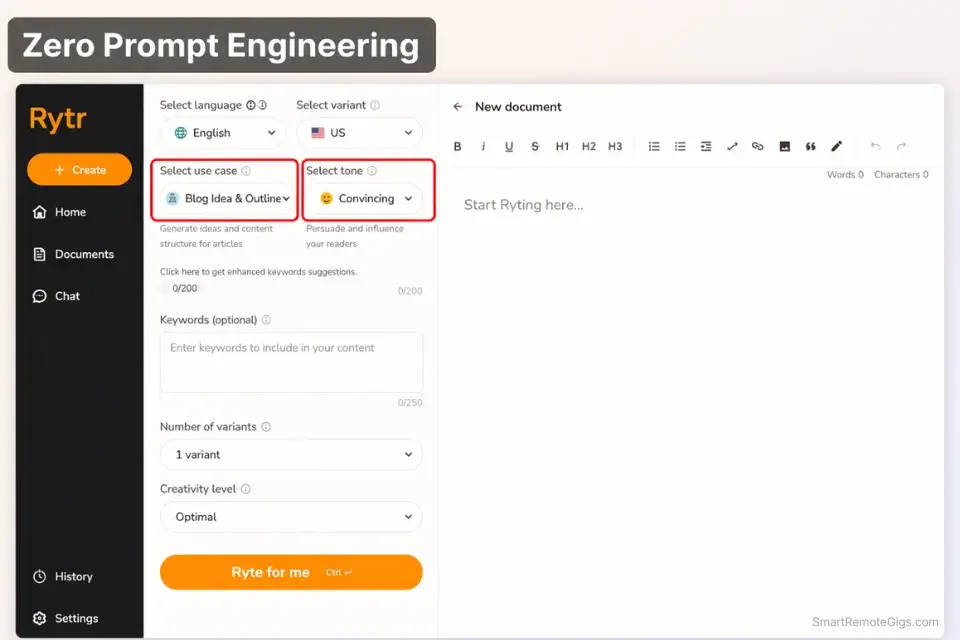
Rytr’s core proposition has never changed: give beginners the structure of a dedicated AI writing tool without the $40-100/month price tag that makes premium tools inaccessible when you’re still building your client roster.
What makes it viable isn’t raw output quality—it’s the interface. Rytr gives you a clean, distraction-free document editor with a built-in rich text environment. You pick a use case from a dropdown of 40+ options, select a tone from 20+ presets, drop in your input, and generate. No prompt engineering. No system message setup. No learning curve.
For someone coming from a blank Google Doc and zero AI experience, that guided structure cuts the intimidation factor dramatically. You’re not staring at a cursor wondering how to phrase a prompt. You’re filling in a brief and clicking a button.
That simplicity is not a compromise for most beginners—it’s the point. As your skills develop and your revenue grows, you’ll outgrow Rytr. That’s fine. It’s a starting engine, not a career-long platform.
Short-Form Copy & Outlining: Where It Shines
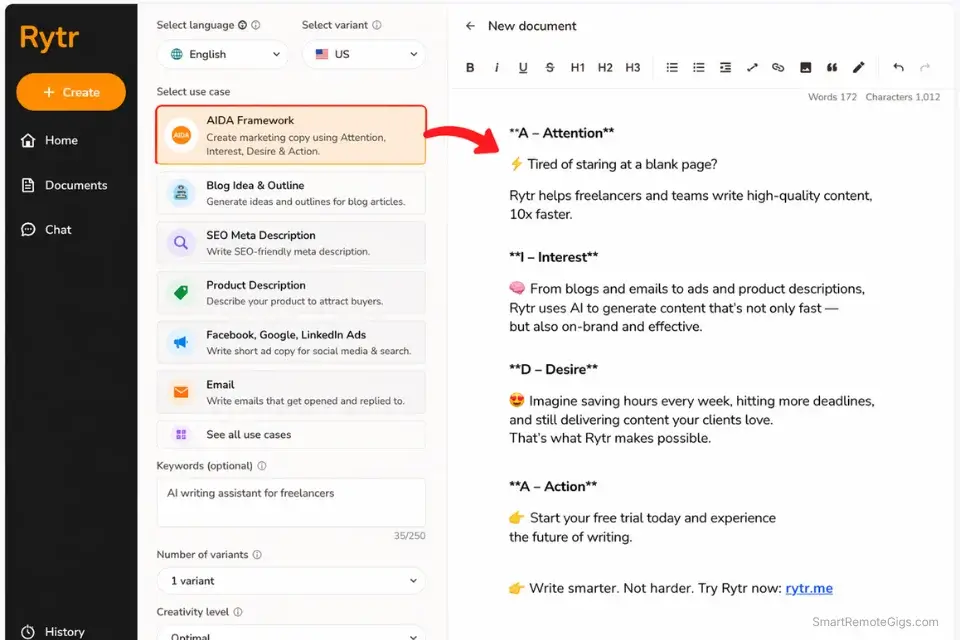
Verdict: For short-form tasks—blog outlines, YouTube video descriptions, cold email drafts, LinkedIn bios, and product descriptions under 300 words—Rytr consistently punches above its weight class. The AIDA and PAS framework templates in particular produce structurally sound marketing copy that requires minimal editing. At $9/month, no competing tool delivers this level of structured short-form output for anywhere near the price.
In my 30-day test, the tasks where Rytr genuinely impressed me were the ones with a defined, bounded structure. Cold email sequences? Clean, conversion-focused, ready to personalize in one pass. Blog post outlines? Logically organized, keyword-aware, usable as a working skeleton without alteration. YouTube descriptions? On-brand and formatted correctly on the first output roughly 70% of the time.
The AIDA template (Attention, Interest, Desire, Action) is the standout. Feed it a product name and two bullet points of context, and it returns a coherent short-form sales framework that any beginner can edit into a polished deliverable. At this price, that’s a real skill accelerator.
The tone selector compounds this. With 20+ tone options—Professional, Witty, Convincing, Inspirational—you can dial the output to match a client’s brand without needing to write elaborate voice instructions in a prompt. For beginners who don’t yet know how to prompt for tone, this removes one of the biggest barriers to producing on-brand copy.
Pro Tip: When you’re using Rytr to brainstorm blog topics or draft initial title ideas, take those raw outputs and run them through our Free AI Blog Title Generator to pressure-test them against click-through rate benchmarks. Rytr gives you the idea volume; the Title Generator helps you identify which ones will actually perform in search.
Long-Form Content & The Credit Trap
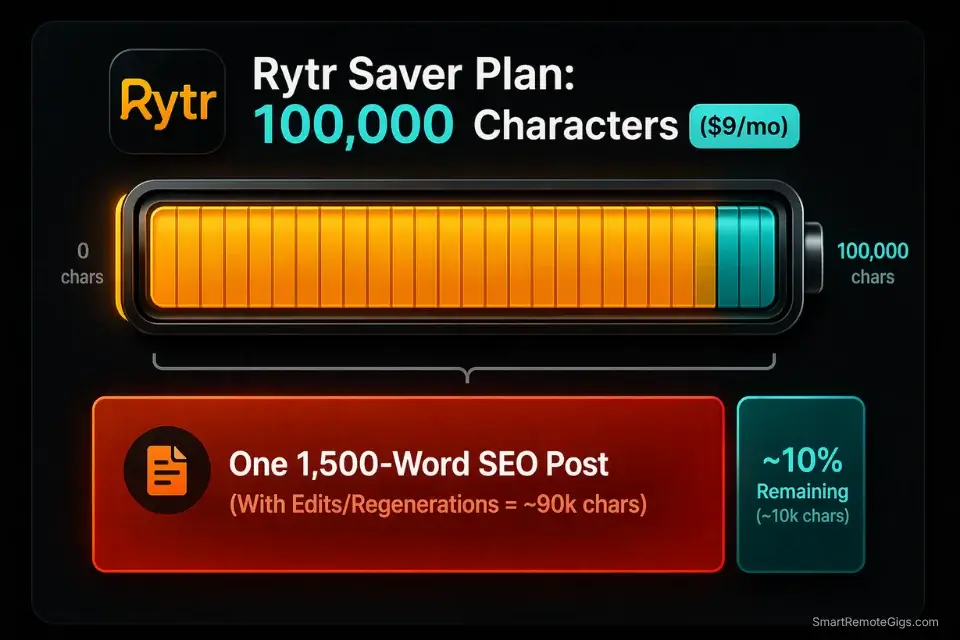
Red Flag: Rytr’s long-form content collapses fast, and the credit system makes it expensive to fix. Past the 600-word mark, outputs become repetitive, lose narrative thread, and start recycling earlier points in slightly reworded form. The deeper problem: every time you hit “regenerate” to try for a better paragraph, you’re burning through your monthly character allowance. On the $9/month Saver plan, 100,000 characters sounds generous until you’re regenerating the same section of a 1,500-word article four times trying to get something usable. You can blow 20% of your monthly limit on a single blog post’s second half. For long-form SEO content, Rytr’s credit architecture actively works against you.
This is the single most important thing to understand about Rytr before you subscribe. The tool is priced for short-form volume. If you try to use it as a long-form blog writing engine, the character economics break down immediately.
A 1,500-word blog post requires roughly 90,000-100,000 characters of generation across the full draft—including outlines, rewrites, and regenerations. That’s nearly your entire monthly Saver plan allowance on one article. One.
If long-form SEO content is your primary deliverable, Rytr is the wrong tool regardless of the price. The math doesn’t work, and the quality ceiling isn’t there even when credits aren’t the bottleneck.

Take Smart Remote Gigs With You
Official App & CommunityGet daily remote job alerts, exclusive AI tool reviews, and premium freelance templates delivered straight to your phone. Join our growing community of modern digital nomads.
Rytr vs The Alternatives: Should You Upgrade?
Feature | Rytr | Writesonic | Free ChatGPT |
|---|---|---|---|
Short-Form Templates | ✅ 40+ built-in use cases | ✅ Strong template library | ⚠️ Manual prompting required |
Long-Form Content | ❌ Repetitive past 600 words | ✅ AI Article Writer with SERP data | ✅ Strong with good prompts |
SEO Integration | ❌ None | ✅ Real-time Google data | ❌ None |
Tone Control | ✅ 20+ preset tones, no prompting | ⚠️ Manual prompt adjustment | ⚠️ Manual prompt adjustment |
Usage Limits | ⚠️ 100k chars/month (Saver) | ✅ Word-based plans, more generous | ✅ Unlimited (with rate limits) |
Learning Curve | ✅ Minimal—designed for beginners | ⚠️ Moderate | ⚠️ Requires prompt skills |
Starting Price | Free / $9/month | From $16/month | Free |
The table reveals Rytr’s exact position in the market: it wins on price, beginner accessibility, and tone control. It loses on long-form quality, SEO integration, and credit generosity. Free ChatGPT matches it on output quality for users willing to learn prompting—but lacks the structured templates that make Rytr usable for beginners with zero AI experience.
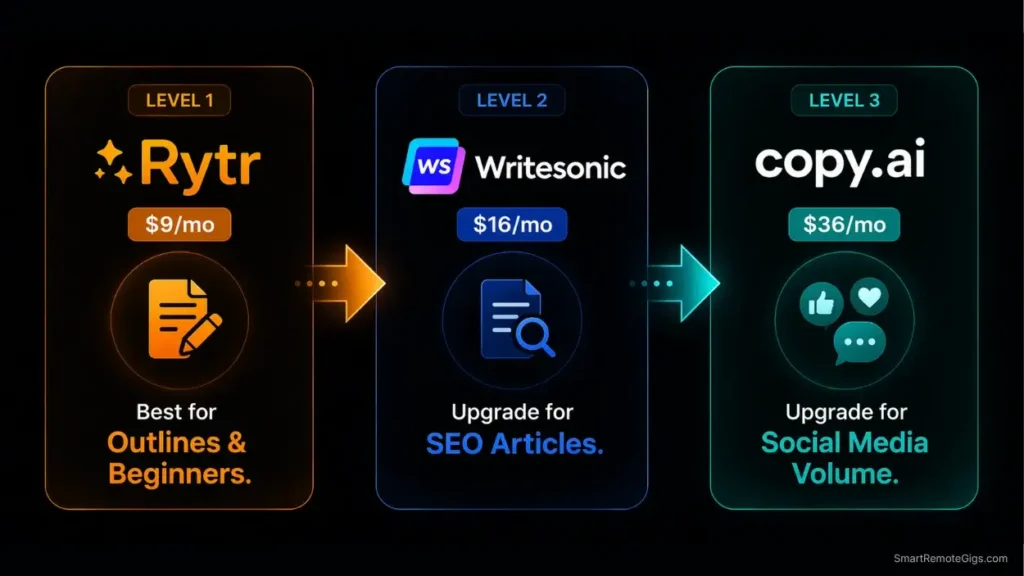
When you’re ready to move beyond Rytr’s limitations, here are the two tools that most naturally replace it:


If SEO content is why you’re considering the upgrade, our Writesonic Review 2026 breaks down exactly how its real-time SERP integration stacks up for niche site builders and affiliate marketers. To see how Rytr compares to higher-tier platforms across the board, explore our definitive ranking of the Best AI Writing Tools 2026.
Pricing & ROI: The Freelancer’s Math
Rytr’s 2026 pricing structure is the simplest in this entire market:
Free Plan
10,000 characters per month. Access to all 40+ use cases and tone presets. Enough to test the tool across 3-4 short pieces of content. Not viable for any consistent production volume—you’ll hit the ceiling in two days of real work.
Saver — $9/month
100,000 characters per month. Access to all templates, 20+ tones, and the built-in plagiarism checker. The right plan for beginners producing 8-12 short-form pieces per month. Burns fast if you’re regenerating long-form content.
Unlimited — $29/month
Unlimited characters, dedicated account support, and access to priority generation. The plan that removes the credit anxiety entirely. At this price point, however, Writesonic and Copy.ai become direct competitors worth evaluating.
The ROI math for the Saver plan is the most favorable calculation in AI writing tools: at $9/month, you need to save less than four minutes of writing time per month to break even. Any beginner producing even two cold email drafts per month clears that bar on the first day.
The Unlimited plan math is tighter. At $29/month, you’re competing with free ChatGPT plus a solid system prompt. The justification is the template structure and tone presets—worth it if those features save you meaningful editing time, less defensible if you’ve developed your prompting skills enough to replicate them manually.
Pro Tip: Keeping your overhead minimal with tools like Rytr while you build your roster is how you stay profitable in early-stage freelancing. Pair it with our Free Invoice Generator to keep your entire business operation cost-free while your client list grows. Every dollar saved on software at this stage is margin you keep.

AI Content Checklist Template
Publishing raw ChatGPT output is professional suicide. If your articles sound like…
Frequently Asked Questions
Is Rytr completely free to use?
Yes—Rytr’s forever-free plan is real and functional. At 10,000 characters per month, it gives you enough room to genuinely evaluate whether the tool fits your workflow before committing any money. That said, 10,000 characters evaporates in roughly two to three short blog outlines or five to six cold email drafts.
It’s suitable for light testing and occasional use, not daily production work. If you find the interface clicks for you, the $9/month Saver plan is one of the lowest-risk software upgrades in the freelance toolkit.
Can Rytr write a full blog post?
Technically yes—by generating section by section in the document editor and stitching them together manually. In practice, the output loses coherence and starts recycling ideas past the halfway point of any article over 800 words. The Blog Section via Outline template helps with structure, but the individual paragraph quality drops as the piece gets longer.
For full blog posts, Claude 3 or Jasper produce dramatically better results with less editing overhead. Use Rytr for the outline and introduction, then hand off to a stronger LLM for the body.
Is Rytr better than ChatGPT?
For raw intelligence, reasoning, and coding tasks—no. Free ChatGPT is more capable on a pure output quality basis. Where Rytr wins is on accessibility and structure. A beginner who has never written a prompt in their life can open Rytr, pick “Cold Email” from a dropdown, and get a usable draft in 60 seconds.
Replicating that result in ChatGPT requires knowing how to write a detailed system prompt and brief—a skill that takes time to develop. Rytr removes that barrier entirely. Once you’ve learned prompt engineering basics, the advantage shifts back to ChatGPT.
Rytr AI Review 2026: The Verdict
After 30 days of strict budget testing, here’s where the dust settles:
If you’re a beginner freelancer or student building your first client roster: Rytr is the right starting tool. The $9/month Saver plan gives you structured templates, tone control, and a clean editor that removes every barrier between you and a first deliverable. The credit limit is manageable if you stick to short-form work.
If you’re a social media manager or email marketer doing light volume: The Saver plan covers you comfortably. Eight to twelve short-form pieces per month fits cleanly within the character allowance without credit anxiety.
If you’re a serious SEO blogger or long-form content producer: Rytr is not built for your workflow. The long-form quality ceiling is low and the credit economics punish regeneration. Move directly to Claude 3, Writesonic, or Jasper depending on your budget and primary use case.
If you’re on the Saver plan and consistently hitting the credit ceiling: Upgrade to Unlimited at $29/month or switch to Writesonic. At that price point, the market becomes competitive and the choice depends on whether you need SEO integration or just unlimited volume.
Rytr is a hidden gem with a clearly defined shelf life. It solves a real problem for a specific type of user at a price point nobody else matches. Know exactly when you’ve outgrown it—and move up without guilt when that day comes.
Now that your software budget is optimized, it’s time to grow the revenue side. Head over to the Smart Remote Gigs Job Board to find entry-level and intermediate freelance writing gigs perfectly matched to your new Rytr workflow—real clients, vetted listings, and projects that fit where you are in your freelance journey right now.

Rytr
Rytr is the most accessible entry point into AI-assisted writing for beginner freelancers and budget-conscious marketers. Its pre-built copywriting frameworks and tone presets eliminate the prompt engineering barrier that prevents many beginners from getting value out of raw LLMs. The credit system and long-form quality ceiling make it unsuitable for serious SEO content production—but for short-form copy at $9/month, nothing else comes close on value.
The Good
- The lowest-cost dedicated AI writing tool on the market at $9/month for the Saver plan
- 40+ pre-built use cases and 20+ tone presets require zero prompt engineering knowledge
- Clean document editor with AIDA and PAS frameworks produces solid short-form marketing copy
The Bad
- 100,000 character monthly limit on the Saver plan burns fast during long-form regeneration
- Long-form content loses coherence and becomes repetitive past the 600-word mark