


Cline AI is a coding agent that runs in your editor and your terminal. Its client is free for individual developers, but model access is separate, and you choose among several paths for it. We checked Cline’s pages on 2026-11-21.
Key Takeaways
- The Cline client is free for individual developers, and Cline says its open source version has no subscriptions or seat fees.
- Model access is separate and runs through four paths: your own key, Cline usage billing, ClinePass at $9.99 a month, or local models.
- Decision rule: if you already hold provider keys, start with your own key and skip the other paths.
- Cline runs in IDEs, a CLI and a Desktop app, but its pages disagree on JetBrains and on Linux for Desktop.
- What Cline is
- Is Cline free?
- Cline pricing: the cost paths
- Free client for individuals
- Bring your own key
- Cline usage-billing provider
- ClinePass
- Local models
- Enterprise
- Which plan should you pick?
- Where Cline runs
- IDE extension for VS Code
- JetBrains
- Cline CLI
- Cline Desktop
- SDK and Cloud agents
- Claude and Codex subscriptions
- Is Cline safe to use?
- Approvals and auto-approve
- Where your code goes
- Cline alternatives and fit
- Verdict
- Sources and what we didn't check
- Frequently Asked Questions
What Cline is
Cline, often searched as Cline AI, is in its docs’ words “an AI coding agent that lives in your editor and your terminal.”
Its GitHub page uses a longer headline: “The open source coding agent in your IDE, terminal, & desktop!”
The repository lists Apache 2.0 as its license. The JetBrains plugin is the exception, because Cline’s repository says “Currently we are not open-sourcing JetBrains plugins.”
Free plan
Open source client for individual developers
Starting price
Client is free; model costs are separate
Billing basis
Model access by path: own key, usage credits, flat ClinePass, local
Best for
Developers who choose their own models
Is Cline free?
Yes, the Cline AI client is free if you are an individual developer. Cline’s pricing page lists the open source client as Free for individual developers.
It says “There are no subscriptions or seat fees for the open source version.”
The models are a separate cost. The no-subscriptions line applies to the open source version only. ClinePass below is a monthly subscription.
Cline’s FAQ says “You only pay for token access from a wide selection of frontier AI models.” That line is about token payment and does not describe ClinePass.
Cline doesn’t state a price for the Desktop app or the SDK. Don’t assume they are free just because they are open source.
Cline pricing: the cost paths
Cline shows no single price for the client and the models together. The client price and the model cost are different things, and the model cost depends on the path you choose. The table lists each path with the price Cline shows.
| Path | Who you pay | Price shown | Price Scope | Note |
|---|---|---|---|---|
| Free client | No charge stated | Free | Client price | For individual developers |
| Your own key | Not stated by Cline | Not published | Model cost | Providers like OpenAI, Anthropic and Google |
| Cline usage billing | Credits used in Cline (usage-billing) | Pay-as-you-go credits | Model cost | Free-tagged models appear in the selector |
| ClinePass | Flat monthly subscription | $9.99/month | Model cost | Optional; a processing fee may apply |
| Local models | Not stated; models run on your own machine | Not published | Model cost | Ollama, LM Studio or Atomic Chat |
| Enterprise | Through Contact Sales | Custom | Enterprise | SSO, SLA and dedicated support |
The paths bill in different units, so we don’t rank them by price. Compare them by how you want to pay.
Free client for individuals
The Open Source card reads Free, for individual developers. Its feature list names the VS Code extension, the CLI, “Secure Client-Side Architecture,” MCP Marketplace, Multi-Root Workspaces and Community Support.
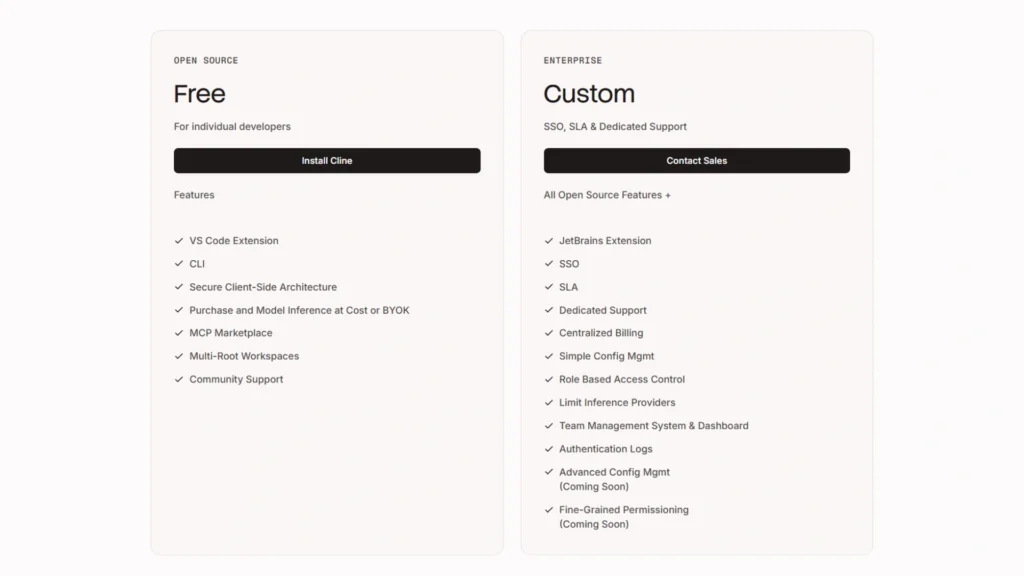
Our screenshot shows the two cards side by side. Open Source has an Install Cline button, and Enterprise has a Contact Sales button.
Bring your own key
Cline’s pricing page says you can bring your own API keys from providers like OpenAI, Anthropic, Google and others. Its docs describe the same path as using “your own provider credentials for cloud providers or local runtimes.”
Cline doesn’t state who bills your own-key usage. Cline’s FAQ says the client runs locally, and with your own keys requests go “directly from your environment to your chosen model provider.”
Cline usage-billing provider
The Cline (usage-billing) docs call it “the pay-as-you-go provider in Cline.” Credits are used when you select paid models. Cline’s overview calls it the “Fastest setup path,” with one sign-in and built-in billing.
Free options appear as models tagged FREE in the selector. These are free model promotions for users with a Cline account, “up to a limited usage quota.”
The promotions rotate, and a recent release (v4.1.27) says the free list changed. Cline doesn’t publish an end date for them.
Cline’s pages also differ on where free models work. The free models page says only the IDE extension and CLI, while the Cloud Agents page also mentions free models.
ClinePass
ClinePass is optional model access, not a Cline plan. Cline’s docs call it “a separate provider from Cline (usage-billing)” and say “You don’t need ClinePass to use Cline.”
The ClinePass page shows a button reading “Get ClinePass for $9.99.”
Its small print says “*Standard rate $9.99 per month after promotion period” and “*Additional processing fee may apply.”
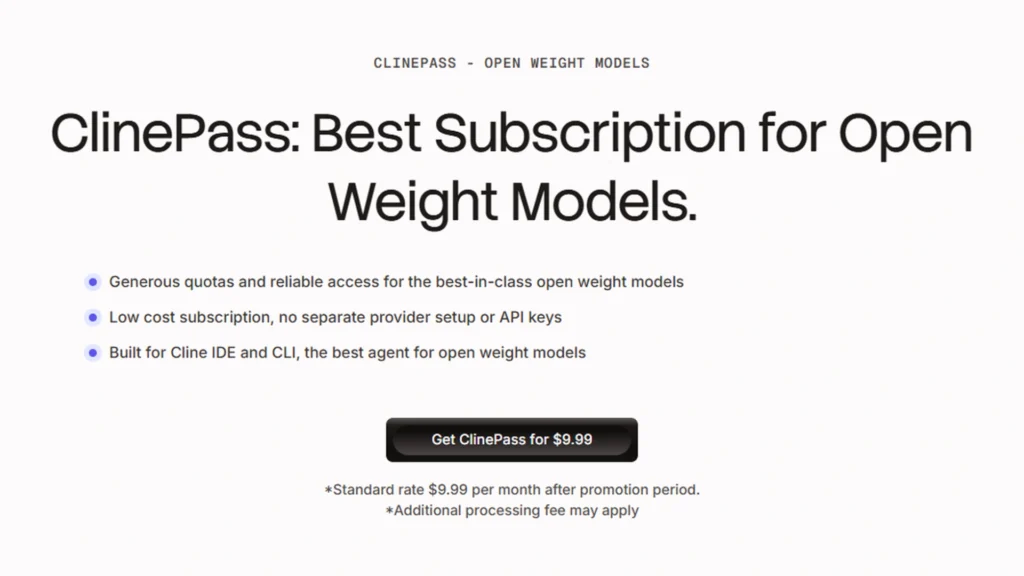
The screenshot shows only $9.99 and those two lines. Cline doesn’t publish a promo price or promotion length for ClinePass in the page text, so we show no discount and no savings.
Cline’s docs call it a “Flat $9.99/month subscription.”
Cline doesn’t define the baseline for the 2-5x figure. Its docs say it offers “2-5x the usage on popular open coding models compared to standard API rate.”
Cline’s docs say ClinePass measures usage against three limits: a 5-hour rolling window, a weekly limit and a monthly limit. Because it is flat, you are “not charged the individual API prices” for those models.
Cline’s own hero lines call it the “Best Subscription for Open Weight Models” with “Generous quotas.” Those are Cline’s words, not our finding. The model list changes, so check the current list on the ClinePass page.
You can also use ClinePass models from your own scripts through the Cline API, or with other coding agents using your ClinePass API key.
Local models
The local models guide says to “Run Cline with local models using Ollama, LM Studio or Atomic Chat,” with inference on your machine. Cline’s home page also says “Bring your own key or your own weights.”
The guide’s hardware table pairs 32-64GB of RAM with mid-size coding models. Cline doesn’t publish a cost for local models, because they run on your own hardware.
Enterprise
The Enterprise card shows Custom with a Contact Sales button. The pricing page names centralized billing, audit logs and OpenTelemetry. The Enterprise page says it adds “SSO, Enterprise global configuration for model access, MCP controls, rules and workflows.”
Which plan should you pick?
For individual developers the client is free, so pick by how you want to get model access. Enterprise is the exception and shows Custom:
- Pick your own key if you already hold provider credentials. Cline says you can bring keys from providers like OpenAI, Anthropic and Google, and it doesn’t state who bills that usage.
- Pick Cline usage billing if you want one sign-in and pay-as-you-go credits. Cline calls it the “Fastest setup path,” which is Cline’s wording.
- Pick ClinePass if you want a flat $9.99 a month for open-weight models and can work within its 5-hour, weekly and monthly limits.
- Pick local models if you want to run on your own machine. Cline publishes no cost for this path.
- Pick Enterprise if you need SSO, central billing or the JetBrains extension as listed on the pricing card.
Quick Verdict:
Use the free client if you are an individual developer, then pick the model path that matches how you want to get model access.
Best For: Developers who want a free coding agent and choose their own models.
Skip If: You want one published price that covers the client and every model.
Where Cline runs
IDE extension for VS Code
The Cline VSCode extension is the main IDE route. Its Marketplace listing calls it an “Autonomous coding agent right in your IDE.”
That is Cline’s wording. Cline’s install docs also point to the JetBrains Marketplace as an alternative.
JetBrains
Cline’s pricing page lists the JetBrains extension on the Enterprise card. The JetBrains Marketplace page offers the plugin for install with no plan stated, and Cline doesn’t explain the difference.
Cline’s docs say it gives the same experience in IntelliJ IDEA, PyCharm, WebStorm and GoLand. Its home page has an “Install Cline in JetBrains” link with no plan wording. Cline’s repository says it is currently not open-sourcing JetBrains plugins, and its docs describe a route through the CLI and ACP.
Cline CLI
The CLI docs say to use the Cline CLI “for interactive terminal sessions and automated headless workflows.” The page shows no beta or preview label.
Cline Desktop
The Desktop docs call it “an open-source app for open-weight models” for macOS or Windows, with Windows support in beta. Cline’s pages disagree on whether Cline Desktop is available for Linux. The ClinePass page and home page list Linux, while the docs and GitHub page do not.
SDK and Cloud agents
Cline’s SDK docs call it an open source framework for building agentic applications. Cline says it is the same harness the IDE extensions and CLI use. Cloud agents let you give a task on a GitHub repo and work “in its own secure cloud sandbox,” with nothing to install.
Cline’s docs call Cloud agents new and say some local features don’t carry over yet. Cline doesn’t publish a separate price for them.
Claude and Codex subscriptions
The Anthropic provider docs list a subscription route: use your Claude Max or Pro subscription through the Claude CLI. Cline’s docs add that this route “Uses your Claude subscription limits instead of API token billing.”
The OpenAI provider docs list OpenAI Codex sign-in with your OpenAI account. Cline’s docs don’t name which OpenAI plans work with it.
Is Cline safe to use?
It depends on your approval settings and on the path your code takes. Cline’s overview says “Every action requires your explicit approval.” That is Cline’s wording, and auto-approve, YOLO mode and the CLI flag below can each change it.
Approvals and auto-approve
Cline’s FAQ says it asks for confirmation before changes “unless auto-approve settings are enabled.” The Auto Approve docs say approval is evaluated per tool call.
For commands, the model marks each one with a requires_approval flag based on the command and its arguments. The docs add that these are “examples, not guarantees.”
Red Flag: Cline’s docs say of YOLO mode: “This is dangerous. YOLO mode disables all safety checks.”
The same page lists what Cline could do with auto-approve on. It could delete important files without warning, change system settings, make network requests, overwrite configuration files, install or remove packages, and commit and push changes.
The CLI has an --auto-approve flag for unattended runs. The CLI has no allow or deny list for shell commands.
Cline’s CLI docs warn: “Autonomous execution can modify files and run commands without further prompts. Use a clean branch and review results.”
Where your code goes
With your own keys, Cline’s privacy notice says you give your information directly to the provider, “and we do not collect it.”
Telemetry is still on by default. Cline says it leaves out your code, file contents and prompts, except for requests to the Cline and ClinePass providers.
With Cline credits, Cline’s FAQ says your code and prompts pass through its infrastructure to reach the model. It adds “we never use them to train models.” That statement covers Cline credits only.
If you use API keys provided by Cline, the privacy notice says some model providers may use content for training. You can opt out where the provider offers that. Cline’s free models page adds that free model usage “may be used to help improve model performance and quality.”
For Enterprise Cline-managed inference, Cline says your code is never used to train models. For ClinePass, the telemetry statement above is the only data-handling line we found.
Cline’s privacy notice was last updated September 24, 2025, and its FAQ and telemetry statements show no date. Cline doesn’t publish its data-use preferences on an official page we could capture, and its pricing page lists “Secure Client-Side Architecture” without defining it.
Cline alternatives and fit
Pros ✅
- Client is free for individual developers
- Four model paths, including your own key
- Runs in IDEs, a CLI and a Desktop app
Cons ❌
- Model costs are separate and Cline lists no combined price
- JetBrains plan wording is unclear
- Auto-approve and YOLO mode can run commands without review
If Cline’s model-cost split is not for you, look at these pages:
- Claude Code: see our review of this option.
- Continue: see our review of this option.
- Cursor: see our review of this option.
To compare more tools, see how to compare AI coding assistants or browse the free AI coding assistants.
Verdict
Verdict: Cline’s client is free for individual developers, and model access depends on the path you choose. Check your approval settings before you let it run commands.
Best For: Developers who want a free coding agent and choose their own models.
Sources and what we didn’t check
More primary pages behind the numbers: the Cline overview, the ClinePass docs and the GitHub repository. Also see its releases, the VS Code Marketplace listing and the telemetry docs.
Based on official sources, our own screenshots of the Cline pricing page and the ClinePass page, checked November 2026. We did not test Cline in use or measure any model costs. Cline’s pages show no update date, so figures are checked on 2026-11-21.
- How Cline behaves in use: setup, speed and output quality.
- Any model provider’s per-token price, or a monthly model bill.
- JetBrains plugin terms for individuals, and a price for Desktop or the SDK.
- Enterprise contract terms and the data-use preferences page in the Cline web app.