


Descript pricing runs from a $0 Free plan to $50 a person a month on Business, billed annually. Free has a watermark and caps exports at 720p.
Free plan
60 min/month, 100 credits once
Starting price
$16/mo (Hobbyist)
Billing basis
Billed annually, per person
Checked November 22, 2026 against Descript’s public pricing and help pages. Prices are US dollars per person per month, annual billing first. Images 3 to 6 show a new free Descript account.
Key Takeaways
- Annual billing saves $96 to $180 a year per person, depending on the plan (our calculation).
- The pricing page badge claims a bigger saving than its own prices give. The numbers are in the pricing section below.
- Main risk: unused media minutes and AI credits do not roll over into the next cycle.
- Descript pricing by plan
- Education and nonprofit pricing
- Media minutes and AI credits
- Is Descript free?
- Descript cancel steps and refund rules
- Which plan should you pick?
- Descript podcast and remote recording
- Editing and AI tools
- Descript review: pros and cons
- What users report
- Descript alternatives
- Verdict
- Sources and method
- Frequently Asked Questions
Descript pricing by plan
Descript’s pricing page lists Free, Hobbyist, Creator and Business, plus Enterprise with no public price. Media minutes and AI credits are per editor.
| Plan | Monthly | Annual | Media minutes | AI credits |
|---|---|---|---|---|
| Free | $0 | $0 | 60 a month | 100, one-time |
| Hobbyist | $24 | $16 | 600 a month | 400 a month |
| Creator | $35 | $24 | 1,800 a month | 800 a month |
| Business | $65 | $50 | 2,400 a month | 1,500 a month |
| Enterprise | Contact sales | Contact sales | Not listed on its page | Not listed on its page |
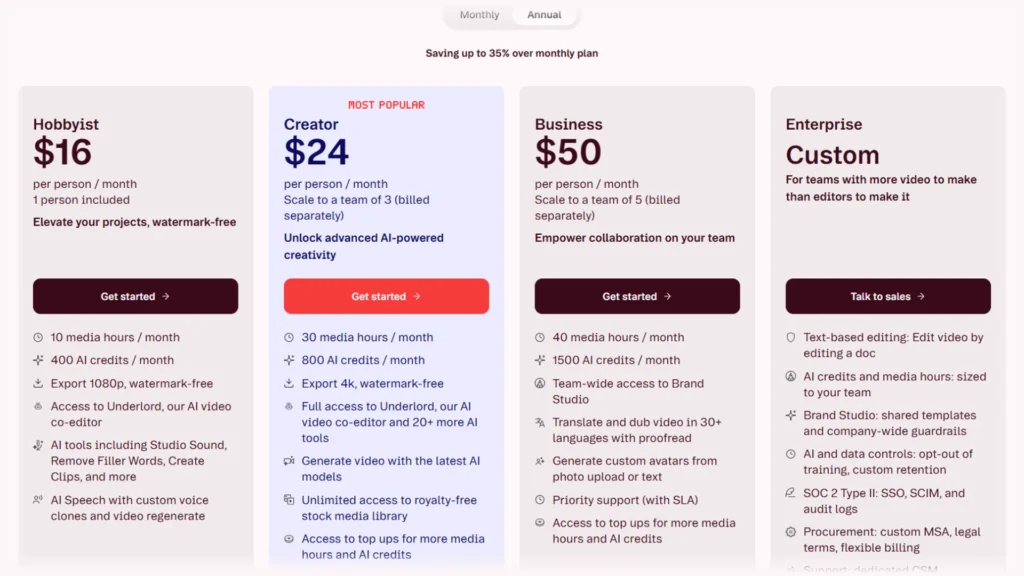
Annual billing is charged upfront and costs less per month. Hobbyist, for example, is $192 a year on the annual price and $288 over 12 monthly payments (our calculation).
$96 to $180
saved per person each year on annual billing: Hobbyist $96, Creator $132, Business $180
Source: Descript’s pricing page, 12 x (monthly price minus annual price), our calculation
Descript’s badge says up to 35%, and on the listed prices the highest saving is 33%: Hobbyist at $16 against $24 monthly (our calculation). The page does not say what the badge is measured against, so check the total at checkout. Descript’s pricing page showed no sale on November 22, 2026.
Seats are billed separately: Creator allows up to 3 and Business up to 5. Each extra member joins as a paid Editor or a free Viewer.
Descript’s refund policy says switching from monthly to annual billing applies at once, and the unused time on your old plan is credited to the new one. The upgrade page says billing cycle changes wait until the cycle ends, which fits switching from annual to monthly.
Education and nonprofit pricing
Students, teachers and qualifying 501(c)(3) nonprofits get the education and nonprofit rate: $8 a month billed annually or $12 billed monthly, per editor. The plan has all Hobbyist features and up to 3 seats per drive.
Media minutes and AI credits
Descript media minutes count every file you upload and every recording you make, whether or not it is transcribed. Still images count as 1 second each, and a Rooms session counts by its length: a 1-hour session with 5 participants uses 60 minutes, not 300. Descript’s help page on media minutes and AI credits explains the counting.
Reusing a file from your Media Library costs no extra minutes, and effects are charged once, when first applied. Allowances reset when your subscription renews.
| Unit | What uses it | Reset and rollover |
|---|---|---|
| Media minute | Uploads and recordings; Rooms sessions by length | Resets each billing cycle; unused minutes do not roll over |
| AI credit | Underlord prompts, Studio Sound, Remove Filler Words | Resets each billing cycle on paid plans; unused credits do not roll over |
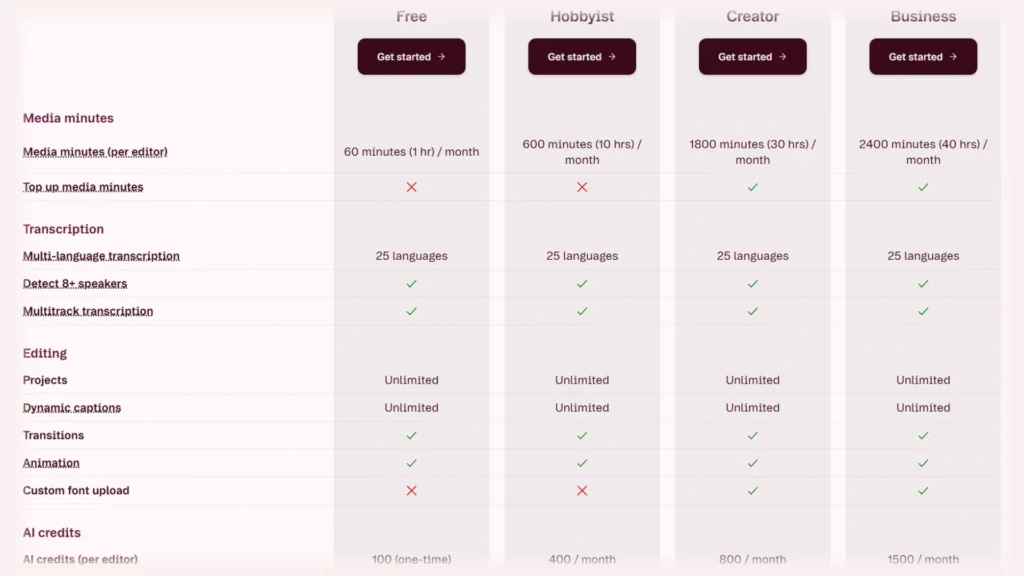
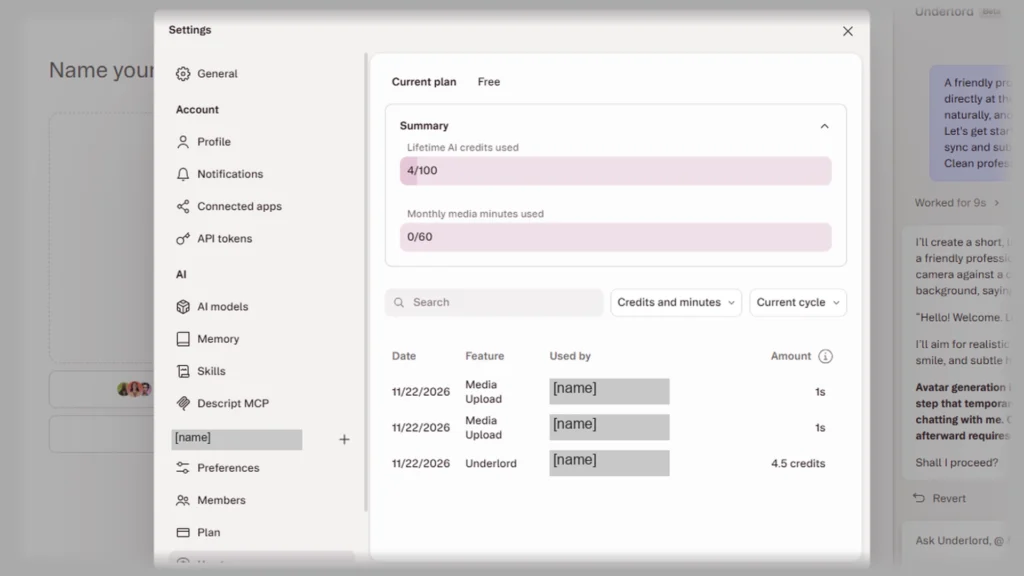
Studio Sound and Remove Filler Words cost at most 30 credits a run, and Underlord has no fixed price per action. The Usage tab in App settings shows what each run cost.
Creator and Business can buy top-up packs. They are used only after your monthly allowance runs out and expire 12 months after purchase. Hour bundles cost $5, $4 and $3 an hour, and credit bundles cost $0.10, $0.08 and $0.05 a credit, with larger bundles at the lower rate.
Creator’s annual price of $24 covers 30 media hours, which is $0.80 an hour if the whole price goes to media hours. The cheapest top-up hour is $3.00, or 3.75 times that (our calculation). Descript’s pages do not say what happens on Free when media minutes run out.
Is Descript free?
Yes. Descript’s Free plan costs $0 and needs no credit card, and it includes recording, editing and mixing. The table below shows what it limits.
| Feature | Free | Paid |
|---|---|---|
| Media minutes per editor | 60 a month | 600 to 2,400 a month |
| AI credits per editor | 100, one-time | 400 to 1,500 a month |
| Export resolution | 720p | 1080p on Hobbyist, 4k on Creator and Business |
| Watermark-free export | Not included | Included |
| Top-ups | Not included | Creator and Business only |
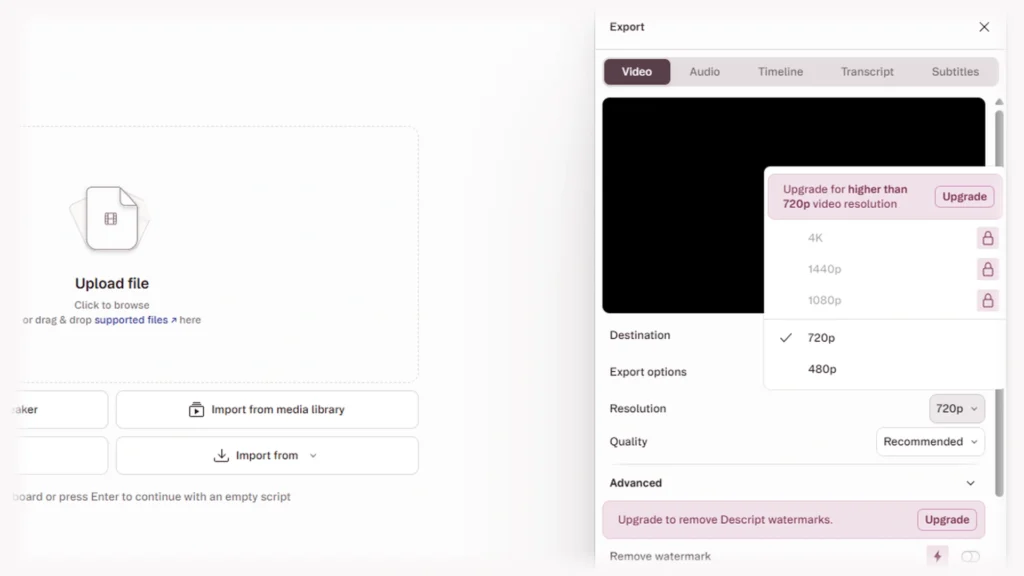
A search snippet shows 4k, but the pricing table gives 4k to Creator and Business. Free exports at 720p, and Descript’s export help page says the file carries a watermark in the bottom-right corner. Upgrading to Hobbyist, Creator or Business removes the watermark from future exports.
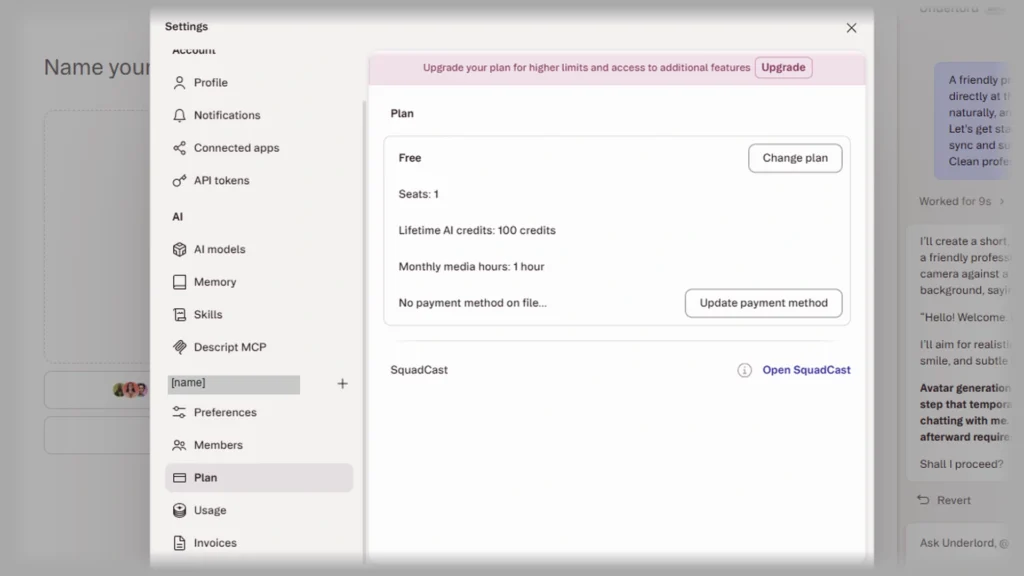
A help line says every plan has a monthly allowance, but it does not apply to Free credits, which the pricing table lists as one-time. The Plan panel below shows lifetime AI credits of 100.
Red Flag: Free exports carry a watermark, and Descript’s pages do not say whether you may use them for commercial work. Ask Descript before you send a Free export to a client.
Descript cancel steps and refund rules
Canceling a plan is the same as downgrading to Free. Follow these cancel steps:
- Open your plan settings.
- Choose Downgrade to Free.
- Select a reason for canceling, which is required.
- Click Cancel subscription to confirm.
Your plan stays active until the end of the billing cycle. Your remaining top-up balance is kept, but you cannot use it on Free. Support can only act on a cancellation sent from the drive owner’s email address.
Plan refunds are available within 48 hours of the invoice date, and seat refunds within 7 days. Top-ups are non-refundable, and Descript’s pages do not list a separate window for annual plans.
Warning: Descript does not offer prorated refunds for unused time, and plans renew automatically. Cancel before your renewal date, not after.
Which plan should you pick?
- If you want to try Descript first: start on Free with 60 media minutes and 100 credits once. Skip it if you need exports without a watermark.
- If you need watermark-free 1080p, 10 media hours and 400 credits a month: pick Hobbyist at $16/mo billed annually. Skip it if you need 4k or top-ups.
- If you need 4k export, top-ups, up to 3 seats or 30 media hours: pick Creator at $24/mo billed annually. Skip it if you need more than 3 seats.
- If you need up to 5 seats, 10 Control Room producers or 40 media hours: pick Business at $50/mo billed annually. Skip it if Creator’s 30 hours and 3 seats already cover you.
- If you are a student, teacher or qualifying nonprofit: ask for the education plan at $8/mo billed annually, with Hobbyist features. Skip it if you need more than 3 seats.
To weigh a plan against your billable hours, use the Freelance Hourly Rate Calculator.
Quick Verdict:
Skip If: you need client-ready exports on Free, or you need unused minutes and credits to roll over.
Descript podcast and remote recording
Descript podcast recording runs through Descript Rooms, a remote recording studio in your browser that is included in your plan. It covers remote podcasting and works as a podcast video recording platform. Recording time counts toward your media minutes.
| Feature | Free | Paid |
|---|---|---|
| Recording session hours per drive | 2 hours | 5 on Hobbyist, 15 on Creator, 25 on Business, a month |
| Room participants | 10 | 10 |
| Control Room producers | Not included | 3 on Hobbyist and Creator, 10 on Business |
| Length of one recording | Up to 4 hours | Up to 4 hours |
Two hours is 120 minutes (our calculation), and Free lists no period for it. Descript’s pages do not say whether session hours stack with your media minutes.
The Control Room is a backstage area for producers and is paid-only. Joining a Room from a phone or tablet works only if the Room was created on an Enterprise drive.
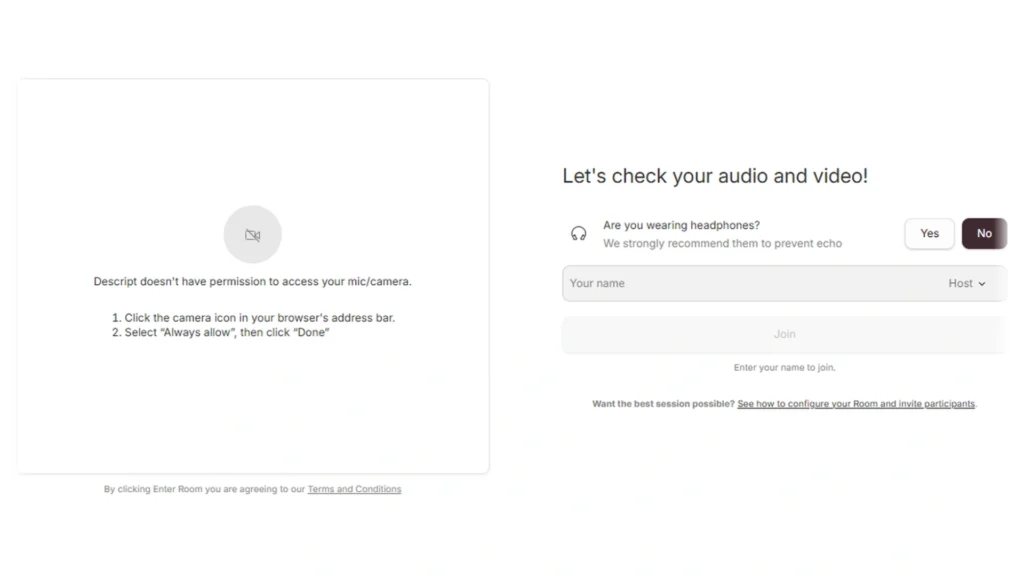
Sessions land in a Descript project automatically. You can then publish a podcast to your hosting service, or a video podcast to YouTube. If you are comparing podcast tools, see our AI tools for podcasters guide.
Editing and AI tools
Descript is video and podcast editing software, and its editor works on the project a recording lands in. If transcription is on, Descript transcribes the audio automatically.
Studio Sound, Regenerate and Underlord are listed as Limited on Free and Included on Hobbyist, Creator and Business. Regenerate supports English audio and video only. Descript’s old Overdub address redirects to its Regenerate page, and no official page says the two names are the same feature.
Underlord is Descript’s AI co-editor and carries a Beta label. Each prompt uses credits for its reasoning plus the tool it runs.
Descript review: pros and cons
This Descript review covers plan limits, refunds and data use.
Pros
- Watermark-free from Hobbyist
- 4k export on Creator
- Rooms included in your plan
Cons
- Free: 720p with watermark
- No rollover for unused allowance
- Top-ups cost more per unit
- No prorated refunds
On data, Descript’s data-sharing setting page says only data from users who opted in trains its internal AI models, and you can opt out at any time. The older Terms of Service and Privacy Policy describe an opt-out route instead, so check the Share data with Descript section of your settings.
What users report
Voice of the Street:
Descript’s Trustpilot profile showed a 2.4 score from 299 reviews on 2026-11-22. Both recent reviews below are complaints, and they are user opinions, not Descript’s own statements.
Complaint on credits: “I burned up most of my credits just trying to figure it out and I use a lot of similar AIs.” (Trustpilot, 2026-11-09, read the review)
Complaint on billing: The reviewer says no notice came when a 3-month free trial ended. Their words: “…got charged 4 consecutive months for $140 despite never logging into the system throughout the entire time.” (Trustpilot, 2026-11-14, read the review)
Descript alternatives
If you want a Descript alternative to compare, these pages in our directory cover other tools.
- VEED.io: our review of its plans and limits.
- Clipchamp: our review of its plans and limits.
- CapCut: our review of its plans and limits.
- OpusClip: our review of its plans and limits.
- Castmagic: our review of its plans and limits.
- Browse the directory of free AI video tools.
Verdict
Verdict: Descript is a paid-plan decision, because Free is for trying it and its exports carry a watermark. Hobbyist at $16 a month billed annually is the lowest price that removes the watermark.
Not a fit? Try: VEED.io
Sources and method
These pages drive the numbers above and are not linked elsewhere on this page.
- How billing works in Descript: each drive has its own plan and billing cycle.
- Manage drive members: Editor and Viewer seats.
- Rooms FAQ: Rooms access and media minutes.
- Terms of Service: output ownership and licence, dated February 2025.
- Privacy Policy: opt-out for project data, dated April 2025.
Based on official sources, our own screenshots of the pricing page and a new free account, and user reports from Trustpilot, checked November 2026. We did not test Descript’s editing, recording or AI features.
What we didn’t check:
- Descript’s editing, Rooms and AI features in use.
- In-app views on paid plans; the screenshots show one free account only.
- Terms of Service wording after its February 2025 date.
- User reports beyond two Trustpilot complaints; no praise from the last six months turned up.