


Free plan
Yes (Basic: 66 monthly credits, valid 31 days)
Starting price
$8.80/month (or a $1.19 one-week pass)
Billing basis
Monthly / Annual
Best for
Generative video testing and commercial motion design
Kling AI is free to try but not free to rely on. According to the official Kling AI membership plan page, non-subscribers claim monthly free credits on login, and the daily credits many searchers expect are reserved for paying subscribers.
Key Takeaways
- The free Basic plan gives 66 credits per month, not per day, and they are valid for 31 days.
- Daily bonus credits are for paid subscribers only and expire at 24:00:00 local time.
- Commercial use is listed for paid plans only, and free exports are watermarked and limited to 720p.
- Monthly plan credits expire after 31 days and are forfeited if the subscription ends.
- Free Tier Realities: The 66 Monthly Credits and Video Math (Kling 4.0 at 720p)
- Kling AI Pricing Tiers: Monthly vs Annual Breakdown
- One-Time Passes and Purchased Credit Packs
- Watermarks, Commercial Licensing, and Export Quality
- Which Plan Should You Pick?
- Strengths, Weaknesses, and Verified Feedback
- Software Verdict
- Sources and Methodology
- Frequently Asked Questions
Free Tier Realities: The 66 Monthly Credits and Video Math (Kling 4.0 at 720p)
No, Kling AI does not give free daily credits to free accounts. A Basic account receives 66 credits each month when you log in, and those credits stay valid for 31 days. In our November 2026 check, the account showed 66 bonus credits issued on Nov 12 with an expiry of Dec 13, 2026.
The “Daily Bonus Credits” line on the plan page applies to active subscribers. It excludes 7-day trial and 7-day pass users, and the credits expire at 24:00:00 local time on the day they are issued.
1 clip (5 seconds) per month
Free Basic Account Generation Yield (Kling 4.0 at 720p)
Source: Verified via live Kling workspace capture, November 2026
Here is the math. With Omni reference selected, the generate button showed 50 credits for a 5-second clip and 100 credits for a 10-second clip (Kling 4.0 at 720p). That works out to 10 credits per second (Kling 4.0 at 720p), which fits Kling’s “billed per second” rule.
Our calculation: 66 credits ÷ 50 credits = one 5-second clip per month, with 16 credits left over (Kling 4.0 at 720p). A 10-second clip costs 100 credits, so it is out of reach on free credits alone (Kling 4.0 at 720p). In seconds, 66 credits cover at most 6.6 seconds of footage (Kling 4.0 at 720p).
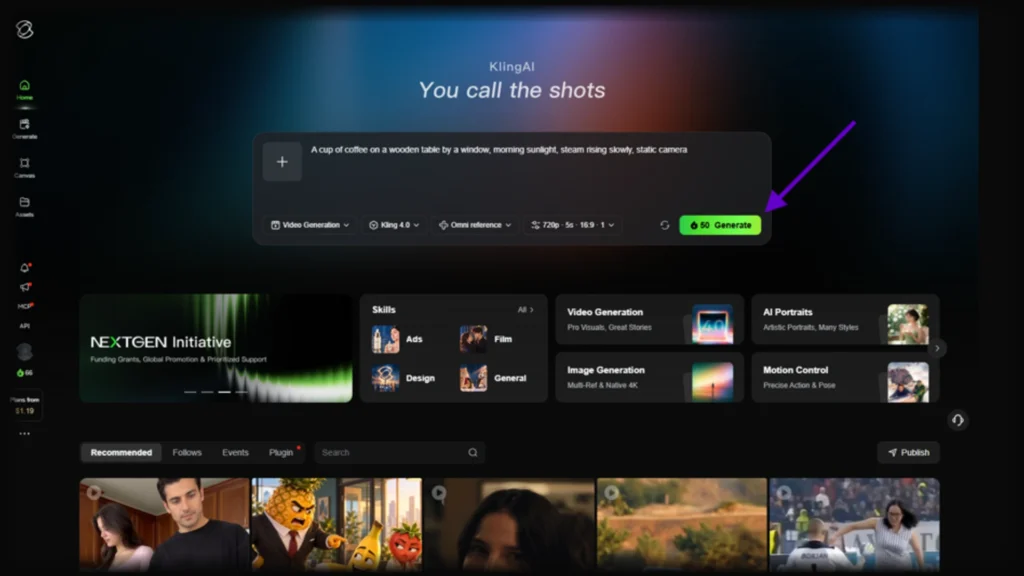
The duration slider runs from 3 to 30 seconds, but the free balance caps what you can actually generate. These numbers apply to Kling 4.0 at 720p only. Kling states that deductions depend on the number of outputs, model, duration, and resolution, so other models and 1080p will cost different amounts. Those rates appear inside the generator workspace. For prompt-writing help, see our cinematic text-to-video prompt playbook.
Kling AI Pricing Tiers: Monthly vs Annual Breakdown
The official Kling AI membership plan page lists four active paid tiers: Standard, Pro, Premier, and Ultra+. Each tier has a 30% first-month offer, available once. The table below uses the regular recurring price, because the promotional price applies to the first month only. Annual figures are billed yearly, and the monthly equivalent is our calculation (annual price ÷ 12).
| Plan Name | Regular Monthly | Regular Annual (Monthly Equiv.) | Monthly Credits | 5-Second Clips (Kling 4.0 at 720p) |
|---|---|---|---|---|
| Basic (free) | $0 | $0 | 66 | 1 |
| Standard | $8.80 ($6.99 first month) | $79.20/yr ($6.60/mo) | 660 | 13 |
| Pro | $32.56 ($25.99 first month) | $293.04/yr ($24.42/mo) | 3,000 | 60 |
| Premier (18K) | $181.99 ($144.99 first month) | $1,639.99/yr ($136.67/mo) | 18,000 | 360 |
| Ultra+ | $544.99 ($432.99 first month) | $4,902.99/yr ($408.58/mo) | 57,000 | 1,140 |
Per-clip cost for one 5-second clip, by our calculation from Kling’s price per 100 credits (Kling 4.0 at 720p): Standard $0.53 monthly or $0.50 yearly; Pro $0.44 or $0.41; Premier $0.41 or $0.38; Ultra+ $0.38 or $0.36. Paying yearly saves 34% against the listed monthly price.
Ultra is no longer sold to new subscribers; existing Ultra subscribers keep their benefits, so Ultra+ is the active top tier. If you stack subscriptions, Kling applies them in this order: Ultra+, Ultra, Premier, Pro, Standard. Premier also offers 8K, 28K, and 38K credit options on a slider, which the static table does not price.
Some guides, such as the Renderforest Kling 3.0 wrapper overview, describe a reseller’s own plans rather than Kling’s native web tiers, so check which one a price belongs to. For a cross-vendor view of credits, see Runway pricing and credits.
Red Flag: Monthly plan credits are valid for 31 days from issuance. When a subscription expires, any unused monthly credits expire with it and can no longer be used. Budget for what you will actually generate each month, not the headline credit count.
One-Time Passes and Purchased Credit Packs
You can use Kling without a recurring subscription. The Standard one-week pass costs $1.19 for 80 credits, valid for 7 days, and the screen listing it also showed commercial rights and watermark removal. By our calculation the 80 credits cover one 5-second clip at an effective $0.75 per clip (Kling 4.0 at 720p), since the pass works out to $1.49 per 100 credits.
Purchased top-up credits stay valid for 2 years. Kling is explicit that owning credits does not grant subscription benefits: features such as watermark removal and 4K generation require an active subscription. In other words, a credit pack alone will not take the watermark off your clips.
Watermarks, Commercial Licensing, and Export Quality
Free Basic accounts get a branded watermark, 720p exports, and one output per generation. Paid plans remove the brand watermark, list 1080p and 4K generation, allow up to 4 outputs per run, and include a dedicated generation queue.
On commercial rights, Kling’s terms say paid subscribers may use, modify, and distribute generated content commercially, provided it is not used to build products that compete with Kling. The comparison table lists commercial use for paid plans only, so Basic free accounts do not include commercial rights.
Warning: Paid plans list 1080p and 4K generation, but in the Kling 4.0 settings we saw in November 2026, 4K was marked “Coming Soon” and 1080p carried a VIP tag on the free account. Do not count on 4K output from Kling 4.0.
Which Plan Should You Pick?
The tiers differ on credits and a few feature limits. Basic gives 66 credits, 720p only, a watermark, 30 elements, and one output. Standard (660 credits) adds watermark removal, 1080p/4K listing, 50 elements, and 4 outputs. Pro (3,000 credits) raises elements to 150 and adds priority access to new features.
Premier (18,000 credits) keeps 150 elements for high volume. Ultra+ (57,000 credits) has 500 elements and beta test invites. Every paid plan gets a dedicated generation queue.
Quick Verdict: Match the plan to the number of clips you need each month.
Best For:
- Free (Basic): evaluating motion fidelity on 720p clips for personal experiments where a watermark and one clip per month (Kling 4.0 at 720p) suffice.
- Standard ($8.80/mo): up to 13 short clips per month (Kling 4.0 at 720p) that need watermark removal and commercial rights.
- Pro ($32.56/mo): client projects needing up to 60 clips per month (Kling 4.0 at 720p), 150 elements, and priority access to new features.
- Premier ($181.99/mo): high-output content channels that need 360 clips per month (Kling 4.0 at 720p).
- Ultra+ ($544.99/mo): studios that need 500 elements, beta test access, and over 1,100 clips per month (Kling 4.0 at 720p).
Skip If: you need watermark-free or commercial output and are considering the free plan.
Strengths, Weaknesses, and Verified Feedback
Pros ✅
- Kling 4.0 is available on the free account.
- Billing is per second, so short clips cost less.
- A $1.19 one-week pass is a low-barrier way to try paid features.
- Annual plans save 34% against monthly pricing.
Cons ❌
- The free tier yields one clip per month (Kling 4.0 at 720p).
- Monthly credits expire after 31 days.
- Commercial use is listed for paid plans only.
User friction centers on credits that burn faster than expected. These are individual reports, not a measured rate.
Voice of the Street:
What users say (Trustpilot, October 2026): A Trustpilot user review reports, “On October 28, 2026, a staggering 387 credits simply disappeared from my account.” In user reports on Trustpilot, another reviewer says, “Kling produced video clips with weird lettering all across the video, 1000s of credits wasted.”
Software Verdict
Verdict: Kling offers direct access to Kling 4.0 with per-second billing, but the Basic tier is strictly an evaluation trial offering 66 monthly credits. Commercial creators must budget for ongoing subscriptions to retain credits and access commercial rights.
Best For: Video creators, freelance editors, and visual artists who want to test Kling’s motion control before paying.
Sources and Methodology
Sources: the official Kling AI membership plan page; Kling’s workspace and account interface (observed capture, November 2026); Trustpilot user reviews (October 2026); the Renderforest Kling AI feature overview.
Methodology: Checked November 2026. We reviewed Kling’s membership plan cards, the yearly pricing tab, the one-time pass modal, and a logged-in free-account workspace (credit balance and generation canvas). We did not generate clips; credit costs were read from Kling’s generate screen before generating (November 2026).
What We Didn’t Check
- 1080p and 4K credit rates: not published on static tables and locked on the free account; 4K was marked Coming Soon in November 2026.
- Per-clip costs for Kling 4.0 Flash, Kling 3.0 Omni, and Voice Control.
- Pricing for the Premier 8K, 28K, and 38K options.
- Developer REST API endpoints and token pricing.