


Free plan
Yes, up to 3 minutes per video at 720p, with a Vidnoz watermark
Starting paid price
$19.99/mo billed annually ($26.99/mo billed monthly)
Paid limits
Up to 60 minutes per video, 1080p export, no watermark
Checked
2026-11-22, prices in USD
Vidnoz AI is an AI video tool with avatars, voices, templates, face swap and talking photos. This Vidnoz review uses Vidnoz’s own pages, checked on 2026-11-22. Prices are in USD from the Vidnoz pricing page.
Quick Answer:
Vidnoz AI has a free plan, but its plan card shows 0 credits a day, 720p exports, a 3-minute limit and a Vidnoz watermark. Starter costs $19.99/mo billed yearly and removes the watermark. At 0.5 credits per second, its 450 credits equal 900 seconds (15 minutes) of video generation, by our calculation.
Most Vidnoz pages show no update date, so treat 2026-11-22 as the check date for everything below.
Key Takeaways
- The free plan allows 3 minutes per video at 720p with a Vidnoz watermark.
- Starter is $19.99/mo billed yearly or $26.99/mo billed monthly, with 450 credits a month.
- Paying yearly saves $84.00 on Starter and $216.00 on Business against 12 months at the monthly price (our calculation).
- Unused subscription credits do not roll over on the plan page, while the Gen pricing FAQ says they do.
- Vidnoz’s pages do not say which plan’s credits pay for face swap or image to video.
- Vidnoz AI plans and prices
- What the free plan includes
- Credits and how far they go
- Which plan should you pick?
- Vidnoz face swap
- Vidnoz image to video
- Talking photo and other tools
- Talking photo
- Is Vidnoz accurate?
- Is Vidnoz legit?
- Vidnoz vs HeyGen and alternatives
- Known limitations
- Sources and what we didn't check
- What we didn't check
- Frequently Asked Questions
Vidnoz AI plans and prices
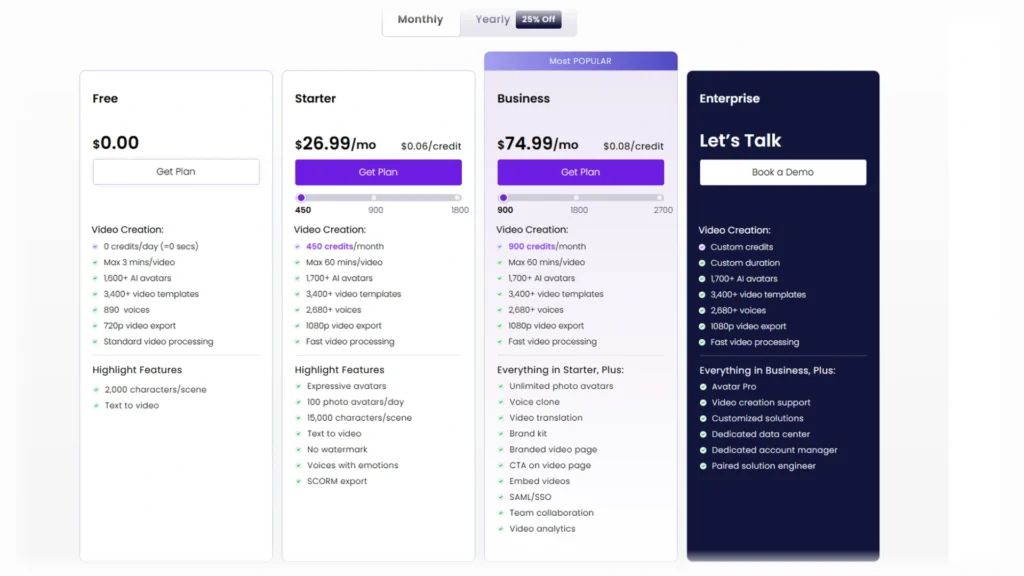
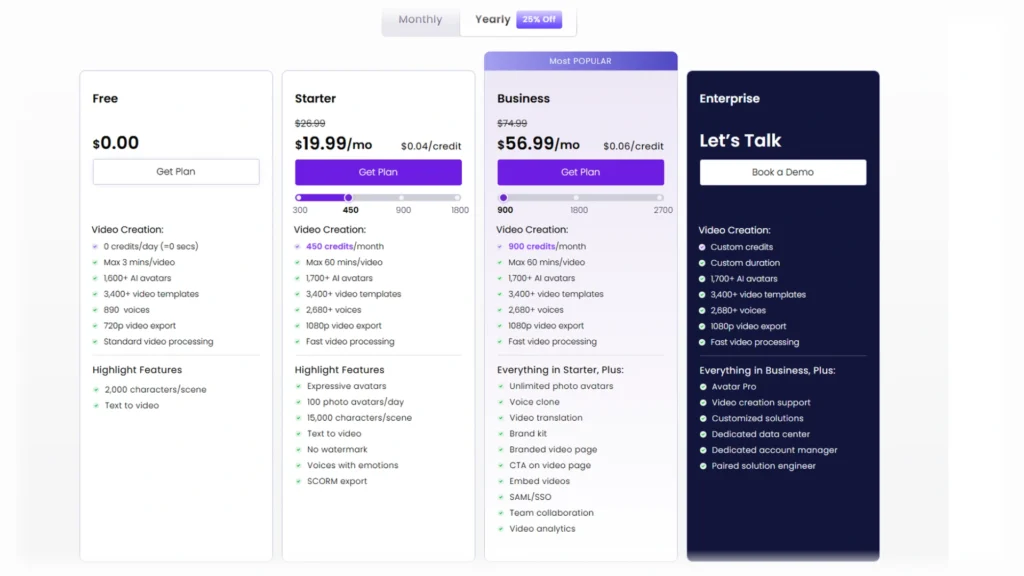
Vidnoz AI has four plans: Free, Starter, Business and Enterprise. Enterprise has no public price and shows “Let’s Talk” on its card.
| Plan | Monthly toggle | Yearly toggle (per month) | Credits | Cost per credit |
|---|---|---|---|---|
| Free | $0.00 | $0.00 | 0 credits/day | Not published |
| Starter | $26.99 | $19.99 | 450 credits/month | $0.06 monthly, $0.04 yearly |
| Business | $74.99 | $56.99 | 900 credits/month | $0.08 monthly, $0.06 yearly |
| Enterprise | Let’s Talk | Let’s Talk | Not published | Not published |
Prices above are at the default credit step: 450 credits for Starter and 900 for Business. Larger steps cost more each month. Starter at 900 credits is $39.99/mo on the yearly toggle.
Our calculation compares the yearly per-month price with 12 months at the monthly price. Starter costs $323.88 at the monthly price and $239.88 at the yearly rate, a saving of $84.00 (25.9%). Business costs $899.88 against $683.88, a saving of $216.00 (24.0%).
$84.00
saved over 12 months on Starter by paying yearly instead of monthly (25.9%)
Source: Vidnoz pricing page, checked 2026-11-22; our calculation
Vidnoz doesn’t show the total yearly charge as a figure on the plan cards, so these totals assume 12 months at the shown per-month rate. The yearly toggle is labelled “Yearly 25% Off”, and the struck-through yearly price equals the monthly price.
Two add-ons sit beside the plans. Avatar Pro is $299/yr and Voice Clone is $9.99/mo, and both carry a “50% OFF” label. Vidnoz doesn’t publish an end date for its current offers.
The two screenshots below show the plan cards on both toggles as they appeared on 2026-11-22.
What the free plan includes
Yes, Vidnoz AI has a free plan. The pricing page FAQ says “Yes, we offer a free plan for creating AI videos.” The homepage adds “No credit card required”.
A guest can create videos, but only registered users can download them.
| Feature | Free | Starter and Business |
|---|---|---|
| Credits on the plan card | 0 credits/day (=0 secs) | 450 and 900 credits/month |
| Max video length | 3 minutes | 60 minutes |
| Video export | 720p | 1080p |
| Remove Vidnoz Watermark | Not included | Included |
| Full Commercial License row | With Vidnoz watermark | Included |
On a new free Vidnoz account, the account panel showed “Total credits 0 credit”, “Export resolution 720p” and “Export without watermark No”.
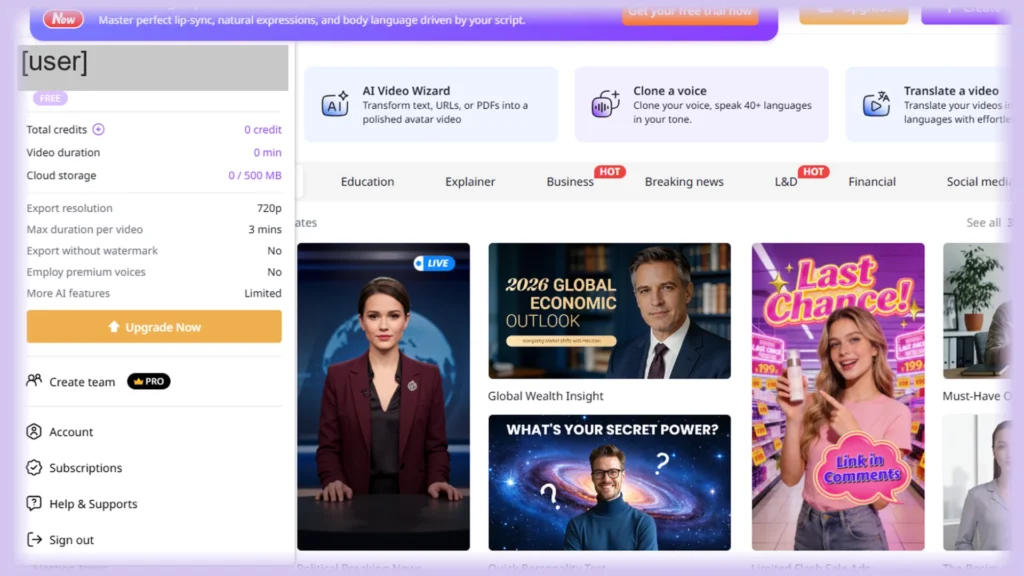
Vidnoz’s pages disagree on two free plan points. The table below shows both statements for each, as seen on 2026-11-22.
| Topic | Plan page says | Another Vidnoz page says | Seen |
|---|---|---|---|
| Free daily credits | Plan card: “0 credits/day (=0 secs)”. Compare row: “450/mo + 0 free/day” | Homepage code banner: “Create Video with 60 Free Credits Every Day!” (not in the visible homepage text) | 2026-11-22 |
| Commercial use | Free column: “With Vidnoz watermark” | Talking photo page: “free for commercial use” | 2026-11-22 |
Vidnoz’s plan page shows 0 daily credits for the free plan. A new free account showed 0 credits in our screenshot. A banner line about 60 free daily credits sits in the homepage code, but it is not shown in the visible homepage text.
Vidnoz’s Terms don’t state commercial-use or watermark rules. The plan page does, and Vidnoz’s help center has no article on free plan limits.
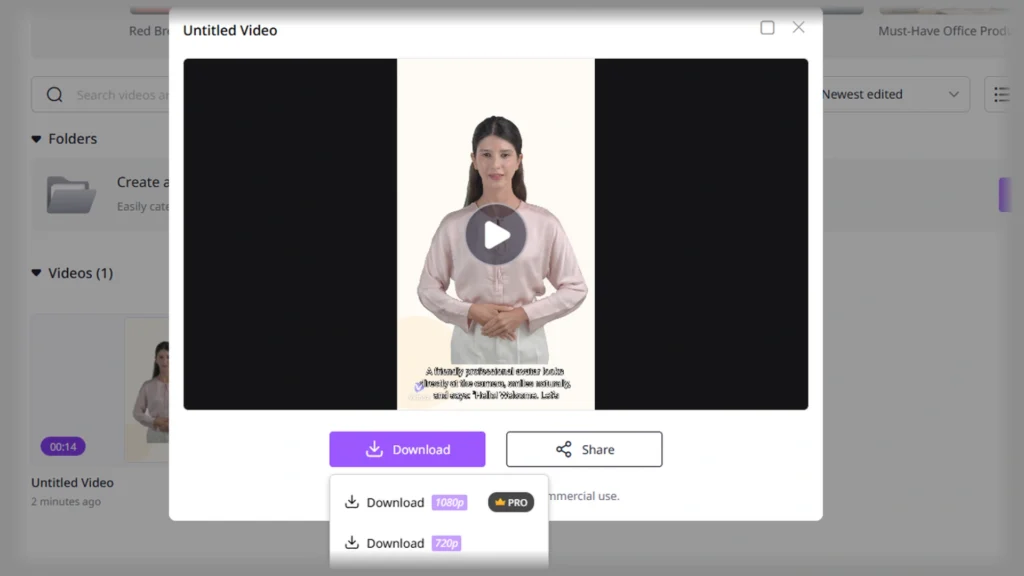
On our Vidnoz account, whose plan shows Expired, the download menu offers “Download 720p” and shows “Download 1080p” with a “PRO” badge.
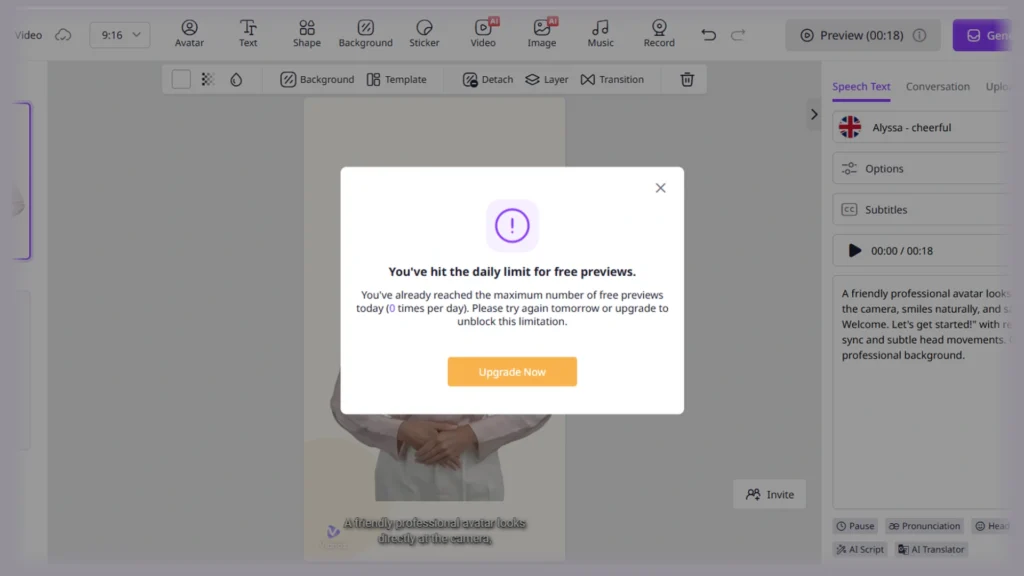
On our Vidnoz account, whose plan shows Expired, a preview attempt returned “You’ve already reached the maximum number of free previews today (0 times per day)”. That dialog is about free previews on an Expired account, not generation credits.
Red Flag: The Vidnoz free plan watermark applies to free exports, and a new free account showed 0 credits in our screenshot. A homepage banner in the page code mentions 60 free credits a day, but it is not in the visible homepage text, and the plan card shows 0.
Credits and how far they go
Vidnoz credits pay for video seconds. The plan page defines them as the total amount of video content you can create during the subscription period.
| Feature | Credit rate | Starter, 450 credits | Business, 900 credits |
|---|---|---|---|
| Vidnoz AI Video Generation | 0.5 credits per second (min 1 credit) | 900 seconds (15 minutes) | 1,800 seconds (30 minutes) |
| Expressive Avatar and Product Avatar | 2 credits per second | 225 seconds (3.75 minutes) | 450 seconds (7.5 minutes) |
The last two columns are our calculation, if the whole allowance goes to that one feature. Text to video (Animatic Generation) costs 1 credit per second. Product Background costs 10 credits per 5 seconds.
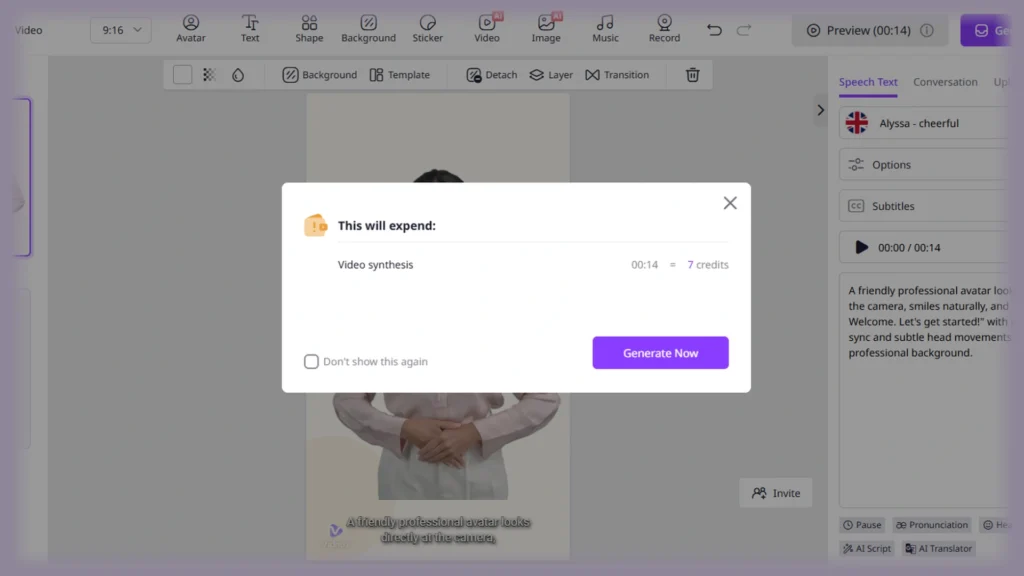
On our Vidnoz account, whose plan shows Expired, the generate dialog read “00:14 = 7 credits”, which matches the 0.5 credits per second rate.
The Compare Plans row for Expressive Avatars shows “Up to 15 mins (HD)” for Starter and “Up to 30 mins (HD)” for Business. Our arithmetic gives 225 and 450 seconds. We show both numbers and do not reconcile them.
On the plan page, unused subscription credits do not carry over, and add-on credit packs expire at the end of the cycle. The Vidnoz Gen pricing FAQ says the opposite for unused credits:
“Yes, unused credits are accumulated and added to the new credits in the next billing cycle.”
The same FAQ says Vidnoz AI and Vidnoz Gen share one credit system. We show both rules and do not pick one.
Vidnoz doesn’t publish a way to earn extra credits on the pages we checked. Deleting a video project does not restore the credits it used.
Which plan should you pick?
- If you only need clips up to 3 minutes at 720p and can accept a Vidnoz watermark, those are the Free plan limits. A new free account showed 0 credits and 0 min of video duration in our screenshot, and the plan card says “0 credits/day (=0 secs)”.
- If you need no watermark and 1080p exports, Starter at $19.99/mo billed yearly covers it. Business has the same watermark, resolution and 60-minute limits, so they do not separate the two. The Full Commercial License row shows a check on all paid plans, so it separates Free only.
- If you need 1-Click Video Translation, a brand kit or unlimited photo avatars, choose Business. Starter shows 100 photo avatars a day.
- If you need a voice clone, the Business column shows 1, while Starter lists it as a “Paid Add-on”. If you need a team, Business shows 1,000 user seats and Starter shows 1.
Quick Verdict:
Best For: Creators who need short free clips, or no-watermark 1080p exports on a small paid plan.
Skip If: You want free daily credits, because the plan card and a new free account both show 0. Also skip it if you need a confirmed credit cost for face swap or image to video.
Vidnoz face swap
The Vidnoz face swap page lists “Daily free usage.” among its features but gives no number.
The page’s credit and upgrade links point to the Vidnoz Gen pricing page. Its entry plan has 180 credits at $9.99/mo on the yearly toggle and $12.99/mo on the monthly toggle. Vidnoz’s pages do not say which plan’s credits pay for a swap, and Vidnoz doesn’t publish the credit cost of one face swap.
The Gen pricing page reads differently in two captures. The raw page source lists face swap and shows “Limited use” in the Free column, while the page as rendered in a browser has no face swap text.
On our Vidnoz account, whose plan shows Expired, we saw the face swap tool open inside “Vidnoz Gen” with Photo, Video and Multiple Face Swap tabs. On that Expired account, the screen names no plan for the credits.
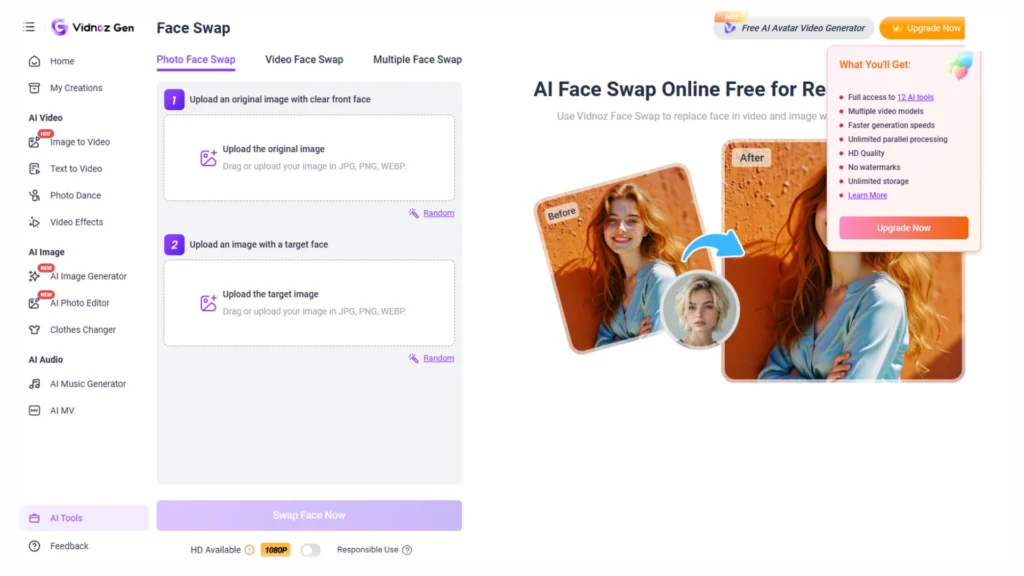
Warning: The face swap page says “please do not use unauthorized images and videos to do face swaps”.
The Vidnoz ethics policy says Vidnoz will never create an AI avatar without your clear consent. It has no swap-specific consent rule.
Vidnoz image to video
The Vidnoz image to video page offers 5s and 8s lengths and Standard and High quality. Its model list includes Vidnoz Turbo, Seedance and Pixverse. Its free use and watermark statements conflict with other Vidnoz pages, as the table shows.
| Topic | Image to video page says | Gen pricing page shows | Seen |
|---|---|---|---|
| Free use | “one free video generation per day” and, on the same page, “no limits” | Free column “Limited” with 0 monthly credits | 2026-11-22 |
| Watermark | “Image to video AI free without watermark!” | “Watermark-free Exports” listed in the Free vs Paid comparison | 2026-11-22 |
The page’s credit and upgrade links also point to the Vidnoz Gen pricing page. Vidnoz’s pages do not say which plan’s credits pay for a clip.
The model list shows starting labels: “5+ credits” for Vidnoz Turbo, “3+ credits” for Seedance and “20+ credits” for Pixverse. Vidnoz doesn’t say what clip length or quality those labels assume.
If the Gen entry plan’s 180 credits pay for clips, our calculation gives at most 36 Vidnoz Turbo clips, 60 Seedance clips or 9 Pixverse clips. Each number is an upper bound, because “+” marks a starting cost.
Talking photo and other tools
Talking photo
The Vidnoz talking photo page turns a still image into a talking character. It says you must upload “a clear front face image under 10MB”. It also says the results are free for commercial use, which conflicts with the plan page row shown earlier.
The photo avatar page doesn’t name a plan. On the plan page, Starter shows 100 photo avatars a day and Free shows a cross.
Is Vidnoz accurate?
Vidnoz doesn’t publish an accuracy rate or method for its face rating tool. The attractiveness test page calls it “a standard face rating AI” and states no more.
Vidnoz doesn’t publish an accuracy figure for lip sync either. The lip sync page says free usage is limited to the first 60 seconds of the video.
Is Vidnoz legit?
The Vidnoz About page names the company as Wise Reward Limited and says Vidnoz was founded in 2016. The founding year is a company claim. The page also says Vidnoz holds ISO 27001 certification, but it shows no certificate body or number.
The About page address block names no country, and its phone line carries “(HK)” and “(US)” labels. The Trustpilot profile shows an address in Austin, United States. We state both and do not claim either is wrong.
Refund rules differ by page. We show each with its date.
| Source | What it says | Date |
|---|---|---|
| Terms of Service | “Payments are non-refundable, except where required by law.” | Last Update: July 2026 |
| Pricing page FAQ | “We provide 7-day full Money Back Guarantee for 1-year subscription.” Monthly refunds will not be accepted. | Seen 2026-11-22 |
| Refund Policy | Same 7-day guarantee on 1-year plans, none on 1-month plans | Last Updated: February 24, 2025 |
Vidnoz’s Privacy Policy says free accounts not logged in for 2 weeks are treated as inactive and their data is permanently deleted. It doesn’t say whether uploads train AI models.
The Vidnoz Trustpilot profile showed 83 reviews and a 2.3 score on 2026-11-22, split 45% 1-star and 37% 5-star. It lists 14 reviews in the last 12 months, and no praise review within six months turned up on its first page. Capterra lists 1 review from 2023, so we use no quote from it.
Voice of the Street:
What users say on Trustpilot (a 1-star review from 2026-08-18):
“Been trying to generate one video for free to see if its worst it to get subscription and its just been impossible, thanks for wasting my time !!!!!!!”
That is one user’s report, not a confirmed fact about the product.
Vidnoz vs HeyGen and alternatives
If you are choosing between Vidnoz and HeyGen, start with our full Vidnoz vs HeyGen comparison. You can also read the HeyGen software page or the Synthesia software page. The free AI video generators directory lists more options.
Known limitations
Pros ✅
- A free plan exists, with 3 minutes per video at 720p and no credit card required
- Starter removes the watermark and exports 1080p from $19.99/mo billed yearly
- Yearly billing costs 24.0% to 25.9% less than 12 months at the monthly price (our calculation)
- Credit rates for core video features are on the plan page
Cons ❌
- Free exports carry a Vidnoz watermark, and a new free account showed 0 credits
- Credit cost per face swap and per image to video clip is not published
- Unused subscription credits do not roll over on the plan page
- No accuracy figures for face rating or lip sync
- Trustpilot score of 2.3 from 83 reviews on 2026-11-22
Verdict: Vidnoz AI offers a free plan for clips up to 3 minutes with a watermark and 720p exports. Starter at $19.99/mo billed yearly removes the watermark and exports 1080p. Face swap and image to video costs stay unclear until Vidnoz says which plan’s credits pay for them.
Best For: Creators who need short free clips, or no-watermark 1080p exports on a small paid plan.
Sources and what we didn’t check
- Terms of Service: Hong Kong governing law and the refund line, dated July 2026
- Vidnoz Privacy Policy – Your Privacy Matters to Us: free account inactivity rule, dated July 2026
- Vidnoz User Subscription Cancellation and Refund Policy: 7-day guarantee on 1-year plans, last updated February 24, 2025
- How to request a refund for credits?: add-on packs get a full refund for unused credits within 3 days of purchase
- Vidnoz Flex Pricing Plan – Grow Your Business with Videos: the Flex plan page, where we found no face swap or image to video mention
- Capterra listing for Vidnoz AI: 1 review, from 2023
Based on official sources, our own screenshots of the pricing page and the app, and user reports from Trustpilot and Capterra, checked November 2026. We did not test face swap or image to video output, lip sync or face rating accuracy, or the sign-up flow.
What we didn’t check
- The credit cost per face swap and per clip, which Vidnoz does not publish
- Reddit threads, and any praise review within six months
- Studio, Gen and Flex plans beyond the Gen entry cost