


CapCut is a video editor with a Free plan. CapCut Pro costs $19.99 a month or $179.99 a year, and Free exports behave differently depending on where you export.
Free plan
Yes, credits come from daily tasks
Pro list price
$19.99/mo
Billing basis
Monthly or billed annually, renews automatically
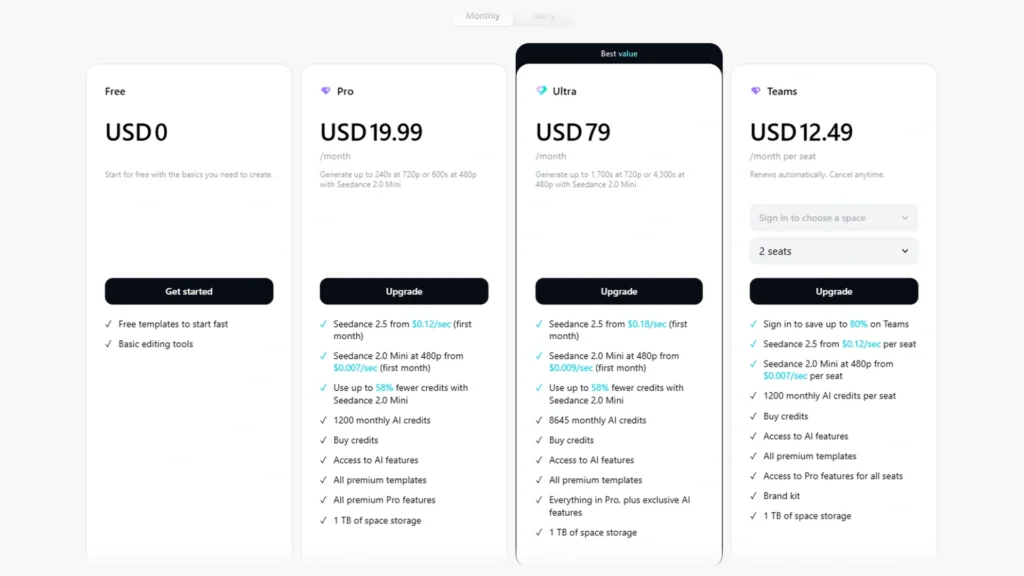
Checked November 23, 2026 against CapCut’s public pricing and help pages. Prices are US dollar list prices. Image 1 shows the public pricing page, and images 2 to 6 show a new free CapCut web account.
Key Takeaways
- Paying for Pro yearly saves about a quarter against 12 monthly payments (our calculation).
- The pricing page lists Free, Pro, Ultra and Teams, while help pages and the iOS listing also mention a Standard plan.
- Main risk: a first-month offer renews at the list price, so read the renewal line before you pay.
- CapCut Pro price and plans
- Is there a Standard plan?
- Why is CapCut expensive now?
- Is CapCut free?
- Watermark and export on Free
- AI credits
- Buying and renewing safely
- Commercial use and asset licence
- Teams and seats
- Which plan should you pick?
- What CapCut is and where it runs
- CapCut review: pros and cons
- CapCut alternatives
- Verdict
- Sources and method
- Frequently Asked Questions
CapCut Pro price and plans
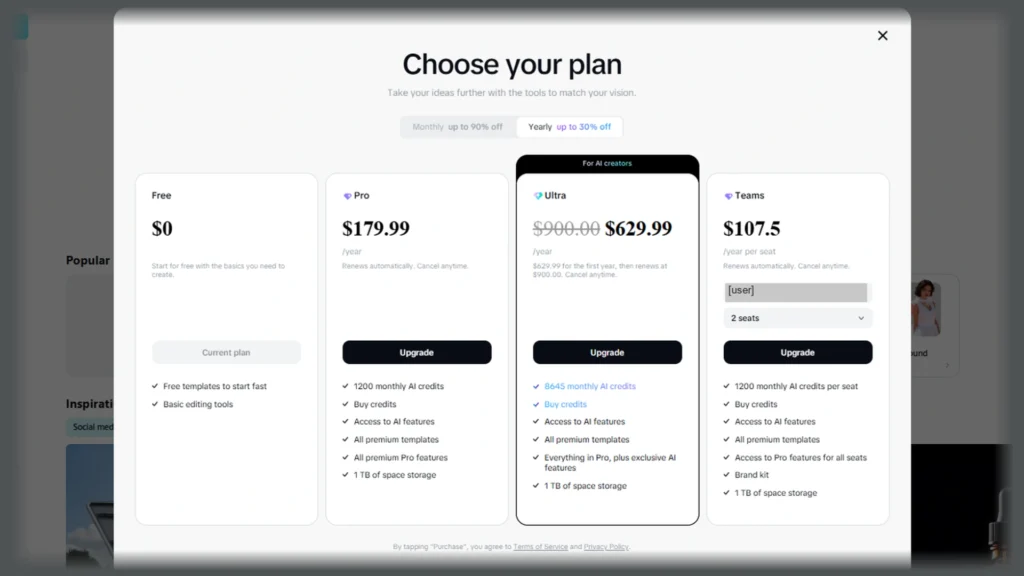
CapCut’s pricing page lists Free, Pro, Ultra and Teams, and Teams is priced per seat. This CapCut pricing table shows list prices, with AI credits and storage as the pricing page states them.
| Plan | Monthly | Yearly | AI credits | Storage |
|---|---|---|---|---|
| Free | $0 | $0 | From daily tasks | Not listed on its page |
| Pro | $19.99 | $179.99 | 1,200 a month | 1 TB |
| Ultra | $79 | $900 | 8,645 a month | Not listed on its page |
| Teams | $12.49 per seat at 2 seats | $107.50 per seat | 1,200 a month per seat | 1 TB, unit not stated |
Teams gives Pro features to every seat. Ultra’s card lists exclusive AI features without naming them, and it names no storage figure.
At the yearly price, Pro works out to about $15 a month, Ultra to $75 and Teams to about $8.96 a seat (our calculation).
$59.89
saved by paying Pro yearly instead of 12 monthly payments (24.97%). Ultra saves $48 (5.06%). Teams saves $42.38 per seat (28.28%), assuming the 2-seat default.
Source: CapCut’s pricing page and upgrade dialog, 12 x monthly list price minus yearly price, our calculation
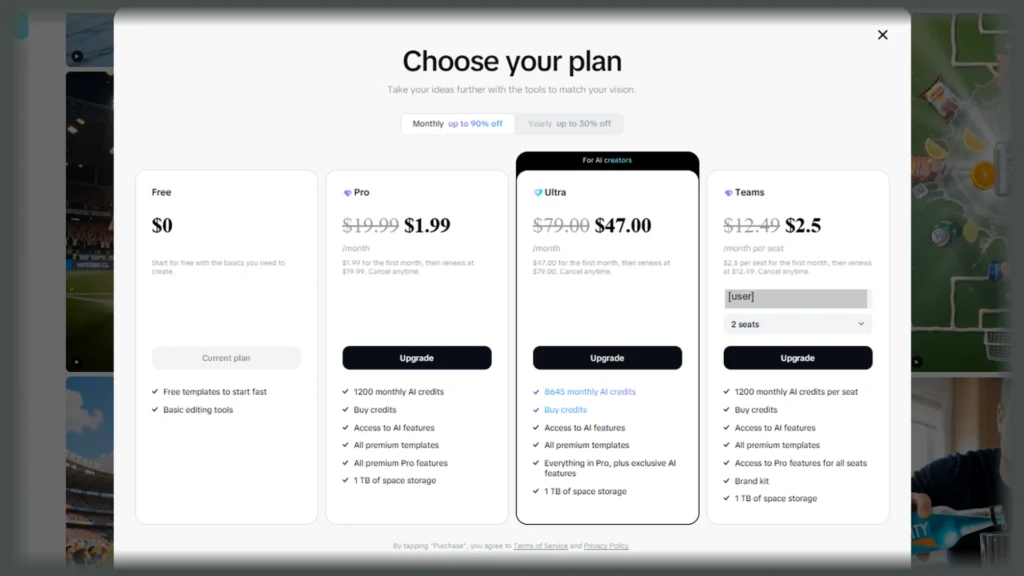
On a new account, checked 2026-11-23, the dialog showed Pro at $1.99 for the first month, Ultra at $47 and Teams at $2.50 per seat. Each renews at list price. Ultra’s first year showed $629.99 against $900.
On monthly billing with the Pro offer, year one costs $1.99 plus 11 payments of $19.99, or $221.88, if the offer applies to month one only. The yearly plan costs $179.99 (our calculation). CapCut’s account-specific offers article says not every account sees the same price.
At list prices, Pro gives about 60 credits per dollar and Ultra about 109 (our calculation). Ultra has 7.2 times Pro’s credits for 3.95 times the price. CapCut doesn’t publish credits per feature, so credit counts do not show equal output.
Is there a Standard plan?
The pricing page and the Upgrade dialog on a new account show no Standard card. CapCut’s Standard plan article and the US App Store listing do mention one, at $9.99 a month on iOS, for mobile in some regions. Check your own dialog.
Standard gives access to blue-diamond items but not purple-diamond ones, and membership features on PC need Pro. Standard is not the free plan. The iOS listing also shows a $89.99 yearly item and a second $7.99 monthly item, and it doesn’t name the plan behind them.
Why is CapCut expensive now?
A first-month offer ends and the plan renews at list price. CapCut’s plan update article also says Pro now has more credits and storage than before.
Prices vary by region, device and promotions, per CapCut’s price help article. Checkout shows the real price. Taxes may be added at payment, as the in-app price article explains, and your store region sets the currency.
Is CapCut free?
Yes. CapCut’s Free plan costs $0 and lists free templates and basic editing tools. The table shows CapCut free vs Pro on the points that change what you can do.
| Feature | Free | Pro |
|---|---|---|
| Templates | Free templates | Pro-marked templates and assets need Pro to export |
| AI credits | From daily tasks, up to 780 | 1,200 a month |
| Cloud storage | Not listed on its page | 1 TB |
| Export resolution | Editor up to 1080p, Studio list up to 4K | Not listed on its page |
Cells marked Not listed on its page are ones CapCut’s pricing page leaves blank. CapCut doesn’t publish a resolution or length cap for the Free plan.
Watermark and export on Free
In Studio, the export panel shows a Remove watermark toggle with a Pro badge, and it was off. The editor’s export panel offered up to 1080p with no watermark toggle, and our 1080p file came without an upgrade prompt. AI-generated media kept a small “CapCut AI” mark.
A help article says CapCut itself does not add a watermark, and that most templates end with a CapCut logo clip. Read the template watermark article and check your own export. We haven’t checked whether plain footage exports from the editor with no mark.

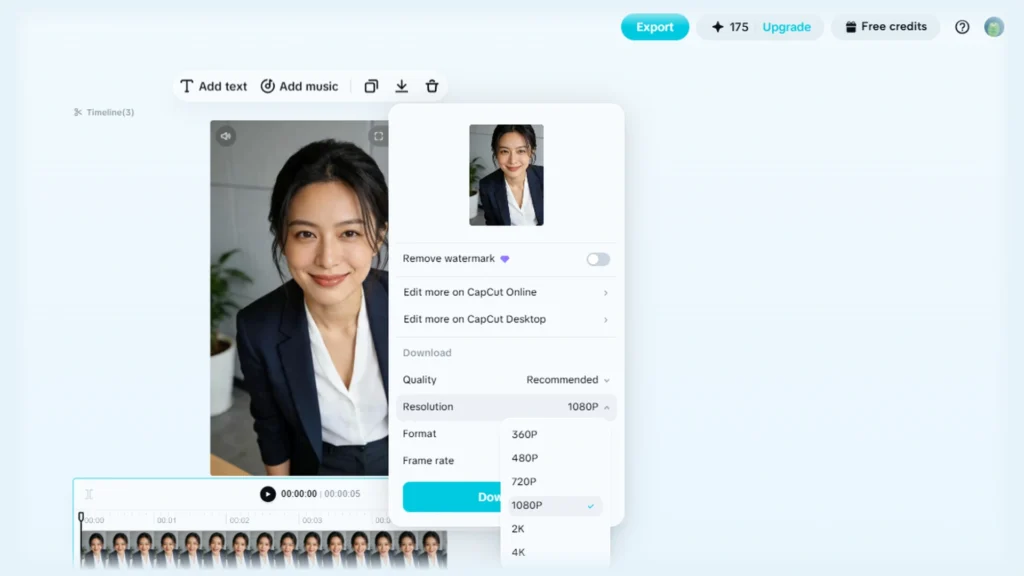
Studio’s download list runs from 360P to 4K, while the editor’s list runs from 360p to 1080p. Our reviewer was asked to upgrade when exporting from Studio. That prompt was not captured, so we can’t say what triggered it.
Red Flag: Free export results depend on the path you use. Export a short clip first, before you promise a client a clean file.
The pricing FAQ says new users can start a 7-day Pro trial, though availability varies by region, platform and billing channel. Our new-account dialog showed first-month offers and no trial. CapCut’s template page says Pro-marked templates and assets need Pro to export.
AI credits
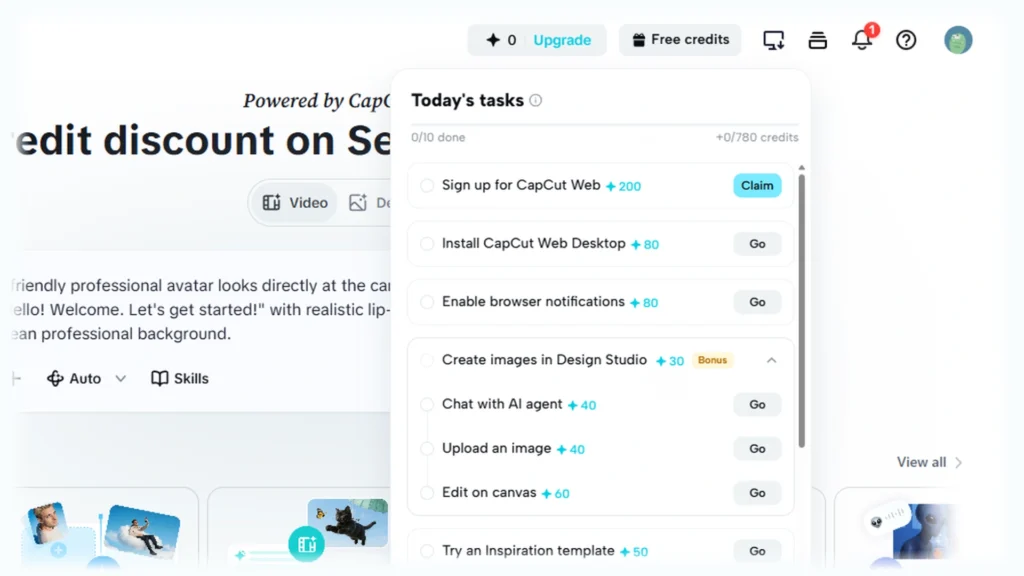
Free credits come from daily tasks. The panel showed 0 of 10 tasks done and up to 780 credits: sign-up gives 200, installing the desktop app 80 and enabling notifications 80. It is a task counter, not a monthly allowance.
Pro includes 1,200 monthly credits and Ultra 8,645. The plan update article says Pro credits rose from 550 to 1,200 and storage from 100 GB to 1 TB. Some help pages still say 100 GB, so go by the pricing page’s 1 TB and confirm it in your dialog.
Pro’s card says you can generate up to 240 seconds at 720p or 600 seconds at 480p with the Seedance 2.0 Mini model, and it names no period. Seedance 2.5 is listed from $0.12 a second on Pro and $0.18 on Ultra, first month only.
At those lowest listed rates, 60 seconds comes to $7.20 on Pro or $10.80 on Ultra (our calculation). The pricing page does not say whether that is a cash charge or a credit equivalent.
CapCut doesn’t publish credit reset, rollover or expiry rules. It also doesn’t publish credits per feature, top-up pack prices, or what happens to credits when you cancel.
Buying and renewing safely
CapCut’s Terms of Service set the rules for paying, renewing and cancelling. Work through these checks before you pay:
- Pay through the right channel: web subscriptions go through your CapCut account, and app subscriptions through your Apple ID or Google account.
- Expect a renewal for the same term length unless you cancel.
- Cancel before the period ends under the Terms, and at least 24 hours before the renewal date under the cancel help, which is the safer rule.
- After cancelling, you drop to Free at the period end and cloud storage is suspended.
The Terms, updated 2026-04-15, set a refund window for a new subscription:
“a full refund within 14 calendar days following the start of your subscription”. The Terms add that this applies only if you have not used the paid features at all.
A help article says subscriptions generally don’t support refunds, so ask before you count on one. CapCut doesn’t publish whether a renewal restarts the 14 days.
The global Terms say US buyers fall under separate US Terms, which we did not capture. Apple and Google purchases follow store refund rules.
The Terms and the dialog say offers renew at list price. A help page says there are no plans to raise renewal prices for current users, and the renewal price article is about price increases, not offers ending.
Warning: The Terms bar unofficial app versions, selling or transferring the Services and sharing login details. They don’t mention keys, so a key or account from a reseller sits outside anything CapCut documents.
Commercial use and asset licence
CapCut’s Materials License Agreement sets commercial rules per material, not per plan. Materials may be used commercially or not, and Dual Use materials carry marks. The default right is personal and non-commercial use.
- Mixing Dual Use and non-commercial materials blocks commercial use of the result.
- Paid material must be paid for again if you re-edit an export.
- Library music is non-commercial unless it is cleared.
CapCut doesn’t publish one commercial-use rule for the Free plan, or a rule that Pro makes all output commercial. Check each material before client work.
You keep ownership of your own content, per the Terms. The Privacy Policy says CapCut collects information about the videos, images and audio you upload, and it lists training machine learning models among its uses. It states no consumer opt-out from model training in the policy we captured, and CapCut’s help advises against uploading sensitive material.
Teams and seats
Teams is priced per seat, gives Pro features to all seats and lists 1,200 credits per seat. The pricing page does not say whether the 1 TB storage line is per seat or per workspace. It also does not say how seat count sets the per-seat price.
CapCut doesn’t publish a Teams seat cap or how unused seats are billed. It also doesn’t say which platforms Ultra and Teams cover, while Pro works on all major platforms.
Which plan should you pick?
Pro is worth paying for only when its credits, storage or Pro-marked templates match what you make.
- If the free templates, basic tools and task credits cover you: stay on Free. Skip it if you need Pro-marked templates exported.
- If you need 1,200 monthly credits, 1 TB, Pro-marked templates exported or membership features on PC: pick Pro. Skip it if you need a published credit rollover rule.
- If you need 8,645 monthly credits: move to Ultra. Skip it if 1,200 credits cover you, since the pricing page does not name the Ultra-only AI features.
- If several people need Pro features: choose Teams, listed at $12.49 a seat a month for 2 seats. Skip it if you need a published seat cap.
- If the iOS app shows a Standard plan: check it first. Skip it if you edit on PC, which needs Pro.
Quick Verdict:
Best For: Creators who cut short videos and want to know if Pro’s credits and storage pay off.
Skip If: you need published credit rollover or US refund terms.
What CapCut is and where it runs
CapCut is a video editor with a web version, a desktop app and apps for iPhone, iPad, Mac and Android. The desktop app needs Windows 7 or above, with Windows 10 recommended, or macOS 10.14 or above.
CapCut review: pros and cons
This CapCut review sticks to plan limits, refunds and rights.
Pros
- Free templates and basic tools
- 1 TB storage on Pro
- Teams priced per seat
Cons
- Watermark depends on export path
- No published credit rollover
- Refund terms conflict
- Offers renew at list price
CapCut alternatives
These pages in our directory cover other video editors and tools.
- Descript: our page on its plans and limits.
- Clipchamp: our page in this directory.
- VEED.io: our page in this directory.
- OpusClip: our page in this directory.
- Browse the free AI video tools directory.
Verdict
Verdict: Start on Free, because the templates and basic tools cost nothing. Move to Pro only when you need its 1,200 credits, 1 TB or Pro-marked templates, and read the renewal price first.
Not a fit? Try: Clipchamp
Sources and method
These pages drive the numbers above and are not linked elsewhere on this page.
- Subscription across platforms: Pro membership works on all major platforms.
- Standard subscription devices: membership features on PC need Pro.
- CapCut desktop page: Windows and macOS requirements.
- Payment currency: currency follows your store account region.
- Price differences: the checkout amount is the actual price.
Based on official sources, our own screenshots of the pricing page and a new free web account, and one export file from that account, checked November 2026. We did not test paid plans, AI output quality or exports of plain footage.
What we didn’t check:
- Paid plans in use, AI output quality and credit use per feature.
- Whether plain uploaded footage exports without a mark on a free account.
- CapCut’s US Terms of Service and US Materials License, which govern US users.
- User reports: no Trustpilot, G2 or Reddit quotes were captured.