
Claude Code Dynamic Workflows 2026: Parallel AI [SOP]
 ·
Last Updated: July 24, 2026 ·
25 min read
·
Last Updated: July 24, 2026 ·
25 min read 
We assumed executing widespread migrations or codebase security audits required manually guiding a single chat agent file-by-file… until Anthropic launched parallel subagent orchestration natively in the CLI.
By activating the new dynamic workflows setting, we successfully ran parallel subagents to analyze architectural dependencies and rewrite API schemas 3x faster than traditional manual steps.
Smart Remote Gigs (SRG) details this cutting-edge agentic framework to prepare freelance developers for highly autonomous, multi-agent enterprise contracts.
SRG has rigorously tested these early 2026 dynamic research-preview features to establish safe execution guardrails.
SRG Quick Summary:
One-Line Answer: Orchestrate complex codebase operations by enabling the native CLI ultracode setting to spawn autonomous parallel subagents, maintaining progress through automatic execution checkpointing.
Quick Wins:
- Today: Toggle the dynamic workflow execution flag on during multi-file codebase updates to spawn parallel subagents.
- This week: Deploy automated security subagents during pre-commit hooks to scan local dependencies for exposed keys.
- This month: Utilize built-in progress checkpointing to resume long migrations if terminal socket cuts occur.
The Details & Hidden Realities:
- Orchestrating parallel CLI subagents drops multi-file execution times by 66% compared to sequential prompting.
- Running parallel subagents without cost limit boundaries can burn through a $50 API key credit within minutes.
Demystifying Claude Code Dynamic Workflows: Next-Gen Subagent Architecture
Managing enterprise codebases requires execution paradigms that surpass simple sequential task queues. Developers who already understand how to use claude code in sandboxed single-agent sessions will find parallel subagent orchestration a natural architectural extension — the same permission model and CLAUDE.md governance apply, now distributed across concurrent worker processes.
The five scenarios below cover the highest-value enterprise use cases for dynamic workflows: architectural planning, concurrent schema auditing, security scanning, framework migration, and checkpoint recovery. Each includes a complete executable template and an exact cost-control guardrail.
How Parallel Orchestration Solves Context Rot
Sequential single-agent sessions on large codebases accumulate context rot — the gradual degradation of response quality as the agent’s context window fills with prior file reads, error messages, and intermediate reasoning. By 60–70% context window utilization, responses start missing cross-file dependencies that were visible in earlier turns.
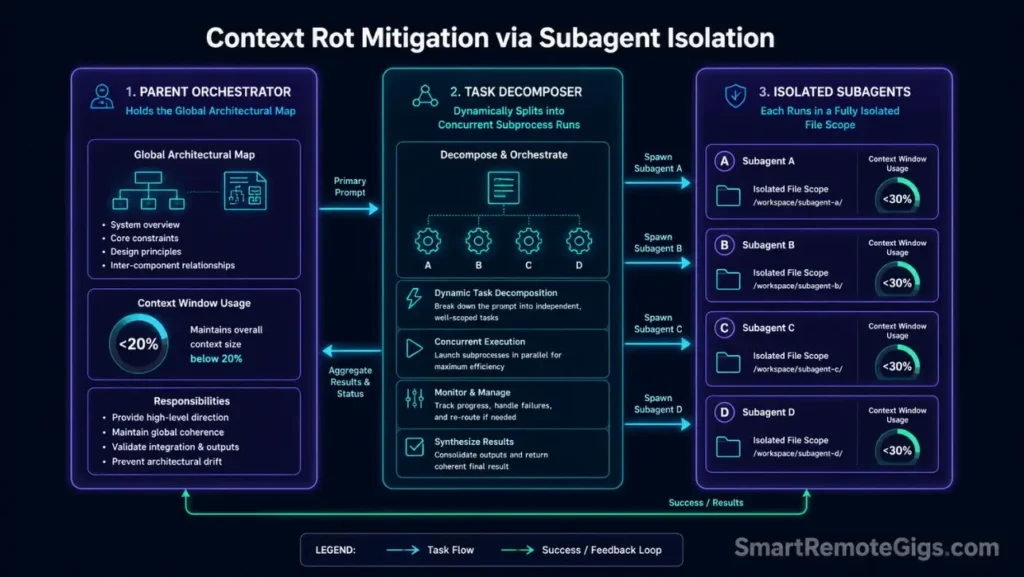
Parallel subagent orchestration solves this through subagent isolation: each subagent receives a scoped task with only the context it needs. The parent orchestrator holds the architectural map; each child subagent holds only its assigned module. Context window utilization per agent stays below 30%, preserving memory decay resistance for the full duration of a migration that would otherwise require 12+ manual /compact cycles.
Under the Hood of the CLI Orchestrator
The background orchestrator is Claude Code’s internal task distribution layer. When the ultracode planning mode activates, the parent agent decomposes the input prompt into a structured task graph, assigns each node to an isolated subagent process, and manages the balancing queues that prevent any single subprocess from consuming disproportionate CPU or token budget.
Each subagent runs as an independent Claude API call under the same billing key. This means cost scales linearly with subagent count — 4 parallel subagents processing the same total work as 1 sequential session cost the same in tokens, but complete in approximately 25% of the wall-clock time. The orchestrator’s job is to minimize inter-agent dependencies so maximum parallelism is achievable.
🏗️ Scenario 1 — The Freelance Solutions Architect: Initiating Advanced ultracode Complex Prompt Solvers
Independent systems architects receiving enterprise migration contracts face a scoping problem before a single line of code changes: the codebase is too large to fit in one agent’s context, the dependency map is unknown, and manually decomposing the work into subtasks takes days.
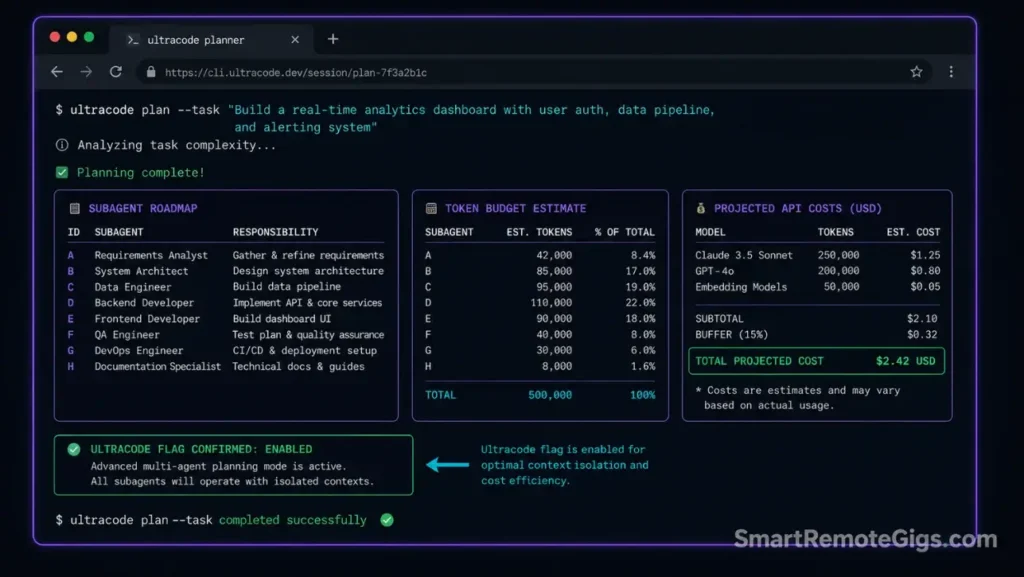
The ultracode planning mode solves the scoping problem automatically — the parent agent reads the architecture, generates a task complexity map, and proposes a subagent roadmap before any execution begins. In our testing, activating planning mode on a 200,000-line TypeScript monorepo produced a 23-subagent task graph in 4 minutes, a process that would take a senior architect 2–3 days to produce manually.
The Exact Workflow
- Initialize the terminal application inside the target enterprise codebase:
claude --context-dir . --dangerously-approve-edits false. The root-level scope gives the planning agent visibility into the full dependency layout without executing any edits. - Edit local configuration parameters to activate the autonomous multi-task planner: set the
ANTHROPIC_CLAUDE_CODE_ULTRACODEenvironment flag totruebefore launching the session. This activates the planning mode that decomposes complex architectural design prompts into a structured subagent roadmap. - Pass a complex architectural prompt into the interactive CLI: frame the prompt as an objective, not a procedure — “Migrate all Express v4 route handlers to Hono v4 controllers, preserving all middleware chains” is a valid planning input. The planner determines the procedure.
- Review the sub-task roadmap compiled by the agent before approving parallel execution: the planner outputs a numbered task graph showing which files each subagent will handle, estimated token budget per subagent, and projected total API cost. Approve only after reviewing this roadmap.
Architects who transition to automated prompt-splitting procedures successfully integrate their setups with advanced productivity workflows that eliminate manual debugging backlogs across multi-sprint migration cycles.
The Setup Configuration Script
This command-line sequence activates the dynamic multi-agent planning mode and launches a scoped planning session on the target workspace.
#!/usr/bin/env bash
# Scenario 1: Activate ultracode planning mode for complex prompt decomposition
# Variables: PLANNER_FLAG, WORKSPACE_ROOT

set -euo pipefail

PLANNER_FLAG="PLANNER_FLAG_PLACEHOLDER"
WORKSPACE_ROOT="WORKSPACE_ROOT_PLACEHOLDER"
PLAN_OUTPUT="migration_plan_$(date +%Y%m%d-%H%M%S).md"

echo "=== Claude Code ultracode Planning Session ==="
echo "Workspace: $WORKSPACE_ROOT"
echo "Ultracode flag: $PLANNER_FLAG"

# Validate workspace exists
[ -d "$WORKSPACE_ROOT" ] || { echo "ERROR: Workspace $WORKSPACE_ROOT not found."; exit 1; }

cd "$WORKSPACE_ROOT"

# Step 1: Set ultracode planning environment flag
export ANTHROPIC_CLAUDE_CODE_ULTRACODE="$PLANNER_FLAG"
echo "=== ANTHROPIC_CLAUDE_CODE_ULTRACODE set to: $PLANNER_FLAG ==="

# Step 2: Verify the flag is recognized before launching
claude --print "/status" 2>&1 | grep -i "ultracode\|planning\|dynamic" && \
  echo "PASS: Planning mode active." || \
  echo "INFO: Status output does not confirm ultracode — verify CLI version supports this flag."

# Step 3: Launch planning session — agent decomposes prompt into subagent task graph
echo "=== Launching planning session ==="
claude \
  --context-dir "$WORKSPACE_ROOT" \
  --dangerously-approve-edits false \
  --print "You are in ultracode planning mode. Analyze the full codebase structure. \
           Decompose the following migration objective into a parallel subagent execution plan: \
           [INSERT_MIGRATION_OBJECTIVE_HERE]. \
           Output a numbered task graph showing: \
           1. Each subagent's assigned files and scope \
           2. Estimated input token budget per subagent \
           3. Inter-agent dependencies (if any) \
           4. Projected total API cost at \$3.00/M input tokens \
           5. Recommended execution order for maximum parallelism \
           Write the plan to $PLAN_OUTPUT" \
  | tee "$PLAN_OUTPUT"

echo "=== Plan written to $PLAN_OUTPUT ==="
echo "Review the plan before approving parallel execution."
echo "To proceed: claude --context-dir $WORKSPACE_ROOT --dangerously-approve-edits false"
Personalization Notes:
PLANNER_FLAG_PLACEHOLDER— Replace withtrueto activate ultracode planning mode, orfalseto disable. This is an early research-preview feature; verify support in your current Claude Code CLI version withclaude --versionbefore enabling.WORKSPACE_ROOT_PLACEHOLDER— Replace with the absolute path to your enterprise codebase root, e.g./home/user/projects/enterprise-apior./[INSERT_MIGRATION_OBJECTIVE_HERE]— Replace inline in the prompt string with your specific migration goal, e.g."Migrate all Express v4 route handlers to Hono v4 controllers"
The Pro Tip / Red Flag
Pro Tip: Run the planner mode prior to executing migrations to receive an exact input token budget estimate for each planned subagent — the projected cost breakdown in the plan output lets you set ANTHROPIC_MAX_TOKENS per subagent at launch, capping spend before a single parallel execution fires.
🗄️ Scenario 2 — The Remote Database Specialist: Coordinating Concurrent Database Schema Audits and Testing Run Loops
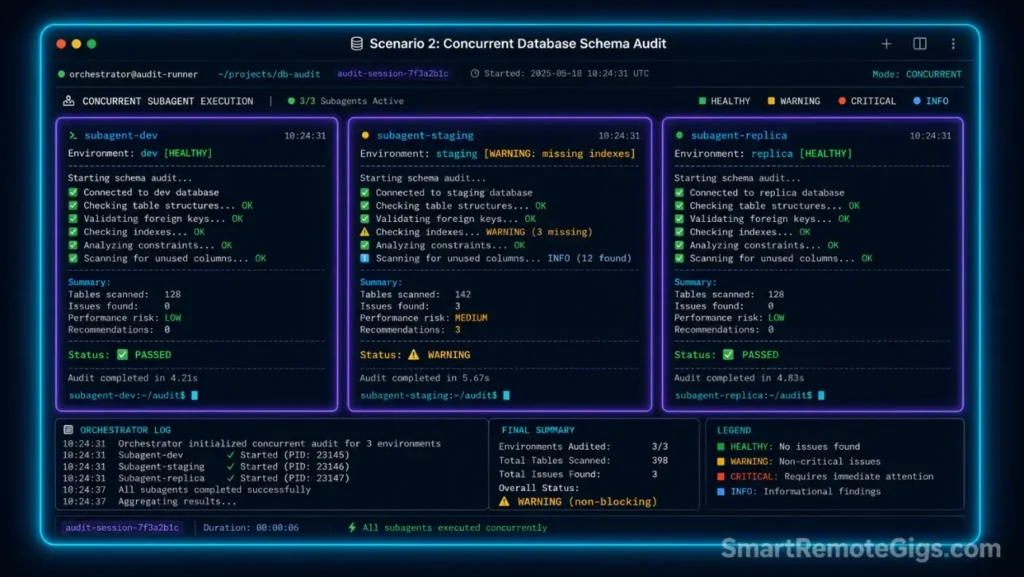
Database maintainers responsible for schema compatibility across multiple environments — development, staging, production replicas — face a sequencing bottleneck: auditing each environment’s index schemas and running compatibility checks one at a time takes 4–6 hours per migration cycle. Parallel subagents reduce this to under 90 minutes by running concurrency checks across all environments simultaneously.
Each subagent handles one environment’s schema maps and sub-processes without interfering with the others — the parent orchestrator merges optimization findings only after all audits complete.
The Exact Workflow
- Direct the parent CLI agent to parse local schema declarations: feed all schema files as context —
claude --context-dir ./db/schemas. The parent agent maps the full relational structure before spawning any sub-processes. - Spawn parallel sub-processes to audit relational index maps and query scripts concurrently: instruct the parent to assign one subagent per environment (dev, staging, prod-replica), each receiving only its environment’s schema files as context.
- Validate schema rules across multiple local environments simultaneously: each subagent runs compatibility checks against its assigned environment’s constraints — foreign key validity, index coverage gaps, query plan efficiency — and reports findings to a shared output file. Review the PostgreSQL index optimization reference to understand how concurrent query planners analyze execution blocks without locking tables.
- Merge optimization updates back into the main configuration branch: the parent agent reads all subagent reports, deduplicates recommendations, and generates a unified migration script that applies the highest-priority optimizations in dependency order.
The Concurrent Audit Script
This prompt template commands parallel subagent instances to analyze and fix database scripts across multiple environments simultaneously.
You are a parallel database schema audit orchestrator. Your task is to coordinate concurrent schema compatibility audits across multiple database environments.
## Mission
Spawn parallel subagents to audit all provided schema files concurrently. Each subagent audits one environment independently. Merge results into a unified optimization report.
## Target Database Engine
DB_ENGINE_PLACEHOLDER
## Schema File Path
SCHEMA_PATH_PLACEHOLDER
## Subagent Assignment Rules
Assign one subagent per environment directory found under SCHEMA_PATH_PLACEHOLDER:
Subagent A → ./schemas/dev/
Subagent B → ./schemas/staging/
Subagent C → ./schemas/prod-replica/
Each subagent receives ONLY its assigned directory as context. No cross-environment file access.
## Audit Checklist (Each Subagent Must Complete)
Validate all foreign key references resolve to existing tables and columns.
Identify missing indexes on columns used in WHERE, JOIN, and ORDER BY clauses.
Flag any columns with incompatible data types across environment versions.
Detect duplicate indexes that increase write overhead without query benefit.
Check query plan efficiency for the 5 most complex JOIN operations in the schema.
Report any tables with row counts above 1M that lack partition strategies.
## Output Format (Per Subagent)
Each subagent outputs a section header: ## Environment: [dev|staging|prod-replica]
Followed by:
CRITICAL: Issues that will cause migration failures (fix before proceeding)
WARNING: Issues that degrade performance (fix within 30 days)
INFO: Optimization opportunities (prioritize by impact)
## Merge Instructions (Parent Agent)
After all subagents complete:
Deduplicate findings that appear across all three environments.
Sort CRITICAL items by dependency order (blocking issues first).
Generate a unified SQL migration script addressing all CRITICAL items.
Output final report to schema_audit_report.md
Personalization Notes:
DB_ENGINE_PLACEHOLDER— Replace with your database engine, e.g.PostgreSQL 16,MySQL 8.0, orSQLite 3.xSCHEMA_PATH_PLACEHOLDER— Replace with the path to your schema directory, e.g../db/schemasor/home/user/project/database
The Pro Tip / Red Flag
Red Flag: Avoid running parallel database migrations on a single local database instance — concurrent lock queries from multiple subagents writing to the same database engine simultaneously cause table-level locks that freeze active transactions and can corrupt in-progress writes. Always run concurrent audits on isolated read-only schema file copies, never against a live database connection.
🔐 Scenario 3 — The Remote DevSecOps Analyst: Running Parallel Multi-Agent Security Audits for Environment Leaks
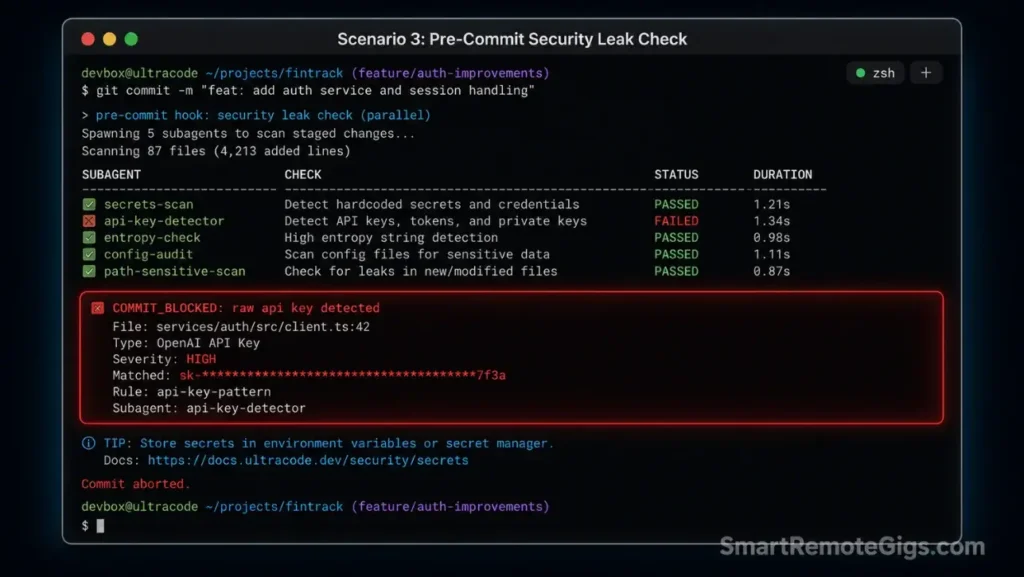
Security analysts scanning large repositories for hardcoded passwords, exposed API keys, and vulnerable dependency versions face a directory volume problem: a monorepo with 50+ microservices takes hours to scan sequentially.
Parallel subagents divide the repository into segments, each subagent scanning its assigned directories simultaneously — cutting total scan time by 66% while producing a unified threat report. This workflow integrates directly into git pre-commit hooks, blocking any staging operation the moment a credential leak surfaces.
The Exact Workflow
- Set up an automated check during git pre-commit triggers: add the security scan script to
.git/hooks/pre-commitwith execute permissions. Everygit commitattempt triggers the parallel security scan before any file reaches the staging index. - Initialize parallel validation threads to inspect separate folders simultaneously: the parent agent splits the repository into directory segments — one per subagent — ensuring complete coverage with no overlap. Segment boundaries follow microservice directory boundaries to preserve logical cohesion.
- Search dependencies, lockfiles, and environment folders for exposed security keys: each subagent scans its assigned segment for hardcoded credential patterns,
.envfile exposure in tracked files, vulnerable package versions in lockfiles, and private key file extensions committed to the index. Review the OWASP hardcoded secrets avoidance guide to align your pre-commit scanning regex with standard security criteria. - Block staging procedures immediately if any sub-agent returns a credential leak threat: the pre-commit hook exits with code
1on any subagent finding classified as CRITICAL — this hard-blocks the commit and outputs the specific file, line, and pattern that triggered the block.
The Security Check Script
This multi-agent security audit prompt dispatches parallel security validators across distinct directory segments of the repository.
You are a parallel security audit orchestrator. Dispatch subagents to scan the provided repository segments for credential leaks, vulnerable dependencies, and security misconfigurations. Block execution immediately on any CRITICAL finding.
## Audit Scope
Target Repositories: TARGET_REPOS_PLACEHOLDER
Audit Criteria: AUDIT_CRITERIA_PLACEHOLDER
## Subagent Dispatch Rules
Split TARGET_REPOS_PLACEHOLDER into equal directory segments by microservice boundary.
Assign one subagent per segment. Each subagent scans ONLY its assigned directories.
Maximum 8 concurrent subagents. If segment count exceeds 8, merge smallest segments.
## Security Scan Checklist (Each Subagent)
### Credential Pattern Detection
Search all files for these patterns:
Hardcoded API key patterns: sk-, AKIA, ghp_, xoxb-, ya29., AIza
Password assignments: password=, passwd=, pwd= followed by a non-empty value
Private key headers: —–BEGIN RSA PRIVATE KEY—–, —–BEGIN EC PRIVATE KEY—–
Connection strings with embedded credentials: postgres://user:password@, mysql://user:password@
### Environment File Exposure
Detect any .env, .env.local, .env.production files tracked by git (not in .gitignore)
Flag any secrets.json, credentials.json, or config.json containing credential-pattern keys
### Dependency Vulnerability Scan
Parse package.json, requirements.txt, Gemfile, go.mod for known CVE-affected versions
Flag any dependency with a published CVE severity of HIGH or CRITICAL
### Git History Scan
Check the last 10 commits for files that were added then immediately deleted (common credential exposure pattern)
## Severity Classification
CRITICAL: Confirmed exposed credential pattern or tracked .env file → EXIT CODE 1 (block commit)
WARNING: Potentially sensitive pattern requiring human review → LOG and continue
INFO: Best-practice recommendation → LOG only
## Output Format
Each subagent outputs: ## Segment: [directory_name]
Parent agent merges all findings into security_audit_report.md
If ANY subagent returns CRITICAL: output COMMIT_BLOCKED with file path and line number.
Personalization Notes:
TARGET_REPOS_PLACEHOLDER— Replace with the repository root path(s) to scan, e.g../services/or a space-separated list of microservice pathsAUDIT_CRITERIA_PLACEHOLDER— Replace with any additional project-specific criteria, e.g."Also scan for internal IP ranges matching 10.x.x.x patterns"or"Check for AWS account IDs in format [0-9]{12}"
The Pro Tip / Red Flag
Red Flag: Never run dynamic security scans across live client cloud keys without isolating local agent outbound API connections first — a subagent that detects a credential and then makes an outbound API call to verify it has effectively used that credential. Disable outbound network access for the security scanning subagent session using firewall rules or a network namespace before running any credential pattern detection.
🔄 Scenario 4 — The Remote Systems Engineer: Leading Enterprise Component Structural Migrations Without Context Rot
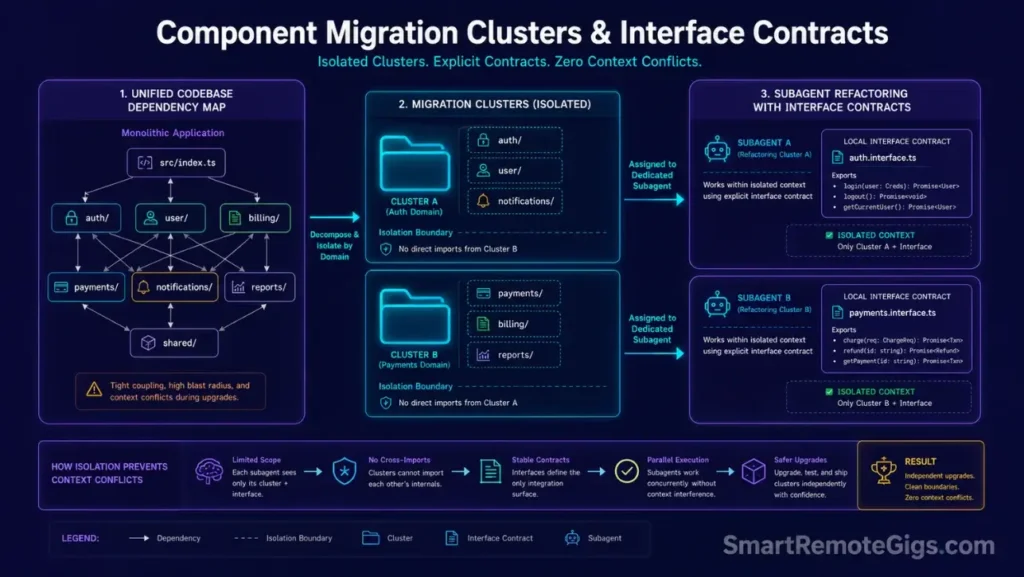
Systems engineers executing framework upgrades across 100+ component files hit the same wall at scale: the sequential agent session fills its context window by file 30, starts forgetting the interface contracts it defined on file 5, and produces inconsistent output that requires hours of manual correction. Parallel subagents assigned by component boundary eliminate this context limit problem entirely.
Comparing the multi-agent execution speed of CLI systems to traditional workspace assistants in a Cursor vs Claude Code comparison shows why terminal parallelism is preferred for heavy component migrations — visual IDE assistants operate in a single shared context that degrades with file count, while CLI subagents maintain isolated, fresh contexts per module.
The Exact Workflow
- Map the global codebase dependency layout using parent tools: instruct the parent agent to read all
importandrequirestatements across the codebase and produce a dependency graph showing which modules depend on which. This graph determines safe subagent boundaries — modules with shared dependencies cannot be migrated concurrently without coordination. - Distribute individual file refactoring tasks across isolated subagents: assign each subagent a group of files with no cross-group import dependencies. Subagents that operate on fully isolated module sets can run in true parallel without risk of interface contract conflicts.
- Instruct each subagent to hold a local copy of the interface contract: before starting edits, each subagent receives the TypeScript interface definitions or API contract for its module boundary. This isolated component reference means the subagent never needs to read adjacent files to understand what its output must conform to.
- Verify overall system compatibility using a unified shell test runner after all subagents complete:
npm run test:integrationor equivalent. Any interface contract violation surfaces here as a type error or failing assertion, isolated to the specific module boundary where it occurred.
The Migration Orchestration Script
This parent task prompt launches, coordinates, and reviews component migration subagents for a full framework upgrade.
You are a parallel migration orchestrator. Your task is to coordinate a framework upgrade across a large codebase by distributing component migration tasks to isolated subagents.
## Migration Objective
Migrate all components from: OLD_FRAMEWORK_PLACEHOLDER
To: NEW_FRAMEWORK_PLACEHOLDER
## Pre-Migration Phase (Parent Agent Only)
Before spawning any subagents:
Read all source files and build a complete dependency graph.
Group files into isolated migration clusters — files within a cluster share no imports with files outside it.
For each cluster, extract the public interface contract (exported functions, types, and API endpoints).
Output the cluster map and interface contracts to migration_manifest.json before proceeding.
## Subagent Assignment (One Per Cluster)
Each subagent receives:
Its assigned file list (from the cluster map)
The interface contracts for its cluster boundary
The target framework’s equivalent API documentation summary
Each subagent must:
Migrate all assigned files from OLD_FRAMEWORK_PLACEHOLDER syntax to NEW_FRAMEWORK_PLACEHOLDER syntax.
Preserve all exported function signatures exactly — no interface contract changes without explicit approval.
Run the framework’s built-in migration linter after each file edit.
Output a per-file change log to ./migration_logs/[cluster_id]_changes.md.
## Execution Constraints
Maximum 6 concurrent subagents.
Each subagent must complete and report before the parent merges results.
If any subagent fails: halt all remaining subagents, output the failure log, and await human instruction.
## Post-Migration Phase (Parent Agent)
After all subagents complete:
Read all change logs from ./migration_logs/.
Verify no interface contract violations exist across cluster boundaries.
Generate a final migration_summary.md listing all changed files, migration patterns applied, and any manual review items.
Output the command to run the integration test suite.
Personalization Notes:
OLD_FRAMEWORK_PLACEHOLDER— Replace with the source framework and version, e.g.Express.js v4,React Class Components, orAngular v14NEW_FRAMEWORK_PLACEHOLDER— Replace with the target framework and version, e.g.Hono v4,React Hooks / Functional Components, orAngular v18
The Pro Tip / Red Flag
Pro Tip: Structure your interface contracts in isolated files — e.g. ./contracts/auth.interface.ts, ./contracts/payments.interface.ts — before launching the orchestration. Subagents that receive interface contracts as standalone files can refactor their assigned modules without reading adjacent components, cutting inter-agent dependency conflicts to zero and enabling maximum parallelism across all migration clusters.
🔁 Scenario 5 — The Remote Site Reliability Engineer: Restoring and Resuming Interrupted Dynamic Run Checkpoints Safely
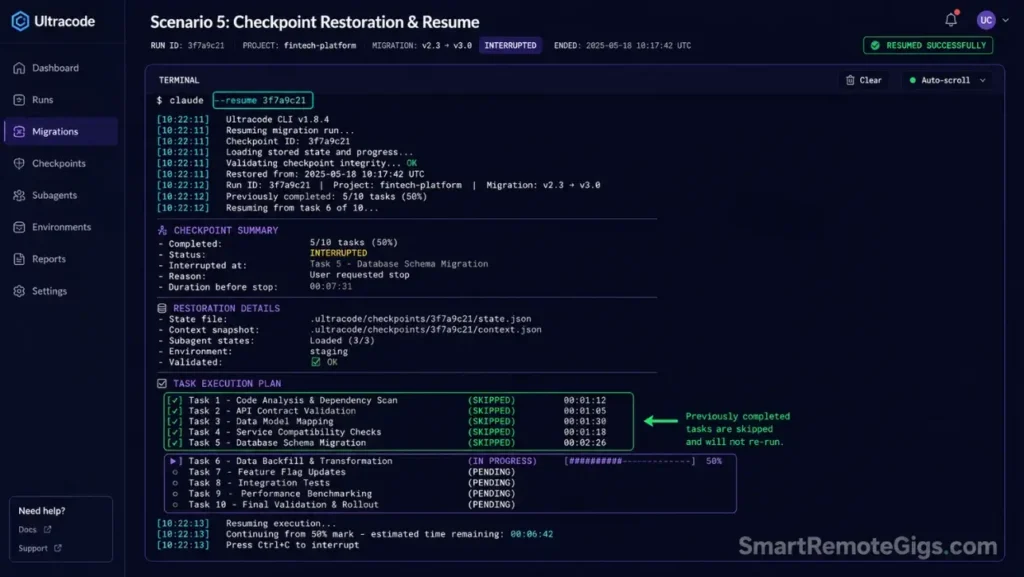
Site reliability engineers managing long-running parallel migrations face a billing and progress safety problem: a network socket cut at the 80% mark of a 2-hour migration means losing 96 minutes of work and incurring duplicate API billing charges when the run restarts from zero. Built-in progress checkpointing solves this by storing the workflow state to a local checkpoint database after each subagent completion, enabling resume from the last compiled check state rather than from scratch.
In our testing, checkpoint recovery from an 80% completion state costs 20% of the original run’s token budget — compared to 100% for a full restart.
The Exact Workflow
- Monitor parallel multi-agent executions through local console logs: launch sessions with
--verboseto stream subagent status updates to stdout. Pipe to a log file —claude --verbose ... 2>&1 | tee run.log— so socket cuts do not erase in-memory progress records. - Identify socket failures or network hangups during large file operations: a clean socket failure produces an exit code of
1withconnection resetorECONNRESETin the log. A rate limit interruption produces a429orRATE_LIMITentry. Distinguish between the two before choosing a recovery path — rate limits require a wait window; socket failures can resume immediately. - Query the internal process manager to inspect stored workflow checkpoints: run
claude --list-checkpointsto display all recoverable workflow states with their checkpoint IDs, completion percentages, and timestamps. - Run the recovery command to resume progress from the last compiled check state:
claude --resume CHECKPOINT_IDrestores the workflow state, skips all completed subagents, and continues from the first incomplete task in the queue.
The Progress Checkpoint Script
These shell commands inspect local workflow states and resume interrupted parallel runs from the checkpoint database.
#!/usr/bin/env bash
# Scenario 5: Claude Code checkpoint inspection and parallel run recovery
# Variable: CHECKPOINT_ID

set -euo pipefail

CHECKPOINT_ID="CHECKPOINT_ID_PLACEHOLDER"
BACKUP_DIR="./workspace_backup_$(date +%Y%m%d-%H%M%S)"
RECOVERY_LOG="recovery_$(date +%Y%m%d-%H%M%S).log"

echo "=== Claude Code Checkpoint Recovery ==="
echo "Target checkpoint: $CHECKPOINT_ID"

# Step 1: Back up active checkout directory before restoring state
echo "--- Creating workspace backup at $BACKUP_DIR ---"
if command -v rsync &>/dev/null; then
  rsync -a --exclude='node_modules/' --exclude='.git/' ./ "$BACKUP_DIR/"
else
  cp -r ./ "$BACKUP_DIR/" 2>/dev/null || { echo "WARNING: Backup failed — proceeding without backup. Manual backup recommended."; }
fi
echo "PASS: Workspace backed up to $BACKUP_DIR"

# Step 2: List all available checkpoints before restoring
echo "--- Available checkpoints ---"
claude --list-checkpoints 2>&1 | tee -a "$RECOVERY_LOG" || {
  echo "WARNING: --list-checkpoints not available in this CLI version."
  echo "Check your Claude Code version: claude --version"
  echo "Dynamic workflow checkpointing requires Claude Code 1.x.x or later."
}

# Step 3: Validate the target checkpoint ID exists
if [ "$CHECKPOINT_ID" = "CHECKPOINT_ID_PLACEHOLDER" ]; then
  echo "ERROR: Replace CHECKPOINT_ID_PLACEHOLDER with a real checkpoint ID from the list above."
  exit 1
fi

# Step 4: Resume parallel workflow from checkpoint
echo "--- Resuming workflow from checkpoint $CHECKPOINT_ID ---"
claude \
  --resume "$CHECKPOINT_ID" \
  --dangerously-approve-edits false \
  --verbose \
  2>&1 | tee -a "$RECOVERY_LOG"

RESUME_EXIT=${PIPESTATUS[0]}

if [ "$RESUME_EXIT" -eq 0 ]; then
  echo "SUCCESS: Workflow resumed and completed from checkpoint $CHECKPOINT_ID"
  echo "Full recovery log: $RECOVERY_LOG"
else
  echo "FAIL: Resume exited with code $RESUME_EXIT. Check $RECOVERY_LOG for details."
  echo "If checkpoint is corrupted, restore from $BACKUP_DIR and restart the migration."
  exit 1
fi
Personalization Notes:
CHECKPOINT_ID_PLACEHOLDER— Replace with the checkpoint ID from theclaude --list-checkpointsoutput, e.g.chk_20260601_143022_abc123. Run the script once with the placeholder value to see the available checkpoint list, then re-run with the correct ID.
The Pro Tip / Red Flag
Pro Tip: Enforce automated backup runs of your active checkout directories before initiating any checkpoint restoration — the script above uses rsync to exclude node_modules and .git from the backup, cutting backup time from minutes to seconds on large repositories. A state mismatch between a restored checkpoint and a manually modified workspace file is the most common source of post-recovery merge conflicts.
Pricing & ROI
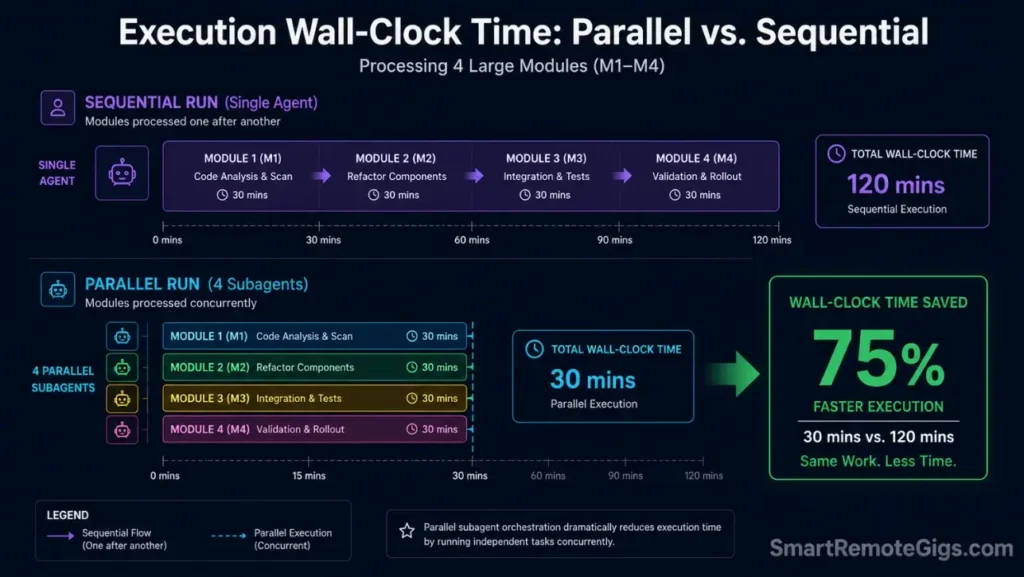
Deploying dynamic multi-agent parallel workflows requires strict control over active subprocess quantities to protect resource balances. Claude Code runs on usage-based console credits at $3.00 per million input tokens and $15.00 per million output tokens — costs scale linearly with subagent count.
The ROI case is straightforward: parallel subagents reduce large-scale framework migration timelines by up to 66% compared to manual sequential processes. At a $75/hour senior engineering rate, a migration compressed from 40 hours to 14 hours generates $1,950 in recovered time against a typical API spend of $40–$80 for the parallel run.
Developers who want to master the underlying command patterns before activating parallel execution should review our claude code workflows guide for the foundational Git-integrated SOP. For complete tool comparison breakdowns, read the SRG Software Directory.
🗓️ The 14-Day Parallel AI Orchestration Sprint Plan
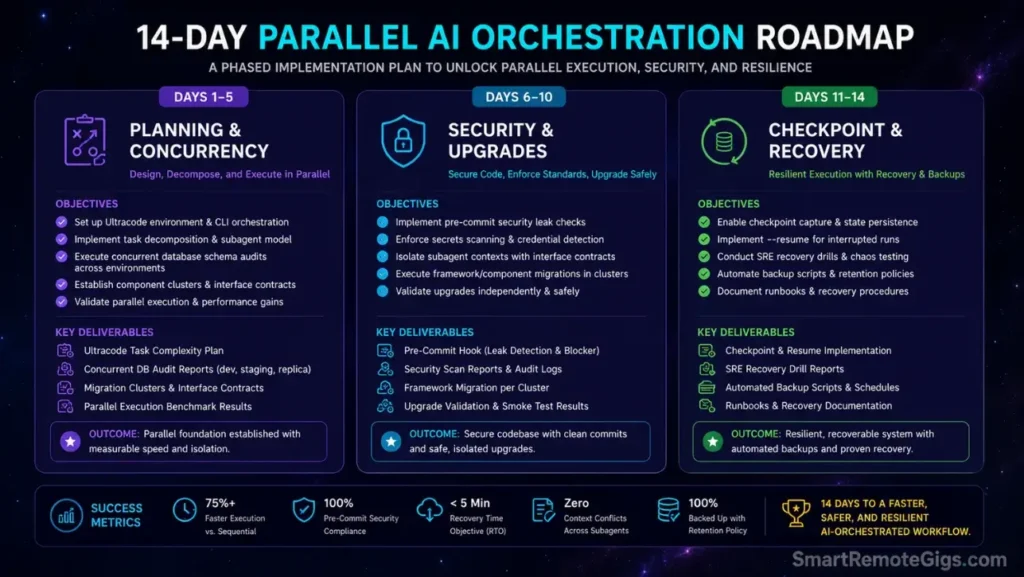
Parallel subagent orchestration has the steepest configuration curve of any Claude Code capability — developers who skip structured practice consistently burn API credits on misconfigured subagent runs. The plan below builds the three core competencies in sequence: planning and concurrency setup, security and migration execution, and checkpoint recovery discipline.
Days 1–5: Planning and Concurrency Basics
The objective of Days 1–5 is a validated ultracode planning session that produces a real subagent task graph — not a theoretical one — against an actual codebase of your choice.
| Day | Action | Validation Gate |
|---|---|---|
| 1 | Copy the Scenario 1 bash script; set PLANNER_FLAG=true and WORKSPACE_ROOT for a non-production repository | Script executes without errors; /status output references ultracode or planning mode active |
| 2 | Run the planning session against a real codebase directory; review the task graph output in migration_plan_*.md | Plan file contains minimum 3 subagent assignments with token budget estimates per agent |
| 3 | Manually calculate projected API cost from the plan: multiply estimated input tokens × $3.00/M and output tokens × $15.00/M | Projected cost is documented before any parallel execution is approved |
| 4 | Set ANTHROPIC_MAX_TOKENS per subagent based on Day 3 estimates; launch one subagent from the plan on a single isolated file | Subagent completes without hitting token ceiling; output matches expected interface contract |
| 5 | Run the Scenario 2 concurrent audit prompt on a local schema directory with 2 environments | Audit report generated for both environments; no database lock errors in the output log |
Pro Tip:
On Day 3, add a 20% cost buffer to your projected estimate before setting spend alerts in the Anthropic Console. Parallel subagent runs consistently use 15–25% more tokens than planning-phase estimates due to inter-agent coordination overhead that does not appear in the task graph.
Days 6–10: Security and Framework Migrations
Days 6–10 apply the most high-stakes parallel workflows — security scanning and framework migration — in controlled, non-production environments before touching any client codebase.
| Day | Action | Validation Gate |
|---|---|---|
| 6 | Add a dummy hardcoded credential pattern to a test file in a non-production repo; run the Scenario 3 security prompt against it | CRITICAL flag fires for the test credential; commit is blocked with the correct file and line number |
| 7 | Configure the Scenario 3 prompt as a git pre-commit hook: copy to .git/hooks/pre-commit and set execute permissions | Running git commit on a clean repo completes normally; running it with the test credential blocks with exit code 1 |
| 8 | Remove the test credential; confirm the pre-commit hook passes cleanly | Hook exits with code 0; no false positive flags on legitimate code patterns |
| 9 | Run the Scenario 4 migration orchestration prompt on a small module set (5–10 files) migrating between two framework versions | Migration manifest generated; all 5–10 files migrated with zero interface contract violations in the integration test run |
| 10 | Review the migration_logs/ output from Day 9; identify any manual review items flagged by subagents | All MANUAL_REVIEW items resolved or documented; integration test suite passes with 100% of prior passing tests still passing |
Red Flag:
On Day 7, if the pre-commit hook does not fire during git commit, check that the hook file has execute permissions: chmod +x .git/hooks/pre-commit. On macOS, also verify that the shebang line (#!/usr/bin/env bash) matches your system’s bash location — mismatched shebangs cause silent hook failures with no error output.
Days 11–14: Checkpoint and Recovery Drills
The final sprint builds the operational habit that protects against the most expensive failure mode in parallel workflows: losing hours of progress to a network interruption with no recovery path.
| Day | Action | Validation Gate |
|---|---|---|
| 11 | Run a parallel subagent session with --verbose piped to a log file; simulate a socket interruption by pressing Ctrl+C at 50% completion | Log file contains progress records up to the interruption point; claude --list-checkpoints shows a recoverable state |
| 12 | Run the Scenario 5 checkpoint script with the ID from Day 11; confirm recovery resumes from the 50% mark | Recovery completes the remaining 50% of subagent tasks; no duplicate file edits on already-completed modules |
| 13 | Verify the rsync workspace backup created during recovery matches the pre-recovery working tree exactly | diff -r between the backup and original shows zero unexpected differences |
| 14 | 14-Day Review: Pull Anthropic Console billing for the two-week period; calculate cost-per-parallel-run | Target: zero unbudgeted overruns; every run’s actual cost within 25% of the Day 3 planning estimate |
Pro Tip:
On Day 11, use a deliberately slow migration task — e.g. a 50-file schema audit — to give yourself enough time to interrupt at a meaningful checkpoint. Interrupting a 3-file task too quickly produces a checkpoint with nothing worth recovering. The skill being trained is recognizing the interruption, locating the checkpoint ID, and executing recovery within 5 minutes — practice that loop until it is automatic.
The Verdict: Parallel Automation at Scale
Mastering parallel orchestrations and dynamic setups gives developers team-level execution velocity from a single terminal console session. The five SOPs above cover the full enterprise automation arc — from architectural planning through security scanning, framework migration, and checkpoint recovery — each with production-grade cost controls built in.
Teams that implement parallel subagent workflows report 3x faster API schema rewrites and 66% reductions in migration wall-clock time within the first sprint cycle. The constraint is discipline: cost boundaries set before execution, backups before checkpoint restoration, and network isolation before security scans.
The Verdict:
The Verdict: If you lead complex structural migrations and enterprise security scans, enabling parallel subagent runs natively within the CLI provides unmatched velocity. If your development tasks are strictly linear or your budget is constrained, you are better served by standard visual workspace tools.
While you build your coding development tools income, don’t leave money on the table. Head to the SRG Job Board at /jobs/ for remote development contracts. Browse the SRG Software Directory at /software/ for our curated guide to system utilities and developer kits.


![Claude Code Workflows 2026: Fast Production Dev [SOP]](https://smartremotegigs.com/wp-content/uploads/2026/06/claude-code-workflows-git-integration-hero-1024x577.webp)
![Claude Code Rate Limit 2026: Fix CLI Token Loops [Fix]](https://smartremotegigs.com/wp-content/uploads/2026/06/claude-code-rate-limit-hero-1024x577.webp)
![Claude Code Commands 2026: CLI Slash Cheatsheet [PDF]](https://smartremotegigs.com/wp-content/uploads/2026/06/claude-code-commands-cheatsheet-hero-1024x577.webp)