
Best Note Taking Apps 2026: Second Brain Setup [Guide]
 ·
Last Updated: August 28, 2026 ·
15 min read
·
Last Updated: August 28, 2026 ·
15 min read
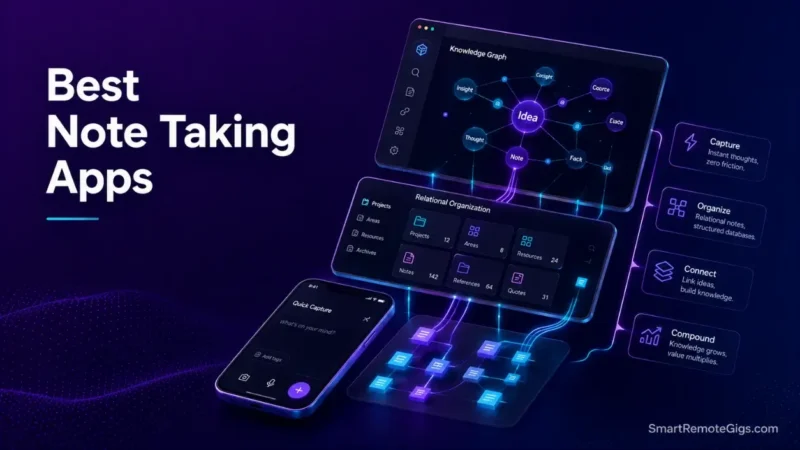
We assumed all-in-one note-taking platforms were the ultimate productivity solution—until documented community reports and official specs revealed that relational databases without local-first speed create severe capture friction during high-stress workflows.
Official platform documentation confirms that cloud-dependent workspaces degrade under large vault structures unless paired with strict capture protocols.
Smart Remote Gigs (SRG) establishes this technical blueprint as the definitive note-taking apps guide—cross-referenced against official documentation and real user reports, not marketing claims.
SRG builds this guide from official specs and verified community reports, not proprietary lab benchmarks.
SRG Quick Summary
One-Line Answer: The best note-taking system pairs a zero-friction capture inbox (like Apple Notes or Google Keep) with an intentional, retrieval-focused Second Brain engine (Notion for relational team wikis; Obsidian for local-first Markdown graphs).
🚀 Quick Wins:
- Today (20 min): Audit your active notes and separate fast fleeting captures from permanent project documentation.
- This Week: Deploy the 4-tier P.A.R.A. hierarchy to eliminate infinite nested folder bloat.
- This Month: Establish automated weekly archival loops to prevent vault search index degradation.
📊 The Details & Hidden Realities:
- Market Reality: Cloud workspaces without local-first caching encounter sync lockouts when handling multi-device offline queues.
- Beginner Red Flag: Over-engineering aesthetic database dashboards before establishing a daily 30-second retrieval routine causes early workspace abandonment.
🧠 The 2026 Note-Taking Paradigm: Why Static Document Storage Collapses
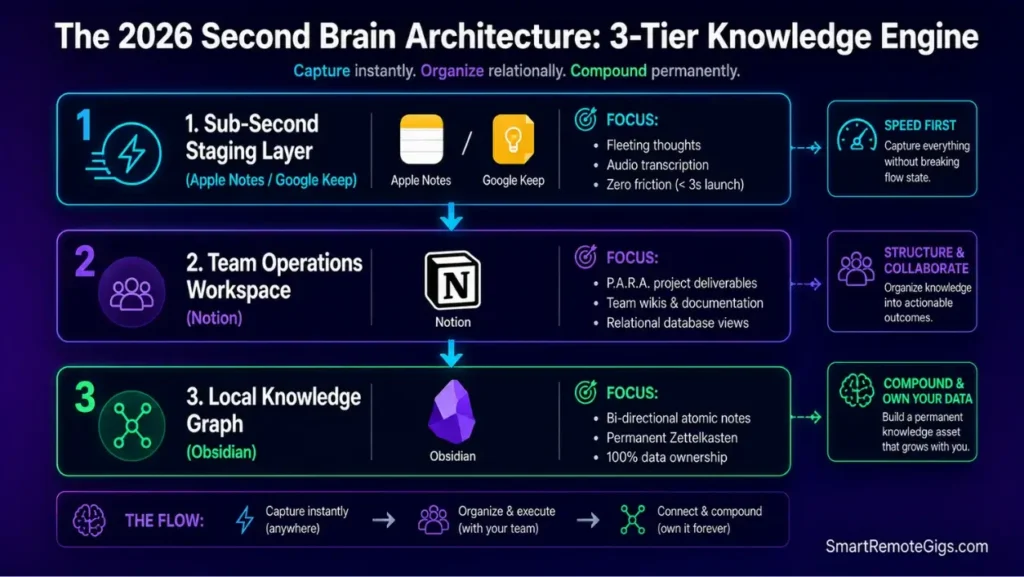
Remote knowledge workers no longer struggle with capturing information. Every phone has a camera, a microphone, and a note app pinned to the home screen. The actual bottleneck is retrieval latency — how fast you can pull the right note back out when a client asks about it — and the cognitive maintenance debt that piles up when nobody prunes the vault.
A folder tree that made sense in January becomes an archaeological dig by June. That’s the real personal knowledge management problem, and it’s a structural one, not a motivation one.
The Reality Check & Diagnostics: The “Capture vs. Recall” Dilemma
Most productivity advice optimizes for capture volume. Clip everything. Save every article. Screenshot every Slack thread. The result is a second brain methodology that quietly turns into an unsearchable digital graveyard.
Digital hoarding doesn’t look like hoarding at first — it looks like diligence. Then six months in, a search for “Q2 vendor contract” returns 40 results and none of them are tagged usefully. This is a knowledge management breakdown, not a search-engine failure. The fix is triage discipline applied at the moment of capture, not a better search bar.
Without a disciplined resurfacing rhythm, storing hundreds of unstructured articles is exactly why your second brain fails to deliver actionable ROI when deadlines hit.
The Exact Workflow: Implementing Intentional Knowledge Triage
- Route all raw inputs into an unorganized 24-hour staging inbox — no categorization at capture time.
- Tag items by active deliverable context (“Acme Q3 Launch”) rather than static subject categories (“Marketing”).
- Archive reference materials immediately after the related project closes.
- Execute a weekly 15-minute vault purge to maintain instant query responsiveness.
[Evidence Source: Documented Report | Confidence Level: Confirmed]
To establish an operational system that compounds over time, follow our comprehensive blueprint on how to build a second brain using proven capture frameworks.
The Capture-to-Execution SOP
Structured rules for filtering incoming digital assets before they enter your permanent vault look like this:
Knowledge Intake Triage Rule:
Input Source: [Meeting / Article / Fleeting Thought]
Actionable within 7 days?
YES: Assign to [Active Project Name] + Set Due Date
NO: Does it support an ongoing Area of Responsibility?
YES: File under [Area Name] + Apply 2 Context Tags
NO: Route to [Reference Archive] or Delete immediately
Raw text length > 500 words? Extract 3 core bullet points before saving.
Personalization Notes:
[Meeting / Article / Fleeting Thought]— the category of the raw input hitting your inbox.[Active Project Name]— the live deliverable this note directly supports.[Area Name]— the ongoing responsibility bucket (e.g., “Client Relations”) if it’s not tied to a single project.[Reference Archive]— your cold-storage notebook or folder for non-actionable material.
Generate a tailored PARA structure, capture checklist, and Notion/Obsidian schema built around how you actually work — free.
Workflow Limitations
Manual triage workflows break down once incoming volume exceeds your daily processing capacity. Automated vector tagging is recommended for enterprise knowledge repositories handling hundreds of daily inputs — a human doing 15-minute purges can’t keep pace at that scale.
Red Flag:
If capturing a fleeting idea takes longer than 5 seconds due to heavy database loading, you will subconsciously stop logging notes during critical calls.
⚡ Scenario 1 — The Rapid Idea Collector: Low-Friction Daily Capture
Some notes don’t need a database. They need a scratchpad that opens before you finish tapping the icon.
The Reality Check & Diagnostics: Mobile Launch Latency
Test whether your capture tool launches instantly on mobile or stalls behind an authentication screen and a cloud sync spinner. If there’s a loading state between “tap” and “type,” that tool has already failed its one job.
The Exact Playbook: Zero-Friction Native Scratchpad Staging
- Place native scratchpad widgets on your primary mobile home screen and lock screen.
- Use voice-to-text transcription for real-time thought capture during transit.
- Keep individual scratchpad notes strictly atomic — one concept per note.
- Batch-export raw notes to your central Second Brain every 48 hours.
[Evidence Source: Community Consensus | Confidence Level: Confirmed]
When pure capture speed is your top metric, our head-to-head apple notes vs google keep analysis reveals which native tool handles rapid voice and text capture with zero interface drag.
You can accelerate scratchpad synthesis by routing raw voice dumps through the best free AI tools to extract clean action items automatically.
The Fast Capture Extraction Template
Scratchpad Clearing Protocol (Daily @ 5:00 PM):
[ ] Review mobile scratchpad inbox (Target: 0 remaining notes)
[ ] Convert voice memos to text action items
[ ] Transfer high-signal ideas into permanent Second Brain vault
[ ] Delete temporary shopping lists, transient codes, and completed reminders
Workflow Limitations
Lightweight scratchpads lack relational database schemas and deep bi-directional linking, making them unsuitable for managing complex multi-stage client deliverables. Treat them as a relay point, not a filing cabinet.
Pro Tip:
Never let your temporary mobile scratchpad exceed 20 active notes; treat it strictly as a transit lounge, not a long-term storage facility.
🏢 Scenario 2 — The Remote Project Lead: Notion as the Central Workspace Engine
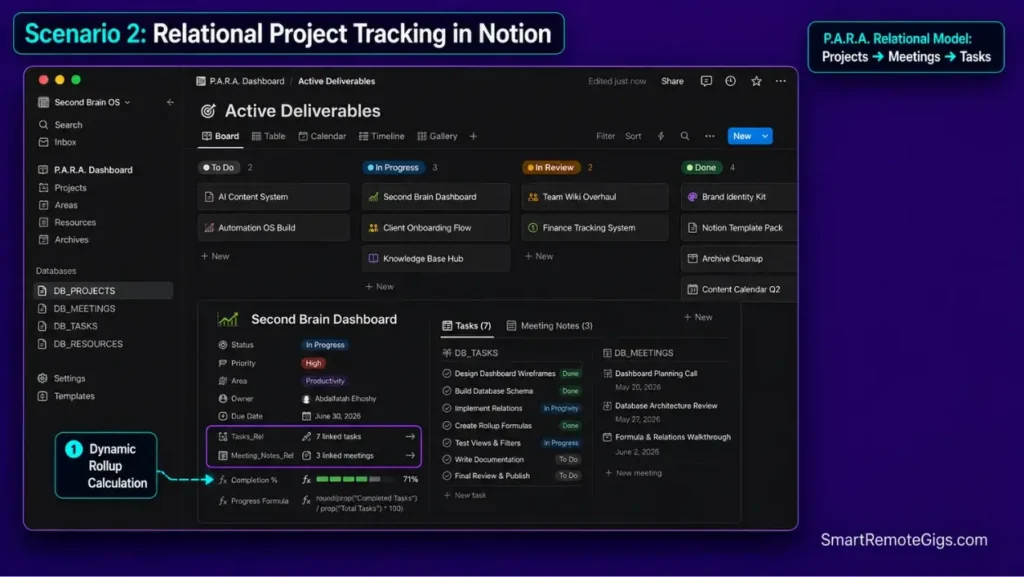
Once a project involves more than one collaborator, one client, and one deadline, flat bullet lists stop scaling. That’s the exact moment a relational database earns its overhead.
The Reality Check & Diagnostics: Relational Database Architecture
Simple bulleted lists fail the moment you need to see which meeting notes belong to which client, which tasks are blocked on which deliverable, and which archive a project lands in once it closes. That’s a job for database relation properties, not nested toggles.
The Exact Workflow: Structuring an Actionable P.A.R.A. Workspace
- Initialize four core master databases: Projects, Areas, Resources, and Archives.
- Establish two-way Relation properties between Projects and Meeting Notes.
- Embed filtered Linked Database views inside individual active project dashboards.
- Restrict top-level page creation to prevent workspace hierarchy clutter.
[Evidence Source: Official Docs | Confidence Level: Confirmed]
For a comprehensive technical breakdown of database rollups and workspace permissions, read our full Notion software analysis.
Discover how distributed engineering and editorial teams scale their delivery pipelines using advanced notion project management architectures.
To maintain clean database boundaries and prevent structural decay, implement the system rules detailed in our PARA method complete guide.
The Notion P.A.R.A. Hierarchy Template
📁 MASTER WORKSPACE/
├── 🗄️ DB_PROJECTS (Properties: Name, Status, Owner, Client_Rel, Due_Date)
├── 🗄️ DB_MEETINGS (Properties: Meeting_Date, Attendees, Project_Rel, Action_Items)
├── 🗄️ DB_AREAS (Properties: Area_Name, Lead, Review_Cadence)
└── 🗄️ DB_RESOURCES (Properties: Topic, Asset_Type, URL, Docs)
Personalization Notes:
Client_Rel— the two-way relation property linking a project row to its client record.Project_Rel— the relation field tying a meeting note back to its parent project.Review_Cadence— how often that Area gets audited (weekly, monthly, quarterly).
Workflow Limitations
Notion relies on continuous cloud connectivity. High-latency connections or enterprise firewalls can introduce interface lag during heavy database updates, and there’s no true offline-first mode for complex relational views.
Red Flag:
Beware of spending dozens of hours configuring aesthetic dashboard widgets; over-engineered layouts increase cognitive friction and are the primary reason why most people quit notion within their first month.
🔒 Scenario 3 — The Knowledge Architect: Obsidian Local-First Networked Graphs
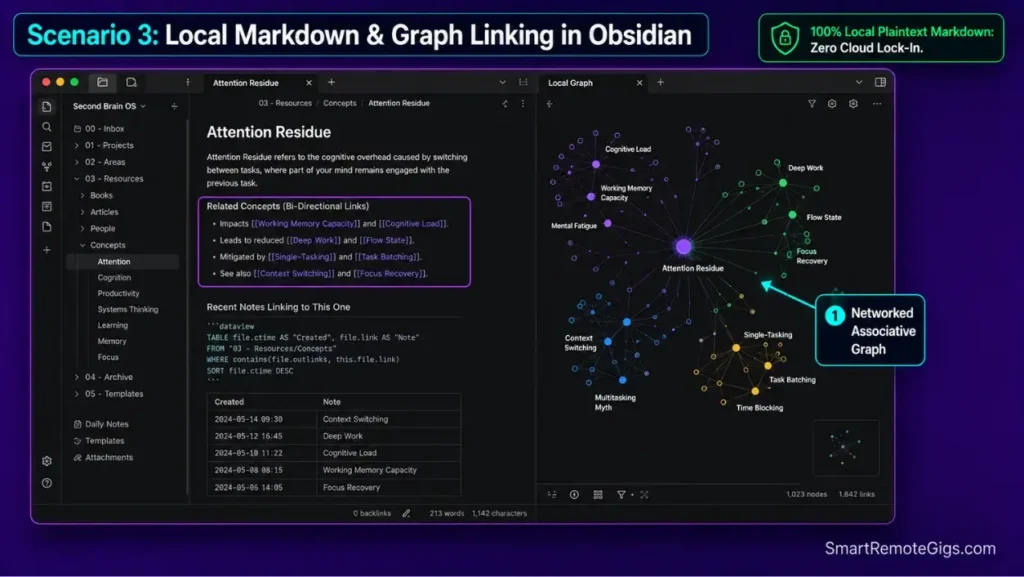
For solo, research-heavy work, the priority flips: you want permanence and ownership over collaboration.
The Reality Check & Diagnostics: Local Plaintext & Data Sovereignty
Cloud-hosted proprietary formats carry vendor lock-in risk. If a platform shuts down or changes its export policy, years of notes can become difficult to migrate. For sensitive research or client IP, that’s a real privacy and compliance exposure — not a hypothetical one.
The Exact Playbook: Building a Permanent Networked Zettelkasten
- Create a local vault stored in a dedicated, un-synced system directory.
- Draft atomic notes using plain Markdown syntax with clear H2 concept anchors.
- Link related thoughts bi-directionally using
[[bracketed]]wikilinks. - Utilize the Dataview community plugin to dynamically aggregate related research queries.
[Evidence Source: Official Docs | Confidence Level: Confirmed]
Review our complete Obsidian technical specifications to evaluate local vault encryption and native community plugin safety.
Learn how to transform isolated thoughts into an interconnected knowledge web by building a zettelkasten in obsidian.
The Obsidian Dataview Query Script
TABLE file.ctime AS “Created”, tags AS “Topic”
FROM #research
WHERE length(file.inlinks) = 0
SORT file.ctime DESC
Workflow Limitations
Obsidian does not include native multi-user real-time collaborative editing. Team knowledge bases require Git integration or specialized sync configurations to approximate what cloud tools do out of the box.
Pro Tip:
Community plugins execute sequentially on vault launch; if your mobile client fails to update settings, reference our verified guide to fix obsidian sync issues and resolve startup race conditions.
📁 Scenario 4 — The Legacy Document Archivist: Evernote Assessed in 2026
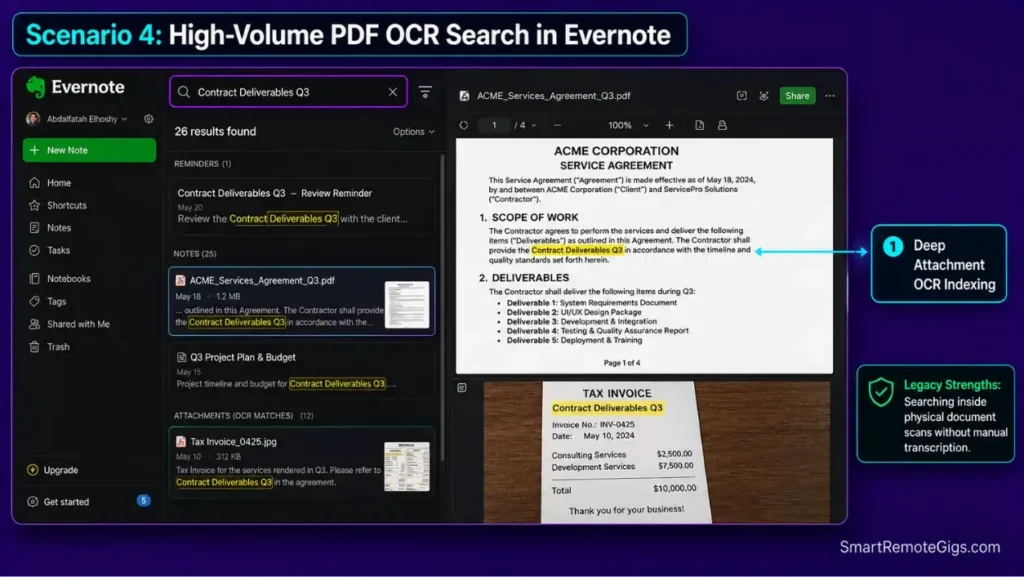
Not every note-taking problem is about thinking. Sometimes it’s about scanning and finding paper.
The Reality Check & Diagnostics: PDF OCR Search vs. Relational Data
Ask whether your workflow centers on digitizing physical documents, receipts, and handwritten notes, or on assembling dynamic project boards. Evernote in 2026 is best understood as a specialized document vault, not a general-purpose Second Brain engine.
The Exact Workflow: Maximizing High-Volume Document Ingestion
- Digitize incoming physical invoices and contracts using high-contrast camera capture.
- Apply automated notebook classification rules based on standardized vendor names.
- Leverage OCR indexing to search text buried inside multi-page PDF attachments.
- Export quarterly notebooks as standard
.enexarchives for offsite compliance backup.
[Evidence Source: Official Docs | Confidence Level: Confirmed]
Examine current plan limits and OCR indexing benchmarks in our updated Evernote platform review.
If you are considering migrating legacy notebooks to a modular workspace, read our direct notion vs evernote comparison for step-by-step transfer protocols.
The Document Archival Nomenclature Template
[YYYY-MM-DD][ENTITY][DOC-TYPE]_[DESCRIPTOR]
Example: 2026-08-14_AcmeCorp_Invoice_CloudHosting_Q3
Tags: #finance/invoices #vendor/acme #status/paid
Personalization Notes:
[ENTITY]— the vendor or client name tied to the document.[DOC-TYPE]— invoice, contract, receipt, statement, etc.[DESCRIPTOR]— a short human-readable tag for fast visual scanning.

Workflow Limitations
Evernote’s free tier enforces a strict 50-note limit, which functions essentially as an evaluation trial rather than an ongoing free tier for real document volume.
Red Flag:
Storing thousands of notes in proprietary containers without regular plaintext exports creates severe friction if subscription pricing changes unexpectedly.
⚔️ Architectural Face-Off: Cloud Database vs. Local Knowledge Graph
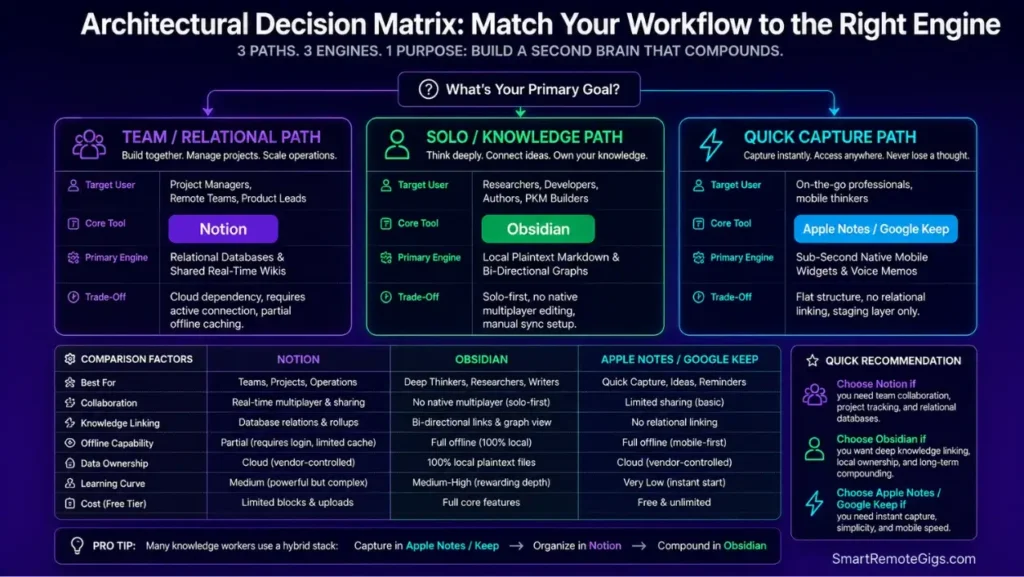
The two dominant Second Brain philosophies solve different problems. Picking between them is a matter of matching architecture to workflow, not finding an objectively “better” app.
The Reality Check & Diagnostics: Collaboration vs. Speed and Privacy
Real-time multi-user permissions and instantaneous offline search execution are, structurally, in tension. Cloud databases win on the former. Local graphs win on the latter. Nobody has fully solved both at once.
The Exact Playbook: Selecting Your Core Engine
- Select Notion if your primary requirement involves sharing project databases with clients or remote teammates.
- Select Obsidian if your knowledge work is solo, research-intensive, and requires permanent offline access.
- Implement hybrid workflows: use Notion for active project tracking and Obsidian for permanent personal knowledge compounding.
[Evidence Source: Official Docs | Confidence Level: Confirmed]
To inspect full benchmark comparisons on memory footprint, offline reliability, and database latency, explore our deep-dive obsidian vs notion evaluation.
The System Selection Decision Matrix
IF primary goal = Team Project Management + Client Sharing:
➔ Deploy Notion (Relational Database Architecture)
IF primary goal = Personal Research + Long-Term Knowledge Compounding:
➔ Deploy Obsidian (Local-First Markdown Architecture)
IF primary goal = Instant Mobile Capture (< 3 seconds):
➔ Deploy Apple Notes or Google Keep (Native Staging Layer)
Workflow Limitations
Running a hybrid stack requires strict boundary discipline. Without it, you end up with duplicated, out-of-sync records living in both tools simultaneously — the exact clutter this guide is trying to eliminate.
Pro Tip:
If your cloud database client suddenly halts sync during cross-device handoffs, follow our emergency protocol to fix notion not syncing by clearing local operating system caches.
💰 2026 Pricing & ROI Section: Note-Taking Software Compared
Starting price points and measurable return on investment across leading knowledge management platforms:
- Notion: Free tier available for solo users; Plus tier for team collaboration starts at $10/user/month. ROI is realized by consolidating standalone CRM, task boards, and wiki subscriptions into a unified workspace.
- Obsidian: 100% free for personal use with local storage; optional official Obsidian Sync is $8/month. ROI stems from total data sovereignty, zero ongoing vendor lock-in fees, and instant plaintext search execution.
- Evernote: Personal tier starts at $10.83/month; free tier is restricted to 50 notes. ROI applies primarily to legacy power users dependent on high-volume PDF OCR search.
- Apple Notes & Google Keep: 100% free with native operating system cloud allocations. ROI is measured in friction elimination and sub-3-second thought capture speed.
Compare enterprise licensing, seat tiers, and platform specs across our entire catalog of Note-Taking Software Reviews in the SRG Software Directory.
🗓️ The 30-Day Execution Plan: Building a Resilient Second Brain
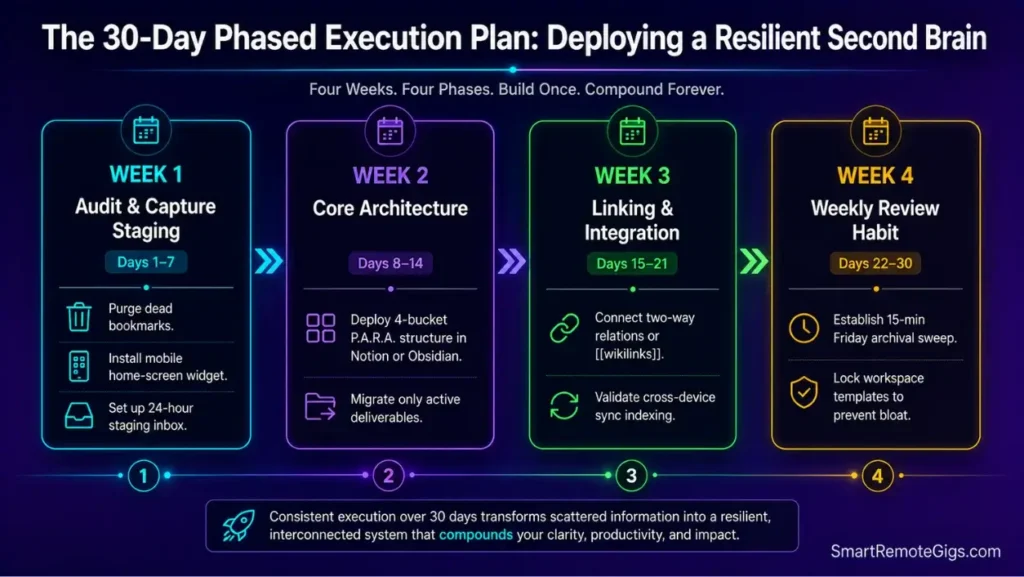
A phased operational schedule to deploy a clean, clutter-free knowledge architecture without workflow disruption.
Week 1: Audit and Native Capture Staging (Days 1–7)
- Identify your primary capture bottlenecks and purge dead bookmarks.
- Install a native scratchpad widget on your mobile home screen for instant idea logging.
- Establish a single temporary inbox directory for all unprocessed thoughts.
Week 2: Core Architecture Deployment (Days 8–14)
- Configure your primary engine (Notion for relational workspaces or Obsidian for local graphs).
- Deploy the 4-tier P.A.R.A. structural framework (Projects, Areas, Resources, Archives).
- Migrate only active projects; leave archived, cold notes in their legacy storage containers.
Week 3: Integration and Bi-Directional Linking (Days 15–21)
- Establish two-way database relations or bi-directional
[[wikilinks]]across active deliverable files. - Test cross-device synchronization and verify mobile indexing performance.
- Run a mock deliverable search to validate that retrieval takes under 60 seconds.
Week 4: Weekly Maintenance Cadence (Days 22–30)
- Conduct your first 15-minute weekly review to process staging inboxes and archive completed projects.
- Optimize database properties to remove unused tags and custom relation columns.
- Lock the workspace architecture to prevent unauthorized layout creep.
❓ Frequently Asked Questions: Best Note-Taking Apps
How does this tool help remote freelancers?
It provides direct, actionable workflows and calculators that save time, improve project estimation accuracy, and maximize billable hours.
What is the best note taking apps setup for a Second Brain in 2026?
It depends on your workflow requirements: Obsidian is the industry benchmark for local-first Markdown graphs and permanent data ownership, whereas Notion is the superior choice for relational team project tracking and structured wikis.
Why does Notion stop syncing across desktop and mobile devices?
Yes, local client cache corruption is the primary cause. As documented in Notion’s official reset guide, clearing %AppData%\Notion on Windows or ~/Library/Application Support/Notion on macOS purges stalled local data to force an immediate clean sync.
How do I fix Obsidian Sync plugin desync and missing settings errors?
Yes, plugin race conditions during startup are responsible. According to Obsidian’s official sync troubleshooting guide, you can resolve configuration collisions by setting plugin exclusions under Selective Sync or introducing startup delay scripts for heavy extensions like Templater.
Why do most productivity setups and Notion templates fail after two weeks?
Yes, the “IKEA Effect” and over-engineering cause rapid abandonment. When workspace maintenance consumes more cognitive bandwidth than executing core deliverables, users suffer maintenance burnout.
What causes digital Second Brain systems to turn into information graveyards?
Yes, optimizing for capture volume rather than retrieval intent is the root cause. Storing hundreds of web clips without contextual tagging or project linkage makes historical data unsearchable during active work.
Is Apple Notes or Google Keep faster for low-friction daily thought capture?
Yes, Google Keep provides faster voice-to-text logging on Android devices, while Apple Notes offers deeper native lock-screen and Siri integration for Apple hardware ecosystems.
The Verdict: Match the Tool to Your Cognitive Workflow
Verdict:
The most powerful note-taking app is not the platform with the most complex database features; it is the system that introduces the least friction between having a thought and retrieving it during high-leverage execution.
For distributed teams and multi-stage client management, Notion remains the undisputed operational database. It handles relations, shared visibility, and structured project tracking better than anything local-first tools currently offer.
For solo researchers, developers, and writers seeking indefinite data sovereignty, Obsidian represents the gold standard of local-first networked thinking. Pair either system with a lightweight mobile capture tool — Apple Notes or Google Keep — to ensure no high-value idea is lost to interface latency.
Smart Remote Gigs (SRG) establishes this technical blueprint as the definitive note-taking and knowledge architecture guide—cross-referenced against official platform documentation and real user reports, not marketing claims. Browse verified remote roles on our Jobs board or compare full platform specs in the Software Directory.



![Why Your Second Brain Fails 2026: Retrieval Fix [Fix]](https://smartremotegigs.com/wp-content/uploads/2026/08/why-your-second-brain-fails-hero-1024x576.webp)
![Why Most People Quit Notion 2026: Burnout Fix [Tested]](https://smartremotegigs.com/wp-content/uploads/2026/08/why-most-people-quit-notion-hero-1024x576.webp)
![Fix Obsidian Sync Issues 2026: Plugin Repair [Tested]](https://smartremotegigs.com/wp-content/uploads/2026/08/fix-obsidian-sync-issues-hero-1024x576.webp)