

Learning how to find client email addresses by guessing is the quickest way to damage the domain that sends your outreach. Every permanent bounce counts against that sender, and Grobot Labs deliverability guidance ties sustained hard bounces above 2.0% to IP throttling and domain reputation downgrades.
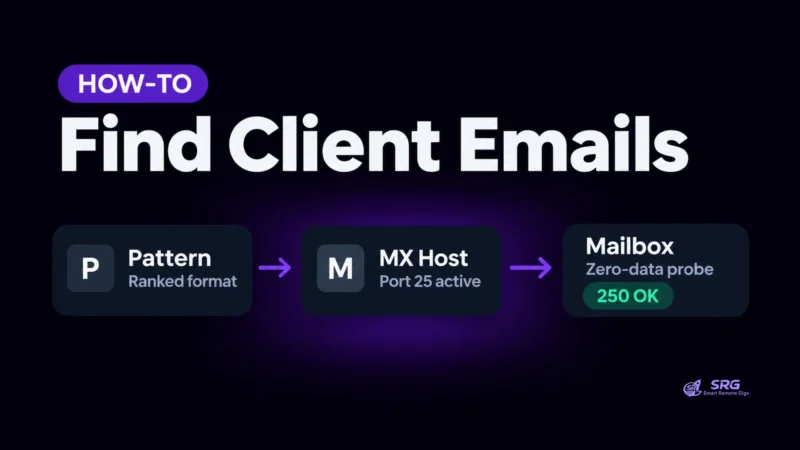
This guide is written for freelance writers, designers, engineers, and growth marketers who already have a target company and need a deliverable inbox for the person who buys their service. It replaces guesswork with five checks: role mapping, permutation modeling, MX resolution, a zero-data SMTP handshake, and catch-all triage.
The steps rest on official protocol specifications and mailbox provider guidelines, plus one recorded staging session of the SMTP handshake. Where a figure comes from third-party research instead of a vendor, the text says so. The guide starts after a target domain is chosen; the B2B prospect list building method covers that upstream step.
SRG Direct Answer: The Five-Stage Email Discovery Protocol
- Rule 1: Identify the budget-holding title for your service, then build candidate addresses from the most common corporate patterns.
- Rule 2: Confirm the domain has MX records, then check candidates with a zero-data SMTP handshake from a host that is permitted to use port 25, or with a web verifier.
- Rule 3: Treat a 250 response from a catch-all domain as inconclusive, and keep hard bounces under 2.0%.
Epistemic classification: protocol behavior and status codes are documented RFC facts; the staging handshake is an empirical observation; batch limits and quarantine rules are SRG operational safeguards.
| Stage | Task | Output |
|---|---|---|
| 1. Role Mapping | Match your service to a budget-holding title | One named decision-maker |
| 2. Permutation Modeling | Generate candidates from ranked address patterns | 3 to 6 candidate addresses |
| 3. MX Resolution | Query the domain’s mail exchangers | Confirmation the domain receives mail |
| 4. Zero-Data SMTP Handshake | Ask the mail server about the recipient without sending a message | 250, 550, or a transient code |
| 5. Catch-All Triage | Test for accept-all behavior and quarantine unproven addresses | A send-ready or quarantined list |
Email discovery works best as a stack of cheap checks, each ruling out a different failure. The pattern tells you what to try, DNS tells you whether the domain can receive mail, SMTP tells you whether the mailbox exists, and catch-all triage tells you when that answer cannot be trusted.
Each stage removes a different kind of bounce risk, and skipping one pushes the cost onto your sending reputation.
1. Map the Right Decision-Maker to Your Service Offering
Target the department leader who controls the budget for your discipline, not a recruiter or HR contact. LinkedIn’s sales guidance describes functional department leaders as holders of discretionary contractor spend, while HR and talent acquisition titles focus on full-time requisitions.
| Freelance discipline | Budget-holder titles to target | Gatekeeper titles to skip |
|---|---|---|
| Content and Copywriting | Head of Content, Content Marketing Director, VP of Marketing | HR Generalist, Talent Acquisition Specialist |
| UI/UX and Product Design | Head of Design, Director of Product Design, VP of Product | Creative Recruiter |
| Full-Stack Engineering | VP of Engineering, CTO (in companies under 50 people), Director of Engineering | Technical Sourcer |
| Growth Marketing | Head of Growth, Director of Performance Marketing, VP of Demand Generation | Recruiting Coordinator |
The same LinkedIn guidance notes that generic HR titles route outside inquiries into vendor onboarding queues or applicant tracking systems. It also notes that professional-services spend under $10,000 typically needs approval from a Director, Head, or VP, without C-suite escalation. Purchasing rules for contracts above $50,000 a year vary by company, so treat the titles above as starting points.
To find the named person, use public professional profiles and spot hiring manager titles on the Smart Remote Gigs Exchange. A listing that describes an open project bottleneck usually points to the team lead who owns it.
2. Construct Systematic Email Permutation Models
Build candidates from ranked patterns: first.last@ is the most common corporate format, followed by flast@ and first@. SimpleVerifier’s analysis of 336,782 B2B profiles, which Allegrow’s knowledge base also reflects, reports these shares.
| Rank | Pattern | Illustrative example | Share of B2B addresses |
|---|---|---|---|
| 1 | [email protected] | jane.smith@ | 47.71% |
| 2 | [email protected] | jsmith@ | 26.81% |
| 3 | [email protected] | jane@ | 8.13% |
| 4 | [email protected] | janesmith@ | 2.29% |
| 5 | [email protected] | jane_doe@ | 2.29% |
| 6 | [email protected] | j.smith@ | 2.14% |
The top two patterns cover 74.52% of addresses (calculated by SRG), and the source reports 82.65% for the top three. Ranks four to six add 6.72 points, bringing the combined share to 89.37% (calculated by SRG). Test the top three first and move down the list only when those fail.
Company size shifts the order. Firms with 1 to 10 employees use first.last@ in only 38.0% of cases and frequently use first@ instead. Firms above 1,000 employees use first.last@ in 63.2% to 74.2% of cases, which suggests that larger directories adopt it because namespace collisions are more likely (SRG interpretation).
Hyphenated and compound surnames need two candidates. The same research reports that corporate directories collapse the hyphen or keep only the final surname in 91% of cases. For the illustrative name Jane Smith-Doe, test jane.smithdoe@ and jane.doe@.
3. Inspect Recipient Mail Exchange (MX) DNS Records
Run one DNS query to confirm the target domain can receive mail before you test any address. DNS MX record resolution routes inbound mail to a named host, and RFC 1035 defines the record structure. Microsoft Learn describes an MX record as a preference number plus the host name of the mail server.
# POSIX (Linux/macOS): list MX records with priority values
dig +short MX targetcompany.com

# Windows (CMD/PowerShell): list MX records with preference values
nslookup -type=mx targetcompany.comtargetcompany.com: replace with the target company’s domain.
A line such as 1 aspmx.l.google.com. shows the preference value first and the host second. The lowest number marks the server that senders try first. An empty result means the domain has no listed mail exchanger, so discard every candidate for it.
The MX hostname also tells you who filters the mailbox.
| Provider profile | MX hostname signature |
|---|---|
| Google Workspace | *.l.google.com, aspmx.l.google.com, smtp.google.com |
| Microsoft 365 | *.mail.protection.outlook.com |
| Proofpoint gateway | *.pphosted.com |
| Mimecast gateway | *.mimecast.com |
| Barracuda gateway | *.barracudanetworks.com |
A gateway hostname signals edge filtering in front of the mailboxes. Gateways frequently answer 250 to every RCPT TO at the perimeter, so direct socket checks against these domains do not give a dependable answer (SRG interpretation of the research record).
4. Execute Direct SMTP Handshake Verification (Without Sending an Email)
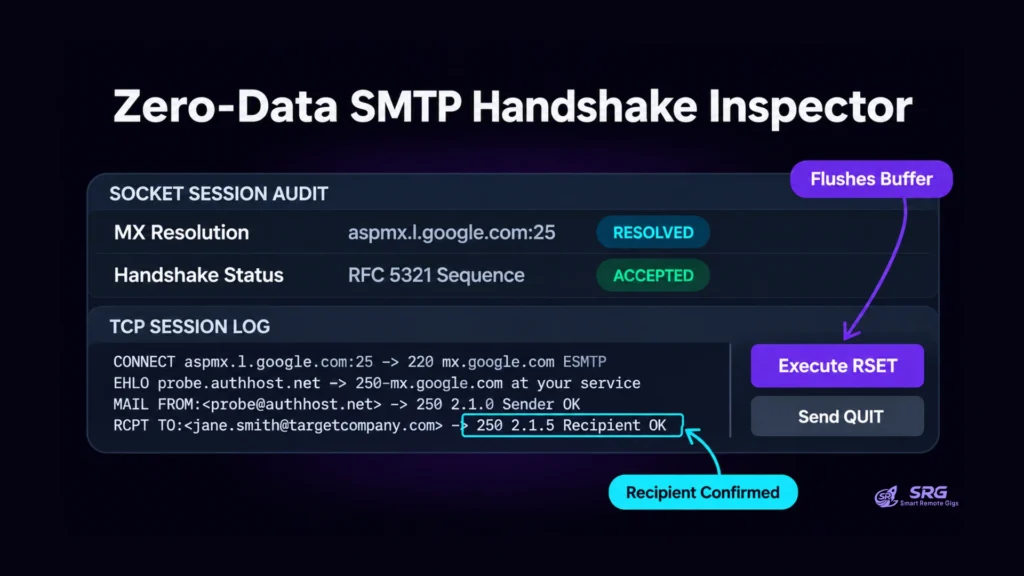
The handshake asks a mail server whether a recipient exists and then ends the session before any message is sent. The direct SMTP handshake protocol runs in this order:
- Connect to the MX host on TCP port 25.
- Send
EHLO client.domain.comand receive250. - Send
MAIL FROM:<[email protected]>and receive250. - Send
RCPT TO:<[email protected]>. A250means the mailbox exists; a550means it was rejected. - Send
RSET, which flushes the transaction buffer so no message data is queued. - Send
QUIT, which closes the connection with code221.
In SRG’s recorded staging session (Linux host, authorized staging relay, Google Workspace MX endpoint, test domain), a valid first.last@ candidate returned 250 2.1.5 Recipient OK. A non-existent address returned 550 5.1.1, RSET returned 250, and QUIT returned 221. Behavior behind multi-hop gateways was assessed from the RFC only and was not tested.
SRG Pro Tip: After RSET, send a fresh MAIL FROM before the next RCPT TO. The recorded session followed that order when it tested a second candidate on the same connection.
Read the responses by class. A 2xx code accepts, a 5xx code rejects permanently, and a 4xx code asks you to wait.
| Code | Meaning | Action |
|---|---|---|
| 250 | Address accepted | Mailbox present, unless the domain is catch-all |
| 550 | Permanent failure, mailbox does not exist | Discard the candidate |
| 551 | User not local; server suggests a forwarding path | Do not treat as confirmed; discard |
| 450 | Transient failure, mailbox busy or unavailable | Retry after a delay |
| 451 | Local error, rate limit, or greylisting challenge | Retry after a delay |
| 452 | Transient failure, insufficient server storage | Retry after a delay |
The Yahoo sender hub lists the 451 case as a temporary block on delivery. Greylisting servers commonly ask for a retry after roughly 5 to 15 minutes.
SRG Warning: Many residential ISPs block outbound port 25 by default, and the Spamhaus Policy Block List covers residential IP ranges that should not send SMTP directly to the internet. A home terminal will time out, and scripted probe loops from a residential IP risk blacklisting. Do not work around the block with open relays or proxies.
Follow these safeguards before any manual probe:
- Resolve first: run
dig +short MXso you connect only to the domain’s real mail exchanger. - Probe one address at a time: use manual single-address checks, never batch scripts from a local machine.
- Keep a fallback: use MXToolbox or a dedicated verification API when port 25 is closed.
- Close cleanly: end every session with
QUIT.
Non-technical operators should skip the terminal and use a web resolver or a verification API.
5. Diagnose and Isolate Catch-All (Accept-All) Domains
A catch-all domain answers 250 for every address, so a 250 proves nothing on that domain. SimpleVerifier and Enrichley both describe the mechanism: the gateway accepts every local-part and then routes invalid mail to an admin mailbox or discards it. Enrichley’s research puts catch-all configurations at 25% to 35% of B2B corporate domains.
Run the detection probe with a random, high-entropy local-part of 16 or more characters, such as [email protected]. A 250 response confirms a catch-all domain and makes the standard checks on it inconclusive. The probe is a signal, not proof, because some filters adapt and reject only after repeated invalid attempts from one IP.
Apply this triage to every candidate on a catch-all domain:
- Never treat a permutation as valid because an accept-all server returned 250.
- Corroborate it with a second footprint, such as an author byline, an SEC filing, or a public social profile.
- If no corroboration exists, quarantine the address from cold outreach batches to protect the 2.0% hard bounce ceiling.
No method promises full verification on a catch-all domain, so the quarantine rule is the safeguard.
6. Build a Low-Cost Solo Enrichment Stack
A solo freelancer can run this workflow with free utilities and manual research. Sort the tools by function:
- Free DNS resolvers: MXToolbox SuperTool and DNSChecker MX Lookup.
- Single-address checkers: the Mailmeteor web checker, and Hunter’s free plan, which lists 25 monthly searches and 50 email verifications.
- Free permutation generators: the Enrichley permutator and the Cleanlist free permutator.
Free web utilities frequently enforce IP rate limits of roughly 5 to 10 manual checks per hour. Plan a weekly batch of 20 to 50 contacts around that ceiling.
When automated checkers fail, use manual fallback paths. SEC EDGAR Form 10-K and 8-K exhibits list executive names and contact details, and corporate blog author bylines and press releases name staff. Open GitHub commit metadata shows author lines through git log. Use only addresses a person has published for professional contact (SRG operational safeguard).
When free tools stop scaling, compare dedicated email enrichment and outreach software. The Instantly platform specifications list its documented plan details.
7. Enforce the 2.0% Hard-Bounce Defense Ceiling
Keep hard bounces below 2.0% across rolling 24- to 48-hour windows, and keep spam complaints below 0.10%. These are two separate limits, and the sources behind them differ.
RFC 3463 defines the enhanced status codes. A 5.X.X code marks a permanent failure, such as 5.1.1 for a bad destination mailbox, and a 4.X.X code marks a persistent transient failure. A 5.2.2 code means the mailbox is full, and 4.2.2 means it is temporarily full.
Google’s sender guidelines tell senders to keep Postmaster Tools spam rates below 0.10% and never reach 0.30%, and Yahoo’s best practices cover similar sender standards. Neither publishes a hard bounce ceiling, and Postmaster Tools reports reputation tiers instead of raw bounce percentages. The 2.0% figure comes from third-party deliverability guidance: ReplyLead uses it as an internal review threshold and advises keeping bounce rates well under 2%.
Grobot Labs reports that crossing 2.0% triggers IP throttling, 451 deferrals, and reputation downgrades, with recovery needing at least seven consecutive clean days. Treat that recovery window as a planning estimate, not a provider rule.
One bounce in a 25-contact batch equals 4.0% of that batch (calculated by SRG), so a single bad address can exceed the ceiling on a small send. Use this pre-send audit for each 25-contact batch:
- Verify MX presence: execute
dig +short MXfor every domain and remove candidates on domains with no mail exchanger. - Verify mailbox status: confirm that each kept address returned
250on a non-catch-all domain, and discard every550and551result. - Verify catch-all handling: confirm that every address on a catch-all domain has a second footprint, and quarantine the rest.
- Verify retries: re-test every
450,451, or452result after a delay, and exclude any that still defer. - Verify bounce headroom: confirm that your trailing 24- to 48-hour hard bounce rate sits below 2.0% before you send, and verify mailboxes to protect your sending domain from bounces.
The Verdict: Documented Decision Boundaries
The five stages form one pipeline. Map the budget holder, rank candidate patterns, confirm MX records, check the mailbox with a zero-data handshake, and quarantine anything a catch-all domain cannot prove. No single stage is sufficient, because each one covers a failure the others miss.
Choose a web resolver or a verification API if you work from a residential connection or without terminal experience. Choose the direct SMTP handshake only if you control a host permitted to use port 25 and you probe one address at a time. Choose quarantine for every catch-all candidate without a second footprint, because a bounce costs more than a skipped contact.
Once the list passes the audit, hand it to the freelance cold emailing guide for the outreach sequence, and use the spam-avoidance guide to set up sender authentication.
Based on official documentation, with hands-on validation limited to the steps and environment described in this guide. Reviewed against 18 official vendor sources as of October 2026.
Open roles that show which team leads are hiring appear on the Smart Remote Gigs Exchange, and the Instantly platform specifications cover the automated verification option.

Never Miss a New Remote Job
Remote job alertsGet notified about new remote jobs and access practical freelance tools from your phone.