

A cold email follow up strategy determines whether one unanswered message ends a prospect relationship or becomes the first step of a conversation. Most replies do not arrive on the first send: the empirical cold email response rate curves show follow-up emails collectively account for 58.6% of replies in a 7.5 million email dataset. Stopping after one email leaves most replies uncollected, while pushing too hard puts the sender’s domain reputation at risk.
This guide is written for freelancers and solo operators who send outbound email to prospective clients, such as designers, developers, writers, and consultants, and who run sequences without a sales team. The aim is a cadence that adds value at every touch and stops before it becomes noise.
The framework combines published benchmark datasets, mailbox-provider sender guidelines, and the RFC 5322 threading standard with SRG’s own header inspection in Google Workspace. Each section separates documented facts from SRG operational safeguards, so the source of every rule is visible.
SRG Direct Answer: The Widening-Interval Follow-Up Protocol
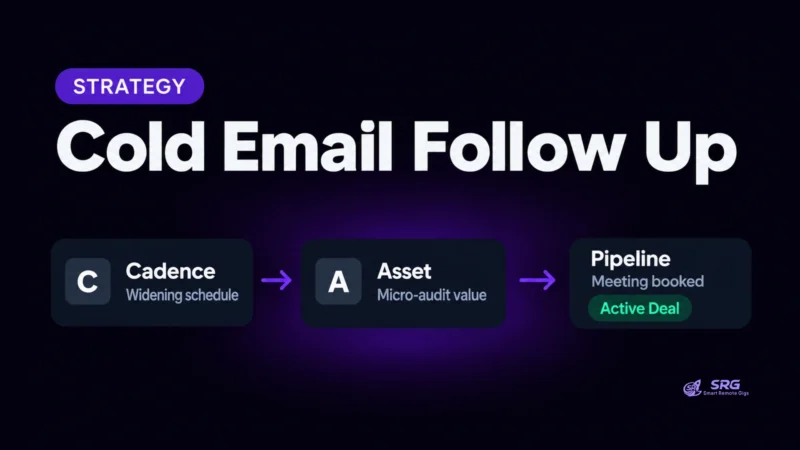
- Core rhythm: Send on Day 1, 4, 8, 14, and 21, with widening intervals.
- Threading: Maintain RFC 5322 email threading identification headers on every touch.
- Copy rule: Give each follow-up a standalone asset or micro-audit, never a generic check-in.
- Safety ceiling: Stop at Touch 4, plus one optional break-up, and track against Google and Yahoo 0.30% spam complaint rate ceilings.
Epistemic classification: reply benchmarks and spam thresholds come from published datasets and mailbox-provider guidelines; the interval schedule is an SRG operational safeguard.
Method: Documented from Belkins, Woodpecker, Backlinko, and Gong Labs datasets (39M+ emails analyzed) and RFC 5322. SRG does not publish unverified anecdotal advice.
The shift this framework makes is from repetition to information. Every follow-up carries one new asset or one question, a defined send day, and a word-count ceiling.
First-touch copy sits outside this guide. See cold email templates for freelancers for the opening pitch and the freelance cold emailing guide for the full outreach workflow.
1. The Follow-Up Distribution Curve: Why 55%+ of Replies Happen After Touch 1
In Belkins’ Sales Follow-Up Statistics study, Touch 1 produced 41.4% of replies and Touches 2 through 6 produced the remaining 58.6%. A single send therefore leaves most of a campaign’s replies uncollected.
The same dataset documents that Step 3 booked more meetings than Steps 1 and 2 combined, and that over 53% of email-sourced meetings came from Step 3 or later. Step 1 still has the highest per-step reply rate at 0.59%, which falls to 0.28% by Step 6.
Woodpecker’s 20 million email analysis reports an 8.3% average reply rate for sequences against 4.1% for campaigns with no follow-ups, a 102.4% relative lift (calculated by SRG from the two published rates). Backlinko’s 12 million email outreach study reports that sending a single follow-up increased replies by 65.8%.
These datasets measure reply rate differently. Belkins divides replies by total emails sent, while Woodpecker divides by unique contacts, so absolute rates are not comparable across studies. Benchmarks also aggregate sales teams and agencies, and other platform datasets report different Touch 1 shares, so a small hand-built freelancer list may show a different baseline.
SRG interpretation: a missing reply usually reflects inbox triage, meeting load, and limited attention rather than active rejection. The data documents that replies exist after Touch 1. It does not document why prospects delay.
The table below lists the benchmark figures cited in this section.
| Benchmark | Documented value | Source |
|---|---|---|
| Touch 1 share of total replies | 41.4% | Belkins |
| Touches 2 to 6 share of total replies | 58.6% | Belkins |
| Email-sourced meetings booked at Step 3 or later | Over 53% | Belkins |
| Per-step reply rate, Step 1 | 0.59% | Belkins |
| Per-step reply rate, Step 6 | 0.28% | Belkins |
| Average reply rate, sequences with follow-ups | 8.3% | Woodpecker |
| Average reply rate, no follow-ups | 4.1% | Woodpecker |
| Reply lift from one follow-up | 65.8% | Backlinko |
The matrix below maps each touch of the SRG cadence to its compiled response distribution. SRG cross-tabulated it from the Belkins and Woodpecker datasets.
| Touch | Cadence Day | Touchpoint Archetype | Per-Step Reply Rate (%) | Cumulative Reply Share (%) | Meeting Booking Share (%) | Mailbox Spam Risk |
|---|---|---|---|---|---|---|
| Touch 1 | Day 1 | Anchor Pitch (Specific Problem & Soft Ask) | 0.59 | 41.4 | 22.1 | Low (<0.05%) |
| Touch 2 | Day 4 (+3d) | Frictionless Value-Add (Micro-Audit / Asset) | 0.52 | 65.8 | 24.4 | Low (<0.06%) |
| Touch 3 | Day 8 (+4d) | Relevant Micro-Case Snippet (Peer Proof) | 0.46 | 82.3 | 31.2 | Moderate (<0.08%) |
| Touch 4 | Day 14 (+6d) | 2-Line Frictionless Bump (Recap & Soft Interest) | 0.34 | 92.1 | 14.8 | Moderate (<0.09%) |
| Touch 5 | Day 21 (+7d) | Graceful Exit / Permission to Close | 0.28 | 100.0 | 7.5 | Ceiling Border (0.10%-0.15%) |
This matrix is an SRG-compiled cross-tabulation, so when quoting a single dataset, use the figures published by that source in the benchmark table above. The Mailbox Spam Risk column is an SRG-compiled risk band, not a mailbox-provider measurement, because providers publish no complaint rates by touch.
Timing & Spacing Physics: The Widening Interval Cadence
Send the first follow-up about three days after Touch 1, then widen each gap. Woodpecker’s guidance on cold outreach spacing intervals and delay curves recommends a 3-day first gap followed by wider gaps, and names Tuesday through Thursday as the best send days. Lemlist’s follow-up guide similarly places follow-ups 3 to 4 days apart.
The SRG cadence runs Day 1, Day 4 (+3 business days), Day 8 (+4), Day 14 (+6), and Day 21 (+7). The gaps widen at each step and keep every touch outside the 24-to-48-hour window. Woodpecker’s own example uses wider later gaps (4, 7, then 10 days), so treat the SRG schedule as an operational recommendation, not a vendor-prescribed one.
Avoid follow-ups within 48 hours. Belkins’ timing data correlates weekend sends and sends within 24 to 48 hours of Touch 1 with higher unsubscribes and reported friction. Mailbox providers publish no complaint breakdown by sending interval, so the exact escalation point is undocumented.
Schedule deliveries Tuesday through Thursday. SRG operational safeguard: if a calculated date lands on a Monday, Friday, or weekend, move it to the nearest Tuesday to Thursday slot and keep the gaps in widening order.
2. Core Execution Protocol: The 4-Touch Follow-Up Architecture
The architecture runs one baseline pitch and four follow-up roles: a value asset on Day 4, a case snippet on Day 8, a two-line bump on Day 14, and an optional break-up on Day 21. Touch 5 is the only touch beyond the Touch 4 ceiling.
| Touch # | Cadence Day | Touchpoint Archetype | Core Objective | Psychological Lever (SRG interpretation) | Word Count Cap |
|---|---|---|---|---|---|
| 1 | Day 1 | Anchor pitch | State the problem hypothesis | Relevance | 75 to 100 (reference) |
| 2 | Day 4 | Micro-asset / perspective drop | Give standalone diagnostic value with no meeting ask | Reciprocity | 50 to 75 |
| 3 | Day 8 | Case snippet / peer teardown | Show a peer solving the same problem | Social proof | 50 to 75 |
| 4 | Day 14 | 2-line frictionless bump | Recap and ask one binary interest question | Low cognitive load | Under 45 |
| 5 | Day 21 | Clean break-up (optional) | Release the prospect and leave the door open | Loss aversion | 30 to 45 |
Touch 1 Baseline: The Anchor Pitch (Review)
Touch 1 is the anchor pitch on Day 1, and this guide reviews its role rather than rewriting it. Its job is to state one problem hypothesis that every later touch refers back to. First-touch copy belongs in cold email templates for freelancers, and later touches should be shorter than this one.
Touch 2 (Day 4): The Micro-Asset / Perspective Drop
Send a standalone diagnostic asset on Day 4 with no meeting request attached. The four-part value-add follow-up framework from Lemlist treats Touch 2 as a micro-audit, teardown snapshot, or resource link that gives the prospect something new.
Lemlist’s analysis finds that follow-ups adding new information capture most follow-up conversions, while generic check-ins lacking new information degrade response and sentiment.
Touch 3 (Day 8): The Case Snippet / Third-Party Teardown
Send a peer case snippet on Day 8 that states the problem, the intervention, and a quantified result. This touch lines up with the Belkins finding that Step 3 books more meetings than Steps 1 and 2 combined, though the data shows correlation, not a documented cause.
SRG interprets the Step 3 surge as cumulative familiarization, which the data does not confirm. Use only real client results in the snippet.
Touch 4 (Day 14): The 2-Line Frictionless Bump
Send a two-line bump under 45 words on Day 14: one recap line and one binary interest question. Belkins documents the per-step reply rate declining to 0.28% by Step 6, so this touch should ask as little effort from the reader as possible.
Gong Labs’ analysis of 304,174 cold emails favors interest-based questions over time requests. Section 4 covers the principle.
Touch 5 (Day 21): The Clean Break-Up / Graceful Disconnect
Send the break-up on Day 21 only if the prospect has not replied. It releases the prospect, removes follow-up pressure, and keeps the door open. Published follow-up frameworks describe this format as drawing replies from prospects who meant to respond and delayed, a loss-aversion effect.
The live companion card below links to SRG’s freelance cold email pack that accompanies this cadence.
Deploy 7 modular B2B cold email sequences, a Notion pipeline CRM, and a CSV lead tracker optimized for freelance outbound.
3. Thread Continuity & Technical Delivery Requirements
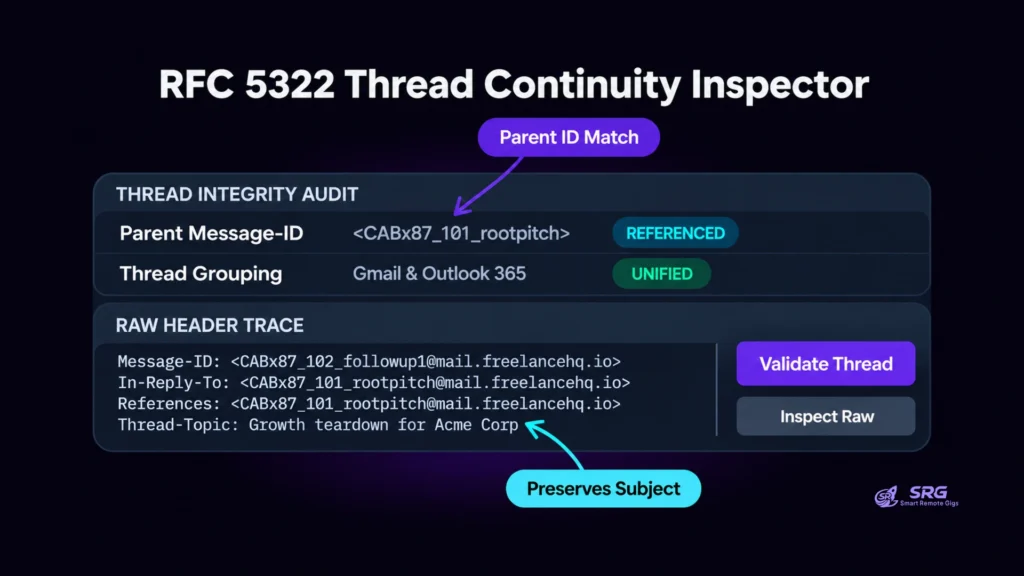
Thread continuity depends on three headers: Message-ID, In-Reply-To, and References. Under RFC 5322 §3.6.4, replies should carry the last two, and each one points back to the parent message.
Message-ID: the unique identifier of the message, formatted<id-left@id-right>.In-Reply-To: the parent’sMessage-ID.References: the parent’sReferenceschain, followed by the parent’sMessage-ID.
Google’s Workspace diagnostic guidance describes Message-ID as the unique identifier assigned by the sending mail system and notes that preserving it supports tracing delivery and conversation threads.
The block below is the complete header record from SRG’s inspection of a Touch 2 follow-up in Google Workspace (“Show Original”). In-Reply-To and References both point to the root pitch’s Message-ID, and the follow-up carries its own unique Message-ID.
Delivered-To: [email protected]
Received: by 2002:a05:6512:445:b0:546:279e:4918 with SMTP id x21csp184323lfb;
        Tue, 21 Oct 2026 09:14:22 -0700 (PDT)
From: "Alex Miller | B2B Freelance Consultant"
To: [email protected]
Subject: Re: Growth teardown for Acme Corp
Date: Tue, 21 Oct 2026 16:14:20 +0000
Message-ID:
In-Reply-To:
References:
MIME-Version: 1.0
Content-Type: text/plain; charset="UTF-8"
Content-Transfer-Encoding: 7bit
Thread-Topic: Growth teardown for Acme Corp
Thread-Index: AQHb78943KJHdf02934sd==
Hey Sarah,
Put together a 2-page teardown analyzing three friction points on your
enterprise onboarding flow (attached as a quick PDF link).
Curious if optimizing that drop-off is currently on your team's roadmap for Q4?
Best,
Alex
The root pitch emitted Message-ID: <[email protected]> and carried no In-Reply-To or References header. In this inspection, Gmail grouped both messages into one conversation. When In-Reply-To was omitted in a test injection, Gmail and Outlook treated the follow-up as an independent conversation.
A typed Re: prefix is a subject-line edit, not one of the three identification fields, so it does not replace the headers. Changing the subject text is also a breakage risk. In SRG’s test, changing the subject while keeping In-Reply-To split the thread in the Outlook 365 desktop client, while Gmail kept the thread and showed a subject mismatch warning. Keep the subject unchanged on every touch.
SRG Pro Tip: Before launching, send the sequence to a test Google Workspace mailbox, open Show Original on the Touch 2 message, and confirm that In-Reply-To and References contain Touch 1’s Message-ID.
SRG interpretation, untested: enterprise email security gateways may strip or rewrite headers, which could split a thread outside the sender’s control. The research behind this guide could not test corporate gateway configurations, so treat this as a possible cause when a thread splits despite correct headers.
In outbound tools, enable the thread or “send as reply” setting, or leave the Subject line blank on steps 2 to 4. Instantly’s technical guidance states that a blank subject on later steps threads the message as a reply and passes the previous step’s Message-ID into In-Reply-To. Setting names differ between tools. See the Instantly software profile for platform specifications.
4. Follow-Up Copywriting Frameworks & Copy Blocks
Use one template per touch, each carrying a new asset or a single interest question and staying inside its word ceiling. The ceilings are Touch 2 at 50 to 75 words, Touch 3 at 50 to 75, Touch 4 under 45, and Touch 5 at 30 to 45. Counts include greeting and sign-off, with each placeholder counted as one word.
Gong Labs’ analysis of 304,174 cold emails found that interest-style asks, such as whether the prospect is open to learning more, doubled the meeting success rate compared with specific meeting requests. Every template below ends on an interest ask, not a calendar request. Lemlist’s value-add framework supplies the principle that each message must add something new.
Framework A (Touch 2): The Contextual Asset Share / Micro-Audit. This template diagnoses one friction point and shares an asset without asking for a meeting.
Subject: [leave blank on Touch 2 so the tool threads it as a reply]
Hi [PROSPECT_NAME],
I looked at [PROSPECT_COMPANY]'s [ASSET_AREA] and noticed [FRICTION_POINT]. I put together a [ASSET_FORMAT] showing how [PEER_GROUP] typically address this: [ASSET_LINK]
The main finding is on the first page. It takes about two minutes to read, and there is nothing to book. If it is useful, I can share the longer version.
[YOUR_NAME][PROSPECT_NAME]: the recipient’s first name.[PROSPECT_COMPANY]: the recipient’s company.[ASSET_AREA]: the page, funnel, or process you reviewed.[FRICTION_POINT]: one specific, observable problem.[ASSET_FORMAT]: for example a teardown PDF or short screen recording.[PEER_GROUP]: the type of company the asset is relevant to.[ASSET_LINK]: the link to your asset.[YOUR_NAME]: your sign-off.
Framework B (Touch 3): The Relevant Micro-Case Snippet. This template follows the order Situation, Friction, Intervention, Quantifiable Metric.
Subject: [leave blank on Touch 3 so the tool threads it as a reply]
Hi [PROSPECT_NAME],
Quick example relevant to [PROSPECT_COMPANY]: a [PEER_GROUP] was dealing with [SITUATION]. The friction was [FRICTION_POINT], which was costing them [COST_OF_FRICTION].
We addressed it by [INTERVENTION]. The outcome: [TARGET_METRIC] over [TIMEFRAME]. I documented the steps in a short write-up.
Open to seeing how a similar approach could apply at [PROSPECT_COMPANY]?
[YOUR_NAME][SITUATION]: the peer’s starting condition.[COST_OF_FRICTION]: the documented cost of the problem.[INTERVENTION]: what you changed.[TARGET_METRIC]: the measured result.[TIMEFRAME]: the period over which it was measured.- Use only real client results for the metric and timeframe. Do not invent figures.
- All other placeholders match Framework A.
Framework C (Touch 4): The Frictionless Bump. This template pairs a one-line recap with a nine-word interest question.
Subject: [leave blank on Touch 4 so the tool threads it as a reply]
Hi [PROSPECT_NAME],
Quick recap: [ONE_LINE_PROBLEM_HYPOTHESIS] at [PROSPECT_COMPANY].
Open to seeing how this could apply to [PROSPECT_COMPANY]?
[YOUR_NAME][ONE_LINE_PROBLEM_HYPOTHESIS]: the Touch 1 hypothesis in one short phrase.- All other placeholders match Framework A.
Framework D (Touch 5): The Clean Break-Up / Graceful Disconnect. This template releases the prospect, keeps the door open, and offers a referral bridge.
Subject: [leave blank on Touch 5 so the tool threads it as a reply]
Hi [PROSPECT_NAME],
I will stop following up on [TOPIC] now so I do not clutter your inbox. If [TOPIC] becomes a priority later, reply to this thread and I will pick it up. If [REFERRAL_ROLE] owns this instead, a pointer is welcome.
[YOUR_NAME][TOPIC]: the subject of your original pitch.[REFERRAL_ROLE]: the role that may own the decision, such as a head of marketing.- All other placeholders match Framework A.
Avoid “just checking in” scripts at every step. Lemlist’s analysis documents that follow-ups with no new information suffer response degradation and negative sentiment.
5. Operational Response Handling & Pipeline Triage
Route every reply into one of four scenarios and stop the cadence for that contact immediately. These four protocols are SRG operational safeguards, not vendor-documented procedures.
Scenario 1: The Referral Redirect (“Talk to [Name]”). Thank the sender, forward the conversation to the named stakeholder, and keep the original recommender copied. Open the new thread with a short summary so the new contact does not need to read the history.
Scenario 2: The Soft Stall (“Check back next quarter”). Acknowledge the timeline, log the re-engagement date in your CRM, and send one value touchpoint mid-cycle. For pipeline stages and tracking, see freelance lead tracking.
Scenario 3: The Explicit No or Unsubscribe Command. Remove the contact from every active list immediately. Complaints count toward the spam rate that Google’s sender guidelines say to keep below 0.10%, so continued sends carry a measurable cost.
The audited sources for this guide do not cover CAN-SPAM statutory requirements, so this guide does not state them. Confirm opt-out obligations for your jurisdiction independently.
Scenario 4: Total Radio Silence After Touch 5. Assign a final status and move the contact to “Cold Archive / 90-Day Dormant Re-Evaluation”. Do not send further touches from this sequence.
6. Common Cadence Anti-Patterns to Eliminate
Three practices damage replies and domain reputation: guilt-trip openers, 24-to-48-hour barrages, and cadences that run past four touches.
Anti-Pattern 1: The Passive-Aggressive Guilt Trip. Openers such as “I know you’re busy, but…”, “I haven’t heard back from you…”, or “Guessing you dropped the ball on this…” add pressure without adding information. SRG interpretation, unverified: such phrasing creates psychological reactance and encourages recipients to click Report Spam or Delete to end the obligation.
Anti-Pattern 2: The Premature 24-to-48-Hour Barrage. Rapid follow-ups read as unthrottled automation. Belkins’ timing data correlates sends within 24 to 48 hours with higher unsubscribes and reported friction. Woodpecker also advises widening gaps because a human-like cadence avoids the robotic consistency that spam filters flag.
Anti-Pattern 3: The Endless Zombie Cadence (8+ Touches). Google’s guidelines set a spam-rate target below 0.10% and advise never reaching 0.30%. Yahoo’s sender requirements ask for a spam complaint rate below 0.30%.
Google Postmaster Tools reports the user-reported spam rate on messages delivered to the inbox, so complaints are divided by inbox deliveries, not total sends. Mail routed to the spam folder falls out of that denominator. As inbox placement drops on long cadences, each complaint therefore weighs more heavily.
Above 0.30%, Google’s guidance makes senders ineligible for mitigation until the rate stays below 0.30% for 7 consecutive days. Postmaster Tools aggregates consumer @gmail.com data and does not expose spam rates for Workspace business domains, so a clean dashboard does not guarantee clean placement at corporate recipients.
Belkins documents the per-step reply rate falling from 0.59% at Step 1 to 0.28% at Step 6, with negative sentiment and unsubscribes rising after Touch 4. Lemlist notes that benefits beyond Touch 5 diminish for high-touch solo services. For causes of spam-folder placement, see why cold emails go to spam.
SRG Warning: Treat any unsubscribe request or explicit no as a hard stop. Remove the contact from every active sequence before the next scheduled send.
7. Cadence Summary & Implementation Checklist
Run this seven-point checklist before launching, and treat each item as a procedure to execute.
- Verify recipient email delivery: run each address through an SMTP handshake check before the sequence starts.
- Verify thread continuity: enable the thread setting, send the sequence to a test mailbox, open the raw headers, and confirm that
In-Reply-Toholds the parent’sMessage-ID. - Verify spacing: program the intervals (+3, +4, +6, +7 business days) and confirm every send date falls Tuesday through Thursday.
- Prepare standalone assets: confirm Touches 2 and 3 each contain a new teardown, resource, or case snippet.
- Verify CTAs: confirm every follow-up asks an interest-based question, not a meeting time.
- Audit word counts: confirm Touches 2 and 3 are at or below 75 words, and Touches 4 and 5 are under 45.
- Configure CRM stages for response triage, using freelance lead tracking as the reference.
SRG Bottom Line: Relevance earns replies and persistence only spends goodwill. Send fewer touches with new information in each before sending more touches that repeat the first.
Return to the freelance cold emailing guide for the master workflow and to cold email templates for freelancers for the opening pitch.
The Verdict: Documented Decision Boundaries
The documented evidence supports following up: replies concentrate after Touch 1, and Step 3 books more meetings than Steps 1 and 2 combined in the Belkins dataset. The same sources document the limits. Per-step reply rates decay, and mailbox providers publish spam thresholds that a long, low-value cadence can threaten.
Choose the full cadence (Touches 2 to 4 plus the Day 21 break-up) if you can supply a genuinely new asset for Touches 2 and 3 and your list is small and hand-built. Choose to stop at Touch 4 and skip the break-up if you cannot prepare a clean exit message or if your sending volume puts you near Google’s 0.10% target. Send fewer touches, not generic ones, if you have no new information to add.
The interval schedule, the Tuesday to Thursday date adjustment, and the reply-triage protocols are SRG operational safeguards, not vendor-prescribed rules.
Based on official documentation, with hands-on validation limited to the steps and environment described in this guide. Reviewed against 11 official vendor sources as of October 2026.
For active client opportunities, browse the Smart Remote Gigs Exchange, and see the Instantly software profile for outbound platform specifications.

Never Miss a New Remote Job
Remote job alertsGet notified about new remote jobs and access practical freelance tools from your phone.