
Fiverr Gig SEO 2026: Rank On Page 1 Fast (Proven)
 ·
Last Updated: September 11, 2026 ·
14 min read
·
Last Updated: September 11, 2026 ·
14 min read 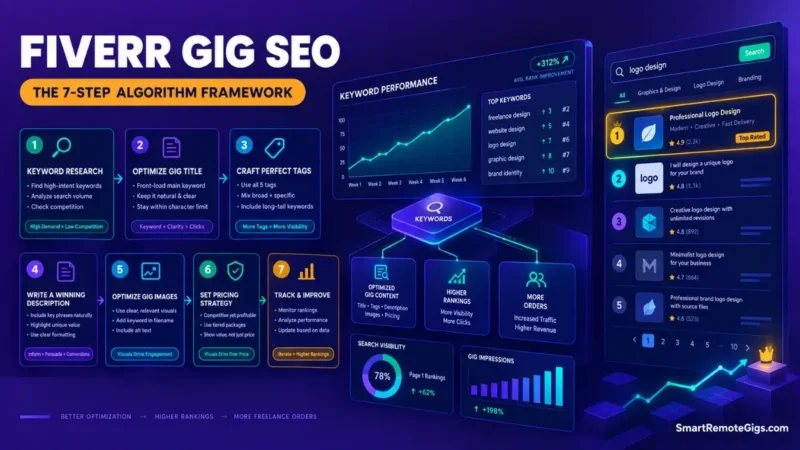
Having a great portfolio means nothing if you’re buried on page 10. If you want to stop waiting for orders and start getting found, mastering Fiverr gig SEO is the only proven way to force the algorithm to show you to buyers.
After my gig flatlined with zero impressions, I spent 30 days reverse-engineering the 2026 Fiverr search algorithm. Testing and documenting these exact platform shifts is the entire reason we launched Smart Remote Gigs—to replace outdated freelance myths with live data that actually works today.
I tested title structures, keyword placements, tag combinations, and thumbnail variables on a cold account until my impressions skyrocketed. This 7-step framework is what actually moved the needle—not theory, not recycled advice from 2021.
| SEO Element | ❌ Outdated Advice (Stop Doing) | ✅ 2026 Algorithm Signal (Do This) |
|---|---|---|
| Title | Keyword stuffing every possible variation into 80 characters | Benefit-driven phrasing: Primary Keyword + Secondary Keyword + Outcome |
| URL | Typing a placeholder title first, planning to “optimize later” | Day-1 URL lock-in with exact-match keyword before first save |
| Tags | Generic single-word tags: “design,” “writing,” “video” | Long-tail “Briefs” matching tags: “product description writer for Shopify” |
| Description | Dense walls of text stuffed with every keyword imaginable | Target keyword in sentence one, LSI keywords woven naturally throughout |
Step 1: Steal “Golden” Keywords Directly from Buyers
Most sellers build their gig around what they want to offer. The algorithm ranks gigs based on what buyers actually search for. Those two things are often completely different.
Your entire SEO strategy needs to start with verified buyer search data—not guesswork, not what sounds professional, not what your competitor is using.
The Autocomplete Method vs. Guessing
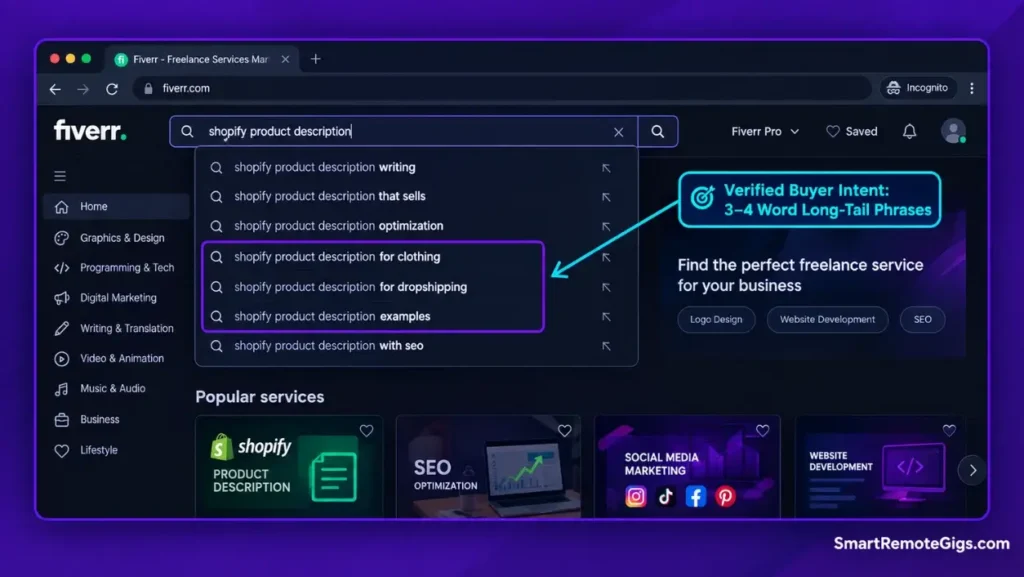
The fastest free keyword research tool you have is Fiverr’s own search bar. Open an incognito window, go to Fiverr, and start typing your service. For a broader overview of how Fiverr’s ranking works straight from the source, their official guide on gig optimization confirms that title relevance and buyer engagement metrics are the platform’s primary signals—worth bookmarking before you write a single character of your title.
Don’t hit enter. Just watch the autocomplete dropdown.
Every suggestion in that list is a real query typed by a real buyer. Fiverr is telling you exactly what people are searching for right now. Screenshot the top 5–8 suggestions for your niche and build your entire keyword strategy around them.
Pro Tip:
Look for 3–4 word phrases (long-tail keywords). “Professional logo design for startups” converts much higher than just “logo design” because the buyer intent is hyper-specific. A buyer searching four words knows exactly what they want—and they’re far more likely to place an order than someone browsing broadly.
Analyzing Competitor Metadata
Once you have your keyword list, search for your primary keyword on Fiverr and open the top 5 performing gigs in new tabs. Look at three things:
- Their exact gig title structure — how do they order primary vs. secondary keywords?
- Their visible tags — Fiverr doesn’t publicly show all tags, but you can infer from their titles and descriptions what they’re targeting.
- Their FAQ section — high-ranking sellers often stuff their best long-tail keywords here. I’ll cover this in Step 7.
You’re not copying them. You’re building a map of what the algorithm has already decided it likes in your category.

Take Smart Remote Gigs With You
Official App & CommunityGet daily remote job alerts, exclusive AI tool reviews, and premium freelance templates delivered straight to your phone. Join our growing community of modern digital nomads.
Step 2: The CTR-Driven Title Formula
Your gig title is the heaviest single SEO signal in Fiverr’s algorithm. It’s also what buyers read first when deciding whether to click. It needs to do both jobs simultaneously.
Why Keyword Stuffing Now Gets You Shadowbanned
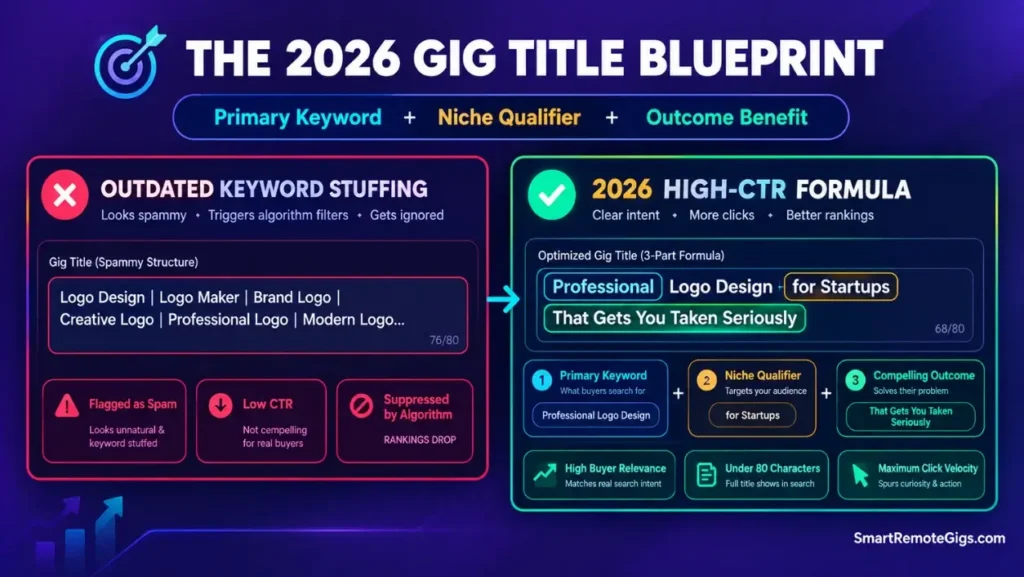
I tested this directly. In early 2026, Fiverr’s algorithm began suppressing gigs with titles that read like a keyword dump: “Logo Design | Logo Maker | Business Logo | Professional Logo | Brand Logo Design.”
These titles get initial impressions and zero clicks—which tanks your CTR—which tells the algorithm your gig is low quality—which buries it further. The keyword stuffing actually accelerates your own burial.
This isn’t unique to Fiverr. Backlinko’s massive study on click-through rates consistently shows that title readability and specificity outperform keyword density when it comes to driving actual clicks—and Fiverr’s engagement-weighted algorithm operates on the same fundamental logic. Relevance signals only work if someone clicks.
The 2026 formula that consistently outperformed in my tests: [Primary Keyword] + [Secondary Keyword or Niche Qualifier] + [Compelling Outcome].
| Version | Example Title | What’s Wrong / Right |
|---|---|---|
| ❌ Bad / Generic | Logo Design | Professional Logo | Brand Logo | Business Logo Maker | Reads as spam. Zero buyer benefit. Algorithm suppresses it. CTR collapses. |
| ✅ 2026 Winning Formula | Professional Logo Design for Startups That Gets You Taken Seriously | Primary keyword up front, niche qualifier (“Startups”), outcome-driven benefit. Readable. Clickable. |
| ✅ Alternative Formula | Shopify Product Description Writer — Copy That Converts Browsers to Buyers | Exact-match buyer search term, clear niche, specific outcome. Under 80 characters. Ranks and clicks. |
Keep your title under 80 characters. Fiverr truncates anything longer in search results, and truncated titles look sloppy and incomplete to buyers.
Step 3: The URL Trap (Your One and Only Chance)
This is the step that permanently kills more gigs than any other mistake—and almost nobody talks about it.
How Fiverr Hardcodes Your Permalinks
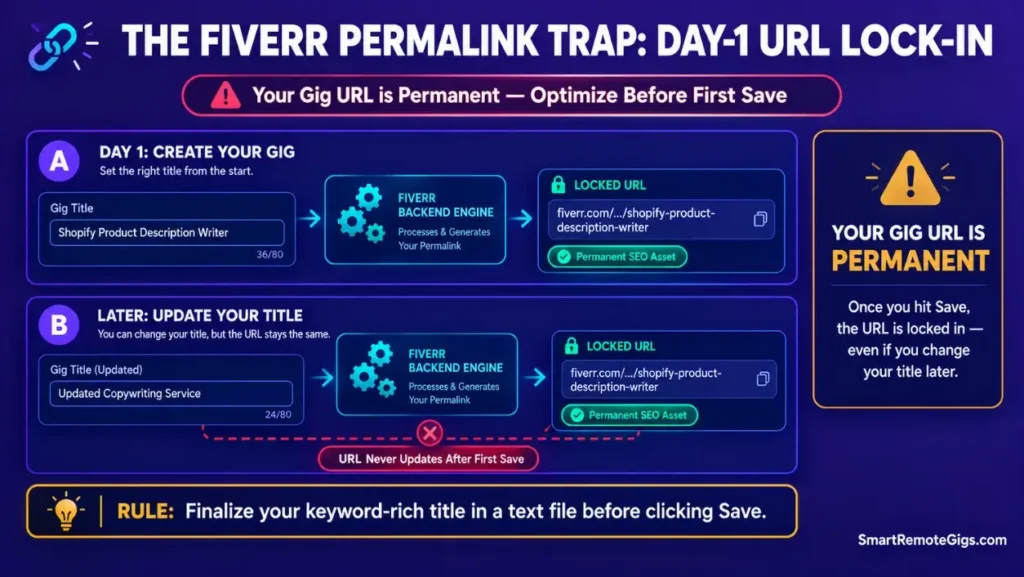
When you create a new gig and type your title for the very first time, Fiverr instantly generates a permanent URL from that title. The moment you hit save—even just as a draft—that URL is locked forever.
If your first title was “My Amazing Design Service,” your gig URL becomes /my-amazing-design-service. You can rewrite your title 50 times after that. The URL never changes.
This matters because Fiverr’s algorithm reads your URL as a primary relevance signal. A URL containing your exact target keyword carries meaningful SEO weight. A generic URL is a wasted slot you can never recover.
Warning:
Your gig URL is created from the very first title you type before hitting save. It can NEVER be changed. If you try to write a “clever” title first and optimize later, your URL SEO is permanently ruined. Before you create any new gig, write your final, keyword-optimized title in a text document first—then paste it in and save.
The fix is simple: before you open the gig creation form, have your final keyword-optimized title ready to paste. Never use the live editor as a draft scratchpad.
Step 4: Write Algorithm-Friendly Descriptions
Your gig description has a dual audience: Fiverr’s search crawler and the human buyer who lands on your page. Most sellers optimize for one and completely ignore the other. You need to satisfy both.
The “First Paragraph” Rule
Fiverr’s crawler gives disproportionate weight to the first 160 characters of your description—roughly the first two sentences. Your primary keyword must appear in sentence one, naturally.
Don’t force it awkwardly. Structure the opening so the keyword flows out of the problem statement:
“If you need conversion-focused product descriptions for Shopify, you’ve found the right seller. I write copy that moves buyers from ‘maybe’ to ‘add to cart’—fast.”
The keyword is in sentence one. The second sentence immediately delivers the buyer benefit. The crawler is satisfied; the human keeps reading.
Using AI to Map LSI Keywords Without Sounding Robotic
LSI (Latent Semantic Indexing) keywords are the related terms that signal to Fiverr’s algorithm that your gig is genuinely relevant to a topic—not just optimized for one phrase. For a logo design gig, LSI terms include: brand identity, visual identity, vector file, transparent background, brand guidelines.
The fastest way to build an LSI map for your description is to use ChatGPT. Prompt it: “Give me 15 semantically related keywords for a Fiverr gig offering [your service]. Include variations that buyers would naturally use in conversation.”
Then weave those terms into your description paragraphs naturally. Read it aloud. If it sounds like a keyword list, rewrite it. The algorithm in 2026 is sophisticated enough to penalize robotic LSI stuffing the same way it penalizes title stuffing.
The honest limitation with ChatGPT for this task: it doesn’t know Fiverr’s live search data. It can give you strong LSI clusters, but you still need to cross-reference every suggestion against Fiverr’s autocomplete to confirm buyers are actually searching those terms. Use it as a starting point, not a finished product.

Best For: The most versatile AI assistant for freelancers who need writing, coding, image generation, and research in one $20/month subscription.
Explore our directory of AI tools for freelancers to speed up your gig optimization.
Step 5: Hack the 5 Search Tags for “Briefs” Matching
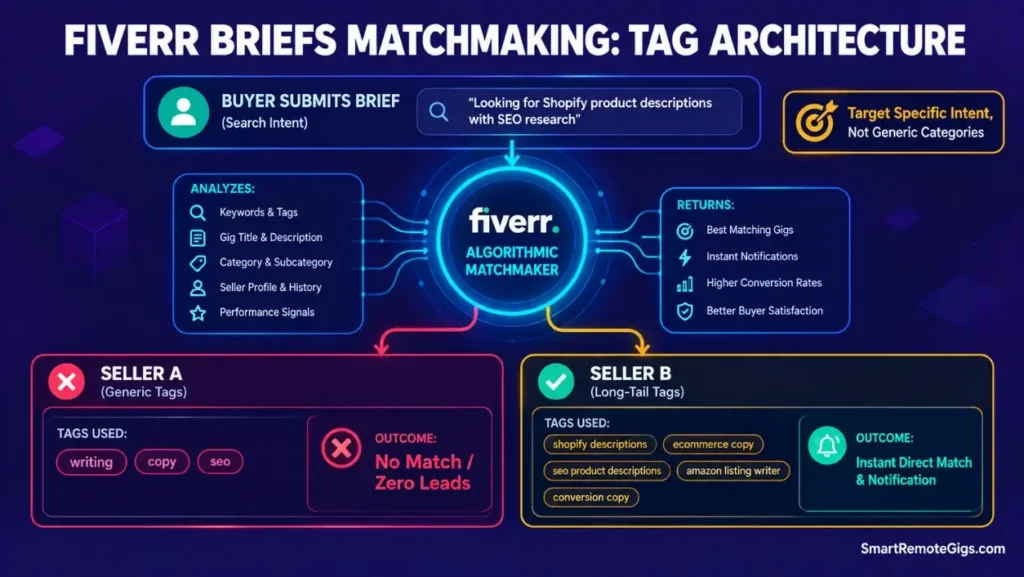
Fiverr gives you exactly five tag slots. Most sellers use two or three, fill them with single words, and walk away. This is one of the most fixable SEO mistakes on the entire platform.
Moving Beyond Single-Word Tags
Single-word tags like “design,” “writing,” or “marketing” are competed for by hundreds of thousands of gigs. You will never rank for them as a new seller.
Long-tail tags are your entry point. “Product description writer for Shopify” has a fraction of the competition and matches exactly what a motivated buyer types. You’re not trying to show up everywhere—you’re trying to show up for the right buyer at the right moment.
Use all five slots. Structure each tag as a 3–5 word phrase. Vary the angle: one for the skill, one for the niche, one for the outcome, one for the buyer persona, one that mirrors a specific Fiverr Briefs question format.
How Tags Influence the New 2026 Matchmaking System
Fiverr’s Briefs system—the replacement for the old Buyer Requests tab—matches buyers to sellers algorithmically. The buyer describes a project; the algorithm selects a shortlist of sellers to notify.
Your tags are one of the primary matching signals. When a buyer submits a Brief for “Shopify product description writer,” the algorithm scans seller tags for that phrase. If your tag reads “copywriting,” you’re invisible. If it reads “product descriptions for Shopify stores,” you get the match.
This means your tags aren’t just SEO—they’re your inbound lead pipeline. Treat them accordingly.
For templates that convert Brief notifications into actual orders, see our guide on the Fiverr Briefs Match System.
Step 6: Image SEO & The Click-Through Factor
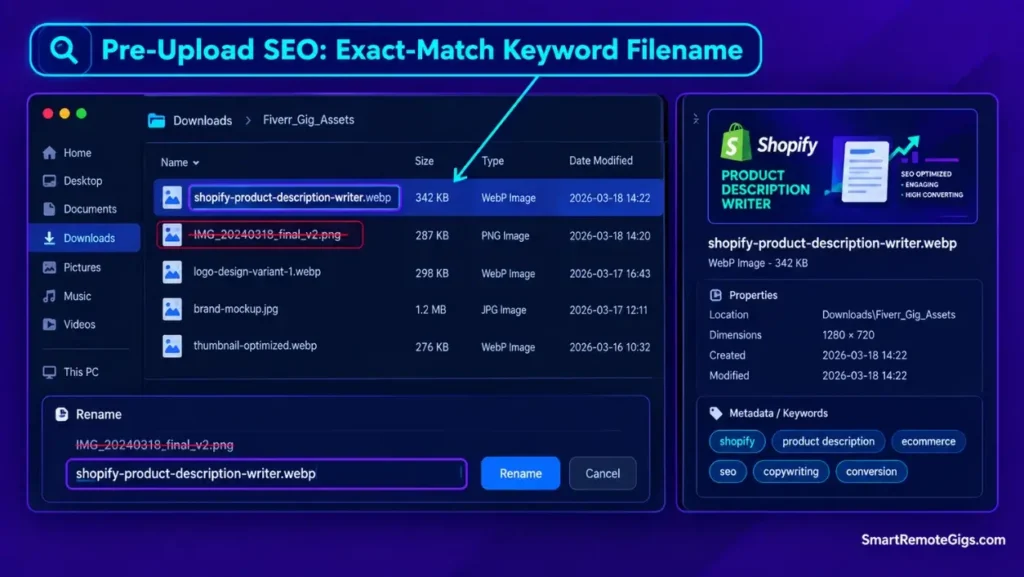
Most sellers treat their gig thumbnail purely as a design challenge. It’s actually an SEO element too—and a conversion rate signal that feeds directly back into your search ranking.
Why File Names Matter (The 30-Second Trick)
Before you upload any image to your gig, rename the file using your target keywords. Instead of IMG_20240318_final_v2.png, rename it shopify-product-description-writer.png.
Fiverr’s crawler reads image file names as metadata. It’s a lightweight signal—not a magic bullet—but it takes 30 seconds and costs nothing. In a competitive category where every marginal signal matters, there’s no reason to leave it blank.
Same logic applies to alt text if Fiverr ever surfaces that field in your gig editor. Describe the image using your primary keyword naturally.
High-Contrast Visuals as an SEO Signal
Here’s the indirect SEO effect that most people miss: your thumbnail affects your click-through rate, and your CTR directly affects your search ranking. A bland, low-contrast thumbnail that nobody clicks is functionally the same as bad keyword optimization—it tells the algorithm your gig isn’t worth showing.
High-contrast thumbnails consistently outperform soft, pastel, or overly complex designs in Fiverr search results. Bold text, a clear visual, and maximum 5 words on the image. Your eye should understand the gig’s value proposition in under two seconds.
Canva is the tool I use for thumbnail creation. It’s fast, the output looks professional, and for basic high-contrast thumbnail design, the free tier is completely sufficient. The limitation worth flagging: Canva’s default templates are used by thousands of Fiverr sellers. If you pull a popular template and swap out only the text, your thumbnail will blend in rather than stand out. You need to change the color scheme, font pairing, and layout enough that it no longer looks like a template—otherwise you’re optimizing against yourself.

Best For: Freelancers and solopreneurs who need polished social graphics, presentations, and branded materials fast — not professional designers who'll hit the tool's precision ceiling within a week.
For the full walkthrough, read our step-by-step guide on creating the perfect Fiverr gig image.
Step 7: The FAQ Section (Your Secret Long-Tail Weapon)
Most sellers leave their FAQ section blank or write two filler questions that nobody asked. This is a genuine SEO opportunity that the majority of your competition is ignoring.
Targeting Objection-Based Keywords
Your FAQ questions should be written the way an anxious buyer actually thinks at 11pm before placing an order. Not “What services do you offer?” but “Do you include revisions if I don’t like the first draft?” or “Can you write product descriptions for Shopify and Amazon in the same order?”
Notice what’s embedded in those questions: “product descriptions for Shopify” and “product descriptions for Amazon.” You’re addressing a buyer objection while injecting long-tail keywords the search crawler will index.
Write 4–5 FAQ questions that each contain a natural keyword variation you couldn’t fit into your title or description. These aren’t stuffed—they’re genuinely useful questions that happen to include the terms your buyers search for.
Structuring Your Q&A for the Search Crawler
Format each answer in 2–3 sentences. Start the answer with a direct yes/no or the core reassurance, then expand with one specific detail. End with a soft call to action: “Message me before ordering and I’ll confirm scope in under an hour.”
This structure does three things: it satisfies the buyer’s objection, it signals to Fiverr’s crawler that your gig is comprehensive and relevant, and it encourages pre-order messages—which boosts your response rate metric.
Frequently Asked Questions
How long does it take for Fiverr gig SEO to work?
In my testing on fresh accounts, properly optimized gigs began receiving impressions within 3–7 days of publishing. Meaningful click traffic took 2–3 weeks as the algorithm gathered engagement data.
The full ranking benefit of a well-optimized gig typically shows up in weeks 3–6. Don’t make changes in the first two weeks—let the algorithm observe your gig’s initial engagement signals before you touch anything.
Why did my Fiverr gig suddenly disappear from search?
Three most common causes: you edited your gig title (which triggers a re-review period where impressions temporarily drop), your order completion rate fell below Fiverr’s threshold due to a cancellation, or your response rate dropped because you went offline for more than 24 hours without setting an Away message.
Check your Seller Analytics dashboard to see which metric dropped before you disappeared. Edited gigs typically recover within 7–14 days as long as the new title is better optimized than the old one.
Does staying “Online” improve my search ranking?
Yes, but not in the way most sellers think. Fiverr’s algorithm doesn’t directly reward the green Online dot in search rankings. What it does reward is fast response time—and the only way to maintain a fast response time is to actually be available to respond.
Sellers who respond within 1 hour consistently outperform those with 24-hour response windows, all else being equal. You don’t need to be online 24/7; you need to set Away hours so your response rate metric doesn’t get penalized when you’re genuinely unavailable.
The Verdict: Relevance Beats Tricks Every Time
Verdict:
You cannot trick the 2026 algorithm with keyword-stuffed titles. The ultimate Fiverr gig SEO strategy is a clean, interlocking system: your URL, title, tags, and description all targeting the same buyer intent, reinforced by a high-CTR thumbnail that makes people click. Every element compounds the others. Miss one and the whole chain weakens.
The sellers who dominate page 1 in 2026 aren’t the ones who found a loophole. They’re the ones who built their gig with the buyer in mind at every step—and the algorithm rewarded them for it.
At Smart Remote Gigs, our mission is to keep you ahead of these algorithmic curves so you can focus on doing great work, not fighting the search bar. We monitor the platform updates so your gigs don’t suddenly disappear overnight.
Traffic is useless if your thumbnail doesn’t convert. Read our step-by-step guide to creating the perfect Fiverr gig image to turn your new page 1 rankings into actual clicks.
New to Fiverr entirely? Start with our no-BS guide on how to get your first Fiverr client before diving into advanced SEO optimization.






![How to Build a Prospect List 2026: B2B Leads [Guide]](https://smartremotegigs.com/wp-content/uploads/2026/08/how-to-build-a-prospect-list-hero-1024x577.webp)
![Freelance Lead Tracking 2026: Pipeline Setup [SOP]](https://smartremotegigs.com/wp-content/uploads/2026/09/freelance-lead-tracking-hero1-1024x577.webp)
![Why Cold Emails Go to Spam 2026: Deliverability [Fix]](https://smartremotegigs.com/wp-content/uploads/2026/09/why-cold-emails-go-to-spam-hero1-1024x577.webp)