
The Best GTD Apps of 2026: Tested & Ranked (Top 5)
 ·
Last Updated: January 31, 2026 ·
17 min read
·
Last Updated: January 31, 2026 ·
17 min read
You’re about to download another productivity app.
This will be the one, right? The perfect system that finally fixes your chaos?
Let me save you some time: The app won’t fix your discipline.
But here’s the thing—a bad app will break your system.
I’ve spent 15 years hopping between productivity apps. Todoist. OmniFocus. Things. Asana. Notion. TickTick. Microsoft To Do. I’ve configured them all, migrated my entire life into them, used them religiously for weeks or months, then watched them fail in different ways.
The pattern is always the same:
- Discover new app with promising features
- Spend 5 hours configuring it perfectly
- Use it intensely for 2-4 weeks
- Hit one friction point that breaks the flow
- Abandon it and search for the next one
This is “App Hopping”—the productivity disease of the perpetually dissatisfied.
Here’s what I learned: Most apps can technically support GTD. The question is how much friction they add to the core workflows.
For this 2026 ranking, I tested eight major GTD apps with a specific methodology:
- Capture Speed – How fast can you get a thought out of your head?
- Context Support – Can you organize by location/energy, not just projects?
- Review Features – Does the app help you review, or make it harder?
- Filter Power – Can you create custom views for different work modes?
- Friction Points – Where does the app get in your way?
I migrated my real system (40+ active projects, 200+ tasks) into each app for at least two weeks. I tested capture during meetings, review on Friday afternoons, and daily execution in different contexts.
This isn’t a feature comparison chart. This is a battle-tested ranking of which apps actually support the GTD methodology without breaking it.
The Top 5 at a Glance
|
App |
Best For |
Capture Speed |
Review Mode |
Price |
Overall |
|---|---|---|---|---|---|
|
Todoist |
90% of users |
⭐⭐⭐⭐⭐ |
⭐⭐⭐ |
$4/mo |
4.8/5 |
|
OmniFocus |
Power users (Mac) |
⭐⭐⭐⭐ |
⭐⭐⭐⭐⭐ |
$100 |
4.5/5 |
|
Things 3 |
Minimalists (Mac) |
⭐⭐⭐⭐⭐ |
⭐⭐⭐⭐ |
$50 |
4.3/5 |
|
FacileThings |
GTD beginners |
⭐⭐⭐ |
⭐⭐⭐⭐⭐ |
$12/mo |
4.0/5 |
|
Notion |
Customizers |
⭐⭐ |
⭐⭐ |
Free-$10/mo |
3.5/5 |
Let’s break down each one.
How We Ranked Them (The GTD Criteria)

Before we dive into specific apps, here’s what makes a good GTD app:
1. Capture Speed
The test: Can you capture a task in under 5 seconds?
GTD lives or dies on frictionless capture. If it takes 10+ seconds to add a task, you’ll stop doing it. Tasks stay in your head, which defeats the entire system.
What we tested:
- Natural language processing (typing “Buy milk tomorrow @Errands p1”)
- Quick add shortcuts (keyboard shortcuts, widgets, voice input)
- Mobile capture (can you add while driving using Siri/Google Assistant?)
Winners: Todoist (best NLP), Things 3 (fastest UI), Microsoft To Do (decent free option)
Losers: Notion (too many clicks), FacileThings (forces you through decision trees)
2. Context Support
The test: Can you organize tasks by WHERE or HOW you do them, not just by project?
Standard GTD uses “contexts”—tags like @Computer, @Home, @Calls, @Errands. The idea is that you filter tasks based on your current situation.
Many apps only support project-based organization, which breaks GTD. You need robust tagging and filtering.
What we tested:
- Can you create custom tags/labels?
- Can you filter by multiple contexts simultaneously?
- Can you organize by energy level (@HighFocus, @LowFocus)?
Winners: OmniFocus (unlimited tags + Perspectives), Todoist (labels + filters), Things 3 (tags + custom views)
Losers: Basic apps without tagging (Apple Reminders, Google Tasks)
3. Review Features
The test: Does the app help you do your Weekly Review, or ignore it entirely?
Most apps are designed for adding and completing tasks. Few help you review your system—the heartbeat of GTD.
What we tested:
- Can you see which projects haven’t been reviewed recently?
- Can you easily scan all your Next Actions for currency?
- Does the app surface stale or overdue items?
Winners: OmniFocus (dedicated Review mode), FacileThings (forced weekly review), Things 3 (project review workflow)
Losers: Todoist (no review mode), Notion (manual process), TickTick (no review support)
4. Filter Power
The test: Can you create custom views that show exactly what you need to see right now?
GTD works best when you can slice your task database multiple ways:
- Show me @Computer tasks that are high priority
- Show me everything due in the next 7 days except Someday/Maybe
- Show me all tasks I can do in under 15 minutes
What we tested:
- Custom saved searches/filters
- Boolean logic (AND, OR, NOT operators)
- Multiple criteria (context + priority + date)
Winners: Todoist (unlimited filters on Pro), OmniFocus (Perspectives with complex logic), FacileThings (pre-built GTD views)
Losers: Things 3 (limited filtering), Microsoft To Do (basic search only)
5. Friction Points
The test: Where does the app break your flow?
This is subjective but critical. An app can have great features on paper but introduce friction in daily use.
Common friction points:
- Too many clicks to complete simple actions
- Slow sync between devices
- Mandatory fields that interrupt capture
- Cluttered interface that hides important info
- Notifications that distract more than help
We tracked these during real-world use and noted where each app added unnecessary resistance.
Now let’s rank the contenders.
🥇 #1: Todoist – The All-Rounder
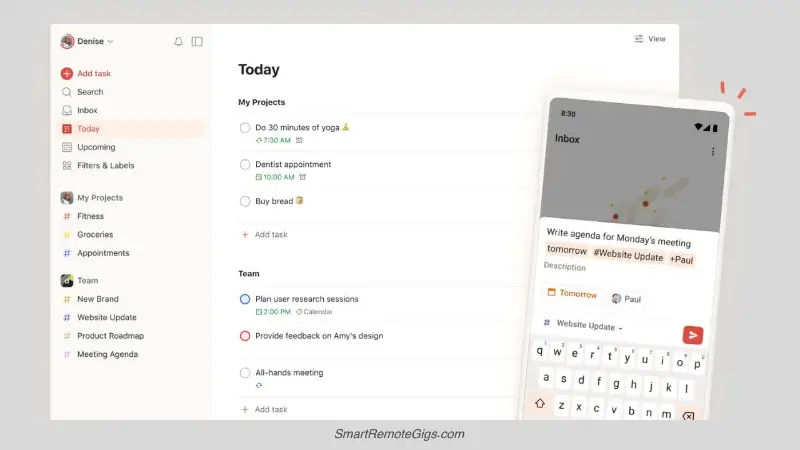
Overall Score: 4.8/5
Best for: 90% of GTD users
Pricing: Free (limited), Pro $4/month, Business $6/month
Todoist wins because it gets out of your way.
It’s not the most powerful app. It’s not the most beautiful. It doesn’t enforce GTD structure. But it’s fast, flexible, and cross-platform—which matters more than any feature checklist.
What Makes It Great
Capture Speed: 5/5
The natural language processing is the best in the business. Type:
Buy milk tomorrow @Errands #Personal p1
Todoist instantly parses:
- Task: Buy milk
- Date: Tomorrow
- Label: @Errands
- Project: Personal
- Priority: High (p1)
The Quick Add shortcut (Cmd+Shift+A on Mac, Ctrl+Shift+A on Windows) works from any app. Capture without breaking flow.
Filter Power: 5/5
This is Todoist’s secret weapon. You can create unlimited custom filters (on Pro) with complex logic:
(@HighFocus | p1) & today & !#SomedayThis shows: High-focus tasks OR priority 1 tasks, due today, excluding Someday/Maybe projects.
You can build filters for any scenario:
- Morning deep work (@HighFocus & today)
- Quick wins (@15min & !overdue)
- Weekly review prep (overdue | 7 days)
Cross-Platform: 5/5
Works on everything: Mac, Windows, Linux, iOS, Android, web. Perfect sync. Offline mode. Wear OS support.
If you use multiple devices or aren’t locked into Apple ecosystem, Todoist is the only serious option.
What’s Missing
No Review Mode: 3/5
Todoist has no built-in weekly review feature. You have to manually open each project and scan for staleness. This is the biggest weakness.
Workaround: Create a “Weekly Review” recurring task with a checklist in the description. Not elegant, but functional.
Basic Project Structure: 3/5
You can’t have true dependencies (“Task B can’t start until Task A is done”). You can’t defer tasks (hide them until a start date). These are power features only serious GTD users miss.
The Verdict
Todoist is the Honda Civic of GTD apps. Reliable, affordable, does everything well without excelling at any one thing.
Read the full Todoist 2026 Review for setup instructions and advanced filter examples.
🥈 #2: OmniFocus 4 – The Powerhouse
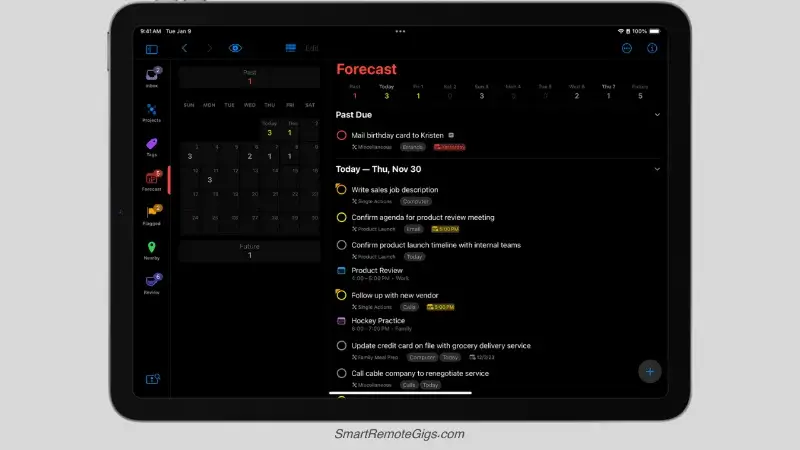
Overall Score: 4.5/5
Best for: Power users on Apple devices
Pricing: $50 Standard / $100 Pro (one-time) or $10/month subscription
OmniFocus is a chainsaw. If you’re trimming hedges, it’s overkill. If you’re felling a forest, nothing else comes close.
What Makes It Great
Review Mode: 5/5
This is the killer feature. OmniFocus has a dedicated “Review” perspective that tracks when you last reviewed each project and surfaces ones that are overdue for review.
You set different review intervals:
- Daily routines: Review weekly
- Active projects: Review weekly
- Long-term goals: Review monthly
- Someday/Maybe: Review quarterly
The app does the tracking. You just work through the queue. This is the only app that actively prevents you from ignoring your commitments.
Defer Dates: 5/5
OmniFocus separates “defer date” (when task becomes available) from “due date” (when it must be done).
Example: Tax filing is due April 15. But you can’t start until you receive W-2s in late January. Set defer date Feb 1, due date Apr 15. The task is invisible until February, then appears with a clear 10-week window.
This eliminates “future worry clutter” that plagues other apps.
Perspectives (Custom Views): 5/5
Perspectives are saved searches with complex logic. You can filter by:
- Context tags
- Project hierarchy
- Defer/due dates
- Completion status
- Custom flags
- Estimated duration
- Any combination of the above
Example “Deep Work” Perspective:
- Context: @HighFocus
- Available: Today
- Not blocked by dependencies
- Estimated duration: 2+ hours
- Sorted by: Priority, then due date
You can create unlimited perspectives (Pro license only) for any workflow scenario.
What’s Missing
Apple Ecosystem Only: 1/5
No Windows. No Android. No Linux. If you use anything other than Mac/iPhone/iPad, stop reading.
There’s a web viewer but it requires an Apple device to set up initially.
Steep Learning Curve: 2/5
OmniFocus assumes you understand GTD deeply. The interface is dense with options. New users are overwhelmed.
If you’re new to GTD, start with Todoist or Things 3. Graduate to OmniFocus when you hit their ceiling.
Expensive: 3/5
$100 for Pro license is steep compared to Todoist’s $4/month. But it’s a one-time purchase (with paid upgrades for major versions).
For serious GTD practitioners, it’s worth it. For casual users, it’s overkill.
The Verdict
OmniFocus is the professional tool for serious GTD practitioners. If you’ve read David Allen’s book, you’re on Mac, and you’ve outgrown simpler apps, this is your endpoint.
Read the full OmniFocus 4 Review for setup guide and Perspective examples.
🥉 #3: Things 3 – The Minimalist
Overall Score: 4.3/5
Best for: Apple users who want beauty and simplicity
Pricing: $50 (Mac), $10 (iPhone), $20 (iPad) – one-time purchases
Things 3 is the most beautiful task manager ever made. It’s also surprisingly powerful while maintaining a minimal interface.
What Makes It Great
Gorgeous Design: 5/5
This app is art. Every interaction is polished. Animations are smooth. Typography is perfect. Using it feels like a luxury experience.
For people who need their tools to be aesthetically pleasing (not shallow—design affects motivation), Things 3 is unmatched.
Quick Entry: 5/5
The Quick Entry window (keyboard shortcut from anywhere) is as fast as Todoist but more elegant. You can add tasks, schedule them, assign projects, and add tags without touching the mouse.
Today View: 5/5
Things has a brilliant “Today” view that combines:
- Tasks scheduled for today
- Tasks from your “Anytime” list you might want to tackle
- Calendar events (with Fantastical integration)
It’s a smart daily dashboard that doesn’t overwhelm you with everything.
What’s Missing
Limited Filtering: 3/5
You can’t create complex filters like Todoist or OmniFocus. The search is basic. You can’t save custom perspectives with Boolean logic.
For simple GTD, this is fine. For complex multi-project management, it’s limiting.
No Natural Language: 3/5
You can’t type “tomorrow @home p1” and have it parse automatically. You have to click fields or use keyboard shortcuts for each element.
It’s still fast, just not as fast as Todoist’s NLP.
Apple Only: 1/5
Same problem as OmniFocus—Mac and iOS only. If you use Windows or Android, this isn’t an option.
The Verdict
Things 3 is the perfect middle ground between Todoist’s flexibility and OmniFocus’s power. If you’re on Apple devices and want a beautiful, capable app without overwhelming complexity, this is it.
No in-depth review yet, but their official site has great tutorials.
#4: FacileThings – The GTD Purist
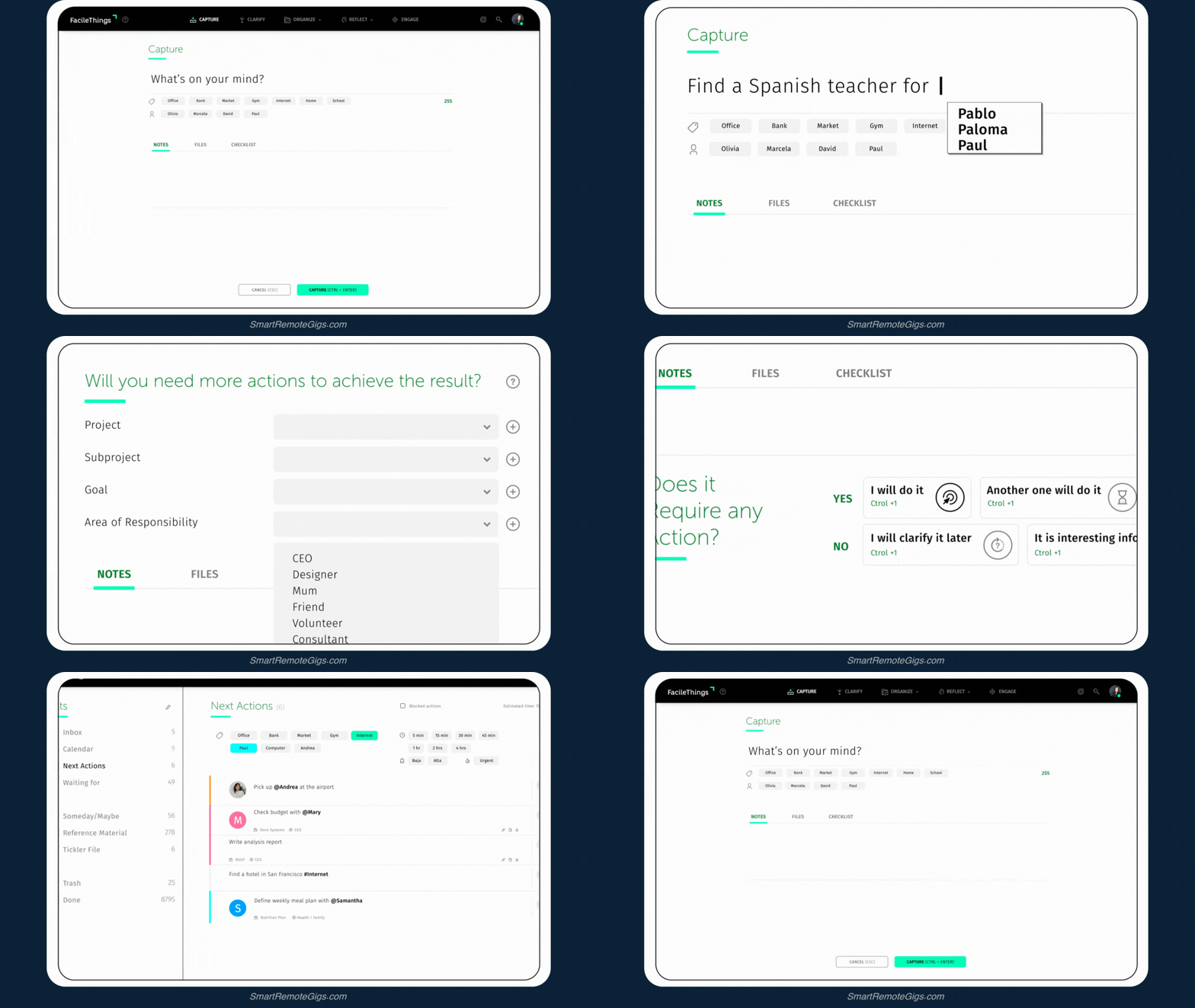
Overall Score: 4.0/5
Best for: GTD beginners who want structure
Pricing: $12/month (no free tier)
FacileThings is the only app designed exclusively for GTD. It doesn’t just support the methodology—it enforces it.
What Makes It Great
Forced GTD Structure: 5/5
When you process your inbox, FacileThings walks you through the GTD decision tree:
- Is it actionable? (Yes/No)
- What’s the next action?
- Will it take less than 2 minutes? (Do it now / Defer it)
- Is it a project or single action?
- What context does it belong to?
This is brilliant for beginners learning GTD. The app teaches you the methodology as you use it.
Weekly Review Built-In: 5/5
FacileThings forces you to do a weekly review. The app literally won’t let you continue using it normally until you complete the review checklist.
For people who skip reviews (most people), this discipline is valuable.
GTD Horizons: 4/5
The app supports all six GTD “Horizons of Focus” (current actions, projects, areas of responsibility, goals, vision, purpose). Most apps stop at actions and projects.
What’s Missing
Slow Capture: 2/5
Because FacileThings enforces the full GTD workflow, capture is slow. You can’t just throw tasks into an inbox—you have to answer questions and go through decision trees.
This breaks fast capture, which is essential for GTD.
Expensive: 2/5
$12/month with no free tier is steep compared to Todoist’s $4/month or OmniFocus’s one-time $100.
Rigid: 3/5
The enforced structure is great for learning but frustrating once you know GTD. You can’t customize the workflow or shortcuts. You’re locked into their interpretation of the methodology.
The Verdict
FacileThings is a training app. Use it for 3-6 months to learn strict GTD, then graduate to a faster, more flexible tool.
Check their official site for a demo.
#5: Notion – The Builder
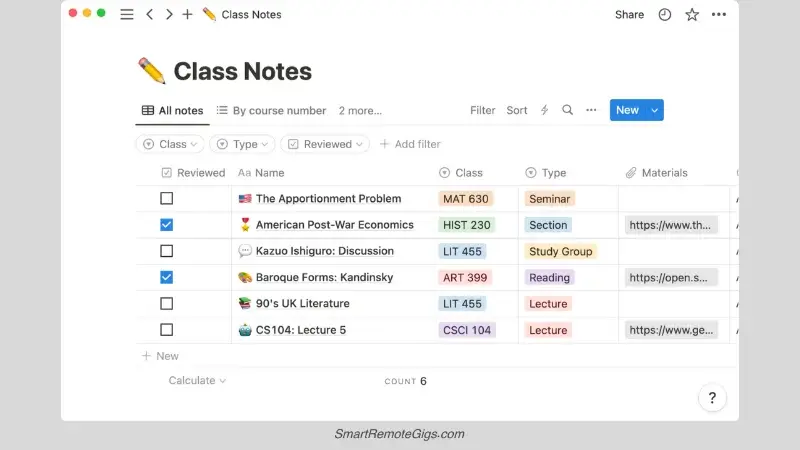
Overall Score: 3.5/5
Best for: People who want infinite customization
Pricing: Free (personal), Plus $10/month, Business $15/month
Notion isn’t a task manager—it’s a blank canvas. You can build a GTD system from scratch using databases, views, and templates.
What Makes It Great
Infinite Flexibility: 5/5
You can build literally any system you can imagine. Multiple database views. Custom properties. Linked databases. Embedded content. Templates.
If you’re a tinkerer who loves designing systems, Notion is paradise.
All-in-One: 4/5
Notion combines tasks, notes, wikis, databases, and docs in one place. Your project management and reference material live together.
Need a digital filing cabinet? Notion is also one of the best note-taking apps for comprehensive information management.
Collaboration: 5/5
Notion’s collaboration features are excellent. Real-time editing, comments, mentions, permissions. Great for teams.
What’s Missing
Slow Capture: 1/5
Adding a task in Notion requires:
- Navigate to the right database
- Click “+ New”
- Fill in multiple properties (Name, Status, Context, Priority, Date)
- Save and close
This takes 15-30 seconds. Way too slow for GTD capture. Your thoughts evaporate before you finish entering them.
No Quick Add: 1/5
There’s no universal quick add shortcut. You can’t capture from outside the app. You can’t use natural language processing.
High Maintenance: 2/5
Custom-built systems require constant maintenance. Views break. Databases get cluttered. You spend more time organizing Notion than using it.
No Review Support: 2/5
Notion has no built-in review features. You have to manually build views and checklists for weekly reviews.
The Verdict
Notion is powerful but high friction. Only use it if:
You love customizing and building systems
You need both tasks and extensive reference material in one place
You’re willing to invest hours in setup and maintenance
For pure task management, use a dedicated app. For comprehensive knowledge management + tasks, Notion works.
Special Mentions
Best for ADHD: Tiimo
Score: 4.2/5 (for ADHD users specifically)
Tiimo isn’t a traditional task manager—it’s a visual time-blocking app designed for neurodivergent brains.
Why it works:
- Color-coded visual schedule (see your day at a glance)
- Notifications with custom sounds (reduce notification blindness)
- Focus timer built-in (Pomodoro-style sprints)
- Routines and habits (perfect for ADHD consistency struggles)
The tradeoff: It’s not a full GTD system. It’s an execution layer that sits on top of your organizational system.
Best combo: Use Todoist for GTD organization, Tiimo for daily execution.
See why visual planning works better in our GTD for ADHD guide.
Best Free Option: Microsoft To Do
Score: 3.8/5
If you need zero-cost GTD, Microsoft To Do is surprisingly capable:
- Cross-platform (Windows, Mac, iOS, Android, web)
- “My Day” feature (daily planning)
- Lists, subtasks, due dates, recurring tasks
- Decent mobile app
What’s missing: No real context support, weak filtering, no review mode.
Good for: Simple GTD systems with few projects. Anyone on a tight budget.
Honorable Mention: TickTick
Score: 4.0/5
TickTick has more features than Todoist (calendar view, Pomodoro timer, habit tracking, Eisenhower matrix) but feels heavier.
For people who want an all-in-one productivity suite, TickTick delivers. For people who want a focused task manager, Todoist is cleaner.
Check TickTick if Todoist feels too minimal.
Frequently Asked Questions
What is the best free GTD app?
For most people: Microsoft To Do
It’s genuinely free (no premium tier needed for basic GTD), cross-platform, and has enough features for simple systems.
For Apple users: Apple Reminders (iOS 17+)
Recent updates added tags, smart lists, and better organization. Still basic, but functional for straightforward GTD.
Budget compromise: Todoist Free
The free tier is limited (5 projects, 5 filters), but if you have a simple life, it works. Upgrade to Pro ($4/month) when you hit the ceiling.
Is OmniFocus worth the money?
For strict GTD practitioners on Mac: Yes, absolutely.
The Review mode alone justifies the price. No other app actively prevents you from ignoring your commitments. The defer dates, dependencies, and Perspectives are professional-grade features.
For everyone else: No.
If you’re on Windows/Android, it literally won’t work. If you’re new to GTD, the complexity will overwhelm you. If your system is simple, it’s expensive overkill.
The rule: Try Todoist or Things first. Only upgrade to OmniFocus if you definitively hit their limitations.
Read the full OmniFocus Review to understand if you need it.
Can I use multiple apps together?
Short answer: No.
Long answer: GTD requires one trusted system. If you split your commitments across multiple apps, you’ll never achieve “mind like water.” You’ll always wonder “Did I capture that in App A or App B?”
The exception: Hybrid analog + digital
You can use one digital app as your database (Todoist, OmniFocus) and paper for daily execution. This works because you’re using each tool for different phases—not splitting your commitments.
See our Analog vs. Digital GTD guide for hybrid strategies.
What about Asana, Monday, or Trello?
These are team collaboration tools, not personal GTD systems.
Use them if:
You’re managing team projects
You need to delegate and track others’ work
You require permissions, workflows, and reporting
Don’t use them if:
You’re managing personal commitments
You need fast capture and private organization
You want minimal friction
Personal GTD and team project management are different use cases. Don’t confuse the tools.
How do I know which app is right for me?
Ask yourself three questions:
1. What devices do I use?
Mac/iOS only → OmniFocus or Things 3
Cross-platform → Todoist
Windows-heavy → Todoist or Microsoft To Do
2. How complex is my system?
Simple (< 20 projects) → Things 3 or Todoist Free
Medium (20-50 projects) → Todoist Pro
Complex (50+ projects) → OmniFocus
3. Do I know GTD well?
Beginner → FacileThings (to learn) or Todoist (to practice)
Intermediate → Todoist or Things 3
Advanced → OmniFocus
Still not sure? Default to Todoist. It works for 90% of people.
Final Verdict: Todoist for 90%, OmniFocus for the 10%

After testing eight apps with real systems for months, here’s the truth:
For 90% of people: Todoist
It’s fast, flexible, affordable, and cross-platform. The NLP capture is unmatched. The filter system is powerful enough for complex GTD without overwhelming beginners. It gets out of your way and lets you work.
For 10% of people: OmniFocus
If you’re a committed GTD practitioner on Mac/iOS who’s hit Todoist’s limitations (no review mode, no defer dates, no dependencies), OmniFocus is the graduation point. It’s expensive and complex, but for power users, it’s worth it.
For everyone else:
- Minimalists on Mac: Things 3
- GTD beginners: FacileThings (temporarily) or Todoist
- Budget users: Microsoft To Do
- Customizers: Notion (if you love tinkering)
- ADHD brains: Tiimo for execution, Todoist for organization
The most important rule: Pick one and commit for 90 days.
Don’t app hop. Don’t “just try” alternatives. Give your chosen system time to become second nature. The magic isn’t in the app—it’s in the habit.
Your next steps:
- Pick your app based on the guide above
- Download and set it up (don’t overthink the configuration)
- Read our Getting Things Done Guide to implement the methodology
- Do your first Weekly Review this Friday
- Commit for 90 days without switching
The app is just the container. The system is what matters.
Now stop researching and start executing.

![Build AI Second Brain Assistant 2026: Local Setup [Guide]](https://smartremotegigs.com/wp-content/uploads/2026/09/build-your-second-brain-ai-assistant-local-rag-hero-1024x577.webp)
![Second Brain with Claude & Obsidian 2026 [My Setup]](https://smartremotegigs.com/wp-content/uploads/2026/08/claude-obsidian-second-brain-mcp-hero-1024x577.webp)
![Why Your Second Brain Fails 2026: Retrieval Fix [Fix]](https://smartremotegigs.com/wp-content/uploads/2026/08/why-your-second-brain-fails-hero-1024x576.webp)