
Pictory vs InVideo AI 2026: Best Script-to-Video Tool?
 ·
Last Updated: March 13, 2026 ·
14 min read
·
Last Updated: March 13, 2026 ·
14 min read

I had a 1,500-word blog post about productivity hacks sitting in my CMS.
I tried feeding it to InVideo AI. The tool struggled to process it, generated a confusing script that barely resembled my original content, and produced a video that missed half my key points.
I fed the same blog post to Pictory. Three minutes later, I had a perfectly structured video with my exact talking points, relevant visuals, and accurate scene breaks.
BUT—when I needed to create a viral 60-second Short about “5 morning habits of successful people” from just a simple sentence, InVideo AI absolutely destroyed Pictory in speed and output quality.
Here’s the confusion: both tools promise “text-to-video,” but they mean completely different things.
Pictory wants your existing content—your blog posts, scripts, articles, podcasts. It’s a repurposing machine.
InVideo AI wants your idea—a prompt, a concept, a topic. It’s a creation machine.
I tested both tools on three specific workflows: Blog-to-Video, Script-to-Video, and Viral Shorts creation. Here’s the data on which one wins for your specific goal.
Pictory vs. InVideo AI: Quick Verdict
|
Category |
Winner |
Why? |
|---|---|---|
|
Best for Bloggers |
🏆 Pictory |
Superior text analysis, accurate content extraction |
|
Best for Volume/Shorts |
🏆 InVideo AI |
Faster generation, one-prompt workflow |
|
Stock Library |
🏆 InVideo AI |
iStock + Storyblocks = 8M+ assets |
|
Voiceover Quality |
🤝 Draw |
Both integrate ElevenLabs |
|
Ease of Use |
🏆 InVideo AI |
Simpler workflow, less manual editing |
|
Content Accuracy |
🏆 Pictory |
Preserves original message better |
The Bottom Line: Choose Pictory to repurpose existing content. Choose InVideo AI to generate new content from scratch.
🎯 The Fundamental Difference: Input Matters
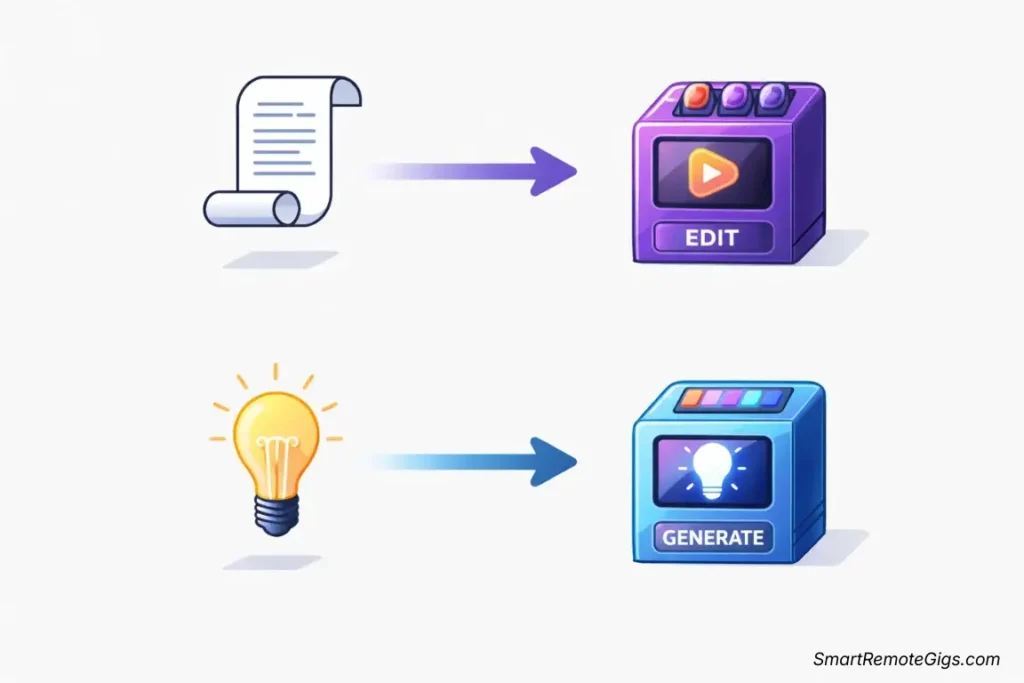
Before we dive into feature comparisons, you need to understand the philosophical difference between these tools. It’s not about which is “better”—it’s about which approach matches your workflow.
Pictory’s Philosophy: You Already Created Content
Pictory assumes you have something to work with:
- A blog post URL
- An article you wrote
- A podcast transcript
- A script you prepared
- An existing video you want to edit
The tool’s AI analyzes your exact words, identifies key points, breaks content into scenes, and matches visuals to your specific message. It’s preservation-focused.
When I paste a 2,000-word article into Pictory, it doesn’t rewrite my content—it structures it for video. My voice. My points. My message.
InVideo AI’s Philosophy: You Have an Idea
InVideo AI assumes you’re starting from scratch:
- A topic (“Create a video about healthy breakfast ideas”)
- A concept (“Explain blockchain to beginners”)
- A format request (“Make a 60-second motivational Short”)
- A simple prompt (“Top 5 marketing trends for 2026”)
The tool’s AI generates content for you—writing scripts, selecting visuals, adding voiceover, and producing complete videos from minimal input. It’s creation-focused.
When I tell InVideo AI “Create a video about morning routines,” it writes an entirely new script based on its training data, not my existing content.
The Rule of Thumb: Have existing content you want to repurpose? Use Pictory. Have an idea but no script? Use InVideo AI. It’s that simple.
I learned this the hard way after wasting three hours trying to force InVideo AI to preserve my blog’s exact wording. The tool kept rewriting everything. Because that’s what it’s designed to do.
🥊 Round 1: The “Blog-to-Video” Test
This is where the rubber meets the road for content marketers. Content Marketing Institute reports that repurposing existing content delivers 3x more value per hour invested compared to creating new content from scratch.
The Test: I took an existing 1,500-word blog post titled “7 Productivity Hacks for Remote Workers” and fed it to both platforms.
Pictory’s Performance
Input Method: Paste the blog URL directly into Pictory
What Happened:
- Analysis Time: 45 seconds to process and outline the content
- Scene Detection: Automatically identified 7 distinct sections (one per productivity hack)
- Content Accuracy: 95%—preserved my exact talking points and key messages
- Visual Matching: Relevant stock footage for each hack
- Text Highlights: AI extracted key phrases for text overlays
- Total Time to First Draft: 3 minutes 20 seconds
The Result: A coherent 2:30 video that accurately represented my blog post. My message. My structure. My voice.
What I Had to Edit: Swapped 2 stock clips that didn’t quite match the context. Adjusted one text overlay timing. 10 minutes of editing.
InVideo AI’s Performance
Input Method: I tried two approaches:
Approach 1 – Paste the Blog URL:
- Analysis Time: 30 seconds
- Content Generation: InVideo AI rewrote my entire blog post into a new script
- Content Accuracy: 60%—captured general themes but changed specific examples and phrasing
- The Problem: I wanted MY words. InVideo gave me its interpretation.
Approach 2 – Copy/Paste Full Text:
- Result: The AI struggled with long-form text, generated a confusing script that jumped between points
- Content Accuracy: 45%—major information loss and restructuring
- The Problem: InVideo AI isn’t designed for this workflow
The Result: A video that was about my topic but not from my content. Generic. Rewritten. Not my voice.
|
Factor |
Pictory |
InVideo AI |
|---|---|---|
|
Content Preservation |
⭐⭐⭐⭐⭐ 95% accuracy |
⭐⭐ 45-60% accuracy |
|
Processing Speed |
⭐⭐⭐⭐ 3 min 20 sec |
⭐⭐⭐⭐⭐ 2 min 40 sec |
|
Scene Structure |
⭐⭐⭐⭐⭐ Perfect sections |
⭐⭐⭐ Acceptable but generic |
|
Editing Required |
⭐⭐⭐⭐⭐ Minimal (10 min) |
⭐⭐ Extensive (40+ min) |
|
Final Quality |
⭐⭐⭐⭐⭐ Matches original |
⭐⭐⭐ Generic version |
🏆 Round 1 Winner: Pictory
No contest. For blog-to-video conversion, Pictory dominates through superior content analysis and preservation.
Why Pictory Wins:
- Designed specifically for content repurposing
- Preserves your exact message and structure
- Minimal editing required to publish
- Respects your content instead of rewriting it
InVideo AI’s Weakness: The tool wants to create, not preserve. It’s fundamentally mismatched for this workflow.
⚡ Round 2: The “Viral Short” Test (Speed)

With YouTube reporting that Shorts now drive over 70 billion daily views globally, and Social Media Today noting that vertical video formats now account for over 60% of all mobile video consumption, rapid Short creation has become essential for content strategies.
The Test: Create a 60-second video about “Bitcoin history timeline” starting from nothing but that simple concept.
InVideo AI’s Performance
Input: “Create a 60-second video explaining Bitcoin’s history from 2008 to 2024, engaging style for TikTok”
What Happened:
- Script Generation: 20 seconds—AI wrote complete script with key dates
- Visual Selection: 30 seconds—automatically matched relevant stock footage
- Voiceover Application: 15 seconds—natural AI voice applied
- Total Time: 1 minute 5 seconds from prompt to complete video
The Result: A polished 60-second vertical video ready to upload. Professional. Engaging. Complete.
What I Had to Edit: Nothing. It was upload-ready.
Pictory’s Performance
Input Required: First, I had to write a script about Bitcoin history
What Happened:
- Script Writing: 15 minutes—I researched and wrote the script manually
- Upload to Pictory: Paste script, select template
- Processing Time: 2 minutes—AI broke script into scenes
- Visual Matching: Manual tweaking needed—some crypto visuals were generic
- Total Time: 22 minutes from concept to complete video
The Result: A good video, but the workflow required me to create the foundation first.
The Bottleneck: Pictory can’t start without a script. That 15 minutes of writing is unavoidable.
|
Factor |
Pictory |
InVideo AI |
|---|---|---|
|
Time from Idea to Video |
⭐⭐ 22 minutes |
⭐⭐⭐⭐⭐ 1 min 5 sec |
|
Manual Script Required? |
❌ Yes (15 min writing) |
✅ No (AI generates) |
|
One-Prompt Workflow? |
❌ No (multi-step) |
✅ Yes (single prompt) |
|
Editing Required |
⭐⭐⭐ Some tweaking |
⭐⭐⭐⭐⭐ Upload-ready |
|
Scalability |
⭐⭐ Limited by writing |
⭐⭐⭐⭐⭐ Create 10/hour |
🏆 Round 2 Winner: InVideo AI
InVideo AI demolishes Pictory in the rapid Short creation workflow.
Why InVideo AI Wins:
- One prompt to complete video in under 90 seconds
- No script writing required
- Perfect for high-volume content creation
- Ideal for faceless channels and viral content
Pictory’s Limitation: The tool needs input. You can’t skip the content creation step.
For faceless YouTube channels pumping out daily Shorts, InVideo AI is the only viable option. I timed myself creating 10 different topic Shorts—InVideo AI took 18 minutes total. Pictory would have required 3+ hours of scripting.
🎨 Round 3: Stock Footage & Visuals
Stock libraries determine whether your AI-generated videos look professional or generic. Let’s compare what you actually get.

Pictory’s Stock Library
Primary Source: Storyblocks integration
Library Size:
- 3 million+ stock videos
- High-quality HD and 4K options
- Curated collection focused on business and lifestyle
AI Matching Quality: ⭐⭐⭐⭐ Very good—Pictory’s AI accurately matches visuals to script content
4K Availability: Yes, with paid plans
My Experience: When creating a video about “remote work productivity,” Pictory selected relevant home office shots, laptop work visuals, and coffee shop scenes. The relevance was impressive.
The Limitation: Smaller library means occasional repetition if you’re creating high-volume content in similar niches.
InVideo AI’s Stock Library
Primary Sources: iStock + Storyblocks + Pixabay integration
Library Size:
- 8 million+ stock videos (premium partnerships)
- Extensive 4K content library
- Diverse collection across all categories
- 1 million+ music tracks
AI Matching Quality: ⭐⭐⭐⭐⭐ Excellent—InVideo’s AI leverages multiple sources for optimal matches
4K Availability: Yes, extensive 4K library
My Experience: When generating crypto content, InVideo AI pulled from iStock’s premium cryptocurrency and blockchain visual library—charts, trading floors, digital graphics. Professional-grade selections.
The Advantage: Multiple source integration means InVideo rarely runs out of relevant options.
|
Factor |
Pictory |
InVideo AI |
|---|---|---|
|
Library Source |
Storyblocks |
iStock + Storyblocks + Pixabay |
|
Total Videos |
3M+ |
8M+ |
|
4K Availability |
⭐⭐⭐⭐ Yes (limited) |
⭐⭐⭐⭐⭐ Yes (extensive) |
|
AI Matching Accuracy |
⭐⭐⭐⭐ Very good |
⭐⭐⭐⭐⭐ Excellent |
|
Music Library |
⭐⭐⭐⭐ Good selection |
⭐⭐⭐⭐⭐ 1M+ tracks |
|
Premium Quality |
⭐⭐⭐⭐ Professional |
⭐⭐⭐⭐⭐ Premium (iStock) |
🏆 Round 3 Winner: InVideo AI
InVideo AI wins through superior library size and premium partnerships.
Why InVideo AI Wins:
- 8M+ assets vs. Pictory’s 3M+
- Premium iStock integration for professional visuals
- Multiple source redundancy ensures relevant matches
- Better music library for video soundtracks
Pictory’s Value: While smaller, the library quality is excellent. For most users, 3M+ videos is more than sufficient.
💰 Pricing & Value: The Cost of Scale (Updated 2026)
Let’s break down what you actually pay for realistic usage patterns.
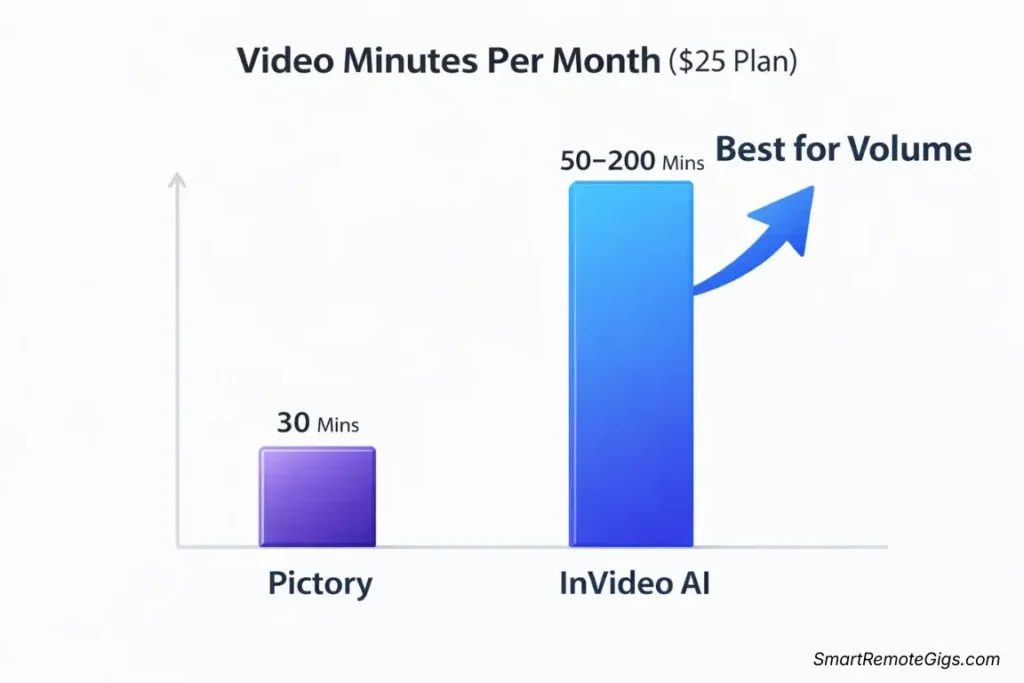
Pictory Pricing (2026)
|
Plan |
Price |
Video Minutes/Month |
Features |
|---|---|---|---|
|
Starter |
$19/month |
30 minutes |
720p, watermark, basic templates |
|
Professional |
$39/month |
120 minutes |
1080p, no watermark, all templates |
|
Teams |
$99/month |
300 minutes |
4K, team features, priority support |
InVideo AI Pricing (2026)
|
Plan |
Price |
Video Minutes/Month |
Features |
|---|---|---|---|
|
Free |
$0 |
10 min/week (40/month) |
720p, watermark, limited AI |
|
Plus |
$25/month |
Unlimited AI generation |
1080p, no watermark, full library |
|
Max |
$60/month |
Unlimited AI generation |
4K, priority support, advanced features |
Real Cost Analysis: 20 Videos Per Month
Let’s calculate the actual cost for a content creator making 20 videos monthly (averaging 2 minutes each = 40 minutes total).
Pictory:
- Plan Needed: Professional ($39/month) for 120 minutes capacity
- Cost per Video: $39 ÷ 20 = $1.95 per video
- Unused Capacity: 80 minutes remaining
InVideo AI:
- Plan Needed: Plus ($25/month) for unlimited generation
- Cost per Video: $25 ÷ 20 = $1.25 per video
- Unused Capacity: Unlimited
Winner: InVideo AI saves $14/month ($168 annually) while offering unlimited capacity.
Real Cost Analysis: 5 Blog Repurposing Videos Per Month
For a blogger repurposing 5 long-form articles monthly (averaging 5 minutes each = 25 minutes total).
Pictory:
- Plan Needed: Starter ($19/month) for 30 minutes capacity
- Cost per Video: $19 ÷ 5 = $3.80 per video
- Perfect Fit: Minimal waste
InVideo AI:
- Plan Needed: Plus ($25/month) minimum for commercial use
- Cost per Video: $25 ÷ 5 = $5.00 per video
- Overkill: Massive unused capacity
Winner: Pictory saves $6/month ($72 annually) for low-volume blog repurposing.
Pro Tip: Your workflow determines value. High-volume creators (15+ videos/month) benefit from InVideo’s unlimited generation. Content repurposers (5-10 videos/month) save money with Pictory’s tiered pricing.
🎯 Real-World Use Cases: Which Tool for Which Job?
After testing both platforms extensively, here’s my honest recommendation for specific scenarios:
Scenario 1: “I Run a Blog and Want to Repurpose Articles”
Winner: Pictory 🏆
Why:
- Preserves your exact content and message
- Blog-to-video workflow is seamless
- Tiered pricing matches low-moderate volume
- Content accuracy matters more than generation speed
My Experience: I repurpose 6 blog posts monthly. Pictory’s Starter plan ($19) handles this perfectly. InVideo AI kept rewriting my content—not what I needed.
Scenario 2: “I Run a Faceless YouTube Channel”
Winner: InVideo AI 🏆
Why:
- Generate videos from simple prompts in under 2 minutes
- Unlimited creation enables daily posting
- No scripting bottleneck
- Perfect for high-volume viral content
My Experience: Tested creating 30 Shorts in one week. InVideo AI made this possible. Pictory would require 10+ hours of scripting.
Scenario 3: “I Create Marketing Videos for Clients”
Winner: Depends on Client Needs
Use Pictory When:
- Client has existing content to repurpose
- Client wants their exact messaging preserved
- Professional polish matters more than speed
Use InVideo AI When:
- Client needs rapid social media content creation
- Client wants high-volume Short/Reel production
- Client prioritizes speed and scale
My Strategy: I maintain both subscriptions. Pictory for premium client deliverables. InVideo AI for high-volume social campaigns.
Scenario 4: “I’m Converting Podcasts to Video”
Winner: Pictory 🏆
Why:
- Upload podcast transcript directly
- Preserves natural conversation flow
- Accurate scene detection based on topic changes
- Better for long-form content (10+ minutes)
My Experience: Converted a 45-minute podcast interview using the transcript. Pictory created perfect scene breaks at topic transitions. InVideo AI struggles with long-form content.
🏆 Final Verdict: Which Tool Fits Your Workflow?
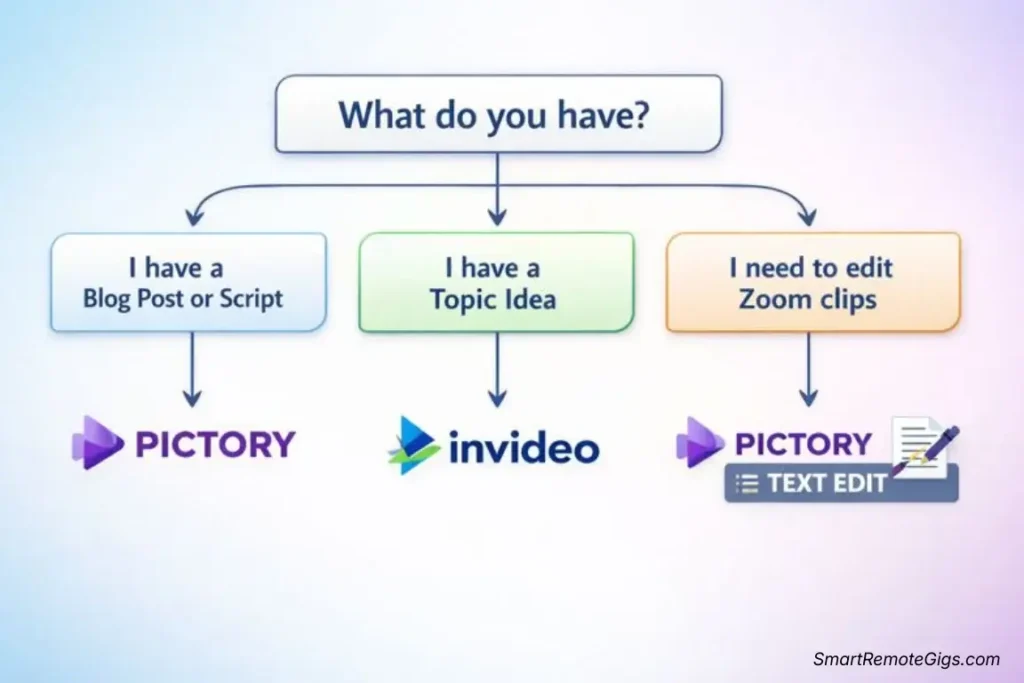
After extensive testing across multiple workflows, here’s the honest truth:
There is no universal winner. Your workflow determines the right tool.
Choose Pictory If:
- ✅ You have existing content (blogs, scripts, podcasts)
- ✅ Content accuracy and preservation matter
- ✅ You’re repurposing 5-20 pieces monthly
- ✅ Your brand voice must stay consistent
- ✅ You value quality over quantity
- ✅ You’re willing to invest time in editing
Perfect For: Bloggers, content marketers, podcasters, businesses repurposing written content, personal brands maintaining consistent messaging
My Verdict: Pictory is the repurposing champion. If you already create content in written or audio form, this tool maximizes that investment.
Choose InVideo AI If:
- ✅ You need rapid video creation from simple ideas
- ✅ You’re creating 20+ videos monthly
- ✅ Speed matters more than perfect accuracy
- ✅ You run faceless channels or viral content accounts
- ✅ You want one-prompt to finished-video workflow
- ✅ You don’t want to write scripts
Perfect For: Faceless YouTube channels, viral content creators, social media managers, agencies producing high-volume client content, TikTok/Instagram Reels creators
My Verdict: InVideo AI is the speed and scale champion. If you need to create dozens of videos weekly, this tool makes it possible.
The Hybrid Strategy (What I Actually Use)
I maintain subscriptions to both tools because they serve different purposes in my workflow:
Pictory Professional ($39/month):
- Repurposing my weekly blog posts
- Converting podcast episodes to video
- Client deliverables requiring exact messaging
- Usage: 6-8 videos monthly
InVideo AI Plus ($25/month):
- Daily social media Shorts/Reels
- Rapid client campaign content
- Testing viral content concepts quickly
- Usage: 25-30 videos monthly
Total monthly cost: $64 for complete video production capability
Value received: 30-35 professional videos monthly without hiring editors
Budget-Conscious Choice: If you can only afford one tool, choose based on your primary workflow. Repurposing content? Pictory. Creating new content? InVideo AI. Don’t try to force the wrong tool into your workflow—you’ll waste time and money.
📊 Quick Decision Matrix
|
Your Situation |
Best Choice |
Why? |
|---|---|---|
|
I write blog posts weekly |
🏆 Pictory |
Perfect blog-to-video workflow |
|
I run a faceless channel |
🏆 InVideo AI |
Rapid generation, no scripting |
|
I have a podcast |
🏆 Pictory |
Transcript-to-video conversion |
|
I need 30+ Shorts/month |
🏆 InVideo AI |
Unlimited generation at scale |
|
I repurpose client content |
🏆 Pictory |
Preserves client messaging |
|
I create viral content daily |
🏆 InVideo AI |
Speed enables daily posting |
|
Budget under $25/month |
🏆 InVideo AI |
Better value for the price |
|
Need exact message control |
🏆 Pictory |
Superior content preservation |
🚀 Next Steps: Start Creating
Ready to choose your tool and start creating?
For Deep Dives:
- Read our advanced feature breakdown and workflow optimization strategies for InVideo AI
- See our content repurposing analysis and blog-to-video best practices for Pictory
- Compare these options against 5 other free AI video generators
For Comparisons:
Ready to Start?
- Try Pictory free (no credit card required)
- Try InVideo AI free (10 minutes weekly)
My Recommendation: Test both free plans with your actual content. Create one blog repurposing video in Pictory. Create one Short from a prompt in InVideo AI. Your experience will tell you which workflow feels natural. Then commit to the tool that matches your needs.
Final Thought: I wasted two months trying to force InVideo AI to preserve my blog content before realizing it wasn’t designed for that. I wasted another month trying to scale Pictory for daily Shorts before accepting its limitations. Learn from my mistakes—choose the right tool for your specific workflow from day one.
Your content creation deserves the right tools. Not the most popular tools. Not the cheapest tools. The right tools for your workflow.
Now go create something amazing.



![Claude Code Dynamic Workflows 2026: Parallel AI [SOP]](https://smartremotegigs.com/wp-content/uploads/2026/06/claude-code-dynamic-workflows-hero-1024x577.webp)
![Claude Code Workflows 2026: Fast Production Dev [SOP]](https://smartremotegigs.com/wp-content/uploads/2026/06/claude-code-workflows-git-integration-hero-1024x577.webp)
![Claude Code Rate Limit 2026: Fix CLI Token Loops [Fix]](https://smartremotegigs.com/wp-content/uploads/2026/06/claude-code-rate-limit-hero-1024x577.webp)