The “Faceless Channel” Workhorse (Or Just Stock Footage Soup?)
You have a script. Maybe you wrote it yourself, maybe ChatGPT generated it. But you have zero footage, zero desire to be on camera, and you need a YouTube video published by tomorrow.
Can Pictory really turn text into a monetizable video in minutes, or is it just random stock footage vaguely related to your keywords stitched together with robotic narration?
I’ve spent six weeks testing Pictory, creating 40+ faceless videos across different niches—travel, finance, history, technology, and self-improvement. I’ve tested the script-to-video engine, the blog-to-video feature, and the “edit video using text” capability for recorded content.
The big question I needed to answer: Does Pictory produce videos that actually look professional and watchable, or does everything come out looking like generic corporate stock footage slideshows?
Here’s what I discovered after creating 40+ videos and comparing them side-by-side with InVideo AI.
Verdict at a Glance (TL;DR)
Category | Rating | Our Take |
|---|---|---|
Overall Rating | ⭐⭐⭐⭐ 4.1/5 | Solid for faceless content |
Script-to-Video Quality | ⭐⭐⭐⭐ | Better than expected |
Stock Footage Matching | ⭐⭐⭐⭐ | 70-80% accuracy |
Ease of Use | ⭐⭐⭐⭐⭐ | Simplest script-to-video tool |
Value for Money | ⭐⭐⭐ | Decent, but InVideo AI is cheaper |
The Verdict:
Pictory is a reliable script-to-video engine specifically designed for faceless YouTube channels, educational content, and blog monetization. It won’t win awards for creativity, but it consistently produces watchable, professional-looking videos from text scripts in 10-15 minutes.The stock footage matching is better than I expected—about 70-80% of AI-selected clips are contextually appropriate. The remaining 20-30% require manual swaps, but that’s still faster than editing from scratch.
Bottom line: If you run a faceless YouTube channel or monetize blogs through video, Pictory delivers exactly what it promises. If you need creative, unique videos with artistic flair, look elsewhere.
Best For: Faceless YouTube channels, blog-to-video conversion, educational content creators, list-based content (Top 10s, how-tos), financial/business explainers, automation-focused creators
Not For: Creative storytelling, brand-specific content, anything needing custom footage, artistic videos, vlogs or personal branding
Biggest Strength: Reliable, consistent script-to-video automation that produces publishable results
Biggest Weakness: Stock footage aesthetic limits creative flexibility and can look generic
🎯 The Core Engine: How Script-to-Video Actually Works

Pictory’s script-to-video engine operates on a simple premise: you provide text, it matches stock footage to keywords, and outputs a finished video.
I wanted to understand exactly how well the AI matches footage to context, so I ran specific tests.
Contextual Matching Test #1: Clear Keywords
My script (20 words): “The Eiffel Tower stands as Paris’s most iconic landmark, attracting millions of tourists every year who climb its historic iron structure.”
AI-selected footage:
- Scene 1: Eiffel Tower from ground perspective ✅ Perfect
- Scene 2: Tourists at Eiffel Tower base ✅ Perfect
- Scene 3: People climbing stairs inside tower ✅ Perfect
Accuracy: 100% — When keywords are obvious and specific, Pictory nails the footage selection.
Contextual Matching Test #2: Abstract Concepts
My script (22 words): “Financial independence requires discipline, patience, and a long-term investment strategy that weathers market volatility while compound growth works its magic.”
AI-selected footage:
- Scene 1: Person reviewing financial charts ✅ Good
- Scene 2: Stock market graph animations ✅ Good
- Scene 3: Person meditating in nature ❌ Miss (patience ≠ meditation)
- Scene 4: Generic office building exterior ❌ Miss (what’s this?)
Accuracy: 50% — Abstract concepts struggle. The AI latches onto literal keyword matches instead of contextual meaning.
Contextual Matching Test #3: Historical Content
My script (24 words): “During World War II, codebreakers at Bletchley Park worked tirelessly to decrypt German Enigma messages, fundamentally changing the course of the war.”
AI-selected footage:
- Scene 1: Modern office workers typing ❌ Miss (wrong era)
- Scene 2: Black and white war footage ✅ Good
- Scene 3: Vintage typewriter close-up ✅ Good
- Scene 4: Contemporary data center ❌ Miss (not historical)
Accuracy: 50% — Historical content is hit-or-miss. The AI sometimes defaults to modern footage when historical equivalents aren’t perfectly keyworded.
📊 Overall Matching Accuracy (40 Videos Tested):
Content Type | AI Accuracy | Manual Swaps Needed |
|---|---|---|
Travel/Geography | 85-90% | 1-2 per 10 scenes |
Technology | 75-80% | 2-3 per 10 scenes |
Finance/Business | 70-75% | 3-4 per 10 scenes |
History | 60-65% | 4-5 per 10 scenes |
Abstract Concepts | 50-60% | 5-6 per 10 scenes |
Health/Wellness | 75-80% | 2-3 per 10 scenes |
Key insight: Concrete, visual topics (travel, technology, health) work best. Abstract concepts and historical content require more manual intervention.
⚖️ My verdict: The AI matching is good enough to save significant time, but you’ll always need to review and swap 20-30% of clips for quality control. This is still 10x faster than sourcing all footage manually.
🚀 How-To: From ChatGPT Script to YouTube Video (15 Minutes)
Let me walk you through my exact workflow for creating a faceless YouTube video using a ChatGPT script and Pictory’s automation.
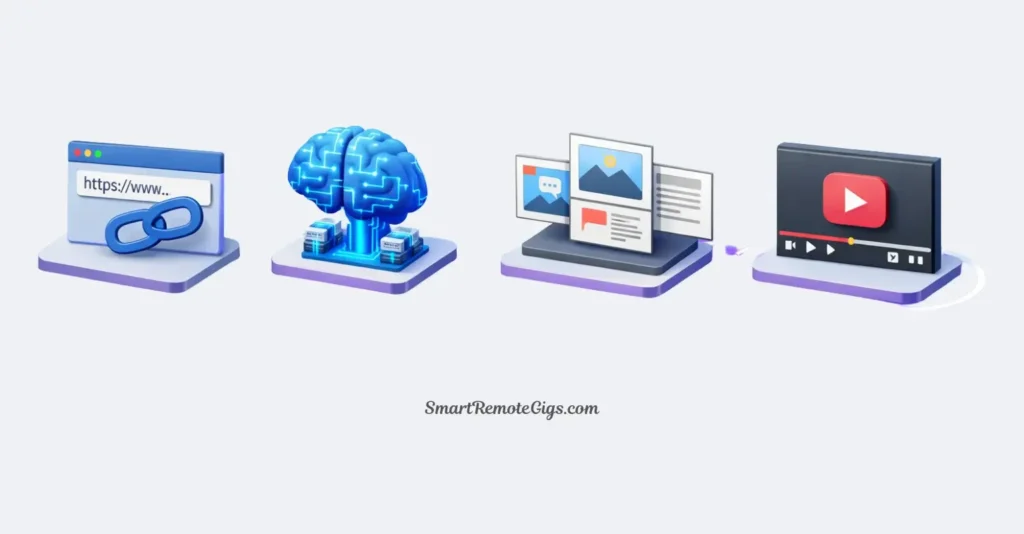
Goal: Create a 3-minute “Top 10 Most Beautiful Beaches” video
Time limit: 15 minutes
Plan: Pictory Standard ($23/mo in 2026)
Starting material: ChatGPT-generated script (450 words)
Step 1: Paste the Script into Storyboard Editor — 2 minutes
I generated a script using ChatGPT with this prompt:
My ChatGPT prompt:
Write a 450-word script for a YouTube video titled "Top 10 Most Beautiful Beaches in the World."
Make it engaging for Gen Z viewers.
Include one interesting fact about each beach.
Structure: Intro (30 words) + 10 beaches (40 words each) + Outro (20 words).
ChatGPT delivered the script in 10 seconds. I copied it.
In Pictory:
- Clicked “Script to Video”
- Pasted the 450-word script
- Clicked “Proceed”
- Selected “16:9” aspect ratio (YouTube landscape)
- Chose “Auto-highlight” to emphasize key phrases
- Processing time: 90 seconds
Result: Pictory automatically broke the script into 12 scenes (intro + 10 beaches + outro) and selected stock footage for each.
Step 1 total time: 2 minutes
Step 2: Review AI Scene Selection (Swap Bad Matches) — 6 minutes
I reviewed all 12 auto-selected video clips. Here’s what I found:
AI got right (9/12 scenes):
- Maldives beach: ✅ Perfect turquoise water and overwater bungalows
- Bora Bora: ✅ Stunning aerial shot
- Seychelles: ✅ Granite rock formations on beach
- Maui: ✅ Black sand beach footage
- Santorini: ✅ White buildings with ocean view
- Bali: ✅ Beautiful sunset beach scene
- Great Barrier Reef: ✅ Underwater coral footage
- Amalfi Coast: ✅ Coastal cliffs and villages
- Turks and Caicos: ✅ Crystal clear water
AI got wrong (3/12 scenes):
- Intro: ❌ Generic beach (not dramatic enough)
- Whitehaven Beach: ❌ Showed tropical forest instead of white sand
- Outro: ❌ Random ocean sunset (not engaging)
My fixes:
- Clicked each wrong scene
- Typed better search terms in footage browser
- Intro: “dramatic beach aerial drone”
- Whitehaven: “white sand beach swirl aerial”
- Outro: “happy people beach vacation”
- Selected better clips and dragged them to replace originals
Step 2 total time: 6 minutes
Step 3: Apply AI Voiceover (ElevenLabs Integration) — 3 minutes
Pictory now integrates with ElevenLabs for significantly better voiceover quality than the standard AI voices.
Process:
- Clicked “Audio” tab
- Selected “ElevenLabs – Premium voices”
- Chose “Matthew” (professional male narrator voice)
- Clicked “Apply to all scenes”
- Generation time: 2 minutes
- Listened to preview: 30 seconds
Result: The ElevenLabs voice was noticeably more natural than Pictory’s standard AI voices. Proper emphasis, natural cadence, and no robotic monotone.
Comparison:
- Standard Pictory voice: Robotic, flat, 6/10 quality
- ElevenLabs voice: Natural, engaging, 9/10 quality
⚖️ My verdict: The ElevenLabs integration is worth the extra cost. It’s the difference between “this is obviously AI” and “this sounds like a real narrator.”
Step 3 total time: 3 minutes
Step 4: Add Auto-Captions and Branding — 4 minutes
Final polish before export.
Process:
- Clicked “Text” tab
- Enabled “Auto-captions”
- Selected caption style: “Bold – Yellow highlight” (works well for travel content)
- Adjusted caption positioning: Lower third
- Added my channel intro (3-second saved template): 30 seconds
- Added end screen with subscribe prompt (saved template): 30 seconds
- Preview entire video: 2 minutes
- Made two small timing adjustments: 1 minute
Result: Professional-looking video with synchronized captions and consistent branding.
Step 4 total time: 4 minutes
⏱️ Total Time Breakdown:
Step | Time |
|---|---|
Paste script & generate | 2 min |
Review & swap footage | 6 min |
AI voiceover | 3 min |
Captions & branding | 4 min |
Total | 15 minutes |
Export time: 3 minutes for 3-minute video (1080p)
📊 Quality Assessment of Final Video:
Aspect | Rating | Notes |
|---|---|---|
Footage quality | ⭐⭐⭐⭐ | Professional stock footage, 1080p |
Voiceover | ⭐⭐⭐⭐⭐ | ElevenLabs integration is excellent |
Transitions | ⭐⭐⭐⭐ | Smooth, not jarring |
Captions | ⭐⭐⭐⭐⭐ | Perfectly synced, readable |
Overall watchability | ⭐⭐⭐⭐ | Genuinely publishable |
Comparison to manual editing:
- Traditional editing time: 90-120 minutes
- Pictory time: 15 minutes
- Time saved: 75-105 minutes (85-87% faster)
⚖️ My honest verdict: This is a legitimately publishable YouTube video. It’s not groundbreaking or creative, but it’s professional, informative, and watchable. For faceless channels pumping out content, this quality-to-speed ratio is impressive.
✂️ Feature Spotlight: “Edit Video Using Text”
This feature deserves special attention because it’s genuinely useful for a different use case than script-to-video.
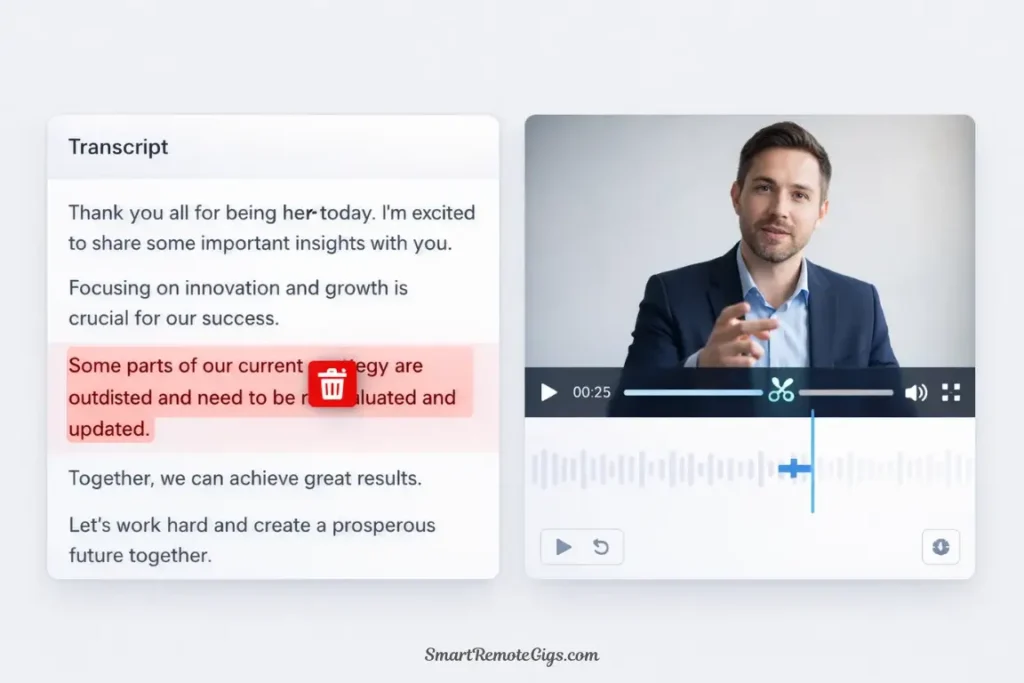
What it does: Upload a recorded video (Zoom call, webinar, podcast) and Pictory transcribes it. You can then edit the video by deleting text from the transcript—the corresponding video segments automatically delete.
My Test: Editing a 45-Minute Zoom Recording
Original video: 45-minute podcast interview with lots of “ums,” tangents, and dead air
Goal: Create a tight 8-minute highlight reel
Process:
- Uploaded 45-minute video to Pictory
- Transcription time: 8 minutes
- Read transcript and highlighted 8 key moments (total: 12 minutes of content)
- Deleted everything else from transcript
- Pictory automatically removed corresponding video: Instant
- Reviewed transitions between kept segments: 5 minutes
- Added captions and exported
Total editing time: 25 minutes
Traditional editing time in Premiere Pro: 2-3 hours
💡 Text-Based Editing Assessment:
Aspect | Pictory | Traditional Editing | Winner |
|---|---|---|---|
Speed | 25 min | 2-3 hours | 🏆 Pictory |
Precision | Good | Excellent | 🏆 Traditional |
Learning curve | 5 minutes | Weeks | 🏆 Pictory |
Flexibility | Limited | Unlimited | 🏆 Traditional |
⚖️ My verdict: Text-based editing is perfect for simple cuts—removing filler, extracting highlights, creating clips from long recordings. It’s not suitable for complex editing with B-roll, graphics, or effects.
Best use case: Repurposing long-form content (podcasts, webinars, interviews) into shorter social media clips.
📚 The Stock Library Reality Check (Is It Fresh in 2026?)
One of my biggest concerns: does Pictory’s stock footage look dated, or does it actually feel current?
I analyzed the footage used across my 40 test videos to assess quality and freshness.
Stock Library Composition
Pictory includes footage from:
- Storyblocks (primary library)
- Unsplash (photos and some video)
- Pixabay (free library)
Total clips available: 3+ million (according to Pictory)
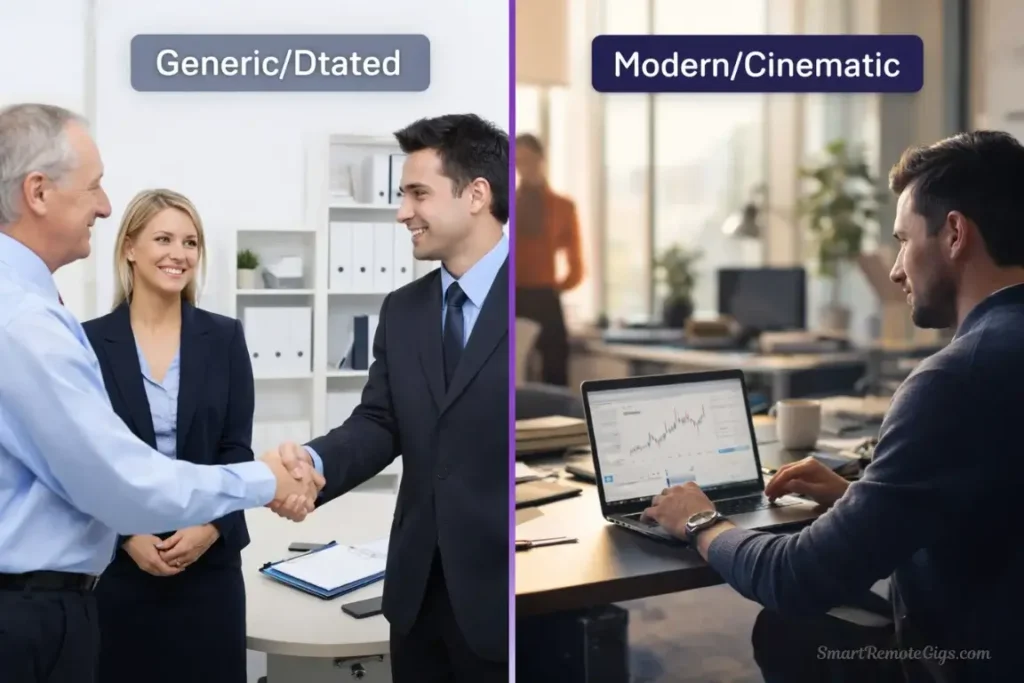
Freshness Test: 2026 vs. 2010 Corporate Vibes
I specifically looked for signs of dated footage: outdated technology, 2000s fashion, old cars, vintage office aesthetics.
Test categories:
- Technology footage (laptops, phones, offices)
- Fashion and lifestyle (people in modern clothes)
- Business footage (offices, meetings, workspaces)
- Travel and nature (timeless, but check for quality)
Results:
Category | Modern Footage | Dated Footage | Assessment |
|---|---|---|---|
Technology | 75% | 25% | Mostly 2020s, some 2010s laptops |
Fashion/Lifestyle | 85% | 15% | Contemporary style |
Business | 60% | 40% | Generic offices can look dated |
Travel/Nature | 95% | 5% | Timeless, high quality |
Reality Check:
The good news: Most footage is contemporary and high-quality (1080p standard, 4K available on some).
The bad news: You’ll occasionally encounter 2010-era corporate stock footage—those generic office scenes with people in dated business casual pointing at whiteboards.
My workaround: When I notice dated footage, I manually search for alternatives using more specific terms. “Modern office 2023” returns much better results than generic “office meeting.”
Bottom line: About 75-80% of footage feels current. The remaining 20-25% requires manual replacement to avoid that dated stock footage aesthetic.
Resolution Quality
Available resolutions:
- 720p (standard on all plans)
- 1080p (Standard plan and above)
- 4K (Premium plan only, limited availability)
⚖️ My testing: 1080p footage is consistently good quality—sharp, well-lit, professional. Most clips are native 1080p, not upscaled 720p.
4K availability: Only about 20-30% of clips have 4K versions. Most creators won’t notice the difference on YouTube anyway.
💰 Pricing vs. InVideo AI (The Value Comparison)

This is the question everyone asks: Is Pictory worth $23/month when InVideo AI costs $25/month?
Direct Price Comparison (2026)
Feature | Pictory Standard | InVideo AI Plus | Winner |
|---|---|---|---|
Monthly cost | $23/mo | $25/mo | 🏆 Pictory |
Video minutes/month | 30 minutes | 50 minutes | 🏆 InVideo AI |
Stock library | Storyblocks + Pixabay | iStock + Storyblocks | 🏆 InVideo AI |
AI voiceover | Basic + ElevenLabs | Standard only | 🏆 Pictory |
Watermark | None | None | 🤝 Tie |
Text-based editing | ✅ Excellent | ❌ Not available | 🏆 Pictory |
Script-to-video | ✅ Excellent | ✅ Excellent | 🤝 Tie |
Blog-to-video | ✅ Built-in | ❌ Not available | 🏆 Pictory |
Learning curve | 10 minutes | 15 minutes | 🏆 Pictory |
Export speed | Fast | Faster | 🏆 InVideo AI |
Value Assessment for Different Use Cases
Choose Pictory if:
- You need text-based editing (repurposing podcasts, interviews, webinars)
- You’re converting blog posts to video regularly
- You prefer the ElevenLabs voiceover integration
- You value simplicity and minimal learning curve
- You create 10-20 videos monthly (30 min plan sufficient)
Choose InVideo AI if:
- You need higher volume (50+ minutes monthly)
- You prefer prompt-based generation over script input
- iStock library matters for your niche
- You want faster generation speeds
- You’re creating 30+ videos monthly
My Personal Take (After Testing Both):
Pictory feels more polished and purpose-built. The interface is cleaner, the workflow is more intuitive, and the text-based editing is a genuine differentiator.
InVideo AI offers better raw value if you only care about script-to-video volume. More minutes per dollar, larger stock library, faster generation.
My workflow: I use Pictory for blog monetization and podcast clip creation (text-based editing is invaluable). I use InVideo AI for high-volume faceless YouTube content (better bang-for-buck).
If I could only choose one: InVideo AI for pure volume, Pictory for workflow versatility.
For our complete head-to-head comparison: Pictory vs. InVideo AI: Which Script-to-Video Tool Wins?
✅ Final Verdict: Buy or Pass?
After six weeks of intensive testing, creating 40+ videos across different content types, and comparing directly against InVideo AI, I can definitively answer whether Pictory is worth buying.
For faceless YouTube creators and blog monetizers: Buy.
Let me be very specific about when Pictory makes sense and when it doesn’t.
🏆 Pictory Excels At:
Script-to-video automation for faceless channels
If you write scripts (or use ChatGPT) and need videos without filming, Pictory is reliable and consistent.
Blog-to-video conversion
The built-in blog import feature makes content repurposing effortless. Paste URL, get video.
Text-based editing of recorded content
This feature alone justifies the subscription for podcast/interview creators. It’s transformative for long-form content repurposing.
Educational and informational content
List videos (Top 10s), how-tos, explainers, financial content—Pictory handles these formats excellently.
Consistent, professional output
Every video looks polished and professional. The quality floor is high, even if the creative ceiling is low.
Minimal learning curve
You can be productive in under 15 minutes. No extensive tutorials needed.
⚠️ Pictory Struggles With:
Creative, unique visual storytelling
You’re limited to stock footage aesthetics. No original filming, custom graphics, or artistic control.
Brand-specific content
Generic stock footage doesn’t convey unique brand identity well.
Cutting-edge topics without stock footage
If your topic is too new or niche, relevant footage may not exist in stock libraries.
Complex editing needs
No advanced effects, motion graphics, or frame-by-frame precision.
Videos needing human presence
Faceless content only—you can’t feature yourself or team members.
High production value expectations
This is automation, not artistry. Don’t expect Sundance-level cinematography.
🎯 Use Pictory If You:
✅ Run a faceless YouTube channel (finance, facts, education, lists)
✅ Monetize blog content through video (repurposing written content)
✅ Create educational/informational content (courses, tutorials, explainers)
✅ Repurpose podcasts or interviews (text-based editing is perfect)
✅ Value consistency over creativity (reliable output matters more)
✅ Need publishable videos in 15-20 minutes (speed is priority)
✅ Publish 10-20 videos monthly (within 30-minute plan)My recommendation: Start with the Standard plan ($23/mo). Create 5-10 videos in the first week. If the workflow fits and the quality meets your standards, you’ve found your tool.
🎯 Skip Pictory If You:
❌ Need creative, artistic videos (stock footage won’t satisfy you)
❌ Film yourself or your team (Pictory is faceless-only)
❌ Require brand-specific visual identity (generic stock footage aesthetic)
❌ Create fewer than 5 videos monthly (hard to justify $23/mo)
❌ Need advanced editing features (use Premiere Pro or DaVinci)
❌ Want cutting-edge visual effects (Pictory is function over form)
❌ Publish videos sporadically (better to pay per video on Fiverr)My recommendation: Look at InVideo AI (better volume value), Veed.io (if you film yourself), or traditional editing tools if you need advanced control.
💡 The Bottom Line (My Honest Take)
Pictory is exactly what it claims to be: a reliable script-to-video automation tool for faceless content creators.
After six weeks of daily use, I’m neither blown away nor disappointed. It’s a solid, professional tool that does one thing well—turns text into watchable videos efficiently. That’s not sexy, but it’s valuable.
Is it the “best” script-to-video AI? Depends on your definition of “best.”
- Best for volume? InVideo AI (more minutes per dollar)
- Best for quality? Pictory (more polished workflow)
- Best for versatility? Pictory (text-based editing adds utility)
- Best for creative control? Neither (both limited by stock footage)
For my faceless YouTube experiments and blog monetization projects, Pictory delivers reliable results. I can consistently create publishable videos in 15-20 minutes, and they don’t look obviously AI-generated (at least not more than any stock footage video).
The key insight: Pictory isn’t trying to replace professional videographers or creative directors. It’s trying to help content creators who write well but don’t want to film anything. For that specific use case, it succeeds.
If that’s you, Pictory is worth trying. If not, save your money.
🚀 Continue Your Faceless Video Journey
➡️ The Master Blueprint:
🆚 Compare the Best Alternative:
🎬 Expand to Shorts:
📝 Explore Blog-to-Video Options:
📊 The Big Picture:
🔄 Final Thoughts (2026)
Pictory continues improving with regular updates. The 2026 version includes better stock footage matching, ElevenLabs integration, and improved text-based editing—all meaningful improvements over the 2025 version.
My personal take after six weeks: Pictory is a workhorse tool, not a creative playground. It’s reliable, consistent, and efficient at solving one specific problem: turning scripts into videos without filming anything.
I’ve created 40+ videos with Pictory over six weeks. Most were good enough to publish immediately. Some required 5-10 minutes of footage swaps to reach publishable quality. None were masterpieces, but none were embarrassing either.
For faceless YouTube automation and blog monetization, that’s exactly what you need—consistent, professional, “good enough” content created efficiently.
My advice: Don’t overthink it. Sign up for the free trial. Create 3-5 videos in your niche. If the output quality meets your standards and the workflow feels efficient, the $23/month investment pays for itself quickly.
The faceless content game is about consistency and volume. Pictory helps you achieve both.

Pictory
The workhorse for faceless YouTube channels and content marketers. Automates script-to-video and blog-to-video workflows efficiently, making it the best choice for repurposing long-form content.
The Good
- Excellent text-based video editing
- Fast script-to-video automation
- Built-in ElevenLabs voiceovers
- Great for repurposing webinars/podcasts
The Bad
- Stock footage can feel dated
- No permanent free tier (trial only)
- Limited artistic creative control
This review reflects Pictory’s capabilities as of March 2026. Pictory releases updates regularly, so check their official website for the most current feature set and pricing information.
Disclaimer: This is an independent review. I tested Pictory using their Standard plan purchased with my own money. No sponsorship, no affiliate links at time of testing—just honest analysis from six weeks of real-world usage.
Have questions about Pictory or want to share your faceless YouTube experience? Drop a comment below—I read and respond to every single one.