
Commercial Use of Free AI Tools 2026: Safety [Guide]
 ·
Last Updated: April 28, 2026 ·
25 min read
·
Last Updated: April 28, 2026 ·
25 min read
We believed every “Top 10 Free AI Tools” list would finally give us a completely $0 workflow… until we hit the inevitable “Upgrade to Pro” paywall after just three prompts.
By benchmarking 200+ allegedly free tools over the last six weeks, we found exactly 17 that genuinely offer enough daily context windows to run a remote freelance business entirely for free.
Smart Remote Gigs (SRG) builds resilient remote workflows—so you never have to guess what’s truly free versus what’s a disguised 7-day trial.
SRG has tested 244 free-tier AI limitations across text, video, and code generation platforms in 2026.
⚡ SRG Quick Summary
One-Line Answer: The commercial use of free AI tools is only legal if the platform’s Terms of Service explicitly grants commercial rights to $0 tier users — otherwise, selling the output is a ToS violation that exposes you and your client to legal action.
🚀 Quick Wins:
- TODAY: Audit the Terms of Service for your primary free image generator — CTRL+F “Commercial Use” and confirm the free tier explicitly grants or restricts it before your next client generation session.
- THIS WEEK: Insert an AI transparency clause into your standard freelance contract using the template in Scenario 4 — this single addition eliminates your post-delivery IP liability.
- THIS MONTH: Delete all NDA-protected client data from your free-tier LLM chat histories and disable model training across every active platform account.
📊 The Details & Hidden Realities:
- 81% of browser-based AI art generators explicitly forbid commercial monetization on their free tiers — a restriction buried in the Terms of Service that most freelancers never read before invoicing a client.
- Outputting a “likeness” of a real human using free video or voice tools violates the Right of Publicity regardless of what the platform’s ToS says — this is a statutory right that no platform license can override.
The Commercial Rights Gap Every Freelancer Falls Into
The gap between “free to generate” and “free to sell” is where freelance careers end. In 2026, the ToS enforcement landscape has tightened considerably — platform legal teams have become more aggressive about free-tier commercial use violations as a revenue protection strategy, and AI-generated content is now detectable enough that IP audits on branded assets routinely surface the generation platform. The freelancers who build durable $0 professional stacks understand one foundational principle: the commercial rights question must be answered before the first generation, not after the first invoice.
The four scenarios below cover the four professional contexts where commercial rights violations occur most frequently — visual design, copywriting, audio content, and client contracts. Each includes a verification workflow, a documented script, and the specific legal exposure it prevents. For the full cross-category audit of best free ai tools that cleared every commercial rights bar — confirmed as safe for professional $0 workflows — the SRG benchmark is the starting filter before any tool enters your client-facing stack.
🎨 Scenario 1 — The Visual Designer: Surviving the “Personal Use” Trap
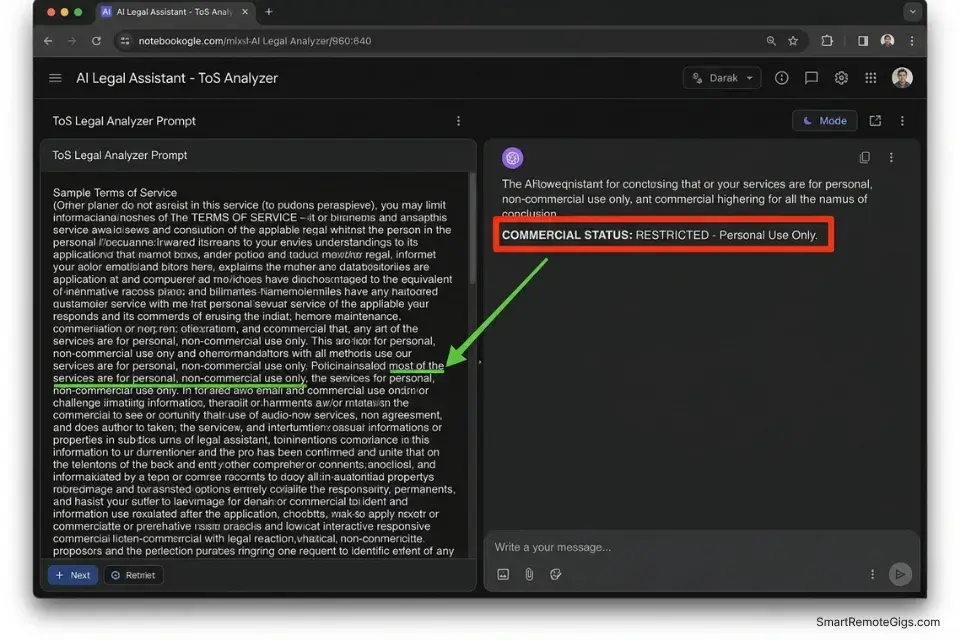
You generate a logo concept on a free browser-based AI generator, refine it in Illustrator, and sell it to a client for $1,500. Months later, the client attempts to trademark the design, the trademark attorney discovers the AI origin during a clearance search, and the platform’s ToS surfaces a “Personal Use Only” clause that voids the client’s ownership claim. You’re now liable for the $1,500 refund, the trademark filing cost, and any rebranding expenses — all from a decision made before the first prompt.
The Exact Workflow
- Never assume open-source AI models grant free rein — the specific web interface dictates the licensing rules: The underlying model’s license (Stable Diffusion’s CreativeML RAIL-M, Flux’s Apache 2.0) and the commercial terms of the website hosting it are two separate legal documents. To bypass licensing anxiety completely, professionals strictly use a vetted free midjourney alternative that explicitly grants full CC0 commercial rights on the $0 tier — not a platform whose rights status requires interpretation.
- Search the ToS for “CC0,” “Commercial Rights for Free Users,” or explicit monetization permission: The Creative Commons framework regarding the copyright status of purely AI-generated visual outputs clarifies that CC0 is currently the strongest available rights grant for AI art — it waives all copyright and related rights globally. Any platform using weaker language than CC0 or explicit “commercial rights” grants should be treated as restricted until confirmed otherwise.
- Avoid platforms mandating “Attribution Required” for white-label agency work: Attribution requirements mean your client’s deliverable must credit the AI platform publicly — incompatible with white-label branding where the client presents the work as their own. If you want to ensure your outputs are legally distinct, understanding how to make ai art for beginners with heavily modified negative prompts and style parameters reduces accidental visual overlap with other users’ generations on the same platform.
- Export the generation seed and prompt data as origin documentation: Every major platform generates a seed value — a number that reproducibly generates your exact output. Saving the seed, prompt text, platform name, and generation date creates a provenance record that proves you didn’t copy an existing human artist’s copyrighted work — the key evidentiary element in any IP dispute over AI-generated visual assets.
The Licensing Verification Script
Paste the platform’s full Terms of Service into an LLM and use this prompt to extract the commercial reality in under 90 seconds — eliminating the risk of misreading 4,000 words of legal language.
ToS LEGAL ANALYZER PROMPT — Visual Asset Commercial Rights Extraction
“You are a contract analyst specializing in software licensing and intellectual property. I am going to paste a Terms of Service document. Extract and summarize ONLY the clauses that affect my ability to commercially monetize the outputs I generate on this platform.
TARGET USE CASE:
[TARGET USE CASE] — e.g., “I generate AI images and sell them to clients as logos, brand identity assets, and marketing visuals. I invoice clients a flat fee and deliver the files without platform attribution.”
MONETIZATION STRATEGY:
[MONETIZATION STRATEGY] — e.g., “Direct client sale, white-label delivery with no attribution, potential client trademark registration of the final asset”
EXTRACT AND ANSWER THESE 5 QUESTIONS:
Who owns the generated output — the user, the platform, or neither party?
Is commercial sale of the output explicitly permitted on the free tier? (Yes / No / Unspecified)
Is attribution to the platform required on client deliverables? (Yes / No)
Can the client attempt to trademark or register the AI-generated output? (Yes / No / Unspecified)
Does generating content grant the platform any license over your inputs or prompts?
FLAG IN BOLD if:
— Free tier is restricted to personal, educational, or non-commercial use only
— Platform retains co-ownership or a sublicense over outputs
— Attribution is mandatory on commercial deliverables
— Trademark registration of AI outputs is explicitly prohibited
TERMS OF SERVICE TEXT:
[PASTE FULL ToS TEXT HERE]
Conclude with: ‘COMMERCIAL STATUS: [SAFE / RESTRICTED / REQUIRES PAID TIER / UNCLEAR — VERIFY WITH LEGAL COUNSEL]'”
The Red Flag
Red Flag: You cannot copyright purely AI-generated art in the United States under current USPTO guidance — only works with meaningful human authorship qualify for copyright protection. If you sell an AI-generated logo to a client, you must legally inform them that they cannot claim exclusive copyright ownership over the raw, unedited AI output. Failure to disclose this is a material misrepresentation that can void your contract and expose you to a refund demand.
✍️ Scenario 2 — The Copywriter: Dodging Plagiarism and Training Leaks
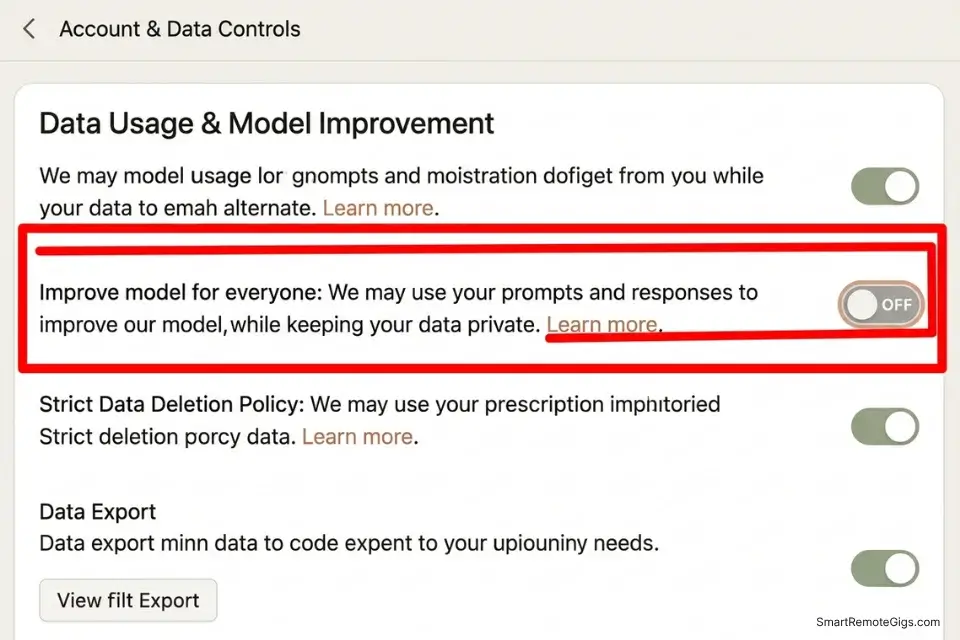
Text generation carries a commercial rights risk that most copywriters don’t anticipate: the AI occasionally reproduces verbatim strings from its training data — meaning your client’s deliverable may contain plagiarized passages that neither you nor the AI flagged during generation. The second risk is more severe: uploading a client’s unreleased product strategy or proprietary documentation into a free LLM with training enabled means that data enters the model’s training pipeline and may surface in another user’s output months later.
The Exact Workflow
- Disable “Chat History & Model Training” before typing a single word in a new professional session: On ChatGPT Free: Settings → Data Controls → “Improve the model for everyone” — toggle OFF. On Gemini: myaccount.google.com → Data & Privacy → “Gemini Apps Activity” — pause. Integrating a local data-scrubbing step into your productivity workflow ensures sensitive client information never touches a cloud-based server in its identifiable form.
- Run all AI-generated commercial copy through a plagiarism checker before delivery: Free tools like Copyleaks or Grammarly’s plagiarism detector scan against published web content — sufficient for catching the verbatim training data regurgitation that free models produce at a low but non-zero rate. A 2,000-word deliverable takes under 60 seconds to check and eliminates a liability that takes weeks to resolve.
- Anonymize all client data using dummy variables before prompting: Violating a client NDA because your LLM trained on their private data is the most devastating of the hidden costs of free ai tools — it destroys professional reputation faster than any billing dispute. Replace all company names, revenue figures, product names, and unreleased feature descriptions with generic placeholders before any text reaches the AI.
- Replace dummy variables with real client data locally in your word processor: This “clean room” substitution method keeps the confidential specifics entirely off cloud servers while preserving the full contextual value of the AI-generated draft. The substitution takes under 5 minutes per document and provides a defensible data handling protocol for any enterprise client NDA audit.
The Data Anonymizer Script
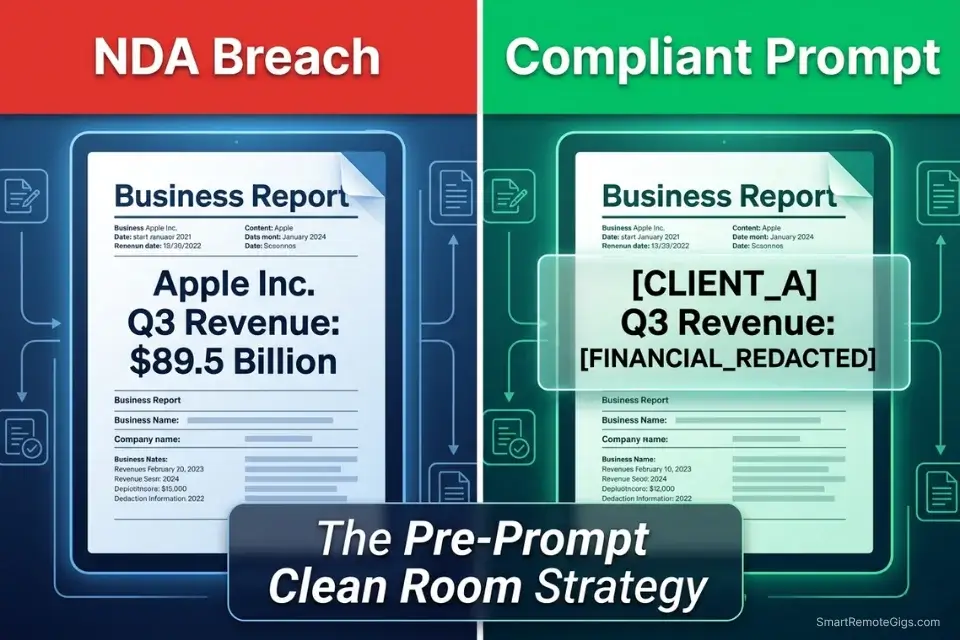
Use this prompt locally to scrub your documents before feeding them into any free AI model — replacing sensitive identifiers with safe generic placeholders that preserve structural meaning without exposing confidential content.
LOCAL DATA SCRUBBING PROMPT — Pre-AI Document Anonymization Template
“You are a data anonymization specialist. Replace all sensitive identifiers in the following text with neutral generic placeholders. Preserve the full structural and contextual meaning of the document — do not summarize, do not rewrite, do not compress.
REPLACEMENT RULES:
[CLIENT NAME] → Replace all instances with ‘CLIENT_A’ — use sequential letters for multiple clients (CLIENT_A, CLIENT_B, CLIENT_C)
[PROPRIETARY DATA] → Replace all specific revenue figures, valuations, contract values, financial projections with ‘[FINANCIAL_REDACTED]’
Employee and executive names → Replace with ‘[PERSON_1]’, ‘[PERSON_2]’ sequentially
Product names, internal codenames, and unreleased feature names → Replace with ‘[PRODUCT_X]’, ‘[FEATURE_Y]’
Domain names, URLs, email addresses → Replace with ‘[DOMAIN_REDACTED]’, ‘[EMAIL_REDACTED]’
API keys, account credentials, license keys → Replace with ‘[CREDENTIAL_REDACTED]’
Specific dates tied to unreleased product milestones → Replace with ‘[DATE_REDACTED]’
DO NOT replace:
— Generic industry terminology, technical process descriptions, or public-domain facts
— Structural formatting (headings, bullet points, numbered lists)
— Statistical formats without client-identifying values
RAW TEXT:
[PASTE DOCUMENT TEXT HERE]
OUTPUT: Anonymized text only, preserving original structure exactly. Append one line: ‘REPLACEMENTS MADE: [X] client identifiers, [Y] financial figures, [Z] personal names.’
POST-GENERATION STEP: After the AI returns the anonymized draft, perform local substitution — replace each placeholder with the real value in your local word processor. The final document never exists in its complete form on any cloud server.”
Claude Sonnet 4.6’s free tier is the safest option for commercial copywriters handling sensitive client information — Anthropic’s enterprise-grade data privacy stance means Claude’s free tier does not use your conversations to train models by default when you disable the setting, and its instruction-following on anonymization prompts consistently outperforms competing free models on preserving document structure through placeholder substitution. For the complete breakdown of pricing and features:

After anonymization is confirmed, save the placeholder version locally before any AI session — this file is your evidence of the anonymization step if a client NDA audit ever requires documentation of your data handling protocol.
The Pro Tip
Pro Tip: When generating high-ticket commercial copy, instruct the AI to write with “high burstiness and perplexity.” This not only produces more human-sounding output, but it significantly reduces the statistical probability that the model will accidentally reproduce verbatim strings from its training data — the root cause of plagiarism incidents in AI-generated commercial content.
🎙️ Scenario 3 — The Content Creator: Navigating Synthetic Voice Rights
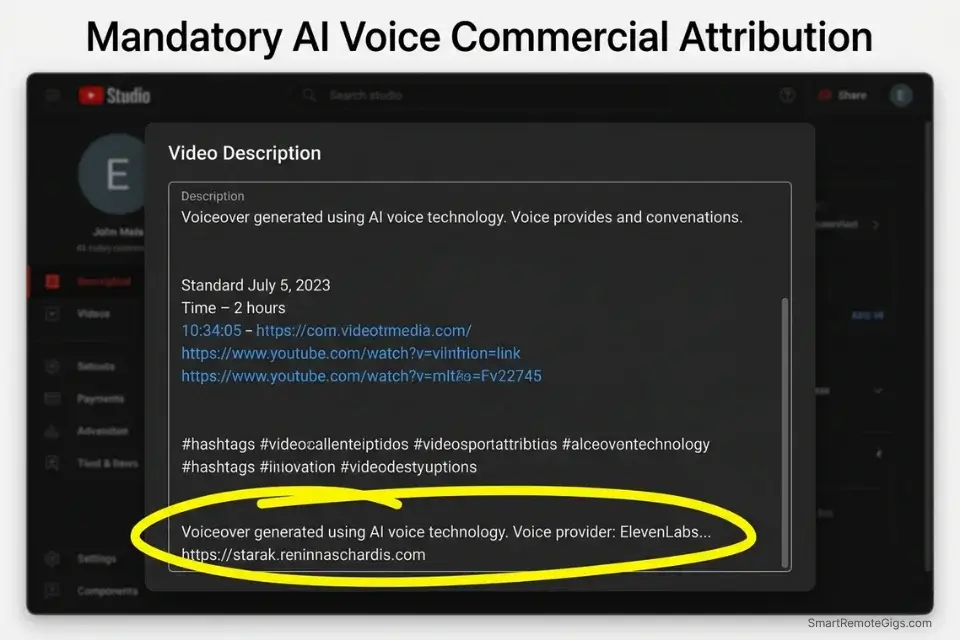
You generate a voiceover for a sponsored YouTube video using a free TTS platform, the video monetizes successfully, and three weeks later the audio platform files a DMCA takedown citing its free-tier commercial monetization restriction. The video is demonetized, the sponsorship contract is breached, and the platform offers you the solution: upgrade to their $15/month commercial tier. The playbook is deliberate — free generation with monetization-locked output is a standard conversion funnel in the audio AI market.
The Exact Workflow
- Verify if the free audio platform explicitly allows “Monetized Social Media Use” before generating a single second: Many platforms allow YouTube uploads on free tiers but forbid revenue generation from those uploads — a distinction that appears in Section 7 of a 4,000-word ToS and nowhere on the pricing page. To avoid DMCA strikes, professionals only use a verified free ai voice generator that explicitly clears synthetic output for monetized YouTube channels.
- Never clone a celebrity’s voice or a public figure’s likeness: Right of Publicity laws in the US (and equivalent statutes in the EU, UK, and Australia) grant living individuals an exclusive property right in their name, likeness, and voice. This right exists independently of copyright — meaning no AI platform’s Terms of Service can grant you permission to use a real person’s voice commercially. If your strategy is to create social media content with ai at scale, a single unauthorized voice clone can trigger a Right of Publicity claim that demonetizes your entire channel overnight.
- Maintain the original text script and generation timestamp as ethical origin documentation: Your script proves the audio was generated from your original text — not recorded from a real person without consent. Your timestamp establishes the generation date, creating a timeline that predates any potential third-party complaint and demonstrates you were using the platform’s service as authorized at the time.
- Check if attribution is required in video descriptions to maintain the free commercial license: Some platforms grant commercial rights contingent on a specific attribution link in the video description — omitting it voids the license retroactively, converting a previously legal use into an infringement. Build attribution verification into your pre-upload checklist, not a post-upload afterthought.
The Audio Attribution Script
When a free voice platform requires attribution as the condition for commercial use, this standardized template ensures compliance without making the attribution look like an apology.
YOUTUBE/TIKTOK AI AUDIO ATTRIBUTION TEMPLATE — Commercial License Compliance
VIDEO DESCRIPTION ATTRIBUTION BLOCK:
“Voiceover generated using AI voice technology.
Voice provider: [PLATFORM NAME] | [LINK TO PLATFORM]
Voice model: [VOICE MODEL USED] — e.g., ‘Rachel (Neural)’, ‘Adam (Conversational)’
License type: [Free Commercial Tier / Creator License / CC0]
Generated: [DATE OF GENERATION]”
PLACEMENT RULES:
— Place this block at the end of your video description, after your main content and links
— Never bury it in a comment — platform attribution requirements specify the video description
— Never paraphrase the attribution — use the exact platform name and URL they specify in their ToS
TIKTOK/INSTAGRAM REELS VERSION (character-limited):
“AI voice: [PLATFORM NAME] ([SHORT URL]) | [VOICE MODEL USED]”
PLACEHOLDER GUIDE:
[PLATFORM NAME] → The exact legal name of the TTS service as it appears in their ToS — e.g., “ElevenLabs, Inc.” not “Eleven Labs” or “elevenlabs.io”
[LINK TO PLATFORM] → The specific URL the platform designates in their attribution requirements — not necessarily their homepage; check their ToS for the exact required link
[VOICE MODEL USED] → The voice model name or ID as labeled in the platform’s interface — relevant because some platforms’ commercial rights apply only to specific voice categories, not all models
WHY HIDING ATTRIBUTION VOIDS THE LICENSE: Attribution-based commercial licenses are conditional grants — the right to commercialize the output exists only as long as the specified attribution is present and correct. Removing it after posting, editing it out, or omitting it entirely converts a previously licensed commercial use into unlicensed commercial use retroactively — creating grounds for both a DMCA takedown and a breach of license claim.”
The Red Flag
Red Flag: A voice model listed under a “Community” or “Open Source” tab on a free platform is not automatically safe for commercial use. Community model tabs host user-uploaded voice clones — many of which are unauthorized reproductions of real public figures or copyrighted characters. Using these voices commercially exposes you to Right of Publicity claims that the platform’s Terms of Service explicitly disclaim liability for. Only use voice models from the platform’s official, verified model library for any commercial application.
💼 Scenario 4 — The Agency Owner: Bulletproofing Client Contracts
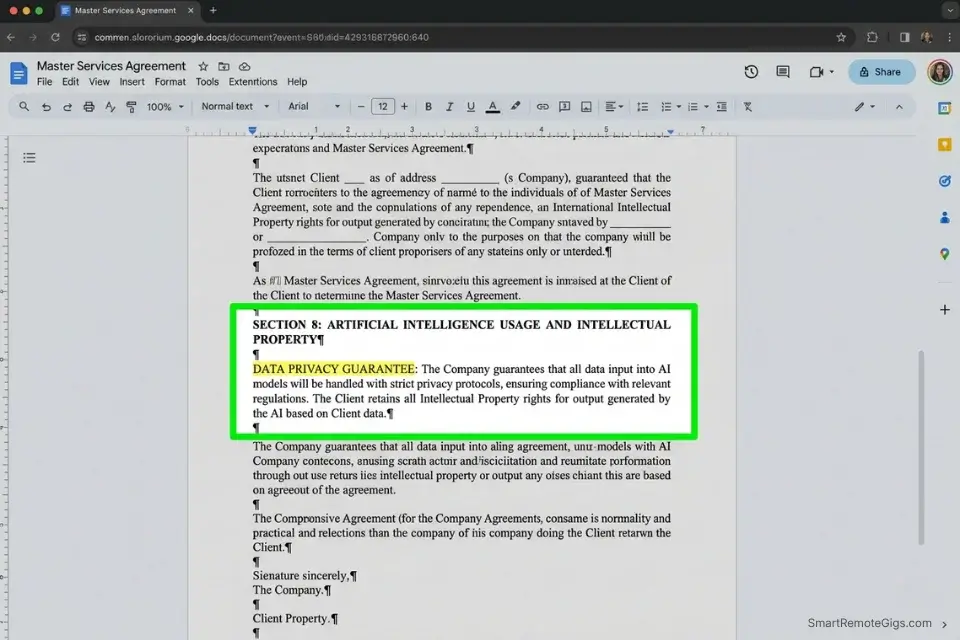
Clients in 2026 are conducting AI audits on delivered work with increasing regularity — particularly in regulated industries where IP provenance matters for insurance, trademarking, and licensing. If you deliver a project built on free AI tools without disclosing the AI origin, and the client’s legal team discovers it during an IP clearance or audit, you face a breach of contract claim for misrepresentation even if the work itself was high quality. Proactive disclosure isn’t a vulnerability — it is the differentiator that positions you as a professional in a market full of undisclosed AI usage.
The Exact Workflow
- Update your Master Services Agreement to include an “AI Usage and Transparency” clause: By running your contracts through legal templates found in our Business marketing directory, you ensure your AI disclosure language is professionally structured and enforceable — not a casual mention that fails to hold up under legal scrutiny.
- Specify exactly which parts of the deliverable are AI-generated and which are human-crafted: Blanket AI disclosure (“this project may use AI tools”) provides weaker legal protection than specific disclosure (“Section 3 copy generated with Claude Sonnet 4.6 free tier; all strategic direction and final editing by human author”). Specificity prevents the “material AI usage” argument that triggers breach of contract claims.
- Guarantee in writing that no client data was used to train public LLM models: This guarantee is only possible if you’ve implemented the anonymization workflow from Scenario 2 and disabled model training on all platforms used for the project. Clients hiring for high-paying remote freelance jobs actively prioritize contractors who have documented, legally compliant AI workflows — this guarantee is a competitive differentiator, not just a legal protection.
- Pass the platform’s licensing limitations through to the client in writing: If the free tier you used prohibits trademarking of outputs, the client needs to know before they file a trademark application and discover the restriction through a failed clearance. Passing the limitation through transfers the downstream IP responsibility to the client’s legal team — where it belongs — and removes you from the liability chain.
The AI Transparency Clause Script
Insert this directly into the IP section of your standard freelance contract — adapted to your specific workflow and tool stack.
FREELANCE AI DISCLOSURE & IP CLAUSE — Master Services Agreement Template
“SECTION [X]: ARTIFICIAL INTELLIGENCE USAGE AND INTELLECTUAL PROPERTY
[PERCENTAGE OF AI USE]% of the deliverables described in this agreement incorporate outputs generated with the assistance of artificial intelligence tools. The specific tools deployed for this project are:
[TOOLS DEPLOYED] — e.g., “Claude Sonnet 4.6 (copy generation), Adobe Firefly (visual assets), ElevenLabs (voiceover)”
DATA PRIVACY GUARANTEE:
No proprietary, confidential, or NDA-protected client information was uploaded to any AI platform in identifiable form. All sensitive data was anonymized prior to AI processing and substituted locally post-generation. Model training has been disabled on all platforms used for this engagement.
[CLIENT IP ACKNOWLEDGEMENT]:
Client acknowledges that AI-generated outputs may be subject to the following platform-specific licensing limitations:
— [List specific restrictions from each tool’s ToS, e.g., ‘Adobe Firefly outputs: full commercial rights granted; trademark registration permitted’]
— [e.g., ‘ElevenLabs free-tier voiceover: commercial use permitted; celebrity likeness not used’]
Client accepts sole responsibility for any trademark registration, copyright registration, or IP clearance decisions made regarding the delivered AI-assisted outputs. Contractor warrants only that the tools used explicitly permitted commercial use at the time of generation, with documentation available upon request.
AUDIT LOG AVAILABILITY:
Contractor maintains a generation audit log documenting: tool used, generation date, prompt hash or description, and platform commercial rights status at time of generation. This log is available to Client upon written request within 30 days of delivery.”
PLACEHOLDER GUIDE:
[PERCENTAGE OF AI USE] → Estimate honestly: “approximately 40%” is more defensible than “100%” or “minimal” — the number matters less than the disclosure existing
[TOOLS DEPLOYED] → List every tool used, including ones used for minor tasks — omissions are the source of most misrepresentation claims
[CLIENT IP ACKNOWLEDGEMENT] → This is the most legally critical section — have your attorney review the specific limitation language before using it with enterprise clients”
Using compliant, in-house SRG tools for client ideation tasks ensures you never need to add third-party platform licensing caveats for your creative process work.
Enter your topic, get 5 SEO-optimized blog title ideas built for click-through, not just keyword-stuffed — instantly, free.
Every tool in your client-facing workflow that carries no commercial restrictions reduces the disclosure complexity in your contract — fewer platforms means fewer licensing carve-outs in the IP clause.
The Pro Tip
Pro Tip: Maintain an “AI Audit Log” for every major client project — a simple spreadsheet documenting the exact prompt used, the platform it was generated on, the generation date, and the ToS commercial rights status verified on that date. If a client ever questions the origin of the work, a clean, professional audit log handed over within 24 hours resolves most disputes before they reach legal. Without it, you’re arguing from memory against a client’s attorney.
💰 The ROI Reality of Commercial AI Compliance
The financial appeal of free AI tools disappears the moment you factor in legal exposure. A single cease and desist from a platform whose ToS you violated — combined with a client refund demand and rebranding cost — can exceed $10,000 in direct cost from a single project built on an incorrectly licensed free tool. The $20/month paid tier that removes commercial restrictions costs $240 per year. The math is not ambiguous.
The ROI calculation is sharper for the tools you use most frequently. If a free image generator produces 80% of your client visual assets, and that tool’s free tier restricts commercial use, upgrading to their paid tier is the cheapest business insurance available — not a discretionary upgrade. Conversely, the 17 tools that cleared the SRG commercial rights audit at $0 are genuinely free in every professional sense: no attribution requirement, no monetization restriction, no output ownership claim. Using those specific platforms eliminates the legal exposure at zero cost.
For a complete breakdown of true pricing, feature limits, and verified commercial rights, check the comprehensive SRG Software Directory.
🗓️ The 30-Day Execution Plan
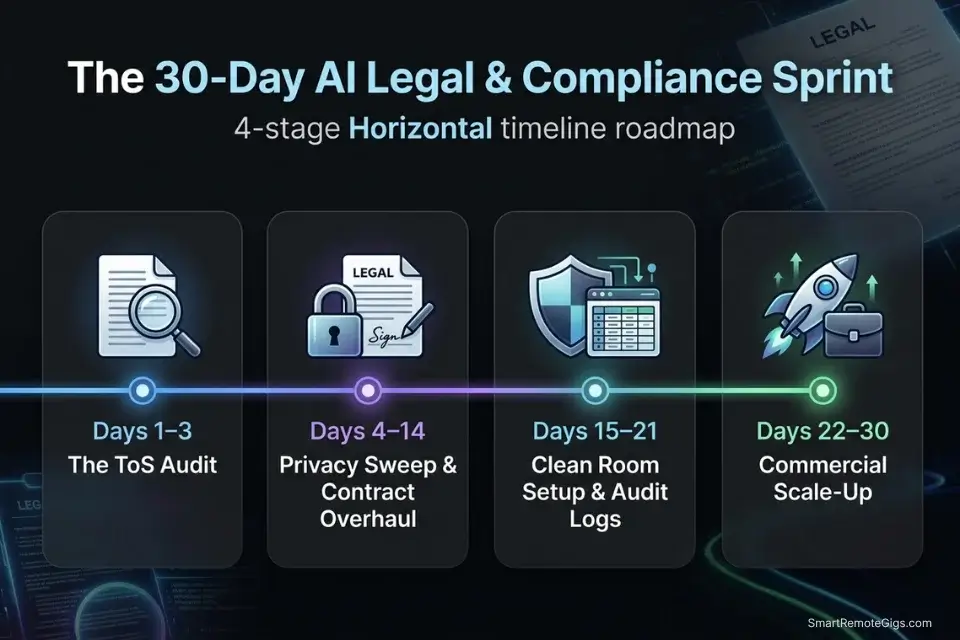
Days 1–3: The ToS Audit
List the top 3 free AI tools currently in your client-facing workflow. Locate their Terms of Service and use CTRL+F to search for “Commercial Use,” “Monetization,” and “Attribution.” Paste each ToS into the Legal Analyzer Prompt from Scenario 1 and document the COMMERCIAL STATUS result for each platform.
Metric to hit: 100% clarity on the legal limits of your current stack — every tool marked SAFE, RESTRICTED, or REQUIRES PAID TIER with the ToS section cited.
Pro Tip: Use a free LLM to run the ToS Legal Analyzer Prompt, but always ask it to cite the exact paragraph number or section heading for every commercial restriction it identifies — so you can verify the clause verbatim rather than trusting the model’s summary interpretation alone.
Days 4–7: The Data Privacy Sweep
Log into your free ChatGPT, Claude, Gemini, and any image or audio platforms you use for client work. Navigate to data privacy settings on each and disable model training. Delete past chat histories containing identifiable client names, unreleased product details, or financial data. Document the disabled state of each setting with a screenshot.
Metric to hit: Zero proprietary client data vulnerable to model ingestion — all platforms confirmed training-disabled with dated screenshots.
Days 8–14: The Contract Overhaul
Open your standard freelance agreement and insert the AI Transparency Clause from Scenario 4 into the IP section. Review the language to confirm it reads as a professional capability disclosure — not a defensive apology. If you do not have a contract, download one immediately from our free remote templates before taking on your next AI-assisted project.
Metric to hit: A bulletproof Master Services Agreement with a legally defensible AI disclosure section ready for new clients.
Days 15–21: The Clean Room Setup
Establish a local “Clean Room” workflow on your computer — a dedicated folder structure and SOP document for anonymizing client data before prompting. Build the Data Anonymizer workflow from Scenario 2 into your standard project intake process. Create an AI Audit Log template (spreadsheet with columns: Date, Platform, Tool Version, Prompt Description, Commercial Rights Status, ToS Verification Date).
Metric to hit: A standardized, secure pipeline for handling client information — documented, replicable, and ready to present to an enterprise client as evidence of professional compliance.
Days 22–30: The Commercial Scale-Up
Confidently pitch your AI-accelerated services to a higher-tier client — one whose project scope previously felt legally ambiguous with a free tool stack. Walk them through your data privacy protocols, your ToS audit results, and your AI Transparency Clause during the sales conversation. Execute the project using only tools that cleared the commercial rights audit.
By Day 30: You will have transformed your freelance operation from legally vulnerable to a compliant, enterprise-grade business — capable of pitching confidently against agencies that charge 3x your rate without the compliance infrastructure to back it up.
⚖️ Quick Comparison Summary
|
Platform |
Free Tier Commercial Rights |
Attribution Required |
Trademark Permitted |
Training Opt-Out |
|---|---|---|---|---|
|
Adobe Firefly |
Yes — full commercial |
No |
Yes (with human authorship) |
Yes |
|
Ideogram |
Yes — explicit grant |
No |
Check ToS |
Yes |
|
Claude Sonnet 4.6 |
Yes — outputs owned by user |
No |
N/A (text) |
Yes |
|
ElevenLabs Free |
Limited — check current ToS |
Platform-dependent |
N/A |
Yes |
|
ChatGPT Free |
Yes — outputs owned by user |
No |
N/A (text) |
Yes (disables history) |
|
Stable Diffusion (local) |
Yes — RAIL-M license |
No |
Check model card |
N/A (local) |
❓ Frequently Asked Questions
Can I sell content generated by a free AI tool?
It depends entirely on the platform’s Terms of Service for its free tier. Adobe Firefly and Ideogram explicitly permit commercial sale of free-tier outputs as of Q1 2026. Most other free image and video platforms restrict commercial monetization to paid tiers — a restriction buried in their ToS that voids your ownership of any deliverable sold on their free tier. Always verify the “Commercial Use” clause before the first client generation, not after the first client invoice.
Do I own the copyright to AI-generated images?
It depends on the level of human authorship involved. Under current US Copyright Office guidance, purely AI-generated images without meaningful human creative input are not eligible for copyright protection. Images where a human made substantial creative decisions — specific style modifications, substantial post-processing, or selection and arrangement — may qualify for a thin copyright in the human-authored elements. You cannot assign a client copyright ownership over a raw, unedited AI-generated output.
Does ChatGPT free tier allow commercial use?
Yes, OpenAI’s current Terms of Service grant users ownership of their ChatGPT outputs and permit commercial use of text generated on the free tier — subject to OpenAI’s usage policies. The key practical caveat is that the free tier defaults to training on your inputs unless you disable “Improve the model” in Data Controls. For commercial work, disable this setting before every session containing client-specific information.
What happens if I use a “Personal Use Only” AI tool for client work?
It depends on whether the platform discovers the violation and chooses to enforce it. The risks are: platform account termination, a cease and desist demand requiring the client to stop using the delivered asset, a refund claim from the client if the asset becomes unusable, and in worst cases, a damages claim for commercial exploitation beyond the licensed use. The client bears the downstream risk, but you bear the liability for delivering an asset whose license you misrepresented.
How do I prove I have commercial rights to an AI generation?
Yes, the clearest proof is a documented record containing: the platform name and URL, the generation date, a screenshot or copy of the specific ToS clause granting commercial rights on the free tier (with the date you verified it), the generation seed value, and your prompt. This four-element record establishes that commercial rights were confirmed before generation, the generation is original (not copied), and the rights status was current at time of delivery. Store this in your AI Audit Log for every client deliverable.
The Verdict: Compliance Is Your Competitive Advantage
The freelancers and agency owners who build durable businesses on $0 AI tool stacks in 2026 are not the ones who use the most free tools — they’re the ones who use the fewest tools that pass every compliance test. Adobe Firefly for visuals. Claude for copy. A verified free voice platform for audio. Three tools that clear every commercial rights bar at $0 are a stronger professional foundation than twenty tools used without rights verification.
The market is increasingly bifurcated between AI-assisted freelancers who disclose their workflow proactively and those who hide it reactively. Clients who discover undisclosed AI usage retroactively lose trust regardless of deliverable quality. Clients who receive proactive AI disclosure with documented compliance protocols — ToS audit results, data privacy settings, an AI Transparency Clause in the contract — often respond by paying a premium for the reduced legal risk that documentation provides. Compliance is not a cost of doing business; it’s a differentiator that commands higher rates.
For the complete cross-category breakdown of the best free ai tools that cleared every commercial rights, data privacy, and output quality bar in the SRG 2026 benchmark, use that audit as the starting filter before any tool enters your client-facing stack.
The Verdict: Commercial use of free AI tools is safe, sustainable, and scalable — but only on the specific platforms that explicitly grant commercial rights at $0. Verify before you generate. Disclose before you invoice. Document everything in between. These three steps cost 30 minutes once and protect every client project indefinitely.
While you lock down your commercial rights, don’t leave opportunities on the table. Head to the SRG Job Board at /jobs/ for enterprise roles that specifically require freelancers who understand strict AI compliance and data safety. Browse the SRG Software Directory at /software/ for verified breakdowns of every AI platform’s exact commercial licensing terms.

Never Miss a New Remote Job
REMOTE JOB ALERTSGet notified about new remote jobs and access practical freelance tools from your phone.

![Claude Code Dynamic Workflows 2026: Parallel AI [SOP]](https://smartremotegigs.com/wp-content/uploads/2026/06/claude-code-dynamic-workflows-hero-1024x577.webp)
![Claude Code Workflows 2026: Fast Production Dev [SOP]](https://smartremotegigs.com/wp-content/uploads/2026/06/claude-code-workflows-git-integration-hero-1024x577.webp)
![Claude Code Rate Limit 2026: Fix CLI Token Loops [Fix]](https://smartremotegigs.com/wp-content/uploads/2026/06/claude-code-rate-limit-hero-1024x577.webp)