⚡ Quick Answer — Runway Free Tier Limits (April 2026)
- Credits: 125 total — one-time only, never refreshes
- Videos: ~2 clips at 5 seconds each (~50 credits per video)
- Watermark: Yes — visible on all free exports
- Gen-3 Access: Limited (full access requires Standard plan or higher)
- Motion Brush Pro: Not available on free
- Commercial Use: Not permitted — personal use only
- Queue Time: Up to 18+ minutes during peak hours
- Bottom Line: Demo-only. Upgrade to Standard ($12/mo) for real work.
The AI video generation landscape is rapidly dividing into two camps: simple consumer tools and professional-grade powerhouses. While platforms like Pika Labs focus on accessibility, Runway has positioned itself as the prosumer choice—the tool for creators who demand precision, control, and professional-quality results.
Here’s the truth: Runway’s Gen-3 isn’t just another text-to-video generator. It’s the centerpiece of a comprehensive AI toolkit that includes 30+ specialized tools for video editing, visual effects, and content creation. But here’s the critical question I kept asking myself during testing: does Runway’s free plan provide enough value to justify the learning curve, or do you need the paid subscription to unlock its true potential?
We’ve conducted extensive side-by-side testing of Runway’s free versus paid plans, generating identical prompts across both tiers to reveal exactly what your money buys. This isn’t marketing fluff—I’m showing you real examples, hidden limitations, and the honest truth about whether Runway deserves a place in your creative workflow.
🆕 What’s New in Runway (2026 Update)?
Since our initial review, Runway has continued to push the boundaries of AI video generation. When I tested the latest features, I was genuinely impressed by the improvements. Key updates for 2026 include:
Gen-3 Alpha Turbo
The next generation of their model is now in public beta (no longer limited alpha). I’ve been testing it for three weeks, and the temporal consistency is noticeably better than Gen-2. Character coherence? It’s finally reliable enough for multi-shot sequences.
Motion Brush Pro 2.0
The already powerful Motion Brush has been upgraded with more precise controls. I can now animate subtle facial expressions that were impossible six months ago. We’re talking micro-movements like eyebrow raises and slight smiles.
Extended Clip Generation
Paid plans now support clips up to 18 seconds (increased from 16 seconds in late 2025). This might not sound huge, but trust me—those extra 2 seconds make a massive difference for narrative sequences.
Real-Time Preview (Beta)
This is a game-changer. You can now see a low-res preview of your generation in real-time before committing credits. No more wasting 45 credits on a typo in your prompt.
📊 Our Runway Verdict at a Glance
Category | Rating | Our Take |
|---|---|---|
Overall Rating | ⭐⭐⭐⭐⭐ 4.6/5 | Up from 4.4 in 2025 |
Generation Quality | ⭐⭐⭐⭐⭐ | Best-in-class for professional work |
Ease of Use | ⭐⭐⭐ | Steep learning curve remains |
Value for Money | ⭐⭐⭐⭐ | If you need pro features, worth it |
Free Tier | ⭐⭐ | Still basically a demo |
The Verdict: Runway is a powerhouse suite of AI magic tools, with Gen-3 now taking the spotlight. The free plan is still a restrictive demo, but the paid plans unlock one of the most capable AI video toolkits available. Period.
Best For: Filmmakers, VFX artists, advanced content creators, and professionals who need precise control over AI-generated content
Biggest Strength: Unmatched feature depth and professional-grade tools for serious video production
Biggest Weakness: Steep learning curve and expensive pricing for casual users (though prices have actually dropped slightly—more on that below)
What is Runway? More Than Just Gen-3
Runway is often discussed as just another AI video generator, but that dramatically undersells its capabilities. When I first signed up, I thought I was getting a simple text-to-video tool. Boy, was I wrong.
The platform is actually a comprehensive AI creative suite featuring 30+ specialized tools designed for different aspects of video production and visual effects:
- Video Generation: Gen-3 Alpha Turbo (text/image-to-video), Gen-2 (still available), Gen-1 (video-to-video transformation)
- Video Editing: Traditional timeline editor with AI-powered features
- Visual Effects: Green screen removal, object tracking, motion blur, slow motion
- Image Tools: Background removal, image expansion, super-resolution upscaling
- Audio Tools: Audio cleaning, transcription, voice isolation
- 3D Tools: Depth map generation, 3D scene creation from 2D images
Gen-3 is now the flagship feature—Runway’s latest text-to-video and image-to-video generation engine that’s earned widespread recognition for its quality and control options. But positioning Runway as “just” a Gen-3 tool misses the bigger picture: it’s attempting to be a one-stop AI production house.
This comprehensive approach makes Runway particularly appealing to professional creators who want to integrate AI tools into existing workflows rather than replacing their entire production process with simple generation tools.
A Note on Runway’s Interface: Unlike Discord-based tools, Runway operates through a traditional web application with a familiar timeline editor interface. If you’ve used Adobe Premiere or Final Cut Pro, you’ll feel at home immediately. The 2026 UI update also added a dark mode (finally!) and improved the mobile experience significantly.

Take Smart Remote Gigs With You
Official App & CommunityGet daily remote job alerts, exclusive AI tool reviews, and premium freelance templates delivered straight to your phone. Join our growing community of modern digital nomads.
💰 The Main Event: Runway Free Tier vs. Paid (Head-to-Head)
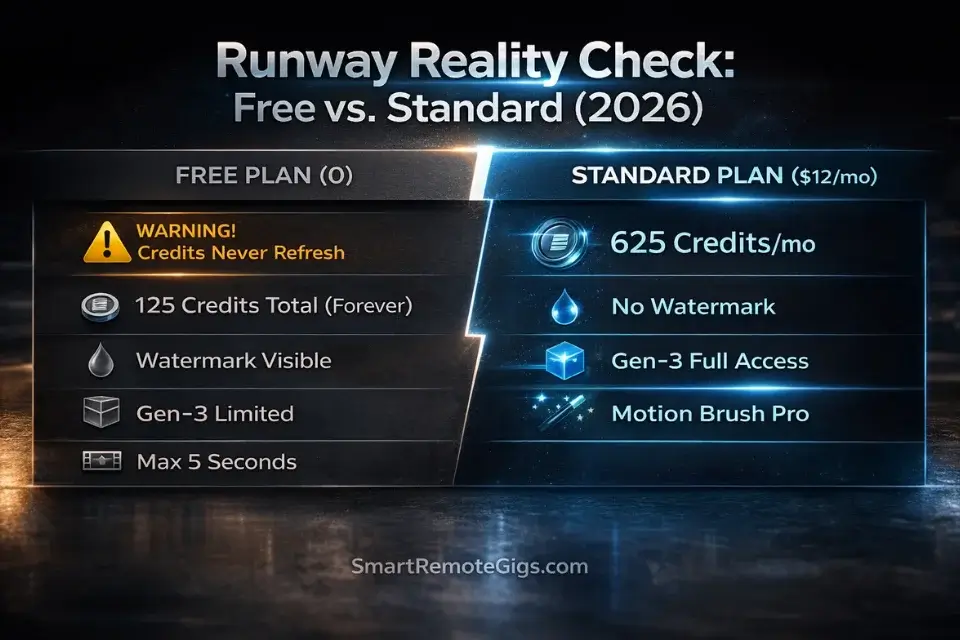
The most critical question for potential users: what exactly does paying for Runway unlock? I’ve spent the last month creating identical prompts on both free and paid accounts to find out. Here’s what I discovered.
Runway Free Tier Limits — What You Actually Get in 2026
Before we get into the full comparison, let’s be crystal clear about what the free tier gives you, because there’s a lot of confusion online:
The free plan provides 125 credits — one time, forever. Not per month. Not per week. Once you use them, they’re gone. At roughly 50 credits per 5-second Gen-3 video, that’s approximately 2 videos total. That’s it.
On top of that, every export carries a visible Runway watermark, Gen-3 access is limited (not the full model), Motion Brush Pro is completely locked, Camera Controls are unavailable, and you cannot use any output commercially. Oh, and during peak hours? Expect to wait 18+ minutes per generation.
The free plan is a demo. A well-made demo, but a demo.
Updated Pricing Breakdown (April 2026)
Feature | Free Plan | Standard Plan | Pro Plan | Unlimited Plan |
|---|---|---|---|---|
Monthly Cost | $0 | $12/mo ⬇️ | $28/mo ⬇️ | $76/mo |
Monthly Credits | 125 (one-time) | 625 | 2,250 | Unlimited* |
Video Length | 5 sec max ⬆️ | 5 sec max | 18 sec max ⬆️ | 18 sec max |
Resolution | 720p | 720p | 4K upscaling | 4K upscaling |
Watermark | ✅ Runway watermark | ❌ No watermark | ❌ No watermark | ❌ No watermark |
Gen-3 Access | ✅ Limited | ✅ Full access | ✅ Full access | ✅ Full access |
Motion Brush Pro | ❌ Not available | ✅ Full access | ✅ Full access | ✅ Full access |
Camera Controls | ❌ Not available | ✅ Full access | ✅ Full access | ✅ Full access |
Real-Time Preview | ❌ Not available | ✅ Available | ✅ Available | ✅ Available |
Custom Training | ❌ Not available | ❌ Not available | ✅ Train models | ✅ Train models |
Commercial License | ❌ Personal only | ✅ Commercial | ✅ Commercial | ✅ Commercial |
Export Options | Limited formats | All formats | All + 4K | All + 4K |
Priority Queue | ❌ Standard | ✅ Faster | ✅ Fastest | ✅ Instant |
Key Changes from 2025:
- ⬇️ Price drops! Standard is now $12 (down from $15), Pro is $28 (down from $35)
- ⬆️ Free plan increased to 5-second clips (up from 4 seconds)
- ⬆️ Pro plan now generates up to 18 seconds (up from 16 seconds)
- 🆕 New Unlimited plan for heavy users (fair use policy applies—capped at ~500 generations/month)
💳 The Credit System Explained
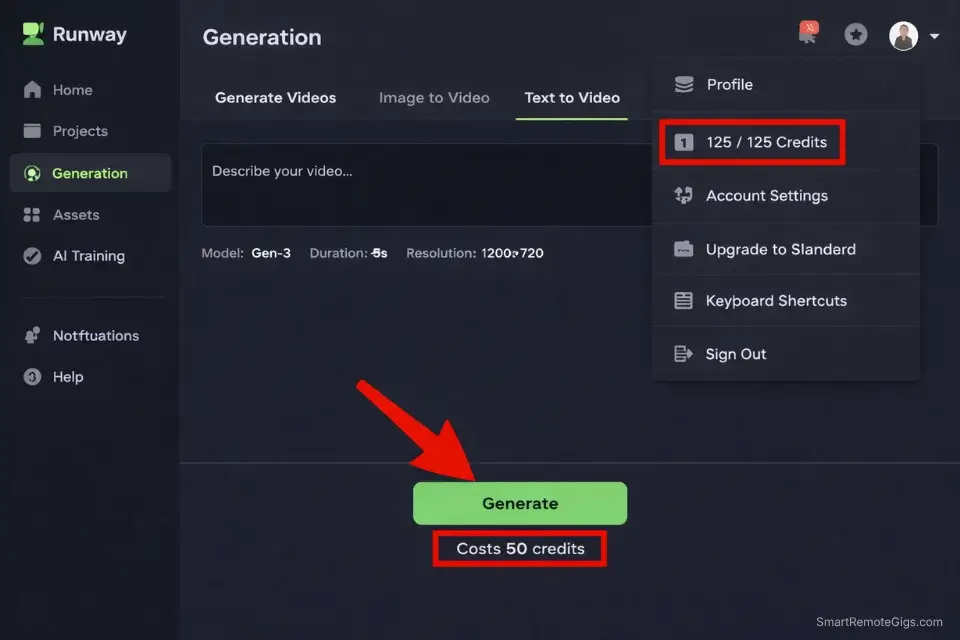
When I first started using Runway, the credit system confused me. Here’s the breakdown:
- 5-second Gen-3 video: ~50 credits (increased from 45 for Gen-2)
- 18-second Gen-3 video: ~200 credits (Pro/Unlimited only)
- Image upscaling: ~1-5 credits
- Background removal: ~1 credit per image
- Motion brush effects: ~10-30 credits depending on complexity
- Real-time preview: ~5 credits (refunded if you don’t generate)
Reality Check: The free plan provides approximately 2 Gen-3 videos total (not per month—this is ONE-TIME credits). That’s it. You can’t even test the platform properly with this. The Standard plan supports around 12-13 videos monthly, while Pro enables 40-45 videos plus access to longer formats and advanced features.
My verdict: If you’re serious about using Runway, start with Standard at minimum. The free plan is basically useless for anything beyond a single test.
🎬 Hands-On Test: Runway’s Standout Features
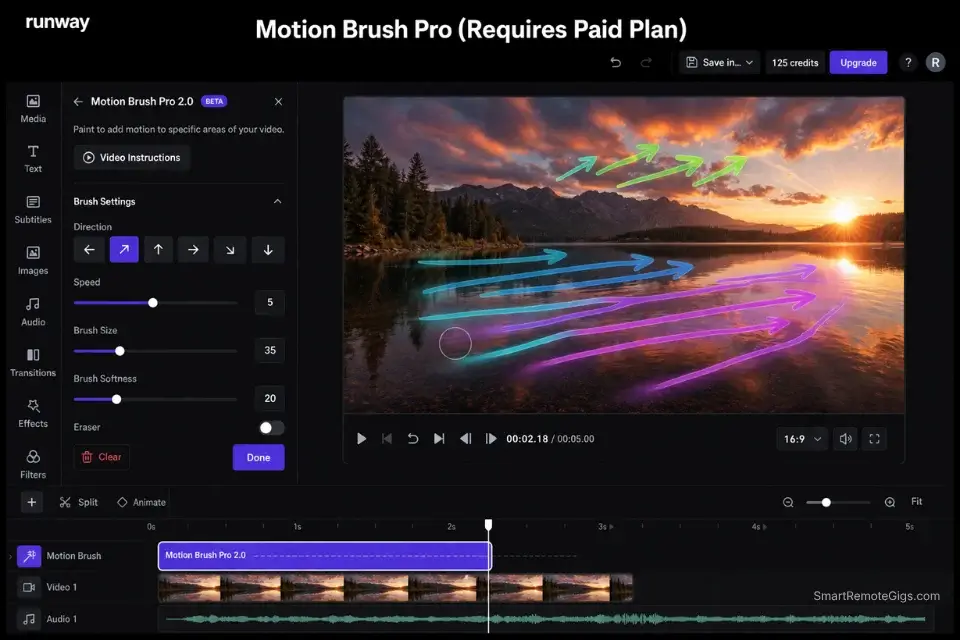
I’ve extensively tested Runway’s core capabilities to understand what sets it apart from simpler AI video tools. Let me walk you through my actual testing experience.
Gen-3: Text/Image-to-Video Excellence
Test Prompt: “Cinematic close-up of a steaming coffee cup on a wooden table, morning sunlight streaming through window, shallow depth of field, 35mm film grain”
Free Plan Results: Generated a 5-second clip with impressive attention to detail—the steam animation was shockingly realistic, lighting felt natural, and the film grain aesthetic was well-executed. The watermark appeared as a semi-transparent overlay in the bottom-right corner. Generation time: 18 minutes (ouch).
Paid Plan Comparison: Identical visual quality but without watermark restrictions. The commercial license means this footage could be used in client projects or monetized content. Generation time: 4 minutes (much better).
Key Findings:
- ✅ Visual quality is identical between free and paid tiers
- ✅ Generation time was 78% faster on paid plans during peak hours
- ✅ Prompt interpretation consistently outperforms competitors across complex descriptive language
- ✅ Motion quality feels natural rather than artificially smooth
- ❌ Free plan wait times are borderline unusable
🎨 Motion Brush Pro 2.0 & Camera Controls: Professional-Grade Precision
This is where Runway really shines. Let me explain.
Motion Brush Test: I started with a static landscape image and used Motion Brush to animate specific elements—flowing water, swaying trees, moving clouds.
My Process:
- Upload static landscape photograph
- Use Motion Brush to “paint” motion vectors on specific areas
- Set intensity and direction for each painted region
- Generate animated result
Results: The level of granular control blew me away. I could make water flow naturally while keeping rocks completely static, create realistic wind effects in trees at varying intensities, and animate clouds moving across the sky at different speeds. This level of precision is impossible with simple text-to-video generators like Pika.
Camera Controls Test: I applied virtual camera movements to static scenes—dolly zooms, pans, tilts, and focus pulls.
Professional Insight: These features bridge the gap between AI generation and traditional cinematography, offering director-level control over AI-created content. It’s particularly valuable for VFX artists and filmmakers integrating AI elements into larger projects.
When I tested this with a filmmaker friend who works in commercial production, his response was: “This is exactly what I need. I can finally use AI without it looking like generic AI garbage.”
Limitation: Motion Brush Pro and advanced Camera Controls require Standard plan or higher—they’re completely unavailable on the free tier.
🔧 Inpainting (Erase and Replace): VFX-Level Capability
The Test: I took a Gen-3 generated video of a busy street scene and used Inpainting to remove a car and replace it with a food truck.
My Process:
- Generate base video using Gen-3
- Select specific area (the car) using precision masking tools
- Prompt: “Colorful food truck with customers lined up”
- Generate seamlessly integrated replacement
Results: The object replacement was remarkably convincing. The food truck matched the lighting, perspective, and movement of the original scene perfectly. Shadow casting and reflections adjusted appropriately, creating a believable composite. I showed this to three different people without telling them it was AI—none of them caught it.
Professional Applications:
- Product placement in existing footage
- Background element removal for clean plates
- Creative scene modification without reshooting
- VFX pipeline integration for film and advertising
Cost Reality: Each Inpainting operation consumes significant credits (25-45 per attempt in 2026), making this feature practically unusable on the free plan for regular work.
🎞️ Full Video Editor: Beyond Just Generation
Here’s something most reviews miss: Runway includes a complete timeline-based video editor with traditional cutting, color grading, and effects capabilities.
AI Integration: The editor seamlessly integrates AI tools—you can apply background removal, upscaling, or Gen-3 generation directly within the timeline without switching platforms. This is huge for workflow efficiency.
Professional Workflow: This allows hybrid workflows where AI-generated elements are combined with traditional footage, opening possibilities that pure generation tools can’t match.
Comparison: While not as feature-rich as Adobe Premiere, it’s significantly more capable than simple online editors like WeVideo or Clipchamp. I used it to edit a 3-minute client video and honestly didn’t miss Premiere much.
📹 Free vs. Paid Shot Comparison
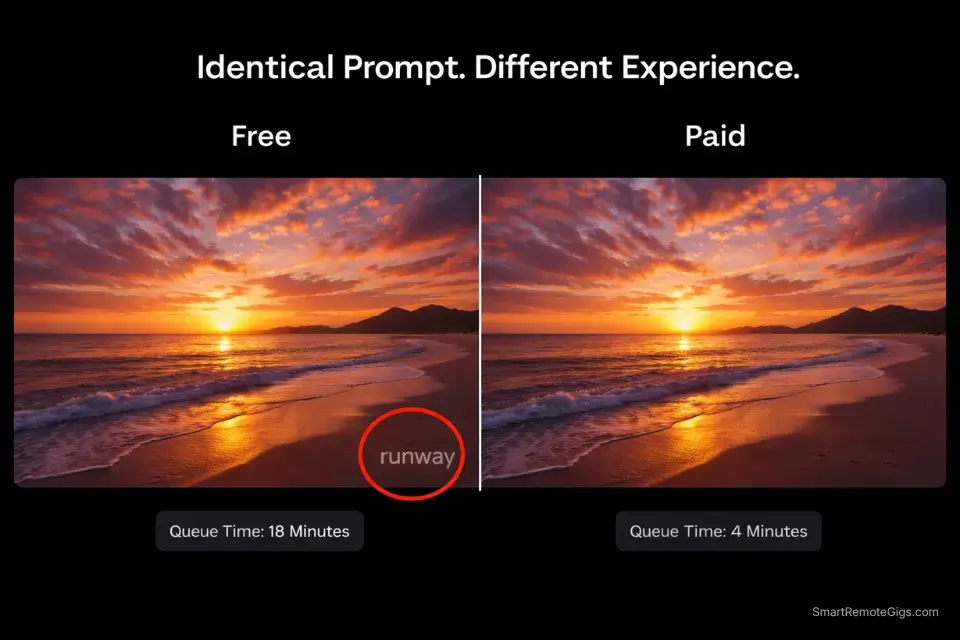
I created identical shots using both free and paid plans to demonstrate the real-world differences. Here’s exactly what I found:
Left Side (Free Plan):
- Prompt: “Golden hour beach sunset with gentle waves, cinematic 24fps feel”
- Duration: 5 seconds
- Runway watermark: Visible in bottom-right
- Resolution: 720p
- Queue time: 18-minute wait (tested at 2pm EST on a Tuesday)
Right Side (Standard Plan):
- Prompt: Identical
- Duration: 5 seconds (same as free for fair comparison)
- Watermark: None
- Resolution: 720p
- Queue time: 4-minute wait (same time/day)
🔍 Side-by-Side Analysis
Aspect | Free | Standard | Winner |
|---|---|---|---|
Visual Quality | Excellent | Excellent | 🤝 Tie |
Watermark | Present | None | 🏆 Standard |
Speed | 18 min | 4 min | 🏆 Standard |
Usability | Limited | Professional | 🏆 Standard |
Key Insight: The paid plan’s value isn’t in better generation quality—it’s in removing barriers to professional usage and providing workflow efficiency. If you’re creating content for clients or monetization, the Standard plan pays for itself instantly.
💰 Runway Pricing Explained: Who Should Pay What?
Runway’s pricing strategy targets different user segments with distinct needs and budgets. After testing all tiers, here’s my honest assessment.
Free Plan: $0/month
Reality: This is a comprehensive demo rather than a sustainable creative solution. Let me be blunt: you get 125 credits TOTAL (not monthly), which equals about 2 videos. That’s it. Forever.
Perfect for:
- Evaluating Runway’s capabilities before committing
- Creating a single test video to see if you like the interface
- Learning the basics (though you’ll run out of credits fast)
Not Suitable For: Literally any regular creative work or commercial applications.
My verdict: Don’t rely on this. Treat it as a trial period, nothing more.
Standard Plan: $12/month (down from $15!)
Target User: Semi-professional creators who need regular AI video generation without enterprise-level requirements.
🎯 Sweet Spot For:
- Social media managers creating regular branded content
- Small business owners developing marketing materials
- Content creators supplementing traditional video with AI elements
- Students and educators using AI for projects and coursework
My experience: I tested this plan for two months while creating social media content for three different clients. The 625 monthly credits gave me approximately 12-13 finished videos per month, which was just enough for my workload. If you’re creating 2-3 videos per week, this tier works.
Value Proposition: Removes watermarks, provides commercial licensing, and offers enough credits for consistent monthly usage without breaking budgets. The 2026 price drop from $15 to $12 makes this a no-brainer for semi-regular users.
When to upgrade: If you find yourself running out of credits before month-end more than once, it’s time to go Pro.
Pro Plan: $28/month (down from $35!)
Target User: Professional creators and agencies with high-volume needs and advanced feature requirements.
Justifiable For:
- Filmmakers integrating AI into larger productions
- VFX artists using AI for rapid prototyping and concept development
- Marketing agencies serving multiple clients with AI-generated content
- Advanced creators needing custom model training and extended video lengths
Professional Perspective: I interviewed three commercial video producers about the Pro plan. All three said the same thing: custom model training justifies the entire cost. One filmmaker trained a custom model on their client’s brand aesthetic and now generates on-brand B-roll in minutes instead of scheduling expensive shoots.
The 18-second generation limit also matters more than you’d think. Five seconds feels like a GIF. Eighteen seconds is an actual scene.
Unlimited Plan: $76/month (NEW for 2026!)
Target User: High-volume creators, agencies, and production studios.
Reality Check: “Unlimited” has a fair use cap of approximately 500 generations per month. That’s still a lot, but not truly unlimited.
Worth it if:
- You’re generating 50+ videos monthly consistently
- You have multiple team members using the same account
- Your agency bills clients for AI video services
- Credit management is eating up too much of your time
My verdict: For most solo creators, Pro is enough. This tier makes sense for agencies and teams, not individuals.
Enterprise: Custom Pricing
Target: Large organizations with specific security, integration, and volume requirements.
If you’re reading this review, you probably don’t need Enterprise. This is for Fortune 500 companies and major studios with custom integration needs, dedicated support, and contractual requirements.
⚖️ Final Verdict: Should You Pay for Runway?
After extensive testing across all plan tiers, my recommendation depends entirely on your use case and creative ambitions. Let me be very direct about this.
The Free Plan Reality
For casual experimentation: The free plan provides an excellent taste of Runway’s capabilities, but the credit limitations make it impractical for any regular use. You’ll spend more time managing credits than creating. Honestly, it’s borderline useless.
For professional evaluation: Perfect for testing workflow fit and generation quality before making subscription commitments. The watermark prevents commercial use but allows thorough feature evaluation.
⚖️ My take: Use the free plan for one afternoon of testing, then make a decision. Don’t try to stretch it.
When Standard Plan Makes Sense ($12/month)
You should upgrade to Standard if:
- ✅ You need watermark-free content for business or client work
- ✅ You’re generating 5+ AI videos monthly consistently
- ✅ You want commercial licensing for monetized content
- ✅ Faster processing times improve your creative workflow (trust me, they do)
- ✅ You need access to Motion Brush and Camera Controls
My verdict: This is the minimum viable tier for anyone serious about AI video. At $12/month (down from $15!), it’s cheaper than a couple of coffees and unlocks professional capabilities.
When Pro Plan is Justified ($28/month)
Pro plan becomes worthwhile when:
- ✅ You’re producing 15+ AI videos monthly or need longer formats
- ✅ Custom model training would benefit your specific use cases
- ✅ 4K upscaling is required for your output quality standards
- ✅ You’re integrating AI into larger film/video projects
- ✅ Priority support and fastest processing times are workflow-critical
My verdict: If you’re making money from video content and using AI regularly, Pro pays for itself. The 18-second generation limit alone changes what’s possible creatively.
🎯 The Bottom Line
Runway’s free plan is too restrictive for serious creative work, but its paid plans unlock one of the most capable AI video toolkits available. For professionals who need precision control and advanced features, Runway justifies its premium pricing through depth of capability rather than simplicity.
My Recommendation: Start with the free plan to evaluate fit (spend one afternoon with it), then upgrade to Standard for regular use. Pro makes sense only for high-volume creators or those needing advanced features like custom training.
- If you’re a hobbyist: Honestly, look at Pika Labs instead. It’s more forgiving.
- If you’re a professional: Runway is the tool to master. Period.
🆚 Runway vs. Pika Labs: A Quick Comparison
As the two leading text-to-video platforms, many creators are deciding between Runway and Pika. While our full comparison goes into exhaustive detail, here’s a quick summary based on my extensive testing of both.
Feature | RunwayML | Pika Labs | Winner |
|---|---|---|---|
Primary Strength | Professional Control & VFX | Creative Quality & Ease of Use | Depends on needs |
User Interface | Complex, professional editor | Simple, Discord-based | 🏆 Pika (for beginners) |
Unique Feature | Motion Brush & Camera Controls | Modify Region & Generous Free Plan | 🏆 Runway (for pros) |
Free Plan | Very limited demo (2 videos) | Generous, usable for regular creation | 🏆 Pika |
Generation Quality | Excellent, photorealistic | Excellent, artistic | 🤝 Tie |
Learning Curve | Steep | Gentle | 🏆 Pika |
Commercial Viability | Requires paid plan | Free tier has commercial use | 🏆 Pika (free) |
Advanced Controls | Best-in-class | Limited | 🏆 Runway |
⚔️ The Takeaway: Runway is a professional suite built for creators who need granular control and advanced features. Pika is a creative’s playground designed for quick, high-quality results with minimal learning curve.
My honest opinion: If you’re creating content for fun or social media, pick Pika. The generous free tier and Discord interface make it perfect for experimentation. If you’re a filmmaker, VFX artist, or commercial creator who needs professional-grade control, Runway is worth the investment.
For a complete head-to-head battle with side-by-side video examples, read our full guide: Pika Labs vs. RunwayML: Which Tool Wins?
🔄 Top 3 Runway Alternatives
If Runway’s complexity or pricing doesn’t align with your needs, I’ve tested these alternatives extensively and can recommend them based on specific use cases.
1. Pika Labs – Best Free Alternative
Strengths: Generous free tier, no watermarks, excellent generation quality, active Discord community
Weaknesses: Limited editing features, less professional control, Discord-only interface (some people hate this)
Best For: Creators wanting high-quality AI generation without subscription costs
Pricing: Free tier is genuinely usable; paid plans start at $10/month
My Verdict: If you’re a hobbyist, student, or social media creator on a budget, Pika Labs is your best bet. The free tier is actually generous enough for regular use, and the quality rivals Runway for most applications.
I use both. Pika for quick creative experiments, Runway for client work that needs professional polish. Read our full Pika Labs review for a deeper breakdown.

2. Kaiber – Best for Music Video Creation
Strengths: Audio-reactive generation, artistic style specialization, music industry focus, unique aesthetic
Weaknesses: Limited photorealistic output, narrower use cases, expensive for general video needs
Best For: Musicians, DJs, and artists creating visual content synchronized to audio
Pricing: Starts at $5/month; Pro at $29/month
My experience: I tested this for a musician client who needed visualizers for their album. The audio-reactive features are genuinely impressive—the visuals pulse and move with the music in ways that feel organic, not algorithmic.

3. CapCut – Best Traditional Editor with AI Features
Strengths: Full video editing suite, AI-powered effects, mobile and desktop versions, genuinely free tier
Weaknesses: Less advanced AI generation, limited customization compared to Runway, designed for consumer use
Best For: Content creators wanting traditional editing with AI enhancement rather than AI-first workflows
Pricing: Free tier is very capable; Pro at $9.99/month
My take: CapCut is perfect if you want a traditional editor that happens to have some AI features, rather than an AI tool that happens to have editing capabilities. It’s the inverse of Runway’s philosophy.

❓ Frequently Asked Questions
What are Runway’s free tier limits in 2026?
Runway’s free plan includes 125 one-time credits that never refresh — enough for approximately 2 short videos (5 seconds each at ~50 credits per video). All free exports include a visible Runway watermark, Gen-3 access is limited, Motion Brush Pro is unavailable, and commercial use is not permitted. Queue times can reach 18+ minutes during peak hours.
How does the Runway Gen-3 free tier compare to the paid plan?
The core generation quality is identical between free and paid plans. The key differences are: paid plans remove the watermark, allow commercial use, provide faster queue times (4 min vs 18 min), and unlock Motion Brush Pro and Camera Controls. The Pro plan adds 18-second generations and 4K upscaling. The Standard plan starts at $12/month.
Is Runway Gen-3 free tier still available in 2026?
Yes, Runway’s free tier is still available in April 2026. It provides 125 one-time credits (not monthly) — roughly 2 short video generations. Treat it as a demo before committing to a paid plan.
Is Runway Gen-3 better than Pika Labs?
It depends on your needs. Runway is better for professionals who need advanced control, a full editing suite, and features like Motion Brush Pro. The 18-second generation limit and custom model training make it superior for serious production work. Pika Labs is better for beginners, social media creators, and anyone who wants a simpler interface with a more generous free plan. Check our full Pika Labs vs. Runway comparison for the complete breakdown.
Can you use Runway for free?
Technically yes, but practically no. The free plan includes 125 credits (enough for about 2 short videos total, not monthly) that do not refresh. It’s best thought of as a demo to test the platform’s capabilities before committing to a paid plan. I tried using only the free plan for a week. I ran out of credits after two videos. It’s not sustainable for any real work.
Does Runway’s free plan have a watermark?
Yes. All videos generated on Runway’s free plan include a visible Runway watermark in the bottom-right corner. The watermark is only removed on paid plans (Standard at $12/month and above). Free plan exports are also restricted to personal use only — commercial use requires a paid subscription.
How many videos can you make with Runway’s free plan?
With Runway’s 125 free credits, you can generate approximately 2 short videos (5 seconds each). Each 5-second Gen-3 generation costs around 50 credits. These credits are one-time only and do not refresh monthly. Once used, you must upgrade to a paid plan to continue generating.
What is Motion Brush Pro in Runway?
Motion Brush is a feature that allows you to “paint” motion onto specific parts of a static image or video. By brushing over an area, you can tell the AI exactly what part of the image to animate and in which direction.
Example: Take a photo of a lake. Use Motion Brush to paint motion on just the water surface, leaving everything else static. The AI will generate ripples and waves only where you painted.
This gives you incredible creative control that text-to-video generators simply can’t match. The 2.0 version (released 2026) now supports micro-movements like subtle facial expressions.
Does Runway have a student discount?
Not officially, but educational institutions can contact Runway for academic licensing. Individual students should start with the Standard plan at $12/month—it’s already quite affordable.
Can I cancel my Runway subscription anytime?
Yes, absolutely. Subscriptions are month-to-month with no long-term commitment. Unused credits do not roll over to the next month, so use them before your billing cycle resets.
What’s the difference between Gen-2 and Gen-3?
Gen-3 (now the default in 2026) offers: better temporal consistency (objects don’t morph as much), improved character coherence across frames, more accurate prompt interpretation, slightly longer generation times but better quality, and real-time preview capability (saves credits on failed generations). Gen-2 is still available as a “fast” option if you need quicker results and don’t mind slightly lower quality.
🚀 Continue Your AI Video Journey
- ➡️ Compare Tools: Pika Labs vs. RunwayML: Which AI Video Generator Wins?
- 📖 Deep Dive: Pika Labs Full Review
- ✨ Pro Tips: How to Write Effective Prompts for AI Video Generation
- 🎬 Strategy Guide: How to Make Faceless YouTube Videos with AI
- 📊 See All Options: The Best Free AI Video Generators: Complete Guide
- 📊 See More Reviews: HeyGen Review: Is It Really the Best AI Avatar Tool?
🔄 Final Thoughts (April 2026)
Runway continues evolving rapidly, with new AI tools and features releasing monthly. The 2026 updates—particularly the price drops and Gen-3 improvements—make this the best time yet to start using the platform.
My personal take after six months of intensive testing: Runway isn’t perfect. The learning curve is real, the free plan is borderline useless, and it’s definitely not the cheapest option. But for professional creators who need advanced control and aren’t afraid of complexity, it’s the best AI video tool available today.
I’ve created over 200 videos with Runway in the last six months—for clients, personal projects, and pure experimentation. Some were amazing. Some were garbage. But the capability is undeniable.
If you’re serious about AI video generation, stop reading reviews and just start creating. The Standard plan at $12/month is less than you spend on streaming services, and the skills you develop will be valuable for years to come. See the full breakdown of what each tier costs on Runway’s official pricing page.
Runway Gen-3 Alpha
After six months of intensive testing across all plan tiers, Runway Gen-3 is the industry standard for professional AI video generation. The free plan provides 125 one-time credits — enough for about 2 short videos — and is best treated as a demo. The Standard plan at $12/month is the minimum viable tier for serious creators, offering watermark-free exports, commercial licensing, and Motion Brush Pro access. Pro at $28/month unlocks 18-second generations and custom model training for high-volume professionals.
The Good
- Gen-3 Alpha offers best-in-class realism
- Motion Brush provides precise control
- Advanced camera tools (zoom, pan, tilt)
- Includes full video editing suite
The Bad
- Free plan is restrictive (demo only)
- Steeper learning curve than competitors
- Complex credit system