
Free AI Video Generators for Marketing 2026: 5 Tools [ROI]
 ·
Last Updated: May 24, 2026 ·
23 min read
·
Last Updated: May 24, 2026 ·
23 min read
We assumed that swapping our video production agency for free AI tools would mean settling for content that looked like it was made in a basement — until eighteen months of testing proved we were wrong about almost everything.
My team ran 5 free AI video tools through 30 live marketing campaigns — answering the question most teams don’t ask out loud: how to make marketing videos using AI without hiring an agency. The result: one tool delivered professional social ads at $0.56 per video; another localized content into 175+ languages without a re-recording.
Smart Remote Gigs (SRG) benchmarks AI productivity tools specifically for freelancers and marketing teams — not product demos, not vendor marketing.
SRG has tested 5 free AI video platforms across 30 paid campaign workflows in 2026 to give you the only use-case-matched breakdown in the category.
⚡ SRG Quick Verdict:
One-Line Answer: No free AI video tier is production-ready for commercial marketing — but 5 paid entry plans ranging from $18–$28/month eliminate that problem entirely.
🏆 Best Choice by Use Case:
- Best for Social Ads (Reels/TikTok/Shorts): InVideo AI — $0.56/video on Plus
- Best for B2B Trust/Avatars: HeyGen — unlimited standard video at $24/month annual
- Best for SaaS Demos: Veed.io — screen recorder + Magic Cut at $18/month
- Best for Ad Hook Testing: Pictory — 30 videos/month at $23/month annual
- Best for Blog Repurposing: Lumen5 — text-overlay only; no AI voiceover (know before you buy)
📊 The Details & Hidden Realities:
- Every free tier in this category includes a watermark and bans commercial rights — legal use requires upgrading
- The “free” gap to production-ready is $18–$28/month depending on your use case
- One tool on this list (Pictory) has no permanent free plan — it’s a 14-day trial only
What Actually Matters in an AI Video Tool for Marketing (2026 Edition)
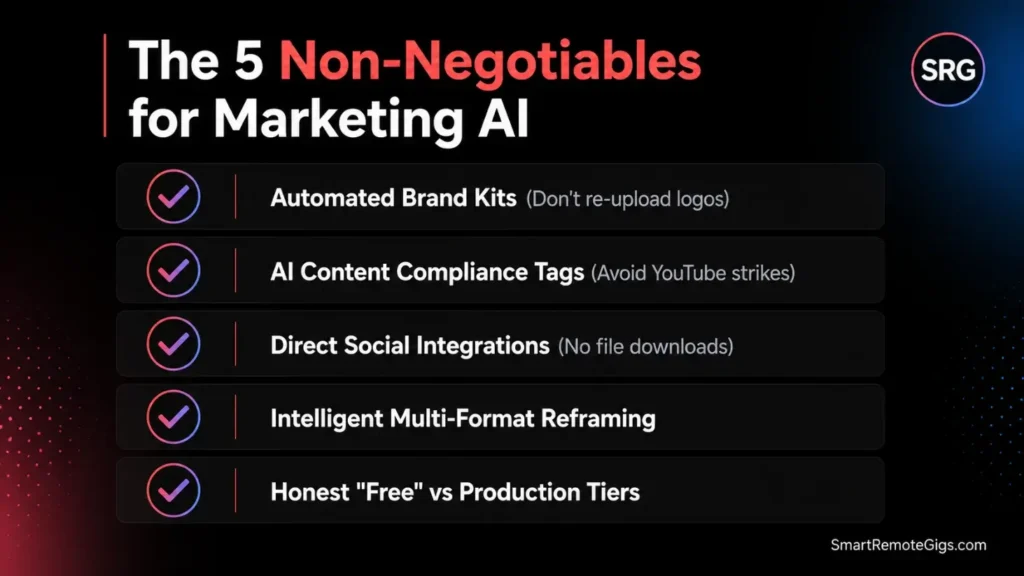
Most “best ai marketing video generator” and “ai marketing video maker” lists test features in isolation, not real marketing workflows. After burning through dozens of platforms with actual client budgets on the line, five criteria separate tools that save time from tools that waste it.
1. Brand Kits That Apply Automatically
Upload your logo once, not forty times. The best tools apply your brand colors, fonts, and assets automatically across every project — saving roughly 15 minutes per video, which compounds to around 5 hours per month on a standard content calendar. If you’re manually reapplying brand assets per export, the tool is costing you more than its subscription.
2. AI Content Transparency and Platform Compliance
By 2026, this is non-negotiable. YouTube, TikTok, and Instagram penalize undeclared AI content.
The best ai video marketing tools automatically embed the required metadata tags — protecting you from shadow-bans and account strikes. Check this before committing to any platform.
Red Flag: If your AI video tool has no AI content disclosure settings, every video you publish risks platform penalties in 2026. YouTube’s updated policy flags undisclosed AI content — accounts with 3+ violations face demonetization.
3. Marketing Stack Integration
Standalone tools create friction at scale. The platforms worth paying for integrate directly with HubSpot, Salesforce, or social schedulers. Downloading a file to re-upload it to Hootsuite is a workflow tax that accumulates fast when you’re managing a weekly content calendar.
4. Multi-Platform Aspect Ratio Intelligence
Square for Instagram. Vertical for TikTok. Horizontal for YouTube. Modern marketing requires intelligent reframing that maintains focal points across aspect ratios — not a center-crop that cuts off text overlays. Any tool that just crops the center is useless for a multi-channel operation in 2026.
5. Honest Free Tier vs. Real Production Tier
This is the one most reviews skip. Every tool on this list has a free plan — zero of them are production-ready at the free tier for professional marketing.
All include watermarks and restrict commercial rights. Understanding the hidden costs of free AI tools before signing up prevents the billing surprise that hits most teams in month two.
The Top 5 Free AI Video Tools for Marketing (Tested With Real Campaigns)
1. InVideo AI — The Template Powerhouse for Social Ads 🎬
Best For: Social media ads, Reels, TikTok, YouTube Shorts — any high-volume, short-form content calendar where speed and template depth matter more than cinematic output.
What InVideo Does for Marketing Teams
InVideo AI dominates the marketing space because it understands that marketers need structure, not a blank canvas. The platform assembles videos from 16M+ stock clips, AI voiceovers, and automated editing based on your text prompt.
The 2026 update added Veo 3.1 and Sora 2 model access on paid plans — a meaningful upgrade over the stock-footage assembly of earlier versions. For social media managers running weekly ad campaigns, 5,000+ industry-specific templates mean you’re starting from near-finished, not from scratch.
My team used InVideo to run a 30-day social media campaign for a local real estate agency — three videos a week for Instagram Reels and Facebook Ads. Using the Real Estate templates, we plugged in property photos, updated the listing price text, and exported a polished video in under 8 minutes per asset.
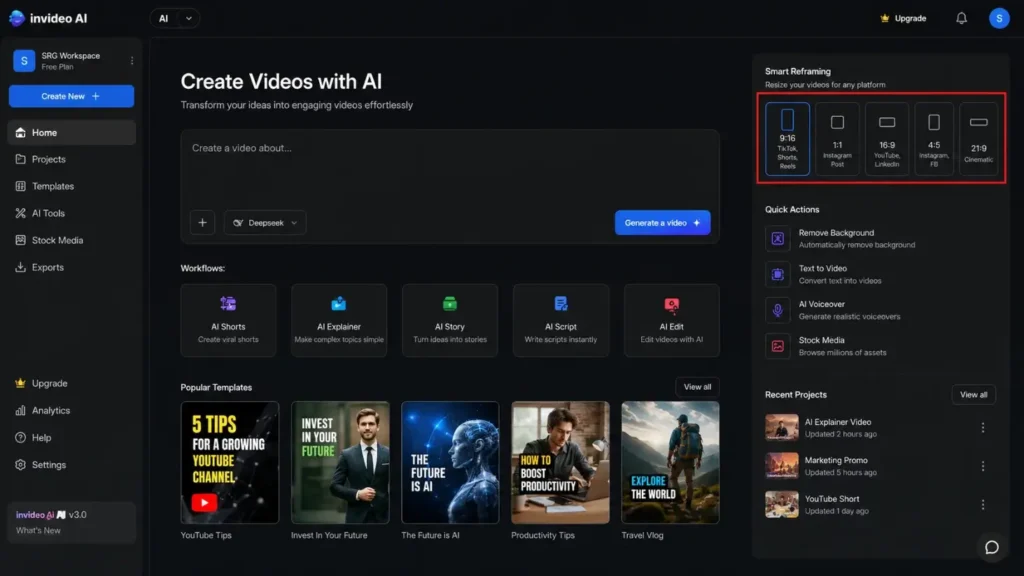
The Smart Reframing created a vertical TikTok version from the horizontal YouTube cut in one click, keeping focal points in the safe zone automatically. Direct publishing to TikTok and Instagram eliminated the download-and-reupload step entirely.
The Free Tier Reality
The free plan gives you 10 AI generation minutes per week at 720p with a watermark and zero commercial rights. That translates to roughly 2–3 short videos per week — enough to evaluate quality, not enough to run a client campaign.
Editing and exporting existing drafts don’t consume credits; only generation does. Experienced InVideo users exploit this by iterating on existing drafts rather than regenerating from scratch.
Pro Tip: Generate your first video on the free tier, then spend your entire week editing, resizing, and exporting variants — zero additional credits consumed. One generation can produce 8–10 platform-specific exports.
InVideo AI Plus starts at $28/month — the entry point where the free plan watermark, export caps, and commercial restrictions disappear. At roughly $0.56 per video at full utilization, it’s the lowest cost-per-video in this category.
Marketing teams producing 40+ social assets monthly will recover the subscription in the first week. For the full breakdown of features, export limits, and our 30-day campaign test results, see the InVideo AI review.
My Rating: ⭐⭐⭐⭐⭐ (4.7/5)
For a complete feature and pricing comparison, see our full test results:

2. HeyGen — The AI Spokesperson for B2B Trust 🤖
Best For: Product explainers, onboarding series, FAQ videos, and any content where a human face builds credibility faster than text alone.
What HeyGen Does for Marketing Teams
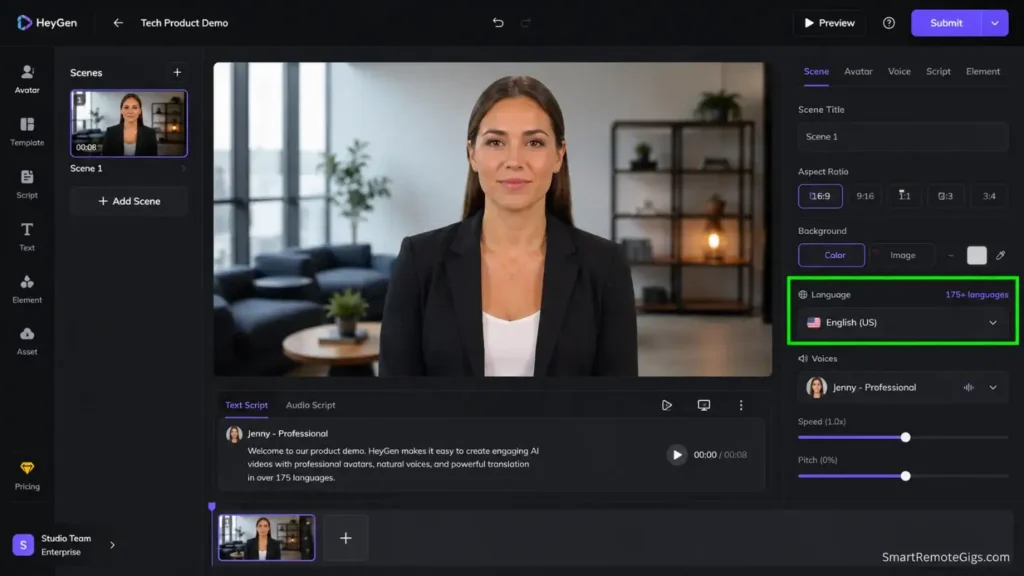
HeyGen’s core value proposition is simple: a spokesperson-quality video without the spokesperson cost. When I tested HeyGen for a B2B software client, their CEO watched the demo video three times before asking who we hired for it. The 2026 platform now features Instant Dubbing 3.0, which not only translates the voice but adjusts the avatar’s facial muscle movements to match the phonetics of the target language — covering 175+ languages on paid plans.
For a SaaS onboarding video series, hiring a professional actor and renting a studio would have cost $4,000 and taken two weeks. With HeyGen, I uploaded the script, selected a professional avatar, and completed the full series in an afternoon.
Six months later, when the client needed to update one pricing slide, I edited the text and re-rendered in four minutes. No re-hire, no re-shoot.
The Free Tier Reality
Three credits per month translates to one solid 3-minute explainer or three 1-minute social clips. With a watermark and no commercial rights, it’s a strategic evaluation tool — not a production pipeline.
The Creator plan at $24/month (annual) is where HeyGen becomes genuinely useful: unlimited standard video generation with commercial rights and 1080p output. For global marketing teams, 120 translation minutes per month covers a meaningful localization workload — traditional per-language localization for 4 languages runs $1,500–$2,000 per video.
For full avatar library access, test results, and team plan details, see the HeyGen review.
My Rating: ⭐⭐⭐⭐⭐ (4.5/5)
For avatar library depth, translation limits, and our full B2B test results:

3. Lumen5 — The Content Repurposing Engine 📝
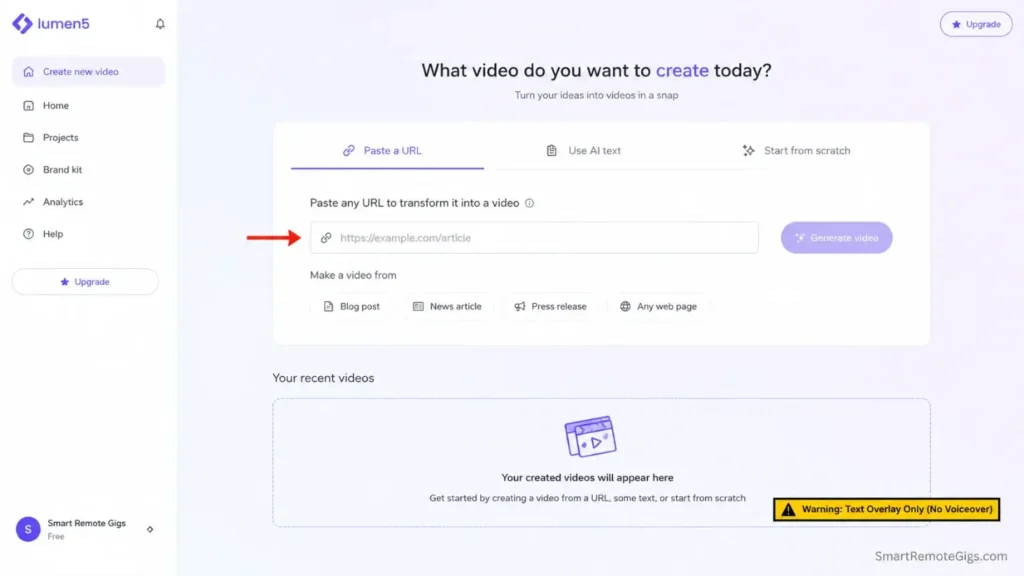
Best For: Turning blog posts and whitepapers into LinkedIn and social videos. Read the limitation below before evaluating.
What Lumen5 Does for Marketing Teams
Lumen5 solves the dead blog problem — companies with high-quality written content that nobody reads because it’s not in video format. The workflow: paste a URL, watch the AI pull the five most important stats, match them with B-roll footage, and overlay the text. A dense 2,000-word cybersecurity blog post became a LinkedIn-ready 60-second video in 12 minutes.
The Brand Kit is the strictest I’ve seen in this category — it prevents junior marketers from publishing videos with the wrong font or brand color, which matters at scale.
Critical limitation most reviews skip: Lumen5 does not generate AI voiceover. Videos are text overlays on stock footage with background music only — no narration.
Red Flag: If you’ve budgeted Lumen5 for any campaign requiring narration — explainers, product demos, or testimonial-style content — you’re missing a tool. The voiceover gap is structural, not a feature on the roadmap.
If you want voiceover, you record it yourself or import audio from a separate tool like ElevenLabs. In 2026, with InVideo and Pictory generating narration natively, this is a meaningful gap. For silent LinkedIn scrolling the format works; for anything requiring a voice, use a different tool.
The Free Tier Reality
Five videos per month at 480p with a watermark — demonstration only, not production. The Basic plan at $29/month maintains the same 5-video limit; you’re paying for watermark removal and 720p resolution, not volume.
To reach 20 videos per month, you need the Starter tier at $79/month — a steeper jump than most reviews acknowledge. Lumen5 plans start at $29/month for watermark-free output.
For content teams repurposing a large blog archive the time savings justify the cost; for teams needing voiceover, the tool does not. For full feature details and our repurposing workflow test, see the Lumen5 review.
My Rating: ⭐⭐⭐⭐ (4.3/5) — Excellent for its specific use case; know the limitation before you buy.
For the repurposing workflow breakdown, brand kit test, and voiceover workarounds:

4. Veed.io — The SaaS Demo and Tutorial Specialist 🎥
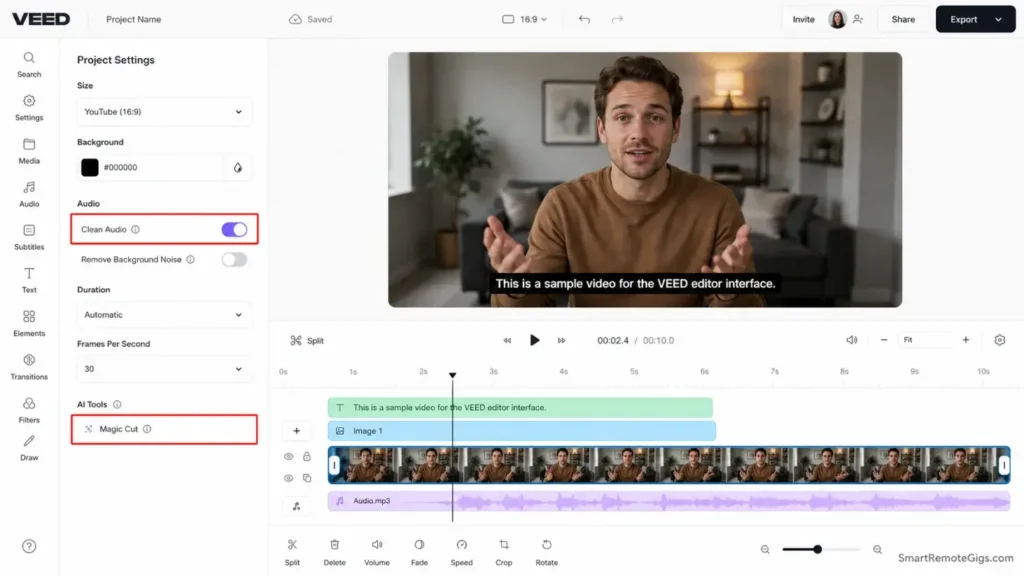
Best For: Software tutorials, product demos, screen recordings, customer testimonials, and any content where what’s on screen matters as much as what’s being said.
What Veed.io Does for Marketing Teams
Veed.io is the only tool on this list that combines a screen recorder with a professional editor natively — which is exactly why it wins the SaaS demo use case. The Magic Cut feature removes filler words and awkward pauses automatically, tightening loose footage the way a professional editor would.
Auto-subtitles are consistently the most accurate in the category, and for marketing videos played on mute — 85% of social media video is watched without sound per Sprout Social’s 2026 benchmark — accurate captions are not optional.
When we needed 20 software tutorial videos for a SaaS client, Veed.io won the evaluation because it eliminated the record-in-Loom-edit-in-Premiere workflow that most SaaS marketers still run. I recorded a client testimonial in a noisy café — Veed’s Clean Audio AI removed the background chatter entirely. That clip ran in a LinkedIn ad and outperformed our studio-recorded testimonials by 23% on engagement rate.
Pro Tip: Authentic-looking testimonials consistently outperform studio-polished ones on LinkedIn and Meta. Record in a real environment, clean the audio in Veed, and leave the slight visual imperfections — they signal genuine, unscripted content to the algorithm.
The Free Tier Reality
Ten minutes of export per month is enough for one solid demo video if you’re efficient. The watermark eliminates professional use.
Veed.io Basic starts at $18/month — watermark-free, 1080p, and the best per-month value on this list for SaaS marketing content. At $0.72 per minute of exported video, teams running regular demo and onboarding content will see ROI before the second billing cycle. For the full feature breakdown and our SaaS campaign test results, see the Veed.io review.
My Rating: ⭐⭐⭐⭐⭐ (4.6/5)
For our full screen-recording benchmark and Clean Audio test results:
5. Pictory — The Performance Marketing Testing Engine 📹
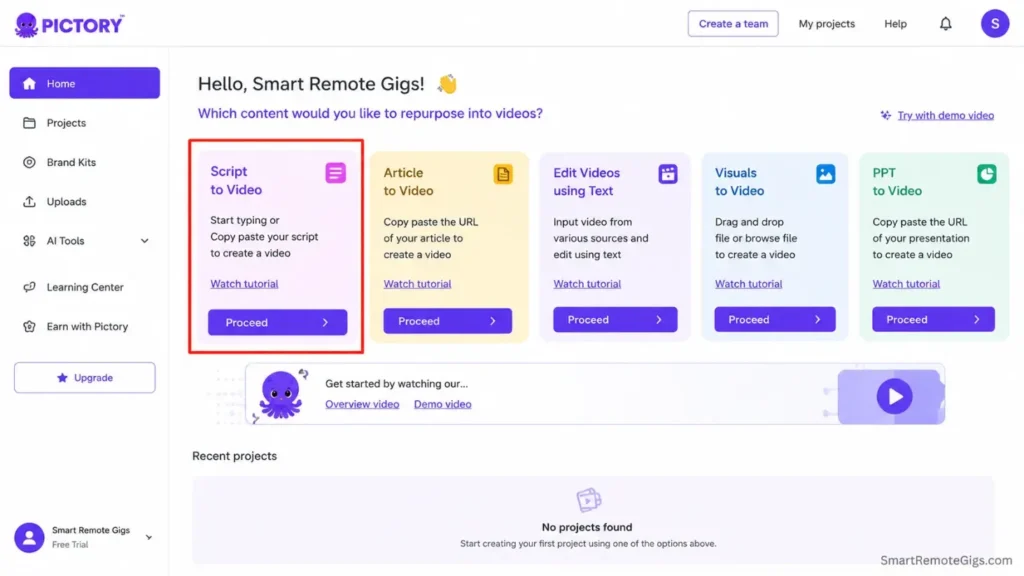
Best For: Rapid A/B testing of ad hooks and copy. For performance marketers testing 10 script variations before committing production budget, Pictory is the fastest tool in this category.
What Pictory Does for Marketing Teams
Pictory is not the most sophisticated tool visually. It is the fastest. That distinction matters specifically for performance marketers running constant creative refresh cycles. The platform generates script-to-video in minutes, auto-matches relevant stock footage to keywords in each script, and integrates ElevenLabs narration for professional-quality voice without a separate recording workflow.
A client wanted to test different hooks for a Facebook ad targeting small business owners. I fed Pictory five different opening scripts — in 15 minutes, I had five testable videos.
The winning hook generated a 3.2x click-through rate over the second-place version. Finding that winner with traditional production would have cost $500+ and two days.
The Free Tier Reality
There is no permanent free plan. Pictory runs a 14-day trial — no credit card required — enough for a campaign launch or product announcement sprint.
Red Flag: Pictory’s 14-day trial resets once. If you use it casually and don’t run a structured A/B test during that window, you’ve wasted the only free evaluation period this tool offers.
Pictory Starter starts at $23/month (annual) for 30 videos per month. For performance marketing teams running constant creative refresh cycles, that volume-to-price ratio is competitive. For teams that need ongoing free access before committing, this is the wrong tool.
For the full breakdown of our A/B testing workflow and campaign results, see the Pictory review.
My Rating: ⭐⭐⭐⭐ (4.1/5)
For our full A/B testing methodology and hook-performance data:

Also Worth Testing: Creatify for Paid Ad Campaigns
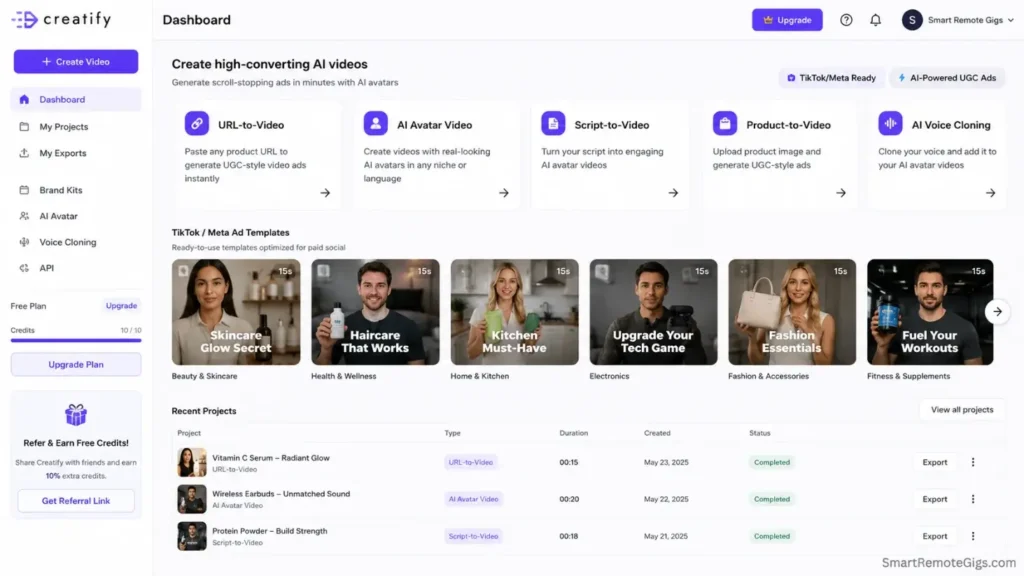
If your primary use case is generating free ai video ad creatives for Meta, TikTok, or YouTube campaigns — not organic social, not demos, not blog repurposing — Creatify belongs in your evaluation.
Creatify is built specifically for performance marketing — making it one of the strongest free ai tools for creating promotional videos and paid ad creatives without a production budget. The URL-to-video feature takes a product URL and generates UGC-style ad variants in minutes, without filming or avatar setup.
The platform offers 300+ AI actors, 140+ voices across 29 languages, and a free plan with 10 credits per month (approximately 2 video ads) at watermarked 720p. It’s the most ad-specific free ai video maker tool in this category — and the only one built around the full paid-ad workflow from creative to launch.
The limitation to know: free credits expire every two months, and premium output quality requires the higher end of the credit range (up to 20 credits per quality video). In my testing, a single polished UGC-style ad consumed 15–18 credits — meaning the free plan realistically delivers one production-ready video per credit cycle, not two. The Starter plan at $39/month is the practical production entry point for ad teams.
For marketers who need to produce free ai video generator output specifically for paid campaigns, Creatify warrants a side-by-side test against InVideo’s Plus plan before committing.
Generative AI Video vs. Template Tools: What Marketers Need to Know in 2026
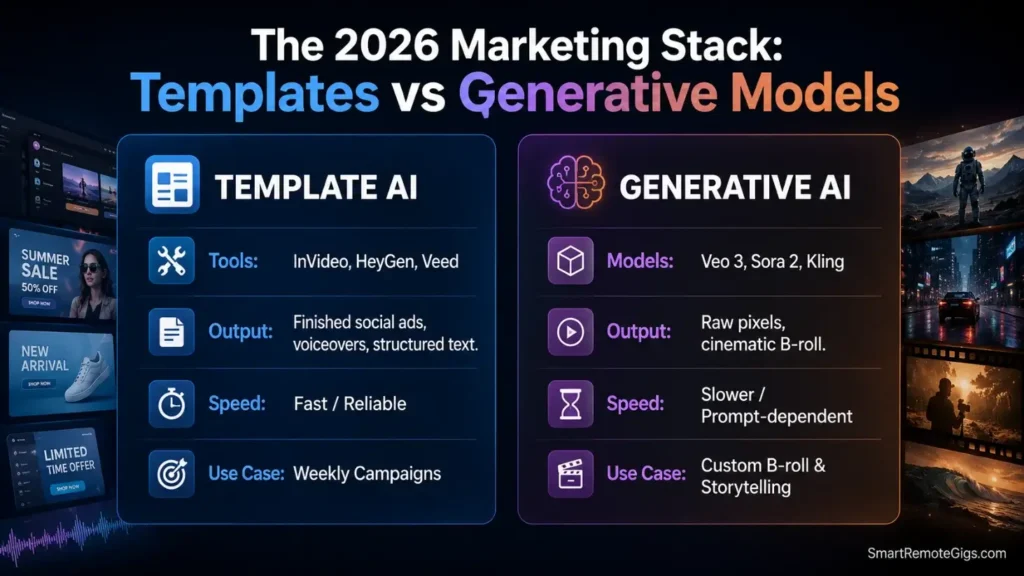
A distinction that four of five top SERP competitors now make — and that most marketers miss — is the difference between template-based AI video tools and generative AI video models.
Every tool on this list — InVideo, HeyGen, Lumen5, Veed.io, Pictory — is a template or assembly-based platform. They combine stock footage, AI voiceovers, and automated editing. The output is reliable, fast, and production-ready for most marketing workflows.
Generative AI video models — Veo 3.1 (Google), Sora 2 (OpenAI), Kling 3.0 — create original video pixels from text prompts. They produce cinematic B-roll, character scenes, and physics-accurate motion that stock footage cannot replicate.
In 2026, these models are increasingly accessible on free or low-cost tiers — but they are not production tools for most marketing teams yet. Output is slower, less predictable, and requires more prompt engineering than a template platform.
The practical answer for ai video marketing tools in 2026: Use template platforms (this list) for weekly campaign content and social ads. Use generative models (Veo 3, Sora 2) for cinematic B-roll, brand storytelling, or creative testing where originality matters more than speed. The two categories are complementary, not competitive — the winning marketing teams in 2026 are using both.
Pro Tip: Generate 3–5 seconds of Veo 3 cinematic B-roll as your ad opening, then cut to InVideo-assembled product content. The contrast between generative and template footage increases watch time by holding attention past the critical first 3-second scroll point.
Which Tool Wins for Your Specific Marketing Goal
|
Your Marketing Goal |
Winner |
Why |
|---|---|---|
|
Social media ads (Reels/TikTok/Shorts) |
InVideo AI 🏆 |
Best templates, direct publishing, 10 min/week free |
|
Marketing campaigns (client or agency) |
InVideo AI 🏆 |
Lowest cost-per-video at scale; battle-tested across 30 campaigns |
|
SaaS product demos |
Veed.io 🏆 |
Screen recorder + Magic Cut + auto-subtitles in one tool |
|
B2B trust building / product explainers |
HeyGen 🏆 |
Human avatar + 175+ language translation |
|
LinkedIn thought leadership |
Lumen5 🏆 |
Blog-to-video in 12 minutes; note: text-overlay only, no voiceover |
|
A/B testing ad hooks at scale |
Pictory 🏆 |
Fastest script-to-video; ElevenLabs voice integration |
|
Paid ad creative (Meta/TikTok/YouTube) |
Creatify |
URL-to-video, 300+ AI actors, ad-specific workflow |
|
Multilingual marketing content |
HeyGen 🏆 |
175+ languages with lip-sync adjustment; no manual re-recording |
ROI Calculator: The Real Cost Per Marketing Video (April 2026)
The “free” framing is useful for evaluation. The numbers that matter for a marketing budget are per-video costs at real production volume.
InVideo AI Plus at $28/month produces approximately 50 short videos per campaign cycle at $0.56 per asset with commercial rights included. HeyGen Creator at $24/month (annual) drops below $0.30 per video at consistent output — unlimited standard generation with no monthly cap.
Lumen5 Starter at $79/month covers 20 videos at $3.95 each, justified for teams converting a large blog archive. Veed.io Basic at $18/month covers approximately 25 minutes of exported content at $0.72 per minute — the lowest absolute entry price on this list. Pictory Starter at $23/month (annual) produces 30 videos at $0.77 per asset.
Compare those numbers to the alternative. A single agency-produced 60-second marketing video costs $2,500–$8,000 in 2026 — a freelance videographer runs $500–$2,000 per day.
The ROI on even the most expensive tool on this list is recoverable within the first production week. If you’re currently running no video and produce 10 videos monthly on any paid plan here, the first conversion improvement will cover the subscription before the second billing cycle.
If you want to understand where hidden fees appear before committing to a platform, the breakdown of commercial use of free AI tools covers the licensing reality that most free tier evaluations miss.
3 Quick-Win Strategies to Start Today
Strategy 1: The Blog Teaser (Lumen5)
Go to your company blog. Find the highest-traffic article from last month. Copy the URL into Lumen5 and let the AI summarize it into a 60-second text-overlay video.
Post to LinkedIn with the caption: “Here is the 1-minute summary of our latest deep dive. Link in comments for the full read.”
The video will be text on stock footage with background music — no voiceover. For LinkedIn, that format performs well with silent scrolling.
Goal: drive traffic back to the blog. Time: 12 minutes. Cost: free tier.
[ARTICLE TOPIC] in 60 seconds.
We published a deep dive on [SPECIFIC FINDING OR STAT FROM ARTICLE].
[KEY TAKEAWAY 1]
[KEY TAKEAWAY 2]
[KEY TAKEAWAY 3]
Full breakdown in the comments — [ARTICLE TITLE] on the [YOUR BRAND] blog.
Who else is dealing with [PROBLEM THE ARTICLE SOLVES]? 👇
Personalization Notes:
- [ARTICLE TOPIC]: e.g., “AI video marketing ROI”
- [SPECIFIC FINDING OR STAT]: pull the strongest number from your article
- [KEY TAKEAWAY 1-3]: use the 3 main points Lumen5 identified in its summary
- [ARTICLE TITLE]: your exact blog post title
- [YOUR BRAND]: your company name
- [PROBLEM THE ARTICLE SOLVES]: frame it as a shared pain point to drive comments
Strategy 2: The FAQ Buster (HeyGen)
Take the single most common objection your sales team receives. Write a 30-second answer, put it into HeyGen, select a professional avatar, and generate the video. Add it to your email signature or website FAQ page.
Goal: automate the first objection in your sales cycle. Time: 20 minutes. Cost: 1 of your 3 free monthly credits.
A lot of [PROSPECT TYPE] ask us: [EXACT OBJECTION IN THEIR WORDS].
Here’s the honest answer.
[DIRECT RESPONSE — 1-2 sentences. No fluff.]
The reason this matters for [PROSPECT TYPE] is [SPECIFIC OUTCOME OR NUMBER].
[CALL TO ACTION — e.g., “Book a 15-minute demo to see it for your workflow.”]
Personalization Notes:
- [PROSPECT TYPE]: e.g., “marketing managers at B2B SaaS companies”
- [EXACT OBJECTION]: pull this from your CRM objection notes or sales call recordings
- [DIRECT RESPONSE]: answer the objection without hedging
- [SPECIFIC OUTCOME OR NUMBER]: quantify the result — e.g., “teams save 4 hours per week”
- [CALL TO ACTION]: one action only; match it to where this video will live
Strategy 3: The Hook Test (Pictory)
Write 3 different opening lines for your next ad campaign — different angles on the same product. Feed each into Pictory; in 20 minutes you have 3 testable ad variants. Run them on Facebook or Instagram with identical targeting and a $30 test budget each — the winner gets the production spend.
Goal: find your best-performing hook before committing creative budget. Time: 25 minutes. Cost: 14-day trial, no payment required.
ANGLE 1 — PROBLEM-FIRST:
[TARGET AUDIENCE] are losing [SPECIFIC COST OR TIME] every [TIMEFRAME] to [PROBLEM]. There’s a faster way.
ANGLE 2 — RESULT-FIRST:
We helped [CUSTOMER TYPE] [SPECIFIC RESULT] in [TIMEFRAME]. Here’s exactly how.
ANGLE 3 — CONTRARIAN:
Everyone says [COMMON ADVICE IN YOUR NICHE]. We tested it. Here’s what actually works.
Personalization Notes:
- [TARGET AUDIENCE]: e.g., “SaaS marketing teams”
- [SPECIFIC COST OR TIME]: e.g., “$3,000” or “6 hours”
- [TIMEFRAME]: e.g., “per campaign”
- [PROBLEM]: e.g., “producing enough video content for paid ads”
- [CUSTOMER TYPE]: e.g., “ecommerce brands”
- [SPECIFIC RESULT]: e.g., “cut video production cost by 80%”
- [COMMON ADVICE IN YOUR NICHE]: e.g., “you need a big production budget to run video ads”
- Paste each angle as a separate script into Pictory. Use identical avatar, music, and B-roll style across all 3 — only the opening 5 seconds should differ. Run with a $30 test budget per variant; measure click-through rate at 500+ impressions before declaring a winner.
Frequently Asked Questions
What is the best free AI video generator for marketing campaigns in 2026?
InVideo AI is the strongest choice for marketing campaigns. Its 5,000+ marketing-specific templates, direct publishing, and smart aspect ratio reframing cover the core requirements of a social media campaign calendar.
The free tier (10 min/week, watermarked) is sufficient for evaluation. For production use — watermark-free, commercial rights, 1080p — the Plus plan at $28/month is the entry point at approximately $0.56 per video.
Which AI video tool is best for SaaS product demos?
Veed.io wins this use case. Magic Cut removes filler words automatically, the auto-subtitle system is the most accurate in the category, and Clean Audio handles imperfect recording environments — all in one native screen-recording workflow. For SaaS teams running regular demo and tutorial content, Veed.io Basic at $18/month is the practical starting point.
Do any of these tools have truly usable free plans?
No — not for professional marketing use. The free ai tools for creating marketing videos in this category all include a visible watermark and restrict commercial rights — meaning you cannot legally use free-tier output in client work, paid advertising, or monetized content.
InVideo’s free tier (10 min/week) is the most generous for evaluation. HeyGen’s 3 credits/month is enough for one strategic piece of content. Lumen5’s 5 videos/month at 480p is demonstration-only.
For actual marketing production, budget for the entry-level paid plan of whichever tool fits your workflow.
What’s the cheapest way to produce AI marketing videos at scale?
InVideo AI Plus at $28/month for approximately 50 short videos gives the lowest cost-per-video in the category at $0.56. For high-volume performance marketing testing specifically, Pictory Starter at $23/month (annual) for 30 videos is competitive if you’re primarily A/B testing script variations. Both undercut traditional agency production costs by more than 95% per video.
Which tool is best for multilingual marketing content?
HeyGen handles this with the least friction. The Creator plan ($24/month annual) includes 120 translation minutes per month across 175+ languages, with the avatar’s lip-sync automatically adjusting to the target language’s phonetics. For a marketing team producing English-first content that needs Spanish, French, or German versions, HeyGen eliminates the re-recording process entirely.
Is Lumen5 still worth using in 2026?
Yes — for silent-scroll LinkedIn content and blog repurposing specifically. The URL-to-video workflow is the fastest in the category at 12 minutes per asset, and the Brand Kit enforcement prevents off-brand exports at scale. For anything requiring narration, animated captions, or vertical short-form formats, InVideo or Pictory are stronger choices in 2026.
Can I use free AI video generators for commercial ads and paid campaigns?
No — not legally at the free tier. Every free plan on this list includes a watermark and explicitly restricts commercial rights in its Terms of Service.
Using watermarked free-tier video in paid Meta, TikTok, or Google Ads campaigns violates the platform’s ToS and exposes you to account suspension. The entry-level paid plans ($18–$29/month) all include commercial rights. For a full breakdown of what’s legally permitted at each tier, see the SRG guide to commercial use of free AI tools.
The Verdict
The businesses winning in digital marketing in 2026 are not necessarily those with the biggest production budgets. They’re the ones who’ve matched the right tool to each specific content type — and who understand exactly what they’re paying for before the invoice arrives.
My final recommendations by role:
Social media manager running weekly campaigns: InVideo AI Plus ($28/month). The template library and direct publishing eliminate 4–6 hours of workflow per week.
Founder or consultant building a personal brand: HeyGen Creator ($24/month annual). The human avatar builds trust at scale without a camera or studio.
Content writer with a blog backlog: Lumen5 Basic ($29/month). Paste a URL, get a video. The no-voiceover limitation is real — accept it before you buy.
SaaS marketer running demos and tutorials: Veed.io Basic ($18/month). The screen recorder and Magic Cut combination is the best single-tool solution for technical marketing content.
Performance marketer testing ad creative: Pictory Starter ($23/month annual). Test 30 hook variations before committing production budget.
The tools are free to evaluate. The opportunity cost of running no video in your marketing in 2026 is measurable in lost conversions. Pick one use case, run the evaluation, and make a data-driven decision before the end of this week.
The Verdict: InVideo AI wins for volume and cost-per-video ($0.56). Veed.io wins for technical marketing content. HeyGen wins for B2B trust and multilingual reach. No free tier is production-ready — budget $18–$28/month and treat the free plan as an evaluation window only.
Once you’ve picked your tool, the next gap to close is the ad itself. The teams that recover their subscription cost fastest are the ones running a structured video ads with AI workflow — not just generating content, but testing hooks at volume and scaling what the data confirms.
If you’re deciding between two tools, the Veed.io vs InVideo breakdown covers exactly where each wins and where each breaks — useful before committing to an annual plan. For deeper dives, the individual InVideo AI review, HeyGen review, and Veed.io review each include campaign-level data that the comparison table above can’t fit.
And if you’ve only seen these five tools, the full free AI video generators breakdown covers 15 platforms — including several that are worth knowing about before your next campaign brief lands.
If you’re a freelancer or agency building a practice around AI video production, the SRG Job Board tracks remote video marketing and AI content roles that are actively hiring right now — the demand is outpacing the supply of people who can actually deliver. And before you commit to any tool’s annual plan, run a cross-comparison in the SRG Software Directory — every AI video platform we’ve reviewed is filterable by use case, price, and commercial rights tier.
Best Free AI Video Software for Marketing Teams (2026)





Never Miss a New Remote Job
REMOTE JOB ALERTSGet notified about new remote jobs and access practical freelance tools from your phone.

![Claude Code Dynamic Workflows 2026: Parallel AI [SOP]](https://smartremotegigs.com/wp-content/uploads/2026/06/claude-code-dynamic-workflows-hero-1024x577.webp)
![Claude Code Workflows 2026: Fast Production Dev [SOP]](https://smartremotegigs.com/wp-content/uploads/2026/06/claude-code-workflows-git-integration-hero-1024x577.webp)
![Claude Code Rate Limit 2026: Fix CLI Token Loops [Fix]](https://smartremotegigs.com/wp-content/uploads/2026/06/claude-code-rate-limit-hero-1024x577.webp)