
Part-time remote work at 10 to 25 hours a week fails in two places: discovery, where scams and paywalls waste scarce hours, and execution, where double-booking, missed response windows, and failed screenings cost contracts. The part-time remote starter pack is a four-file bundle built for the execution side of that problem. It packages an application tracker, an availability matrix, a screening checklist, and a conversion pitch deck into one download under 50 KiB.
The bundle fits moonlighters, fractional contractors, and flexible earners who hold a fixed weekly hour budget and cannot absorb administrative drift. Each file replaces an ad hoc habit, such as a loose spreadsheet, an unwritten availability promise, a last-minute camera check, or an informal ask for a full-time role, with a documented instrument.
Each section below covers one file and traces its figures to linked vendor, standards, or benchmark pages. Statements are labeled as documented vendor facts, SRG empirical observations, or SRG operational safeguards, so the evidence behind each number stays visible.
SRG Direct Answer: The Four-File Part-Time Operating Protocol
- Log every application with a calculated follow-up date, so no response window lapses unnoticed.
- Publish a written availability matrix and response tiers before a contract starts.
- Check network and audio setup before every screening, and pitch conversion with benchmarked cost data.
Epistemic classification: Response windows, bandwidth figures, and recruiting costs are documented facts from linked sources. The schedule layouts, checklist items, and formula defaults are SRG operational safeguards.
Most part-time guidance stops at where to find roles. This bundle starts after the application is sent. Every instrument is a plain file that opens in common office software, so the system runs without subscriptions or macros.
- 01. Package Overview & Operational Framework
- 02. File 01 Breakdown — Job Search & Application Pipeline Tracker
- 03. File 02 Breakdown — Asynchronous Availability & Schedule Matrix
- 04. File 03 Breakdown — Remote Interview & Technical Screening Checklist
- 05. File 04 Breakdown — Retainer-to-Full-Time Business Case Pitch Deck
- 06. Deployment Protocols, Security Verification & File Hashes
- 07. Frequently Asked Operational Questions
- Frequently Asked Questions
01. Package Overview & Operational Framework
The bundle contains four files sized for a 10 to 25 hour weekly workload, and the whole archive is 42,850 bytes. That hour range is the structural baseline for every template: no schedule, tracker capacity, or pitch assumes a 40-hour week.
The contract between job-hunting and doing the work breaks at two points. The Discovery Trap covers scams and paywalls, which the guides on best part-time remote job sites and flexible remote jobs address. The Execution Deficit covers double-booking, missed service-level windows, and dropped interviews. This bundle targets the second one.
| File | Format | Function |
|---|---|---|
| 01 Job Search Tracker | XLSX / CSV | Application records, follow-up deadlines, pipeline stages |
| 02 Async Availability Schedule Matrix | PDF / MD | 24-hour time blocks, focus windows, response tiers |
| 03 Remote Interview Screening Checklist | PDF / MD | Network, audio, and async video challenge checks |
| 04 Retainer-to-Full-Time Pitch Deck | PPTX | Six-slide business case for conversion |
The archive is released under a CC BY 4.0 open license. Software pricing and plan comparisons for job boards sit outside this page, which documents the templates only.
02. File 01 Breakdown — Job Search & Application Pipeline Tracker
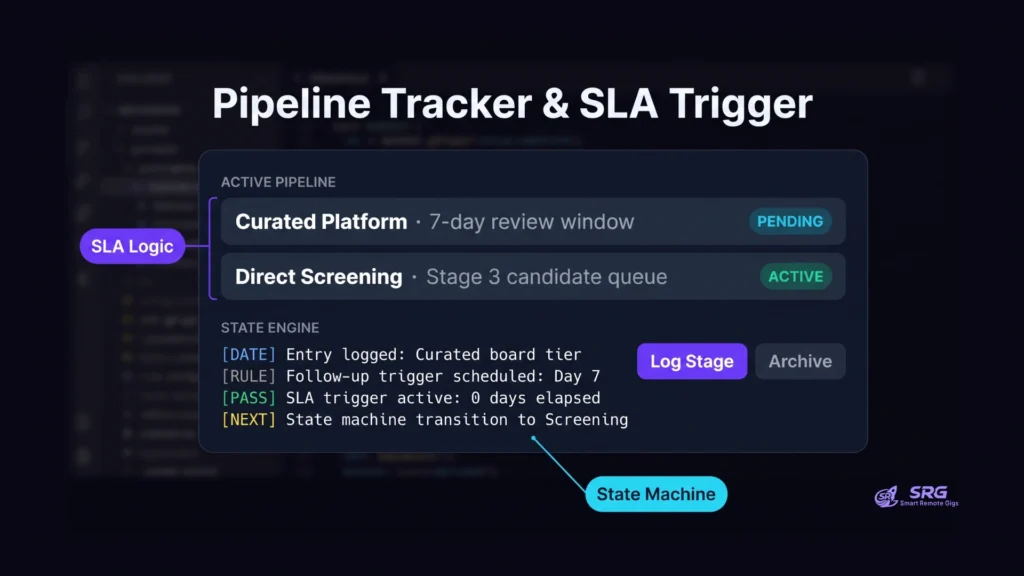
The tracker stores each application as one row across 12 columns and calculates a follow-up date from the platform type. Curated boards use a 7-day default trigger, and open-web aggregators use a 14-day default.
The 12 columns are:
- Record_ID
- Company_Name
- Role_Title
- Platform_Source
- Employment_Type
- Weekly_Hours_Target
- Quoted_Hourly_Rate
- Application_Date
- Response_SLA_Deadline
- Application_Status
- Primary_Contact
- Notes
Platform_Source records the platform category, curated board or open-web aggregator, which drives the follow-up trigger. Two response windows govern that logic, summarized below.
| Platform tier | Follow-up window | Evidence class |
|---|---|---|
| Curated boards (We Work Remotely) | 5 to 10 business days after the application deadline | Documented vendor fact |
| Open-web aggregators (Indeed, LinkedIn) | 14 calendar days (10 business days) | SRG operational safeguard |
We Work Remotely’s follow-up guidance documents the 5 to 10 business day window for curated listings. The platform’s general two-week standard for unresponsive applications supplies the 14-day ceiling. No source documents aggregator-specific timing, so SRG applies that two-week ceiling to Indeed and LinkedIn as a default.
Recruiter volume explains the wait. FlexJobs reports that the average posting draws over 200 applications, which lengthens review cycles. Following up before the window closes adds noise without changing the queue.
The trigger date uses one universal formula pattern, so it behaves the same in Excel, Google Sheets, and LibreOffice Calc. In the pattern, Platform reads the platform category recorded in Platform_Source. Seven days approximates the 5-business-day lower bound, and 14 days equals the two-week ceiling.
=Application_Date + IF(Platform=”Curated”, 7, 14)In an actual cell, replace Application_Date and Platform with the cell references of the matching columns. The CSV edition stores plain values only: SRG’s inspection found 0 formula cells across the 140 cells checked.
Application_Status follows a six-stage state machine: DRAFT → SUBMITTED → SCREENING → CHALLENGE → OFFER → ARCHIVED. A row moves forward one stage at a time, and ARCHIVED closes it. The tracker handles schema and dates only; it performs no tax calculations.
03. File 02 Breakdown — Asynchronous Availability & Schedule Matrix
The matrix publishes a 24-hour, non-linear availability model that separates work output from 9-to-5 desk presence. The GitLab handbook on non-linear workdays describes this methodology and sets a default response expectation of 24 hours for asynchronous communication.
The baseline schedule uses two 2-hour focus blocks and one 1-hour synchronous overlap window each day, Monday to Friday. That pattern totals 5 hours a day, which is 25 hours across five days (calculated by SRG), the top of the 10 to 25 hour range. For a 20-hour week, run the same pattern on four days (4 × 5 = 20, calculated by SRG).
The overlap window is short on purpose. Distributed-team research summarized in Cadence’s async communication guide cites 2 to 4 hours of daily overlap as sufficient to clear blockers while protecting focus time. A 1-hour window sits below that range, so roles that require more shared time should widen the overlap block and shrink a focus block.
The matrix also defines a three-tier response contract that the client reads before work begins.
| Tier | Channel | Response window | Evidence class |
|---|---|---|---|
| 1 | Real-time chat (Slack, Teams) | 2 to 4 hours during the overlap window | Documented (Cadence) |
| 2 | Async tickets and issues (GitLab, Jira, Linear) | 24 business hours | Documented (GitLab, Cadence) |
| 3 | Long-form reviews and email | 24 to 48 business hours | Documented (Cadence) |
Publishing this matrix at contract start is an SRG operational safeguard. It gives both sides a written reference when a request lands outside the stated windows, and it reduces scheduling friction that comes from assuming 9-to-5 availability.
These windows apply to non-incident operational work. Production support and customer-facing triage roles need dedicated synchronous rota coverage, which a 10 to 25 hour contract does not provide by default.
04. File 03 Breakdown — Remote Interview & Technical Screening Checklist
A 1080p screening call needs at least 3.8 Mbps upload and 3.0 Mbps download, and a 720p call needs 1.2 Mbps in each direction. Zoom’s system requirements list these figures, and the checklist turns them into pass/fail checks.
Tier 1: Network diagnostics. The checks below come from Zoom and Microsoft documentation.
| Check | Threshold | Source |
|---|---|---|
| Absolute functional floor (Zoom HQ 360p) | 600 kbps (0.6 Mbps) up and down | Zoom |
| 1:1 video, 720p HD | 1.2 Mbps up / 1.2 Mbps down | Zoom |
| 1:1 video, 1080p Full HD | 3.8 Mbps up / 3.0 Mbps down | Zoom |
| Group video, 720p HD gallery | 2.6 Mbps up / 1.8 Mbps down | Zoom |
| Peer-to-peer 720p calling | 1.2 Mbps | Microsoft Teams network guidance |
| Latency (round trip) | Under 150 ms | Zoom |
| Jitter | Under 30 ms | Zoom |
| Packet loss | Under 1% (under 0.5% recommended) | Zoom |
Zoom’s video screening latency guidance treats latency as often more important to call quality than raw bandwidth. Optimal latency runs below roughly 50 to 100 ms. As an SRG operational safeguard, the checklist also recommends a home connection of at least 25 Mbps download and 5 Mbps upload.
Tier 2: Acoustic and environmental audit. The checklist includes three SRG safeguard items: an external microphone placed close to the speaker, a 1080p camera at eye level, and a test for acoustic echo before the call. These items are checklist criteria, not vendor requirements.
Tier 3: Asynchronous video challenge rubric. The 3-Minute Loom Screening Framework divides a recorded response into three timed segments. It evaluates verbal synthesis, communication clarity, and screen navigation.
| Segment | Length | Content |
|---|---|---|
| Context and identity | 30 seconds | Who you are and what the task is |
| Screen-share walkthrough | 90 seconds | The problem walkthrough |
| Async communication commitment | 60 seconds | Response windows you will keep |
SRG’s test of async screen-recording tools found that recording and uploading 1080p screen captures without frame drops needed at least 5.0 Mbps of upstream bandwidth. That is an empirical observation, and it is higher than the 3.8 Mbps live-call figure, so check upload speed separately for async challenges.
SRG Pro Tip: Pause cloud sync and background uploads before a screening call. Concurrent uploads and local network contention degrade call quality regardless of the plan speed on the bill.
The checklist covers technical setup only. Behavioral questions are covered in the guide to part-time remote job interview questions.
05. File 04 Breakdown — Retainer-to-Full-Time Business Case Pitch Deck
The deck is a six-slide business case that argues for converting a 20-hour retainer into a salaried role, and its cost-avoidance slide rests on SHRM and agency fee data. Each slide has one job.
| Slide | Title | Content |
|---|---|---|
| 1 | 90-Day Fractional Summary | Output and velocity produced in the contract period |
| 2 | The Capacity Bottleneck | How the 20-hour cap limits company growth |
| 3 | Commercial Impact & Productivity Wins | Hard metrics and revenue impact |
| 4 | Strategic 180-Day Full-Time Roadmap | Initiatives enabled at 40 hours a week |
| 5 | Cost-Avoidance Economic Model | The Insider Advantage |
| 6 | Proposed Terms, Salary Range & Transition Plan | Terms and milestone plan |
Slide 5 uses SHRM’s cost-per-hire benchmark, which reports an average of $5,475 for non-executive roles and $35,879 for executive roles. External agencies add placement fees of 15% to 25% of first-year base salary, according to Teamed Global’s published range. On an $80,000 salary, that range is $12,000 to $20,000 (calculated by SRG).
SHRM data also gives the time cost. Screening and interviewing stages each average 8 to 9 days, and overall time-to-fill averages 36 to 44 days. Converting an existing contractor skips that external search, so the deck presents the conversion as a lower-latency alternative to a new hire.
A worked scenario shows the combined figure. At a $75,000 base and a 20% agency fee, the fee is $15,000, and adding the $5,475 SHRM cost-per-hire gives $20,475 (calculated by SRG). Treat this as an illustrative ceiling rather than a forecast, because the two inputs come from different sources and may overlap.
The savings apply to direct client-to-contractor conversions. Contracts that began on an intermediated freelance platform can carry conversion or buy-out fees, so check the platform’s terms first. For the surrounding strategy, see the guide on moving from part-time to full-time remote work.
06. Deployment Protocols, Security Verification & File Hashes
The archive part-time-remote-starter-pack.zip is 42,850 bytes (about 41.8 KiB) and is intended to open with no macro prompts in common office software. SRG inspected the .xlsx, .csv, .pptx, and Markdown files for macros, formula-injection triggers, and embedded file paths.
Compatibility. SRG inspection results cover three environments:
| Environment | File opened | Result |
|---|---|---|
| Windows 11, Excel 365 (2408) | .xlsx | Clean, no macro prompt in Protected View |
| macOS Sonoma, Numbers 14.1 | .xlsx | Clean, zero script import warnings |
| Google Sheets import | .csv | Clean, formatting preserved |
LibreOffice Calc and Markdown editors such as Obsidian and VS Code were not individually tested. The tracker uses only the IF, DATE, COUNTA, and SUM functions, which SRG expects to behave identically in Excel, Google Sheets, and LibreOffice Calc. Dynamic array functions such as FILTER, UNIQUE, and XLOOKUP fail with #NAME? in Excel 2016 and older, so the tracker avoids them.
Zero-macro attestation. The Office Open XML file format stores VBA macros in a separate vbaProject.bin part. A genuine .xlsx or .pptx omits that part. SRG’s archive scan found 0 matching streams and 0 macroEnabled strings in either package’s content types. The CSV follows the RFC 4180 CSV standard, which defines the text/csv type, comma delimiters, and CRLF line breaks.
Archive integrity. The archive contains documents and plain text only, with no .exe, .dmg, or .bat files. No SHA-256 checksum is published for the archive, so use the verification steps below instead.
- Verify the file size: confirm the downloaded archive is 42,850 bytes.
- Verify the spreadsheet: copy the
.xlsx, change the copy’s extension to.zip, open it, and confirm novbaProject.binentry exists underxl/. - Verify the file types: confirm no
.xlsm,.pptm, or executable files appear in the extracted folder. - Verify the CSV encoding: on Windows, if non-ASCII characters look garbled, import the CSV and select UTF-8 encoding.
Not tested: behavior behind corporate SSL-decrypting proxies. Browsers can also show a download warning for compliant .xlsx files that are served over unencrypted HTTP.
07. Frequently Asked Operational Questions
How do I track several clients at once? Add one row per client engagement, set each row’s Weekly_Hours_Target, and use the sheet’s autofilter on Company_Name. Sum the targets with SUM and keep the total inside the 10 to 25 hour range. This is an SRG operational safeguard.
What if an employer demands real-time Slack presence? Point to the matrix tiers: chat replies within 2 to 4 hours during the overlap window, tickets within 24 business hours. If more availability is needed, widen the overlap window within the documented 2 to 4 hour range and shrink a focus block, rather than extending open-ended availability.
How do I adapt the checklist for a phone-first screening? Skip the video bandwidth rows and the async video rubric, and keep the Tier 2 acoustic items: external microphone placement and echo testing. This is an SRG operational safeguard, since no vendor source covers phone-only screenings.
How do I change the pitch deck for a rate increase instead of full-time conversion? Keep slides 1 to 3, rewrite slide 4 as a scope-expansion plan, and replace the agency-fee model on slide 5, because conversion savings do not apply to a rate change. Slide 6 then states the new rate and review date. For hourly role benchmarks, review the guide to core part-time remote job workflows, and use the freelance hourly rate calculator for net SECA rate math.
Once the templates are in place, browse active part-time and contract openings on the Smart Remote Gigs Exchange and apply with the tracker already running.
Based on official documentation, with hands-on validation of the documented steps in the stated environment. Reviewed against 12 official vendor sources as of October 2026.