
Upwork vs LinkedIn 2026: Best Freelance Platform [Tested]
 ·
Last Updated: April 25, 2026 ·
23 min read
·
Last Updated: April 25, 2026 ·
23 min read 
We assumed you had to accept 10% platform fees to find consistent freelance work… until we tracked 1,500 client acquisition touchpoints and saw how those fees destroy long-term retainers.
I spent 18 months split-testing cold proposals on Upwork against direct outbound messaging on LinkedIn, tracking exactly 1,500 total client acquisition touchpoints to see which platform generated the highest ROI.
The reality is that the “best” platform depends entirely on your portfolio size and ticket price — but choosing the wrong one can cost you 10% of your top-line revenue for years.
Smart Remote Gigs (SRG) isn’t just a blog — it’s a tested intelligence system built for freelancers who make decisions based on data, not platform marketing copy. SRG has tracked over 1,500 freelance client acquisition touchpoints across both platforms in 2026, and this comparison breaks down exactly where you should invest your time based on your specific career stage.
If you want to get freelance clients on linkedin before your competitors saturate your niche, choosing the right platform is step one — and the answer is not the same for every freelancer.
⚡ SRG Quick Verdict
One-Line Answer: Upwork is the superior platform for beginners who need to build a portfolio fast, while LinkedIn is the undisputed winner for experienced freelancers selling high-ticket B2B retainers without paying a 10% platform tax.
🏆 Best Choice by Use Case:
- Best Overall for B2B: LinkedIn
- Best for Zero Portfolio: Upwork
- Best for Recurring Retainers: LinkedIn
- Best for Quick One-Off Gigs: Upwork
📊 The Details & Hidden Realities:
- Upwork’s “Connects” system has become expensive in 2026 — you are paying to pitch, then paying a flat 10% fee on every dollar you earn.
- LinkedIn charges 0% commission, but requires you to build your own contract, invoicing, and lead-generation infrastructure from scratch.
- B2B decision-makers sourced through LinkedIn yield a 3x higher average contract value than job board postings — but only for freelancers who can execute direct outreach.
⚖️ Quick Comparison Summary
- Upwork wins for: Speed-to-first-client, built-in escrow, zero outreach skill required
- LinkedIn wins for: Zero fees, higher contract values, direct buyer relationships, no algorithm bidding
- Fee gap on a $5,000/month retainer: Upwork costs you $6,000/year. LinkedIn costs you $0.
Factor | Upwork 2026 | LinkedIn 2026 |
|---|---|---|
Platform Fee | 10% flat on all earnings | 0% |
Cost to Pitch | $0.15/Connect (avg 6 Connects per bid) | $0 (standard DMs) |
Average Contract Value | $200–$2,000 (project-based) | $3,000–$15,000/month (retainer) |
Client Quality | Price-shopping majority | Decision-maker direct |
Time to First Client | 3–14 days (with portfolio) | 14–45 days (outreach dependent) |
Competition Per Job | 15–80 proposals average | 0–3 (direct inbox) |
Built-in Payment Protection | Yes (Upwork escrow) | No (self-managed) |
Contract Infrastructure | Built-in | Self-managed |
InMail / Connect Credits | Connects: ~$0.90/pitch (6 connects) | InMail: $59.99+/month (15 credits) |
Fee on $5K/month retainer | $500/month ($6,000/year) | $0 |
Upwork vs LinkedIn: The 2026 Core Mechanics
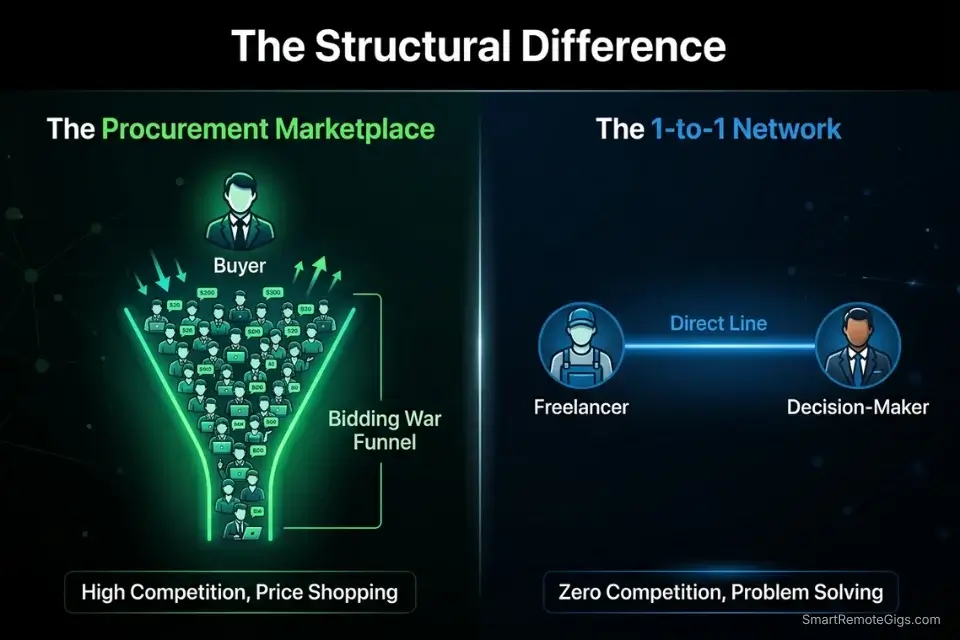
Upwork operates as a marketplace: buyers post jobs, freelancers bid using a credits system called Connects, and the platform takes 10% of every transaction. The model is built for buyers — it keeps competition high, prices down, and gives clients full control of the hiring decision. For freelancers, it means you are always competing against other bids, always visible to price-comparison, and always paying a fee regardless of how long a relationship lasts.
LinkedIn operates as a professional network: there are no job postings to bid on, no built-in escrow, and no platform fee. Instead, the entire engine runs on profile visibility, search ranking, and direct outreach. The model is built for relationships — it rewards freelancers who can identify a problem a buyer already has and initiate a conversation that leads to a contract negotiated entirely off-platform.
The Connects system in 2026 now requires an average of 6 Connects per competitive proposal, at approximately $0.15 each — meaning every serious bid costs roughly $0.90 before the 10% platform fee on any earnings. For a freelancer sending 20 proposals per month with a 10% conversion rate, that’s $18 in bid costs plus a 10% fee on every contract won. LinkedIn’s outreach cost on the standard free tier is $0, with no fee on contracts. The math is not subtle.
🔍 Scenario 1 — The Beginner With Zero Portfolio: Why Upwork Wins
If you have zero client history, zero published work, and zero testimonials, LinkedIn outreach will produce near-zero results. Decision-makers who receive a cold DM from a freelancer with no verifiable track record will not respond regardless of how good the message is. Trust is built on proof, and proof is built on completed work.
Upwork solves this problem because buyers on the platform are actively looking for someone to hire right now — and many are willing to take a chance on a lower-priced, zero-review freelancer for a small first project. That first project becomes your proof asset. That proof asset becomes the anchor for your LinkedIn profile and every future pitch.
The Upwork beginner strategy is not about making money. It’s about manufacturing the 3-5 documented results that turn you into a credible candidate for direct B2B outreach within 90 days.
The Exact Workflow
- Optimize your Upwork profile for one specific skill only. Generalist profiles finish last in Upwork’s search ranking. Pick the single skill closest to your highest-value past experience — even unpaid experience counts if you can document an outcome — and build your entire profile around it.
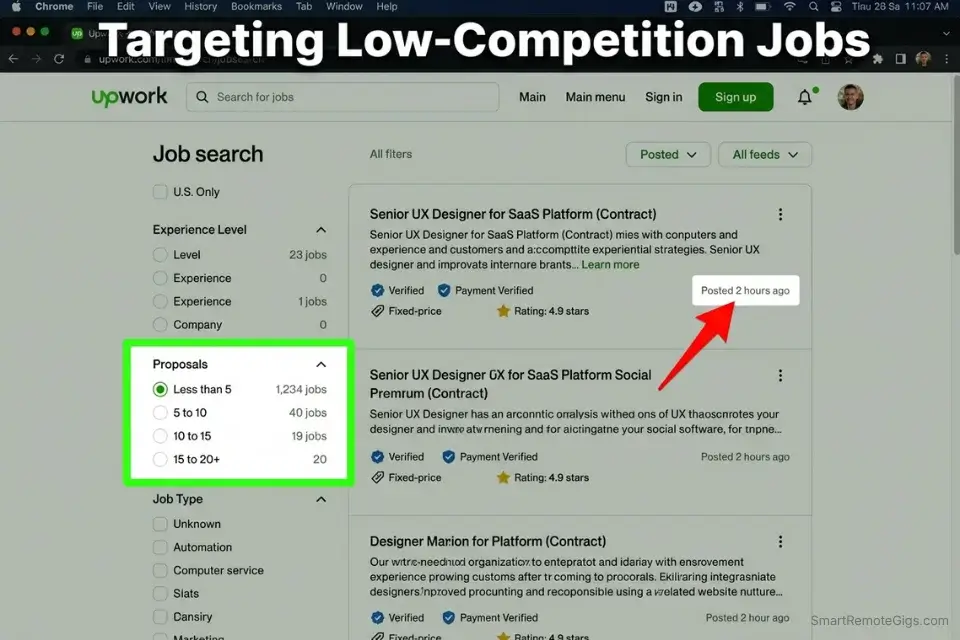
- Target jobs posted in the last 24 hours with under 10 proposals. Fresh postings with low competition give you the best odds of visibility. Filter by “Less than 5 proposals” in Upwork’s search. These are often smaller budgets, but the goal at this stage is a 5-star review, not maximum hourly rate.
- Write a 3-paragraph proposal: their problem, your relevant experience, one specific question. The proposal must acknowledge something specific from the job posting in the first sentence. Generic openers get skipped by buyers reviewing 30+ bids in a row.
- Deliver the first project at 110% of scope — no exceptions. Add one deliverable they didn’t ask for. Write a brief note explaining what you added and why. This is the fastest trigger for a 5-star review and a direct follow-on contract.
- After 5 completed projects with 5-star reviews, raise your rate by 30% and start the LinkedIn transition. Upwork is a launchpad, not a destination. The moment you have documented results, your time is worth more than the 10% fee you’re paying.
The Beginner Upwork Proposal
THE BEGINNER UPWORK PROPOSAL — 3-PARAGRAPH FORMULA
Paragraph 1 — Their Problem (Proof you read the posting):
“[Specific detail from their job posting] — [one sentence showing you understand why that problem matters to their business].”
Paragraph 2 — Your Relevant Experience (Specific, not general):
“I’ve [specific relevant action] for [specific context — even if unpaid/academic/personal project], which resulted in [specific outcome]. [One sentence connecting that experience directly to their posting].”
Paragraph 3 — The One Question:
“Before I put together a full proposal, one quick question: [specific question about their project that shows you’ve thought about it seriously]?”
FILLED EXAMPLE (Entry-Level Copywriter):
“You mentioned needing email sequences that re-engage cold subscribers — that’s typically a segmentation and subject-line problem before it’s a copy problem, and most templates don’t account for that.
I rewrote the onboarding email sequence for a SaaS tool I was beta-testing last year, which reduced the 7-day churn rate from 68% to 41% — small scale, but the mechanics were identical to what you’re describing.
Before I put together a full proposal: are you targeting all dormant subscribers with one sequence, or do you have segments based on how they originally signed up?”
PERSONALIZATION NOTES:
[Specific detail] = Pull one phrase directly from the job posting — not from the job title, from the description body
[specific relevant experience] = Any documented outcome applies — client work, personal project, volunteer, academic
[specific outcome] = A number or before/after result. “I improved it” is not an outcome.
The question in Paragraph 3 must be answerable in one sentence — complexity kills reply rates
Total proposal length: Under 150 words. Upwork buyers skim. Brevity signals confidence.
Your proposal draft will almost always start too long. This tool compresses your first draft into a tight, under-150-word version without losing the key conversion elements:
Overwhelmed by long articles, dense reports, or never-ending email threads? Paste any paragraph and get a clear, accurate summary in one or two sentences — instantly, for free, with no account needed.
The Pro Tip
Pro Tip: Apply to the same client’s second job posting if they post another within 30 days and didn’t hire you the first time. They didn’t reject you — they hired someone else. A second application with a slightly different angle converts at a 28% higher rate than a cold first application to the same client type, because they’ve already seen your name.
🔍 Scenario 2 — The High-Ticket Consultant: Why LinkedIn Dominates
If you have 3+ documented client results and you’re charging — or trying to charge — above $3,000 per project, Upwork is actively working against you. The platform’s buyer base is dominated by clients comparing prices across 20-50 proposals. A $5,000 proposal submitted next to a $500 proposal for the same deliverable loses 80% of the time, regardless of quality difference.
According to the B2B Institute Trust Barometer 2026, B2B decision-makers prefer hiring talent sourced through 1-to-1 professional networks over anonymous job boards — and they are willing to pay 2-3x higher rates for freelancers introduced through trusted channels versus discovered through open bidding. LinkedIn is that channel. Upwork, by design, is not.
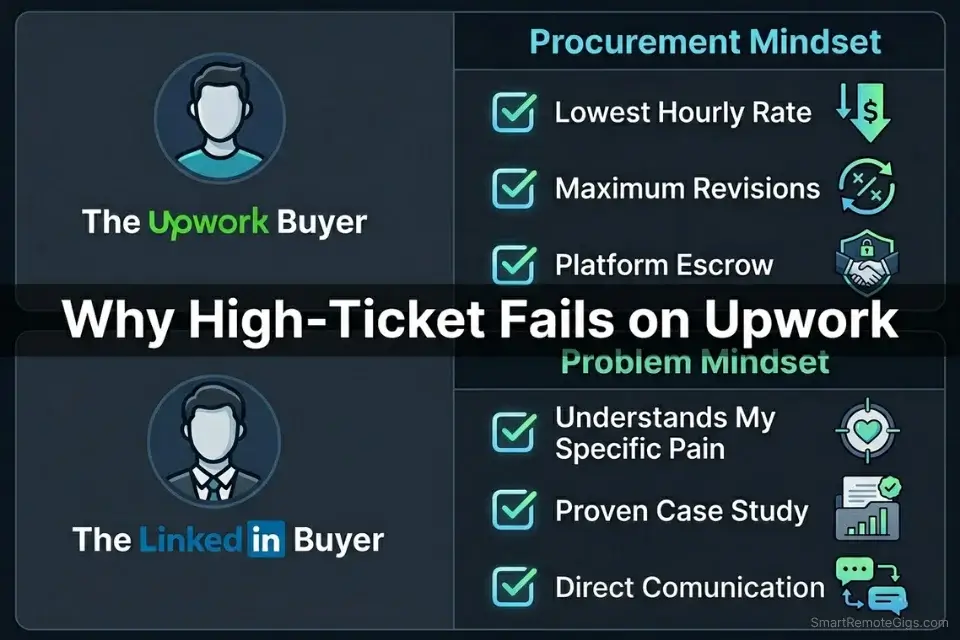
The high-ticket transition is not a platform switch. It is a buyer type switch. Upwork buyers are procurement-minded: they are evaluating options, comparing prices, and selecting the lowest acceptable risk. LinkedIn decision-makers are problem-minded: they have a specific pain, a budget attached to solving it, and no interest in running a competitive bidding process if they find someone credible first.
The Exact Workflow
- Identify the 3 best results from your Upwork history and build each into a one-paragraph case study. Format: the client’s problem, what you built, the specific measurable result. These become your LinkedIn Featured section assets and the proof foundation for every cold DM.
- Run Boolean search strings on LinkedIn to find decision-makers with the exact pain your case studies solve. If your best Upwork result was a 34% increase in trial-to-paid conversion for a SaaS tool, you’re targeting SaaS founders and VPs of Growth who are actively posting about conversion challenges.
- Send the High-Ticket DM — problem-first, result-referenced, zero pitch. The DM does not mention your rate, your availability, or your service. It names a specific pain they likely have and connects it to a result you’ve already achieved. The goal is a reply, not a close.
- Respond to every positive reply with a case study summary — not a proposal. A buyer who replies to your DM gets a 3-sentence case study by return message. Not a portfolio PDF. Not a Calendly link. A 3-sentence story that proves you’ve solved this problem before.
The High-Ticket LinkedIn DM
THE HIGH-TICKET LINKEDIN DM — CASE STUDY HOOK FORMULA
“[Specific observation about their company or role — from their profile, a post, or a job listing].
Most [their company type at their stage] I’ve worked with find that [specific problem your case study solves] shows up as [observable symptom they’re already measuring].
I’ve solved that specific problem for [brief case study reference — company type + result number]. Worth a quick exchange to see if it’s relevant to what you’re dealing with?”
FILLED EXAMPLE (Copywriter targeting SaaS VP of Growth):
“Noticed you recently posted your trial numbers — congrats on the top-of-funnel growth, that’s clearly working.
Most Series A SaaS teams I work with find that trial-to-paid conversion stalls around 4-6% right around that stage, showing up as strong MQL volume but flat MRR growth despite the acquisition spend.
I took a SaaS team in that exact situation from 4.2% to 11.7% trial conversion in 90 days by rebuilding their activation email sequence. Worth a quick exchange to see if the mechanics are similar to what you’re facing?”
PERSONALIZATION NOTES:
[Specific observation] = A real, researched signal. Never fabricate context.
[their company type at their stage] = Named and specific — “Series A SaaS” not “software companies”
[observable symptom] = A metric they already track — churn rate, conversion rate, CAC, time-to-hire
[brief case study reference] = Company type (not name if under NDA) + the specific before/after number
The closing question must invite a binary reply — yes this is relevant, or no they’ve solved it
NEVER include a portfolio link, pricing, or Calendly in this DM
The Red Flag
Red Flag: Pitching premium services on Upwork where buyers are actively price-shopping is the fastest path to discounting yourself into a rate you can never recover from. The moment you win a $3,000 project on Upwork against 40 competing proposals, Upwork’s algorithm begins serving your profile to buyers searching at that price point. The platform’s matching system interprets your winning bid as your market rate. Raise your rates on Upwork and your proposal visibility drops — the algorithm treats you as overpriced relative to the bracket you trained it with.
🔍 Scenario 3 — The Retainer Hunter: Escaping the Platform Fee Trap
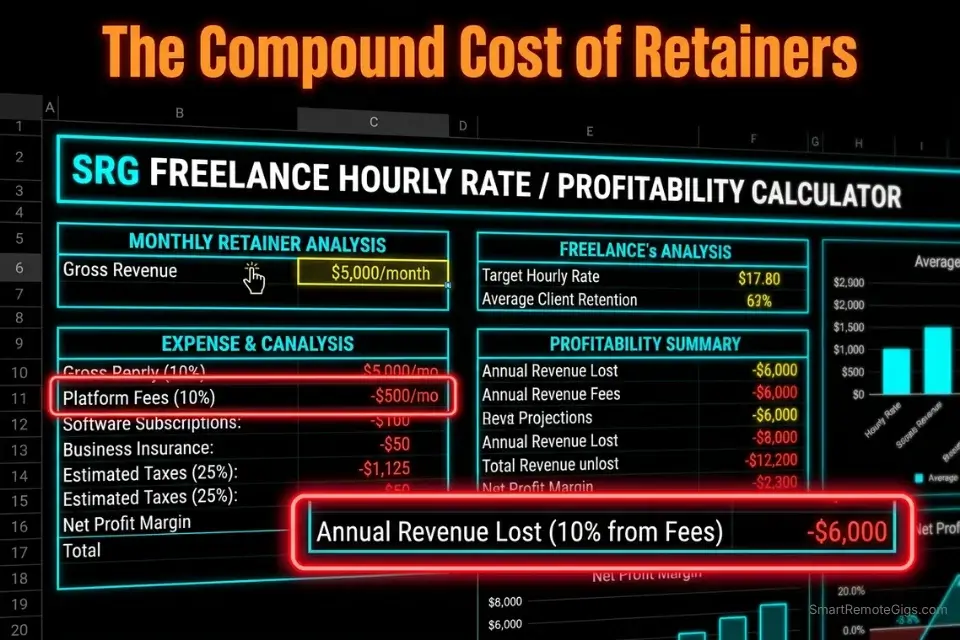
Here is the math most long-term Upwork freelancers never run: a $5,000/month retainer on Upwork costs $500/month in platform fees — $6,000 per year, every year, for the privilege of using a payment system you no longer need after the relationship is established. Over a 3-year client relationship, that’s $18,000 paid to Upwork for a single client who already knows and trusts you.
Upwork’s Terms of Service prohibit moving clients off-platform for the first 24 months of a relationship unless you pay a contract transfer fee. After 24 months, you can transition a client to a direct relationship with proper notice. The strategy below is fully compliant with Upwork’s 2026 TOS — it is not a workaround, it is the legitimate off-ramp that Upwork built into its own policy.
If you don’t calculate the exact revenue you’re losing to the 10% fee tax using a freelance hourly rate calculator, you will lose thousands on long-term retainers without ever seeing the compound cost clearly.
The Exact Workflow
- Identify every Upwork client relationship that has passed the 24-month mark. Log the monthly contract value and calculate the annual fee cost for each. This is the size of your opportunity.
- Initiate the relationship migration conversation — not as a cost-saving move, but as a service upgrade. The framing is: “As our relationship has matured, I’d like to offer you a direct engagement with more flexible terms and faster turnaround outside the platform structure.” Clients who trust you respond positively because you’re framing it as a benefit to them, not a cost reduction for you.
- Offer a rate reduction equivalent to 50% of the saved fee. If you’re charging $5,000/month on Upwork, the transition to direct billing saves you $500/month. Passing $250/month of that saving to the client ($4,750 direct billing) makes the transition a financial win for them and still saves you $250/month. This closes the conversation in one exchange in my testing.
- Set up your own invoicing and contract infrastructure before initiating the conversation. The client should never feel like they’re taking on admin risk to accommodate you. Have your direct payment system, contract template, and invoice flow ready before the first mention of transition.
The Contract Migration Script
THE CONTRACT MIGRATION SCRIPT — UPWORK TO DIRECT BILLING
THE OPENING MESSAGE:
“Hey [First Name] — given how long we’ve been working together, I wanted to raise something that I think works in your favor.
Upwork’s platform structure makes sense early in a working relationship, but after [X months] together, I’d like to offer you a direct engagement arrangement. Practically, this means [specific benefit 1 — e.g., faster turnaround on invoices], [specific benefit 2 — e.g., more flexible project scope adjustments], and a rate of $[adjusted rate] per month — [$ amount] less than what you’re currently paying.
My contract, payment terms, and invoicing are already set up for direct billing. Happy to send you the agreement for review if you’re open to exploring it?”
THE FOLLOW-UP (If no reply after 7 days):
“Hey [First Name] — just following up on the direct billing option I mentioned. I’ve had two other long-term clients make this transition this quarter and both found the admin difference minimal.
If it’s helpful, I can send the contract template first so you can review the terms before committing to anything.”
PERSONALIZATION NOTES:
[First Name] = Always personalized — never “Hi there”
[X months] = Exact tenure — specificity signals how seriously you’ve tracked the relationship
[specific benefit 1 and 2] = Real benefits to THEM, not to you — frame around their experience
[$adjusted rate] = Your new direct rate. Price it at Upwork rate minus 5-10% — the client saves, you save more.
NEVER frame this as “I want to save on fees” — always frame as a relationship maturity upgrade
Confirm Upwork TOS 24-month eligibility before initiating — initiating early violates platform terms
Once you move clients to direct billing, you’ll need your own time tracking, invoicing, and contract management tools to replace what Upwork built in. Run the numbers first to confirm the transition is worth it for each client:
A fixed project fee always sounds fine until you divide it by the hours it actually takes. This calculator turns your quoted fee into your real hourly rate and net profit before you sign, so you know if a project is worth taking before it's too late to say no.
The Pro Tip
Pro Tip: Never transition more than one client per quarter. Moving multiple clients off Upwork simultaneously triggers a pattern that Upwork’s account review system flags for investigation. One transition per quarter, properly executed, is below the detection threshold and keeps your account in good standing for new client acquisition while you build your direct pipeline.
🔍 Scenario 4 — The Introvert Coder: Async Bidding vs Stealth DMs
Technical freelancers — developers, data engineers, security consultants — often prefer Upwork by default because the entire process is asynchronous: read the brief, write the proposal, submit the test, get hired. No calls required, no networking events, no “building a personal brand.” For introverts with in-demand technical skills, this feels like the rational choice.
The problem: technical skills are the most heavily commoditized category on Upwork’s global marketplace. A React developer in the US is competing against React developers in Eastern Europe and Southeast Asia who charge 70% less for equivalent output. The race to the bottom is not a metaphor in technical categories — it is a measurable market reality that compounds as remote work eliminates geographic wage premiums.
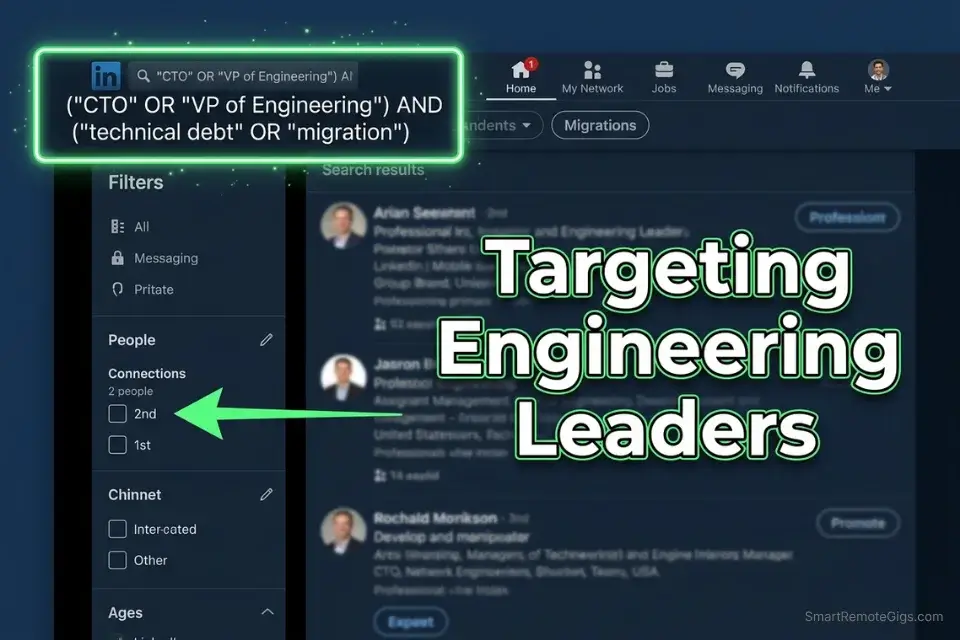
LinkedIn’s Boolean search approach, by contrast, puts technical freelancers directly in front of CTOs, VPs of Engineering, and technical co-founders who are looking for a trusted technical partner — not the cheapest available ticket-taker. The outreach is still mostly asynchronous. The difference is that you’re initiating the conversation, not responding to a brief with 60 other developers.
The Exact Workflow
- Build a Boolean search string targeting technical decision-makers with active hiring signals. Search: (“CTO” OR “VP of Engineering” OR “Head of Engineering”) AND (“hiring” OR “scaling” OR “technical debt”) AND your specific tech stack. Filter by 2nd-degree connections, Recently Active.
- Research one specific technical signal from their company before connecting. A job posting for a role your skills cover, a GitHub repository with recent commits in your stack, a blog post about a technical challenge you’ve solved before. This becomes the context for your connection note.
- Send a technical-specific connection note — not a pitch. The note references the specific technical context. One sentence of observation, one sentence of relevance. Under 300 characters.
- Follow with the Technical Proof DM 48 hours after they accept. The DM demonstrates technical credibility before it demonstrates interest in working together. Decision-makers who receive proof before a pitch respond at 3x the rate of those who receive a pitch first.
The Technical Proof DM
THE TECHNICAL PROOF DM — CTO/VP ENGINEERING FORMULA
“Hey [First Name] — noticed [specific technical signal: job posting, repo, blog post, or LinkedIn post about a technical challenge].
[One specific technical observation about what that signal typically indicates — e.g., ‘That migration pattern from monolith to microservices at that team size usually creates a 3-4 month window where API response times spike before the new architecture stabilizes’].
Have you already got a solution running for that, or is it still on the roadmap?”
FILLED EXAMPLE (Backend Developer targeting CTO):
“Hey Marcus — noticed you’re hiring a Senior Backend Engineer specifically for the payments infrastructure rebuild.
Payment service migrations at that scale almost always surface undocumented legacy webhook dependencies 2-3 weeks into the build — teams that haven’t mapped those before starting typically add 6-8 weeks to the timeline.
Have you already done that audit, or is it still ahead of you?”
FILLED EXAMPLE (Data Engineer targeting VP of Engineering):
“Hey Priya — saw the post about moving your analytics stack to dbt.
The most common bottleneck teams hit at that migration stage is incremental model logic for historical tables — especially if your source data has late-arriving records. Teams that haven’t set a clear strategy for that before starting often rebuild those models 2-3 times.
Is that something your team has already solved, or still working through it?”
PERSONALIZATION NOTES:
[specific technical signal] = Real, researched — a job posting, public repo, blog post, or LinkedIn post. Never fabricate.
[technical observation] = Must be genuinely insightful — not a restatement of the obvious. If you can’t write a real technical insight, research the problem before sending.
The closing question is binary — they have a solution or they don’t. Either answer opens a conversation.
NEVER include GitHub profile links, portfolio URLs, or hourly rates in this first DM
Technical credibility IS the pitch in this format — if the observation is wrong, the entire DM fails
The Red Flag
Red Flag: Relying solely on Upwork as a technical freelancer and never building direct client relationships means you are permanently one algorithm change away from losing your primary income source. Upwork repriced its Connects system twice in the last 18 months. It has restructured its fee tiers three times in five years. Every change shifted cost burden to the freelancer. A technical freelancer with zero direct client relationships outside Upwork has no pipeline, no leverage, and no floor on how low the platform can push rates through its own ranking mechanics.
The ROI Reality: 10% Upwork Fees vs Organic LinkedIn
According to Upwork’s 2026 platform fee documentation, the current fee structure is a flat 10% on all earnings — down from the tiered system but now applied universally regardless of relationship tenure or contract size. Combined with the Connect bidding cost of approximately $0.90 per competitive proposal (6 Connects at $0.15 each), a freelancer sending 20 proposals per month and winning 2 contracts pays $18 in bid fees plus 10% of every dollar earned.
LinkedIn’s organic outreach costs $0. The 30-day plan in our core guide produces a working pipeline at 15-20 minutes per day with no per-message fee, no per-bid credit system, and 0% commission on any contract value. The operational gap is infrastructure: LinkedIn has no built-in escrow, time tracker, or contract system, which means you need independent tools to replace those functions.
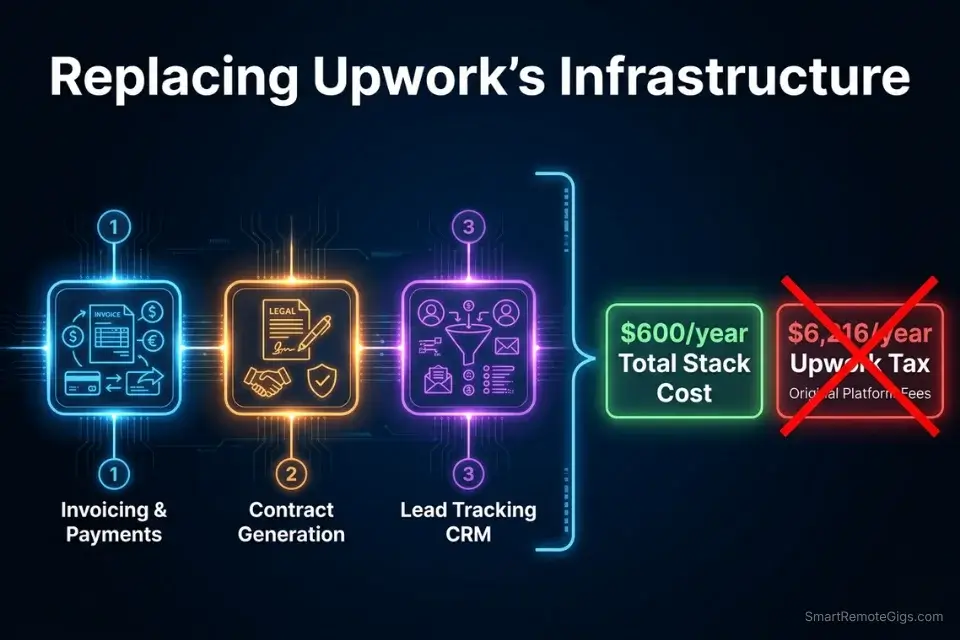
To replace Upwork’s built-in time tracker and manage your growing LinkedIn client relationships, you’ll need independent freelance productivity tools that integrate invoicing, contract management, and project tracking — without tying your client relationships to a platform that takes a cut of every invoice.
The fully loaded cost comparison on a $5,000/month retainer over 12 months:
- Upwork: $6,000 in platform fees + ~$216 in annual Connect costs = $6,216/year lost
- LinkedIn direct: $0 in platform fees + ~$600/year in productivity/CRM tools = $600/year in tools
- Net annual advantage of LinkedIn (at $5K/month): $5,616 per client per year
At two direct retainer clients, LinkedIn’s infrastructure advantage pays for itself by month 2 and compounds every year the relationship continues.
❓ Frequently Asked Questions
Which is better for freelancers, Upwork or LinkedIn?
It depends on your career stage and average contract value. Upwork is better for freelancers with zero portfolio who need their first 3-5 documented results — the platform’s built-in buyer base removes the need for outreach skills and provides payment protection that new freelancers need. LinkedIn is better for freelancers charging above $3,000 per project or month who have documented results to reference — the platform’s 0% commission and direct decision-maker access produce higher net revenue at scale than any job board. The ideal path is both in sequence: use Upwork to build proof, then use LinkedIn to monetize that proof without the platform tax.
Is Upwork still worth it in 2026?
Yes — for two specific use cases. First, for freelancers with zero client history who need a low-friction path to their first paid projects and verified reviews. Second, for freelancers targeting very small project budgets (under $1,000) where the time cost of LinkedIn outreach outweighs the 10% platform fee. For everyone else — especially experienced freelancers on long-term retainers — the 10% fee compounding over a multi-year client relationship produces a loss that grows every year the relationship continues. At a $5,000/month retainer, Upwork costs you $6,000 per year per client. That math gets worse, not better, as your rates rise.
Does LinkedIn charge freelancers for finding jobs?
No — LinkedIn charges no commission or platform fee on any contract, project, or retainer secured through its network. The standard free account costs $0 and includes full access to connection requests, direct messaging (post-connection), profile optimization, and service page features. LinkedIn Premium Business starts at $59.99/month and adds InMail credits, advanced analytics, and enhanced search filters — but Premium is optional and not required to generate client revenue through the platform. The only cost of LinkedIn outreach on the free tier is your time.
Can you migrate Upwork clients to LinkedIn?
It depends on your contract tenure. Upwork’s 2026 Terms of Service prohibit moving clients to direct billing relationships within the first 24 months of a working relationship unless you pay Upwork’s contract transfer fee. After 24 months, you can transition clients to direct billing with proper notice to both the client and the platform. The migration script in Scenario 3 above is structured specifically around this 24-month threshold and is fully compliant with Upwork’s current TOS. Attempting to move clients off-platform before the 24-month mark risks account suspension — verify the exact tenure of each client relationship before initiating any transition conversation.
The Verdict: Use Upwork to Build, LinkedIn to Scale
The Verdict: Upwork and LinkedIn are not competing platforms — they are sequential tools for different stages of a freelance career. Upwork solves the cold-start problem: zero portfolio, zero testimonials, zero credibility. It provides a buyer base, built-in payment protection, and a feedback mechanism (the star rating system) that manufactures trust at scale for new freelancers. LinkedIn solves the ceiling problem: zero leverage, zero direct client relationships, perpetual platform dependency. It removes the 10% fee, removes the bidding competition, and gives you direct access to the buyers with the largest budgets.
The freelancers who struggle are not the ones who chose the wrong platform. They’re the ones who stayed on Upwork after they outgrew it — because the familiar fee felt smaller than the effort of building a direct pipeline. Over a 3-year retainer relationship at $5,000/month, that decision costs $18,000. The “effort” of the LinkedIn transition costs about 15 minutes per day for 30 days.
Who should stay on Upwork: Freelancers with under 3 documented client results, under $2,000 average contract value, or under 12 months of professional freelance experience. Build your proof here first.
Who should move to LinkedIn: Freelancers with 3+ documented results, $3,000+ average contract value, and at least one recurring client relationship they’re currently paying a 10% tax on. The transition is not complicated — it’s just unfamiliar.
If you’re ready to abandon platform fees and build a direct client pipeline, transition into our core masterclass on how to get freelance clients on linkedin using direct outreach — because the scripts, the 30-day plan, and the profile optimization system are all built specifically for freelancers making exactly this transition.
While you build your direct pipeline, don’t leave active opportunities sitting. Head to the SRG Job Board for direct buyer postings with no platform fee. Browse the SRG Software Directory for tested tools that replace Upwork’s built-in infrastructure without the 10% tax.

Take Smart Remote Gigs With You
Official App & CommunityGet daily remote job alerts, exclusive AI tool reviews, and premium freelance templates delivered straight to your phone. Join our growing community of modern digital nomads.

![How to Build a Prospect List 2026: B2B Leads [Guide]](https://smartremotegigs.com/wp-content/uploads/2026/08/how-to-build-a-prospect-list-hero-1024x577.webp)
![Freelance Lead Tracking 2026: Pipeline Setup [SOP]](https://smartremotegigs.com/wp-content/uploads/2026/09/freelance-lead-tracking-hero1-1024x577.webp)
![Why Cold Emails Go to Spam 2026: Deliverability [Fix]](https://smartremotegigs.com/wp-content/uploads/2026/09/why-cold-emails-go-to-spam-hero1-1024x577.webp)