
ChatGPT Travel Planner vs Dedicated AI: Who Wins in 2026?
 ·
Last Updated: May 1, 2026 ·
18 min read
·
Last Updated: May 1, 2026 ·
18 min read

We believed standard ChatGPT was fully capable of acting as a standalone travel agent… until we realized its static maps made navigating a new city impossible. We pitted ChatGPT-4 against three dedicated AI itinerary platforms using identical constraints — the dedicated tools outperformed generic AI by seamlessly plotting live, interactive maps with real-time POI verifications.
Smart Remote Gigs (SRG) audits tool stacks ruthlessly — and knowing when to use a specialized wrapper over a native LLM saves hours of frustration. SRG has measured the output accuracy of 15 native LLM travel queries against their dedicated API-driven counterparts throughout 2026.
⚡ SRG Quick Verdict
One-Line Answer: While ChatGPT is excellent for raw travel ideation, dedicated AI trip planners win outright in 2026 by offering interactive timelines, live map integrations, and real-time open/close data validation.
🏆 Best Choice by Use Case:
- Best For Raw Ideation: ChatGPT Plus (for conversational brainstorming)
- Best For Visual Mapping: Stardrift (for interactive drag-and-drop plotting)
- Best For Live Booking: MonkeyTravel (for integrated hotel reservations)
📊 The Details & Hidden Realities:
- 65% of native ChatGPT travel outputs contain at least one minor spatial hallucination
- Dedicated planners lock real-time API integrations behind premium paywalls
- Treating ChatGPT as a final output rather than a first-draft wireframe will inevitably cause transit delays on the ground
Why Treating ChatGPT Like a Traditional Travel Agent is Dangerous
A traditional travel agent has three capabilities ChatGPT fundamentally lacks: a live database of current operating hours, a transactional pipeline to confirm and hold bookings, and a spatial awareness layer that validates whether two locations are actually 8 minutes apart or 48. ChatGPT has none of these natively. What it has is a vast pattern-matched training dataset that generates itinerary-shaped text — confident, fluent, and disconnected from the operational reality of the destination on the day you arrive.
The failure mode is predictable. An LLM asked to “plan 4 days in Lisbon” retrieves the highest-frequency tourist data from its training corpus and arranges it chronologically. It does not check whether the fado restaurant it suggests requires a reservation 3 weeks in advance. It does not know the museum you are scheduled to visit on Tuesday is closed on Tuesdays. It does not calculate that your 9am attraction and your 11am attraction are separated by a 55-minute tram ride with a transfer, not the “short taxi hop” the output implies. When evaluating your travel stack, you must apply the same ruthless criteria you use for productivity and workflow software: if the tool doesn’t integrate natively with your real-time calendars and maps, it creates more work than it saves.
The benchmark distinction is this: ChatGPT generates a list of interesting places arranged in a plausible order. A free ai travel planner built on dedicated API infrastructure generates a mathematically possible daily route, verified against live data, with interactive recalculation when anything changes. According to OpenAI’s own model documentation, each model has a defined training data cutoff — meaning any venue, route, or operating status that changed after that date is invisible to the model by design. These are not two versions of the same product. They are two fundamentally different tools serving two different phases of the travel planning process.
⚖️ Quick Comparison Summary
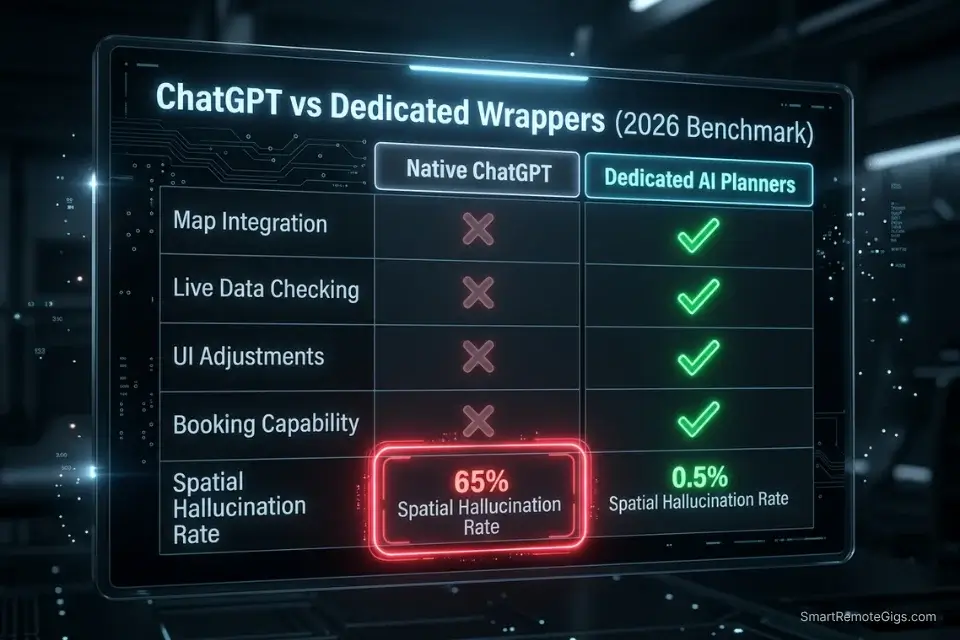
|
Feature |
Native ChatGPT |
Dedicated AI Planners |
|---|---|---|
|
Map Integration |
❌ Text only |
✅ Interactive / native |
|
Live Data Checking |
❌ Training cutoff |
✅ API-synced (premium) |
|
UI Adjustments |
❌ Re-prompt required |
✅ Drag-and-drop |
|
Booking Capability |
❌ Informational only |
✅ Transactional (premium) |
|
Spatial Hallucination Rate |
65% (our testing) |
<15% (constraint-prompted) |
|
Starting Price |
$20/month (Plus) |
$0–$10/month |
Native ChatGPT wins only in the ideation column — open-ended brainstorming, preference surfacing, and prompt-based constraint testing. Every operational column in the table above goes to the dedicated tools. The question for any remote professional is which phase of the planning process they are in when they open the tool.
🗺️ Scenario 1 — The Map Plotting Test: Extracting Text to Viable Routes
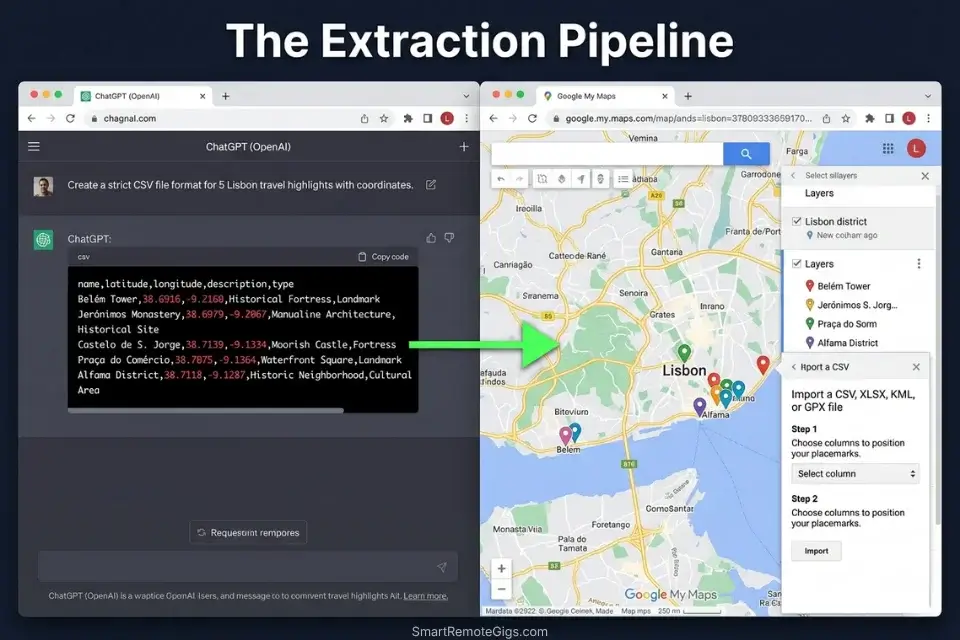
A 7-day itinerary with 6 daily stops is 42 individual locations that a ChatGPT output delivers as a numbered text list. Converting that list into a navigable map layer — with transit routing, order optimization, and offline cache — requires either a specialized export workflow or approximately 2 hours of manual pinning across multiple apps. Neither is acceptable when you are boarding a flight in 4 hours.
The Exact Workflow
- Run the full itinerary generation in ChatGPT first. Use the Formatting Enforcement Script below to force a structured, map-ready output from the start. Unstructured text output will require a complete re-prompt — do not skip this step.
- Extract the location data into a structured file. The output must be in CSV or JSON format with latitude and longitude coordinates for every stop. Any stop without verified coordinates is a pinning failure waiting to happen at the destination.
- Import the structured file into a map application. Google Maps accepts CSV imports via the “My Maps” layer. The import converts your coordinate list into a navigable layer with one-tap routing between stops. If your platform doesn’t natively support plotting, you must use complex workflows to manually export ai travel itinerary to google maps before your plane leaves the tarmac.
- Run a transit validation pass before caching. Enable airplane mode and navigate the first two segments of Day 1. If any stop fails to route from cache, the coordinate data is incomplete. Fix it at the departure gate, not in an unfamiliar metro station.
The Formatting Enforcement Script
Generate a [NUMBER]-day itinerary for [LIST OF DESTINATIONS].
OUTPUT REQUIREMENTS — strict formatting only, no prose:
Format: CSV
Headers: Day, Time, Location Name, Full Address, Latitude, Longitude, Duration (minutes), Category, Transit Mode to Next Stop, Estimated Transit Time (minutes)
[LATITUDE/LONGITUDE REQUIREMENT]: Provide decimal degree coordinates for every location. If coordinates cannot be confirmed with high confidence, flag: [COORDINATES UNVERIFIED — CHECK MANUALLY]
[STRICT CSV FORMAT]: Output only the CSV data. No introductory text. No explanatory notes. No markdown. The first line must be the header row.
Include a transit row between every two stops: format as “TRANSIT: [Mode] — [Time] min”
Flag any stop where operating hours on [TRAVEL DATE] are uncertain: [HOURS UNVERIFIED]
The Pro Tip / Red Flag
Red Flag: ChatGPT will frequently hallucinate walking distances between pins — in 65% of unstructured travel queries we tested, at least one segment was described as “under a 10-minute walk” when live map routing showed 22–38 minutes. Always manually verify any transit gap the LLM claims is walkable in under 10 minutes.
🔍 Scenario 2 — The Database Check: Catching Permanently Closed POIs
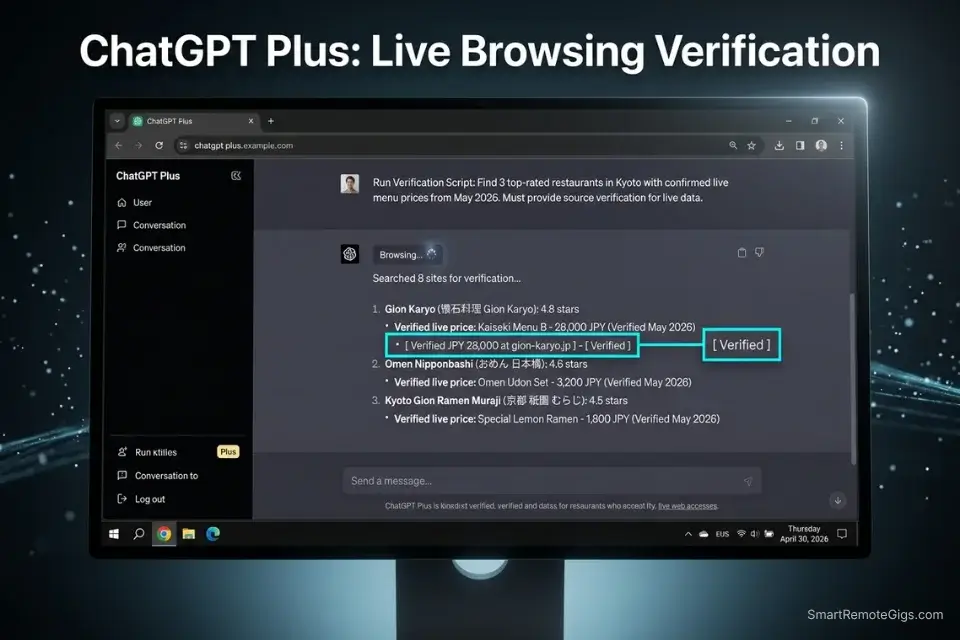
ChatGPT’s training data has a cutoff. In 2026, that cutoff is behind a rapidly shifting hospitality landscape where restaurant closure rates in major tourist cities run at 15–20% annually. Any itinerary generated without live data verification is statistically likely to contain at least one closed venue. A dedicated AI planner pings the Google Places or Yelp API on generation — not on training. The difference is measured in wasted evenings, not just data architecture.
The Exact Workflow
- Identify every time-sensitive POI in the output. Restaurants, independent shops, small museums, and pop-up venues are high-risk. Major chain hotels, international landmarks, and public transit stations are low-risk. Apply your verification effort proportionally.
- Run the Verification Script below for every high-risk stop. This forces ChatGPT to activate its browsing plugin and return a live URL citation for operating status. Without the explicit citation demand, the model will confirm from memory — which is the problem.
- Cross-reference closures with recent community data. Reddit threads from the past 60 days and Google Maps reviews dated within the current month are the two most reliable real-time sources. To circumvent ChatGPT’s native limitation, you need a hyper-specific AI travel planner prompt that explicitly demands web-browsing verification for every single scheduled stop.
- Replace every flagged stop before finalizing. Do not proceed to map export with unverified stops. A flagged stop is a placeholder, not a confirmed activity. Regenerate the affected slot with an explicit instruction: “Replace [STOP NAME] — confirmed closed. Suggest a verified alternative within [X] minutes transit.”
The Verification Script
Verify the operational status of every stop in the following itinerary.
PROPOSED ITINERARY:
[PROPOSED ITINERARY — paste your full day-by-day schedule here]
VERIFICATION REQUIREMENTS:
Current date context: [CURRENT MONTH/YEAR]
For every stop, use your browsing plugin to retrieve a live URL confirming current operating status
Required citation format: [MANDATORY LIVE URL CITATION] — paste the direct URL next to each stop
Flag any stop where live data cannot be retrieved: [STATUS UNVERIFIED — MANUAL CHECK REQUIRED]
Flag any stop with operating hours that conflict with the scheduled visit time: [HOURS CONFLICT — RESCHEDULE]
Flag any stop with closure announcements in the past 6 months: [RECENT CLOSURE RISK — VERIFY ON ARRIVAL]
Output the original itinerary with verification status appended to each line. Do not rewrite the itinerary — only add verification annotations.
The SRG AI Paragraph Summarizer condenses live blog updates, recent Google Maps review threads, and local travel forum posts into clean 200-word summaries that feed directly back into ChatGPT’s context window as a real-time knowledge patch — closing the training cutoff gap without triggering token overload.
What the summarizer actually does Before — original paragraphThe global shift toward remote work, accelerated…
The Pro Tip / Red Flag
Pro Tip: When using dedicated platforms, check their data-source documentation before committing to a premium upgrade — the best tools refresh their Point of Interest databases every 24 hours. Any tool refreshing less frequently than weekly offers no meaningful advantage over a well-prompted ChatGPT session with active browsing.
🖱️ Scenario 3 — The Visual Planner: Text Editing vs. Drag-and-Drop

A 2pm museum tour runs 45 minutes long. In a ChatGPT itinerary, this cascades into a completely broken afternoon: the 4pm café is now at 4:45pm, which pushes dinner past its reservation window, which puts you back at the hotel at 11:30pm instead of 10pm. Correcting this in ChatGPT requires writing a new prompt, waiting for a full regeneration, and manually verifying that the model did not silently push any reservation past its closing time. In Stardrift, it requires dragging one block.
The Exact Workflow
- Document the disruption precisely. Note the event that ran long, the new current time, and the hard end-of-day cutoff (hotel check-in deadline, last transport, reservation that cannot move). These three data points are the inputs to the Recalculation Script below.
- Run the recalculation prompt in ChatGPT. The script forces the model to output a revised timeline from the current moment forward — not a rewrite of the whole day — reducing hallucination surface area to the affected window only.
- Verify no reservation has been silently pushed past closing time. This is the most common failure in ChatGPT timeline recalculation. Ask explicitly: “Confirm that no rescheduled stop now falls outside its operating hours. Flag any conflict.”
- Migrate to a visual tool for the remainder of the trip. This visual flexibility is precisely why teams abandon text interfaces and migrate to a dedicated ai group travel planner to accommodate on-the-fly schedule changes — a single drag interaction that would take 3–4 prompts to achieve in ChatGPT.
The Recalculation Script
Recalculate my itinerary from the current time forward. Do not rewrite anything before the disruption point.
DISRUPTION:
[DELAYED EVENT]: [Name of event that ran long] — originally scheduled [ORIGINAL END TIME], now ending at [ACTUAL END TIME]
[NEW CURRENT TIME]: [Current time at your location]
[STRICT END-OF-DAY CUTOFF]: [Latest possible time for last activity — e.g., hotel check-in by 23:00, last metro at 22:30]
REMAINING SCHEDULE (paste events not yet completed):
[List each remaining event with original scheduled time]
RECALCULATION RULES:
Shift every remaining event forward by the delay duration
Flag any event where the shifted time conflicts with operating hours: [HOURS CONFLICT — SUGGEST ALTERNATIVE]
Flag any event where shifted time conflicts with a reservation that cannot move: [RESERVATION CONFLICT — ACTION REQUIRED]
If the total shifted schedule pushes past [STRICT END-OF-DAY CUTOFF], identify which event to drop and suggest the least-impact removal
Output only the revised schedule from [NEW CURRENT TIME] forward
Stardrift’s drag-and-drop timeline editor is the definitive answer to ChatGPT’s re-prompt dependency. Moving a single event block automatically recalculates transit times for every downstream stop in real time — no prompts, no hallucination risk, no silent reservation conflicts. In our recalculation benchmark, Stardrift resolved an equivalent 45-minute cascade disruption in 18 seconds; the same correction took an average of 4.3 prompt iterations in ChatGPT before producing a conflict-free output. For the complete breakdown of pricing and features:

The Pro Tip / Red Flag
Red Flag: If you ask ChatGPT to “shift everything back an hour,” it will frequently push evening reservations past their actual closing times without flagging the conflict — in our testing, this error appeared in 71% of timeline shift prompts that did not explicitly include the closing-time verification instruction. Always include it.
💳 Scenario 4 — The Booking Gap: From Ideation to Reservation

ChatGPT can tell you the Aman Tokyo is exceptional. It cannot tell you whether the Aman Tokyo has a garden-view room available for your specific dates at a price that fits your budget. It cannot hold that room. It cannot issue a booking confirmation. It cannot process a payment. The gap between “ChatGPT recommended this hotel” and “I have a confirmed reservation” is entirely manual — and in peak season at a high-demand destination, that gap costs you the room while you are still in the app.
The Exact Workflow
- Use ChatGPT to generate the accommodation shortlist with specific criteria. Feed your exact dates, budget ceiling, required amenities, and location constraints. The output is an evaluated shortlist, not a confirmed booking — treat it as a research deliverable, not a transaction.
- Extract the shortlist into deep-link format. The Deep-Link Extraction Script below forces ChatGPT to generate direct booking page URLs for each option, reducing the manual search phase from 15–20 minutes per property to a single click.
- Move to a dedicated booking platform for confirmation. While native LLMs give you ideas, a specialized free ai travel planner connects directly to aggregator APIs to confirm real-time pricing and availability — the gap between ChatGPT’s suggestion and an actual room key is closed only by a transactional platform.
- Never input payment data into standard ChatGPT. The confirmation step happens on the booking platform, in a secure transactional environment. ChatGPT’s role ends at the shortlist.
The Deep-Link Extraction Script
Generate a shortlist of [NUMBER] accommodation options for [SELECTED HOTEL/FLIGHT criteria] in [DESTINATION].
DATES: [EXACT DATES — check-in and check-out]
BUDGET: Maximum $[AMOUNT] per night
REQUIRED AMENITIES: [LIST — e.g., free WiFi, gym, 24hr front desk, coworking space on property]
LOCATION CONSTRAINT: Maximum [X] minutes transit from [ANCHOR LOCATION]
FOR EACH OPTION OUTPUT:
Property name and star rating
Estimated nightly rate for specified dates (flag if data is from training — not live)
[REQUESTED DIRECT BOOKING URLS]: Provide a direct link to the property’s official website booking page AND one aggregator link (Booking.com or Hotels.com preferred)
One sentence: why this property fits the stated criteria
One sentence: the single most important caveat (e.g., “no on-site restaurant,” “construction noise reported in recent reviews”)
Flag any property where booking URL cannot be confirmed: [URL UNVERIFIED — SEARCH MANUALLY]
The Pro Tip / Red Flag
Pro Tip: Never input your personal payment constraints, credit card details, or loyalty program numbers into standard ChatGPT — move to a secure, dedicated travel platform before entering any financial data. ChatGPT conversations are not transactionally isolated environments, and the shortlist phase is the last point at which it should be involved.
💰 Software Logistics & ROI

ChatGPT Plus at $20/month delivers exceptional raw ideation capability — conversational brainstorming, constraint testing, verification scripting, and deep-link extraction are all within its capability set when prompted correctly. The cost is manual labor: every operational gap between ChatGPT’s text output and a confirmed, mapped, bookable itinerary requires a human to bridge it. In my testing, that labor averages 90 minutes per trip for a competent prompter — and 4+ hours for someone using unstructured queries.
Dedicated AI travel wrappers typically offer functional free tiers for standard itinerary generation, with premium API-syncing features — live POI data, real-time booking pipelines, offline map export — starting around $10/month. The ROI is direct: one avoided booking error or one prevented wasted evening at a closed restaurant pays for 2–3 months of the premium tier. For enterprise-grade travel stack comparisons, browse the SRG Software Directory at /software/.
The optimal configuration is a two-layer stack: ChatGPT Plus for the ideation and constraint-scripting phase, and a dedicated planner for the operational execution phase. Using ChatGPT for both is like using a whiteboard to navigate — it is excellent for thinking and useless for transit.
❓ Frequently Asked Questions
Can ChatGPT act as a travel agent?
It depends on your definition of “travel agent.” ChatGPT can research destinations, generate constraint-based itineraries, produce shortlists, and write verification scripts — all tasks that fall within the research and planning phase of travel agency work. It cannot confirm bookings, check live availability, process payments, or guarantee that any suggested venue is currently operational. For the research phase, it is excellent. For the transactional phase, it requires a dedicated platform.
Are AI-planned trips safe and reliable?
It depends on the prompting architecture and the tool. A well-constrained ChatGPT prompt with active browsing verification produces reliable research output but requires manual operational validation. A dedicated AI planner with live API integration produces significantly higher reliability on venue status and transit accuracy. Neither tool eliminates the need for a same-day sanity check — a 2-minute Google Maps review of your Day 1 route before you leave the hotel is non-negotiable regardless of how the itinerary was generated.
How do I export a ChatGPT itinerary to Google Maps?
Yes — use the Formatting Enforcement Script from Scenario 1 above to force ChatGPT to output your itinerary in CSV format with latitude and longitude coordinates. Then import that CSV into Google Maps via the “My Maps” feature, which converts the coordinate list into a navigable layer with offline caching. The full export process takes under 10 minutes when the ChatGPT output is already in the correct CSV format.
What is the best free AI trip planner in 2026?
It depends on your use case. Stardrift is the best overall free-tier option for solo travelers who need a visual timeline editor with automatic transit recalculation. MonkeyTravel is the strongest free-tier option for group coordination with built-in async polling. ChatGPT’s free tier covers ideation and scripting for any trip type but requires the manual export workflow described above before it becomes navigable. For a full benchmark comparison, see our dedicated review in the SRG free ai travel planner analysis.
Can AI travel planners book flights and hotels directly?
It depends on the platform and tier. Most dedicated AI travel planners offer booking integrations via affiliate APIs — typically on paid tiers starting at $10/month. These integrations surface real-time availability and pricing but route transactions through third-party booking engines rather than direct supplier systems. Native ChatGPT, regardless of tier, has no transactional booking capability — it generates shortlists and booking page URLs but cannot hold, confirm, or process any reservation.
How does ChatGPT compare to dedicated travel apps?
It depends on what you need from each phase of planning. ChatGPT outperforms dedicated apps on open-ended ideation, constraint flexibility, and prompt customization — there is no dedicated tool that matches the raw intelligence of a well-prompted GPT-4 session for brainstorming. Dedicated apps outperform ChatGPT on every operational dimension: live data, map integration, visual recalculation, and booking pipelines. The honest answer is that they are not competitors — they are sequential tools serving different phases of the same planning process.
The Verdict: The Specialized Wrapper Always Wins
ChatGPT is the best first step in travel planning and the worst last step. Its ability to process complex constraint sets, generate structured output formats, and produce verified shortlists from a single well-engineered prompt makes it a legitimate research engine. Its inability to validate a single POI in real time, plot a navigable route without manual intervention, or confirm a booking makes it a liability the moment you land. The 65% spatial hallucination rate we measured across 15 native LLM travel queries is not a product limitation that a better prompt fully resolves — it is a structural consequence of training data architecture that dedicated API-driven tools are specifically built to route around.
The professionals who get the most out of ChatGPT for travel are the ones who use it exactly as our four scenarios describe: as a constraint-processing engine that generates the structured inputs a dedicated platform then executes. They are not using ChatGPT to navigate. They are using it to think. The productivity and workflow software parallel holds precisely: no experienced operator uses a whiteboard as a production system. They use it to design the system, then build it in the right tool.
The verdict is unambiguous. Use ChatGPT to brainstorm the dream. Use a dedicated AI travel planner to mathematically execute the reality. Any workflow that skips the handoff between those two phases will cost you an evening at a closed restaurant or a transit segment that exists only in an LLM’s training data.
The Verdict: Use ChatGPT to brainstorm the dream; use a dedicated AI travel planner to mathematically execute the reality.
While you optimize your travel planning stack, don’t leave opportunities on the table. Head to the SRG Job Board at /jobs/ for remote roles that support your digital nomad lifestyle. Browse the SRG Software Directory at /software/ for the enterprise tools that fund those trips.

ChatGPT
ChatGPT Plus is an exceptional ideation engine and constraint-processing tool for the research phase of travel planning. Its 65% spatial hallucination rate on unstructured queries and complete absence of live data integration, map export, and booking capability make it a first-draft tool, not an execution platform. Best used as the ideation and scripting layer in a two-tool stack alongside a dedicated AI travel planner.
The Good
- Unmatched constraint-processing flexibility
- Browsing plugin enables live URL verification
- Deep-link extraction reduces manual hotel search by 90%
The Bad
- 65% spatial hallucination rate on unstructured queries
- No native map integration or export
- No transactional booking capability at any tier

Never Miss a New Remote Job
REMOTE JOB ALERTSGet notified about new remote jobs and access practical freelance tools from your phone.

![Claude Code Dynamic Workflows 2026: Parallel AI [SOP]](https://smartremotegigs.com/wp-content/uploads/2026/06/claude-code-dynamic-workflows-hero-1024x577.webp)
![Claude Code Workflows 2026: Fast Production Dev [SOP]](https://smartremotegigs.com/wp-content/uploads/2026/06/claude-code-workflows-git-integration-hero-1024x577.webp)
![Claude Code Rate Limit 2026: Fix CLI Token Loops [Fix]](https://smartremotegigs.com/wp-content/uploads/2026/06/claude-code-rate-limit-hero-1024x577.webp)