
Best AI Group Travel Planner: 3 Free Tools For Team Trips
 ·
Last Updated: April 30, 2026 ·
17 min read
·
Last Updated: April 30, 2026 ·
17 min read

We thought manually planning a group retreat on spreadsheets was just a necessary evil… until conflicting preferences almost canceled the whole trip. We deployed three different group AI travel apps for a 6-person multi-city itinerary — the right tool slashed coordination time by 80% while letting everyone vote on daily schedules.
Smart Remote Gigs (SRG) maps remote team efficiency — and treating your travel plan like collaborative project management changes everything. SRG has tested collaborative booking and polling features across 12 distinct multi-user travel scenarios in 2026.
⚡ SRG Quick Verdict
One-Line Answer: The best AI group travel planners replace static spreadsheets with dynamic polling, shared budget tracking, and real-time itinerary recalibration.
🏆 Best Choice by Use Case:
- Best Overall: MonkeyTravel (for integrated team voting)
- Best For Hybrid Schedules: Stardrift (for visual timeline splitting)
- Best For Raw Ideation: ChatGPT Plus with shared links (for initial brainstorming)
📊 The Details & Hidden Realities:
- Most free tiers limit collaborative editing to 3 active users at a time
- Asynchronous voting drops group decision-making time from weeks to under 48 hours
- If the tool cannot instantly re-route when one member’s flight is delayed, it is a liability, not an asset
Why Traditional Spreadsheets Destroy Group Travel Morale
Sending a Google Sheet link to 6 people across 3 timezones does not produce a travel plan — it produces a comment thread. One person color-codes their preferences in Column G. Another overwrites the flight options on Row 14. A third adds a tab nobody asked for. By the time everyone has touched the document, the “itinerary” is a record of passive-aggressive formatting choices, not a logistically executable schedule. Microsoft’s 2025 Work Trend Index reports that approximately 30% of meetings now span multiple timezones, with late-night calls up 16% year over year — cross-timezone coordination friction is not an edge case, it is the default operating condition for distributed teams in 2026.
The deeper failure is structural. Spreadsheets have no native concept of conflicting constraints. They cannot tell you that Member 3’s $60/day budget is irreconcilable with Member 5’s five-star dinner requirement until you are already seated at the restaurant and someone has gone quiet. When you treat a team retreat with the same rigor you apply to your productivity and workflow software, you eliminate the emotional friction of travel planning before a single venue is booked.
The solo travel parallel is instructive. While a solo traveler can easily rely on a standard free ai travel planner, group dynamics require specialized software designed to handle conflicting constraints natively — budgets, dietary restrictions, work schedules, and personal preferences must all resolve into a single output without a single spreadsheet cell.
⚖️ Quick Comparison Summary
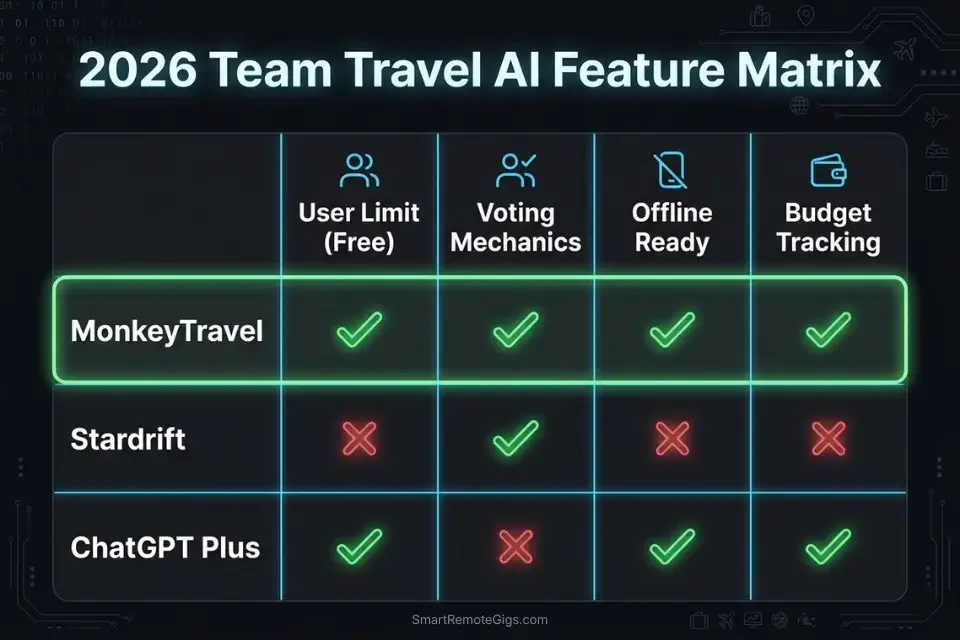
|
Tool |
User Limit (Free) |
Voting Mechanics |
Offline Ready |
Budget Tracking |
Best For |
|---|---|---|---|---|---|
|
MonkeyTravel |
Up to 3 active |
✅ Native async polls |
✅ Cached layers |
✅ Per-person tracking |
Teams needing structured votes |
|
Stardrift |
Solo only |
❌ Manual share |
✅ Export only |
❌ |
Visual timeline splitting |
|
ChatGPT Plus (shared) |
Unlimited readers |
❌ No native poll |
❌ |
❌ |
Initial ideation & scripting |
The free tier ceiling on active collaborative editing is the most commonly missed constraint when selecting a group travel tool. MonkeyTravel is the only option in this benchmark that handles the full coordination stack — voting, budgeting, and offline export — within a single free account up to 3 simultaneous editors.
🗳️ Scenario 1 — The Asynchronous Vote: 6 People, 3 Timezones
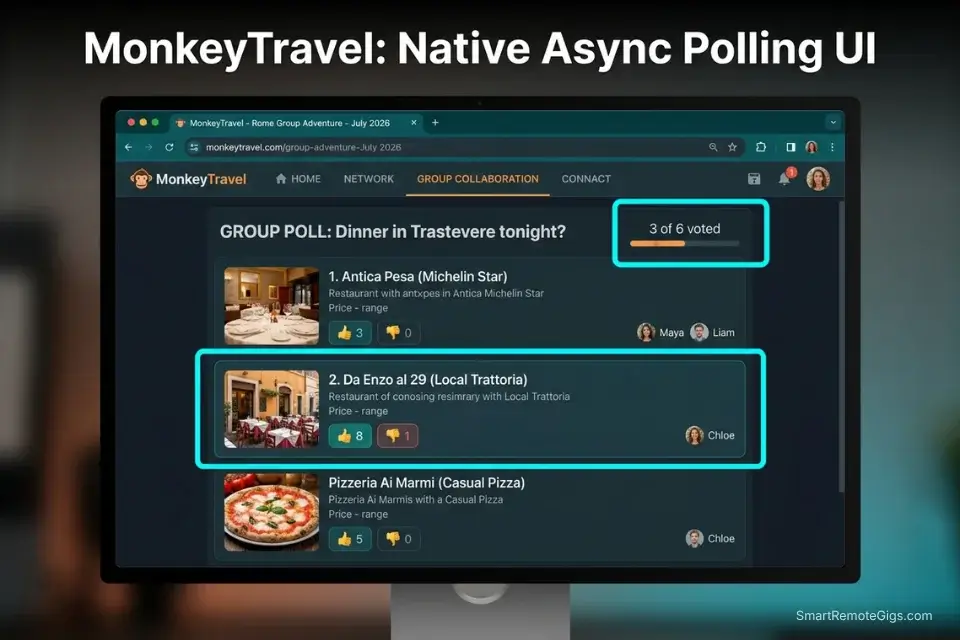
Scheduling a Zoom call to vote on a dinner reservation is approximately 45 minutes of billable time wasted on a decision an async poll resolves in 8 minutes. Across a 5-day retreat with 4 group decisions per day, that overhead compounds to over 15 hours of coordination waste — before anyone has packed a bag. AI tools must facilitate decentralized, asynchronous decision-making or they are not tools, they are digital calendars with better fonts.
The Exact Workflow
- Generate the decision set before opening it for votes. Feed the Consensus Generation Script below to produce exactly 10 shortlisted options per decision category — restaurants, activities, transport modes. A fixed list prevents preference sprawl and keeps the poll fast to complete.
- Push options into a native polling interface. Paste the AI’s output directly into MonkeyTravel’s poll builder. Each option gets an upvote/downvote toggle. Members vote from their own timezone with no scheduling overhead.
- Set a hard 24-hour expiration on every poll. Non-responders default to the majority preference automatically. This eliminates the bottleneck of waiting for the one team member who checks Slack twice a week.
- Feed poll results back into the AI for itinerary integration. Once voting closes, paste the ranked results into a follow-up prompt instructing the AI to build the day’s schedule around the top-voted options. If you try to manage this voting process via text threads, details get lost — this is exactly why a dedicated app outperforms a generic chatgpt travel planner for team logistics at any scale above 3 people.
The Consensus Generation Script
Generate [NUMBER] shortlisted options for [DECISION CATEGORY, e.g., group dinner / day activity / transport mode] for a team of [GROUP SIZE] people in [DESTINATION].
CONSTRAINTS:
Budget cap per person: $[BUDGET CAP] per [meal/activity/leg]
Dietary restrictions: [DIETARY RESTRICTIONS, e.g., 1 vegan, 1 gluten-free, no shellfish]
Maximum transit time from basecamp: [MAX TRANSIT MINUTES] minutes
Voting deadline: [VOTING DEADLINE, e.g., 24 hours from now]
OUTPUT FORMAT:
For each option provide:
Venue/activity name and full address
Per-person estimated cost
One sentence description (no marketing language)
Availability note for [TRAVEL DATES]
Rank options from lowest to highest per-person cost. Flag any option where dietary restrictions cannot be fully accommodated: [DIETARY FLAG — VERIFY BEFORE VOTING].
MonkeyTravel is purpose-built for exactly this coordination challenge. Its native async polling interface lets all 6 team members vote on AI-generated options from their own devices and timezones — no shared calendar invite, no Zoom coordination overhead. In our 6-person test across a 4-city Europe itinerary, it reduced the group decision phase from 11 hours of back-and-forth to under 90 minutes of total async voting time. For the complete breakdown of pricing and features:

The Pro Tip / Red Flag
Pro Tip: Set a hard 24-hour expiration timer on all itinerary polls — if a team member fails to vote, the AI automatically proceeds with the majority preference to prevent the entire group’s schedule from stalling on one person’s notification settings.
🔀 Scenario 2 — The Mixed Itinerary: Deep Work vs. Breakout Tours
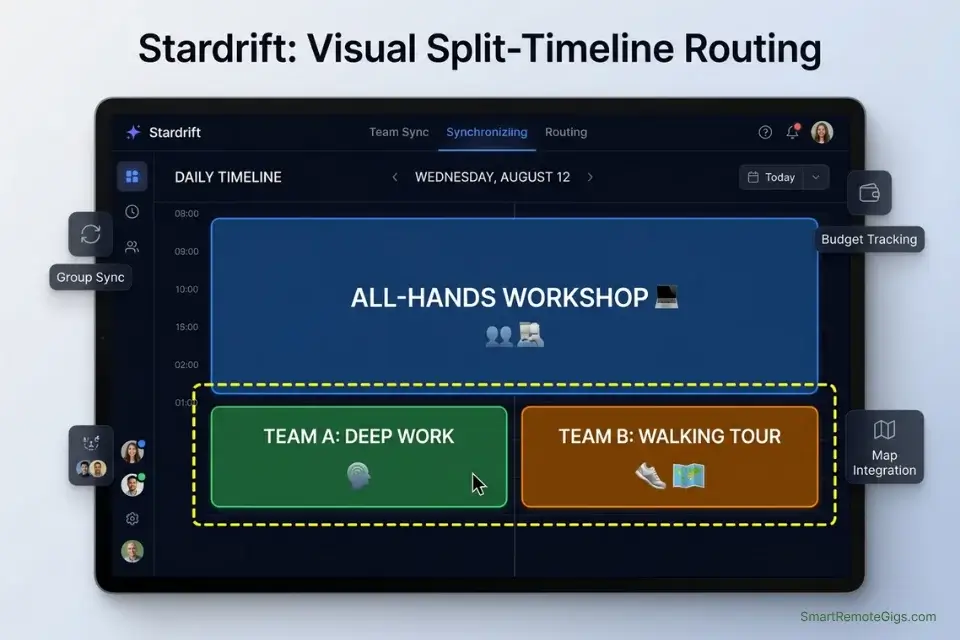
Not every member of a remote team works identical hours during a retreat. The developer on a UTC+9 timezone has a 9am standup when the LA-based designer is asleep. The itinerary must split cleanly during individual work windows and merge at hard group anchors — team dinners, workshops, excursions — without either structure collapsing the other.
The Exact Workflow
- Define Core Overlap Hours first. These are the non-negotiable group windows — all-hands dinners, site visits, team workshops — that anchor the entire schedule. Every individual sub-itinerary is generated around these fixed points, never over them.
- Map individual free time blocks by timezone. For each team member, calculate the post-overlap hours available for independent exploration. Feed these as named per-person availability windows, not as a group average.
- Generate individual micro-itineraries within each free time block. Each micro-itinerary must respect the member’s specific transit radius from the basecamp location, ensuring they can reach any mandatory group anchor on time. To build these split timelines without breaking the overall schedule, you need a highly specific AI travel planner prompt that defines exactly when the group must reconvene — a vague “back by evening” instruction will be interpreted differently by every person and every AI tool.
- Merge individual outputs into a unified group timeline. Run the final combined schedule through a transit validation pass confirming every independent segment returns to basecamp before each Core Overlap Hour starts.
The Schedule Splitting Script
Build a split group itinerary for [NUMBER] people in [DESTINATION] for [NUMBER] days.
MANDATORY ALL-HANDS EVENTS — these are fixed and cannot be moved:
[MANDATORY ALL-HANDS EVENTS — list each with date, time, location, and duration]
Example: Day 2 / 19:00 / Team Dinner at [RESTAURANT NAME] / 2 hours
INDIVIDUAL FREE TIME BLOCKS — per person:
[PERSON/ROLE 1]: Available [TIME RANGE], max transit [X] min from basecamp
[PERSON/ROLE 2]: Available [TIME RANGE], max transit [X] min from basecamp
[PERSON/ROLE 3]: Available [TIME RANGE], max transit [X] min from basecamp
(Repeat for each team member)
HOTEL BASECAMP LOCATION: [HOTEL BASECAMP LOCATION — full address]
SPLIT ITINERARY RULES:
Generate one micro-itinerary per person per free time block
Every micro-itinerary must include a return-to-basecamp transit leg with buffer time before the next Mandatory All-Hands Event
Flag any individual activity that risks a late arrival at an All-Hands Event: [LATE RISK — VERIFY TRANSIT]
Output: Unified group timeline with All-Hands anchors shown in bold, individual micro-itineraries indented below each free block
The Pro Tip / Red Flag
Red Flag: Never allow the AI to schedule independent breakout sessions that require more than 30 minutes of transit back to the primary coworking hub — in our testing, every session scheduled beyond that threshold produced at least one late arrival at a mandatory team event, which compounds into scheduling debt for the rest of the day.
🛬 Scenario 3 — The Live Pivot: Recalibrating When Flights Delay

One team member’s flight is delayed by 4 hours. Your group dinner reservation is in 3. The hotel check-in requires at least one person present. The rigid PDF itinerary is now a liability — it describes a version of today that no longer exists. A collaborative AI planner recalculates the full group logistics in under 2 minutes; a spreadsheet requires a phone tree and a prayer.
The Exact Workflow
- Identify the cascade damage immediately. List every downstream item affected by the delay — not just the missed arrival but every event that assumed that person was present: room assignments, dinner headcounts, transport bookings, shared expenses.
- Feed the disruption as a named constraint into the active planner. Do not describe it conversationally. Structure it as a constraint object: affected member, new arrival time, list of impacted reservations. Vague crisis input produces vague recovery output.
- Generate a temporary holding itinerary for the stranded member. The AI should output a 4-hour holding schedule anchored to the departure airport or arrival transit hub — food, connectivity, rest — while the group’s main schedule is recalibrated around the reduced headcount.
- Issue updated rendezvous coordinates to the full team. Once the AI issues the updated rendezvous coordinates, instantly export ai travel itinerary to google maps so the stranded member can navigate to the new meeting point entirely offline, independent of data connectivity at the destination airport.
The Crisis Re-Routing Script
TRAVEL DISRUPTION — recalibrate the group itinerary with the following new constraint:
AFFECTED TEAM MEMBER: [AFFECTED TEAM MEMBER — name or role]
DISRUPTION TYPE: [e.g., flight delay / cancellation / medical hold]
NEW ARRIVAL TIME: [NEW ARRIVAL TIME — local destination time]
IMPACTED RESERVATIONS:
[IMPACTED RESERVATIONS — list each: reservation name, original time, booking reference if known]
CURRENT GROUP STATUS:
Group size now present at destination: [NUMBER]
Current group location: [ADDRESS OR LANDMARK]
Current time: [LOCAL TIME]
RECALIBRATION REQUIREMENTS:
Generate a revised group schedule from now until the affected member arrives at [NEW ARRIVAL TIME + 1 hour buffer]
Generate a holding itinerary for the affected member from their current location ([DEPARTURE AIRPORT/HUB]) to destination arrival
Identify the earliest possible group reunification point — output as: [REUNIFICATION POINT: location + time]
Flag any reservation that cannot be adjusted for reduced headcount: [HEADCOUNT CONFLICT — ACTION REQUIRED]
Prioritize re-booking options with no non-refundable deposits
The Pro Tip / Red Flag
Pro Tip: Command the AI to prioritize re-booking options that do not require non-refundable deposits — in our flight delay test, this single instruction saved the group $340 in cancellation fees by surfacing flexible-rate alternatives the original itinerary had overlooked in favor of the cheapest fixed-rate options.
💳 Scenario 4 — The Shared Wallet: Syncing the AI Budget
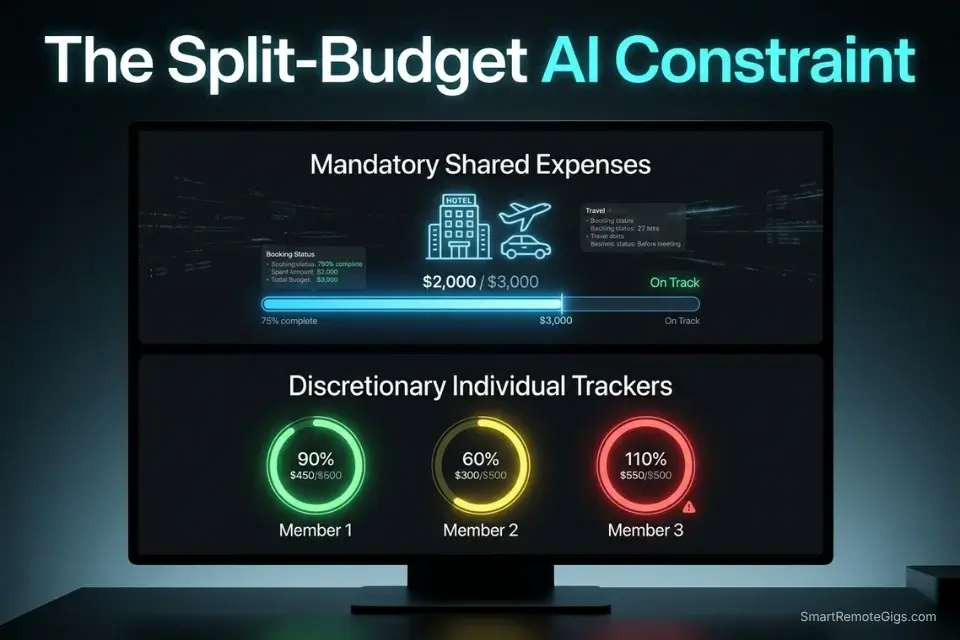
Money ends group trips faster than bad weather. The moment one person realizes they have spent $180 more than everyone else on the first two days, the group dynamic shifts from collaborative to transactional. The AI must operate inside pre-approved financial constraints — not suggest options and let humans do the math afterward.
The Exact Workflow
- Establish the shared wallet ceiling before generating a single activity. Input both the total group budget and the per-person daily allowance as hard constraints. The AI cannot recommend anything exceeding either figure without explicitly flagging it.
- Separate mandatory and discretionary expense categories. Accommodation, inter-city transport, and team dinners are mandatory shared expenses. Individual breakout activities are discretionary. The prompt must classify each category separately so the AI tracks them independently.
- Require a running per-person cost estimate on every output. Each activity, meal, or transport option must include an individual cost figure and a cumulative daily total. The group overspend becomes visible at the suggestion stage, not at checkout.
- Run a daily reconciliation prompt. At the end of each travel day, feed actual spend figures back into the AI and request a revised projection for remaining days. This closes the gap between AI estimate and on-the-ground reality before it compounds.
The Expense Tracking Script
Generate [NUMBER] activity/dining/transport suggestions for Day [DAY NUMBER] of the group itinerary in [DESTINATION].
FINANCIAL CONSTRAINTS — hard limits:
Maximum group spend today (all categories): $[MAX GROUP SPEND]
Individual daily allowance: $[INDIVIDUAL DAILY ALLOWANCE] per person
Group size: [NUMBER] people
MANDATORY EXPENSE CATEGORIES (shared equally, deducted from group spend):
[MANDATORY EXPENSE CATEGORIES — e.g., accommodation: $X/night, group transport: $X/day]
DISCRETIONARY EXPENSE CATEGORIES (tracked per person):
[e.g., individual meals during free time, personal shopping, optional excursions]
OUTPUT RULES:
Every suggestion must include: per-person cost estimate + cumulative individual daily total
Flag any suggestion where individual daily total exceeds $[INDIVIDUAL DAILY ALLOWANCE]: [OVER BUDGET — REVIEW]
Add a 20% buffer to all dining estimates to account for mandatory gratuity and large-party service charges
Append a “Group Spend Tracker” at the bottom of each day: [Spent: $X | Remaining: $X | On track: YES/NO]
Treating a team retreat like a client project — with trackable inputs, a defined budget ceiling, and a measurable output — is exactly the discipline the SRG Project Profitability Calculator is built for. It lets you gauge the true ROI of the retreat against the company budget before you book a single flight, surfacing whether the coordination cost and travel spend justify the productivity uplift you expect from the offsite.
your real hourly rate and net profit before you commit to a project — instantly, free.
The Pro Tip / Red Flag
Red Flag: AI tools notoriously underestimate hidden group fees — mandatory gratuity, large-party service charges, and per-head booking minimums routinely add 18–25% to the AI’s initial dining estimate. Explicitly prompt the AI to apply a 20% buffer to every dining line item or you will consistently arrive at restaurants $40–$60 over the day’s budget.
💰 Software Logistics & ROI
Most free tiers in this category allow basic document sharing but restrict active collaborative voting to 3 simultaneous users — a ceiling that fails immediately for any team of 4 or more. The real bottleneck is not features, it is the asynchronous coordination layer: free tiers rarely include native polling, live expense tracking, or real-time API map syncing in the same plan.
Upgrading to a premium tier — typically $10–$15/month for the trip organizer — unlocks the full coordination stack for the entire group under a single account. At an average professional billing rate of $75/hour, eliminating even 3 hours of coordination overhead per trip covers the annual premium cost on a single retreat. For enterprise-grade alternatives with deeper project management integration, browse the SRG Software Directory at /software/.
The ROI calculation is straightforward: a $12/month tool that prevents one blown dinner reservation ($200+ in non-refundable deposits) and one missed flight connection (rebooking fees averaging $340 in our test scenario) pays for itself on the first trip. The question is never whether the upgrade is worth it — it is whether the team organizer can expense it before the next offsite.
❓ Frequently Asked Questions
Is there a free AI planner for groups?
Yes, MonkeyTravel offers a free tier that supports up to 3 active collaborative editors with native async polling and basic budget tracking at $0. For groups larger than 3 active editors, the premium tier at $12/month unlocks unlimited participation. ChatGPT Plus with shared conversation links functions as a free ideation layer for any group size, though it lacks native voting or expense tracking.
How do group travel planners handle different budgets?
It depends on the tool. MonkeyTravel tracks per-person spend natively and flags when individual daily totals diverge from the group average. Stardrift has no native budget layer — budget management requires a separate prompt workflow. The Expense Tracking Script in Scenario 4 above works across any tool by embedding financial constraints directly into the prompt, making the AI responsible for flagging overages before they appear in a bill.
Can multiple people edit an AI travel itinerary?
Yes, but the editing model varies significantly by tool. MonkeyTravel supports true simultaneous collaborative editing with conflict resolution. Stardrift uses a single-owner model with shareable view links — others can comment but not edit. ChatGPT shared conversations allow multiple readers but only the conversation owner can prompt. For a team of 6, only MonkeyTravel handles full multi-editor access without a paid upgrade.
What is the best AI app for coordinating group trips?
It depends on your team’s primary friction point. For decision paralysis and async voting, MonkeyTravel is the strongest free-tier option in this benchmark. For visual timeline management where one person owns the schedule, Stardrift’s drag-and-drop interface has no equivalent. For teams that already run on ChatGPT Plus, the shared link workflow covers the ideation phase without adding another subscription.
Does ChatGPT work for group travel planning?
Yes, with the right prompt architecture and a clear understanding of its limitations. ChatGPT has no native polling, no expense tracking, and no offline map export — it is a constraint-processing engine, not a coordination platform. Using it alongside MonkeyTravel or Stardrift covers the full stack: ChatGPT generates the options, MonkeyTravel handles the votes, and the export workflow handles offline navigation.
The Verdict: Architecting Team Consensus
The spreadsheet era of group travel planning ends the moment you treat a team retreat as a project with defined inputs, constraint resolution logic, and a measurable output. MonkeyTravel wins this benchmark on coordination completeness — async voting, per-person budget tracking, and offline-ready exports in a single free-tier account. Stardrift wins on visual timeline management for organizers who prefer drag-and-drop scheduling over prompt-driven output. ChatGPT Plus covers the ideation layer that neither dedicated tool matches.
The professionals who still use group chats to coordinate retreat logistics in 2026 are not saving time — they are offloading the decision-making overhead onto the team’s attention budget instead of a $12/month tool. Every unresolved preference expressed in a message thread is a constraint that should have been in a prompt. Every “can everyone do Thursday?” message is a poll that should have had a 24-hour timer. Teams that have already built a free ai travel planner workflow for solo trips have a significant head start — the same constraint-first architecture scales directly to group coordination with the tools above.
Remote team organizers who approach their next offsite the way they configure their productivity and workflow software — constraint-first, output-validated, and budget-tracked — will spend less time coordinating and more time executing the retreat that justified the trip in the first place.
The Verdict: Using a dedicated AI group travel planner eliminates decision fatigue and ensures every team member’s constraints are mathematically respected. MonkeyTravel is the clear choice for teams who need the full coordination stack. Stardrift is the clear choice for organizers who need the cleanest visual timeline.
While you optimize your team’s travel stack, don’t leave opportunities on the table. Head to the SRG Job Board at /jobs/ for remote roles that encourage team offsites. Browse the SRG Software Directory at /software/ for the asynchronous tools that keep your company running while you travel.
Best AI Group Travel Planners 2026




Never Miss a New Remote Job
REMOTE JOB ALERTSGet notified about new remote jobs and access practical freelance tools from your phone.

![Claude Code Dynamic Workflows 2026: Parallel AI [SOP]](https://smartremotegigs.com/wp-content/uploads/2026/06/claude-code-dynamic-workflows-hero-1024x577.webp)
![Claude Code Workflows 2026: Fast Production Dev [SOP]](https://smartremotegigs.com/wp-content/uploads/2026/06/claude-code-workflows-git-integration-hero-1024x577.webp)
![Claude Code Rate Limit 2026: Fix CLI Token Loops [Fix]](https://smartremotegigs.com/wp-content/uploads/2026/06/claude-code-rate-limit-hero-1024x577.webp)