


Free plan
A free account exists (“Continue for free”)
Starting price
Creator $10 per user a month, billed yearly
Billing basis
Per seat, monthly or yearly
Best for
Creators who need captions and clean audio, and teams that can pay per seat
VEED.io is a paid online video editor with AI tools and a free account. VEED’s pricing page, checked 20 November 2026, lists Creator, Pro and Enterprise plans.
This VEED review covers VEED pricing, the VEED free plan, credits, cancellation and the main features. Creator costs $10 per user a month billed yearly, and Pro costs $21 on the same terms.
The free account adds a watermark, exports at 720p and showed 0 AI credits in the screenshots we checked. VEED’s own pages also disagree on plan names and start prices, and the plans section shows both sides.
Key Takeaways
- Billed yearly, Creator costs $120 and Pro $252 over 12 months per user, against $240 and $528 on monthly billing (our calculation).
- A free account exists, but its exports carry a watermark at 720p, and it showed 0 AI credits.
- Billing is per seat, credits do not roll over, and cancelling gives no refund.
- VEED’s own pages disagree on plan names and start prices, so check your upgrade screen.
- VEED.io plans and prices
- Where VEED's own pages disagree
- What a free VEED account includes
- Credits, seats and billing
- Cancellation and refunds
- Which plan should you pick?
- VEED features by task
- Podcast and remote recording
- Audio cleanup: Clean Audio and noise removal
- Eye contact correction
- Screen recorder
- Filler words, silences and retakes
- Clips and YouTube automation
- Subtitles and translation
- VEED AI: avatars, voice and generation
- What VEED is
- Known limitations
- What users say about VEED
- VEED alternatives
- Software Verdict
- Sources and method
- What we didn't check
- Frequently Asked Questions
VEED.io plans and prices
VEED.io pricing below comes from the pricing page and the in-app upgrade prompt, both seen on 20 November 2026. All prices are in USD, per user.
| Plan | Monthly billing | Yearly billing | Credits | Adds |
|---|---|---|---|---|
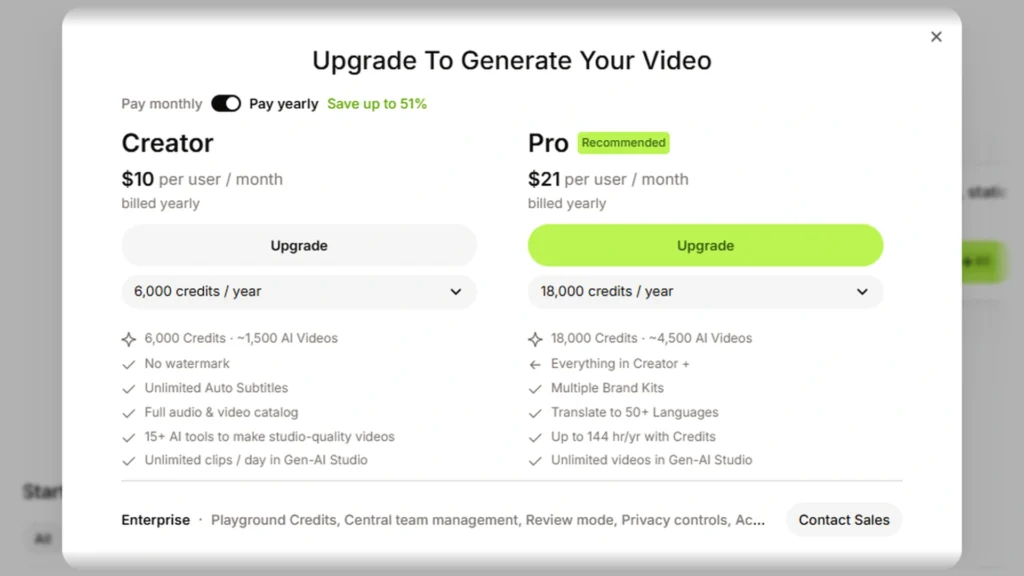
| Creator | $20 per month | $10 per month | 500 a month, or 6,000 a year | No watermark, unlimited auto subtitles, full audio and video catalog, 15+ AI tools |
| Pro (marked Recommended) | $44 per month | $21 per month | 1,500 a month, or 18,000 a year | Everything in Creator, multiple brand kits, translation to 50+ languages, up to 144 hours a year of AI voice (12 hours a month on monthly billing) |
| Enterprise | Custom pricing | Custom pricing | Custom credits | Central team and data management, review mode, privacy controls, customer success |
The yearly toggle on the pricing page carries the label “Save up to 51%”, which is VEED’s own wording. Over 12 months for one user, yearly billing costs $120 for Creator against $240 monthly, and $252 for Pro against $528 (our calculation).
$252
a year for one Pro user on yearly billing, against $528 on monthly billing
Source: Our calculation from the pricing page, 2026-11-20
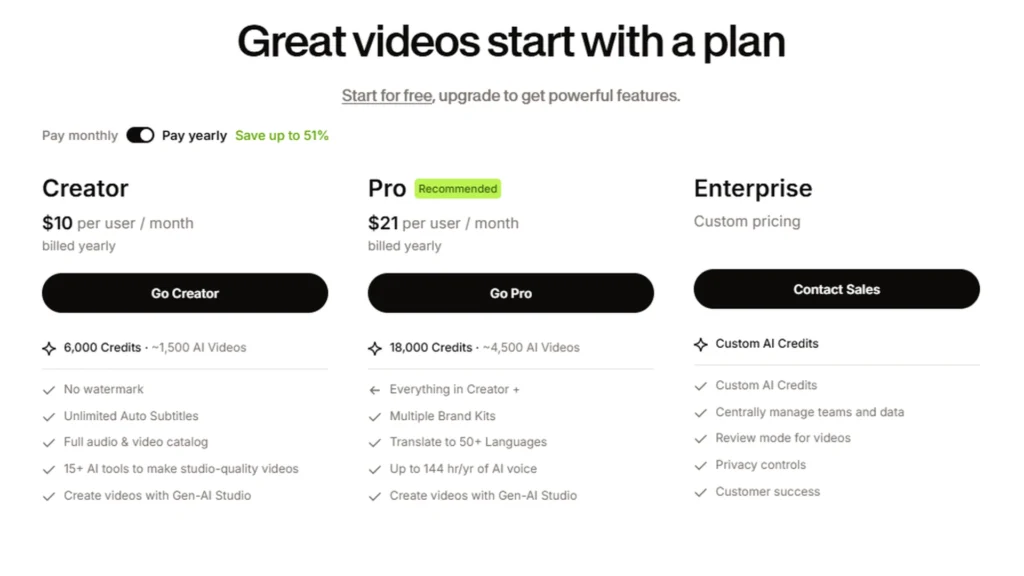
The page shows no Free card and no Studio plan. It shows no date either, so the check date above is ours.
Where VEED’s own pages disagree
Help pages name a Studio plan, but the pricing page shows only Creator, Pro and Enterprise. VEED lists no Studio price.
VEED’s editor page says plans start at $9 a month billed yearly and $19 billed monthly, and it carries no date. The pricing page and the upgrade prompt both say $10 and $20. A subtitle page says Creator starts at $20 a month.
A support article dated 27 August 2026 says Lite is a separate iOS app with its own subscription. Yet the watermark help article still lists Lite, Pro and Enterprise, and the Terms of Use, dated 28 August 2026, still list Basic, Pro and Business. VEED does not say it renamed these plans.
Red Flag: VEED’s pages disagree on plan names and start prices. Check the price on your own upgrade screen before you pay.
What a free VEED account includes
Yes, VEED has a free account. The sign-up plan step offers “Continue for free”, per an owner screenshot from 20 November 2026 that this page does not reproduce.
That free account’s sidebar showed a credit counter of 0, in an owner screenshot not reproduced here. One talking-video setup showed 80 credits on the Generate button, for that setup only.
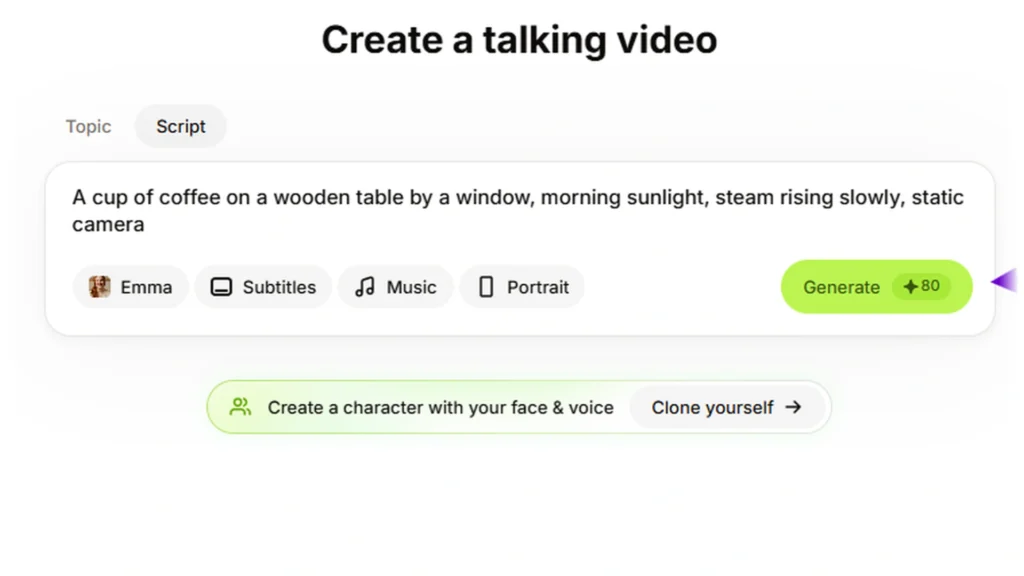
Pressing Generate opened an upgrade prompt. It lists Creator at $10 billed yearly with 6,000 credits a year, and Pro at $21 billed yearly with 18,000 credits a year.
Watermark and export size come from VEED’s watermark help article and export help article, not from the screenshots, which show no export.
| Feature | What VEED states | Source and date |
|---|---|---|
| Watermark | Free exports carry a VEED.IO watermark | Watermark help article, 19 August 2026 |
| Export size | Free is 720p only, Creator goes up to 1080p, Pro goes up to 4K | Export help article, 21 August 2026 |
| AI credits | Free AI credits exist only in some regions | Text to speech help page, no date shown |
| One-time tries | Clean Audio, Eye Contact, Remove Silences and Clips can each be tried once per account | Help articles, 21 to 26 August 2026 |
| Magic Cut | Included on Free with full functionality | Magic Cut help article, 25 August 2026 |
| Re-export | Subscribing does not remove the watermark from files already downloaded, so export the project again | Help article, 21 August 2026 |
| Your content | Content uploaded under a Free subscription can be used by VEED to improve its products | Terms of Use, 28 August 2026 |
| Storage, subtitle minutes, video length | Not published in the pages we checked | Not published |
Credits, seats and billing
VEED’s pricing FAQ says credits refresh when your plan renews and do not carry over. You can raise the credit allowance on your current plan.
All paid plans include unlimited subtitle generation within a fair use limit of 50 hours a month. Translation counts in minutes: a 30-minute video translated into one language uses 30 minutes, and unused minutes do not roll over. VEED doesn’t publish translation minute totals on the pricing page.
VEED doesn’t define the “~1,500 AI Videos” label beside Creator’s 6,000 credits. One talking-video setup showed 80 credits. If that cost held, 6,000 yearly credits would cover 75 such videos, and 500 monthly credits would cover 6 (our calculation, one setup only).
Paid plans are billed per seat, and every person in a workspace counts as a seat, including pending invitations, per a support article dated 21 August 2026. Only the workspace owner can upgrade. Upgrading resets the billing period, with unused time on the old plan prorated.
A trial is for Enterprise customers only, with a minimum of 3 users. VEED states no purchase minimum for Enterprise. Prices show in your local currency where available, and in USD otherwise.
Cancellation and refunds
You cancel in the dashboard, and cancelling does not give a refund. The table sets out the rules from VEED’s cancellation help article and its Terms of Sale, which shows no date.
| Rule | What VEED states | Source |
|---|---|---|
| Where to cancel | Workspace Billing, then Turn off auto-renewal; the pricing FAQ names Team Billing instead | Cancellation article, 21 August 2026, and pricing page |
| iOS purchases | Apple manages them, so they do not appear in Workspace Billing | Subscription management help article |
| Questionnaire | You must complete it to finalize the cancellation | Cancellation article |
| Deadline | Cancel at least two business days before the renewal date | Cancellation article and Terms of Sale |
| After you cancel | Access continues to the end of the billing cycle, and no further charges are made | Cancellation article and pricing page |
| Refund on cancel | Cancelling gives no refund; subscriptions auto-renew by default | Cancellation article and Terms of Sale |
| 14-day refund | A consumer change-of-mind refund applies only if you never used the services; uploading, editing and adding subtitles count as use | Terms of Sale |
| Unused credits | They expire at the end of the subscription period | Terms of Sale |
| Downloads | The refund rule does not mention downloads | Terms of Sale |
Two recent Trustpilot reviews show how renewals and refunds read to some customers. They are two reviews from a recent sample, not a rate.
Voice of the Street:
Two dated reviews on renewals and refunds.
What users say (Trustpilot): “They charged me for an extra year, and are refusing to refund my money.” (Trustpilot review, 6 October 2026).
“Haven’t used the service for over 6 months, got charged a yearly subscription and could not do the refund immediately after.” (Trustpilot review, 20 November 2026).
VEED’s own text covers both sides. You must cancel two business days before renewal, and the 14-day consumer refund applies only if you never used the services.
Which plan should you pick?
Decide by the export size you need, the AI use you expect and how many people will edit.
- Stay on the free account if you only want to try the editor, accept a watermark and 720p export, and will not rely on AI credits.
- Pick Creator if you need no watermark, export up to 1080p, unlimited auto subtitles (50 hours a month fair use) and light AI use of 500 credits a month or 6,000 a year.
- Pick Pro if you need 4K export, translation to 50+ languages, multiple brand kits, or more voice and credits at 1,500 a month or 18,000 a year. Detect Speakers in subtitles needs Pro or higher.
- Contact sales about Enterprise if you need central team management, review mode, privacy controls or a trial, which needs at least 3 users.
- Think twice if you want a fixed monthly cost for several editors, because every person in a workspace is a seat. On any plan, cancel at least two business days before renewal.
Quick Verdict:
A per-seat editor with a free account that adds a watermark and exports at 720p.
Best For: Creators who need captions and clean audio, and teams that can pay per seat.
Skip If: You want a fixed monthly cost for several editors, or you expect a refund when you cancel.
VEED features by task
Each feature below names the official page that describes it, the plans it covers and what we did not check.
Podcast and remote recording
VEED’s AI Podcast Editing page says Clips needs a video longer than two minutes with speech in the audio. The webcam recorder page says “Unlimited time, unlimited retakes”. The recorder help page, dated 9 September 2026, says up to 60 minutes on every plan.
VEED doesn’t state that it records remote guests. We did not check how a podcast edit turns out.
Audio cleanup: Clean Audio and noise removal
VEED’s official tool name is Clean Audio. Its Clean Audio help article, dated 21 August 2026, says it removes wind, AC hum, traffic, static and echo.
The article lists one-time use on Free and full access on Creator, Pro, Studio and Enterprise. The voice cleaner page says it is free to try, then Pro to keep using it, so the two pages differ on the paid plan. The noise removal page says it is powered by Dolby Technology, and we did not check how the result sounds.
Eye contact correction
VEED’s eye contact help article, dated 24 August 2026, lists one-time use on Free and full availability on Creator, Pro, Studio and Enterprise. The product page says to upgrade to Pro, so the two pages differ.
The article says it may not work well if the subject is far from the camera or the video is low resolution or poorly lit. It is switched off when your gaze is far from the camera, and the product page says it works on pre-recorded video. We did not check results on any footage.
Screen recorder
VEED’s recorder help article, dated 9 September 2026, says the recorder is on all plans, records up to 60 minutes and has a built-in teleprompter. The VEED screen recorder page lists 1080p recordings and time-stamped commenting.
People with a shared recording link can watch and comment, but not edit. We did not check recording quality.
Filler words, silences and retakes
VEED’s Magic Cut help article, dated 25 August 2026, says Magic Cut removes complete silences, filler words, repeated mistakes and awkward pauses. The Free plan includes it with full functionality, and only English is supported.
Remove Silences is a separate tool: one-time use on Free, and it removes complete silences only. VEED doesn’t say Magic Cut removes retakes. Its recorder pages use that word for recording, and we did not check how accurate the cuts are.
Clips and YouTube automation
VEED’s Clips help article, dated 21 August 2026, sets a minimum of 1 minute and a maximum of 3 hours of speech. The podcast page says longer than two minutes, so the pages differ. Free gets one try, paid plans get unlimited use, and auto subtitles cover over 100 languages.
VEED’s YouTube video maker page says the AI writes the script, generates footage and runs on AI credits. Its YouTube editor page says to edit only videos you own.
For wider options, see our page on AI video tools for YouTube Shorts. We did not check which moments Clips picks.
Subtitles and translation
VEED’s Auto Subtitle Generator page says the tool is free to start. A paid plan is needed for longer videos and subtitle file downloads, in SRT, VTT and TXT. The page says it finishes “in minutes” and gives no figure.
The subtitle help page says VEED subtitles are on all plans, with limits on the pricing page. Detect Speakers needs Pro or higher.
Subtitle translation is one-time use on Free and Creator, per the translation help page dated 9 September 2026, and it needs AI credits. Pro, Studio and Enterprise follow the pricing page limits, which show no minute totals.
Language counts differ by page and by feature.
| Page | Languages stated | What it covers |
|---|---|---|
| Pricing page | 50+ | Translation on Pro |
| Clips help page | Over 100 | Auto subtitles in Clips |
| Video translator page | 125+ | Subtitle languages |
| Video translator page | 29 | Languages where the speaker voice is kept |
VEED publishes no accuracy or speed figure for subtitles or translation, and we did not check either.
VEED AI: avatars, voice and generation
VEED’s text to speech help page says it supports 50+ languages, uses AI credits on every plan and allows 5,000 characters per generation. Yearly hours are up to 4 on Creator, 144 on Pro and 960 on Studio. The page shows no date.
The AI avatar page lists 60+ stock avatars and 120+ languages, free to try, with Pro for more credits. The Gen-AI Studio help page, dated 29 September 2026, says avatars are not available in Bangladesh, India, Indonesia, Pakistan or the Philippines.
That page also says Gen-AI Studio uses stock clips and does not generate AI video. File caps are 1, 5 and 30 minutes on Creator, Pro and Studio. The YouTube video maker page says the AI generates footage, so the pages differ.
The editor page names the AI video models VEO 3, PixVerse AI, Kling AI and MiniMax AI. VEED doesn’t say which feature uses which model or what each costs in credits. Dubbing, voice clone and text-to-video are named on official pages.
A support page dated 10 March 2026 says a set of legacy avatars will be removed in 2026, so check which avatar you rely on. The teleprompter is free per its page. We did not check output quality or credit costs.
What VEED is
VEED’s editor page says it combines text-based editing, automatic edits and AI video generation in one online platform. It works in Chrome, Safari, Edge and Firefox.
Tool pages say “Trusted by 1M+ creators”, and the About page says millions of people use it. VEED was founded on 20 March 2018. VEED doesn’t publish an exact user count.
Known limitations
These points come from the official pages above, with no ratings.
Pros ✅
- No watermark and up to 1080p export from Creator.
- Unlimited auto subtitles on paid plans, under a fair use limit.
- Magic Cut and one-time tries of other tools on Free.
Cons ❌
- Free export is 720p with a watermark.
- Credits expire and do not roll over.
- Billing is per seat.
- Cancelling gives no refund.
- Pages disagree on plan names and prices.
- Free storage and minutes are not published.
What users say about VEED
On Trustpilot, one review says “Easy interface and pretty clean UI.” (Trustpilot review, 8 November 2026).
VEED’s pricing FAQ says credits do not carry over, and its cancellation article says the plan’s credit allowance is removed after cancelling. One review describes losing unused credits after a move to the free plan.
One reviewer wrote that they “moved to the free plan” and lost the unused credits they had paid for (Trustpilot review, 9 September 2026).
These reviews come from a recent sample, so they show themes and not a count.
VEED alternatives
These SRG pages cover other tools you may be weighing.
- Read our VEED vs InVideo comparison.
- Read our InVideo AI page.
- Read our CapCut page.
- Read our Descript page.
- Read our Clipchamp page.
- Browse our directory of free AI video generators.
Software Verdict
Verdict: In this VEED.io review, a free account adds a watermark and 720p export, and paid plans cost $10 (Creator) or $21 (Pro) per user a month billed yearly. Billing is per seat, and cancelling gives no refund. Check the price on your upgrade screen, because VEED’s pages disagree.
Best For: Creators who need captions and clean audio, and teams that can pay per seat.
Sources and method
These pages drive the numbers above and are not linked elsewhere on this page.
- Auto Subtitle Generator page: subtitle formats and free start.
- How to use Text to Speech: languages, characters and yearly hours.
- How to use VEED’s Gen-AI Studio: file caps and country limits.
- How VEED subscriptions work across mobile and web: the Lite iOS app.
The Terms of Use and About pages are named in the text and not linked. Based on official sources, our own screenshots of VEED’s pricing page and a free account’s sign-up, video setup and upgrade screens, and user reports from Trustpilot, checked November 2026. We did not test how any VEED feature works, the quality of exports, or the mobile apps.
What we didn’t check
- We did not use any VEED feature on a paid plan, so nothing here says how well a feature or export works.
- Free storage, free subtitle minutes and the maximum free video length are not published in the pages we checked.
- Capterra, G2 and Reddit were not read, and Trustpilot was a recent sample, not a count.
- The mobile apps, the API and education plans were not covered, and the pricing page carries no date.