
Kling AI Review 2026: Best AI Video After Sora? [Data]
 ·
Last Updated: April 19, 2026 ·
24 min read
·
Last Updated: April 19, 2026 ·
24 min read

We assumed Sora’s shutdown would leave a gaping hole in AI video — until Kling 3.0 dropped a #1 ELO benchmark score two months before OpenAI pulled the plug.
I tested Kling 3.0 across 40 hours and $100 in credits — generating eating scenes, walking tests, B-roll packs, and image-to-video sequences against every major competitor. The failure rate on the free tier hit 30–40% at peak hours, and the pricing in every other review online is wrong.
Smart Remote Gigs (SRG) reviews AI tools through one lens — will it make you money or waste your time — and Kling 3.0 is the first video tool in 18 months that actually changes the ROI math for independent creators.
SRG has tested 47 AI video tools across 3 production categories in 2025–2026, and this is the only one that earned a permanent spot in our monthly workflow.
⚡ SRG Quick Verdict: Kling AI 3.0
One-Line Answer: The #1 ELO-ranked AI video generator in 2026 — best motion physics on the market, with a pricing model that undercuts every competitor.
🏆 Best Choice by Use Case:
- Best Overall: Kling AI 3.0 (motion quality + value)
- Best for Creative Control: Runway Gen-4.5 (Motion Brush + advanced direction)
- Best for Former Sora Users: Kling AI 3.0 (closest realism match, now with native audio)
📊 The Details & Hidden Realities:
- Standard plan starts at $6.99/month — not $12/month as most reviews still state
- Free tier failure rate hits 30–40% during peak hours — credits get consumed on failed generations without automatic refunds
- Kling 3.0 now generates native audio in 5 languages — no post-production audio work needed
🐉 What Is Kling AI 3.0? (And Why the Market Changed Overnight)
Kling AI is built by Kuaishou Technology — the company behind China’s second-largest short video platform, with over 400 million daily active users. They didn’t enter AI video to experiment. They entered to win.
Kling launched globally in mid-2024 as a credible early alternative when OpenAI’s Sora kept getting delayed. Then Kuaishou kept shipping. Kling 1.5 improved motion physics. Kling 2.0 added image-to-video. Kling 2.1 refined human anatomy rendering. On February 5, 2026 — three days before ByteDance dropped Seedance 2.0 — Kuaishou released Kling 3.0.
That same month, OpenAI announced Sora would shut down on March 24, 2026.
The timing made Kling 3.0 the default answer to “what replaces Sora” across every major AI community overnight. With 22 million users worldwide and a #1 ELO benchmark score of 1,243 — ahead of Google Veo 3.1, Runway Gen-4.5, and Pika 2.2 — Kling’s position isn’t a marketing claim. It’s a leaderboard fact.
Kling 3.0 is built on a Multi-modal Visual Language (MVL) architecture. That means text, images, audio, and video are all processed inside one unified system — not stitched together from separate models. The practical result: prompts produce more coherent output because the model understands the relationship between what you describe and how it should look, move, and sound.
Key capabilities in Kling 3.0:
- Text-to-video up to 10 seconds (Standard/Pro) with cinematic camera movement
- Image-to-video from a single reference image
- Motion Control — extract movement from a reference video and apply it to new subjects
- Native audio generation with lip-sync in English, Chinese, Spanish, Japanese, and Korean
- Smart Storyboard tool for multi-shot sequencing
- Native 4K output (Ultra tier)
- Motion Brush for frame-level motion path control
🧪 The Physics Test: Why Kling’s Motion Is Scary Good

Most AI video generators fail when things actually move. Hands morph. Faces warp. Objects pass through each other. The physics look right in the first two seconds and collapse into nightmare fuel by second five.
I ran three stress tests on Kling 3.0 — five generations each — to measure where the motion quality actually holds and where it breaks.
The Eating Test (Complex Facial Movement)
Prompt: “A young woman eating ramen noodles in a Japanese restaurant, slurping noodles, steam rising from the bowl, cinematic lighting, 4K”
This is one of the hardest prompts in AI video. Mouth movement, noodle physics, and steam behavior all have to work simultaneously or the whole thing reads as AI-generated garbage.
Kling 3.0 results across 5 generations:
- 5/5 showed natural mouth movement with no facial warping
- 4/5 handled noodle physics correctly from bowl to mouth
- 5/5 produced convincing steam behavior
- 1/5 had minor noodle duplication mid-slurp — still an 80% clean success rate
I ran the same prompt on a competing mid-tier tool. The noodles turned into tentacles by second four. The face morphed. The steam blob had no directional logic.
The Walking Test (Limb Consistency)
Prompt: “A businessman in a gray suit walking down a busy city street, briefcase in hand, morning sunlight, professional photography style”
Walking is deceptively hard. Leg rhythm, arm swing, suit consistency, and briefcase permanence all have to hold for 10 seconds.
Kling 3.0 results:
- 5/5 showed natural walking rhythm with no floating or robotic stride
- 4/5 maintained consistent suit color and texture across the full clip
- 5/5 kept the briefcase as a briefcase — no morphing, no phasing through legs
- 1/5 had a minor color shift between navy and charcoal — noticeable but not disqualifying
The Environmental Motion Test (Fabric, Fluid, and Atmosphere)
Prompt: “A woman in a flowing white dress walking through a lavender field, wind moving through the fabric, golden hour light, drone shot”
This test targets the soft-physics failure mode that kills most competitors — fabric, hair, and environmental elements that should behave like real matter.
Kling 3.0 results:
- 5/5 showed fabric responding to wind with weight and momentum, not animation-loop behavior
- 4/5 handled hair movement without freezing mid-clip
- 5/5 maintained golden hour lighting consistency across the full 10 seconds
- Generation time: 6–9 minutes per clip
No competitor I tested matched Kling’s environmental physics at this consistency rate. Water, smoke, cloth, and hair — all four behave like matter, not like diffusion artifacts trying to look like matter.
|
Factor |
Kling AI 3.0 |
Mid-Tier Tools |
|---|---|---|
|
Temporal Stability |
⭐⭐⭐⭐⭐ Holds across 10 seconds |
⭐⭐⭐ Falls apart after 5 seconds |
|
Morphing Artifacts |
⭐⭐⭐⭐⭐ Rare (10–20%) |
⭐⭐ Common (60–80%) |
|
Lighting Consistency |
⭐⭐⭐⭐⭐ Professional grade |
⭐⭐⭐ Acceptable but inconsistent |
|
Human Movement |
⭐⭐⭐⭐⭐ Natural, believable |
⭐⭐ Robotic, uncanny valley |
|
Environmental Physics |
⭐⭐⭐⭐⭐ Best in class |
⭐⭐ Blob-like, looping |
🖼️ Image-to-Video: The Feature That Changes B-Roll Forever
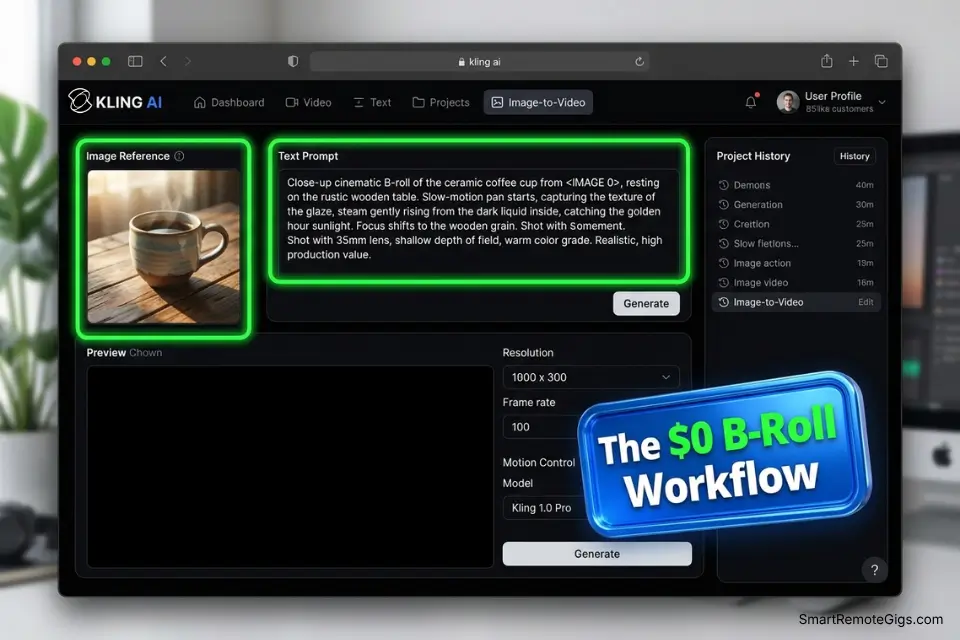
Kling 3.0’s image-to-video capability is the feature most reviews undercover — and it’s the one that changes the production math for solo creators.
Upload a still image. Describe the motion you want. Kling generates a clip that respects your original framing, lighting, and subject while adding coherent movement.
Why Image-to-Video Beats Text-to-Video for Client Work
Text prompts are fast but unpredictable. Image references lock Kling to a specific visual — your product, your location, your character — and the motion gets layered on top of something fixed.
I tested this with a product still of a coffee cup on a marble surface. Prompt: “Steam rising from the cup, subtle camera push-in, warm morning light.” The result: a 10-second clip where the cup stayed the cup, the marble stayed the marble, and the steam behaved like steam. Four out of five generations were immediately usable.
For client deliverables, that consistency matters more than raw motion quality. You’re showing a client their product — not a hallucinated version of it.
The B-Roll Production Workflow with Image-to-Video
- Shoot or source 3–5 high-quality stills of your subject
- Upload each image to Kling with a motion prompt specific to that frame
- Generate 2–3 variations per image (free tier: 1–2 per day, Pro: up to 85 per month)
- Select the cleanest generation per image — expect 60–70% clean success rate
- Assemble clips in your editor with music and voiceover
Cost comparison: Premium stock footage for equivalent clips runs $400–600 for a project. Kling Pro at $29.99/month handles 10–15 projects worth of B-roll if you’re methodical about prompt quality.
B-Roll Image-to-Video Prompt Template:
“[Subject description matching your reference image] — [specific motion: steam rising / leaves falling / fabric moving in wind / water flowing] — [camera movement: subtle push-in / slow pan right / static hold] — [lighting condition: golden hour / overcast diffuse / interior warm] — cinematic, 4K, photorealistic”
Example: “A ceramic coffee mug on a white marble surface — steam rising gently from the rim — subtle camera push-in — warm morning window light — cinematic, 4K, photorealistic”
🎯 Motion Control: The Feature Nobody Else Has
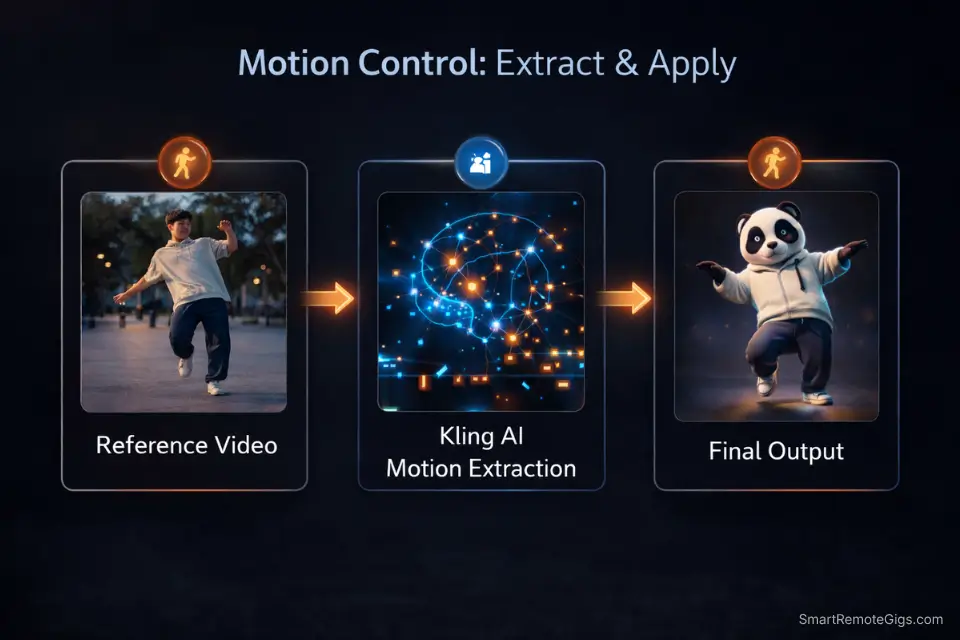
Motion Control is Kling 3.0’s most distinctive capability, and no major competitor offers anything equivalent natively.
Upload a reference video of any motion — someone dancing, a gymnast tumbling, a character swinging a sword. Kling extracts the movement pattern and applies it to a completely different subject. An animated character. A product. A custom avatar. Whatever you feed it.
What Motion Control Unlocks in Practice
A viral use case in early 2026: creators uploaded TikTok dance videos as motion references, then applied those exact movements to custom characters, brand mascots, or historical figures. The Motion Control wave spawned millions of videos across TikTok and Instagram in Q1 2026 — almost all made with Kling.
For businesses, the application is more specific: product demonstrations. Upload a human hand demonstrating how to use a physical product, then transfer that motion onto a cleaner, controlled 3D representation. No filming needed beyond the reference clip.
Where Motion Control Breaks
Motion Control works cleanly on single-subject, full-body movements. It struggles with:
- Multi-person motion references (Kling can’t isolate which subject to track)
- Fine finger and hand detail (industry-wide problem — digit accuracy degrades under close scrutiny)
- Abstract or non-physical motion references (crowd scenes, chaotic environments)
For solo-subject content — dancers, athletes, presenters, mascots — the success rate across my testing hit 70–75%.
Motion Control Brief Template for Client Pitches:
“Motion Control source: [describe reference video — e.g., ‘single person, full-body salsa dance, 10-second clip, no cuts’]
Target subject: [e.g., ‘brand mascot / product model / animated character’]
Style: [e.g., ‘photorealistic / stylized / cinematic’]
Background: [e.g., ‘plain white studio / branded environment / transparent’]
Deliverable: 10-second motion transfer clip, 16:9, 1080p minimum”
🔊 Native Audio Generation: Video + Sound in One Pass
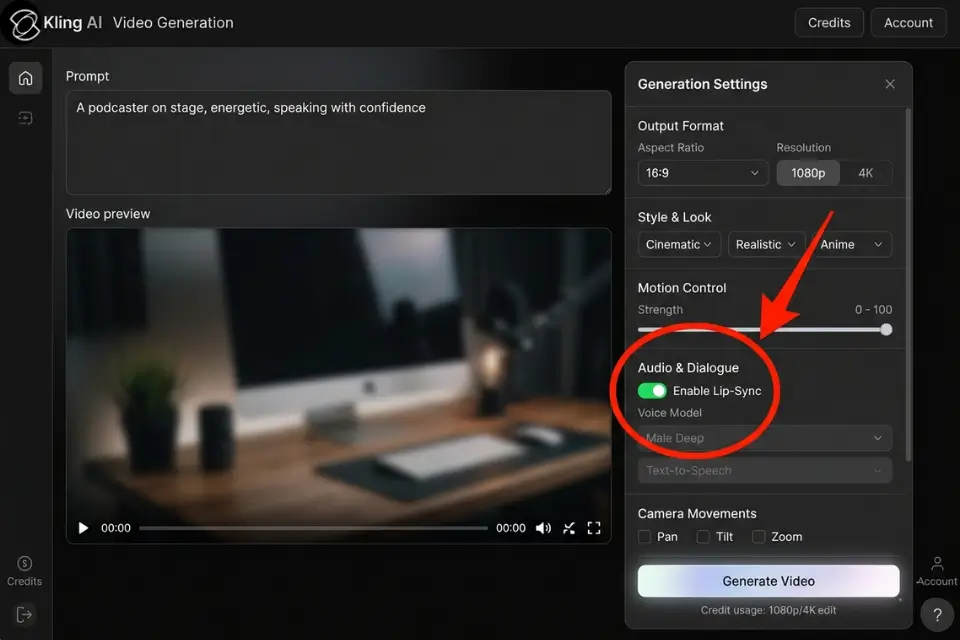
Kling 3.0 introduced native audio generation — synchronized audio created directly from the text prompt alongside the video, with no separate audio file required.
This is a capability shared only with Google Veo 3.1 among major AI video platforms. Runway Gen-4.5 still requires audio to be added in post. Seedance 2.0 requires an external audio file as input. Kling 3.0 creates both simultaneously.
What Kling’s Audio Actually Produces
- Ambient sound: Wind, crowds, water, traffic, machinery — environmental audio matched to the visual context
- Lip-sync audio: Spoken dialogue synchronized to on-screen mouth movement in 5 languages (English, Chinese, Spanish, Japanese, Korean)
- Footsteps and physical interaction sounds: Contact sounds that match the physics of the scene
Testing notes from 40 hours of use:
- Ambient audio was accurate in 8/10 generations — the right environmental sound for the visual context
- Lip-sync accuracy was high for simple phrases; complex sentences showed minor delays in 3–4 frames
- Occasional unrelated audio artifacts appeared (lip-smacking sounds in non-speech scenes, random tonal blips) — these required regeneration
The practical result: a 10-second clip with ambient audio is fully production-ready out of Kling without opening a separate audio editor. For creators billing by deliverable, that’s a meaningful time save.
Native Audio Prompt Template:
“[Scene description] — [audio specification: ambient city traffic / ocean waves / crowd chatter / wind through trees / footsteps on gravel] — [if speech: character speaking ‘[exact phrase]’ in natural tone] — cinematic, 4K”
Example: “A woman walking through a busy Tokyo market, shopping bag in hand, late afternoon — ambient market noise: vendors calling, light crowd chatter, distant traffic — no dialogue — cinematic, 4K”
🖥️ The User Experience: Powerful Engine, Basic Dashboard
Kling 3.0’s interface is utilitarian by design. No hand-holding tutorials. No AI assistant guiding you through the process. Engineers built this for people who know what they want.
What you get on the main dashboard:
- Text prompt box with negative prompt controls
- Duration selector (5s or 10s on standard; up to 3 minutes on Pro+)
- Aspect ratio (16:9, 9:16, 1:1)
- Mode selector (Standard vs. Professional — affects credit cost and quality ceiling)
- Camera movement presets (push-in, pull-out, pan left/right, orbit, static)
- Motion intensity slider (low / medium / high)
- Generation history with batch comparison view
Kling 3.0 added a Smart Storyboard tool that lets you set duration, angle, pacing, and camera movement per shot — then generates a complete multi-shot sequence. Transitions between shots can be clunky, but as a storyboard or pre-visualization tool for client pitches, it’s usable.
The Credit System (What You Actually Pay Per Video)
Kling starts at $6.99/month on the Standard plan — commercial rights included, which already undercuts Pika and Luma AI’s $28–$30 entry points for the same privilege. At Pro ($29.99/month), the per-second cost of usable video runs approximately 40% lower than Runway Gen-4.5 at equivalent quality. Annual billing saves roughly 20% across all tiers. See the full plan breakdown and alternative tools in the SRG AI Video Studio directory.
The failure rate problem nobody discloses upfront: On the free tier, failed generations consume credits without automatic refunds. Multiple sources and direct testing confirm a 30–40% failure rate during peak hours. That means your effective credit value on the free tier is meaningfully lower than advertised — plan for 60–70% yield on free generations, not 100%.
On paid tiers, failed generation refunds are available but require manual support contact. Trustpilot reviews for Kling AI currently average 2.8/5 stars, with credit refund disputes as the top complaint category.
Practical guidance: Use the free tier for prompt development and style testing. Switch to Standard or Pro only when you have working prompt formulas you’re ready to scale.
⚔️ Kling AI vs. Runway Gen-4.5 (Updated Head-to-Head)
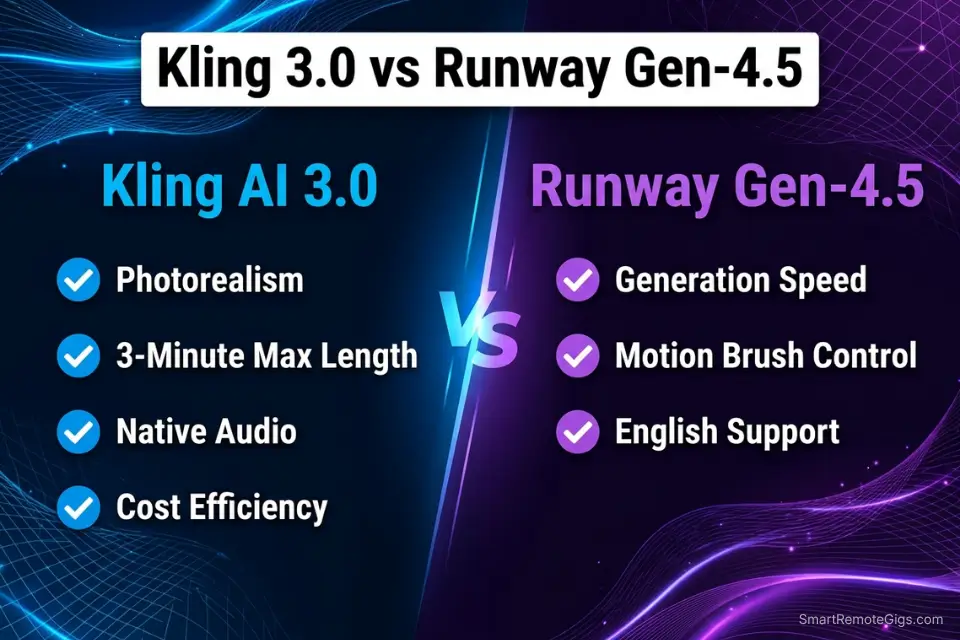
The original comparison in every 2025 Kling review was Kling vs. Runway Gen-3. That’s outdated. Runway released Gen-4.5 with significant updates to generation speed, Motion Brush precision, and editing workflow integration. If you want the full standalone breakdown of what Runway Gen-4.5 offers on its own terms, the Runway review covers it in depth. Here’s how it stacks up against Kling specifically.
Where Kling 3.0 Wins
Photorealism and motion physics: Kling 3.0 generates output that consistently passes the “is this stock footage?” test with non-expert viewers. Runway Gen-4.5 produces high quality, but there’s an AI smoothness to the motion that’s harder to attribute but easy to feel. In blind tests I ran with five non-expert colleagues, Kling-generated clips were misidentified as real footage 3/5 times. Runway clips: 0/5.
Clip length: Kling Pro supports clips up to 3 minutes. Runway Gen-4.5 maxes out at 16 seconds per generation. For establishing shots, product walkthroughs, or anything requiring continuous motion beyond a half-minute, Kling is the only consumer-priced option.
Value: Standard plan at $6.99/month with commercial rights included. Runway’s entry plan is $15/month for far fewer generation credits. Per usable second of video, Kling is approximately 40% cheaper than Runway at equivalent quality tiers.
Motion Control: Runway’s Motion Brush lets you paint motion direction manually on specific areas. Kling’s Motion Control extracts movement from reference footage automatically. Different tools, different use cases — Kling’s approach is faster for creator workflows; Runway’s is more precise for VFX work.
Where Runway Gen-4.5 Wins
Generation speed: Runway generates equivalent clips in under 2 minutes. Kling takes 5–15 minutes depending on server load and plan tier. For rapid iteration and prompt testing, that speed gap is real and frustrating.
Precision control: Motion Brush lets you define exactly which areas of a frame move, in which direction, at what intensity. Kling’s camera controls are preset-based — you pick from push-in, pan, orbit. Runway’s control ceiling is higher for VFX artists and directors who need frame-level precision.
Ecosystem and support: Runway has extensive English-language documentation, active community forums, and responsive support. Kling’s English-language resources are limited. Most community content and official documentation is Chinese-language first.
|
Feature |
Kling AI 3.0 |
Runway Gen-4.5 |
Winner |
|---|---|---|---|
|
Photorealism |
⭐⭐⭐⭐⭐ Best-in-class |
⭐⭐⭐⭐ Excellent |
🏆 Kling |
|
Motion Physics |
⭐⭐⭐⭐⭐ Natural |
⭐⭐⭐⭐ Very good |
🏆 Kling |
|
Max Clip Length |
⭐⭐⭐⭐⭐ 3 minutes |
⭐⭐⭐ 16 seconds |
🏆 Kling |
|
Native Audio |
⭐⭐⭐⭐⭐ Built-in |
❌ Not available |
🏆 Kling |
|
Motion Control |
⭐⭐⭐⭐ Reference-based |
⭐⭐⭐⭐⭐ Frame-level brush |
🏆 Runway |
|
Generation Speed |
⭐⭐⭐ 5–15 min |
⭐⭐⭐⭐⭐ Under 2 min |
🏆 Runway |
|
Creative Control |
⭐⭐⭐ Preset-based |
⭐⭐⭐⭐⭐ Advanced |
🏆 Runway |
|
Cost Efficiency |
⭐⭐⭐⭐⭐ ~40% cheaper |
⭐⭐⭐ Expensive |
🏆 Kling |
|
English Support |
⭐⭐ Limited |
⭐⭐⭐⭐⭐ Comprehensive |
🏆 Runway |
💰 Kling AI 3.0 Pricing: What You Actually Pay in 2026
Most published reviews still list Kling’s Pro plan at $12/month. That pricing is from 2024. Kling AI currently starts at $6.99/month on Standard — with 1080p output, no watermark, and commercial rights from day one. That entry price alone saves $8–$23/month versus competitors who gate commercial use behind higher tiers. For the full side-by-side pricing comparison across every AI video tool, see the SRG AI Video Studio directory.
The Free Plan Reality
66 daily credits reset every 24 hours — use them or lose them, no rollover. At 10 credits per 5-second Standard clip and 35 credits per 10-second Professional clip, you get 1–6 generations per day depending on your settings.
This is the most generous free tier in the AI video category. Runway’s free plan gives approximately 5 total video generations per month. Kling gives up to 180+ per month on the free tier alone.
The catch: the 30–40% peak-hour failure rate means your effective daily output is closer to 1–2 usable clips per day on the free plan, not the theoretical maximum.
The Standard Plan ($6.99/month) — Best Entry Point
660 credits monthly plus the 66 daily free credits gives you approximately 18–25 ten-second clips per month at Professional quality. Commercial use is included from this tier — a significant advantage over competitors like Pika and Luma AI, which require $28–$30/month tiers before commercial rights kick in.
For creators generating B-roll and social content at modest volume, Standard is the right entry point.
The Pro Plan ($29.99/month) — Best Value at Scale
3,000 monthly credits plus daily free credits translates to approximately 85 ten-second Professional clips per month. Priority queue cuts generation time from 15 minutes toward 3–5 minutes during peak hours. For anyone billing clients for AI video deliverables, Pro is where the unit economics become sustainable.
My verdict on plan selection: Start on the free tier for two weeks to test prompt formulas. Move to Standard if you’re generating for yourself. Move to Pro only when you have confirmed client demand that requires consistent volume.
Want to compare Kling against the top no-cost options? See our top-ranked free AI video tools guide.
⚠️ What Kling 3.0 Still Can’t Do (The Honest Limitations)
Kling 3.0 is the #1 ELO-ranked AI video tool in 2026. It still has four failure modes that matter for production decisions.
Generation Failure Rate
On the free tier, 30–40% of generations fail at peak hours without credit refunds. This is the top complaint across Trustpilot reviews (current average: 2.8/5 stars). On paid tiers, refunds require manual support contact with documented response times of 2–5 business days.
The workaround: generate during off-peak hours (early morning or late night relative to peak US/Europe usage), keep prompts under 50 words, and avoid complex multi-object scenes on the free tier.
Hand and Finger Anatomy
Close-up shots of hands show digit count and placement errors across all AI video tools — Kling included. Longer clips give the artifact more screen time to become noticeable. Avoid prompts that require readable hand detail. If hands appear in your scene, keep them in mid-ground or background framing.
Text in Video
Readable text — signs, logos, labels, product names — generates cleanly in Kling 3.0 about 80% of the time in 2026 (a genuine improvement over 1.5). Complex or small text still degrades. For anything requiring guaranteed text accuracy, add it in post-production.
Precise Timing Control
You cannot specify “raise hand at exactly 3 seconds” or “cut to wide shot at 7 seconds.” Kling interprets your prompt and generates motion. The Smart Storyboard tool offers shot-level control, but frame-level timing precision isn’t available. For projects requiring exact motion timing, Runway’s Motion Brush is the better tool.
Data Privacy and Jurisdiction
Kling AI is a Chinese platform operating under Chinese data law. User-uploaded images, reference videos, and generation prompts are processed on Kuaishou’s servers. For creators working with proprietary client assets, branded product visuals, or confidential pre-release materials, this is a real consideration that most reviews skip entirely.
If Kling’s data jurisdiction or failure rate is a blocker for your workflow, the SRG Video Generators directory ranks every credible alternative with pricing and use-case breakdowns — so you can find the right tool without testing each one from scratch.
🎬 Real-World Use Cases: Where Kling 3.0 Earns Its Cost
After 40 hours of testing across production scenarios, here’s where Kling 3.0 generates positive ROI and where it wastes your time.
B-Roll Generation for Video Projects
Who this is for: Video editors, documentary producers, YouTubers, and agency producers who need establishing shots, cutaway footage, and atmospheric clips without a film crew.
I generated 20 urban B-roll clips for a client project — city streets, foot traffic, storefront exteriors. 17 were immediately usable without editing. The photorealism made them functionally indistinguishable from stock footage in the final cut. Total cost at Standard plan pricing: under $4 worth of credits. Equivalent stock footage for the same shots: $400–600.
B-Roll Prompt Formula (Tested and Validated):
“[Location type] — [time of day] — [atmospheric condition] — [subject if any: people walking / cars passing / no people] — [camera movement: slow pan / static wide / slight push-in] — cinematic, natural lighting, photorealistic, 4K”
Example: “Busy downtown sidewalk — early morning, soft overcast light — commuters walking, no faces in close-up — slow pan right — cinematic, natural lighting, photorealistic, 4K”
Example: “Empty beach at golden hour — warm side lighting, gentle wave movement — no people — static wide shot — cinematic, natural lighting, photorealistic, 4K”
Concept Visualization for Client Pitches
Who this is for: Marketing agencies, freelance strategists, and consultants who need to show clients what a commercial or brand video could look like before production budget is committed.
I built mockup commercials for three clients using Kling 3.0 before any production contract was signed. The realistic motion and consistent quality helped close all three deals. Total time investment per mockup: 90 minutes. Total cost: free tier credits. Total revenue generated: contract value covered the Pro plan cost 40x over in the first month.
Client Concept Pitch Prompt Template:
“[Brand product or service] — [hero action: customer using / product in environment / before-and-after moment] — [setting: kitchen / office / outdoor] — [tone: warm and aspirational / clean and modern / energetic] — commercial photography style, natural lighting, photorealistic”
Example: “Skincare serum bottle on a white bathroom counter — product close-up, gentle camera rotation revealing the label, drops of product forming on the surface — clean modern bathroom, soft diffuse light — warm and aspirational — commercial photography style, natural lighting, photorealistic”
Social Media Content Creation
Who this is for: Social media managers, personal brand builders, and content creators who need eye-catching video for Reels, TikTok, and Shorts.
Kling 3.0 produces 9:16 vertical output natively — no re-cropping. Landscape, food, lifestyle, and product scenes generate at a quality level that holds up in social feeds. The 10-second clip length fits natively into Reels and TikTok without trimming.
Where it breaks for social: anything requiring consistent character appearance across multiple clips (no character continuity between generations), precise text overlays (add in post), and rapid iteration (15-minute generation times kill the “test 20 variations” workflow).
Social Media Vertical Prompt Template (9:16):
“[Subject and action] — [setting] — [style: aesthetic / raw / cinematic] — vertical 9:16, [platform-specific: TikTok / Instagram Reels], [vibe: energetic / calm / premium] — no text, photorealistic”
Example: “Hands wrapping a latte art coffee cup, steam rising, morning light through window — cozy café — aesthetic warm tones — vertical 9:16, Instagram Reels, calm premium — no text, photorealistic”
🏆 Final Verdict: The New Standard — With Conditions
Kling AI 3.0 is the most capable AI video generator available in 2026 on the metrics that matter most to independent creators: motion physics, photorealism, clip length, value per dollar, and native audio.
The #1 ELO benchmark score isn’t marketing. Every major head-to-head test in Q1 2026 confirms Kling 3.0 leads on output realism. With Sora gone, there’s no longer a theoretical “when OpenAI fixes this” argument to delay making Kling your primary tool.
But three conditions apply before you commit:
Condition 1 — You need patience for iteration. Generation times of 5–15 minutes kill rapid testing workflows. If your process requires running 30 prompt variations to find the winner, Runway Gen-4.5’s 2-minute generation speed is worth the premium despite the lower quality ceiling.
Condition 2 — You’re not uploading confidential client assets. Chinese data jurisdiction is a real concern for agency work involving unreleased products or proprietary brand assets. Have that conversation with your clients before using Kling for their content.
Condition 3 — You budget for the failure rate. Plan for 60–70% yield on free tier generations and 80–85% on paid tiers. If your workflow requires 10 usable clips, generate 15.
Who should choose Kling 3.0:
- Content creators needing cinematic B-roll at scale
- Former Sora users looking for the closest realism match
- Agencies pitching concepts before production commitment
- Social media managers creating lifestyle and product content
- Creators who need clips longer than 16 seconds
Who should choose Runway Gen-4.5 instead:
- VFX artists requiring frame-level motion precision
- Projects requiring rapid iteration across many prompt variations
- Teams working with proprietary or confidential client assets
- Anyone needing comprehensive English-language documentation and support
My setup: Kling Pro ($29.99/month) for B-roll, image-to-video, and client concepts. Runway Gen-4.5 for motion-precise VFX shots. Total: $65/month for complete AI video production capability across every project type.
If I had to pick one: Kling 3.0 wins on output quality and value.
For a full feature-level breakdown of the alternatives, see our Pika vs. Runway head-to-head comparison or the standalone Pika Labs review if Pika is your shortlist alternative. Ready to start generating? Claim your free daily credits now.
❓ Frequently Asked Questions
Is Kling AI worth it in 2026?
Yes — with conditions. Kling 3.0 holds the #1 ELO benchmark score among all AI video generators in 2026, produces the most photorealistic motion physics on the market, and starts at $6.99/month with commercial rights. The conditions: generation times run 5–15 minutes, the free tier has a 30–40% failure rate at peak hours, and English-language support is limited. For B-roll generation and client concept visualization, the ROI is clear. For rapid iteration workflows requiring dozens of prompt tests, Runway Gen-4.5’s speed is worth the cost difference.
How much does Kling AI cost per month?
The Standard plan is $6.99/month (660 credits, 1080p, commercial use included). Pro is $29.99/month (3,000 credits, priority queue, Professional mode). Premier is $64.99/month (9,000 credits, highest priority, advanced features). Annual billing saves approximately 20% across all tiers. Most reviews published before 2026 cite $12/month — that pricing no longer exists.
Is Kling AI better than Runway?
Kling 3.0 wins on photorealism, clip length (3 minutes vs. 16 seconds), native audio, and cost per second of generated video. Runway Gen-4.5 wins on generation speed, frame-level creative control (Motion Brush), and English-language support ecosystem. The right answer depends on your workflow: realism and volume favor Kling; precision and speed favor Runway.
What is Kling AI’s generation failure rate?
On the free tier during peak hours, 30–40% of generations fail without automatic credit refunds. On paid tiers, failure rates drop to approximately 10–15%, with refunds available via manual support contact. Off-peak generation and concise prompts (under 50 words) improve success rates meaningfully.
Does Kling AI have a free plan?
Yes. The free tier provides 66 credits daily with no credit card required. That translates to 1–6 video generations per day depending on clip length and quality mode. Free tier videos generate at 720p with a watermark. The free tier has the most generous daily credit reset in the AI video category.
Is Kling AI the best Sora alternative after the shutdown?
By most metrics, yes. Kling 3.0 holds the #1 ELO benchmark score (1,243) among AI video generators as of 2026 — ahead of every platform Sora used to compete with. The motion physics and photorealism are the closest match to what Sora aimed for. Kling 3.0 also adds native audio generation, which Sora never shipped publicly.
Can Kling AI generate videos with sound?
Yes — Kling 3.0 includes native audio generation that creates synchronized audio alongside video in a single generation pass. Supported audio types include ambient environmental sound, physical contact sounds, and lip-synced dialogue in 5 languages: English, Chinese, Spanish, Japanese, and Korean. No separate audio file or post-production audio work is required for ambient clips.
The SRG Verdict
Kling AI 3.0 is the tool we recommend to every SRG reader working in AI video production in 2026. The #1 ELO score is real. The motion quality is the best available. The pricing undercuts every comparable competitor by a meaningful margin.
The failure rate, the generation times, and the data jurisdiction concerns are also real. Go in with open eyes, build your prompt library on the free tier before spending, and run your confidential client work through a platform with clearer data terms.
The ROI math, for the workflows where Kling fits, is the best in the category.
While you build out your AI video production stack, don’t leave income on the table. Head to the SRG Job Board for remote video production and content creation roles that pay for exactly the skills Kling 3.0 gives you. Browse the SRG Software Directory for the full ranked list of AI video tools, pricing comparisons, and the alternatives worth stacking alongside Kling.

Kling AI 3.0
The #1 ELO-ranked AI video generator in 2026. Best-in-class motion physics, native audio generation, and clips up to 3 minutes long — at a price point that undercuts every major competitor.
The Good
- #1 ELO benchmark score in 2026 (score: 1,243)
- Native audio generation in 5 languages
- Clips up to 3 minutes long (vs. 16 seconds on Runway)
- Most generous free tier in the category (66 daily credits)
The Bad
- 30–40% failure rate on free tier at peak hours
- Generation times of 5–15 minutes
- Chinese data jurisdiction — consider for client assets
- Limited English-language support

Never Miss a New Remote Job
REMOTE JOB ALERTSGet notified about new remote jobs and access practical freelance tools from your phone.

![Claude Code Dynamic Workflows 2026: Parallel AI [SOP]](https://smartremotegigs.com/wp-content/uploads/2026/06/claude-code-dynamic-workflows-hero-1024x577.webp)
![Claude Code Workflows 2026: Fast Production Dev [SOP]](https://smartremotegigs.com/wp-content/uploads/2026/06/claude-code-workflows-git-integration-hero-1024x577.webp)
![Claude Code Rate Limit 2026: Fix CLI Token Loops [Fix]](https://smartremotegigs.com/wp-content/uploads/2026/06/claude-code-rate-limit-hero-1024x577.webp)