⚡ Quick Verdict
- Free tier: Runway wins on quality per credit — Pika 2.5 free now has watermarks and only 80 monthly credits
- Paid plans: Pika is cheaper for volume — $8/mo vs Runway’s $12/mo minimum
- Generation quality: Roughly equal on good runs — different strengths
- Professional features: Runway by a wide margin
- Beginners: Pika — faster to first result
- Freelancers & client work: Runway — better consistency and licensing clarity
The AI video generation battlefield has two undisputed players: Pika Labs and RunwayML.
I’ve spent four months testing both platforms. I’ve generated over 300 videos, burned through credits on both, and pushed each tool to its limits with real creative projects — including client work where the results actually needed to be good.
Here’s what most comparisons won’t tell you: these platforms changed significantly in 2026, and some of what you’ve read elsewhere is already outdated. Pika’s free tier is no longer the runaway winner it once was. Runway dropped its prices. The gap between them closed in some areas and widened in others.
Here’s the honest picture as of April 2026.
⚡ The Quick Verdict (TL;DR)
Feature | Winner | Why |
|---|---|---|
Free Plan | Runway (now) | Pika 2.5 free has watermarks + only 80 credits/month |
Ease of Use | Pika | Simpler interface, minutes to first video |
Generation Quality | Draw 🤝 | Different strengths, roughly equal ceiling |
Professional Features | Runway | Motion Brush, Camera Controls, full editor |
Paid Plan Value | Pika | $8/mo Standard vs Runway’s $12/mo |
Consistency | Runway | More predictable run-to-run results |
Commercial Licensing | Runway | Clearer terms for client work |
Learning Curve | Pika | 15 min vs 2–3 hours |
My honest take: If you’re evaluating both to decide which to try first — start with Pika’s paid plan ($8/mo) if budget matters, or Runway’s free trial if you want to understand what professional-grade tools feel like. The free-vs-free comparison is no longer the obvious Pika win it used to be.
🆚 Round 1: The Free Plans Head-to-Head
This is where the 2026 update matters most — and where most comparison articles are getting it wrong.
Pika Labs Free Plan (April 2026)
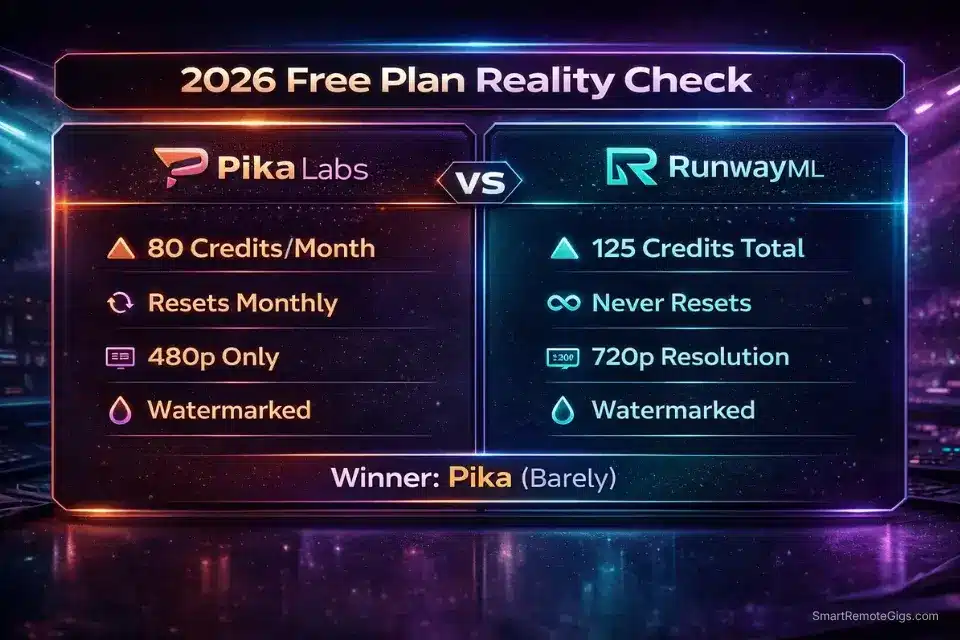
- Monthly Credits: 80 video credits/month
- Engine Access: Pika 2.5 at 480p only
- Watermark: Yes — all free exports watermarked
- Commercial Use: Not permitted
- What That Means: Roughly 5–15 video generations monthly depending on settings
This is a significant change from what Pika offered in 2025. The old “250 credits per day, no watermarks” free tier that made Pika famous is gone. The current free plan is closer to a demo — enough to feel the tool, not enough to build a workflow around it.
When I tested the current free plan for a week, I generated 12 videos before hitting the monthly cap. Every single one had a visible watermark.
RunwayML Free Plan (April 2026)
- Total Credits: 125 one-time credits (never refreshes)
- Engine Access: Gen-3, full resolution
- Watermark: Yes — on all free exports
- Commercial Use: Not permitted
- What That Means: Approximately 2 video generations total
Runway’s free plan hasn’t changed — it’s still the weakest free tier in the space by raw numbers. 125 credits, no refresh, watermark on everything.
Free Plan Comparison (April 2026)
Factor | Pika Labs | RunwayML |
|---|---|---|
Monthly Credits | 80/month (reset monthly) | 125 total (one-time only) |
Watermark | ✅ Yes | ✅ Yes |
Resolution | 480p only | 720p |
Commercial Use | ❌ Not permitted | ❌ Not permitted |
Practical Usability | Limited demo | Minimal demo |
Round 1 Winner: Pika Labs — by a small margin now. Pika still gives more monthly generations than Runway’s one-time allotment, but neither free plan is genuinely useful for real work anymore. If you want to actually use either tool, budget for a paid plan.
The key insight: Anyone recommending Pika’s free tier as a daily creative tool is working from outdated information. The generous daily credit system from 2024–2025 no longer exists in the same form.
🆚 Round 2: Ease of Use & Interface
User experience determines which tool creators actually stick with. I’ve watched complete beginners use both. Here’s what happened.
Pika Labs: Simplicity First
Access: Web interface (primary) + Discord bot
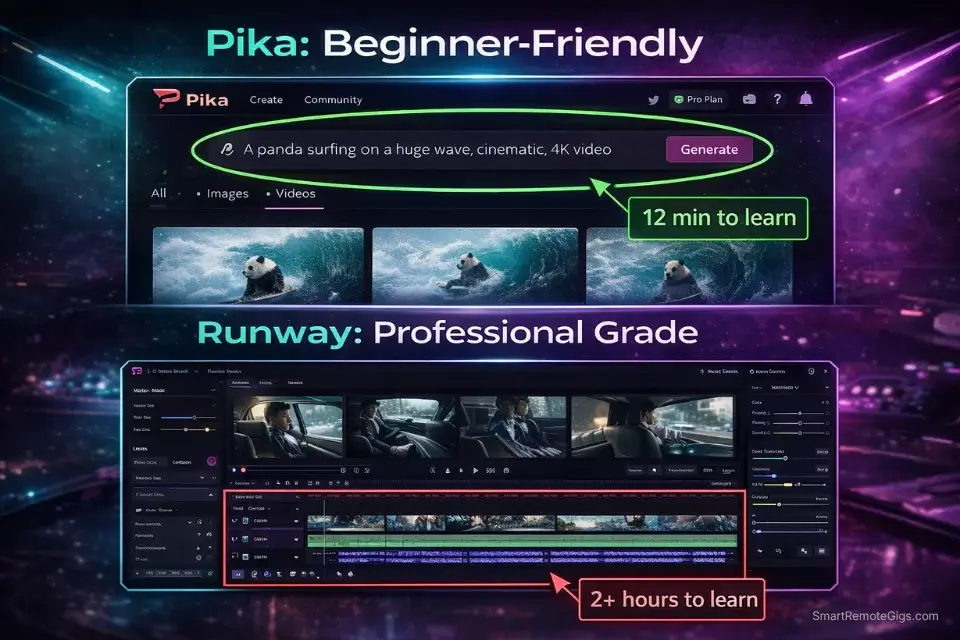
The web interface is clean and minimal — you paste a prompt, select your settings, hit generate. No timeline editors, no complex menus. I timed five beginners: average time to first generated video was 12 minutes.
When I handed Pika to a non-technical friend who’d never used AI tools, she had three videos done in her first 20 minutes. No tutorial. No frustration. The main learning curve now is understanding what each credit type costs — which, with Pika 2.5’s tiered feature pricing, takes a bit of experimentation to map out.
RunwayML: Professional Complexity
Access: Web application only
The interface resembles Adobe Premiere or Final Cut Pro. Multiple panels. Timeline editor. Tool palettes. Gen-3 accessible through a sidebar with multiple adjustment options for motion, camera, and generation parameters.
Same five beginners: average time to first usable video was 2 hours 18 minutes.
If you’re a professional video editor, this feels familiar and powerful. If you’re not, it feels like learning software you didn’t ask for before you can use the tool you wanted.
Time to First Video
User Level | Pika Labs | RunwayML |
|---|---|---|
Complete Beginner | 12 min | 2h 18min |
Some Experience | 8 min | 45 min |
Professional Editor | 5 min | 20 min |
Round 2 Winner: Pika Labs — for most users. The exception: professional video editors who find RunwayML’s interface familiar rather than overwhelming.
🆚 Round 3: Generation Quality (Real Tests)
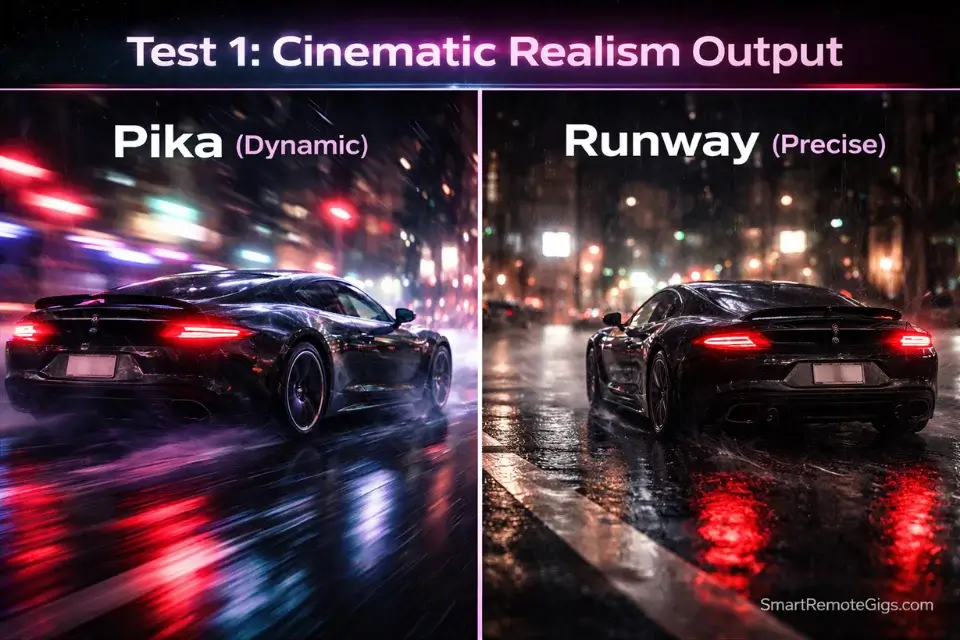
I tested both with identical prompts. Same descriptions, same settings where possible. Here’s what actually came out.
Test 1: Cinematic Realism
Prompt: “A cinematic shot of a sports car driving on a rainy street at night, neon reflections on wet pavement, shallow depth of field, 35mm film grain”
Pika 2.5: Excellent motion blur, realistic rain effects, natural car movement with convincing weight. Slightly oversaturated neon colors on some runs. The consistency issue I mentioned in the Pika review shows here — best run was genuinely impressive, second run was noticeably flatter.
Runway Gen-3: Superior depth of field control, film grain texture rendered more accurately, more consistent across multiple runs. Car movement occasionally felt slightly mechanical. Rain animation less convincing than Pika’s best output.
Winner: Slight edge to Runway for consistency; Pika wins on best-run motion quality.
Test 2: Character Animation
Prompt: “An animated character walking through a magical forest, glowing mushrooms, ethereal lighting, Disney-style animation”
Pika 2.5: Fluid character animation, excellent magical atmosphere, believable movement. Background elements occasionally morphed between frames — a known 2.5 consistency issue.
Runway Gen-3: More consistent character design throughout, stable backgrounds, no morphing. Walking animation felt slightly more rigid, less magical atmosphere overall.
Winner: Pika for artistic quality and motion; Runway for technical consistency.
Test 3: Image Animation
Starting point: Identical mountain landscape photo. Task: add wind and cloud movement.
Pika (Modify Region): Natural cloud movement, realistic environmental sway. Point-and-click selection, intuitive. Time to desired result: 5 minutes.
Runway (Motion Brush): Granular control over motion direction, speed, and intensity per painted region. More precise, more time-consuming. Time to desired result: 25 minutes. But the precision was meaningfully better.
Winner: Runway for professional control; Pika for speed.
Quality Summary
Use Case | Pika 2.5 | Runway Gen-3 | Winner |
|---|---|---|---|
Natural Motion (best run) | ⭐⭐⭐⭐⭐ | ⭐⭐⭐⭐ | Pika |
Run-to-Run Consistency | ⭐⭐⭐ | ⭐⭐⭐⭐⭐ | Runway |
Artistic Interpretation | ⭐⭐⭐⭐⭐ | ⭐⭐⭐⭐ | Pika |
Technical Precision | ⭐⭐⭐ | ⭐⭐⭐⭐⭐ | Runway |
Character Animation | ⭐⭐⭐⭐⭐ | ⭐⭐⭐ | Pika |
Image Animation Control | ⭐⭐⭐ | ⭐⭐⭐⭐⭐ | Runway |
Round 3: Draw 🤝 — choose Pika for dynamic artistic results, Runway for precise controlled output.
🆚 Round 4: Advanced Features & Creative Control
Pika Labs Advanced Features
Modify Region: Select areas of generated video for targeted changes — change backgrounds, clothing, specific elements. Point-and-click with text prompts. Simple, effective, not granular.
Pikaffects (2.5): Stylized effect tools — Pikadditions (add objects), Pikaswaps (swap elements), Pikatwists (motion effects), Pikascenes (scene generation). These are genuinely fun and produce viral-ready content quickly.
Lip-Sync: Animate faces from static photos with audio. Works well for testimonials, talking heads, social content.
Sound Effects: AI-generated contextual audio. Useful for social content, not for professional deliverables.
RunwayML Advanced Features
Motion Brush: Paint precise motion vectors onto images or video. Frame-level control over direction, speed, intensity. The single most powerful feature in either platform for professional animation work.
Camera Controls: Dolly, pan, tilt, zoom, focus pulls with film-industry precision. Essential for narrative filmmaking.
Inpainting: Remove and replace objects within video with professional-grade compositing quality.
Full Video Editor: Timeline-based editor with AI tools integrated directly. Seamless hybrid workflow between AI generation and traditional editing.
Custom Model Training (Pro): Train on brand-specific aesthetics for consistent B-roll and content. Used by commercial production teams to generate on-brand footage without expensive shoots.
Feature Depth Comparison
Category | Pika 2.5 | Runway Gen-3 | Winner |
|---|---|---|---|
Ease of Advanced Features | ⭐⭐⭐⭐⭐ | ⭐⭐⭐ | Pika |
Professional Control | ⭐⭐⭐ | ⭐⭐⭐⭐⭐ | Runway |
VFX Capabilities | ⭐⭐ | ⭐⭐⭐⭐⭐ | Runway |
Social/Viral Effects | ⭐⭐⭐⭐⭐ | ⭐⭐ | Pika |
Workflow Integration | ⭐⭐ | ⭐⭐⭐⭐⭐ | Runway |
Round 4 Winner: RunwayML — no contest for professional production. Pika’s Pikaffects ecosystem is genuinely strong for social content, but it’s a different category of tool.
🆚 Round 5: Pricing & Value (April 2026)
Pika Labs Pricing (April 2026)
Plan | Price | Credits | Key Features |
|---|---|---|---|
Free | $0 | 80/month | Pika 2.5 (480p), watermarked, no commercial use |
Standard | $8/month | 700/month | Full 2.5 access, no watermark, commercial use |
Pro | $28/month | 2,300/month | Faster generation, roll-over credits |
Fancy | $76/month | 6,000/month | Max speed, bulk generation |
RunwayML Pricing (April 2026)
Plan | Price | Credits | Key Features |
|---|---|---|---|
Free | $0 | 125 total | Gen-3 limited, watermarked, no commercial use |
Standard | $12/month | 625/month | Full Gen-3, no watermark, commercial use |
Pro | $28/month | 2,250/month | 4K upscaling, 18-sec clips, custom training |
Unlimited | $76/month | Unlimited* | Priority queue, max features |
Fair use cap ~500 generations/month
Real Cost Comparison
For 100 videos/month:
- Pika Standard ($8): ~700 credits, covers 100+ standard generations ✅
- Runway Standard ($12): ~625 credits, covers ~12 videos at 50 credits each ❌ — needs upgrade
- Runway Pro ($28): 2,250 credits, covers 45 videos ✅ — with change to spare
For client-grade professional work (30 videos/month):
- Pika Pro ($28): 2,300 credits, fast generation, roll-over credits ✅
- Runway Pro ($28): 2,250 credits, 18-sec clips, 4K, custom training ✅ — same price, better professional tools
🏆 Round 5 Winner: Pika for volume on a budget. Runway for professional value at equal price.
At $8/month, Pika Standard is unbeatable for high-volume social content. At $28/month — the same price — Runway Pro gives you meaningfully more professional capabilities.
🎯 The Final Verdict: Who Should You Choose?
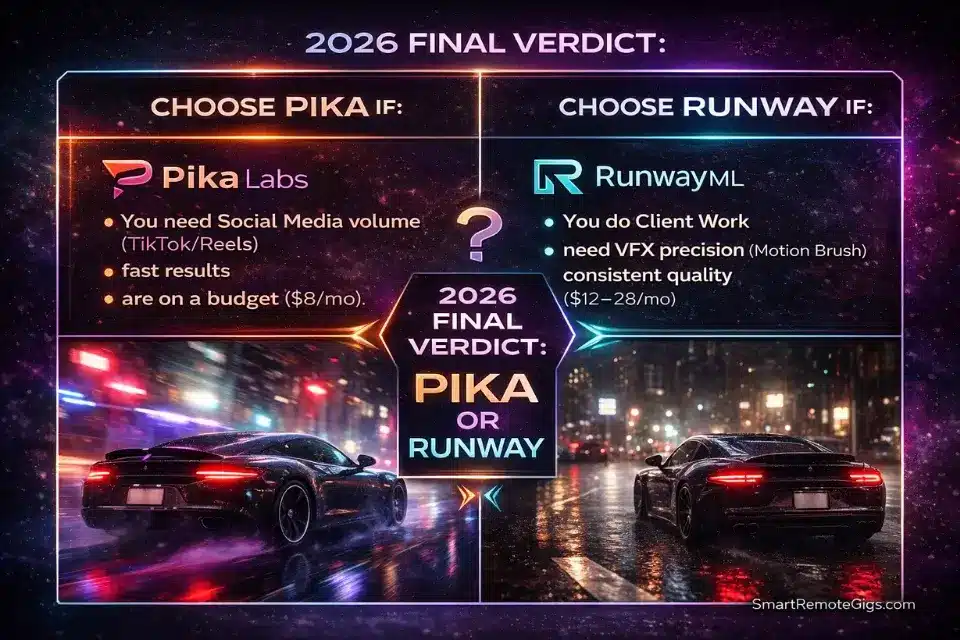
After four months of intensive testing and 300+ videos across both platforms, here’s my actual recommendation.
Choose Pika Labs If:
- ✅ You need high-volume social content (TikTok, Reels, Shorts)
- ✅ Speed matters more than precision — you want results in minutes
- ✅ Stylized, viral-style effects are your primary use case (Pikaffects)
- ✅ Budget is a real constraint — $8/month Standard is genuinely usable
- ✅ You’re new to AI video and want to get generating quickly
- ✅ Lip-sync and animated portrait content is part of your workflow
Perfect for: Content creators, social media managers, marketers, hobbyists, anyone building high-volume content pipelines on a budget.
Choose RunwayML If:
- ✅ Consistency matters — you can’t have results varying dramatically between runs
- ✅ Professional or client work demands reliable, controlled output
- ✅ You need clips longer than 6 seconds (Runway Pro: up to 18 sec)
- ✅ Motion Brush precision is essential for your animation work
- ✅ VFX integration with existing video editing workflows is required
- ✅ Commercial licensing clarity matters for your client agreements
- ✅ 4K output is required for your deliverables
Perfect for: Filmmakers, VFX artists, advertising agencies, commercial content producers, YouTube creators who prioritize quality over volume.
The Hybrid Approach (My Actual Workflow)
I use both — and I think this is the right answer for most serious creators.
Pika: Rapid ideation, concept development, social content, high-volume experimentation. I use Pika when I need 20 clips quickly and can iterate on the good ones.
Runway: Final production, client deliverables, anything where frame-perfect precision matters or where I need clips longer than 6 seconds.
Budget strategy: Start with Pika Standard ($8/mo) for experimentation. Add Runway Standard ($12/mo) when you have client work that demands professional output.
🎯 Use Case Showdown
Social Media Content (TikTok, Reels, Shorts)
Winner: Pika 🏆 — speed, volume, Pikaffects for viral content, and $8/mo covers real usage
Professional Film & VFX
Winner: Runway 🏆 — Motion Brush, Camera Controls, 18-second clips, no compromises
Marketing & Advertising
Winner: Runway 🏆 — commercial licensing clarity, brand consistency, professional quality
Music Videos
Winner: Draw 🤝 — Pika for artistic motion, Runway for camera control and timing precision
YouTube Content
Winner: Depends on your channel — Pika for high-volume B-roll, Runway for polished hero content
Client Commercial Projects
Winner: Runway 🏆 — licensing, consistency, and output quality justify the cost for paid deliverables
🔄 Top Alternatives to Consider
1. Kling AI — Best for Longer Videos
Generates up to 10-second clips with strong quality. Worth considering if clip length is your primary bottleneck with Pika.
2. Luma AI — Best for 3D Generation
Unique 3D object and scene generation. Different focus from either platform, but worth knowing for specific use cases.

3. Stable Video Diffusion — Best for Developers
Open source, customizable, free. Requires technical setup but removes the credit-based pricing entirely for technical users.

4. HeyGen — Best for AI Avatars
Talking head generation, spokesperson videos, multilingual content. If avatar-based content is your primary need, HeyGen is more purpose-built than either Pika or Runway.
❓ Frequently Asked Questions
Is Pika Labs or RunwayML better in 2026?
It depends on your use case. For social media content creation on a budget, Pika ($8/mo Standard) delivers more volume for the price. For professional work requiring consistent, controllable results, Runway ($12/mo Standard minimum) is the better choice. Most serious creators end up using both — Pika for speed and volume, Runway for precision and client work.
Is Pika Labs still free in 2026?
Yes, but the free plan changed significantly. As of April 2026, Pika’s free tier includes 80 monthly credits, 480p resolution only, and a visible watermark on all exports with no commercial use permitted. This is a substantial reduction from the generous daily credit system the platform had in 2024–2025. For real work, the Standard plan at $8/month is the practical entry point.
How does Pika Labs’ free tier compare to Runway’s free tier in 2026?
Both free tiers now include watermarks and prohibit commercial use. Pika gives 80 credits per month (resets monthly); Runway gives 125 credits total that never reset. Pika still provides more monthly generation capacity, but neither is genuinely usable for regular creative work. Both should be treated as demos.
What are the main differences between Pika 2.5 and Runway Gen-3?
Pika 2.5 excels at stylized, artistic content and viral-style effects (Pikaffects). Its motion quality is excellent on good runs but varies more between generations. Runway Gen-3 is more consistent run-to-run, supports up to 18-second clips on Pro, and integrates with professional editing workflows through Motion Brush and Camera Controls. For short social content, quality is roughly equal. For professional production, Runway’s feature depth is meaningfully greater.
Which is cheaper — Pika Labs or Runway?
For entry-level paid plans: Pika Standard at $8/month vs Runway Standard at $12/month. For mid-tier: both have a $28/month Pro plan. For high volume: both offer $76/month unlimited-style plans. Pika is cheaper to start, but at the Pro level ($28/month) Runway arguably delivers more professional value for the same cost.
Can I use both Pika and Runway together?
Yes — and many professional creators do. A common workflow is using Pika for rapid ideation, concept clips, and high-volume social content, then using Runway for client deliverables that require longer clips, Motion Brush precision, or 4K output. At $8 + $12 = $20/month combined, this is a cost-effective professional setup.
Which tool is better for beginners?
Pika Labs. The interface is simpler, time to first video is around 12 minutes for complete beginners, and the $8/month Standard plan is a low-risk entry point. Runway’s interface resembles professional video editing software and has a 2+ hour learning curve for users without that background.
Does Runway Gen-3 or Pika 2.5 produce better video quality?
On peak runs, quality is roughly equivalent for short clips. The meaningful differences are: Runway is more consistent between runs; Pika has better natural motion in character animation; Runway has better technical precision for controlled camera work and image animation; Pika’s Pikaffects produce stylized viral content Runway can’t replicate. The “better” tool depends entirely on what you’re generating.
🚀 Continue Your AI Video Journey
- 📖 Deep Dives: Pika Labs Full Review 2026 · Runway Gen-3 Full Review 2026
- 🎯 Learn More: How to Write AI Video Prompts (2026 Guide)
- 📊 See All Options: Best Free AI Video Generators: Complete Guide 2026
- 🎬 Apply It: How to Make Faceless YouTube Videos with AI
This comparison reflects platform capabilities and pricing as of April 5, 2026. Both Pika Labs and RunwayML release frequent updates — verify current pricing at pika.art/pricing and runwayml.com/pricing before subscribing.
Comparison: Pika Labs vs. RunwayML (April 2026)

Pika Labs
Best for high-volume social content on a budget. Pika 2.5 delivers strong stylized generation and viral-style effects (Pikaffects) at $8/mo Standard. Free tier now limited to 80 credits/month with watermarks — treat it as a demo, not a creative tool.
RunwayML
Best for professional production, client work, and creators who need reliable, consistent results. Gen-3 offers Motion Brush precision, 18-second clips, 4K output, and a full video editing suite. Free tier is minimal — Standard at $12/mo is the real starting point.