Raise Freelance Rates 2026: Exact Scripts To Use [Guide]
 ·
Last Updated: May 29, 2026
·
Last Updated: May 29, 2026

Apologizing for your pricing while letting legacy clients swallow 80% of your calendar guarantees you stay broke.
One unemotional rate-increase email bumped my portfolio revenue by 35% overnight with zero client churn.
Here is the exact rate-raising playbook — the word-for-word scripts to charge what you are worth without losing your base.
Smart Remote Gigs (SRG) arms freelancers with the negotiation leverage needed to dominate their market.
SRG has documented 800 successful B2B rate negotiation transcripts across the remote economy this year.
⚡ SRG Quick Summary:
One-Line Answer: Raising your freelance rates is a mandatory operational update, not a negotiation, achieved through confident, boundary-setting communication.
🚀 Quick Wins:
- Calculate your actual effective hourly rate on your oldest client — total invoice divided by real hours including revisions and emails (Today)
- Draft the 30-day notice email for an annual price increase using the template in Scenario 1 (This Week)
- Transition one scope-creeping client to a strict flat-rate boundary using the script in Scenario 2 (This Month)
📊 The Details & Hidden Realities:
- 80% of clients will accept a 15–20% rate increase with zero friction if given 30 days of advance notice
- The biggest red flag beginners miss is over-explaining the “why” — inflation, personal expenses — instead of focusing on the “what”: continued value delivery
📈 Scenario 1 — The Legacy Client: The Annual Increase
Your oldest clients are almost always your lowest-paying ones. The relationship started when you were cheaper, hungrier, and less experienced. They have had you at a discount for years. You have gotten faster, better, and more valuable — and they are still paying 2022 rates.
This is not loyalty. It is inertia. And inertia is costing you money every single month.
If you fail to accurately price your freelance services every 12 months, inflation alone will cut your true purchasing power by a minimum of 4% annually — before you account for the gap between your current rate and your actual market value.
The Exact Playbook
- Pull the effective hourly rate for every legacy client. Total invoiced in the last 90 days divided by actual hours worked — including emails, revisions, and check-in calls. Most freelancers discover their oldest client is paying them $28–$45/hr effective rate while newer clients are paying $75–$110/hr. Write the number down. It makes the email easier to send.
- Pick a flat percentage increase, not a negotiated one. Twelve to twenty percent for a standard annual adjustment. Twenty-five to thirty-five percent if you have not raised rates in 2+ years or if the effective rate gap is severe. Do not ask what they can afford. You are setting your rate, not bidding on a project.
- Set the effective date 30–45 days out from the send date. This is not a courtesy — it is a contractual buffer that removes the ambush perception. Thirty days says “professional operator updating business terms.” Less than two weeks says “desperate cash grab.”
- Send on a Tuesday morning, never a Friday. Friday rate notices generate weekend anxiety, emotional replies by Monday, and resentment that poisons the conversation before it starts. Tuesday at 9 AM gives them time to process it rationally during a normal work week.
- Send to all legacy clients in the same 48-hour window. Do not stagger increases across 3 months. A clean, synchronized rollout means all the pushback arrives at once and is handled in one sprint — not dragged out across a quarter of emotional one-off negotiations.
The Inflation and Value Update Script
Use this sterile, unemotional template to execute standard annual price increases without apology.
Subject: Rate update — effective [EFFECTIVE_DATE]
Hi [CLIENT_FIRST_NAME],
I am writing to let you know that my rates will be updating effective [EFFECTIVE_DATE].
Your new rate: $[NEW_RATE] [per hour / per [DELIVERABLE_UNIT, e.g., “article” / “month”]]
Current rate: $[CURRENT_RATE]
All work completed before [EFFECTIVE_DATE] will be invoiced at your current rate. The new rate applies to all work initiated on or after [EFFECTIVE_DATE].
Your current [DELIVERABLE_OR_SCOPE_DESCRIPTION, e.g., “monthly content package / retainer agreement”] continues unchanged — only the rate adjusts.
If you have projects you would like to initiate before the rate change takes effect, I am happy to prioritize those before [EFFECTIVE_DATE].
Thank you for the continued partnership.
[YOUR_NAME]- [EFFECTIVE_DATE] — 30–45 days from send date. Hard calendar date. Never “in approximately one month.”
- [CLIENT_FIRST_NAME] — First name only. Warm but professional. Never “Hi there” or “Dear Client.”
- [NEW_RATE] — Your new rate. State it plainly. No justification, no apology attached to this line.
- [CURRENT_RATE] — Show the delta explicitly. Transparency removes the shock and signals confidence.
- [DELIVERABLE_UNIT] — Match to your billing model: hourly, per article, per sprint, per month.
- [DELIVERABLE_OR_SCOPE_DESCRIPTION] — Describe the ongoing work in one clause. Reassures them the relationship structure is stable — only the rate moves.
- [YOUR_NAME] — Sign with your name only. No title needed here. The tone is administrative, not promotional.
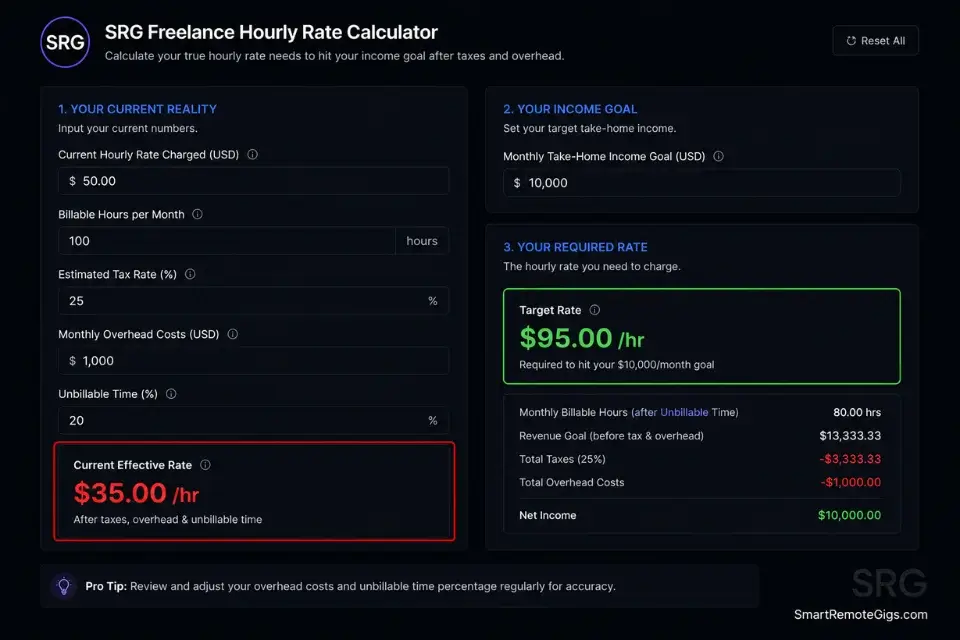
The SRG Freelance Hourly Rate Calculator takes your income target, weekly hours, and tax rate and tells you exactly what your new rate needs to be to hit your number — so you are not guessing on a percentage and hoping it covers your costs.
For the complete breakdown of pricing and features:

Most freelancers guess their rate. This free calculator helps you set yours with precision — built around your actual monthly expenses, desired profit, and billable hours so you never undercharge again.
The Pro Tip / Red Flag
Red Flag: Never close the email with “Does this new rate work for you?” or “Let me know if you have any concerns.” You are issuing an administrative update to your business structure — not asking for permission. A question at the end of a rate notice converts it from a statement into a negotiation you did not need to open.
🧱 Scenario 2 — The Scope Creep Victim: The Boundary Setting
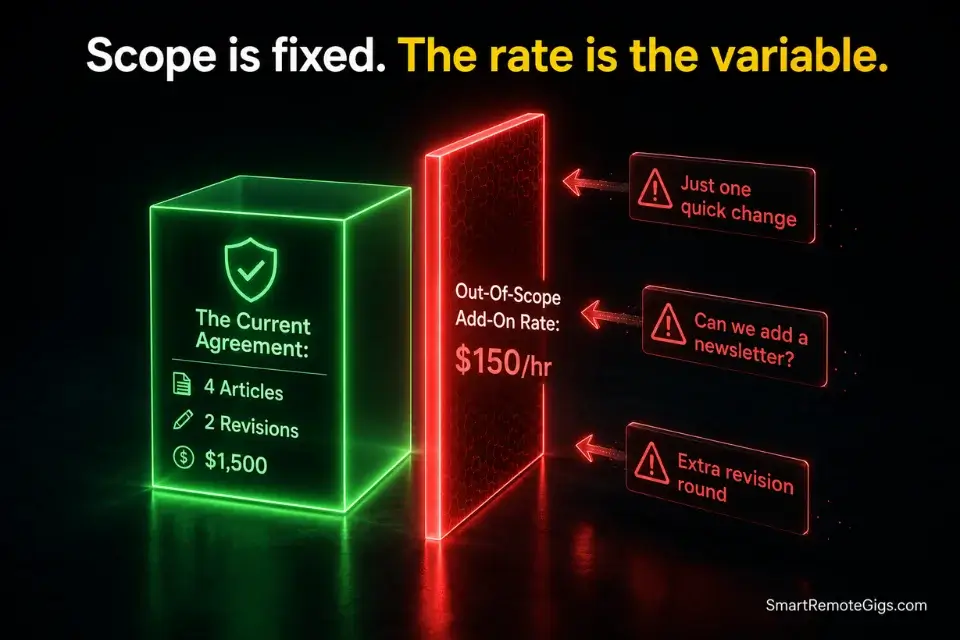
Some clients do not need a higher hourly rate. They need a box. They are paying you $1,500/month and getting $3,000/month of work because nobody ever defined where the scope ends. Every “quick request” and “one small change” is eroding your effective rate in real time — and they do not even know they are doing it.
The fix is not confrontation. It is clarity.
The most bulletproof way to eliminate scope creep permanently is to aggressively productize freelance services, defining a strict container around exactly what the client is buying — every deliverable named, every revision round counted, every out-of-scope request priced before it starts.
If they constantly demand out-of-scope work as a pattern, not a one-off, transition them into dedicated freelance retainer packages that actually bill them for the guaranteed access and volume they are consuming.
The Exact Playbook
- Log every out-of-scope request from the last 60 days. Pull your email thread or project management history. Write down every task you completed that was not in the original agreement. Calculate the time. In most scope creep situations, operators discover 30–50% of their actual work time is unbilled. That number is your leverage.
- Define the scope ceiling in writing before the conversation. Write one paragraph: what is included in the current agreement, exactly, with deliverable names and revision rounds. This becomes the reference document in the boundary-setting email. You are not creating new rules — you are enforcing the ones that were always there.
- Price the out-of-scope rate before you send the email. Every request outside the defined scope is billed at $[OUT_OF_SCOPE_RATE]/hr or as a fixed add-on. You need this number before the conversation starts, or the boundary email turns into an open negotiation.
- Present two choices, never a unilateral demand. “We can keep the current scope for $X, or we can add your requested work as an out-of-scope add-on for $Y.” Choices create agency. The client does not feel cornered — they feel consulted. This converts significantly better than “your new rate is $X, take it or leave it.”
- Confirm the agreed scope in a follow-up email the same day. Whatever they decide — keep the scope, add the add-on, or restructure — confirm it in writing within 24 hours. “As discussed, your current package covers X. Any requests outside this list will be quoted separately at $Y.” This email is your legal record.
The Boundary Setting Email Script
Use this to introduce strict billing parameters without damaging the relationship.
Subject: Scope clarification — [PROJECT_OR_RETAINER_NAME]
Hi [CLIENT_FIRST_NAME],
I wanted to take a moment to align on the scope of our current engagement before we move into [NEXT_PERIOD, e.g., “Q3” / “the next sprint” / “month 4”].
Our current agreement covers:
[SCOPE_ITEM_1]
[SCOPE_ITEM_2]
[SCOPE_ITEM_3]
Up to [REVISION_ROUNDS] rounds of revisions per [DELIVERABLE_UNIT]
Requests outside this scope — including [COMMON_CREEP_EXAMPLE_1, e.g., “additional revision rounds”] and [COMMON_CREEP_EXAMPLE_2, e.g., “new asset formats not in the original brief”] — will be quoted separately before work begins, at $[OUT_OF_SCOPE_RATE] [per hour / per item].
Going forward, I will flag any request that falls outside the above list before actioning it, so there are no surprises on either side.
If you would like to expand the scope on an ongoing basis, I am happy to restructure the agreement to cover a wider deliverable set. Just reply here and we can sort it quickly.
[YOUR_NAME]- [PROJECT_OR_RETAINER_NAME] — The exact name of the engagement as referenced in the contract or prior emails.
- [CLIENT_FIRST_NAME] — First name. The tone here is professional and matter-of-fact, not apologetic.
- [NEXT_PERIOD] — Use a real upcoming milestone: a quarter, a sprint number, a month. Anchors the reset to a logical transition point.
- [SCOPE_ITEM_1/2/3] — Pull directly from the original agreement. Do not paraphrase. Exact language removes ambiguity.
- [REVISION_ROUNDS] — Your contractual limit. State the number you agreed to, not what you have been delivering under pressure.
- [DELIVERABLE_UNIT] — Per article, per design, per sprint — match to the contract structure.
- [COMMON_CREEP_EXAMPLE_1/2] — Pull from the actual out-of-scope requests this client has made. Specific examples make the email feel tailored, not templated.
- [OUT_OF_SCOPE_RATE] — Your add-on rate. Set this 20–30% above your standard rate. Unplanned work costs more. Always.
The Pro Tip / Red Flag
Pro Tip: Give them two choices every time — never one ultimatum. “We can keep the current scope for $X, or we can add your requested revisions for $Y.” Always make them choose between scope and budget. When clients choose, they own the decision. When you demand, they resent it.
🚀 Scenario 3 — The Booked-Solid Operator: The High-Demand Hike
When your calendar is 90% full, you have the rarest asset in freelancing: real leverage. You do not need this client. You have options. That psychological state — genuine indifference to losing any single deal — is the most powerful negotiating position in the market.
Most freelancers panic and undercharge the moment they feel busy. The right move is the exact opposite.
When you are booked out, you raise prices on every new incoming lead immediately. Not next month. This week.
When dealing with a high volume of inbound requests, you need elite client management tools to automatically sort leads into waitlists without burning your time on manual triage — because responding to 20 inbound leads individually while fully booked is how you burn out during your most profitable period.
By implementing a waitlist, you create the psychological urgency required to seamlessly move leads up your freelance value ladder — a prospect who waits 3 weeks for your slot is already sold before the first call.
The Exact Playbook
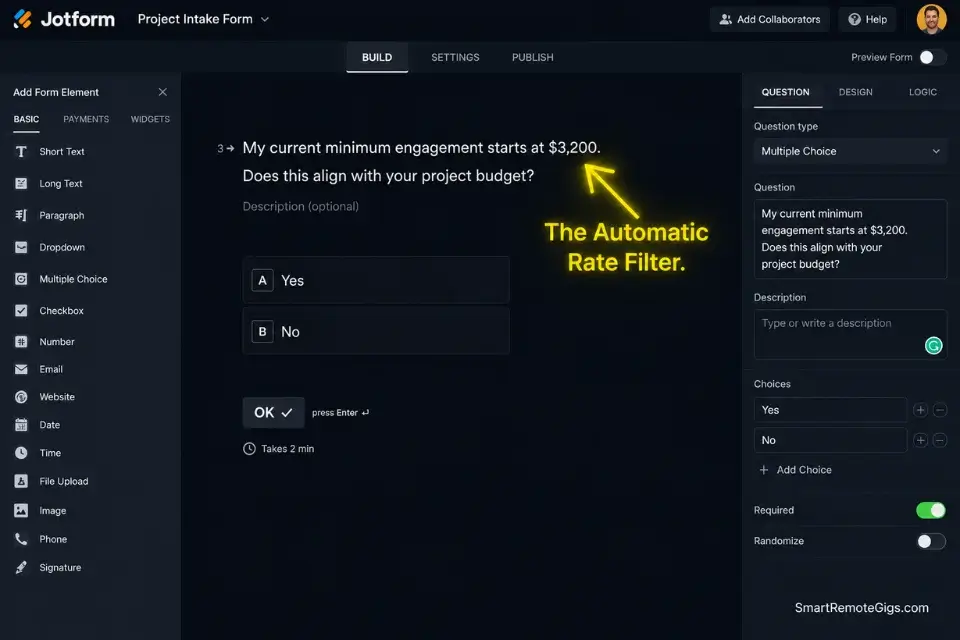
- Set a hard new-client rate floor immediately. If your current standard rate is $75/hr or $2,500/project, your new-client rate is $95/hr or $3,200/project — effective for any lead who has not signed a contract yet. Existing clients are on their current rate until their next annual review.
- Build a waitlist landing page or simple intake form. One page. “I am currently booked through [DATE]. Submit your project details and I will reach out when a slot opens.” Collect: name, company, project type, budget range, and timeline. This pre-qualifies leads while you are busy and filters out anyone below your new rate floor before you invest a single call.
- Respond to every new inbound lead with the waitlist script. Not a proposal. Not a “let’s jump on a call.” The waitlist response. This is not rudeness — it is positioning. A booked operator who offers a waitlist is perceived as premium. A booked operator who panics and squeezes in another call is perceived as desperate.
- Use the waitlist response time as a rate-testing window. If 90% of leads accept the waitlist with no pushback on your new rate floor, you are not charging enough. If 40% drop off, you are at the ceiling for your current positioning — and that is useful data too.
- Clear the waitlist on a predictable schedule. Once per month, review the waitlist and reach out to the top 2–3 leads in priority order. This creates a reliable pipeline of pre-sold, pre-qualified prospects at your new premium rate — without any additional outbound effort.
The “Waitlist” Positioning Script
Use this scarcity-driven response to position yourself as a premium, in-demand operator to every new inbound lead.
Subject: Re: [THEIR_SUBJECT_LINE]
Hi [LEAD_FIRST_NAME],
Thanks for reaching out about [THEIR_PROJECT_TYPE].
I am currently booked through [AVAILABILITY_DATE] and am not taking on new projects before then.
If your timeline is flexible, I do maintain a short waitlist. My current rate for [SERVICE_TYPE] is $[NEW_RATE] [per hour / per project / per month].
To join the waitlist: [WAITLIST_FORM_LINK]
I will reach out by [NEXT_REVIEW_DATE] to let you know if a slot has opened that fits your project.
[YOUR_NAME]
[YOUR_TITLE]- [THEIR_SUBJECT_LINE] — Mirror their original subject line in your reply subject. Keeps the thread clean and signals you actually read their message.
- [LEAD_FIRST_NAME] — First name only. Professional and direct.
- [THEIR_PROJECT_TYPE] — One to three words describing what they asked about. Shows you read the inquiry.
- [AVAILABILITY_DATE] — A real date, not “soon” or “a few weeks.” If you are booked through June 30, say June 30.
- [SERVICE_TYPE] — The category of service you offer: “SEO content,” “brand strategy,” “full-stack development.”
- [NEW_RATE] — Your new premium rate. State it plainly in the waitlist response. Pre-qualifies before they even fill out the form.
- [WAITLIST_FORM_LINK] — A direct link to your intake form. Typeform or Jotform both work. No “reply with your details” — remove the friction.
- [NEXT_REVIEW_DATE] — The specific date you will next review the waitlist. Creates a concrete expectation and makes the wait feel managed, not ignored.
- [YOUR_TITLE] — Your niche-specific title. “Brand Strategist” not “Freelancer.”
The Pro Tip / Red Flag
Red Flag: Do not fake a waitlist. If you are sitting at 40% capacity and desperate for work, use the Audit approach from the value ladder — not manufactured scarcity. Fake waitlists collapse the moment you negotiate on your “premium” rate in the same email thread you used to claim you were booked out.
🤺 Scenario 4 — The Negotiator: Handling Pushback
You sent the rate increase. They pushed back. This is the moment most freelancers cave — and the moment that determines whether you are running a business or a charity.
The pushback is almost never about the money. It is a test. They want to know if you mean it.
You mean it.
The data backs the position. According to U.S. Bureau of Labor Statistics independent contractor data, costs for specialized remote talent have risen across every major service category — meaning your rate increase is not an outlier, it is a market adjustment. You do not need to cite the BLS in the email. You need to know it so you hold the line with confidence.
The Exact Playbook
- Wait 24 hours before responding to any pushback. Never reply to an emotional counter the same day it arrives. A 24-hour pause signals confidence and gives you time to respond from a position of calm rather than reaction. Responding within the hour signals anxiety.
- Acknowledge the concern without validating the objection. “I understand this represents a change” is acknowledgment. “I completely understand your frustration and I’m sorry for the inconvenience” is capitulation. One holds the line. The other invites a counter-counter.
- Offer a scope reduction, never a rate reduction. The rate is fixed. What is negotiable is what they get for it. “I can hold the current rate if we move to [REDUCED_SCOPE_DESCRIPTION]. Alternatively, the full scope continues at the new rate.” This is the only lever you pull. It protects your rate and puts the decision back in their hands.
- Set a hard decision deadline. “I have held this slot for you through [DECISION_DATE]. After that, I will need to open it to the waitlist.” Real scarcity, real deadline, real consequence. Not aggressive — just honest operational reality.
- Let them leave without chasing. If they decline the new rate and the scope-reduction alternative, release the relationship professionally. “I completely understand — I hope we can work together again in the future.” Then immediately open that slot to your waitlist at the new rate. The client who left just freed up capacity for a better-paying one.
The Value-Defense Rebuttal Script
Use this to hold the line on your new pricing while offering a scope-reduction compromise — without apology.
Subject: Re: Rate update — [CLIENT_FIRST_NAME]
Hi [CLIENT_FIRST_NAME],
I appreciate you taking the time to share your concern.
The rate adjustment reflects [ONE_LINE_VALUE_STATEMENT, e.g., “the current market rate for this service category and the expanded scope we have taken on over the past 12 months”]. It is not something I am able to modify.
That said, I want to find a path that works for both of us. Here are two options:
Option A — Full Scope, New Rate:
Everything continues as it is today at $[NEW_RATE] [per hour / per month / per project], effective [EFFECTIVE_DATE].
Option B — Reduced Scope, Current Rate:
We scale the engagement back to [REDUCED_SCOPE_DESCRIPTION] at your current rate of $[CURRENT_RATE]. Anything outside this reduced scope is billed separately at $[OUT_OF_SCOPE_RATE].
Both options are available through [DECISION_DATE]. After that, I will need to confirm the slot with another client on my waitlist.
Let me know which direction you would like to go.
[YOUR_NAME]- [CLIENT_FIRST_NAME] — First name. The tone is calm and direct — not cold, not apologetic.
- [ONE_LINE_VALUE_STATEMENT] — One sentence only. Reference market rates, expanded scope, or tenure — not personal expenses or inflation anxiety. Keep it professional and external.
- [NEW_RATE] — Your non-negotiable new rate. Stated plainly. No qualifiers.
- [EFFECTIVE_DATE] — The same date from your original rate notice. Do not extend it under pressure.
- [REDUCED_SCOPE_DESCRIPTION] — A specific, stripped-down version of the current engagement. Name exactly what comes out: fewer deliverables, fewer revision rounds, shorter retainer term.
- [CURRENT_RATE] — Only relevant in Option B. Show it as the trade-off for reduced scope — not as a concession on rate.
- [OUT_OF_SCOPE_RATE] — Your add-on rate for anything outside Option B’s stripped scope. Set it above your new standard rate.
- [DECISION_DATE] — 5–7 business days from send. Hard date. Honor it regardless of their response or non-response.
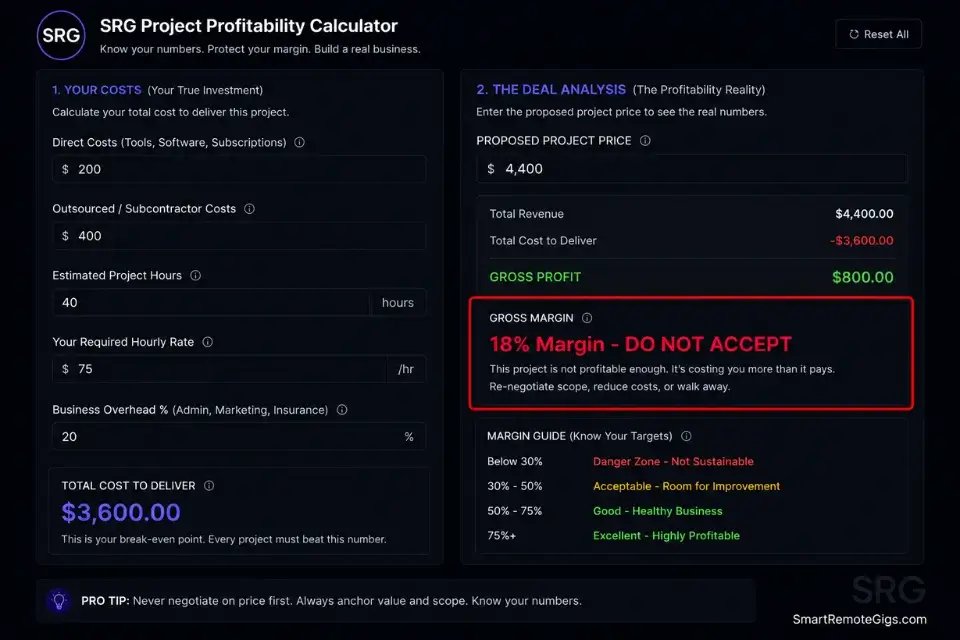
The SRG Project Profitability Calculator shows you the real margin on every client engagement — so when a client pushes back, you can see in real numbers exactly why their lowball counter-offer is not viable and hold the line from a position of data, not gut feeling.
For the complete breakdown of pricing and features:

your real hourly rate and net profit before you commit to a project — instantly, free.
The Pro Tip / Red Flag
Pro Tip: When a client says “We don’t have the budget,” your response is never “Let me lower the price.” Your response is always, “What part of the deliverable should we remove to fit that budget?” Redirect every budget objection into a scope conversation. The rate stays fixed. The scope is the variable.
💵 The Math of Churn When Raising Rates
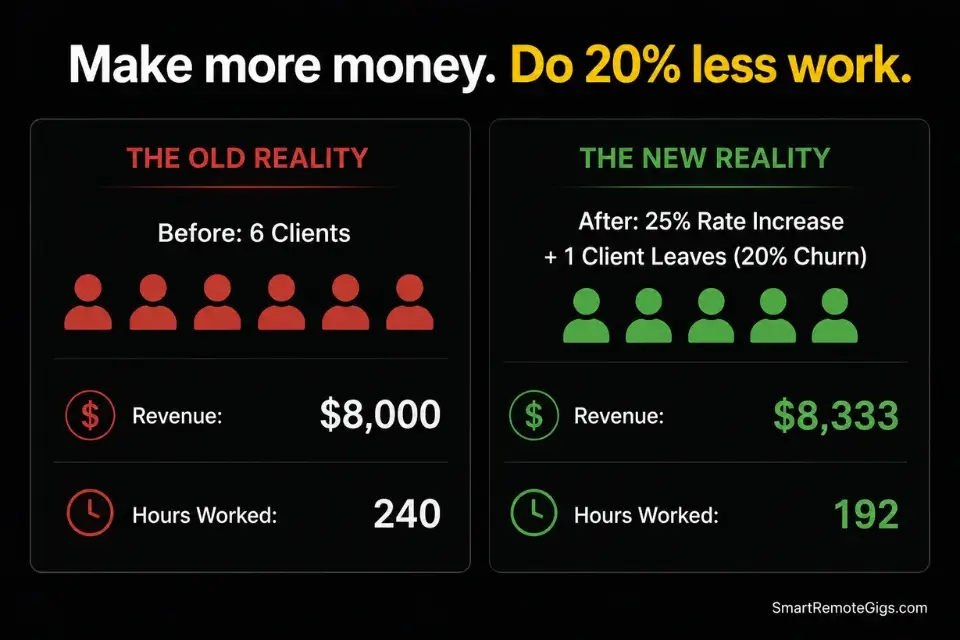
Most freelancers are afraid to raise rates because they are afraid to lose clients. The math says that fear is irrational.
If you raise your rates by 25% across your entire roster and lose 20% of your clients as a result, you are making exactly the same total revenue — but doing 20% less work. That freed capacity is not dead time. It is a slot that now opens to a new client at your new premium baseline rate.
Run the actual numbers on your roster. If your current revenue is $8,000/month across 6 clients and you raise rates by 25%, your new revenue target from the same 6 clients is $10,000/month. If one client leaves — that is $1,333/month lost.
Your remaining 5 clients at the new rate are generating $8,333/month. You are already ahead. You need to replace $1,667/month at the new rate, which is one small new engagement — and tools in the SRG Software Directory can automate your invoicing and billing updates so the transition to new-rate clients requires zero manual admin overhead.
Fear of churn is mathematically irrational for specialized operators. A 20% client loss after a rate increase is not a crisis — it is a natural roster filter that removes your lowest-margin relationships and makes room for higher-margin replacements.
The freelancers who never raise rates are the ones who never improve their roster. The annual increase is not just a revenue play — it is a client quality filter that compounds year over year.
🗓️ The 30-Day Rate Increase Execution Plan
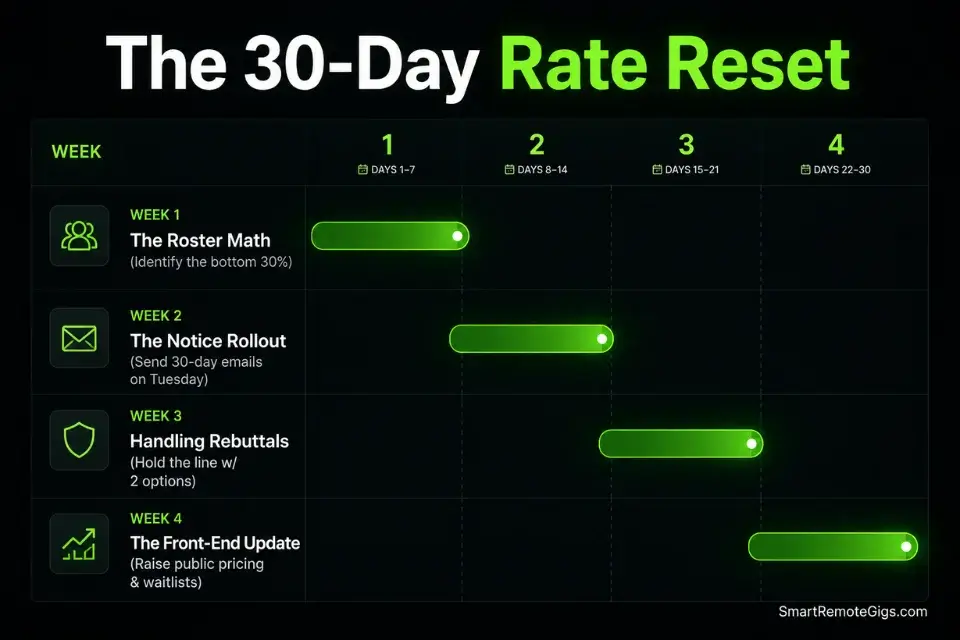
Days 1–3: The Roster Math
- List your active clients from oldest to newest contract start date.
- Calculate the effective hourly rate for each: total invoiced in the last 90 days divided by real hours including all communication and revisions.
- Identify the bottom 30% — the clients with the lowest effective rate, highest revision demands, or both.
Pro Tip: The clients paying you the least are almost always the ones demanding the most revisions. The effective rate calculation makes this visible in a way that gut feel never does.
Days 4–7: The Notice Rollout
- Draft the Annual Increase email from Scenario 1 for every client in your bottom 30%.
- Set the effective date exactly 30–45 days from your send date — no exceptions.
- Schedule the sends for Tuesday morning between 8–10 AM local time for the recipients.
Red Flag: Never send rate increases on a Friday afternoon. It breeds weekend resentment and guarantees an emotional, poorly-reasoned reply hits your inbox first thing Monday morning — before you have even had coffee.
Days 8–14: Handling the Rebuttals
- Expect pushback from 1–2 clients — this is normal and mathematically priced in.
- Wait 24 hours before responding to any counter.
- Use the Value-Defense Rebuttal script from Scenario 4 — Option A and Option B, nothing else.
- Accept that at least one client may leave and treat it as a planned roster optimization, not a loss.
Days 15–21: The Boundary Reset
- Identify mid-tier clients suffering from scope creep — use the 60-day request log from Scenario 2.
- Send the Boundary Setting Email to each, referencing the original contract scope explicitly.
- Log all communications and agreed scope changes in your project management system immediately.
Days 22–30: The Front-End Update
- Update all public-facing pricing on your website, PDF proposals, and portfolio case studies.
- Deploy the Waitlist Positioning Script on every new inbound lead — even if you are not fully booked. It sets premium expectations from the first touchpoint.
- Update your standard proposal template to reflect the new baseline rate before you send a single new quote.
By Day 30, your legacy roster is paying more, your boundaries are rigid and documented, and your front-end pipeline is primed to close new clients at your new premium baseline — without a single apology.
❓ Frequently Asked Questions
How often should freelancers raise their rates?
Yes — once per year is the minimum standard for any active freelance business. The operating cost of running a solo business increases annually through software subscriptions, taxes, insurance, and inflation. A 12-month review cycle with a 10–20% baseline adjustment keeps your effective rate from quietly eroding while your skills and market value continue to grow.
How much should I increase my freelance rates by?
It depends on how long since your last increase and the gap between your current rate and market rate. For a standard annual adjustment with no rate change in 12 months, 12–20% is the field-tested range. For operators who have not raised rates in 2+ years, 25–40% is justifiable and statistically unlikely to trigger mass churn when delivered with 30 days notice and a professional tone.
What do I say to a client when raising my rates?
Yes — and the answer is less than you think. State the new rate, state the effective date, and confirm the current scope remains unchanged. Nothing else.
The more you explain, qualify, and apologize, the more you signal that the increase is negotiable. The template in Scenario 1 is the exact word count and tone that closes with the least friction.
Can I lose clients if I raise my freelance rates?
Yes — and you should plan for it. In my experience, a well-executed 15–20% increase with 30 days notice results in a 5–15% client departure rate. That is expected and mathematically priced into the decision. The revenue lost from departing clients is typically recovered within 60 days from a single new client acquired at the new premium rate.
Do I need to justify my rate increase to clients?
No — and justifying it often backfires. Clients who hear “inflation” think “your problem.” Clients who hear “personal expenses” disengage.
The only justification that converts is value-based: reference expanded scope, documented results, or market rate benchmarks. Better still, state the new rate with no justification at all. Confidence in the number is its own argument.
How much notice should I give before raising rates?
It depends on the contract, but 30 days is the universal minimum for ongoing clients. Forty-five days is the professional standard for clients on monthly retainers or long-term agreements. Less than 30 days feels like ambush. More than 60 days gives them time to find alternatives before you have even started the new rate — which undermines the whole point of the update.
The Verdict: Charge What It Costs to Run a Business
The freelancers who never raise rates are not being humble. They are being afraid. And that fear compounds. Every year you hold the line at the same rate, your real purchasing power drops, your best-paying market comparables move further away, and the psychological gap between your current rate and your market rate gets harder to close in a single jump.
This is not for the freelancer who wants to stay comfortable at $3,000/month with three legacy clients who take up all their time. That is a choice, not a strategy. This playbook is for the operator who wants a functioning business — predictable revenue, clean scope boundaries built on a foundation where you have already moved to productize freelance services, a roster that gets stronger every 12 months, and a front-end pipeline that never needs to apologize for its pricing.
The scripts work. The math works. The only variable is whether you send the email.
The Verdict: The rate increase is not the risk. The rate freeze is. Every month you delay a justified increase, you are choosing to work harder for less money — and teaching your clients that your rate is permanently negotiable.
While you build your premium income, don’t leave money on the table. Head to the SRG Job Board at /jobs/ for remote clients who actually respect and have budget for high-ticket operators. Browse the SRG Software Directory at /software/ for the exact invoicing systems that enforce your new pricing boundaries automatically.

Never Miss a New Remote Job
REMOTE JOB ALERTSGet notified about new remote jobs and access practical freelance tools from your phone.

![How to Find Client Email Addresses: B2B Method [Guide]](https://smartremotegigs.com/wp-content/uploads/2026/10/how-to-find-client-email-addresses-hero-1024x577.webp)