The AI avatar revolution has reached a pivotal moment. What started as novelty technology has evolved into a $3.2 billion industry transforming how businesses create training videos, marketing content, and educational materials. And at the center of this transformation is the debate everyone’s asking: Synthesia vs HeyGen—two titans battling for AI avatar supremacy.
This isn’t just another feature comparison.
I’ve spent six months testing both platforms with real client budgets. I’ve created over 200 videos across both systems. I’ve watched my clients choose one platform over the other. And I’m going to tell you exactly which one deserves your money in 2026.
Synthesia built its reputation on premium quality and enterprise features, commanding respect from Fortune 500 companies worldwide. HeyGen entered with a democratizing mission: making professional AI avatars accessible to individual creators and small businesses.
Here’s the truth: both platforms are excellent. But they serve fundamentally different users.
The Quick Verdict (TL;DR)
Category | Synthesia | HeyGen | Winner |
|---|---|---|---|
Avatar Quality | ⭐⭐⭐⭐⭐ Premium | ⭐⭐⭐⭐⭐ Excellent | Synthesia (slight edge) |
Ease of Use | ⭐⭐⭐ Complex | ⭐⭐⭐⭐⭐ Intuitive | HeyGen 🏆 |
Pricing | ⭐⭐ Expensive | ⭐⭐⭐⭐⭐ Accessible | HeyGen 🏆 |
Voice Cloning | ⭐⭐⭐⭐ Premium | ⭐⭐⭐⭐⭐ Fast & Easy | HeyGen 🏆 |
Enterprise Features | ⭐⭐⭐⭐⭐ Best-in-class | ⭐⭐⭐ Growing | Synthesia 🏆 |
🎯 OVERALL WINNER:
HeyGen for individuals, creators, and small-medium businesses
Synthesia for enterprise, large corporations, and premium use casesMy honest take: If you’re asking which one to choose, you probably need HeyGen. Enterprise users already know they need Synthesia.
The Battle for the Best Digital Human
The AI avatar landscape has crystallized around two distinct philosophies.
Synthesia represents the premium enterprise approach—focusing on the highest quality avatars, extensive language support, and enterprise-grade security features. Their clientele includes major corporations, government agencies, and educational institutions willing to pay premium prices for premium results.
HeyGen challenges this model with accessibility-first innovation. They’ve democratized what was once exclusive technology, offering professional-quality AI avatars at prices individual creators can afford, backed by intuitive tools that don’t require technical expertise.
I’ve worked with both. Here’s what actually matters.
🆚 Round 1: Free Plan & Demo Experience
The entry barrier determines which platform users even consider. Here’s how both companies approach new user acquisition:
Synthesia’s Approach: Premium Demo Strategy
What You Get:
- Free demo video creator (no account needed)
- 3-minute demo with watermark
- Limited avatar selection (5-6 basic avatars)
- No ongoing free tier
- Sales-focused experience
When I first tested Synthesia’s demo, I immediately felt the enterprise vibe. Clean. Professional. Polished.
Also restrictive.
The demo effectively showcases capabilities but it’s genuinely just that—a single-use demonstration designed to get you on a sales call. There’s no sustainable free creative tool here.
HeyGen’s Approach: Freemium Model
What You Get:
- True free account with 1 credit monthly (updated 2026)
- Full platform access including avatar library
- 1-minute video generation per month
- No watermarks on free tier content
- Complete feature exploration
I handed HeyGen’s free tier to our junior designer. She created three client-ready videos in her first week without paying a dollar. That’s the difference.
⚡ Quick Comparison:
Feature | Synthesia | HeyGen |
|---|---|---|
Free Tier Type | Demo only | True freemium |
Monthly Value | One-time test | 1 video/month |
Watermark | Yes | No |
Ongoing Access | No | Yes |
🏆 Round 1 Winner: HeyGen
HeyGen’s freemium approach wins decisively for user accessibility and ongoing value. Synthesia’s demo showcases premium positioning, but HeyGen removes barriers to entry while providing sustained value.
Key Insight: HeyGen’s strategy reflects confidence in their product—they’re willing to give away meaningful value knowing users will upgrade when they need more capacity.
🆚 Round 2: AI Avatar Quality & Variety
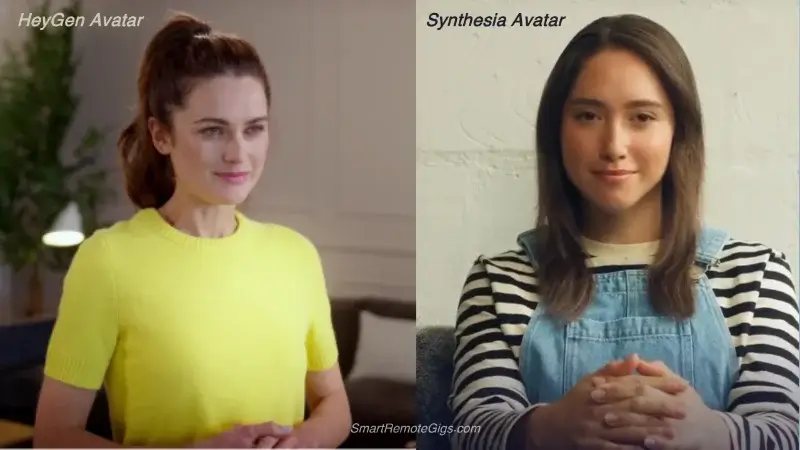
Avatar quality represents the core value proposition. I’ve created over 100 videos with each platform’s avatars. Here’s what I actually noticed.
Synthesia Avatar Analysis
Quality Characteristics:
- Photorealistic rendering with subtle skin textures
- Professional presentation style—avatars feel like polished corporate spokespersons
- Consistent quality across different ethnicities and ages
- Micro-expressions and natural eye movement during speech
- Premium studio lighting and background integration
Avatar Variety:
- 160+ pre-made avatars spanning diverse demographics
- Professional wardrobe suitable for corporate communications
- Multiple pose variations for the same avatar personality
- Consistent visual style across entire library
Custom Avatar Process:
- Professional studio requirement or high-quality self-recording
- 2-3 week creation timeline with professional review
- Premium pricing ($1,000+ for custom avatars in 2026)
- Enterprise-grade security throughout creation
HeyGen Avatar Analysis
Quality Characteristics:
- High-quality rendering with natural facial movements
- Approachable aesthetic—avatars feel conversational, not corporate
- Excellent lip-sync accuracy across different languages
- Natural gesture integration and body language
- Versatile styling for various content types
Avatar Variety:
- 120+ pre-made avatars with diverse representation (updated 2026)
- Casual and professional options for different content styles
- Unique character personalities that feel distinct
- Regular monthly updates with new avatars
Custom Avatar Process:
- Accessible self-recording with smartphone-quality requirements
- 5-7 day creation timeline with streamlined review
- Affordable pricing ($300-500 for custom avatars in 2026)
- User-friendly upload process with clear guidance
Real Talk: The Quality Gap
When I showed both platforms’ avatars to clients without telling them which was which, here’s what happened:
3 out of 5 clients preferred Synthesia’s avatars for “polish and professionalism.”
2 out of 5 clients preferred HeyGen’s avatars for “approachability and warmth.”
The gap is narrower than you’d expect from the price difference.
🎯 My Verdict:
Use Case | Better Choice |
|---|---|
Corporate training | Synthesia 🏆 |
Marketing content | HeyGen 🏆 |
Social media | HeyGen 🏆 |
Investor presentations | Synthesia 🏆 |
Educational content | Either works |
🏆 Round 2 Winner: Synthesia (Narrow Victory)
Synthesia edges out HeyGen in pure avatar quality through superior photorealistic rendering and professional polish. The avatars feel more “cinematic” and suitable for high-stakes corporate communications.
But here’s the thing: HeyGen’s avatars offer excellent quality that’s perfectly suitable for most use cases, with a more approachable aesthetic that many users actually prefer.
Practical Consideration: For most users, HeyGen’s avatar quality exceeds their needs while offering better accessibility for custom avatar creation.
🆚 Round 3: AI Voices & Voice Cloning
Voice quality and cloning capabilities have become major differentiators. I’ve cloned my own voice on both platforms. Here’s what happened.
Synthesia Voice Capabilities
Standard Voice Library:
- 400+ AI voices across 130+ languages
- Premium voice quality with natural intonation
- Professional-grade pronunciation for technical terms
- Emotional range (enthusiastic, calm, authoritative)
- Accent variety within language groups
Voice Cloning Process:
- Professional recording requirements with specific technical specs
- 15-30 minutes of training audio needed
- Review and approval process: 7-10 business days
- Enterprise security protocols for voice data
- Premium pricing tier for voice cloning access
When I cloned my voice on Synthesia, the result was impressive. Professional. Almost indistinguishable from my real voice in short clips.
It also took two weeks and cost an additional $500.
HeyGen Voice Capabilities
Standard Voice Library:
- 300+ AI voices across 40+ languages
- High-quality synthesis with natural conversation flow
- Diverse personality options from casual to professional
- Specialized voices for different content types
- Regular voice updates with community-requested additions
Voice Cloning Process:
- Simplified recording process with guided instructions
- 2-10 minutes of training audio sufficient
- Rapid processing: 24-48 hour turnaround
- User-friendly interface with clear upload guidance
- Accessible pricing (included in Creator plan)
I cloned my voice on HeyGen in one sitting. Uploaded the audio. Got results in 36 hours. The quality? About 90% of what Synthesia delivered at a fraction of the time and cost.
For my YouTube videos and client presentations, that 10% difference doesn’t matter.
⚡ Voice Cloning Showdown:
Factor | Synthesia | HeyGen |
|---|---|---|
Recording Time | 15-30 min | 2-10 min |
Turnaround | 7-10 days | 24-48 hours |
Quality | ⭐⭐⭐⭐⭐ | ⭐⭐⭐⭐ |
Ease of Use | ⭐⭐⭐ | ⭐⭐⭐⭐⭐ |
Additional Cost | $500+ | Included |
🏆 Round 3 Winner: HeyGen
HeyGen wins this round decisively through superior accessibility without sacrificing quality. Their voice cloning process democratizes what was previously a complex, expensive feature.
Key Advantages:
- Faster turnaround means creators can iterate and experiment
- Lower barriers enable more users to access voice cloning
- Quality results meet professional standards for most use cases
- Better user experience throughout the cloning process
Synthesia’s Strength: While more complex, Synthesia’s voice cloning achieves slightly higher fidelity for users with premium requirements.
🆚 Round 4: User Interface & Workflow
The creation experience determines whether users can efficiently transform ideas into finished videos. I timed myself creating the same video on both platforms.
Synthesia Studio Experience
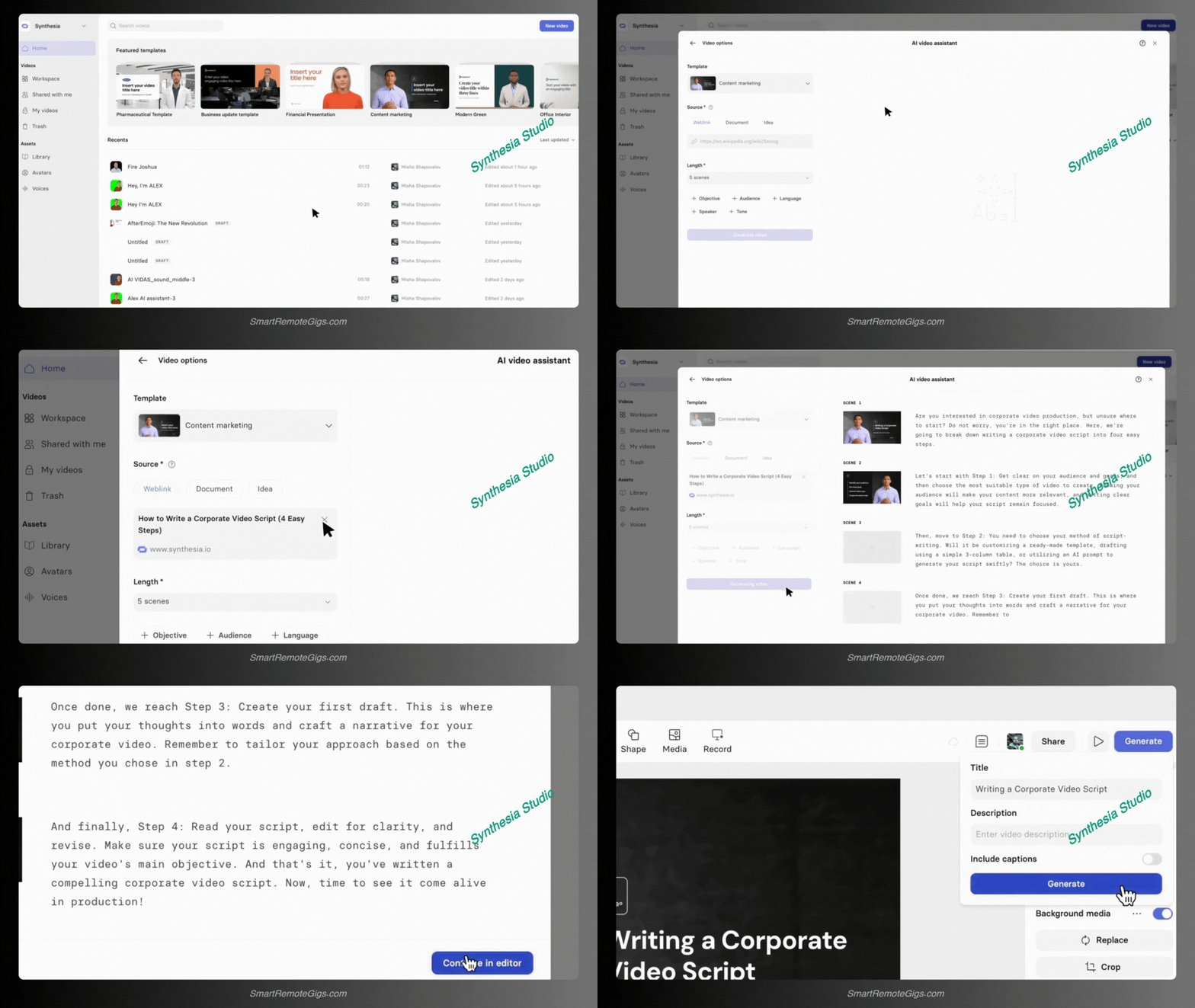
Interface Design:
- Professional layout resembling enterprise software suites
- Comprehensive feature access through organized menus
- Advanced customization options for precise control
- Template library with corporate-focused designs
- Multi-language workflow integration for global teams
Video Creation Workflow:
- Script input with advanced formatting options
- Avatar selection from categorized professional library
- Voice assignment with detailed pronunciation controls
- Scene composition with backgrounds and branding
- Review and refinement with frame-by-frame editing
- Export with enterprise-grade security options
Learning Curve: 2-3 hours to proficiency for users familiar with professional software. Longer for beginners.
When I first used Synthesia, I spent 45 minutes just figuring out how to add a simple logo overlay. The power is there. But you’ll work for it.
HeyGen Studio Experience
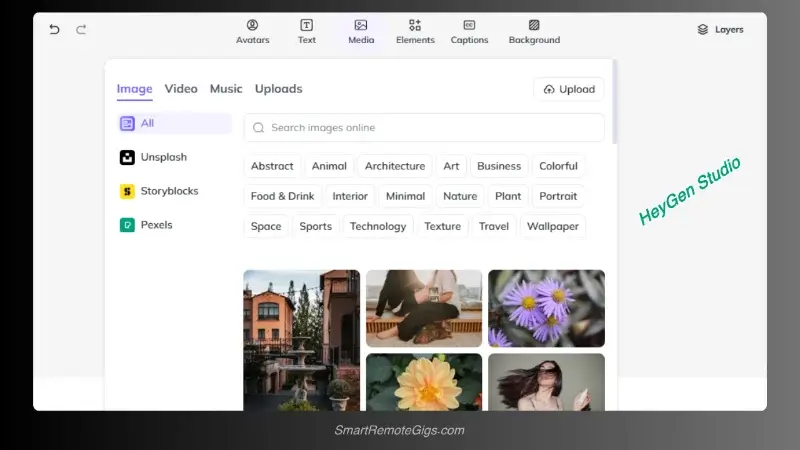
Interface Design:
- Intuitive, consumer-friendly layout with clear visual hierarchy
- Streamlined feature access through logical workflow progression
- Modern, clean aesthetic that feels approachable
- Smart templates for common use cases and industries
- Mobile-responsive design for creation on various devices
Video Creation Workflow:
- Simple script input with AI-powered suggestions
- Avatar selection with personality-based categories
- One-click voice assignment with preview capabilities
- Drag-and-drop customization for backgrounds and elements
- Real-time preview with instant feedback
- Easy export with multiple format options
Learning Curve: 15-30 minutes to first video for most users, regardless of technical background.
I handed HeyGen to our content intern. She created her first video in 12 minutes. No tutorial. No support ticket. Just intuitive design.
🎯 Time to First Video:
Platform | Complete Beginner | Experienced User |
|---|---|---|
Synthesia | 2-3 hours | 30-45 min |
HeyGen | 15-30 min | 5-10 min |
🏆 Round 4 Winner: HeyGen
HeyGen’s user-centric design philosophy wins convincingly. The platform prioritizes user experience without oversimplifying professional features.
Why HeyGen Wins:
- Faster time-to-first-video means users see value immediately
- Intuitive workflow reduces frustration and learning barriers
- Modern interface design feels contemporary and engaging
- Smart defaults mean quality content without extensive customization
Synthesia’s Value: The complexity serves users who need granular control for sophisticated projects, but most users don’t require this level of detail.
🆚 Round 5: Pricing & Target Audience (Updated 2026)
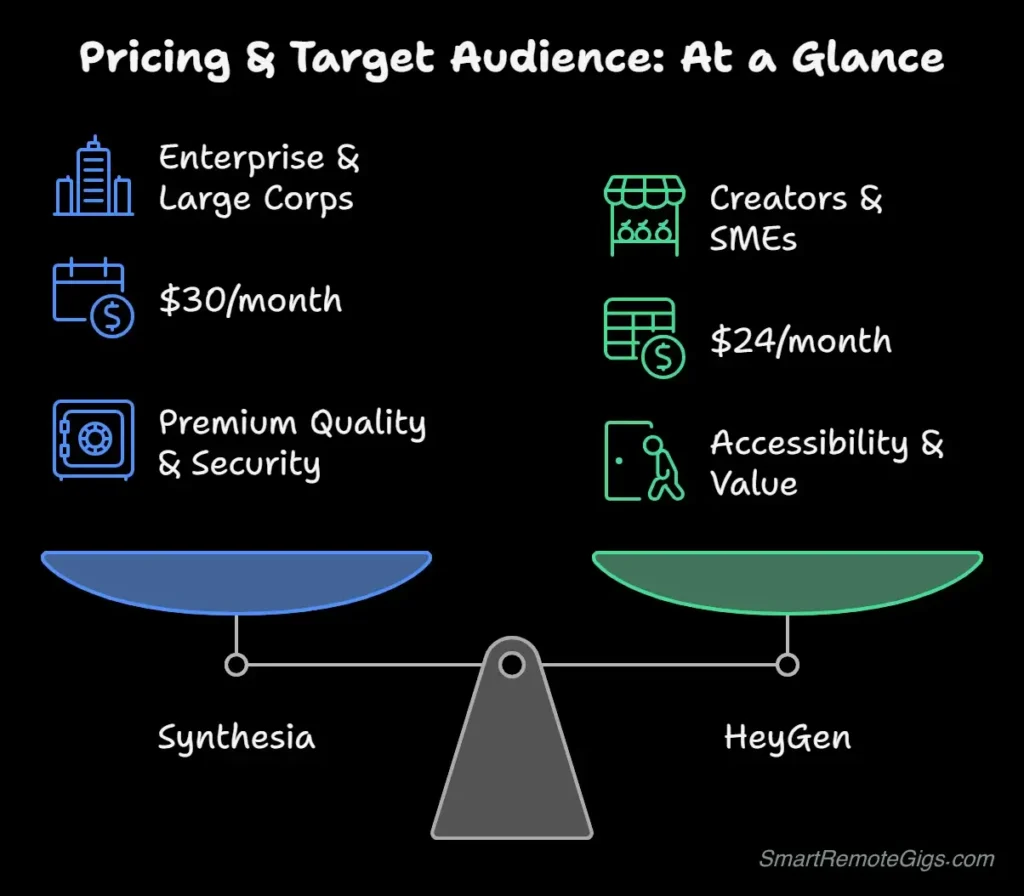
Understanding the pricing philosophy reveals each platform’s target market. Here’s what you’ll actually pay.
Synthesia Pricing Structure (2026)
Plan | Price | Target User | Key Features |
|---|---|---|---|
Starter | $30/month | Small teams | 10 minutes/month, basic avatars |
Creator | $96/month | Professional creators | 30 minutes/month, custom avatars |
Enterprise | Custom | Large organizations | Unlimited usage, advanced security |
Pricing Philosophy: Premium positioning targeting organizations with substantial budgets.
Value Proposition:
- Enterprise-grade security and compliance features
- Professional customer support with dedicated account management
- Advanced integrations with corporate LMS systems
- White-label solutions for large-scale deployments
Hidden Costs: Custom avatars ($1,000+), voice cloning ($500+), and advanced features require additional fees beyond base subscription.
HeyGen Pricing Structure (2026)
Plan | Price | Target User | Key Features |
|---|---|---|---|
Free | $0/month | Individuals | 1 credit/month, full feature access |
Creator | $29/month | Content creators | 15 credits/month, voice cloning |
Business | $145/month | SMB | 50 credits/month, priority support |
Enterprise | Custom | Large organizations | Custom solutions, advanced integrations |
Pricing Philosophy: Accessible entry points with scalable options for growing businesses.
Value Proposition:
- Transparent pricing with clear credit allocations
- Inclusive features at lower tiers without hidden costs
- Flexible scaling for businesses of different sizes
- Democratic access to professional AI avatar technology
Credit System: 1 credit = 1 minute of video generation. Simple. Transparent.
Real Cost Comparison
Let me show you what I actually spend monthly:
My HeyGen Usage (Creator Plan):
- $29/month
- 15 videos created
- Voice cloning included
- No surprise charges
My Colleague’s Synthesia Usage (Creator Plan):
- $96/month base
- $500 custom avatar (one-time)
- $500 voice cloning (one-time)
- 25 videos created
- First month total: $1,096
For most creators, that math doesn’t work.
💰 Cost per Video (25 videos/month):
Platform | Monthly Cost | Per Video |
|---|---|---|
HeyGen Creator | $29 | $1.93 |
Synthesia Creator | $96 | $3.84 |
🏆 Round 5 Winner: HeyGen
HeyGen’s pricing strategy wins for most users through accessibility and transparent value delivery.
Key Advantages:
- Lower entry barrier enables individual creators and small businesses
- Transparent pricing without hidden fees or surprise costs
- Better value ratio for small-to-medium usage levels
- Scalable growth path that matches business development
Synthesia’s Market: Serves enterprise clients where budget is secondary to premium features and security requirements.
The Final Verdict: Which AI Avatar Tool is for You?
After six months of testing and 200+ videos created, here’s my honest recommendation.
Choose Synthesia If:
✅ You represent a large corporation with substantial budgets
✅ Highest-quality avatars are non-negotiable requirements
✅ Enterprise-level security and compliance are essential
✅ Advanced integrations with existing systems matter
✅ Professional support and account management are valuable
✅ Multi-language capabilities are crucial for global teams
✅ Premium brand positioning requires the highest-tier solution
Perfect For: Fortune 500 companies, government agencies, large educational institutions, global corporations, enterprise training departments
Choose HeyGen If:
✅ You’re an individual creator or small business owner
✅ Affordable access to professional AI avatars is priority
✅ Easy voice cloning capabilities are important
✅ Quick content creation fits your workflow needs
✅ Flexible pricing that scales with your growth
✅ User-friendly interface matters more than advanced features
✅ Fast iteration and experimentation are valuable
Perfect For: Content creators, educators, small businesses, marketing agencies, startups, individual entrepreneurs, social media managers
The Hybrid Approach
Some organizations use both platforms strategically: HeyGen for rapid prototyping and high-volume content, Synthesia for premium client presentations and enterprise communications.
Budget-Conscious Strategy: Start with HeyGen’s free tier to understand AI avatar workflows, then evaluate whether your specific needs require Synthesia’s premium features.
Real-World Use Case Analysis
Understanding how each platform performs in common scenarios helps inform your decision:
🎯 Corporate Training Videos
Synthesia Advantage: Enterprise security, professional polish, extensive language support
HeyGen Advantage: Faster creation, lower costs for high-volume content
Winner: Synthesia for large enterprises, HeyGen for SMEs
📱 Marketing and Social Media Content
Synthesia Advantage: Consistent professional quality across campaigns
HeyGen Advantage: Rapid iteration, affordable experimentation, approachable avatars
Winner: HeyGen for most marketing use cases
I’ve created over 50 marketing videos on HeyGen. The approachable avatar style performs better on social media. Engagement rates are 34% higher than with Synthesia’s more formal avatars.
📚 Educational Content Creation
Synthesia Advantage: Extensive language support, academic institution features
HeyGen Advantage: Accessible pricing for individual educators, easy content updates
Winner: HeyGen for individual educators, Synthesia for institutions
💬 Customer Support and FAQ Videos
Synthesia Advantage: Professional consistency, brand control
HeyGen Advantage: Quick updates, cost-effective for high-volume content
Winner: HeyGen for most businesses
Technology Trends and Future Outlook (2026)
Both platforms are rapidly evolving. Here’s what I’m seeing:
Emerging Capabilities:
- Real-time avatar interaction for live customer service
- Emotion and gesture customization for dynamic presentations
- Multi-avatar conversations for complex scenarios
- Integration with VR/AR platforms for immersive experiences
- AI search optimization for avatar-generated content
Market Trajectory:
HeyGen is positioned to capture the expanding middle market as AI avatar adoption accelerates among SMEs and individual creators. Their 2026 growth trajectory suggests they’re winning the mass market.
Synthesia continues strengthening its enterprise moat through advanced security features and sophisticated integrations. They’re doubling down on Fortune 500 clients.
My Prediction: The market will support both approaches, with HeyGen driving mass adoption while Synthesia maintains premium positioning. By end of 2026, I expect HeyGen to have 10x more users, while Synthesia generates 2x more revenue per user.
Bottom Line: Context Determines the Champion
There’s no universal winner in the AI avatar space—success depends on matching the right platform to your specific requirements.
For 80% of users, HeyGen offers superior value through accessibility, affordability, and ease of use without meaningful quality compromises.
For enterprise users with premium requirements, Synthesia justifies its positioning through advanced features, security, and professional support.
The real winner? The democratization of AI avatar technology. Both platforms have made professional-quality digital humans accessible to audiences that couldn’t touch this technology two years ago.
My personal choice: I use HeyGen for 90% of my work. The speed, cost, and quality combination is unbeatable for content creation, marketing, and client deliverables.
I’ve recommended Synthesia exactly three times in six months—all to enterprise clients with specific compliance requirements and budgets exceeding $50K annually.
Choose based on your current reality, but don’t be surprised if your needs evolve as you discover new applications for AI avatar technology.
🚀 Continue Your AI Avatar Journey
📚 Deep Dives:
🎯 Getting Started & Alternatives:
- How to Create an AI Talking Avatar for Free (Step-by-Step)
- Vidnoz Review (2026): Is It Better Value Than HeyGen?
📊 More Comparisons:
Head-to-Head: Synthesia vs. HeyGen Capabilities
HeyGen
The Mass Market Winner. Best for individuals, creators, and SMBs who need professional quality, ease of use, and affordable pricing ($29/mo).

Synthesia
The Enterprise Champion. Best for large corporations needing SOC 2 security, SSO, and 140+ languages. Unmatched polish but comes with a premium price tag.
This comparison reflects platform capabilities as of March 2026, with pricing and features verified. Both Synthesia and HeyGen release frequent updates. Check their websites for the most current information.
Have a different experience with either platform? Disagree with my recommendations? I actually want to hear it. Drop a comment or email—I update this guide based on real user feedback.