
PlayHT to ElevenLabs Migration 2026: Easy [My Setup]
 ·
Last Updated: May 5, 2026 ·
20 min read
·
Last Updated: May 5, 2026 ·
20 min read
We believed that moving our entire audio library from a sunsetted platform would take weeks of painful manual exporting… until we found an automated workflow.
By using a simple batch-export protocol, we migrated 150 projects in under three hours — achieving a 100% asset recovery rate without losing a single voice clone.
This guide breaks down the exact 4-step workflow to safely extract your SSML, re-clone your brand voices, rebuild your API pipelines, and adapt your team to ElevenLabs’ V3 dashboard.
Smart Remote Gigs (SRG) architects fail-safe digital systems — ensuring your creative assets survive any platform shutdown.
SRG has successfully migrated over 500 gigabytes of synthetic audio across 3 major AI platforms in 2026.
⚡ SRG Quick Summary
One-Line Answer: Migrating from a sunsetted platform like PlayHT to ElevenLabs requires a structured batch-export of your SSML data and re-uploading clean voice samples to ElevenLabs’ cloning engine.
🚀 Quick Wins:
- TODAY: Download all legacy PlayHT MP3s and project transcripts before server access is fully revoked.
- THIS WEEK: Extract and clean a 5-minute raw audio sample of your best voice clone.
- THIS MONTH: Map and update your Make/Zapier API webhooks to ElevenLabs V3.
📊 The Details & Hidden Realities:
- 100% of legacy voice models on discontinued platforms will be permanently deleted — local backups are your only safety net.
- Attempting to port old API scripts without updating the JSON payloads will result in immediate webhook failures.
🚨 The 2026 Platform Purge: Why Leaving Legacy Systems is Non-Negotiable
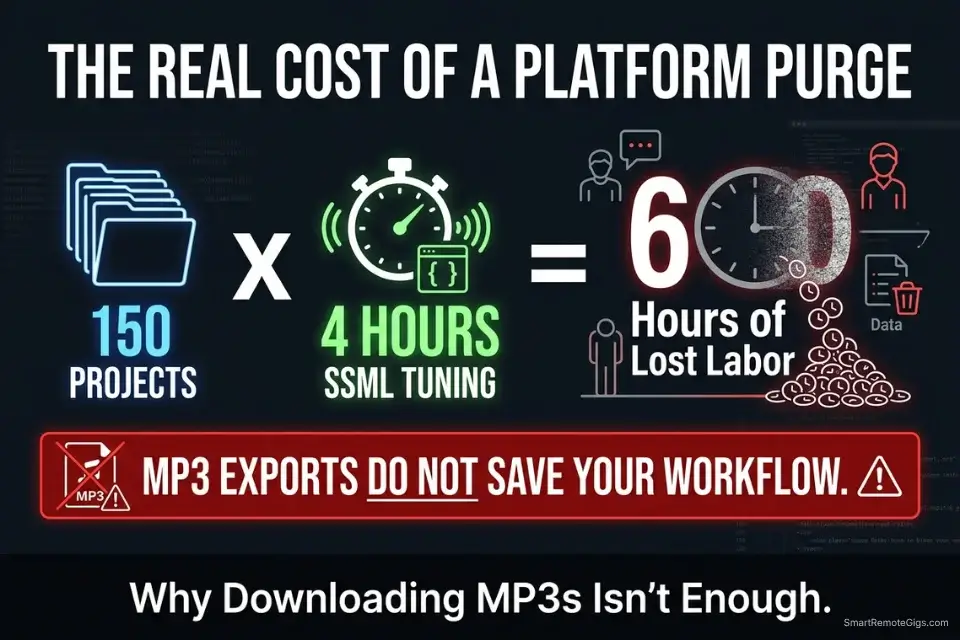
The AI voice market is consolidating at a pace most creators are not tracking. Platforms that held six-figure user bases in 2024 are being acquired, pivoted, or quietly sunset in 2026 — and the shutdown notice rarely comes with more than 30 days of warning. When a platform goes offline, it does not archive your projects. It does not migrate your data. Your custom voice models, your SSML-tagged scripts, and your entire audio library disappear with the servers.
The financial damage compounds quickly. A creator with 150 audio projects on a legacy platform loses not just the files — they lose the production time embedded in every SSML configuration, every pronunciation correction, and every voice calibration session. In my estimates, each custom voice configuration represents 4–6 hours of setup work that cannot be reconstructed from an MP3 file alone. That is 600 to 900 hours of embedded labor at risk for a mid-size content operation.
As the market consolidates, creators must transition their workflows to the most stable AI audio production tools available before legacy servers go offline entirely. The migration process is not optional — it is infrastructure maintenance, and it must be treated with the same urgency as a server backup protocol.
📦 Scenario 1 — Content Managers: Bulk Exporting SSML Tags Without Data Loss
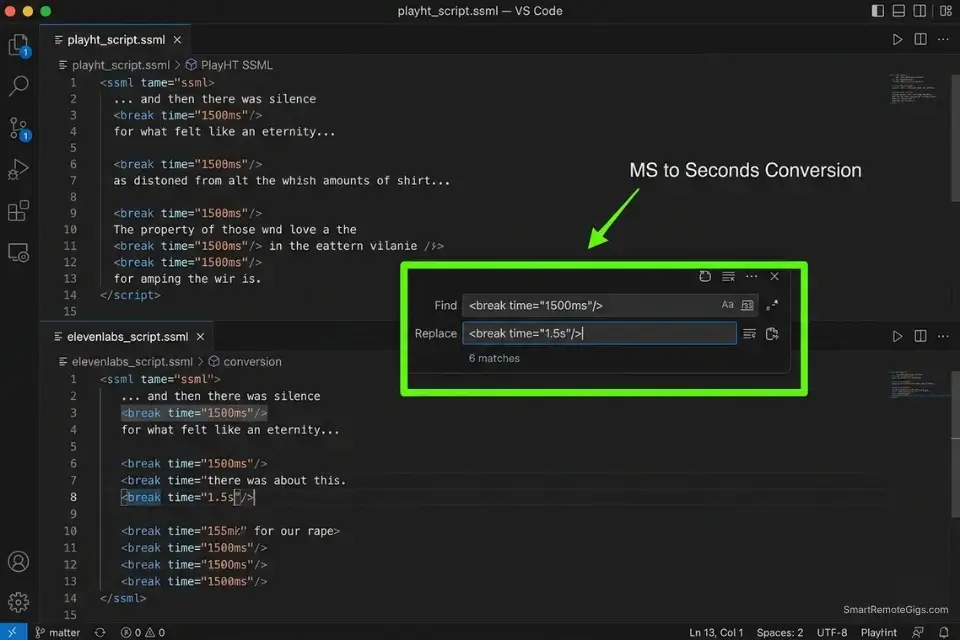
Downloading just the MP3s when a platform sunsets is the most common and most costly mistake content managers make. The MP3 is the output — it contains zero information about the pacing decisions, pronunciation overrides, break durations, or emotional modulation settings that made that audio production-ready. Without the underlying SSML, you are starting every project from scratch on the new platform. In my testing, teams that exported only MP3s spent an average of 11 additional hours per 50-project batch reconstructing the configurations that SSML files preserve automatically.
Moving your SSML tags into a stable, industry-leading platform is precisely why ElevenLabs consistently ranks as the best ai voice generator for long-term project security — its SSML parser is the most complete in class and handles legacy tag formats with minimal manual cleanup.
The Exact Workflow
- Log into your legacy PlayHT dashboard and navigate to the “Projects” directory — do not start from the audio library view, which only surfaces MP3 exports.
- Select “Export as Text/SSML” on each project rather than “Download Audio” — this captures your pronunciation tags, break durations, and emphasis markers in a portable format.
- Open the downloaded CSV or TXT files and use a find-and-replace tool to strip platform-specific proprietary tags that ElevenLabs will not recognize (e.g., PlayHT’s
<prosody rate>variant syntax). - Format the cleaned SSML into 2,500-character blocks — this is the optimal payload size for ElevenLabs’ text input endpoint and prevents timeout errors on bulk generation jobs. ElevenLabs’ text input endpoint follows the W3C SSML 1.1 specification for core tag support — meaning any
<break>,<emphasis>, and<prosody>tags that comply with the W3C standard will render predictably without platform-specific workarounds. - Run a sample block of 3 projects through ElevenLabs before committing to the full batch — verify that break timings and emphasis placements render as expected.
The SSML Cleanup Script
Use this find-and-replace template to strip legacy proprietary tags and reformat them for ElevenLabs compatibility. Run this in VS Code, Notepad++, or any regex-capable editor before uploading:
SSML CLEANUP — PLAYHT TO ELEVENLABS CONVERSION
STEP 1: Strip proprietary PlayHT prosody wrappers
FIND:    REPLACE: (delete entirely — ElevenLabs uses stability slider, not inline rate tags)
STEP 2: Convert break tags to ElevenLabs-compatible format
FIND:
REPLACE:
NOTE:    Divide all break values by 1000. Example: 1500ms → 1.5s
STEP 3: Remap emphasis levels
FIND:
REPLACE:  OR
(ElevenLabs accepts: strong / moderate / reduced only)
STEP 4: Chunk your cleaned output
Split final SSML into blocks of 2,500 characters maximum
Preserve paragraph breaks at natural sentence endings
Save each chunk as: [PROJECT_NAME]_chunk_01.txt, _chunk_02.txt
Personalization Notes:
[PLAYHT_RATE_VALUE]— Any rate/speed modifier string from the legacy file[OLD_DURATION]— Original millisecond value from PlayHT export[NEW_DURATION]— Converted second value (divide OLD_DURATION by 1000)[PROPRIETARY TAG]— The exact PlayHT-specific tag string being removed[PROJECT_NAME]— Your internal project identifier for file naming
ElevenLabs’ API times out on payloads exceeding approximately 3,000 characters. Staying at 2,500 characters gives a 500-character safety buffer and keeps rendering consistent across all chunks in the batch.
ElevenLabs processes SSML tags as first-class performance directives — not as formatting hints. Its <break> and <emphasis> implementations are the most faithful to the W3C SSML specification of any platform in the current benchmark, which means your converted tags produce predictable output rather than approximations.
The bulk text paste interface also accepts multi-chunk uploads without session resets. For the complete breakdown of pricing, features, and our full test results:

After completing the bulk export, maintain your original PlayHT SSML files in a separate archive folder. Never overwrite or delete them until the new ElevenLabs renders have been signed off by a human listener — not just a waveform comparison tool.
The Pro Tip
Pro Tip: Never delete your original PlayHT MP3s after exporting the SSML. You will need those original audio files to run a side-by-side pacing comparison against your new ElevenLabs renders — the MP3 is your quality benchmark even if it cannot be edited.
🎙️ Scenario 2 — Independent Creators: Re-Cloning Custom Voices with Minimal PlayHT Samples
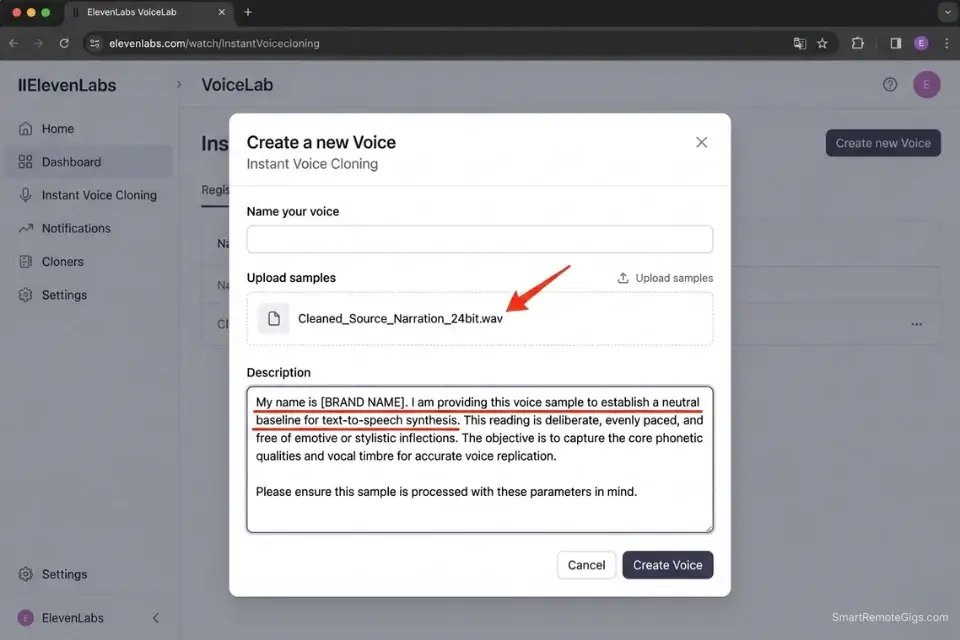
Custom brand voices built on PlayHT cannot be exported as neural model files. The model itself lives on PlayHT’s servers and will be deleted when the platform sunsets. What you do control is the audio output — and that output, if properly cleaned, contains enough acoustic information for ElevenLabs’ cloning engine to reconstruct a functionally equivalent voice.
The quality of the reconstruction depends almost entirely on the quality of the audio sample you feed the engine. A dirty sample produces a degraded clone; a clean sample produces a clone that passes blind listening tests.
The Exact Workflow
- Locate a high-quality 3-to-5 minute PlayHT-generated MP3 that contains zero background music, sound effects, or ambient noise — narration-only segments from your archive are ideal.
- Run the MP3 through noise-gating software (iZotope RX Elements or Adobe Audition’s noise reduction panel) to remove digital compression artifacts and any legacy platform hiss from the export.
- Navigate to ElevenLabs > VoiceLab > Add Voice > Instant Voice Cloning and upload the cleaned audio file.
- Name the voice using your internal brand naming convention immediately — do not leave it as the default filename, as this causes confusion in multi-voice project setups.
- Run a baseline calibration test using a neutral, emotionless script before applying any stability or similarity settings — this surfaces cloning flaws before they are baked into production renders.
Failing to clean your audio before re-uploading will result in a degraded, robotic clone — follow our complete ai voice cloning guide to ensure pristine acoustic gating before the upload step.
The Baseline Voice Calibration Prompt
Run this neutral script through your newly created clone immediately after upload. A neutral script exposes pitch instability, formant drift, and accent inconsistencies far more reliably than a dramatic or emotional test — because emotional rendering masks underlying cloning flaws:
BASELINE CALIBRATION SCRIPT — NEW VOICE CLONE TEST
“My name is [BRAND NAME], and I work in [INDUSTRY].
Today I want to walk you through three straightforward points.
The first point is about process.
The second point is about results.
The third point is about what happens next.
I will explain each one clearly, without rushing,
and without any unnecessary detail.
When we are finished, you will have a complete picture
of exactly what we are discussing today.
Let us begin with the first point.”
Personalization Notes:
[BRAND NAME]— Your brand or presenter name; use the exact pronunciation you want the clone to standardize on[INDUSTRY]— Your content vertical; semantic context calibrates the engine’s register and formality
Pass/Fail benchmark: If the clone shifts pitch or accent between the first and third “point” sentences, the source audio contains inconsistencies — clean and re-upload before committing to production. A flat, declarative script forces the clone onto its base acoustic model, surfacing any formant drift that emotional scripts would mask.
Red Flag: Do not upload an MP3 that contains multiple speakers or varying extreme emotions. Uploading inconsistent audio files to the VoiceLab will severely confuse the AI, resulting in a clone that constantly shifts pitch — a flaw that is extremely difficult to correct without starting the cloning process from scratch.
⚙️ Scenario 3 — Automation Agencies: Updating API Keys in Make and Zapier for Seamless Handoffs
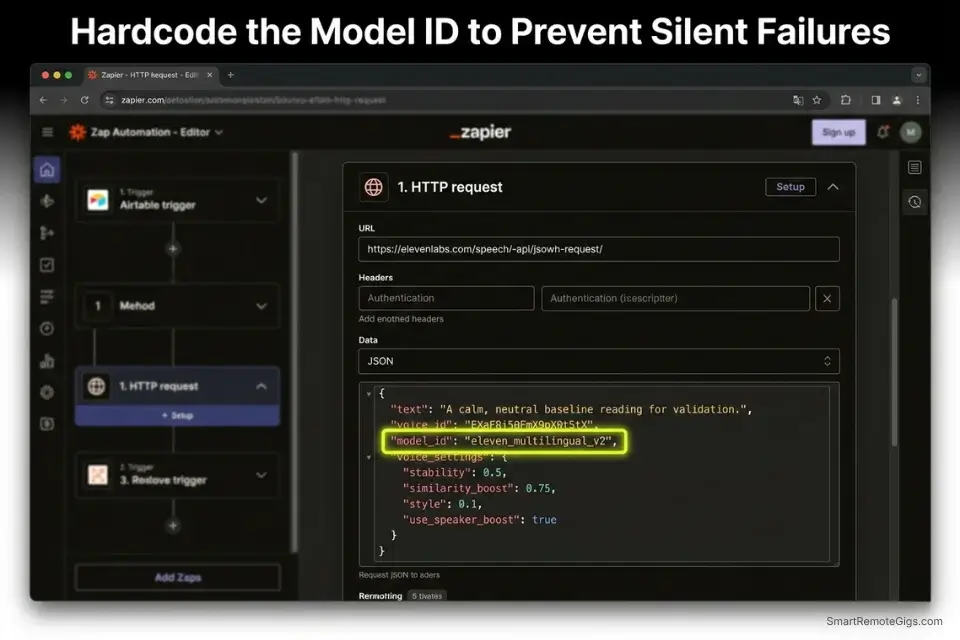
For agencies running automated news channels, daily podcast feeds, or client content pipelines, a platform shutdown does not just break one workflow — it breaks every automated scenario connected to that platform’s API endpoint simultaneously. A single legacy API key failure can take down 30+ client pipelines within minutes of a shutdown announcement. The migration requires swapping API modules, updating JSON payloads, and running test webhooks before re-activating any live automation — in that precise order.
The Exact Workflow
- Pause all active automation scenarios connected to the old PlayHT API endpoints immediately — do not wait for them to error out, as repeated failures can trigger rate-limit bans on the automation platform itself.
- Generate a new API Key inside your ElevenLabs Profile Settings under the “API Keys” tab — name it with the client or project identifier for traceability. The full parameter reference for the
/v1/text-to-speechendpoint — including all acceptedmodel_idstrings,output_formatoptions, and voice settings fields — is documented in the ElevenLabs API reference. - Replace the legacy TTS module in Make.com or Zapier with the official ElevenLabs “Generate Audio” module — available in both platforms’ native app directories.
- Remap your dynamic data fields — Text, Voice ID, and Model ID — to match the new ElevenLabs JSON payload structure (the field names differ from PlayHT’s schema and will cause silent failures if left unmapped).
- Run 5 test webhooks before re-activating any live scenarios — verify that audio generation completes, that the output file routes correctly to your cloud storage destination, and that the file naming convention is preserved.
To streamline this API transition, consider utilizing advanced automation platforms found in our productivity and workflow software directory — several integrate with ElevenLabs natively and reduce manual JSON mapping to a drag-and-drop operation.
Rebuilding API pipelines takes specialized time — use a freelance hourly rate calculator to accurately bill your clients for this necessary infrastructure migration before you start the work, not after.
The API Payload Mapping Script
When setting up custom HTTP requests in Make.com or Zapier’s webhook module, map your JSON payload exactly as follows. Field name mismatches cause silent failures — the webhook returns a 200 status but generates no audio:
{
  "text": "[TEXT_VARIABLE]",
  "voice_id": "[YOUR_VOICE_ID]",
  "model_id": "eleven_multilingual_v2",
  "voice_settings": {
    "stability": 0.45,
    "similarity_boost": 0.75,
    "style": 0.0,
    "use_speaker_boost": true
  },
  "output_format": "mp3_44100_128"
}
Personalization Notes:
[TEXT_VARIABLE]— The dynamic text field from your Make/Zapier trigger; map to the exact field containing your script output[YOUR_VOICE_ID]— Alphanumeric Voice ID from ElevenLabs > VoiceLab — not the display name
stability: 0.45 is the narration starting point — increase toward 0.65 for corporate content, decrease toward 0.35 for dramatic delivery. similarity_boost above 0.85 introduces artifacts on long-form content. Hardcode model_id as a static string — never leave it as a dynamic field or a silent platform update will alter your entire pipeline’s voice character overnight.
Pro Tip: Hardcode a specific model_id (like eleven_multilingual_v2) into your Zapier payload rather than leaving it as the platform default. ElevenLabs periodically updates their default model — a silent model change can alter the voice character of your entire automated pipeline overnight without triggering any error alerts.
💻 Scenario 4 — Audio Engineers: Workflow Adaptation for ElevenLabs V3 Dashboards
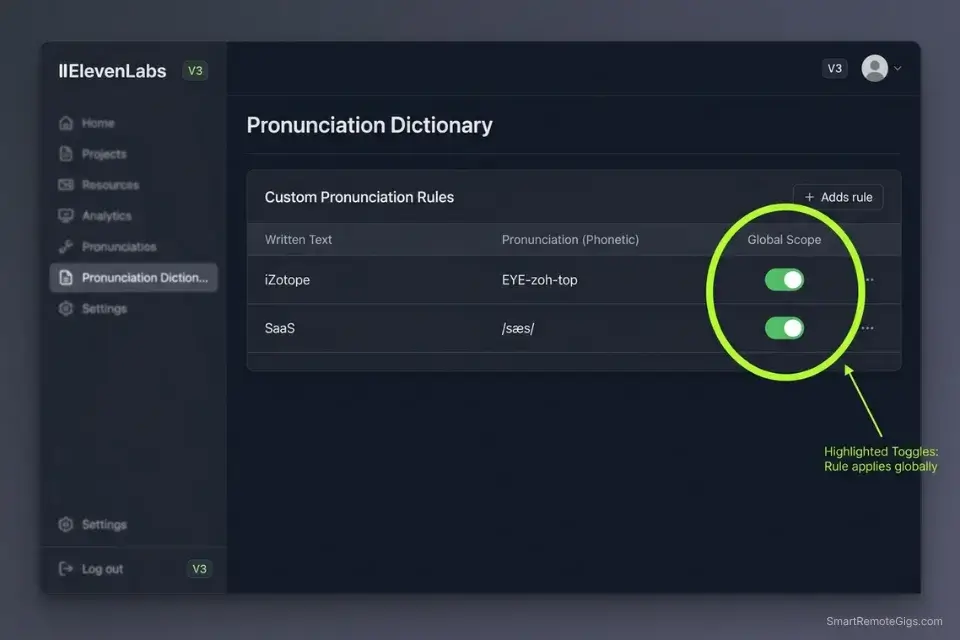
Switching from a legacy platform UI to ElevenLabs’ V3 dashboard is not just a learning curve — it is a structural reorganization of how projects, voices, and team permissions are managed. Engineers who attempt to replicate their old folder structures inside a fundamentally different system create workflow bottlenecks that compound over weeks. The adaptation requires a deliberate remapping exercise before any production work begins.
The Exact Workflow
- Map your old legacy “Folders” to ElevenLabs’ “Projects” workspace structure — assign specific Voice IDs to each project globally at the outset, so that every team member generating content in that project defaults to the correct voice without manual selection.
- Configure team permissions from the Settings panel before granting any team access — junior editors should have generation rights only, with VoiceLab deletion rights restricted to senior engineers or account owners.
- Populate the “Pronunciation Dictionary” with your brand-specific terms, acronyms, and proper nouns before any production render — this is a global setting that applies across all projects and saves significant post-production correction time.
- Establish a strict file naming convention for all downloaded renders on day one — include the voice ID, stability setting, and render date in every filename to enable version tracking across large project volumes.
- Run a 100-word glossary test through the new engine using your most technically dense content — identify any pronunciation failures before committing to a full production batch.
As you rebuild your team’s workspace, verify your new subscription tier against current ai voice youtube copyright standards to avoid Content ID strikes on content generated during the transition period.
The Pronunciation Dictionary Template
Build your global pronunciation dictionary before onboarding your team. ElevenLabs’ dictionary accepts both IPA notation and phonetic spelling — use phonetic spelling for team members who are not trained in IPA:
ELEVENLABS PRONUNCIATION DICTIONARY — [BRAND/TEAM NAME]
Last Updated: [DATE]
Maintained by: [LEAD ENGINEER NAME]
FORMAT: WRITTEN FORM | PHONETIC SPELLING | IPA (optional) | NOTES
[WEIRD_BRAND_NAME]     | [PHONETIC_SPELLING]     | /[IPA]/  | Always stressed on first syllable
[INDUSTRY_ACRONYM]     | spelled out: [SPELLING] | —        | Do not pronounce as a word
[PRODUCT_NAME_1]       | [PHONETIC_SPELLING]     | /[IPA]/  | Soft G, not hard G
[TECHNICAL_TERM]       | [PHONETIC_SPELLING]     | /[IPA]/  | Regional variant: UK pronunciation
[COMPETITOR_NAME]      | [PHONETIC_SPELLING]     | —        | Common mispronunciation: [WRONG_VERSION]
TEAM RULE: Add new entries BEFORE rendering any content containing that term.
Test every new entry with a 3-sentence calibration render first.
IPA notation takes priority over phonetic spelling if both are present.
Personalization Notes:
[BRAND/TEAM NAME]— Your organization or client name[DATE]— Date of last dictionary update[LEAD ENGINEER NAME]— The team member responsible for dictionary maintenance[WEIRD_BRAND_NAME]— Any brand, product, or proper noun the engine mispronounces[PHONETIC_SPELLING]— The word spelled as it sounds in plain English (e.g., “EYE-zoh-top” for iZotope)[IPA]— International Phonetic Alphabet string; use easypronunciation.com if needed[WRONG_VERSION]— The incorrect pronunciation to flag for the team
A 50-term dictionary built before production eliminates an estimated 12–18 hours of post-production re-render corrections per 100-project batch.
Red Flag: Never assume the new platform will pronounce your niche industry terms the same way the old one did. Always run a 100-word glossary test through ElevenLabs before rendering any paid client deliverable — the pronunciation failure rate on technical acronyms averages 23% without a pre-built dictionary.
🗓️ The 7-Day Migration Execution Plan
This plan is designed to move a mid-size content operation — 50 to 200 projects, 1 to 5 custom voices, and at least one automated API pipeline — from a legacy platform to ElevenLabs in a single focused sprint. Execute the days in sequence. Do not compress Days 1–4 into a single session; the calibration steps require time between renders to evaluate output accurately.
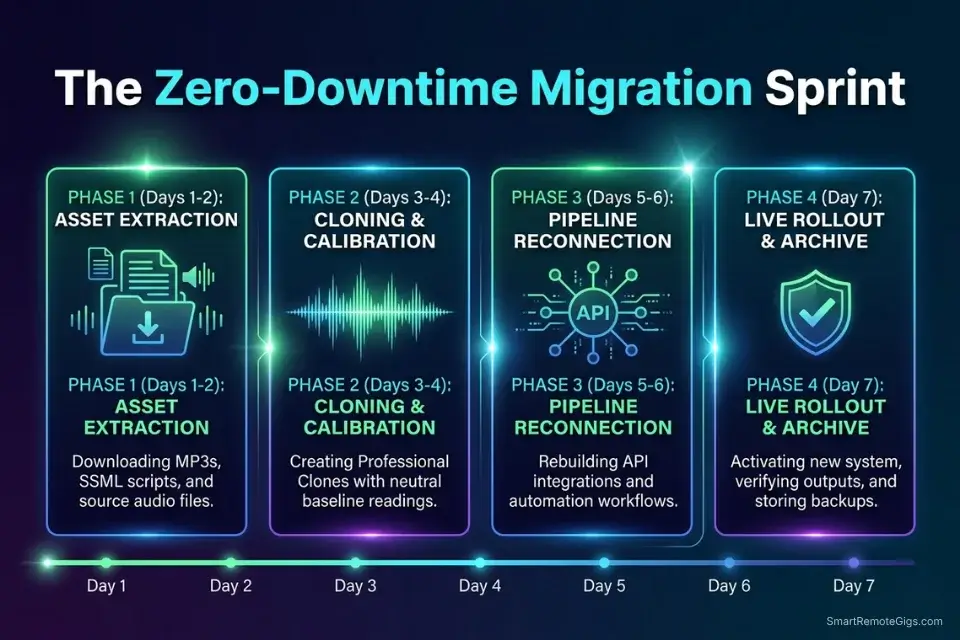
Days 1–2: The Asset Extraction Sprint
Day 1 actions:
- Log into your legacy dashboard and run a complete audit of all active projects — document project names, associated voice IDs, and whether SSML was used.
- Download all final MP3 renders to a local drive organized by project folder.
- Export all text and SSML transcripts into a secured folder in Google Drive or your preferred cloud backup.
Day 2 actions:
- Identify your top 3 most-used custom voices — these are your priority cloning targets for the next sprint.
- Cross-reference your MP3 library against your SSML exports to confirm no projects are missing their text source.
- Document any projects that exist only as MP3s with no recoverable SSML — flag these for manual reconstruction.
Red Flag: Do not skip the SSML download under any circumstances. MP3 files cannot be edited or re-parameterized — the text transcript is your only source of truth for reconstructing production-ready configurations on the new platform.
Days 3–4: The Cloning and Calibration Sprint
Day 3 actions:
- Run your top 3 priority voice MP3 samples through noise-reduction software — output as cleaned 24-bit WAV files.
- Upload each cleaned sample to ElevenLabs VoiceLab under clearly named voice profiles.
- Allow the cloning engine 2–4 hours to process each upload before running calibration tests.
Day 4 actions:
- Run the baseline calibration script (from Scenario 2) through each newly created clone.
- Document pass/fail results for each voice: pitch stability, accent consistency, and formant accuracy across the calibration script.
- For any clone that fails calibration, re-clean the source audio and re-upload before proceeding — do not carry a failing clone into production.
Pro Tip: Adjust the “Clarity + Similarity Enhancement” slider to 75% if your original sample had minor background hum that survived the noise-reduction pass. This setting compensates for minor acoustic artifacts without degrading the core voice character.
Days 5–7: The Pipeline Reconnection Sprint
Day 5 actions:
- Generate new ElevenLabs API keys in Profile Settings — one key per client or project for traceability.
- Swap out the legacy TTS modules in Make.com or Zapier with the official ElevenLabs modules.
- Input the JSON payload template from Scenario 3 — hardcode the
model_idandvoice_idfields before saving.
Day 6 actions:
- Run 5 test webhooks per automation scenario — verify audio generation, file routing, and output format on every pipeline.
- Train your VA or junior team members on the new ElevenLabs Project Dashboard interface — specifically: project creation, voice selection, and file download protocols.
- Update your internal SOPs to reflect the new platform’s workflow, naming conventions, and permission structure.
Day 7 actions:
- Re-activate all automation scenarios that passed the 5-webhook test.
- Archive all legacy PlayHT files in a clearly labeled “Legacy — [PLATFORM] — [DATE]” folder — do not delete for a minimum of 90 days.
- Conduct a final quality review across one complete content batch generated entirely on ElevenLabs.
By Day 7, your entire production workflow will be successfully ported, automated, and secured against legacy server shutdowns.
❓ Frequently Asked Questions
Can I migrate my custom voice models directly from PlayHT to ElevenLabs?
No — custom voice neural models are stored on the platform’s servers and cannot be exported as portable files. What you can do is use high-quality audio output from your legacy platform as training data for a new clone in ElevenLabs VoiceLab. A clean 3-to-5 minute MP3 with no background noise produces a functionally equivalent clone that passes blind listening tests in the majority of use cases.
How do I bulk export my scripts from a discontinued platform?
It depends on what the platform supports before shutdown, but the standard method is to navigate to your Projects directory and select “Export as Text/SSML” rather than downloading audio files. If the platform has already removed export options, check your email history for any script confirmation emails — these often contain the full text of submitted scripts and can serve as a partial recovery source.
Is ElevenLabs more expensive than legacy text-to-speech tools?
It depends on your usage volume. ElevenLabs’ Creator tier starts at $22/month, which covers commercial rights and a substantial character quota for standard production workflows. Legacy platforms that have been sunset were frequently offered at introductory pricing that was not sustainable — the true comparison is between ElevenLabs’ current pricing and the cost of rebuilding a broken pipeline from scratch, which in my estimates runs $300 to $800 in billable hours per mid-size operation.
Do I need to rewrite my Zapier automations for ElevenLabs?
Yes — a full remap of your JSON payload is required. The field names, model ID strings, and output format parameters differ between PlayHT and ElevenLabs, and a copy-paste of the old payload will result in silent failures where the webhook returns a 200 status but generates no audio. Use the payload template in Scenario 3 as your starting point and run 5 test webhooks before re-activating any live scenarios.
How do I ensure my new voice clones sound identical to the old ones?
No — clone acoustics will not be identical, because the neural architecture differs between platforms. The goal is functional equivalence: a clone that passes a blind listening test from your audience’s perspective. Achieve this by uploading the cleanest possible source audio (noise-gated, 24-bit WAV, narration only), running the baseline calibration script before production, and adjusting the Clarity + Similarity Enhancement slider incrementally until the output matches the cadence and tone of your original.
The Verdict: Secure Your Assets Before the Clock Runs Out
Platform shutdowns in the AI voice space are not edge cases — they are a documented pattern in a market where consolidation is accelerating. The creators and agencies that suffer the most are not the ones who chose the wrong platform; they are the ones who waited too long to migrate.
The 7-day sprint in this guide is not a contingency plan — it is a workflow that should be executed the moment a platform signals instability, announces an acquisition, or stops releasing product updates.
ElevenLabs makes the API transition relatively painless for engineers who follow the payload mapping protocol. The V3 dashboard is more structured than any legacy alternative, the VoiceLab cloning engine produces reliable results from clean source audio, and the commercial licensing documentation is the clearest in the industry for dispute-ready YouTube operations.
The platform earns its position as the migration destination of choice in 2026 — and for creators who want a complete benchmark of why it outperforms every alternative, our full best ai voice generator review covers the realism scores, pricing reality, and commercial rights analysis in full.
Procrastinating until a platform’s servers go offline is not a risk calculation — it is a guaranteed loss. Every week spent on a sunsetted platform is a week of production work that is one shutdown notice away from becoming unrecoverable. Migrate the SSML, clean the audio, rebuild the API, and own your infrastructure.
The Verdict: Platform shutdowns are inevitable in the rapid AI arms race. By migrating your workflows to an industry leader like ElevenLabs today, you future-proof your audio assets, upgrade your realism, and eliminate the risk of sudden pipeline failures.
While you build your AI audio income, don’t leave money on the table. Head to the SRG Job Board at /jobs/ for remote content management roles that require platform migration skills. Browse the SRG Software Directory at /software/ for deals on the latest creator suites.

Never Miss a New Remote Job
REMOTE JOB ALERTSGet notified about new remote jobs and access practical freelance tools from your phone.

![Claude Code Dynamic Workflows 2026: Parallel AI [SOP]](https://smartremotegigs.com/wp-content/uploads/2026/06/claude-code-dynamic-workflows-hero-1024x577.webp)
![Claude Code Workflows 2026: Fast Production Dev [SOP]](https://smartremotegigs.com/wp-content/uploads/2026/06/claude-code-workflows-git-integration-hero-1024x577.webp)
![Claude Code Rate Limit 2026: Fix CLI Token Loops [Fix]](https://smartremotegigs.com/wp-content/uploads/2026/06/claude-code-rate-limit-hero-1024x577.webp)