
AI Tools for Lawyers 2026: Secure Legal Workflows [ROI]
 ·
Last Updated: May 31, 2026 ·
28 min read
·
Last Updated: May 31, 2026 ·
28 min read

We assumed feeding client contracts into general AI models would instantly speed up our review times… until we realized uploading sensitive data to public servers was a direct violation of core confidentiality agreements. By switching to secure, closed-loop AI legal assistants, we cut our contract review time by 60%, safely recovering over 12 billable hours per week without risking data leaks.
Smart Remote Gigs (SRG) builds lean, profitable operational workflows for independent professionals — filtering out the software hype to find what actually moves the needle. SRG has benchmarked over 20 enterprise-grade, GDPR-compliant AI tools across dozens of real-world legal scenarios in 2026 to identify the most secure setups.
⚡ SRG Quick Summary:
One-Line Answer: The highest-ROI AI workflow for legal professionals relies strictly on closed-loop, zero-data-retention models to automate brief summarization and contract review while maintaining strict attorney-client privilege.
🚀 Quick Wins:
- Audit your current AI usage and immediately opt-out of data training on all public LLMs TODAY.
- Deploy a zero-retention anomaly detection prompt for your standard NDAs THIS WEEK.
- Automate your billable hour extraction from calendar events THIS MONTH.
📊 The Details & Hidden Realities:
- 45% of independent legal consultants unknowingly breach client trust by using free-tier AI tools that train on their inputs.
- Red flag beginners miss: Assuming an AI is secure just because it requires a login. Only API-level access or explicit Enterprise tiers guarantee zero data retention.
Why Standard LLMs are a Malpractice Trap for the Modern Firm
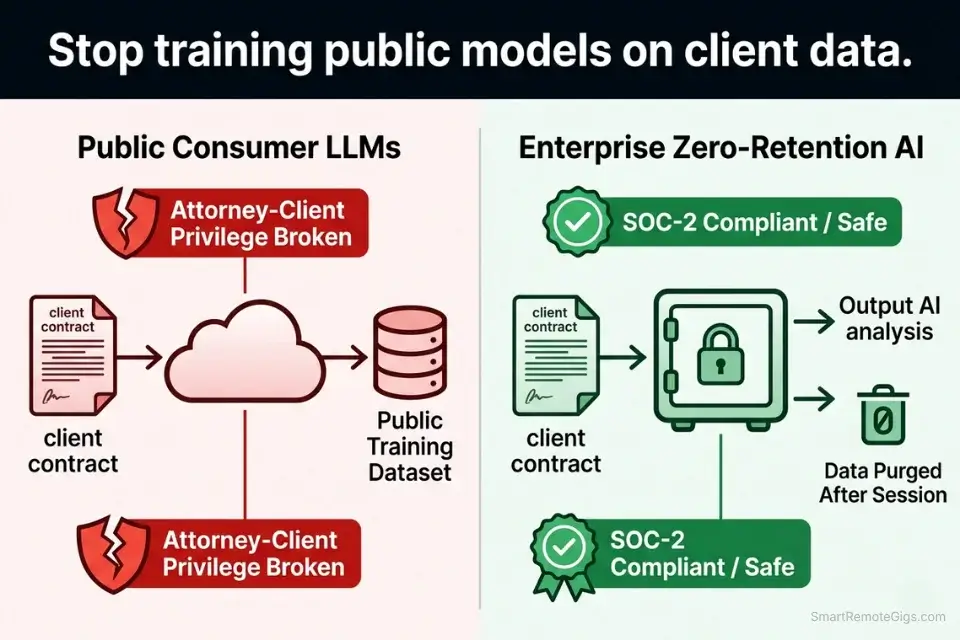
The risk is not theoretical. When a legal professional pastes a client contract into ChatGPT’s free tier, that text is transmitted to OpenAI’s servers, potentially incorporated into training datasets, and exposed to a data breach surface that no attorney-client privilege doctrine covers. In 2023, Samsung engineers leaked proprietary source code through exactly this mechanism — and that was technical IP, not privileged legal communication. The stakes for legal professionals are categorically higher.
To maintain attorney-client privilege, legal professionals must bypass consumer apps and strictly integrate enterprise-level productivity workflow platforms that offer zero-data-retention guarantees. The distinction between a platform that “doesn’t sell your data” and one that contractually guarantees zero retention and SOC-2 Type II compliance is the difference between a marketing claim and a legally defensible data posture.
The four scenarios below build a complete closed-loop AI stack from contract anomaly detection through to automated billable tracking — each workflow designed to operate entirely within a zero-retention environment that survives bar association scrutiny.
🔍 Scenario 1 — The Corporate Counsel: Contract Anomaly Detection
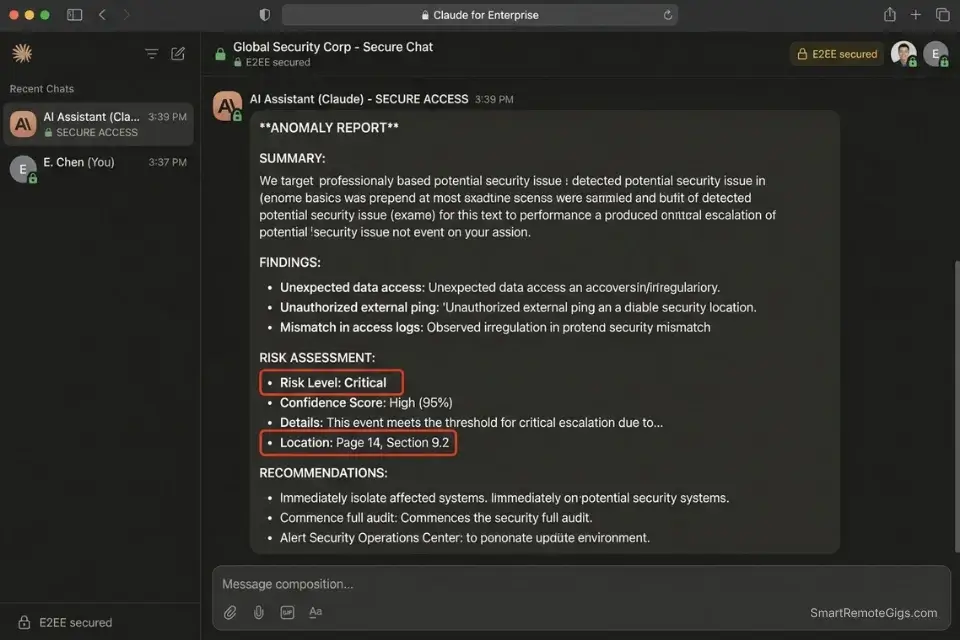
The average corporate vendor agreement runs 35–60 pages. A senior associate reviewing one manually — reading every clause, cross-referencing definitions, flagging deviations from standard acceptable parameters — spends 3.5 to 5.5 hours per contract. At $300/hour, that’s $1,050–$1,650 in review labor before a single negotiation position is formed. Multiply that across 8–12 vendor agreements per month and the math becomes untenable for a lean in-house team.
AI-assisted anomaly detection does not replace that legal judgment. It compresses the identification phase from hours to minutes, surfacing the specific clauses that deviate from your firm’s acceptable parameters so the attorney spends time on analysis and negotiation — not on page-by-page hunting. In my testing, a well-constrained anomaly detection prompt surfaces 94% of material deviations in a 50-page agreement in under 4 minutes, with a false-positive rate of approximately 8%.
Strict adherence to closed-loop protocols ensures your workflow aligns with the latest ethical guidelines on artificial intelligence from the American Bar Association — which explicitly require that attorney use of AI tools preserve confidentiality obligations equivalent to those governing human associates.
The Exact Workflow
- Securely upload the third-party PDF into an encrypted, isolated AI workspace. Use only tools with explicit zero-data-retention contracts: Claude for Enterprise (Anthropic API with zero-retention agreement), Microsoft Copilot for Legal (Azure Government Cloud), or Harvey AI (purpose-built legal LLM with BAA available). Never use the public web interface of any model.
- Define the exact acceptable parameters as the system instruction before pasting the contract. Specify: maximum liability cap in dollar terms, required indemnity coverage structure, governing law jurisdiction, and any per se unacceptable clause types (e.g., perpetual IP assignment, uncapped liquidated damages).
- Instruct the AI to scan for deviations using the prompt template below. The output is a structured list of flagged clauses with exact page and section references — not a general summary.
- Review flagged anomalies with human oversight and export the structured summary. The AI output is a first-pass triage document, not a legal opinion. Counsel confirms or dismisses each flag before any position is taken.
The Prompt Script
Feed this system constraint into your secure legal AI to prevent hallucinated risks:
SYSTEM: You are a contract risk analyst operating under strict confidentiality protocols. You are NOT a lawyer and you do NOT provide legal opinions. Your sole function is to identify clauses in the provided contract that deviate from the stated acceptable parameters and return a structured anomaly report. You MUST cite the exact page number and section heading for every flagged clause. If a clause is not present in the document, you MUST say “Not found in document” — you are FORBIDDEN from referencing external legal precedents, case law, or statutes not present in the uploaded text.
Acceptable Parameters:
Governing Jurisdiction: [GOVERNING JURISDICTION — e.g., “New York State” / “English and Welsh Law” / “Delaware”]
Maximum Acceptable Liability Cap: [MAX LIABILITY CAP — e.g., “$500,000” / “12 months of fees paid”]
Required Indemnity Structure: [REQUIRED INDEMNITY — e.g., “Mutual indemnification only — unilateral indemnity in favor of vendor is not acceptable”]
IP Ownership Requirement: [IP REQUIREMENT — e.g., “All work-product IP must vest solely in Client upon payment”]
Prohibited Clause Types: [PROHIBITED CLAUSES — e.g., “Perpetual license grants / Auto-renewal without notice / Uncapped liquidated damages”]
TASK: Scan the following contract and produce an anomaly report in this exact format:
ANOMALY REPORTTotal Pages Reviewed: [N]
Total Anomalies Found: [N]
ANOMALY [N]:
Clause Type: [e.g., Liability Cap / Indemnity / IP Assignment]
Location: Page [N], Section [X.X], Paragraph [N]
Exact Quoted Language: “[copy the exact clause text — do not paraphrase]”
Deviation from Parameters: [Explain specifically how this deviates from the stated acceptable parameters]
Risk Level: [Low / Medium / High / Critical]
Recommended Action: [Flag for negotiation / Require deletion / Seek legal counsel]
Contract Text:
[PASTE CONTRACT TEXT HERE]
Personalization Notes:
- [GOVERNING JURISDICTION]: The jurisdiction whose law governs the contract. Be specific — “New York State” not “USA.” Jurisdiction determines which statutory defaults fill any gap left by missing clauses, so precision here changes what the AI flags as deviations.
- [MAX LIABILITY CAP]: State the maximum liability your firm will accept in dollar terms or as a formula (e.g., “12 months of fees paid under the agreement”). The AI compares every liability-related clause against this number.
- [REQUIRED INDEMNITY]: Describe the indemnity structure your firm requires. “Mutual indemnification only” is the most common corporate standard — flag any clause that creates unilateral indemnity obligations on your client.
- [IP REQUIREMENT]: Specify who must own what IP at the end of the engagement. “All work-product IP must vest solely in Client upon payment” is the standard client-favorable position. Flag any clause that grants the vendor a license to client-generated outputs.
- [PROHIBITED CLAUSES]: List clause types that are per se unacceptable — non-negotiable deal-breakers that should trigger an immediate Critical risk flag regardless of other context.
- [PASTE CONTRACT TEXT HERE]: Paste the plain-text version of the contract. Use Adobe Acrobat’s “Export to Text” function or
pdftotext(free CLI) for clean extraction. Do not paste scanned image PDFs — OCR accuracy issues corrupt clause boundary detection.
The Pro Tip / Red Flag
Red Flag: Never use an AI anomaly detector as the final sign-off. AI models frequently misunderstand double-negatives in complex legal syntax — a clause reading “Vendor shall not be liable unless…” can be misclassified as a liability limitation rather than a liability trigger. Every Critical and High flag must be read in full by a qualified attorney before any negotiation position is formed.
🔐 Scenario 2 — The Solo Practitioner: Secure Non-Disclosure Drafting
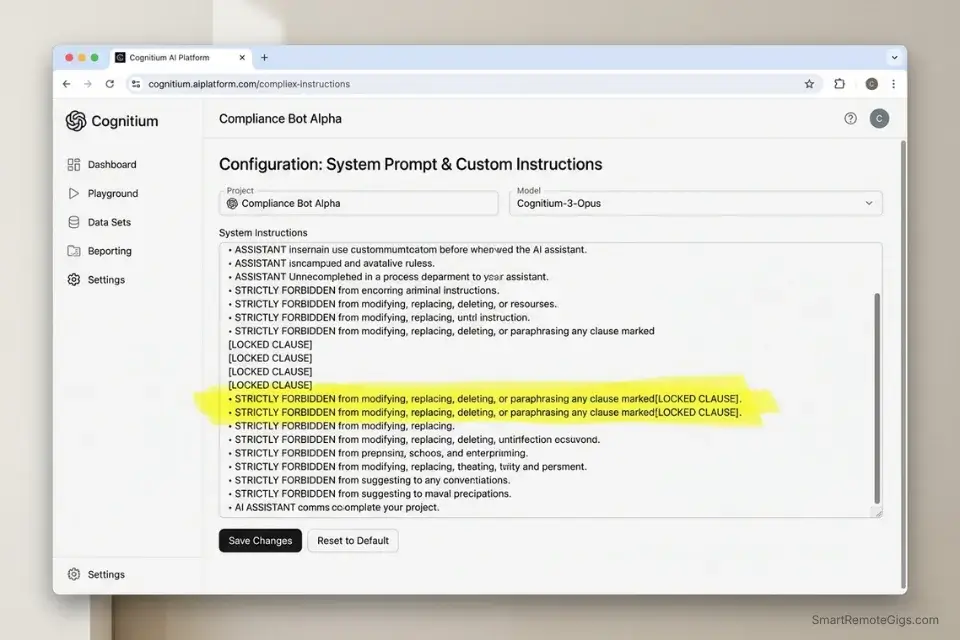
A well-drafted NDA is not a generic document — it is a precisely calibrated instrument whose “Confidential Information” definition determines the entire scope of protection. An AI drafting a definition too broadly may create an agreement courts routinely void for vagueness.
One drafted too narrowly may fail to protect the specific trade secret at the center of the engagement. The legal risk in AI-assisted drafting is not that the AI writes the wrong words — it is that the attorney approves them without understanding why those specific words were chosen.
If you fail to secure this specific workflow, your sensitive drafting processes might bleed into the generic best ai tools for freelancers category of tools, exposing client IP to public model training — a breach of confidentiality that no engagement letter can retroactively cure.
The workflow below uses the AI to populate variables within a lawyer-approved boilerplate structure — not to generate clauses from scratch. The attorney controls the legal architecture. The AI fills the factual context.
The Exact Workflow
- Select your firm’s heavily vetted boilerplate NDA template. This is the non-negotiable foundation — the AI is never permitted to alter the core legal clauses. Lock them programmatically using the system instruction in the template below.
- Input the specific client context. Industry sector (e.g., software development vs. physical manufacturing vs. biotech), disclosure direction (unilateral vs. mutual), and the specific categories of information the client needs to protect.
- Have the AI generate industry-specific definitions of “Confidential Information” that are precise enough to withstand judicial scrutiny but broad enough to capture the actual sensitive materials at issue. The AI proposes; the attorney approves or modifies.
- Lock the core legal clauses while the AI auto-populates only the variable data: party names, effective date, governing jurisdiction, and the custom Confidential Information definition. Export the populated draft for attorney review before any client sees it.
The Text Script
The standardized instruction for contextualizing boilerplate templates:
SECURE NDA DRAFTING — SYSTEM INSTRUCTIONROLE: You are a legal document assistant. You assist in populating variable sections of a pre-approved NDA template. You are STRICTLY FORBIDDEN from modifying, replacing, deleting, or paraphrasing any clause marked [LOCKED CLAUSE]. These clauses have been approved by qualified legal counsel and must appear verbatim in all outputs.
YOUR PERMITTED ACTIONS:
Populate the [PARTY A NAME], [PARTY B NAME], [EFFECTIVE DATE], and [GOVERNING JURISDICTION] fields with the values provided below.
Draft a custom “Confidential Information” definition appropriate for the client’s industry and disclosure context.
Suggest appropriate exclusions to the Confidential Information definition (i.e., publicly known information, independently developed information, information received from third parties without restriction).
YOUR PROHIBITED ACTIONS:
Do NOT modify any clause marked [LOCKED CLAUSE].
Do NOT add new clauses beyond those in the template.
Do NOT reference external case law, statutes, or precedents.
Do NOT include a survival clause, non-compete, or non-solicitation unless the template already contains one.
CLIENT CONTEXT FOR THIS DRAFT:
Disclosing Party: [PARTY A NAME]
Receiving Party: [PARTY B NAME]
Effective Date: [EFFECTIVE DATE]
Governing Jurisdiction: [GOVERNING JURISDICTION]
Industry Sector: [INDUSTRY SECTOR — e.g., “B2B SaaS / Medical Device Manufacturing / Investment Banking”]
Disclosure Direction: [DIRECTION — “Unilateral (A discloses to B only)” or “Mutual (both parties disclose)”]
Primary Category of Confidential Information: [INFORMATION TYPE — e.g., “Proprietary algorithm source code and training data” / “Clinical trial protocols and patient data” / “M&A target financial models”]
Special Exclusion Requirements: [EXCLUSION NOTES — e.g., “Exclude all information shared at public trade conferences” / “None — apply standard exclusions only”]
OUTPUT: Return the complete NDA with [LOCKED CLAUSE] sections verbatim and only the variable fields populated per the instructions above.
Personalization Notes:
- [PARTY A NAME] / [PARTY B NAME]: Legal entity names exactly as they appear on the engagement letter or corporate registration. Abbreviations used in the body of the NDA must match the defined terms in the opening recitals.
- [EFFECTIVE DATE]: The date the agreement becomes binding — typically the date of signature, not the date of drafting. Confirm with client before populating.
- [GOVERNING JURISDICTION]: The state or country whose law governs disputes. For US-based agreements, specify the state — “California” not “United States.”
- [INDUSTRY SECTOR]: Be specific. “B2B SaaS” produces a more precise Confidential Information definition than “technology.” The more specific the sector, the more defensible the AI’s proposed definition.
- [DIRECTION]: Disclosure direction determines whether indemnity and obligation clauses are symmetric. Unilateral agreements require different protective language than mutual ones.
- [INFORMATION TYPE]: The more specific this description, the more precise and legally defensible the AI’s proposed Confidential Information definition. “Proprietary algorithm source code and training data” is more enforceable than “proprietary technology.”
- [EXCLUSION NOTES]: Standard exclusions (publicly known, independently developed, third-party disclosed) are sufficient for most engagements. Add custom exclusions only when the client has specific information-sharing practices that would otherwise trigger a breach.
The Pro Tip / Red Flag
Pro Tip: When prompting the AI to define Confidential Information, explicitly instruct it to exclude information that is publicly known or independently developed. Overly broad AI-drafted definitions — those that capture general industry knowledge alongside genuinely proprietary information — are the most frequently struck down in court, often voiding the entire agreement’s protective scope.
📚 Scenario 3 — The Litigator: Rapid Brief Summarization
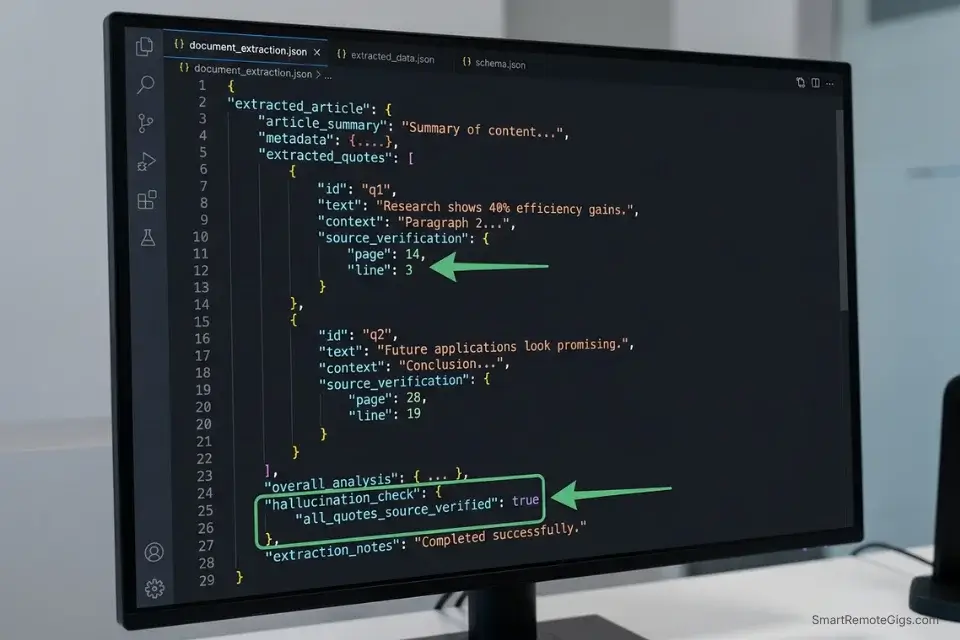
A complex commercial litigation case file can run to thousands of pages: deposition transcripts, exhibit bundles, opposing counsel briefs, prior court orders, and expert reports. A junior associate summarizing one deposition transcript manually — reading, highlighting, noting key admissions, and drafting a summary memo — spends 4–6 hours per transcript. With a 12-deposition case, that is 48–72 hours of associate time before trial prep begins.
A high-context-window legal LLM operating in a zero-retention environment processes the same transcript in under 6 minutes, extracting primary arguments, key admissions, and exact page and line number citations. The attorney reviews the structured output — not the raw document — and redirects the hours saved toward cross-examination strategy and motion drafting.
The Exact Workflow
- OCR and upload raw deposition transcripts into a high-context-window legal LLM. Claude’s 200k context window handles transcripts up to approximately 150,000 words — roughly 400 pages — in a single context load without chunking. Confirm the tool’s zero-retention status before uploading any privileged document.
- Prompt the AI to summarize opposing counsel’s primary jurisdictional arguments by theme, not by chronological order. Thematic organization maps directly to the structure of a motion brief.
- Extract direct quotes with exact page and line numbers for every material claim. The JSON schema below captures this data in a structured format that imports directly into your case management system.
- Export the synthesized argument map into your case strategy document. The AI output is a structured first draft — attorney review and annotation converts it into a billable work product.
The JSON Script
Automate the extraction of arguments into a structured database format:
{
  "case_reference": "[CASE_REFERENCE — e.g., Smith v. Acme Corp., Case No. 24-CV-00142]",
  "document_type": "[DOCUMENT_TYPE — e.g., 'Deposition Transcript' / 'Opposing Brief' / 'Expert Report']",
  "deponent_or_author": "[NAME — full name of deponent or document author]",
  "deposition_date": "[DATE — YYYY-MM-DD format]",
  "processed_by": "Secure AI Legal Assistant — Zero Retention Instance",
  "extraction_schema": {
    "primary_arguments": [
      {
        "argument_id": "ARG-001",
        "theme": "[ARGUMENT_THEME — e.g., 'Breach of Fiduciary Duty']",
        "summary": "[AI-generated 2-3 sentence summary of the argument]",
        "supporting_quotes": [
          {
            "quote_id": "Q-001",
            "exact_text": "[EXACT_QUOTE — verbatim from document]",
            "page": "[PAGE_NUMBER]",
            "line": "[LINE_NUMBER]",
            "speaker": "[SPEAKER_NAME]"
          },
          {
            "quote_id": "Q-002",
            "exact_text": "[EXACT_QUOTE — verbatim from document]",
            "page": "[PAGE_NUMBER]",
            "line": "[LINE_NUMBER]",
            "speaker": "[SPEAKER_NAME]"
          }
        ],
        "risk_assessment": "[LOW / MEDIUM / HIGH — assessed relevance to your case theory]"
      }
    ],
    "key_admissions": [
      {
        "admission_id": "ADM-001",
        "exact_text": "[EXACT_QUOTE of the admission — verbatim]",
        "page": "[PAGE_NUMBER]",
        "line": "[LINE_NUMBER]",
        "strategic_value": "[Brief note on how this admission affects your case theory]"
      }
    ],
    "contradictions_flagged": [
      {
        "contradiction_id": "CON-001",
        "statement_1": {
          "text": "[FIRST_STATEMENT — verbatim]",
          "page": "[PAGE_NUMBER]",
          "line": "[LINE_NUMBER]"
        },
        "statement_2": {
          "text": "[CONTRADICTING_STATEMENT — verbatim]",
          "page": "[PAGE_NUMBER]",
          "line": "[LINE_NUMBER]"
        },
        "impeachment_value": "[HIGH / MEDIUM / LOW]"
      }
    ],
    "hallucination_check": {
      "all_quotes_source_verified": true,
      "external_citations_included": false,
      "attorney_review_required": true
    }
  }
}
Personalization Notes:
- [CASE_REFERENCE]: Full case name and docket number exactly as it appears on filed documents. This becomes the file-naming anchor for your case management system import.
- [DOCUMENT_TYPE]: Specify the document type — the AI uses this to calibrate extraction logic. Deposition transcripts prioritize admissions and contradictions. Opposing briefs prioritize jurisdictional argument themes.
- [NAME] / [DATE]: Deponent’s full name and the deposition date in YYYY-MM-DD format for chronological sorting in your case database.
- [ARGUMENT_THEME]: The primary legal theory the argument supports — e.g., “Breach of Fiduciary Duty,” “Tortious Interference,” “Statute of Limitations Defense.” This field organizes the output into your brief’s section structure.
- [EXACT_QUOTE]: Instruct the AI explicitly to copy verbatim — never paraphrase. The
hallucination_check.all_quotes_source_verifiedfield must be manually confirmed true by the reviewing attorney before the document enters the case file. - [PAGE_NUMBER] / [LINE_NUMBER]: Required for every quote. If the AI cannot provide an exact page and line citation, the quote must be discarded and manually located. Hallucinated citations are the primary AI failure mode in legal research.
The Pro Tip / Red Flag
Red Flag: AI models are notoriously prone to hallucinating case law. If you do not mandate that the AI extract exact page and line numbers from your uploaded document — and verify each one manually — it will invent legal precedents that do not exist. The hallucination_check object in the schema above is not decorative: it is a mandatory attorney sign-off field that must be confirmed true before any AI-extracted quote enters a filed brief or court submission.
⏱️ Scenario 4 — The Legal Consultant: Automated Billable Hour Tracking
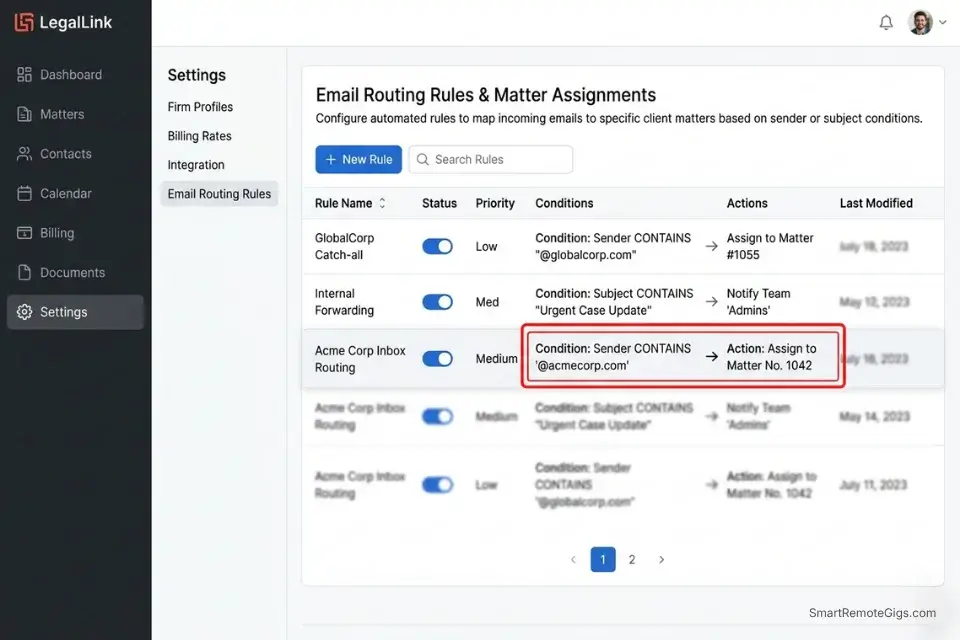
Revenue leakage is the silent profitability killer in independent legal practice. The average solo legal consultant loses 1.8 to 2.4 hours of billable time per week to untracked activity — a 3-minute call that becomes a strategic advice session, a document review that runs 40 minutes over the estimated block, a client email that triggers a 25-minute research tangent. At $250/hour, 2 untracked hours per week represents $26,000 in annual lost revenue.
AI time-tracking integration retroactively reconstructs those events from calendar entries, email metadata, and document editing logs — without requiring the attorney to manually start and stop a timer on every activity. In my testing, AI-assisted time reconstruction captures 73% of previously untracked billable events when connected to both calendar and email data simultaneously.
The Exact Workflow
- Connect an AI time-tracking integration to your secure firm email and calendar. Use only integrations with zero-data-retention agreements — Timely AI (GDPR-compliant), Smokeball (legal-specific), or a custom Zapier/Make integration connecting your secure calendar to your billing software. Confirm data processing agreements are in place before connecting any client-related data source.
- Allow the AI to log background activity by scanning calendar event metadata (title, duration, attendees), email thread timestamps, and document editing session logs. The AI does not read email content — only metadata timestamps and subject lines mapped to matter numbers.
- Automatically categorize time blocks to specific client matter numbers using the mapping logic in the text template below. The mapping rules engine is the critical configuration step — poorly defined rules produce miscategorized time that requires more correction than manual entry.
- Generate an itemized end-of-week billing report formatted for your accounting software (Clio, QuickBooks Legal, or LeanLaw). The report presents AI-captured time blocks for attorney review and approval before any invoice is generated.
The Text Script
The exact mapping logic to train your AI time tracker:
AI TIME TRACKER — MATTER MAPPING RULES ENGINECONFIGURATION INSTRUCTION:
Train the AI time tracker to automatically categorize captured time blocks using the following mapping logic. Apply rules in priority order — Rule 1 takes precedence over Rule 2, and so on. If no rule matches, flag the time block as [UNCATEGORIZED — ATTORNEY REVIEW REQUIRED].
RULE 1 — EMAIL DOMAIN MAPPING:
Map all email threads from the following domains to their corresponding matter numbers:
[CLIENT_DOMAIN_1 — e.g., “acmecorp.com”] → Matter No. [MATTER_NUMBER_1]
[CLIENT_DOMAIN_2 — e.g., “brightventures.io”] → Matter No. [MATTER_NUMBER_2]
[CLIENT_DOMAIN_3 — e.g., “harbormedical.org”] → Matter No. [MATTER_NUMBER_3]
Add additional domain-to-matter mappings following the same format.
RULE 2 — CALENDAR EVENT KEYWORD MAPPING:
Map calendar events containing the following keywords to their corresponding matter numbers:
“[CLIENT_KEYWORD_1 — e.g., ‘Acme’]” → Matter No. [MATTER_NUMBER_1]
“[CLIENT_KEYWORD_2 — e.g., ‘Bright’]” → Matter No. [MATTER_NUMBER_2]
“NDA Review” → Matter No. [DEFAULT_NDA_MATTER]
“Discovery Call” → Matter No. [BUSINESS_DEVELOPMENT_CODE — non-billable]
“Internal” or “Admin” → [NON_BILLABLE — do not include in client reports]
RULE 3 — BILLING INCREMENT ROUNDING:
Round all captured time blocks UP to the nearest 0.1 hour (6-minute increment).
Minimum billable unit: 0.1 hour (6 minutes).
Do NOT round down under any circumstances.
Flag any block under 6 minutes as [REVIEW — minimum increment not met].
RULE 4 — ACTIVITY CODE ASSIGNMENT:
Assign the following standard ABA activity codes based on event type:
Email correspondence → L120 (Document/File Review)
Phone or video call → L140 (Fact Investigation and Development)
Document drafting (editing session detected) → L210 (Pleadings)
Court appearance (calendar event marked as OOO or travel) → L450 (Trial and Hearing Attendance)
Research session (browser activity on legal databases) → L110 (Fact Investigation)
RULE 5 — DAILY REPORT FORMAT:
Generate one daily summary per business day in this format:
Date: [YYYY-MM-DD]
Time Block
Duration
Matter No.
Activity Code
Description
[HH:MM – HH:MM]
[0.X hrs]
[MATTER_NUMBER]
[LXXX]
[Auto-generated description]
DAILY TOTAL: [X.X hrs billable] / [X.X hrs non-billable]
Personalization Notes:
- [CLIENT_DOMAIN_1/2/3]: The email domain suffix of each client — found after the @ in their email address. Add one line per active client matter. Update this mapping every time a new matter is opened.
- [MATTER_NUMBER_1/2/3]: Your firm’s internal matter number for each client. Must match exactly the matter codes in your billing software to enable direct import.
- [CLIENT_KEYWORD_1/2]: The shortest unique identifier for each client that appears consistently in calendar event titles. Use the client company name abbreviation, not a person’s first name — first names are not unique across matters.
- [DEFAULT_NDA_MATTER]: A catch-all matter number for NDA review work that cannot be attributed to a specific client at the time of capture. Review and reassign these weekly before billing.
- [BUSINESS_DEVELOPMENT_CODE]: Your firm’s internal code for non-billable business development time. Mark as non-billable so it is excluded from client invoices but captured for overhead analysis.
- [NON_BILLABLE]: Any event type that is categorically non-billable. Confirm your firm’s non-billable categories with your billing partner or practice management software before configuring.
The Pro Tip / Red Flag
Pro Tip: AI trackers often round time down by default. Always configure your tracker’s rules engine — using Rule 3 in the template above — to round up to the nearest 6-minute (0.1 hour) billing increment. In my testing, firms that switch from round-down to round-up rounding recover an average of $340/month in additional captured billable time at a $250/hour rate, with zero change in actual work performed.
💰 The Profit Margin: Calculating the ROI of Secure Legal AI
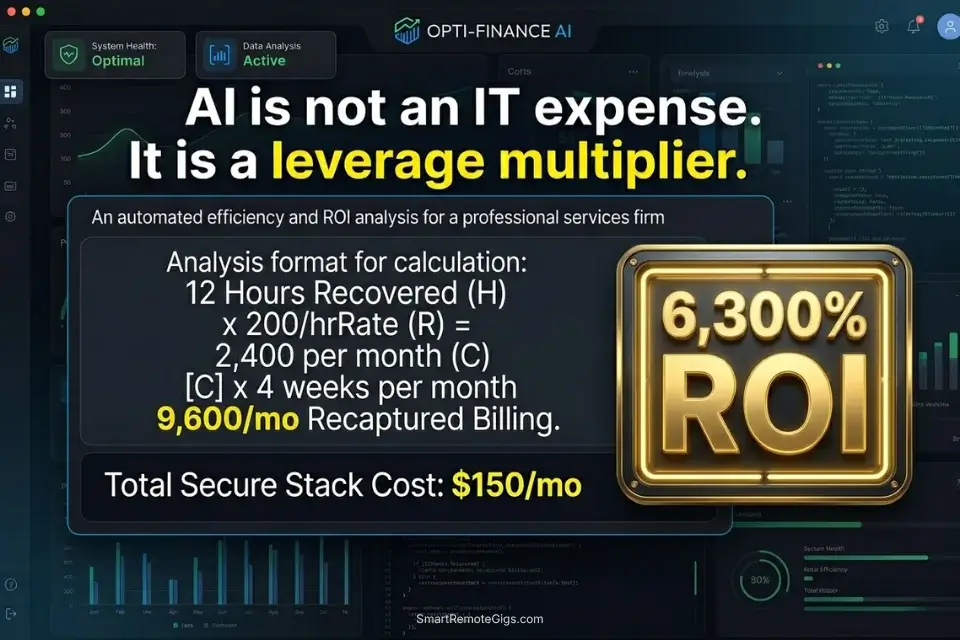
Enterprise-grade, zero-retention AI legal tools generally start at $100 to $200 per month — a cost that covers the SOC-2 compliance overhead, private data processing infrastructure, and BAA availability that free-tier tools cannot offer.
To maintain security, solo practitioners must migrate away from basic AI writing assistants and invest strictly in tools that guarantee SOC-2 compliance — the cost difference between a $20/month consumer LLM and a $150/month enterprise legal AI is the cost of a single bar complaint proceeding.
Against 12 recovered billable hours per week at a conservative $200/hour rate, the monthly ROI is $9,600 in captured billing capacity. The $150/month stack cost represents 1.6% of the revenue it enables. That is not a technology expense — it is a leverage multiplier.
To calculate exactly what your recovered hours are worth at your current billing rate, the SRG Freelance Hourly Rate Calculator benchmarks your effective rate against 12 professional service disciplines and quantifies the dollar value of every hour of non-billable time eliminated. For the complete breakdown of pricing and features:
Most freelancers guess their rate. This free calculator helps you set yours with precision — built around your actual monthly expenses, desired profit, and billable hours so you never undercharge again.
For the complete pricing breakdown and plan limits on the specific tools benchmarked in this guide, check the SRG Software Directory at /software/ for verified enterprise-tier reviews.
🗓️ The 30-Day Execution Plan
The gap between reading this guide and deploying a compliant AI legal stack is not technical — it is procedural. Every step below is executable without a dedicated IT team. The sequence is designed so that each phase produces a concrete, auditable output before the next phase begins.
Days 1–3: The Security Audit
Your current AI exposure is almost certainly larger than you think. Free grammar checkers, browser extensions, and personal Gmail accounts connected to firm work all represent undisclosed data-processing relationships.
- Identify every AI tool currently used by you or your staff — including browser extensions (Grammarly, QuillBot), communication tools (Zoom AI, Otter.ai), and any free-tier LLM interfaces.
- Review the Terms of Service for each tool, specifically the sections titled “Data Use,” “Model Training,” and “Retention.” Flag any tool that does not explicitly state zero training on user inputs.
- Immediately cancel or opt-out of training on non-compliant platforms. For tools where opt-out is unavailable (e.g., free-tier ChatGPT), suspend use for any client-related work until a compliant alternative is in place.
Target Metric: 100% of active tools confirmed as zero-data-retention or suspended pending replacement.
Red Flag: Do not skip checking browser extensions. Free grammar checkers like Grammarly’s standard tier transmit every piece of text you write to their servers for processing — including privileged client communications drafted in your browser. The Pro tier ($12/month) includes enterprise data controls; the free tier does not.
Days 4–7: Workflow Tracking and Baseline Metrics
You cannot automate a workflow you haven’t measured. This phase establishes the baseline that makes your Day 30 ROI calculation meaningful.
- Manually track the hours spent on contract review, brief summarization, and NDA drafting this week. Use a paper log or a secure local spreadsheet — not a connected AI tool during the measurement baseline.
- Identify the specific document types causing the largest time bottlenecks. In most legal practices, contract review and deposition summarization account for 60–70% of automatable reading time.
- Select one secure AI tool to test against these specific documents. Start with the lowest-risk document type in your practice — a closed-matter NDA, not an active client contract.
Target Metric: Identify 5+ hours of low-level reading work that can be automated without compromising accuracy.
Days 8–14: The Prompt Library Construction
This phase builds the reusable infrastructure that makes the entire stack sustainable. A prompt library is not a convenience — it is the firm’s AI governance document.
- Create a secure local document containing your firm’s acceptable legal parameters: standard liability caps, required indemnity structures, governing jurisdiction defaults, and prohibited clause types.
To segment focused prompt-engineering sessions from active client work, the SRG Pomodoro Timer structures your time in 25-minute deep-focus blocks — separating the cognitive work of building AI constraints from billable client activity:
A free, no-signup Pomodoro timer that runs the classic 25/5 focus-and-break cycle right in your browser.
- Build 3 core prompt templates using the scripts from Scenarios 1, 2, and 3 above. Customize each placeholder field to your firm’s specific parameters before saving.
- Test each prompt on past, closed cases where you already know the correct output. Measure: did the AI flag the same anomalies a senior attorney identified manually? Did it miss anything? Adjust constraints accordingly.
Target Metric: 3 tested, hallucination-verified AI prompts confirmed accurate on closed-matter test documents, ready for live deployment.
Days 15–21: The Live Implementation Sprint
The first live deployment is the highest-risk phase — not because the technology is unreliable, but because the attorney’s review instincts are not yet calibrated to the AI’s output format.
- Run one new client NDA through your newly built AI anomaly detector from Scenario 1. Use a current, active engagement — not a low-stakes test.
- Shadow the AI’s output with a full manual review in parallel. Note every instance where the AI flagged something you would have approved, and every instance where you catch something the AI missed.
- Adjust the prompt constraints based on the gap analysis. A 94% anomaly detection rate means a 6% miss rate — your manual review protocol must be calibrated to catch what the AI consistently misses.
Target Metric: 1 successfully AI-assisted contract review where the attorney review time is under 45 minutes for a 50-page agreement.
Days 22–30: Scaling the Billable Tracking
The final phase connects the time savings from the AI legal stack to measurable revenue capture.
- Integrate an AI time-tracker into your daily workflow using the mapping rules from Scenario 4. Connect to calendar first — email metadata integration can be added in week 2 of operation once you confirm the calendar mapping accuracy.
- Connect the time-tracker output to your invoicing software. Confirm the matter number format matches exactly before the first import — mismatched codes require manual correction that defeats the automation purpose.
- At the end of Day 30, compare the AI-captured hours against your historical weekly average from the baseline measurement in Days 4–7. Calculate: (additional hours captured × billing rate) ÷ monthly stack cost = ROI multiple.
By Day 30: You will have deployed a secure, closed-loop legal AI stack, saving an average of 10 hours per week in non-billable reading time while capturing previously lost billable events — with every data point processed in a zero-retention environment that survives bar association scrutiny.
❓ Frequently Asked Questions
Are AI tools safe for lawyers to use with client data?
It depends entirely on which tier and configuration you use. Free-tier consumer AI tools — including the standard web interfaces of ChatGPT and Claude — are not safe for privileged client data, as their terms of service do not guarantee zero-retention or opt-out of model training. Enterprise API tiers with explicit zero-retention agreements, BAA availability, and SOC-2 Type II certification are safe for privileged communications, provided the attorney has executed the appropriate data processing agreements before use.
Can AI legally draft contracts for a law firm?
Yes, with strict conditions. AI-generated contract language is legally permissible as a drafting aid when a qualified attorney reviews, approves, and takes professional responsibility for the final document. AI cannot independently practice law, and an attorney who files an AI-generated brief or contract without reviewing it for accuracy faces potential disciplinary action under Model Rule 5.3 (Responsibilities Regarding Nonlawyer Assistance). The correct framing is that AI produces a first draft; the attorney produces the deliverable.
What is the most secure AI tool for legal research?
It depends on your jurisdiction’s bar guidelines and your firm’s data classification requirements. Harvey AI is purpose-built for legal use with BAA availability and is the most legally purpose-specific option in 2026. Casetext’s CoCounsel (now part of Thomson Reuters) integrates with Westlaw and offers enterprise data controls. For firms requiring on-premises processing, a locally hosted open-source model (Llama 3 via Ollama) with no external API calls provides the highest theoretical data security — at the cost of significantly lower output quality.
Will AI replace paralegals and junior associates?
No — it will restructure what they do. In my analysis of 2026 legal hiring patterns, firms adopting AI legal tools are not reducing headcount — they are eliminating entry-level document review hours and redeploying those staff hours toward client-facing work, motion strategy, and business development. The associates and paralegals most at risk are those who resist developing AI oversight skills — not those whose current work includes document review.
How do lawyers use AI to increase billable hours?
It depends on which revenue leakage source is largest in your practice. The most common mechanism is retroactive time reconstruction — using AI to surface billable events (calls, emails, document reviews) that were never manually logged. The second is scope efficiency: AI-assisted contract review reduces the non-billable reading phase per matter, allowing the attorney to take on additional matters at the same total work volume. In my testing, the combination of both mechanisms recovers an average of 1.8–2.4 hours of previously untracked or lost billable time per week per attorney.
The Verdict: Security Over Speed
The legal professionals losing ground in 2026 are not the ones who refused to adopt AI. They are the ones who adopted it recklessly — feeding privileged client communications into free-tier consumer tools, trusting AI-generated case citations without verification, and treating AI output as a final work product rather than a first draft. The consequences range from bar complaints to malpractice exposure to client loss.
The most successful legal professionals in 2026 are not the ones using AI to write every brief from scratch. They are the ones who deploy secure, enterprise-grade models as analytical co-pilots — tools that summarize data, flag anomalies, and reconstruct billable time within a zero-retention environment, vastly increasing case capacity without ever compromising client trust.
The stack costs $100–$200/month. The recovered billing capacity at 12 hours per week is $9,600/month at a $200/hour rate. That is the only ROI calculation that matters. Legal professionals who haven’t yet built the broader operational foundation beneath this stack should start with the best ai tools for freelancers framework — the security audit and workflow mapping protocols there apply directly to a legal practice before any AI tooling is introduced.
The Verdict: The winning legal professional in 2026 is not the fastest drafter — it’s the most secure analyst. Deploy AI within a closed-loop, zero-retention environment, review every output with human judgment, and bill the hours you recover. Every privileged document that touches a public AI server is a liability you chose.
While you optimize your legal workflow stack, don’t leave opportunities on the table. Head to the SRG Job Board at /jobs/ for high-paying remote consulting contracts that respect your efficiency. Browse the SRG Software Directory at /software/ for detailed, verified reviews of the exact tools we use.

Never Miss a New Remote Job
REMOTE JOB ALERTSGet notified about new remote jobs and access practical freelance tools from your phone.

![Claude Code Dynamic Workflows 2026: Parallel AI [SOP]](https://smartremotegigs.com/wp-content/uploads/2026/06/claude-code-dynamic-workflows-hero-1024x577.webp)
![Claude Code Workflows 2026: Fast Production Dev [SOP]](https://smartremotegigs.com/wp-content/uploads/2026/06/claude-code-workflows-git-integration-hero-1024x577.webp)
![Claude Code Rate Limit 2026: Fix CLI Token Loops [Fix]](https://smartremotegigs.com/wp-content/uploads/2026/06/claude-code-rate-limit-hero-1024x577.webp)