

The freelance cold email sequence pack bundles 7 outbound B2B email sequences, a Notion lead CRM schema, a CSV pipeline tracker, and a deliverability checklist into one free ZIP. The uncompressed payload measures 12,380 bytes, below SRG’s 16 KiB (16,384 bytes) template ceiling. This page documents every file, field, and encoding rule so each component loads without guesswork.
- Version: v1.0
- Archive Footprint: 12.4 KB (Uncompressed)
- Primary Formats: Markdown (.md), CSV, Notion Schema
- Distribution License: SRG Proprietary — Free Commercial Use
The pack serves solo freelancers and technical operators who run outbound B2B outreach and need loadable files rather than general advice. Each file is plain text, so it opens in any editor and carries no account requirement.
The specifications below trace to published standards and vendor help pages. They also draw on recorded checks: opening the CSV in Windows Excel 365 and Google Sheets, loading the tokens in Instantly and Apollo test campaigns, and extracting the archive with Info-ZIP.
SRG Direct Answer: The Isolated-Load Protocol
- Extract the ZIP into its own empty folder, never into an active project directory.
- Strip the YAML frontmatter and XML boundary tags from every sequence before pasting it into an outreach tool.
- Confirm SPF, DKIM, and DMARC records before the first send.
Epistemic classification: extraction behavior, token syntax, and authentication standards are Documented Vendor Facts; CSV and token loading are Empirical Client Observations; warmup, volume, and bounce limits are SRG Operational Safeguards.
The pack separates source files from delivery-time formatting. Markdown files hold the copy and the prompt scaffolding for local LLM use, while the CSV and Notion schema hold lead data. Each component below lists its structure, its encoding, and the failure it prevents.
- 1. Package Manifest & Digital File Inventory
- 2. Outbound Sequence Specifications & Copy Architecture
- 3. Lead Tracking CRM & Pipeline Schema Specifications
- 4. Outbound Deliverability Pre-Flight Checklist
- 5. Installation, Customization & Client Import Workflows
- 6. Terms of Use, Licensing & Related Resources
1. Package Manifest & Digital File Inventory
The ZIP holds four directories with a combined uncompressed size of 12,380 bytes, which sits 4,004 bytes (24.44%) under the 16,384-byte ceiling (calculated by SRG).
| Directory | File | Role | Size (bytes) |
|---|---|---|---|
| 00-documentation/ | README.md | Usage notes | 1,120 |
| 00-documentation/ | LICENSE.txt | License terms | 640 |
| 01-sequences/ | seq-01 to seq-07 (7 Markdown files) | Cold email sequences | 6,720 |
| 02-crm/ | notion-crm-schema.md | Notion database schema | 1,480 |
| 02-crm/ | lead-tracker-template.csv | Lead pipeline tracker | 1,140 |
| 03-deliverability/ | gateway-checklist.md | Deliverability checklist | 1,280 |
| Total | All directories | Uncompressed footprint | 12,380 |
Markdown and documentation files use UTF-8 without BOM. The CSV uses UTF-8 with a BOM and CRLF line breaks, following the RFC 4180 CSV standard for record delimiters. The 3-byte BOM (0xEF, 0xBB, 0xBF) is what lets Windows Excel detect UTF-8, as described in the Excel UTF-8 BOM import guidelines.
2. Outbound Sequence Specifications & Copy Architecture
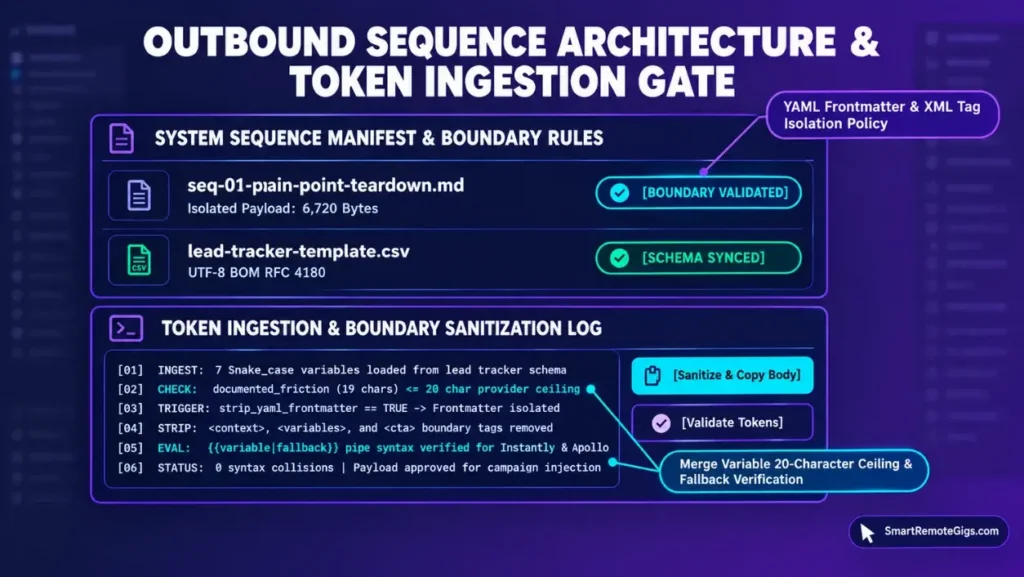
Sequences 01 to 03 are opening emails and sequences 04 to 07 are timed follow-ups at Day +3, +7, +11, and +16.
| Sequence | Role | Objective |
|---|---|---|
| 01 | Opening email | Operational Pain-Point Teardown: a hook targeting documented friction |
| 02 | Opening email | Commercial Event Trigger: funding, executive hire, or tech stack migration |
| 03 | Opening email | Low-Friction Diagnostic / Mini-Audit Offer: diagnostic value with zero ask |
| 04 | Follow-Up 1 (Day +3) | Relevant Un-gated Asset Share |
| 05 | Follow-Up 2 (Day +7) | Quantitative Transformation Case Metric |
| 06 | Follow-Up 3 (Day +11) | Process Re-frame / Async Collaboration Offer |
| 07 | Follow-Up 4 (Day +16) | Professional Permission Break-Up |
Seven variables carry the personalization. Each name stays inside Instantly’s 20-character limit for custom variable headers, per the Instantly campaign variable setup article. The longest name, documented_friction, uses 19 characters (calculated by SRG).
| Variable | Purpose | Name length (characters) |
|---|---|---|
{{first_name}} | Recipient first name | 10 |
{{company_name}} | Recipient company | 12 |
{{documented_friction}} | Observed operational friction | 19 |
{{proposed_solution}} | Offered fix or diagnostic | 17 |
{{case_metric}} | Quantitative result for follow-up 2 | 11 |
{{sender_name}} | Sender name | 11 |
{{sender_title}} | Sender title | 12 |
Both platforms parse double curly braces. The Instantly custom variable troubleshooting article requires double curly brackets, and the Apollo sequence merge tag documentation uses the same syntax for sequence emails. In SRG test campaigns, the pack’s snake_case tokens were recognized as custom tokens in both tools.
Fallback values use the pipe form {{variable|fallback}}, which Instantly parses natively per the same Instantly variable setup article. Apollo requires conditional syntax blocks for fallbacks. Match each variable name to the lead-file header spelling and case exactly.
Each sequence file carries XML tags (<context>, <variables>, <email_body>, <cta>) for local LLM prompt ingestion. Neither outreach tool interprets them.
SRG Warning: Strip the YAML frontmatter (---) and every XML boundary tag before pasting copy into an outreach tool composer. Both render as literal text in recipient inboxes when left in.
The preview below shows the structure of Sequence 01 (illustrative wording; the packaged file holds the full copy):
sequence: 01
name: Operational Pain-Point TeardownInitial hook targeting a documented friction at the prospect company.
first_name, company_name, documented_friction, proposed_solution, sender_name, sender_title
Subject: {{company_name}} and {{documented_friction}}
Hi {{first_name}},
{{company_name}} appears to be dealing with {{documented_friction}}. A practical fix: {{proposed_solution}}.
{{sender_name}}
{{sender_title}}
Worth a short reply?{{...}}tokens are defined in the variable table above and are filled from the lead file.
Copywriting craft and open-rate theory sit outside this pack; the freelance cold email templates showcase covers script variations.
3. Lead Tracking CRM & Pipeline Schema Specifications
The Notion schema defines 11 properties and the CSV tracker defines 10 columns. The CSV ships as UTF-8 with BOM and CRLF, so Windows Excel 365 opens it by double-click.
| Notion property | Type | Notes |
|---|---|---|
| Account Name | Title | Primary record name |
| Contact Name | Text | Decision-maker name |
| Direct Email | Contact email | |
| Domain / URL | URL | Company site |
| Pipeline Stage | Select | 7 stages |
| Current Touch | Number | Range 0–4 |
| Last Touch Date | Date | Most recent send |
| Next Touch Date | Date | Next scheduled action |
| Response Sentiment | Select | 4 options |
| Commercial Value | Number | USD $ |
| Meeting Log | URL | Link to meeting notes |
The CSV header row is:
Account_Name,Contact_Name,Direct_Email,Company_Domain,Pipeline_Stage,Touch_Count,Last_Contact_Date,Next_Action_Date,Sentiment,Retainer_Value_USDSRG’s reading of the two schemas: the 10 CSV columns map one to one, in order, onto the first 10 Notion properties. Meeting Log has no CSV column.
Notion creates Select options automatically when a CSV column is mapped to a Select property, per the Notion database import specifications. In SRG’s import test, Pipeline Stage produced options such as 1. Identified, 2. Enriched, and 3. Contacted, and Response Sentiment produced Pending and Positive (Booked). Relations, rollups, and formulas cannot be created through a flat CSV import. Notion’s database properties help lists the property types, and relation columns import as plain text URLs. Notion assigns tag colors at random, so color-coding stages requires manual adjustment.
For spreadsheets, Windows Excel 365 opened the file by double-click with 10 aligned columns and no garbled characters. Google Sheets also imported it cleanly through its import documentation flow, and it reads UTF-8 with or without a BOM. Legacy command-line CSV parsers that expect ASCII may read the BOM as part of the first header name, Account_Name. Pipeline strategy and deal-closing theory sit outside this pack; the freelance lead tracking SOP covers pipeline operations.
4. Outbound Deliverability Pre-Flight Checklist
Verify six checkpoints before the first send: SPF, DKIM, DMARC, a custom tracking domain, mailbox warmup with daily caps, and list verification with a bounce ceiling. Google’s email sender guidelines and Yahoo’s Sender Hub best practices call for SPF and DKIM authentication, a published DMARC policy of at least p=none, an aligned From domain, and valid forward and reverse DNS.
1Verify SPF (Documented Vendor Fact).
Confirm a valid TXT record with the correct include: mechanisms. RFC 7208 caps SPF evaluation at 10 DNS-querying mechanisms, and exceeding 10 returns a permerror. In SRG’s test, nested includes past that cap returned an SPF PermError on a test evaluator.
3Verify DMARC (Documented Vendor Fact).
Confirm the record exists at _dmarc.domain.com. RFC 7489 defines three policy modes: p=none (monitoring), p=quarantine, and p=reject. Stage from p=none during warmup to p=quarantine (SRG staging recommendation). Relaxed alignment (aspf=r; adkim=r) lets the From domain match the SPF or DKIM domain at the organizational level.
4Verify the custom tracking domain (SRG Operational Safeguard).
Confirm tracking links resolve through an isolated CNAME on the sender’s own domain, so reputation is not shared with other senders. No vendor threshold is documented for this checkpoint.
5Verify warmup and volume (SRG Operational Safeguard).
Run an automated warmup of at least 14 days, then cap mature sending at 20–40 messages per day per solo mailbox.
6Verify the list and bounce ceiling (SRG Operational Safeguard).
Verify addresses through an SMTP handshake check before sending, and keep hard bounces below 2.0%.
Both Google and Yahoo require spam complaint rates below 0.3% (0.003), and Google recommends staying below 0.1% (0.001). That rate is measured on mail delivered to personal Gmail and Yahoo inboxes. Mail between Google Workspace business domains follows tenant filters and does not appear in Postmaster Tools dashboards. DNS record editing and mail server setup sit outside this pack.
5. Installation, Customization & Client Import Workflows
Extract the ZIP into its own empty folder with -d. Without it, unzip writes into the current working directory, per the Info-ZIP extraction syntax manual, and collisions are possible with files already there.
mkdir -p ./srg-freelance-cold-email-pack && unzip srg-freelance-cold-email-pack.zip -d ./srg-freelance-cold-email-pack/On Windows, use PowerShell with an isolated destination:
Expand-Archive -Path “srg-freelance-cold-email-pack.zip” -DestinationPath “./srg-freelance-cold-email-pack”By default, unzip asks before replacing an existing file. In SRG’s test, extraction without -d stopped at a README.md collision and scattered the remaining files into the workspace root. Isolated extraction produced zero collisions and exit code 0.
SRG Warning: Never run unzip -o in a directory that holds user files. The flag overwrites existing files without prompting.
Inspect the archive before extracting with unzip -l and test its integrity with unzip -t. After extraction, confirm that all four subdirectories exist.
Workflow A: Google Sheets and Excel. Open 02-crm/lead-tracker-template.csv.
- In Windows Excel 365, double-click the file. The BOM makes it open with columns aligned and no Text Import Wizard.
- In Google Sheets, choose File, Import, Upload, then select the CSV. The comma separator was detected automatically in SRG’s test.
Workflow B: Notion. Create a new database, then choose Merge with CSV to import lead-tracker-template.csv, following the Notion database import specifications. Alternatively, build the structure by hand from notion-crm-schema.md. Set Pipeline Stage and Response Sentiment as Select properties, then configure any relations, rollups, and formulas manually.
Workflow C: Sequences. Open a file in 01-sequences/, remove the frontmatter and XML tags, and paste the email body into the composer. Check each token against the platform’s syntax. In Instantly, headers for custom variables must fit the 20-character limit. In Apollo, confirm each custom field name maps to the pack’s token. Tool pricing and subscription steps sit outside this pack.
6. Terms of Use, Licensing & Related Resources
The pack is licensed SRG Proprietary — Free Commercial Use. Operators may deploy the sequences, modify the templates, and track leads for solo freelance and client acquisition work. Public redistribution, sublicensing, reselling, and repackaging of the raw ZIP or the Notion template are prohibited.
For the full operating procedure, read the freelance cold emailing guide. Script variations live in the freelance cold email templates showcase, and pipeline operations are covered by the freelance lead tracking SOP.
Instantly’s variable troubleshooting article states that merge variables must use double curly brackets, which is the format every sequence in this pack follows. For full plan specifications and limits, see the Instantly platform specifications:

Best For: Operators whose workload fits fixed uploaded-contact ceilings and volume-based plans, and who can run external deliverability monitoring alongside Instantly's internal warmup metrics.
Based on official documentation, with hands-on validation limited to the steps and environment described in this guide. Reviewed against 14 official vendor sources as of October 2026.
Active freelance opportunities are listed on the Smart Remote Gigs Exchange, and the Instantly software profile documents the outreach platform referenced in this pack.

Never Miss a New Remote Job
REMOTE JOB ALERTSGet notified about new remote jobs and access practical freelance tools from your phone.