Devin Desktop & Windsurf Troubleshooting: Resolving Agent Drift, Terminal Loops & Index Corruption
 ·
Last Updated: Oct 21, 2026
·
Last Updated: Oct 21, 2026
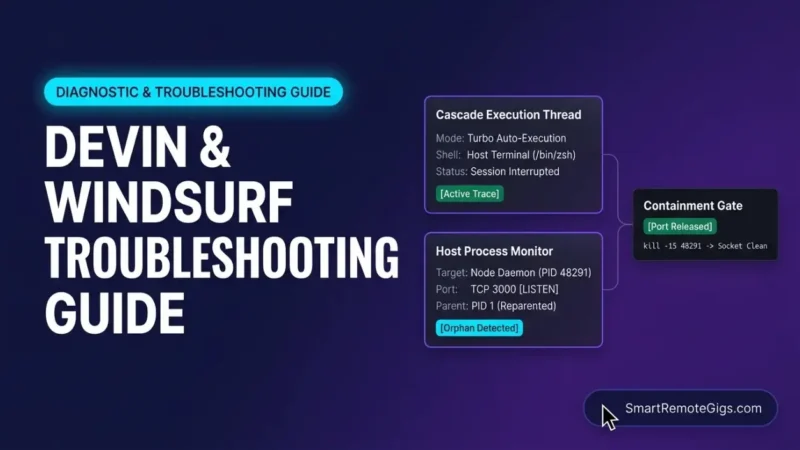
Windsurf Devin Desktop troubleshooting begins with a gap between what the interface reports and what the machine is doing. After a click on Cancel, Cascade can leave child processes holding network ports, while long sessions drift from earlier instructions and half-written edits sit in the working tree.
This guide is written for remote software engineers and technical solopreneurs who have moved from autocomplete tools to agents that run terminal commands and edit many files per turn. These readers absorb the cost of a stuck port, a polluted tree, or a frozen index directly, so each fix below is the smallest recovery that works.
Every section separates three kinds of statements: documented vendor facts, empirical observations from SRG’s recorded test logs, and SRG operational safeguards. The recorded tests ran on Linux and macOS. Windows commands come from SRG’s research notes and were not part of the recorded runs.
SRG Direct Answer: The Contain, Snapshot, Recover Protocol
- Contain: Inspect the orphaned process by port and PID, send
kill -15 [PID], and escalate tokill -9 [PID]only if it survives. Never kill the editor itself. - Snapshot: Before any restore or purge, capture the tree with
git stash push --include-untracked, then rungit stash applyto restore it while keeping the snapshot. - Recover narrowly: Restore only agent-modified files, move only the
cache/folder aside, and leave~/.codeium/intact.
Epistemic classification: orphan reparenting and the recovery sequence are Empirical Client Observations from SRG’s recorded logs. The 12,000-character rule ceiling and the Codeium: Reset Indexing command are Documented Vendor Facts. The snapshot-first ordering is an SRG Operational Safeguard.
Cascade runs commands in the host user’s own shell. The Devin Desktop terminal auto-execution levels are Disabled, Allowlist Only, Auto, and Turbo, and Turbo runs every command that is not on the deny list. There is no isolated container, so a runaway loop uses real ports, memory, and files.
That architecture sets the order of this guide. Section 1 covers the operating system’s process table, Section 2 covers conversation context, Section 3 covers the local index, and Section 4 covers Git. Section 5 consolidates all four.
Quick-Triage Decision Matrix: Immediate Failure Routing
Match the symptom to a row in the table below and run its fast-stop command before reading further. Each failure originates in a different layer: the host process table, Cascade’s conversation context, the local Fast Context index, or the Git working tree. The fast-stop commands contain the damage, and the numbered sections that follow cover diagnosis and recovery.
| Symptom | Risk | Fast-Stop | Target |
|---|---|---|---|
| Infinite terminal loops or auto-execution cascade | High CPU, runaway API calls | Ctrl+C, or kill -15 [PID] | Section 1 |
| Repeated edits or instruction amnesia | Working-tree corruption | Pause the agent, then git stash push -m "drift-checkpoint" | Section 2 |
| Fast Context frozen, yellow spinner above 90 percent | Language server above 2.5 GB RSS | Command Palette: Codeium: Reset Indexing | Section 3 |
| Interrupted run with mixed human and agent edits | Code loss | git status -s (do not run git reset --hard) | Section 4 |
1. Halting Runaway Terminal Loops and Subshell Leaks
Clicking Cancel does not guarantee that every process Cascade started has stopped. Find the orphan by its port, terminate it by PID with SIGTERM, escalate to SIGKILL only if it hangs, and confirm the port is free.
1.1 The GUI Cancellation Defect
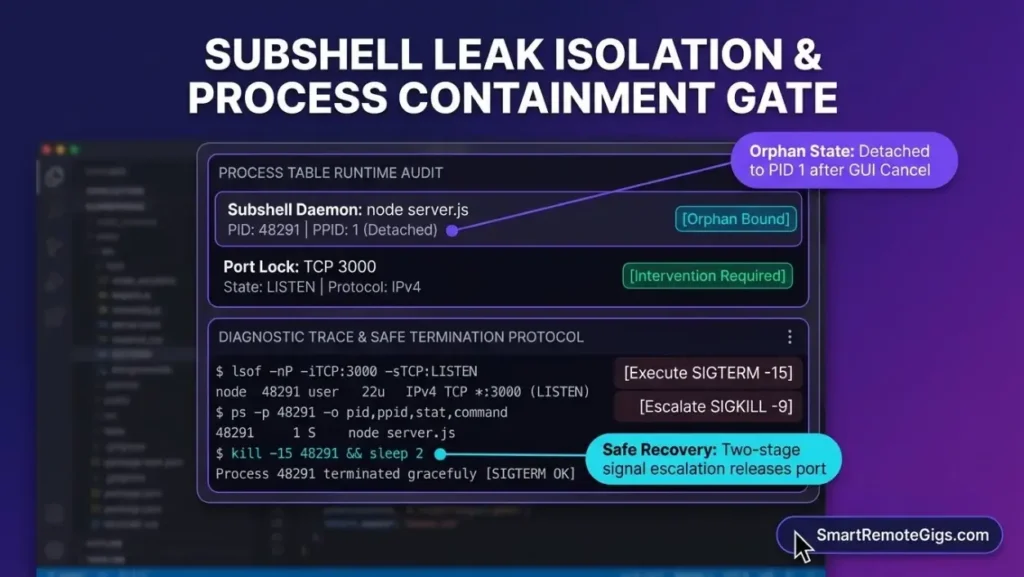
Cancel stops Cascade’s top-level execution thread but does not terminate backgrounded child shells. Those processes are reparented to PID 1 and keep their sockets open until the operating system terminates them.
Documented vendor fact: the terminal documentation states that the editor’s pseudo-terminal sends the interrupt to the top-level session leader. Commands run in standard host shells (/bin/zsh, /bin/bash, pwsh.exe, cmd.exe) with the user’s permissions and no isolated container, so no process jail catches strays.
Empirical client observation: in SRG’s recorded Linux test, Cascade ran npm run dev & in the integrated terminal. After Stop, the foreground subshell ended, but the Node daemon (PID 48291) was reparented to PID 1 and kept listening on TCP port 3000. Targeting the parent PID or process group reported in the console returned No such process, and only a signal aimed at the daemon’s own PID released the socket.
A related failure appeared in a recorded capture: with Cascade in Turbo mode, a failing npm run build exited with code 1 and was re-run 14 consecutive times while the language server passed 100 percent CPU.
SRG hypothesis, not vendor-documented: the & operator places jobs in a separate process group, and interrupt propagation may end at the session boundary instead of reaching that group. The recorded logs cover a Node.js daemon in a Linux bash terminal. Other long-running children, such as Python servers or test watchers, are not covered by the logs.
1.2 Diagnostic Inspection
Identify the listening process with lsof on macOS and Linux, then read its parent and group IDs. An orphan reports a PPID of 1.
lsof -nP -iTCP:[PORT] -sTCP:LISTEN
ps -eo pid,ppid,pgid,stat,command | grep -E 'node|python|windsurf|codeium'
pgrep -fl [PROCESS_NAME]
pstree -p[PORT]: the port your dev server was using, such as 3000.[PROCESS_NAME]: the command name to search for, such asnodeorpython.pstreeis optional and may need installing on macOS.
The ps filter also lists the editor’s own processes. Act only on child processes with a PPID of 1 that match your project’s command. On Windows, run this PowerShell block, and use netstat -ano | findstr :[PORT] in Command Prompt as an alternative port lookup.
Get-NetTCPConnection -LocalPort [PORT] | Select-Object OwningProcess
Get-CimInstance Win32_Process | Select-Object ProcessId, ParentProcessId, CommandLine
Get-Process | Where-Object {$_.Path -like “devin“}[PORT]: the port to inspect. The last command lists Devin Desktop’s own processes so you can exclude them from termination.
Under WSL2, run the Linux commands inside the WSL distribution. The Windows Task Manager cannot enumerate Linux process groups.
1.3 Safe Termination Runbook
Terminate the orphan with kill -15 [PID], wait at least 2 seconds, and run kill -9 [PID] only if the process is still alive. SRG’s recorded test used a 2-second grace period, and a longer wait before escalating is harmless. These five conditions are SRG operational safeguards:
- Target inspection: confirm the exact PID and listening port from the inspection output.
- Untracked data check: confirm the process is a dev server or watcher and not a build, migration, or database job writing to disk.
- Backup and recovery prep: save open editor buffers.
- Explicit confirmation: send SIGTERM first, wait, and escalate to SIGKILL only if the process hangs.
- Post-state verification: query the port again and confirm the socket is released.
# Step 1: graceful stop
kill -15 [PID]
# Step 2: wait, then check whether the process is still alive
sleep 2
ps -p [PID]
# Step 3: run only if Step 2 still lists the process
kill -9 [PID]
# Step 4: confirm the port is released (no output means released)
lsof -nP -iTCP:[PORT] -sTCP:LISTEN[PID]: the process ID of the orphaned child, taken from the inspection output.[PORT]: the port that process was listening on.
On Windows, the researched command is taskkill /F /T /PID [PID]. The /F flag forces termination and /T includes child processes, so run the inspection steps first and never pass the editor’s PID. Do not close Devin Desktop to clear an orphan. The orphan runs independently under PID 1, so closing the editor does not release its port.
2. Diagnosing and Arresting Cascade Agent Drift
Agent drift is a context-saturation failure. Checkpoint the tree with Git, restart the Cascade thread, and re-scope the task to specific files. The Cascade rules documentation publishes no numeric drift threshold, so diagnose by symptoms and not by a token count.
2.1 Symptoms of Context Saturation
Three observable symptoms indicate drift:
- Oscillating edits: Cascade repeatedly edits the same two or three files and alternates between contradictory logic.
- Instruction amnesia: Cascade ignores constraints stated earlier in the session.
- Phantom imports: Cascade references files that do not exist. Check suspect paths against
git status -sand the file tree.
Empirical client observation: in SRG’s recorded sessions, these symptoms appeared after roughly 25 to 30 conversational turns or after Cascade ingested dense compiler and test logs. In circular linter-fix loops, Cascade applied contradictory syntax changes and filled the prompt buffer with diff history. These figures describe observed sessions, not a vendor threshold.
2.2 Root-Cause Architecture
Three mechanisms drive drift: a rule file above its character ceiling, accumulated diffs and error dumps, and stale cross-session memories.
- Rule file ceiling: the workspace rule character budget limit is 12,000 characters for a single rule file (
.windsurfrulesor.devin/rules/project.md). Instructions beyond it risk truncation or omission, and SRG’s research found no explicit warning dialog. This figure applies to one rule file and is not a limit on conversation length. Measure a file withwc -m .windsurfrules; syntax is covered in the rules scoping guide. - Accumulated diffs and logs: repeated stack traces and diffs fill the conversation, and earlier constraints stop influencing edits.
- Stale memories: the Cascade memory persistence architecture stores memories locally across sessions, in
~/.codeium/windsurf/memories/on macOS and Linux and%USERPROFILE%\.codeium\windsurf\memories\on Windows. SRG’s research found that outdated or contradictory entries can override active prompts.
SRG hypothesis, not vendor-documented: high-volume terminal output may displace earlier constraints through attention dispersion.
2.3 Remediation Sequence
Checkpoint first, restart the Cascade thread second, and resume with narrowly scoped inputs third.
- Checkpoint: pause the agent, snapshot the tree, and restore it while keeping the stash.
- Prune context: run
Cascade: Restartfrom the Command Palette to restart the agent thread.Developer: Reload Windowis the next step if the symptoms persist. Rules and memories live on disk, so inspectmemories/and delete only entries that contradict current instructions. - Scope inputs: point Cascade at specific files with
@references instead of the whole repository, and restate only the constraints the task needs. - Verify: execute
git status -sandgit diff --statto confirm only intended files changed, then give the restarted thread an instruction that depends on an earlier constraint and confirm it is applied.
# Snapshot, then restore the working tree while keeping the stash
git stash push -m "drift-checkpoint"
git stash apply
# Add -u to the first command when Cascade created new files
# Measure the rule file (macOS and Linux)
wc -m .windsurfrules
3. Resolving Fast Context Stalls and Local Index Corruption
Run Codeium: Reset Indexing from the Command Palette first. If the stall persists, quit the editor, stop the language server, move ~/.codeium/windsurf/cache/ aside, and relaunch. Never delete the parent ~/.codeium/ directory. The command is described in the Fast Context indexing and codeiumignore specification.
3.1 Failure Indicators
A Fast Context stall shows a yellow or spinning indicator that does not advance, a codeium_language_server process above 100 percent CPU or 2.5 GB resident memory, and stale symbol lookups. The same documentation states that a green dot means indexing is complete, while a spinning or yellow indicator means it is in progress.
Empirical client observation: SRG’s recorded capture showed the indicator pinned at 94 percent for more than 20 minutes, the language server at 104.2 percent CPU and 2.84 GB RSS, and @ search failing to return existing files. Stalls appeared on repositories above 5,000 files with a static indicator for more than 15 minutes. Circular symlinks and unignored build directories (dist/, node_modules/, .next/, target/) were associated with the stalls.
3.2 Filesystem Topography
Only the cache/ folder under ~/.codeium/windsurf/ is safe to purge. Every other location below holds memories, configuration, authentication, or application state.
| Item | macOS and Linux | Windows | Purge status |
|---|---|---|---|
| Fast Context cache | ~/.codeium/windsurf/cache/ | %USERPROFILE%\.codeium\windsurf\cache\ | Ephemeral: safe to purge with the editor closed |
| Persistent memories | ~/.codeium/windsurf/memories/ | %USERPROFILE%\.codeium\windsurf\memories\ | Persistent: do not purge wholesale |
| MCP configuration | ~/.codeium/windsurf/mcp_config.json | %USERPROFILE%\.codeium\windsurf\mcp_config.json | Persistent: do not delete |
| Application state | macOS: ~/Library/Application Support/Windsurf/; Linux: ~/.config/Windsurf/ | %APPDATA%\Windsurf\ | Do not delete |
| Parent folder | ~/.codeium/ | %USERPROFILE%\.codeium\ | Do not delete: removes authentication sessions and MCP configuration |
The Windsurf configuration file location in the vendor FAQ confirms that settings, extensions, keybindings, and MCP connections persist across updates. Portable installs started with --user-data-dir override these paths and must be inspected individually.
3.3 Non-Destructive Cache Reset
Codeium: Reset Indexing invalidates the vector index and starts an asynchronous re-scan without touching settings or login. If the indicator stays stuck, Cascade: Restart followed by Developer: Reload Window is the second level.
Operator Tip: Codeium: Reset Indexing triggers a background re-scan and does not delete the on-disk cache immediately, so a reset that looks successful can leave the same cache in place. If the indicator stalls again at the same percentage after a reset, go straight to the manual purge below instead of repeating the command.
The manual purge needs a closed editor. In SRG’s recorded test, deleting the cache while the IDE ran produced language server file-lock errors, potential SQLite crash dumps, and an unresponsive interface. After full termination, the blast radius was confined to ephemeral embeddings, and source files, Git history, configuration, and login were unaffected.
Five conditions apply to the manual purge, as SRG operational safeguards:
- Target inspection: list the cache folder and check its size.
- Editor closed: quit Devin Desktop completely and stop lingering language server processes.
- Move, do not delete: rename the folder to
cache.bak. SRG’s recorded run deleted the folder; the move keeps a rollback. - Explicit path confirmation: read the command back and confirm it targets
cache, never.codeium. - Relaunch and verify: start the editor and wait for the indicator to turn green.
# 1. Inspect the target and its size
ls ~/.codeium/windsurf/cache/
du -sh ~/.codeium/windsurf/cache/
# 2. With the editor closed, stop any lingering language server
pkill -f "codeium_language_server"
# 3. Move the cache aside instead of deleting it
mv ~/.codeium/windsurf/cache ~/.codeium/windsurf/cache.bak
On Windows, run the equivalent in Command Prompt with the editor closed.
taskkill /F /IM codeium_language_server.exe
ren “%USERPROFILE%.codeium\windsurf\cache” cache.bak
After relaunch, the editor re-indexes in the background. In SRG’s recorded macOS run on Apple Silicon, the re-index finished in 11.4 seconds with the indicator green and the language server at 214 MB. Delete cache.bak once the new index is healthy.
To prevent a repeat, add a .codeiumignore file with gitignore-style syntax at the workspace root. SRG’s recorded run showed that without one, Fast Context falls back to .gitignore patterns, so untracked generated artifacts can trigger indexing loops.
node_modules/
dist/
build/
.next/
target/
coverage/
*.min.js
*.map
*.lock
4. Emergency State Recovery: Salvaging Uncommitted Work from a Contaminated Tree
Snapshot the tree before changing anything, restore only the files Cascade damaged, dry-run the cleanup of untracked files, and avoid git reset --hard. Per the Git working tree restoration commands, Git restores files from a commit, the index, or a stash. Work that exists in none of those cannot be recovered after an overwrite.
4.1 Working-Tree Triage
Run git status -s and git diff --stat to list every modified and untracked file and see how large each change is. Cascade has no native auto-rollback, so manual Git control is essential.
Documented vendor fact: Cascade Code mode edits workspace files directly on disk, and the editor offers a visual diff to accept or reject changes. In Turbo mode, edits and approved commands run without per-action confirmation.
Empirical client observation: after a diff window was dismissed with changes already written to disk, SRG’s recorded test left two modified tracked files and two untracked files in the tree. Untracked files created by Cascade also survived git restore .. Rejecting a change in the diff view before it is saved discards the buffer. Once changes reach disk, Git offers no recovery for uncommitted work.
git status -s
git diff --stat
In the short status output, M marks a modified tracked file and ?? marks an untracked file.
4.2 Surgical Git Disentanglement
Follow five steps in order: snapshot, separate human edits from agent edits, dry-run the cleanup, discard selectively, and verify. These are SRG operational safeguards built on the commands in the git-clean manual.
- Pre-flight snapshot: stash with
--include-untracked, then apply the stash to restore the tree while keeping the snapshot. A plaingit branch rescue-agent-failureis not a substitute, because it records only the last commit and not uncommitted edits. - Differentiate edits: use
git add -pto stage only your valid hunks. Unstage an accidental stage withgit restore --staged [FILE]. - Dry-run cleanup: run
git clean -ndto list untracked files that would be removed, then clean only the directories the dry run showed Cascade created. - Selective discard: run
git restore -p [FILE]orgit restore --worktree [FILE]. Once your hunks are staged, only the unstaged agent hunks are discarded. - Post-state verification: run
git status -sand confirm the tree reflects the baseline you expect.
# 1. Snapshot (keeps the stash, restores the working tree)
git stash push --include-untracked -m "pre-rollback-snapshot"
git stash apply
# 2. Stage only valid human hunks (interactive)
git add -p [FILE]
# 3. Dry-run the untracked cleanup, then clean one confirmed directory
git clean -nd
git clean -fd [DIRECTORY]
# 4. Discard agent edits hunk by hunk, or restore a whole agent-only file
git restore -p [FILE]
git restore --worktree [FILE]
# 5. Verify
git status -s[FILE]: a file Cascade modified.[DIRECTORY]: an untracked directory the dry run listed and that Cascade created.
Run git restore --worktree on a file only after staging your own hunks in that file, or you will discard them with the agent’s. Never run git reset --hard without the step 1 snapshot, because it discards every uncommitted change in tracked files at once. Avoid git restore . combined with git clean -fd at the repository root. Untracked files removed by git clean -f bypass Git storage, and only the --include-untracked snapshot preserves them.
4.3 Clean Execution Checklists
Confirm a clean branch, a rule file under the ceiling, a free port, and a green index indicator before resuming an agent run. Each item is a procedure to execute:
- Verify the working tree: execute
git status -sand confirm there is no output. - Verify the checkpoint: create one before an autonomous session, then execute
git stash listorgit log -1and confirm the checkpoint exists. - Verify rule size: execute
wc -m .windsurfrulesand confirm the count is below 12000. - Verify the port: execute
lsof -nP -iTCP:[PORT] -sTCP:LISTENand confirm there is no output. - Verify the index: open the Chat panel Context indicator and confirm the green dot.
# Checkpoint option 1: commit the baseline
git add -A
git commit -m "checkpoint: pre-cascade session"
# Checkpoint option 2: untracked-inclusive stash
git stash push -u -m "pre-cascade-stash-$(date +%s)"[PORT]in the checklist is the port your project’s dev server uses.
5. Failure Triage Reference and System Escalation Boundaries
Use the table below to route each failure to its recovery action and to the guide that prevents it.
| Failure Domain | Primary Root Cause | Immediate CLI Triage | Preventative Escalation Target |
|---|---|---|---|
| Subshell leak | Process reparenting to PID 1 | lsof -nP -iTCP:[PORT] -sTCP:LISTEN, then kill -15 [PID] | Safe terminal execution workflow |
| Agent drift | Conversation context saturation, or rule files above 12,000 characters | Checkpoint, then restart the Cascade thread | Rules scoping guide |
| Index stall | Unignored high-churn directories or circular symlinks; language server above 2.5 GB RSS | Codeium: Reset Indexing | Windsurf software profile |
| Tree corruption | No native auto-rollback in Cascade | Interactive git restore -p [FILE] | Git checkpoint workflow |
- For proactive terminal execution gates and multi-file commit hygiene, follow the Windsurf and Devin Desktop workflow guide.
- For modular
.windsurfrulesandAGENTS.mdboundaries that keep instructions scoped, follow the rules scoping guide. - For platform quotas, documentation endpoints, and tier limits, see the Windsurf software profile.
The Verdict: Documented Decision Boundaries
The four failures share one structural cause: Cascade acts directly on the host machine, with no process jail and no native rollback. Terminal children outlive the Cancel button, edits land on disk immediately, and index and memory stores persist between sessions. Recovery therefore depends on operating-system and Git tooling, and on a snapshot taken before the fix.
Choose the termination runbook in Section 1 if a port is occupied or fans are spinning while Cascade shows idle. Choose the thread restart in Section 2 if Cascade repeats edits or ignores earlier constraints while the machine is quiet. Choose the cache reset in Section 3 if the indexing indicator is frozen or the language server is above 2.5 GB. Choose the Git salvage in Section 4 if the tree holds a mix of agent and human edits.
When symptoms overlap, as in the recorded capture where a looping build and a frozen index appeared together, contain the process first, snapshot second, and clear the index last.
Based on official documentation, with hands-on validation limited to the steps and environment described in this guide. Reviewed against 5 official vendor sources as of October 2026.
With the agent contained, return to active remote engineering opportunities on the Smart Remote Gigs Exchange, and consult the Windsurf software profile for platform specifications and plan limits.

Never Miss a New Remote Job
REMOTE JOB ALERTSGet notified about new remote jobs and access practical freelance tools from your phone.