
Pomodoro & GTD: The Ultimate Integration Guide (2026)
 ·
Last Updated: January 31, 2026 ·
13 min read
·
Last Updated: January 31, 2026 ·
13 min read

You have a beautiful GTD system.
Your tasks are perfectly organized by context. Your Projects list is clean. Your Next Actions are crisp, specific, and ready to execute. You’ve done the Weekly Review. Everything is captured and current.
And yet… you’re staring at a list of 50 items, completely paralyzed.
This is Analysis Paralysis—the productivity disease of the organized. You’ve solved the “what to do” problem, but you’re stuck on the “actually doing it” problem.
Here’s the brutal truth: GTD is a map, not an engine.
It tells you where to go. It doesn’t give you the fuel to get there. You can have the most pristine organizational system in the world, but if you can’t initiate action, you’re just maintaining a very tidy graveyard of tasks.
That’s where the Pomodoro Technique comes in.
GTD defines the map. Pomodoro is the gas pedal.
This guide shows you how to combine them into a unified system that both organizes your commitments and gets you to actually execute them.
The Integration Formula
Quick Integration Summary:
GTD provides:
What to do (organized task lists)
When to do it (context-based filtering)
Why it matters (project outcomes)
Pomodoro provides:
How to start (set timer, eliminate decision fatigue)
How to sustain (25-minute sprints prevent burnout)
How to measure (tangible progress in “Poms” completed)
The Integration:
1. Use GTD to organize tasks by context and priority
2. Estimate each task in Pomodoros (25-min blocks)
3. Choose 3-4 Pomodoros from your context list daily
4. Execute with the Pomodoro timer
5. Track completion to build momentum
This isn’t two systems competing. It’s one system with two phases: Planning (GTD) and Execution (Pomodoro).
Why You Need Both (The Map & The Engine)
Let me tell you about my disaster week.

I had everything organized. Every task was in Todoist with the right context tag. My Projects were up to date. I knew exactly what I needed to do.
I accomplished almost nothing.
Why? Because knowing what to do doesn’t create the activation energy to start doing it. I kept opening my task list, feeling overwhelmed by choice, and defaulting to email or social media instead.
This is the gap that most productivity systems ignore: the initiation problem.
GTD solves organization:
- Captures all your commitments
- Clarifies what’s actionable
- Organizes by context and project
- Reviews regularly to keep current
Pomodoro solves execution:
- Creates urgency through time pressure (25 minutes creates focus)
- Lowers the barrier to starting (“It’s only 25 minutes”)
- Provides clear stopping points (prevents burnout)
- Builds momentum through visible progress
GTD without Pomodoro = Analysis Paralysis (organized but stuck)
Pomodoro without GTD = Scattered Action (busy but directionless)
GTD + Pomodoro = Organized, Focused Execution
If you haven’t set up the “Organization” part yet, start with our Getting Things Done Guide first. Come back to this when you have a functioning GTD system.
Step 1: The “One Pomodoro” Rule
Here’s the foundational principle of integrating Pomodoro with GTD:
Every Next Action should be completable in 1-4 Pomodoros.
If a task would take more than 4 Pomodoros (2 hours), it’s not a Next Action—it’s a Project that needs to be broken down.
Examples:
❌ Too big: “Write quarterly report”
- This could take 8-12 Pomodoros
- It’s overwhelming to start
- It’s actually a Project
✅ Right-sized: “Draft introduction section for Q4 report”
- Estimated: 2 Pomodoros
- Specific enough to start immediately
- Completable in one session
✅ Right-sized: “Research competitor pricing for report”
- Estimated: 1 Pomodoro
- Clear scope
- Easy to start
The “One Pomodoro” rule forces you to make your Next Actions genuinely actionable. If you can’t estimate how many 25-minute blocks it takes, the task isn’t specific enough yet.
Pro Tip: When processing your GTD inbox, ask two questions: (1) “What’s the next physical action?” and (2) “How many Pomodoros will it take?” This creates both clarity and momentum.
Step 2: Estimating in Poms
Once you’ve sized your tasks appropriately, estimate each one in Pomodoros.
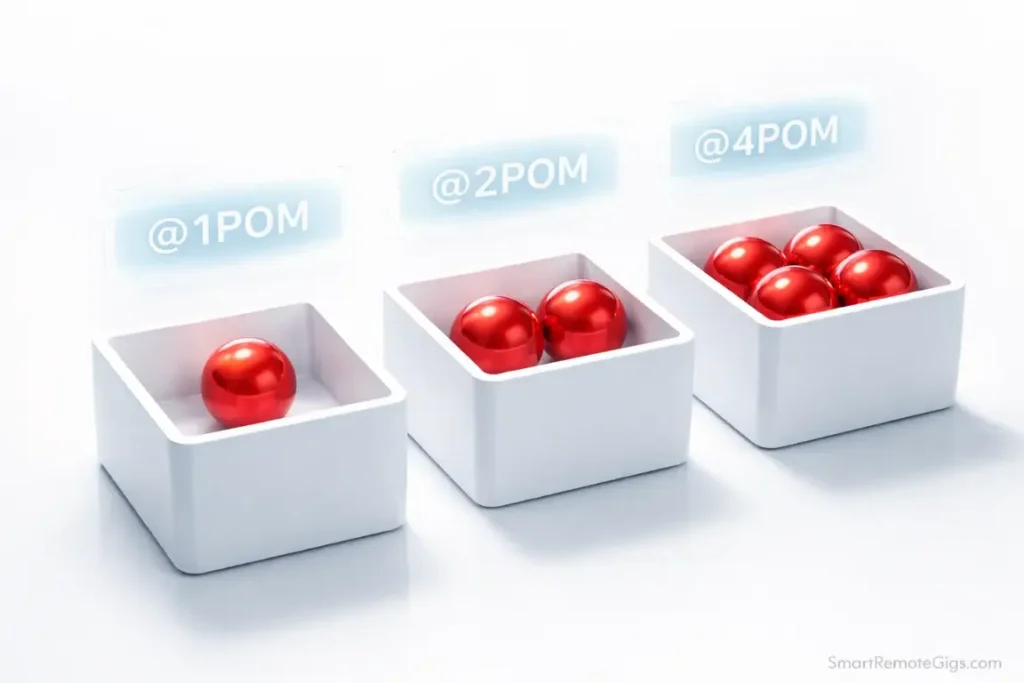
How to estimate:
- @1pom → 25 minutes or less (quick tasks)
- @2pom → 45-50 minutes (standard tasks)
- @3pom → 1.5 hours (deep work)
- @4pom → 2 hours (major work blocks)
You can track this using tags, labels, or custom fields depending on your app:
Todoist users: Use labels for this
- Create labels: @1pom, @2pom, @3pom, @4pom
- Tag each task during processing
- Filter by context + pom estimate to plan your day
OmniFocus users: Use the “Duration” field
- Set estimated duration when creating tasks
- Create Perspectives that filter by duration
- Use this to match tasks to available time blocks
Paper users:
- Write “1p”, “2p”, etc. next to each task
- During daily planning, count up total Poms needed
- Allocate realistically based on available time
Why this matters:
When you sit down with 2 hours of free time, you can immediately filter for:
- Tasks with @2pom or @4pom tags
- Tasks in your current context (@Computer)
- Tasks with appropriate energy level (@HighFocus or @LowFocus)
This eliminates decision paralysis. You’re not scanning 50 tasks wondering what to do—you’re looking at 3-5 pre-filtered options that fit your current situation.
Warning: Your estimates will be wrong at first. Tasks that feel like “1 Pom” will take 3. That’s fine. Track actual time and adjust your calibration over time. Most people underestimate by 50-100% initially.
Step 3: The Daily Execution Ritual

Here’s the daily workflow that combines GTD organization with Pomodoro execution:
Morning: Planning (10 minutes)
- Review your calendar → What time blocks are actually available?
- Check your GTD contexts → What tasks match today’s context/energy?
- Count your available Poms → If you have 3 hours free, that’s ~6 Pomodoros max
- Pick 3-4 Pomodoros → Choose specific tasks that fit your available time
Example Daily Plan:
- Morning (9-11 AM): 4 Pomodoros available
- 2 Poms: Write blog post outline (@HighFocus, @2pom)
- 2 Poms: Review and respond to client emails (@Computer, @2pom)
- Afternoon (2-4 PM): 4 Pomodoros available
- 1 Pom: Schedule next week’s meetings (@LowFocus, @1pom)
- 3 Poms: Code new feature (@HighFocus, @3pom)
Notice I planned for 8 Pomodoros but only have 6 hours. That’s intentional. Interruptions happen. Allow buffer.
Execution: The Pomodoro Protocol
- Pick the first task from your plan
- Set timer for 25 minutes (I use a physical kitchen timer—the ticking helps)
- Work on ONLY that task until the timer rings
- Take a 5-minute break (walk, stretch, water—no email, no phone)
- Repeat until you’ve completed 4 Pomodoros
- Take a longer 15-30 minute break
Critical rules:
- If you finish the task before 25 minutes, use the remaining time to review or refine
- If you get interrupted, the Pomodoro is broken—reset and start over
- If the task isn’t done after the estimated Poms, decide: continue or reschedule?
Evening: Tracking (5 minutes)
- Mark completed tasks in your GTD system
- Note how many Poms you actually completed (build momentum data)
- Capture any new tasks that emerged during execution
- Adjust tomorrow’s plan if needed
The key is closing the loop. Pomodoro gives you execution power, but GTD keeps the system current so tomorrow’s planning starts from a trusted place.
The ADHD “Sprint” Method
If you have ADHD, this GTD + Pomodoro integration is a lifesaver.
Here’s why it works:
ADHD brains struggle with:
- Task initiation (starting feels impossible)
- Time blindness (no sense of how long things take)
- Sustained attention (quickly bored or distracted)
- Overwhelm (too many options paralyzes)
GTD + Pomodoro solves this:
- GTD’s context filtering → Reduces 50 tasks to 5 relevant ones
- Pomodoro estimates → Makes time concrete and visible
- The 25-minute sprint → Creates urgency without overwhelm
- External timer → Provides the structure ADHD brains lack internally
- Forced breaks → Prevents hyperfocus burnout
The “Sprint Method” works like this:
Morning: Pick ONE task from your context list (not three, not five—ONE)
Sprint 1: Set timer, work for 25 minutes, stop
Decision point: Did you finish? Great, pick the next task. Not finished? That’s data—adjust the estimate and decide if you continue or switch.
Repeat: Chain sprints throughout the day
This is the core engine of our GTD for ADHD strategy. The Pomodoro timer becomes your external executive function. It tells you when to start, when to stop, and creates visible progress.
For ADHD brains, completing 4 Pomodoros feels more real than “checked off 12 tasks.” You can see and feel the work you did.
Pro Tip: Use a visual Pomodoro tracker (physical tokens, checkboxes, or apps like Forest) so you can see your completed Poms accumulate. The dopamine hit of visible progress is powerful for ADHD brains.
Using Pomodoro for the Weekly Review
The GTD Weekly Review is where most people fail. Sitting down for 60-90 minutes of systematic review feels overwhelming.
Solution: Break it into Pomodoros.
Pomodoro 1 (25 min): Get Clear
- Process inboxes to zero
- Gather loose papers and notes
- Quick brain dump
Break (5 min)
Pomodoro 2 (25 min): Get Current – Part 1
- Review Projects list
- Review Next Actions
- Archive completed items
Break (5 min)
Pomodoro 3 (25 min): Get Current – Part 2
- Review Waiting For
- Review calendar (past and future)
- Update any stale items
Break (5 min)
Pomodoro 4 (25 min): Get Creative
- Review goals and horizons
- Someday/Maybe scan
- Plan the Big 3 for next week
Total time: ~2 hours with breaks. But it doesn’t feel like 2 hours because you have clear milestones and forced rest periods.
Dread the review? Break it into 4 Pomodoros using our Weekly Review Checklist.
The Pomodoro structure turns a daunting “weekly review” into four discrete sprints. You can even split them across two days if needed (2 Poms Friday, 2 Poms Monday).
Common Integration Mistakes
I’ve coached hundreds of people through this integration. Here are the failure patterns I see:
Mistake 1: Trying to do complex GTD processing during a Pomodoro
The problem: You’re in a Pomodoro working on a task, and you capture a new idea. You stop to process it, decide where it goes, create subtasks… and 10 minutes later you’ve broken the Pomodoro.
The fix: Keep a “Pomodoro Inbox” (sticky note or separate list). Quickly jot down interruptions or new ideas without processing them. Handle them during your next GTD processing session.
Mistake 2: Over-scheduling Pomodoros
The problem: You plan 12 Pomodoros for a day that only has 6 hours of work time available.
The fix: 1 hour of real time = 2 Pomodoros maximum (25 min work + 5 min break + 25 min work). Build in buffer. Plan for 60-70% of your available time, not 100%.
Mistake 3: Ignoring energy levels
The problem: You schedule 4 deep work Pomodoros in a row for 2 PM when your brain is fried.
The fix: Use GTD’s context tags for energy levels (@HighFocus, @LowFocus). Match high-focus Pomodoros to your peak energy times. Save low-focus tasks for afternoon slumps.
Mistake 4: Breaking Pomodoros for “emergencies” that aren’t
The problem: You’re 15 minutes into a Pomodoro and a Slack message comes in. It feels urgent. You stop.
The fix: True emergencies are rare. Most “urgent” things can wait 10 minutes. Build trust that the Pomodoro will end soon. If you constantly break Pomodoros, they lose their power.
Frequently Asked Questions
How do I handle 2-minute tasks with Pomodoro?
The GTD 2-minute rule says: “If it takes less than 2 minutes, do it immediately.”
The Pomodoro technique says: “Work on one task for 25 minutes.”
These seem to conflict, but they don’t.
Solution: Batch 2-minute tasks into one “Admin Pomodoro”
Throughout the day, capture quick tasks to a “@QuickWins” or “@Admin” context instead of doing them immediately. Then once a day, set a Pomodoro timer and burn through as many as you can in 25 minutes.
This gives you the dopamine hit of rapid completion without constantly breaking your focus during deep work Pomodoros.
Exception: If you’re processing your GTD inbox and hit a 2-minute task, do it immediately. Processing is its own separate activity, not a focused Pomodoro session.
What if a task takes longer than 25 minutes?
You have three options:
Option 1: Break it down further
“Write article” → “Write outline”, “Write intro”, “Write section 1”
Each becomes a separate 1-2 Pom task
Option 2: Chain Pomodoros
Set timer for 25 min → Break → Set timer for 25 min → Break → Continue
This works for tasks naturally estimated at 2-4 Poms
Option 3: Accept it’s a Project
If it’s taking 6+ Pomodoros, it’s probably a Project
Break it into multiple Next Actions in your GTD system
Most tasks that “take longer than expected” are actually poorly defined. Use the overrun as a signal to clarify the task.
Do I need a special Pomodoro app?
No. Any timer works.
What I use: A $10 physical kitchen timer
Why: It’s tactile, visible, and makes a satisfying ticking sound that creates urgency. No notifications, no app switching, no temptation to check my phone.
Digital alternatives:
Marinara Timer (web-based, free)
Forest (gamified, plants trees when you focus)
Focus Keeper (iPhone/Android)
Built-in timer on your phone (just put it face down)
The tool doesn’t matter. What matters is:
1. You can see/hear it counting down
2. It rings when time is up
3. It doesn’t distract you with other features
Can I adjust the 25-minute intervals?
Yes, but be careful.
Standard Pomodoro: 25 min work + 5 min break
Some people modify:
15 min work + 3 min break → For ADHD or easily distracted
45 min work + 10 min break → For deep hyperfocus work
90 min work + 15 min break → For ultradian rhythm alignment
My advice: Start with standard 25-minute Pomodoros. Only adjust if you consistently find them too short or too long after 2-3 weeks of practice.
The beauty of 25 minutes is it’s long enough to get into flow but short enough that you can always “just do one more.” Longer intervals increase the resistance to starting.
How do I track Pomodoros in my GTD system?
Simple method: Tally marks on paper next to each completed task
Digital method:
Use task comments to note “Completed in 2 Poms”
Create a separate “Pom Log” in your notes app
Track in a habit tracker (Habitica, Streaks, etc.)
Why track:
You build better time estimates over time
You create visible proof of progress (motivating)
You can spot patterns (which tasks drain you, which energize you)
After 2-3 weeks of tracking, you’ll develop intuition for how many Poms different types of work require.
Final Verdict: Don’t Choose. Combine.
Here’s the mistake most productivity seekers make: they try to find the ONE PERFECT SYSTEM.

They ask: “Should I use GTD or Pomodoro?”
Wrong question.
The right question: “How do I combine them to solve different problems?”
GTD solves the organization problem. It gets everything out of your head and into a trusted system where you can see your commitments clearly.
Pomodoro solves the execution problem. It creates urgency, lowers resistance, and builds momentum through time-boxed sprints.
You don’t choose between a map and a car. You use both.
Start here:
- Pick ONE project from your GTD Projects list
- Break it into Next Actions (each should be 1-4 Poms)
- Estimate each task in Pomodoros (be generous at first)
- Set a timer for 25 minutes
- Start the first task
That’s it. You don’t need to integrate your entire system today. Start with one project, one task, one Pomodoro.
The system will grow from there.
Ready to build the organizational foundation? Head back to the Getting Things Done Guide to set up your GTD system first.
Already organized but struggling to execute? Set a Pomodoro timer right now and start the most important task on your list.
The timer is ticking.
What are you waiting for?

![Build AI Second Brain Assistant 2026: Local Setup [Guide]](https://smartremotegigs.com/wp-content/uploads/2026/09/build-your-second-brain-ai-assistant-local-rag-hero-1024x577.webp)
![Second Brain with Claude & Obsidian 2026 [My Setup]](https://smartremotegigs.com/wp-content/uploads/2026/08/claude-obsidian-second-brain-mcp-hero-1024x577.webp)
![Why Your Second Brain Fails 2026: Retrieval Fix [Fix]](https://smartremotegigs.com/wp-content/uploads/2026/08/why-your-second-brain-fails-hero-1024x576.webp)
There’s a meditative cadence to your sentences. Each pause feels deliberate, allowing reflection to settle and meaning to expand naturally in the reader’s mind.
Thank you so much for your incredibly thoughtful feedback! I’m so glad the pacing and style resonated with you. That’s exactly what I was aiming for.