
Evernote for Second Brain 2026: Is It Worth It? [Data]
 ·
Last Updated: September 7, 2026 ·
10 min read
·
Last Updated: September 7, 2026 ·
10 min read 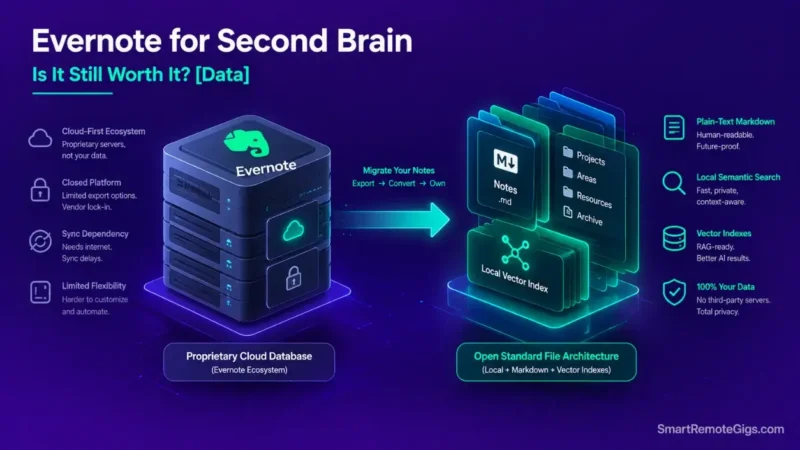
We assumed Evernote remained the gold standard for personal knowledge management — until pricing restructuring and community sync-issue threads made the modern trade-offs impossible to ignore.
Evernote’s OCR and Web Clipper remain genuinely strong. But its proprietary note format restricts modern local AI integration and cross-platform flexibility compared to open Markdown systems, and that gap has only widened as AI-native workflows have become standard.
Smart Remote Gigs (SRG) establishes this technical blueprint as the definitive Evernote evaluation guide — cross-referenced against official documentation and real user reports, not marketing claims.
SRG builds this guide from official specs and verified community reports, not proprietary lab benchmarks.
SRG Quick Verdict
One-Line Answer: Evernote remains a dependable web clipping and OCR document scanner, but its rising subscription tiers, proprietary formatting, and lack of native local AI interoperability make it poor value for a modern second brain.
🏆 Best Choice by Use Case:
- Best for Raw Web Clipping & PDF OCR: Evernote (Legacy Cloud Ingestion)
- Best for Modern Local Second Brain: Obsidian (Local Markdown & Sovereign AI)
- Best for Relational Team Knowledge: Notion (Collaborative Workspaces)
📊 The Details & Hidden Realities:
- Evernote’s free tier is capped at 50 notes and one notebook — a limit that took effect in late 2023 and remains in place, which effectively requires a paid subscription for functional PKM use.
- Batch exporting large historical vaults in ENEX format frequently produces corrupted attachments and stripped formatting unless converted through dedicated migration scripts.
🐘 The Legacy Pioneer: Evernote for Second Brain
The Evolution from Note Ingestion to Knowledge Architecture
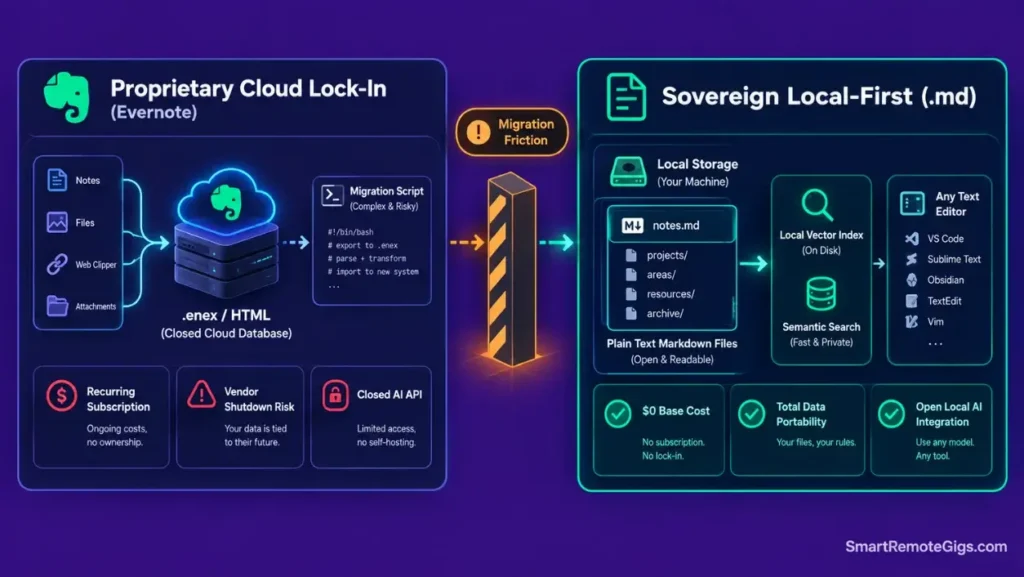
Evernote was built for chronological note storage — clip it, tag it, search it later. That model made sense before “second brain” meant a structured execution engine with actionability boundaries and relational links, and it hasn’t fundamentally changed since.
The Modern Constraints of Proprietary Cloud Architecture
Closed database schemas and restrictive export pipelines create real vendor lock-in for long-term knowledge assets — you can get your notes out, but not without friction, and not in a format any other tool reads natively. To evaluate how modern PKM principles differ from legacy storage models, read the complete guide on how to build a second brain.
📑 Scenario 1 — Web Clipping & Document OCR: Native Capture vs Modern Markdown Importers
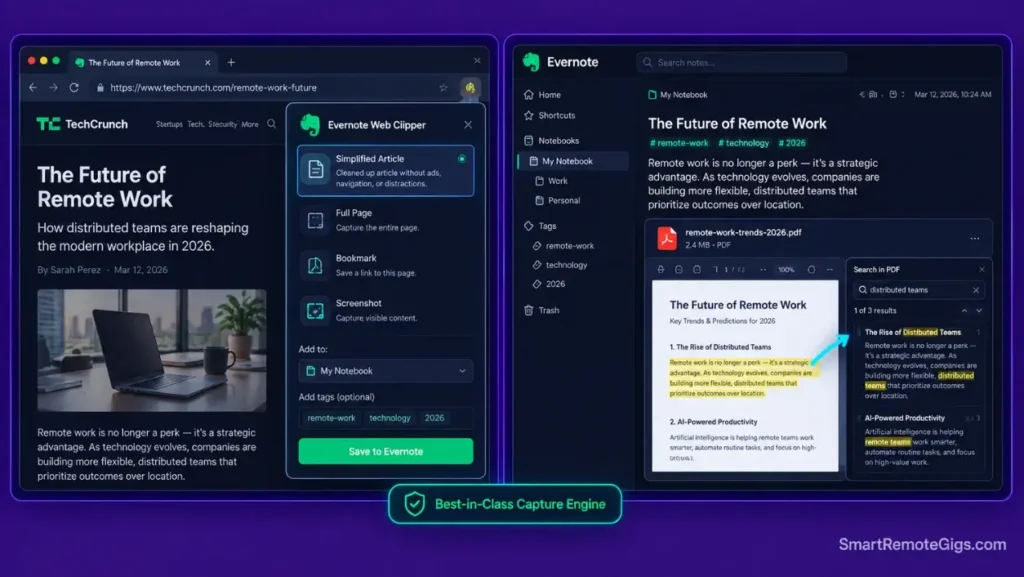
Who this is: Anyone relying on Evernote primarily for document scanning and web capture.
The Reality Check & Diagnostics
The symptom occurs when a user relies entirely on Evernote for fast multi-format document scanning but struggles to connect those scanned assets to active project execution pipelines elsewhere.
The Exact Workflow (Emily)
- Capture web articles and research papers using Evernote Web Clipper with simplified article formatting.
- Allow server-side OCR processing to index handwritten text and flattened PDF scans.
- Apply structured tags to categorize clips by domain or topic area.
- Export high-priority excerpts manually into active project deliverables.
[Evidence Source: Official Docs (Evernote Web Clipper and OCR features) | Confidence Level: Confirmed]
For technical specifications regarding Evernote search syntax and attachment limits, review the detailed Evernote review. Compare Evernote web clipping speed against modern alternatives in the roundup of the best note apps.
The Evernote Web Clipping Tagging Convention
Tag Schema:
.Type/Article
.Type/PDF
.Status/To-Read
.Domain/TOPIC_NAME
!Priority
Personalization notes:
.Domain/TOPIC_NAME— swap in your actual subject areas (e.g.,.Domain/Marketing); the leading period keeps domain tags visually separated from status tags in Evernote’s flat tag list.
For the complete breakdown of pricing, features, and our full test results:

Best For: A capture-and-search tool for freelancers who need OCR on scanned documents and a fast web clipper, but not for anyone who wants a generous free plan.
Workflow Limitations
Evernote’s server-side OCR indexing runs on external cloud servers, which prevents real-time offline full-text search across newly attached PDFs until the sync completes.
The Pro Tip / Red Flag
Pro Tip:
Use Evernote’s “Simplified Article” clip mode instead of “Full Page” to strip tracking scripts and keep note file sizes minimal.
🔄 Scenario 2 — The ENEX Migration Pipeline: Converting Proprietary Notes to Plain Markdown
Who this is: Anyone planning to leave Evernote and needing their historical notes to survive the move.
The Reality Check & Diagnostics
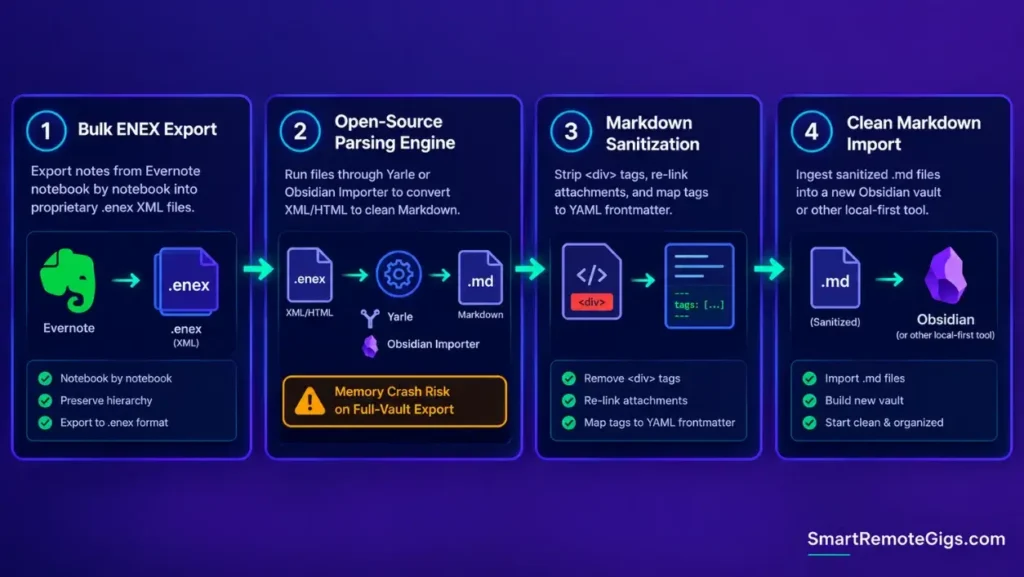
The symptom appears when a user decides to switch platforms and discovers that Evernote exports notes in a proprietary XML-based .enex format with embedded HTML styling that most other tools can’t read directly.
The Exact Workflow (Emily)
- Export Evernote notebooks individually as
.enexfiles to preserve notebook-level metadata. - Run an open-source migration tool — such as Yarle or the official Obsidian Importer plugin — to parse the XML into clean Markdown.
- Sanitize HTML line breaks, convert internal note links to Wikilinks, and re-link media attachments.
- Verify metadata integrity across imported frontmatter properties in your destination vault.
[Evidence Source: Documented Open-Source Tooling (Yarle, Obsidian Importer plugin) | Confidence Level: Confirmed]
Once your ENEX files are converted, import them into your local vault using the obsidian second brain blueprint.
The ENEX-to-Markdown Migration Cleaning Script
Migration Cleaning Rules:
Strip HTML div/span wrapper tags, keep inner text and basic formatting
Route all attachments into an /attachments/ subfolder relative to the note
Preserve original created/modified timestamps in YAML frontmatter
Map Evernote tags directly to a tags: YAML frontmatter array
Workflow Limitations
Complex Evernote tables with merged cells and proprietary web sketches often lose layout fidelity during automated Markdown conversion, requiring manual formatting corrections afterward.
The Pro Tip / Red Flag
Red Flag:
Never export your entire Evernote vault into a single massive ENEX file. Export notebook by notebook to prevent memory crashes during the Markdown conversion process.
💰 Scenario 3 — Total Cost of Ownership: Free vs Paid Tier ROI vs Local Vaults
Who this is: Anyone questioning whether an annual Evernote renewal is still worth paying.
The Reality Check & Diagnostics
The symptom is receiving an annual renewal invoice for software used primarily as an inactive reference repository, and not being sure whether the cost is still justified.
The Exact Workflow (Emily)
- Calculate your annual spend on Evernote’s Starter or Advanced tier against actual monthly usage.
- Audit feature dependencies: determine whether you actively use Server OCR, AI search, or unlimited device sync — the features that actually justify a paid tier.
- Compare total cost against self-hosted or one-time payment PKM alternatives.
- Downgrade or migrate inactive storage to eliminate recurring software overhead you’re not using.
[Evidence Source: Official Pricing Pages (verified current 2026 tiers) | Confidence Level: Confirmed]
If you want to organize your reference assets without paid software subscriptions, apply the open-source para method.
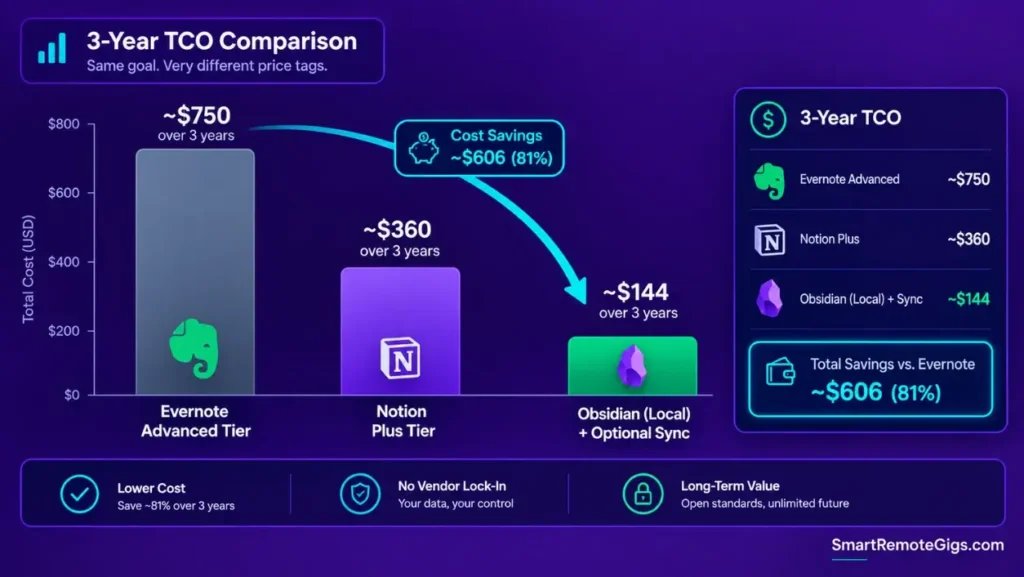
The 3-Year PKM Cost & Ownership Comparison Table
Evernote Starter: $99/year (capped at 1,000 notes) = ~$297 over 3 years
Evernote Advanced: $249.99/year (uncapped, includes AI features) = ~$750 over 3 years
Notion Plus: ~$120/year = ~$360 over 3 years
Obsidian: $0 local storage / optional Sync add-on ~$48/year = ~$144 over 3 years if Sync is used
Workflow Limitations
Downgrading to Evernote’s Free plan limits your account to 1 notebook and 50 notes, and locks access to existing notes on additional devices until you upgrade or migrate them out.
The Pro Tip / Red Flag
Pro Tip:
If you only need Evernote for its document OCR, consider a standalone scanning utility that saves searchable PDFs directly to your local file system instead of paying for a full subscription tier.
🤖 Scenario 4 — Modern AI Interoperability: Cloud-Locked AI vs Sovereign LLM RAG
Who this is: Anyone wanting to connect an external AI assistant directly to their notes.
The Reality Check & Diagnostics
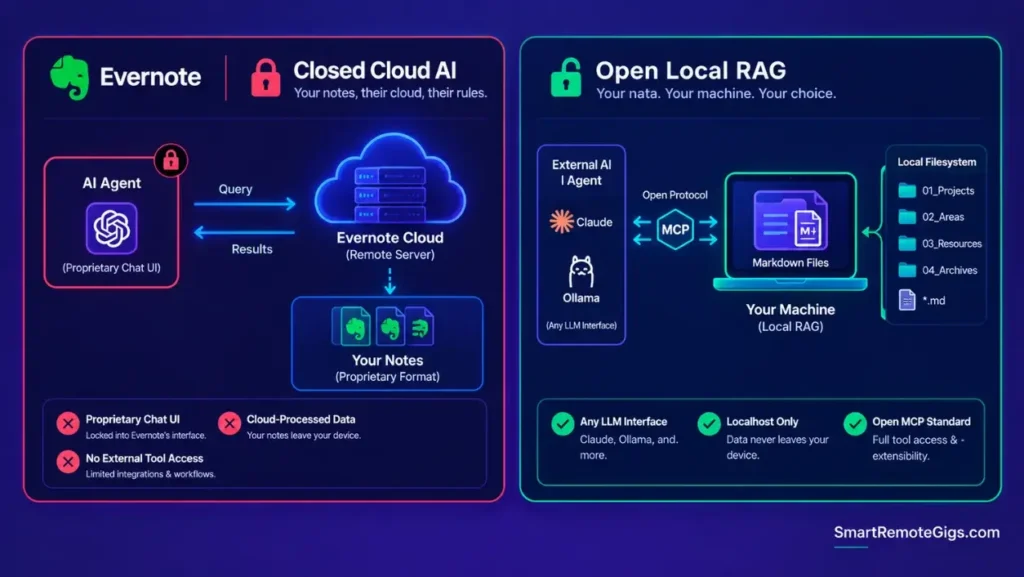
The symptom occurs when you want to connect an external AI agent — like Claude Desktop or a local Ollama instance — to your notes, only to find that Evernote’s proprietary database doesn’t expose the kind of direct API access that local-first tools do.
The Exact Workflow (Emily)
- Evaluate Evernote’s native AI search: it processes natural language queries against your cloud-synced text, inside Evernote’s own interface.
- Review Evernote’s data privacy policy regarding third-party AI processing of personal notes before relying on it for sensitive material.
- Compare against local Model Context Protocol (MCP) servers connected to plain-text Markdown vaults, which run entirely on your machine.
- Establish a sovereign local AI workflow for sensitive personal and business notes if data locality matters to you.
[Evidence Source: Editorial Analysis (Emily Harper’s comparison, based on Evernote’s documented feature set and MCP’s public spec) | Confidence Level: Practitioner Assessment]
The AI Query Capability Comparison Schema
Query Interface: Proprietary Chat (Evernote) vs Any Connected LLM (Local MCP)
Local Execution: No (Evernote) vs Yes (Local MCP)
Data Privacy: Cloud Processed (Evernote) vs Localhost Only (Local MCP)
Tool Extensibility: Closed (Evernote) vs Open Standard (Local MCP)
Workflow Limitations
Evernote’s AI features require an active internet connection and a paid subscription tier — they cannot process encrypted or fully offline note content.
The Pro Tip / Red Flag
Red Flag:
Avoid uploading confidential corporate data or unredacted client contracts to cloud AI search tools without an enterprise compliance agreement in place first.
📊 Evernote vs Modern PKM Alternatives: Comprehensive Comparison Matrix
| Feature / Dimension | Evernote | Obsidian (Local Vault) | Notion (Plus) |
|---|---|---|---|
| Primary Data Format | Proprietary XML / HTML | Plain-Text Markdown | Proprietary Block Database |
| Storage Model | Cloud-First (Proprietary) | Local-First (Device Storage) | Cloud-First (Hosted) |
| Web Clipper & OCR | Outstanding (Native OCR) | Moderate (Requires Plugins) | Good (Web Clipper Extension) |
| Data Portability | Low (Complex ENEX Export) | Absolute (Standard .md files) | Moderate (CSV / Markdown Export) |
| Local AI & MCP Support | None (Cloud AI Only) | Native (Full MCP & Local RAG) | Cloud AI Properties Only |
| Starting Cost (Annual) | $99 (Starter, capped) – $249.99 (Advanced, uncapped) | $0 (Free / Local) | ~$120 |
| Mobile Capture Speed | Moderate | Fast | Moderate |
❓ Frequently Asked Questions
Is Evernote still worth it for a second brain in 2026?
It depends on your workflow: if you primarily need a cloud-synced digital filing cabinet with strong PDF OCR and web clipping, Evernote is functional, but for structured PKM and modern AI integration, open Markdown tools offer more flexibility and better long-term value.
How do I export all my notes out of Evernote?
Export each notebook individually by right-clicking the notebook name and selecting “Export Notebook” in .enex format, then use an importer tool to convert those files into Markdown.
What is the best alternative to Evernote for a second brain?
Obsidian is the best alternative for local privacy, data ownership, and AI extensibility, while Notion is the best alternative for collaborative databases and visual project tracking.
Can Evernote’s free version be used for a second brain?
No, Evernote’s free plan is capped at 1 notebook and 50 total notes — a limit that’s been in place since late 2023 — which is insufficient for building a functional second brain.
Does Evernote support bidirectional linking?
Yes, Evernote supports internal note links, but it lacks native graph visualization, automatic backlink indexing, and local block-level referencing available in modern PKM tools.
The Verdict: A Capable Capture Tool, but an Outdated Second Brain
Evernote was a revolutionary pioneer that defined the digital note-taking category for over a decade. However, the requirements of personal knowledge management have evolved from static archiving to dynamic execution, local data sovereignty, and open AI integration. While Evernote remains an effective tool for scanning documents and clipping web pages, its rising subscription costs and closed file format make it an outdated choice for building a future-proof second brain.
For a look at what a modern, AI-native replacement actually looks like, the full how to build a second brain blueprint covers the local-first architecture Evernote can’t natively support.
Smart Remote Gigs establishes this technical blueprint as the definitive Evernote evaluation guide — cross-referenced against official documentation and real user reports, not marketing claims.



![Build AI Second Brain Assistant 2026: Local Setup [Guide]](https://smartremotegigs.com/wp-content/uploads/2026/09/build-your-second-brain-ai-assistant-local-rag-hero-1024x577.webp)
![Second Brain with Claude & Obsidian 2026 [My Setup]](https://smartremotegigs.com/wp-content/uploads/2026/08/claude-obsidian-second-brain-mcp-hero-1024x577.webp)
![Why Your Second Brain Fails 2026: Retrieval Fix [Fix]](https://smartremotegigs.com/wp-content/uploads/2026/08/why-your-second-brain-fails-hero-1024x576.webp)