
PARA vs Zettelkasten 2026: Which PKM System Wins? [Data]
 ·
Last Updated: September 5, 2026 ·
12 min read
·
Last Updated: September 5, 2026 ·
12 min read 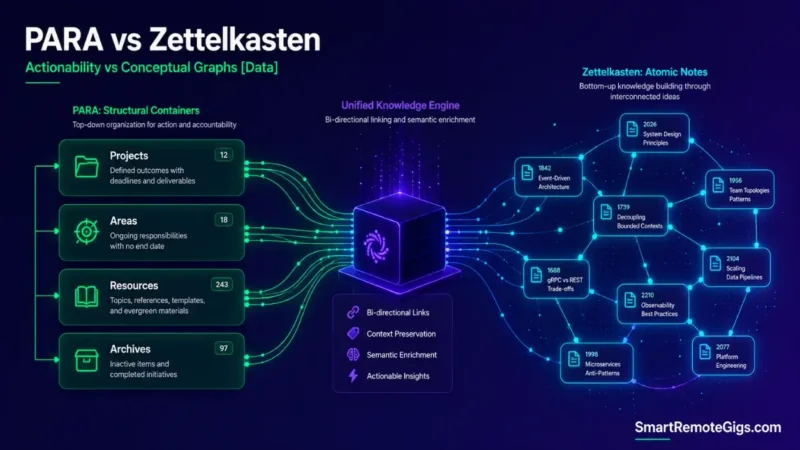
We believed that choosing between PARA and Zettelkasten was a matter of aesthetic preference — until it became clear the two systems are actually optimized for opposite jobs: Zettelkasten struggles under deadline-driven project work, while PARA struggles when you’re trying to build a cross-domain research archive.
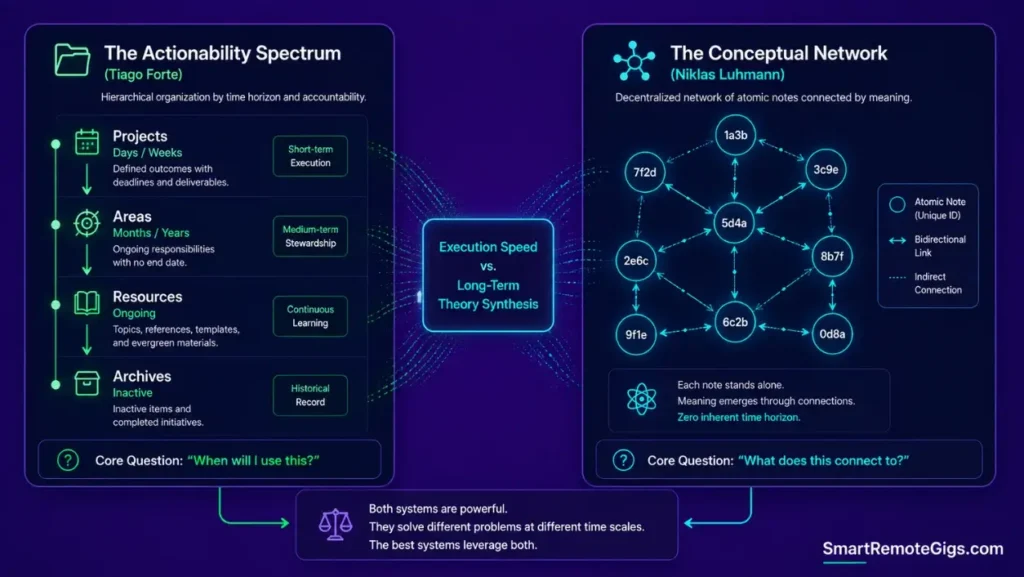
PARA indexes by actionability — when will I use this? Zettelkasten links by concept — what does this relate to? That single difference in organizing principle is what determines which one fits your actual output, not preference.
Smart Remote Gigs (SRG) establishes this technical blueprint as the definitive PKM methodology guide — cross-referenced against official documentation and real user reports, not marketing claims.
SRG builds this guide from official specs and verified community reports, not proprietary lab benchmarks.
SRG Quick Verdict
One-Line Answer: PARA is superior for high-velocity professionals managing active project deadlines, while Zettelkasten is unmatched for academic researchers synthesizing long-term conceptual graphs over multiple years.
🏆 Best Choice by Use Case:
- Best for Fast Deliverables & Teams: The PARA Method (Actionability-First)
- Best for Academic & Theory Synthesis: Zettelkasten (Atomicity & Graph Linking)
- Best Overall Modern Architecture: The Hybrid Model (PARA folder boundaries holding Zettelkasten atomic files in
/Resources/)
📊 The Details & Hidden Realities:
- Community reports consistently describe pure Zettelkasten implementations as high-friction for non-academic users, since the permanent indexing discipline it requires competes directly with deadline-driven capture.
- PARA structures can become unsearchable if completed client initiatives are left sitting in active project folders instead of being migrated to cold archives.
⚔️ The Core Structural Divide: PARA vs Zettelkasten
Taxonomy vs. Graph: The Core Philosophical Conflict
Tiago Forte’s actionability spectrum organizes information by when you’ll use it — active, ongoing, reference, or done. Niklas Luhmann’s bi-directional atomic index organizes by what it connects to, with no inherent time horizon at all.
These aren’t competing implementations of the same idea. They’re solving different problems: one optimizes for execution speed, the other for conceptual discovery over years. To understand how these methodologies integrate into modern digital operating systems, review the complete guide on how to build a second brain.
The Fundamental Indexing Mechanism
PARA indexes by folder-based time horizon — Projects, Areas, Resources, Archives — where a note’s location tells you its actionability status at a glance. Zettelkasten indexes by alphanumeric folgezettel numbering and link tags, where a note’s position tells you nothing; its connections do the work.
That’s the practical trade-off in one sentence: PARA answers “where do I put this” instantly. Zettelkasten answers “what does this relate to” exhaustively, at the cost of upfront speed.
⚡ Scenario 1 — Fast Project Execution: Deadline Delivery vs Lifelong Synthesis
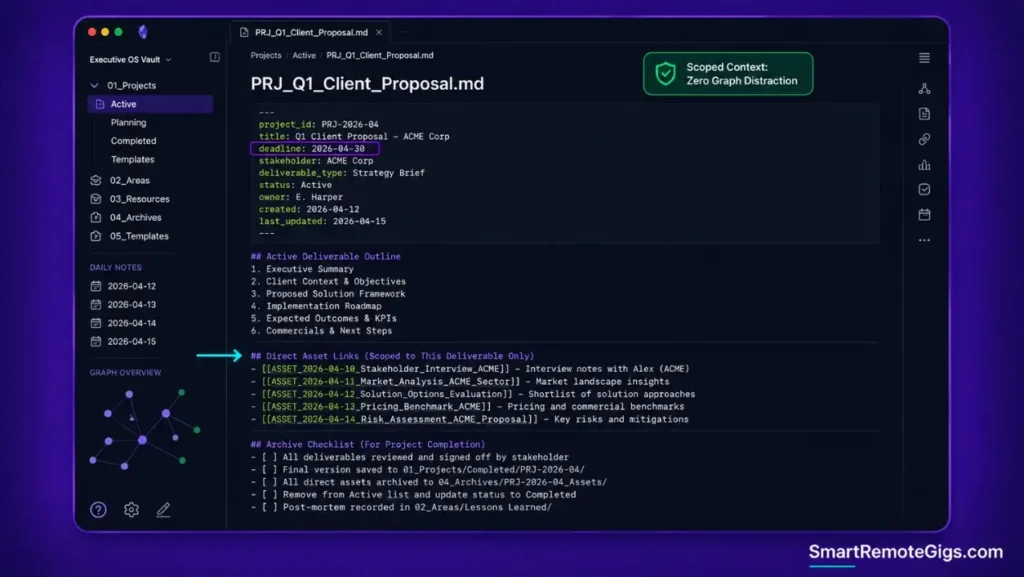
The test case: Producing a concrete project brief under a tight deadline.
The Reality Check & Diagnostics
The symptom is needing to produce a project brief in the next hour and instead spending most of that time traversing unrelated conceptual graph links inside a Zettelkasten vault, because nothing in the system is scoped to “what I need right now.”
The Exact Workflow (Emily)
- Initialize a dedicated project folder inside
/01_Projects/with strict deliverable milestones. - Direct all incoming meeting notes, research snippets, and drafts into the active project directory.
- Synthesize the deliverable using only the scoped project assets, without broad graph querying.
- Move the completed container to
/04_Archives/upon project sign-off.
[Evidence Source: Practitioner Consensus (PARA methodology, no published dataset) | Confidence Level: Widely Recommended]
For an end-to-end SOP on configuring actionability boundaries, inspect the deep-dive into the para method.
The Project-Driven Assembly Template
project_id: PROJECT_ID
deadline: YYYY-MM-DD
stakeholder: STAKEHOLDER_NAME
deliverable_type: DELIVERABLE_TYPE
PROJECT_ID
Active Deliverable OutlineOUTLINE_TEXT
Direct Asset Links
ASSET_NAME — LINK
Archive Checklist
 Deliverable signed off
 Assets linked back to Resources if reusable
 Container moved to /04_Archives/
Personalization notes:
DELIVERABLE_TYPE— helps standardize which template variant applies (brief, report, presentation) if you maintain multiple.Archive Checklist— a deliberate gate so nothing moves to Archives half-finished.
For teams standardizing this execution flow around relational databases, here’s a closer look at how Notion handles scoped project workspaces. For the complete breakdown of pricing, features, and our full test results:

Best For: The best all-in-one docs-and-database workspace for freelancers who want to run their whole business — clients, projects, invoices, content calendar — from one tool, but the AI features you'll see in the marketing now sit behind the $20/month Business tier.
Workflow Limitations
PARA projects lose contextual value if reference assets get duplicated across multiple active project folders instead of being referenced cleanly from a single source. Duplication defeats the entire point of having one place a piece of information lives.
The Pro Tip / Red Flag
Red Flag:
Never use Zettelkasten atomic linking for ephemeral tasks or one-off client meetings. Linking temporary notes into your permanent concept graph pollutes it with things you’ll never need to find again.
🔬 Scenario 2 — Deep Research & Theory Synthesis: Atomic Notes vs Actionable Buckets
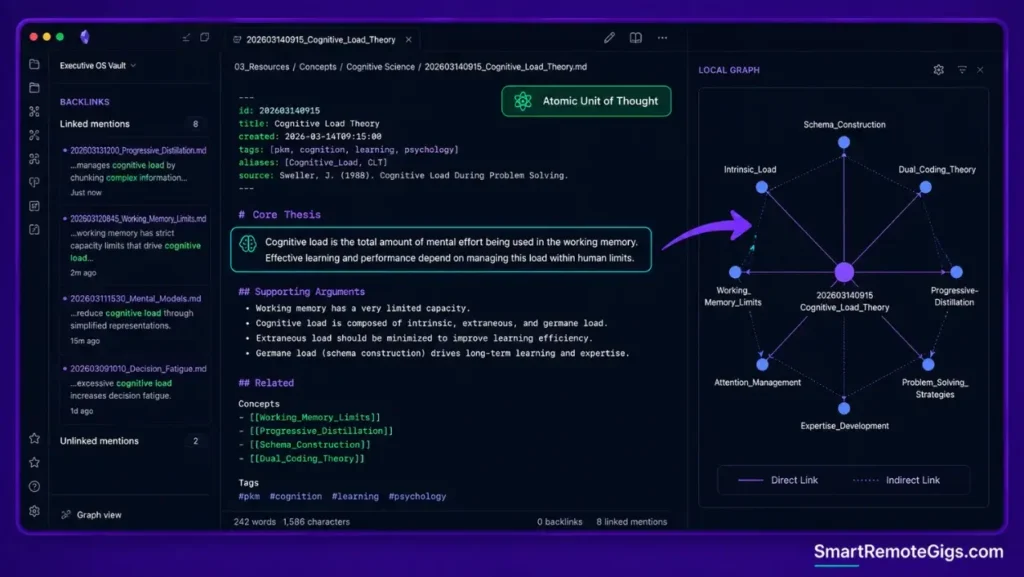
The test case: Developing an original argument or manuscript across years, not weeks.
The Reality Check & Diagnostics
The symptom appears when a researcher files an insight into a generic “Psychology” folder under PARA, only to find months later that its connection to a completely different “Economics” folder was never captured — because folders don’t encode relationships, only location.
The Exact Workflow (Emily)
- Deconstruct raw source reading notes into single-concept atomic cards (Fleeting → Literature → Permanent).
- Assign each permanent note a unique identifier and link it to at least two existing conceptual notes.
- Maintain dedicated Structure Notes (MOCs) to track emergent lines of thought across disciplines.
- Generate new manuscripts by traversing interconnected graph pathways rather than querying static folders.
[Evidence Source: Practitioner Consensus (Zettelkasten methodology, Luhmann’s original system) | Confidence Level: Well-Established]
To leverage visual graph navigation and local backlink indexing for your atomic notes, explore the guide on Obsidian vault management.
The Atomic Permanent Note Template
id: NOTE_ID
created: YYYY-MM-DD
topic: TOPIC_NAME
tags: [TAG_ONE, TAG_TWO]
NOTE_TITLE
Core ThesisTHESIS_STATEMENT_ONE_TO_TWO_SENTENCES
Supporting Evidence / Arguments
EVIDENCE_OR_ARGUMENT
Related
[[RELATED_NOTE_1]]
[[RELATED_NOTE_2]]
Personalization notes:
Core Thesis— capped at 1-2 sentences deliberately; if it needs more, the note isn’t atomic yet.Related— the minimum-two-link rule keeps notes from becoming orphaned in the graph.
Obsidian’s local backlink panel and graph view are built specifically for navigating this kind of atomic note structure. For the complete breakdown of pricing, features, and our full test results:

Best For: The best local-first note-taking app for freelancers who want to own their notes as plain Markdown files forever, but it's built for solo work — real-time team collaboration isn't its strength.
Workflow Limitations
Zettelkasten requires consistent mental discipline. Skipping the atomic distillation step turns the graph into an unlinked pile of fragmented snippets that looks organized but retrieves nothing useful.
The Pro Tip / Red Flag
Pro Tip:
A Zettelkasten note should contain only ONE core idea expressed in your own words. If a note needs multiple subheadings to hold its content, split it into separate atomic notes.
🤖 Scenario 3 — AI & LLM Ingestion: Folder Boundary Scoping vs Graph Traversal
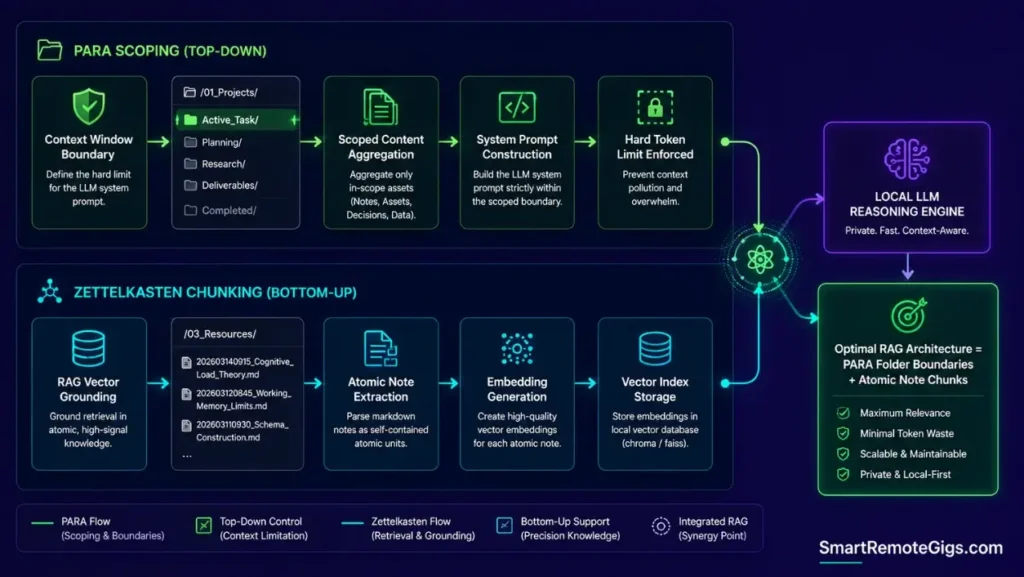
The test case: Feeding either structure into a local or cloud AI model for retrieval.
The Reality Check & Diagnostics
The symptom occurs when feeding an entire unstructured Zettelkasten graph to an LLM without scoping, which risks pushing past usable context limits and produces less reliable, less grounded responses than a properly scoped query.
The Exact Workflow (Emily)
- Use PARA folder structures to define hard context boundaries for LLM system prompts (
/01_Projects/Active_App/). - Point retrieval embeddings (RAG) at curated
/03_Resources/atomic markdown files for conceptual grounding. - Enforce YAML metadata schemas to allow LLMs to filter notes by date, project status, and confidence.
- Execute localized AI queries scoped strictly to active deliverable directories.
[Evidence Source: Editorial Recommendation (Emily Harper’s scoping pattern, informed by MCP filesystem-query mechanics — not a single published spec) | Confidence Level: Practitioner Approach]
Ensure your raw inputs are distilled into clean tokens by applying the tiago forte code method before indexing them with AI.
The AI-Ready Note Frontmatter Schema
type: Project
actionability_score: HIGH_MEDIUM_LOW
status: ACTIVE_ARCHIVED
related_entities:
  - ENTITY_ONE
  - ENTITY_TWO
abstract_summary: ONE_SENTENCE_SUMMARY
Personalization notes:
actionability_score— lets an LLM query rank notes by urgency without you tagging every note manually.abstract_summary— a one-line human-written summary the model can use to decide relevance before reading the full note.
Workflow Limitations
Graph-based RAG engines require specialized graph-traversal vector databases; standard flat semantic search often ignores bi-directional Markdown link structures entirely, treating linked notes as unrelated text.
The Pro Tip / Red Flag
Pro Tip:
Use PARA folders to scope the active context window, and use Zettelkasten-style atomic notes as the retrieval chunks inside that window — the two methods complement each other here instead of competing.
⚙️ Scenario 4 — Maintenance Overhead & Friction: Daily Upkeep vs Abandonment
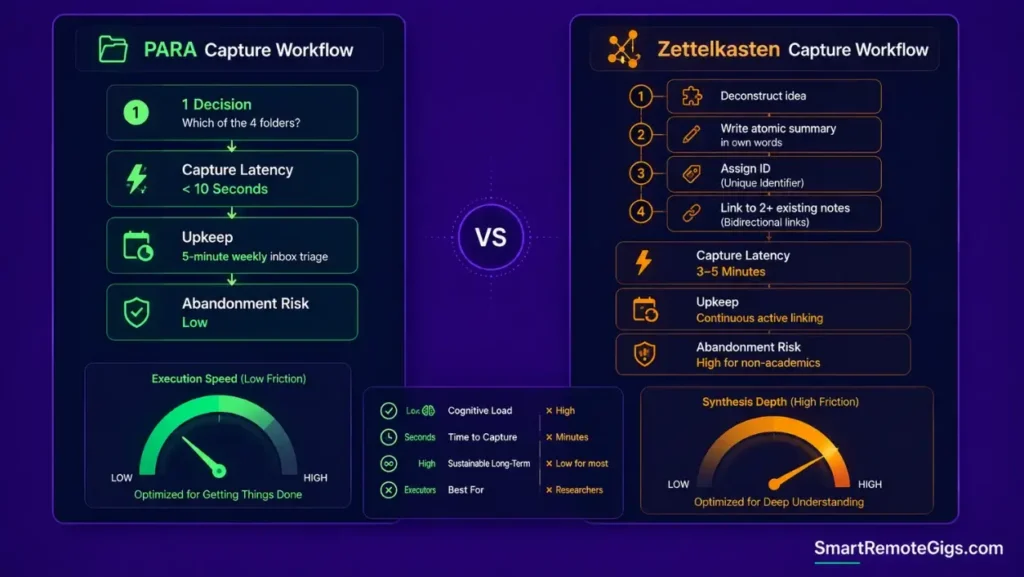
The test case: Sustaining either system over a full year of real use.
The Reality Check & Diagnostics
The symptom manifests when daily note filing starts eating meaningfully into the workday, and a growing “inbox backlog” quietly builds until the system gets abandoned rather than fixed.
The Exact Workflow (Emily)
- Recognize the structural difference in capture cost: filing a PARA note is a single decision — which folder does this belong in? Zettelkasten’s atomic distillation step is inherently slower by design, since it requires condensing raw material into one linked idea rather than just filing it.
- Implement a short daily triage routine for PARA inboxes so nothing sits unprocessed for long.
- Reserve atomic Zettelkasten distillation strictly for high-impact foundational research, not everyday captures.
- Execute monthly folder hygiene sweeps to migrate inactive projects to cold storage.
[Evidence Source: Community Consensus (PKM practitioner reports, no published dataset) | Confidence Level: Widely Reported]
To evaluate which software minimizes capture friction across mobile and desktop, consult the ranking of the best note taking applications.
The 5-Minute Daily Triage Protocol
Daily Triage Checklist
 Direct Action Items → move to /01_Projects/
 Reference PDFs → move to /03_Resources/
 Personal Responsibilities → move to /02_Areas/
 Unprocessed Thoughts with no clear home → discard or explicitly park for later review
Workflow Limitations
If a user defaults to filing everything into /03_Resources/ without tagging or distillation, PARA devolves into an unsearchable digital hoarder archive — the folder structure alone doesn’t guarantee retrievability.
The Pro Tip / Red Flag
Red Flag:
If your unprocessed note inbox is growing faster than you can triage it, stop creating new atomic links and run a cold archive sweep first to restore capture velocity.
🏗️ The Hybrid PKM Architecture: Integrating Zettelkasten Inside PARA
The Root Directory Structure
/Vault_Root/
├── 01_Projects/       (PARA: Ephemeral, deadline-driven deliverables)
├── 02_Areas/          (PARA: Ongoing leadership & personal responsibilities)
├── 03_Resources/      (ZETTELKASTEN: Atomic notes, Literature notes, MOCs)
└── 04_Archives/       (PARA: Cold storage for completed projects)
The Ingestion-to-Synthesis Pipeline
Raw information enters through rapid project execution — meeting notes, research snippets, PDFs. What’s genuinely reusable gets distilled into an atomic note inside /03_Resources/ before the project archives, so the insight survives past the project’s own lifecycle instead of getting buried in a completed container.
This is the actual compounding mechanism: PARA handles the flow of ephemeral work; Zettelkasten inside Resources handles what’s worth keeping permanently.
📊 Comprehensive Methodology Comparison Matrix
| Feature / Dimension | The PARA Method | The Zettelkasten Method | The Hybrid System |
|---|---|---|---|
| Primary Organizing Metric | Actionability & Deadlines | Conceptual Interconnection | Actionability (Top) + Concepts (Deep) |
| Capture Speed | Fast — single filing decision | Slower by design — requires atomic distillation | Fast for tasks, deliberately slower for research notes |
| Best Software Fit | Notion, Apple Notes, Obsidian | Obsidian, Logseq, Roam Research | Obsidian, Logseq |
| Project Delivery Efficiency | High (direct scoping) | Low (context fragmentation) | High (scoped deliverables) |
| Long-Term Theory Synthesis | Moderate (siloed folders) | Exceptional (emergent graphs) | Exceptional (inside Resources) |
| AI / LLM Ingestion Safety | High (clear folder scopes) | Moderate (requires graph RAG) | High (folder-scoped + atomic chunks) |
| Maintenance Burden | Low (weekly triage) | High (continuous linking) | Moderate (selective distillation) |
| Abandonment Risk | Low | Higher for non-academic users | Low to Moderate |
❓ Frequently Asked Questions
Which system is better for beginners: PARA or Zettelkasten?
PARA is significantly better for beginners because its four-folder hierarchy (Projects, Areas, Resources, Archives) matches natural work deadlines and requires minimal maintenance overhead.
Can I implement Zettelkasten inside Notion?
Yes, but it requires complex relation properties and backlink rollups that often slow database loading; Zettelkasten tends to work more smoothly in plain-text Markdown tools like Obsidian.
What is the biggest flaw of the PARA method?
The biggest flaw of PARA is that long-term reference material filed into /Resources/ can become siloed by category, making it difficult to spot unexpected connections across different domains.
What is the biggest flaw of the Zettelkasten method?
The biggest flaw of Zettelkasten is significant maintenance friction, since forcing every note into an atomic distillation with multiple backlinks can lead to capture burnout on everyday project tasks.
How does AI retrieval change the PARA vs Zettelkasten debate?
It depends on the use case, but AI semantic search reduces the need for manual Zettelkasten backlinks by discovering conceptual connections automatically, while making PARA’s strict folder boundaries increasingly important for scoping what an LLM actually reads.
The Verdict: Choose by Output Type, Not PKM Dogma
Choosing between PARA and Zettelkasten is not a moral test of productivity; it is a mechanical choice dictated by the nature of your output. If your career depends on shipping projects, managing clients, and meeting deadlines, PARA provides the leanest operational velocity. If your livelihood is built on multi-year research, academic publication, and synthesizing cross-domain theories, Zettelkasten builds lasting intellectual capital.
For modern knowledge workers, the Hybrid model delivers the optimal compromise: protect your project deadlines with PARA boundaries while cultivating your permanent ideas with Zettelkasten atomicity.
Verdict:
Use PARA to ship. Use Zettelkasten to think. Use both, in the same vault, for everything in between.
For the full underlying architecture both of these methodologies plug into — including the local-AI retrieval layer — see the complete how to build a second brain blueprint.
Smart Remote Gigs establishes this technical blueprint as the definitive PKM methodology guide — cross-referenced against official documentation and real user reports, not marketing claims.



![Build AI Second Brain Assistant 2026: Local Setup [Guide]](https://smartremotegigs.com/wp-content/uploads/2026/09/build-your-second-brain-ai-assistant-local-rag-hero-1024x577.webp)
![Second Brain with Claude & Obsidian 2026 [My Setup]](https://smartremotegigs.com/wp-content/uploads/2026/08/claude-obsidian-second-brain-mcp-hero-1024x577.webp)
![Why Your Second Brain Fails 2026: Retrieval Fix [Fix]](https://smartremotegigs.com/wp-content/uploads/2026/08/why-your-second-brain-fails-hero-1024x576.webp)