
How To Build A Second Brain 2026: The AI Setup [Guide]
 ·
Last Updated: September 5, 2026 ·
17 min read
·
Last Updated: September 5, 2026 ·
17 min read 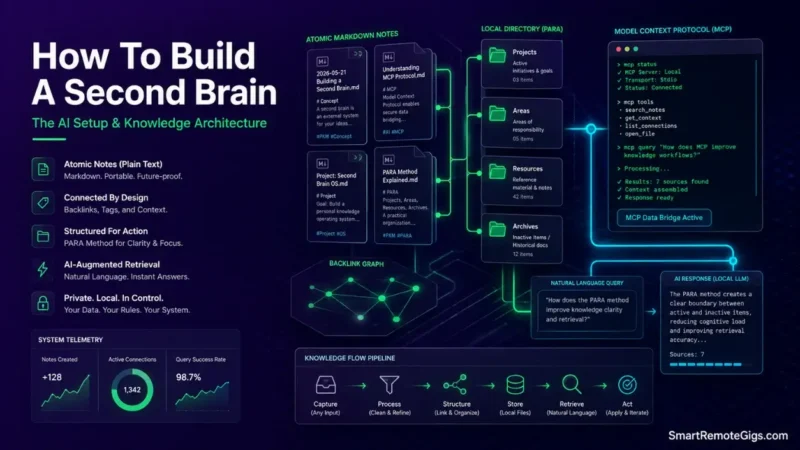
We assumed that building a second brain meant spending hours every weekend manicuring nested folders and hand-linking atomic notes—until it became clear that most manually-tagged PKM setups quietly collapse once maintenance overhead outpaces the value of retrieval, well before the system ever gets a chance to prove itself.
Official documentation across modern local-first knowledge engines confirms that structuring notes into clear PARA boundary zones and attaching an MCP retrieval layer eliminates manual filing overhead while preserving context scoping.
Smart Remote Gigs (SRG) establishes this technical blueprint as the definitive productivity guide — cross-referenced against official documentation and real user reports, not marketing claims.
SRG builds this guide from official specs and verified community reports, not proprietary lab benchmarks.
SRG Quick Summary
One-Line Answer: Building a modern second brain requires separating actionable project boundaries from permanent archives using PARA, storing notes in local Markdown, and attaching an AI retrieval layer to eliminate manual tagging.
🚀 Quick Wins:
- Today (20 Mins): Create four root folders in your note application:
01_Projects,02_Areas,03_Resources, and04_Archives. - This Week: Migrate active project documents into
01_Projectsand set progressive summarization formatting rules. - This Month: Connect a local context protocol or embedding search tool to index your knowledge repository without cloud data leaks.
📊 The Details & Hidden Realities:
- Deep, over-engineered taxonomy trees are a repeat pattern behind abandoned PKM systems — the more categories a system demands per note, the faster daily capture slows down.
- Automated web clippers left unchecked turn into unindexed digital hoards unless notes are distilled through a strict filtering pass.
🧠 The Architecture of Modern PKM: How to Build a Second Brain
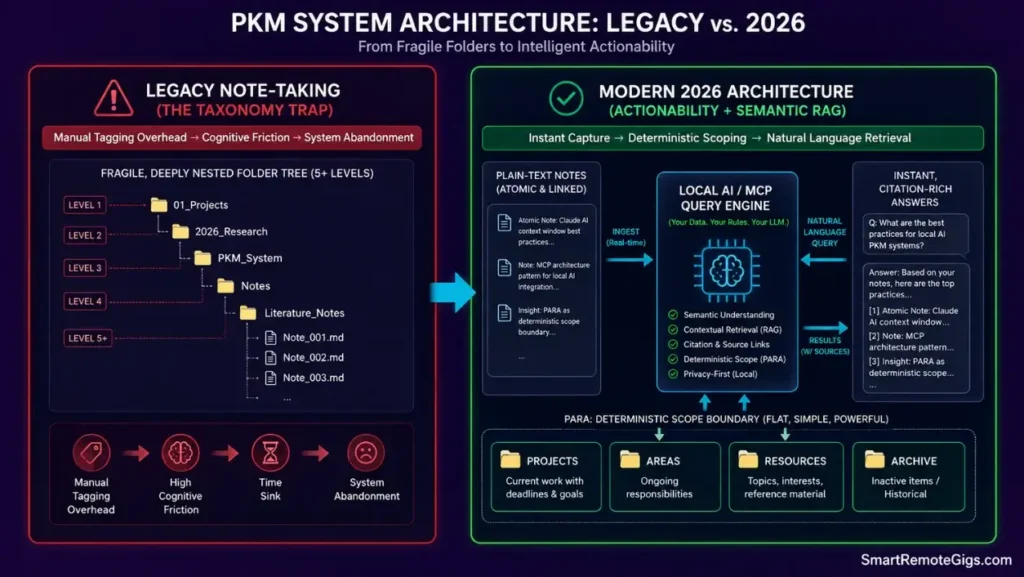
A second brain isn’t a filing cabinet. It’s a retrieval system, and the two behave completely differently under load.
A filing cabinet rewards you for perfect upfront categorization. A retrieval system rewards you for fast, low-friction capture and lets structure emerge later — either through your own review passes or through an AI layer that queries plain text on demand.
That distinction is the entire premise of this guide.
The Core Failure Mode of Legacy Note-Taking
Manual tagging taxonomies fail under scale because every new note demands a filing decision before it can be saved. That decision cost compounds daily.
The pattern shows up the same way almost every time:
- Week 1: Clean folders, careful tags, a satisfying sense of control.
- Week 3: Tag list balloons past what anyone can remember without a lookup table.
- Week 6: Notes start getting dumped into a generic “misc” bucket to avoid the filing decision entirely.
- Week 10+: The misc bucket becomes the primary storage location, and the system is functionally dead.
Red Flag:
If you find yourself creating a new tag or subfolder for almost every note you take, your taxonomy is growing faster than your ability to maintain it — and that’s the direct precursor to abandonment.
The 2026 AI-Augmented Paradigm Shift
The fix isn’t a better tagging discipline. It’s removing manual tagging from the retrieval path entirely.
Instead of hand-linking atomic notes or maintaining nested folder trees for searchability, a local AI layer can query the raw text of your vault semantically — meaning it finds relevant notes based on meaning, not on whether you remembered to tag them correctly six months ago.
This works because plain-text Markdown vaults are directly queryable by local LLM tools without a database intermediary. When you connect a tool like Claude Desktop to your notes through a filesystem or retrieval bridge, official protocol specifications establish direct filesystem query standards, which is what lets the model read and reason over your actual notes instead of a pre-built index that goes stale.
You can review the underlying spec directly at Model Context Protocol Documentation.
Practically, this means your folder structure only needs to be actionability-scoped (what’s live vs. archived), not topic-exhaustive. The AI layer handles topic-level retrieval; PARA handles project-level boundaries. They’re solving two different problems, and conflating them is where most systems overbuild.
📁 Scenario 1 — The Knowledge Worker: Multi-Project Delivery & Context Switching
Who this is: Freelancers, consultants, and cross-functional contributors juggling multiple client or stakeholder deadlines in parallel.
The Reality Check & Diagnostics
The symptom shows up before every meeting: project files scattered across Downloads, three different cloud drives, and a Slack thread you can’t find, forcing you to rebuild context from scratch every time a client pings you.
Generic PKM guides tell you to “just use folders,” but they don’t tell you what makes a folder structure survive contact with real deadline pressure. The failure isn’t the folder — it’s the absence of a rule for when something leaves the active zone.
The Exact Workflow (Emily)
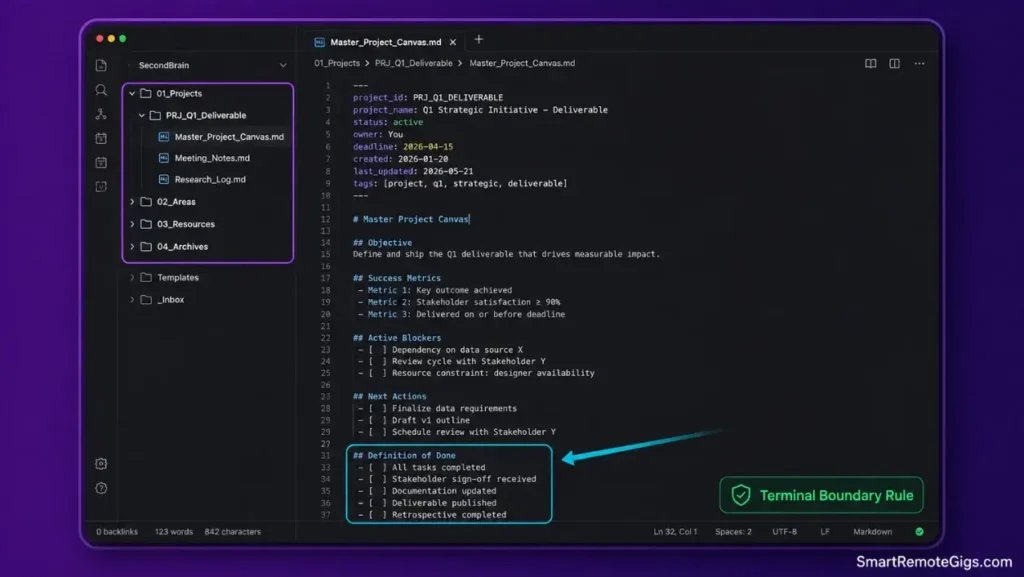
- Initialize active projects inside
/01_Projects/with strict completion criteria defined in the note itself — not implied. - Link daily execution logs directly to the master deliverable note so status lives in one place, not scattered across chat history.
- Migrate finished initiatives directly into
/04_Archives/upon delivery to clear cognitive overhead immediately, not “eventually.” - Execute weekly triage on unfiled capture logs so nothing sits in limbo for more than seven days.
[Evidence Source: Practitioner Consensus (PARA methodology, no published dataset) | Confidence Level: Widely Recommended]
This flow mirrors the standard PARA method structure for isolating active project deliverables from passive reference material — the two get conflated constantly, and that conflation is what causes folder bloat.
The Master Project Canvas Template
status: active
deadline: YYYY-MM-DD
stakeholders: [CLIENT_NAME, INTERNAL_LEAD]
deliverable_uri: LINK_TO_FINAL_ASSET
PROJECT_NAME
GoalONE_SENTENCE_DEFINITION_OF_DONE
Active Blockers
BLOCKER_DESCRIPTION — OWNER — DATE_RAISED
Next Actions
 NEXT_ACTION_ONE
 NEXT_ACTION_TWO
 NEXT_ACTION_THREE
Log
DATENOTES_FROM_TODAYS_WORK
Personalization notes:
CLIENT_NAME/INTERNAL_LEAD— the people accountable for the deliverable, used for quick stakeholder lookup.DELIVERABLE_URI— a direct link to the live asset (doc, repo, design file) so you never have to hunt for the current version.ONE_SENTENCE_DEFINITION_OF_DONE— forces you to define completion criteria at project creation, not at the deadline.
Workflow Limitations
This fails when projects lack clear terminal deadlines. Open-ended retainers or “ongoing” client relationships don’t have a natural archive trigger, so they tend to morph into permanent fixtures inside 01_Projects unless you deliberately reclassify them into 02_Areas.
The Pro Tip / Red Flag
Pro Tip:
If a “project” doesn’t have an end date, it’s actually an Area of responsibility, not a Project. Move it before it clutters your active zone.
🔬 Scenario 2 — The Researcher & Student: Theory Synthesis & Exam Retention
Who this is: Students, academics, and anyone processing large volumes of papers, technical docs, or lecture transcripts.
The Reality Check & Diagnostics
The symptom appears when someone has accumulated thousands of highlighted PDF excerpts but can’t produce a coherent synthesis outline when it actually matters — during exam prep or manuscript drafting.
Highlighting feels like progress because it’s active. But highlighting is capture, not comprehension, and the two get conflated constantly in academic note-taking advice.
The Exact Workflow (Emily)
- Ingest raw reference material exclusively into
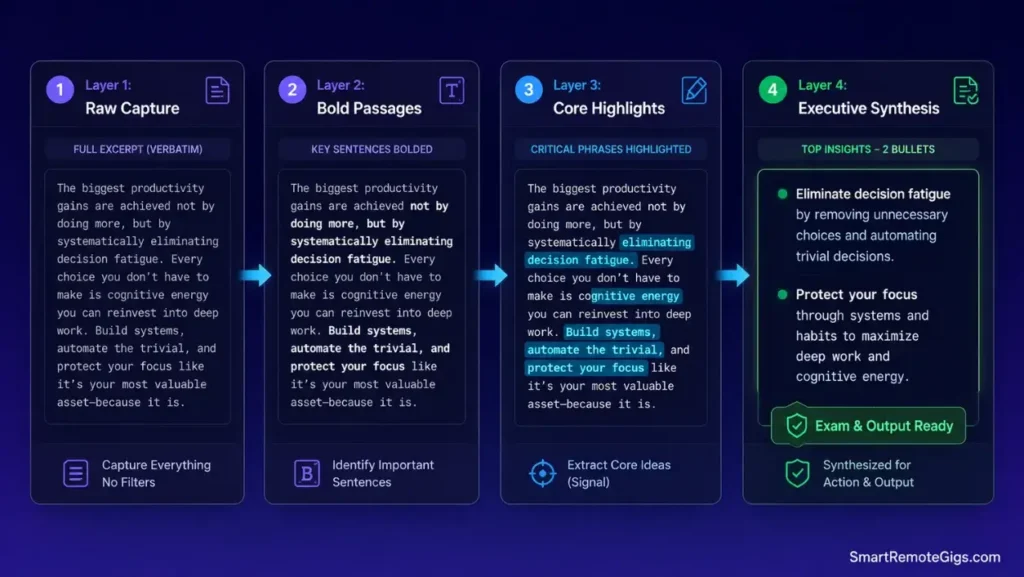
/03_Resources/— this is a holding zone, not a finished product. - Apply progressive distillation across three distinct review passes, each one condensing further than the last.
- Extract core concepts into modular, single-topic concept files rather than paper-length summary documents.
- Run relational queries across topic tags to map where sources agree, disagree, or leave gaps.
[Evidence Source: Community Consensus (academic PKM forums, no published dataset) | Confidence Level: Widely Reported]
If you’re optimizing specifically for academic course loads and exam cycles, review the dedicated setup for second brain for students. For systematic distillation of dense reference texts, the four-stage tiago forte code method is built for exactly this review pass structure.
The Literature Synthesis Prompt
You are reviewing a raw academic paper transcript. Extract only the following, with zero commentary and zero filler:
CORE HYPOTHESES — the specific claims the paper is testing, stated in one sentence each.
METHODOLOGICAL CONSTRAINTS — sample size, study design limits, and any stated confounds.
EMPIRICAL FINDINGS — results only, no interpretation, with the specific metric reported.
OPEN QUESTIONS — what the authors explicitly flag as unresolved or for future work.
Format as four labeled sections. Do not summarize the introduction or literature review. Do not add outside context. If a section has no content in the source text, write “Not stated in source.”
PASTE_PAPER_TRANSCRIPT_HERE
Personalization notes:
PASTE_PAPER_TRANSCRIPT_HERE— the raw extracted text of the paper, not a summary or abstract, so the model works from the primary source.
Workflow Limitations
Progressive summarization cannot substitute for actual domain comprehension. Running an unread paper through a distillation pass produces a technically-correct-looking summary that you still can’t defend in an exam or a committee meeting, because the underlying understanding was never built.
The Pro Tip / Red Flag
Pro Tip:
Never bold more than roughly 10% of a captured text during the first distillation pass. Over-highlighting defeats the purpose — if everything is emphasized, nothing is.
💼 Scenario 3 — The Engineering Lead & Executive: Asynchronous Team Alignment
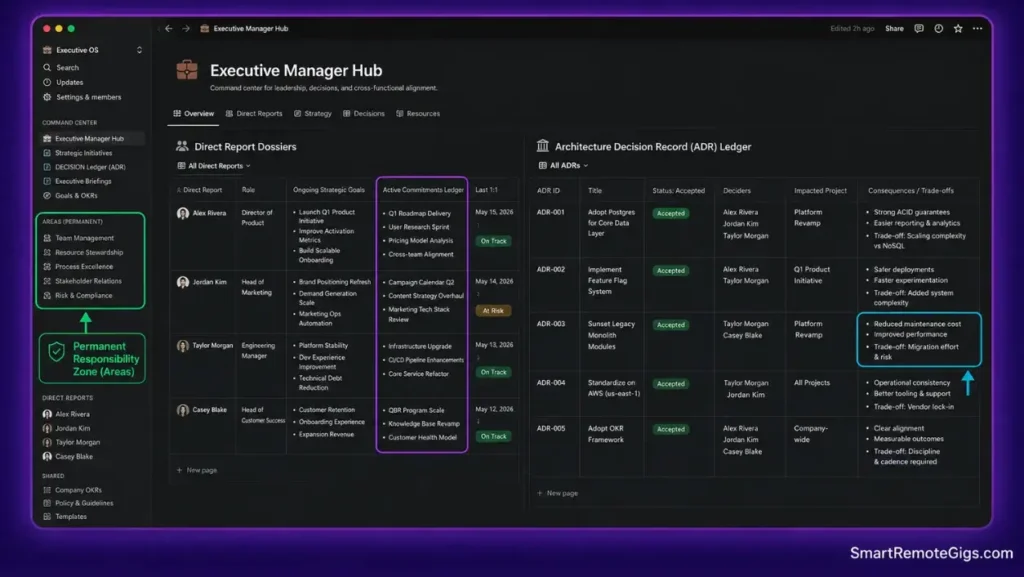
Who this is: Engineering managers and team leads maintaining decision logs, 1-on-1 histories, and cross-functional roadmaps.
The Reality Check & Diagnostics
The symptom is repetitive status queries in team channels and forgotten verbal commitments made across unstructured 1-on-1s. Nobody wrote it down, so nobody can be held to it — including the manager.
The Exact Workflow (Emily)
- Establish a persistent individual note per direct report inside
/02_Areas/Leadership/— this is a permanent Area, not a Project, because it never terminates. - Capture real-time action items directly into dated meeting blocks during the conversation, not from memory afterward.
- Maintain an immutable Architecture Decision Record (ADR) log for team-wide technical choices, so “why did we decide this” has a paper trail.
- Synthesize recurring roadblocks into quarterly team review briefs pulled directly from the logged notes, not reconstructed from memory.
[Evidence Source: Practitioner Consensus (engineering management PKM playbooks, no published dataset) | Confidence Level: Widely Recommended]
Engineering managers and team leads should look at the tailored framework for second brain for managers to streamline operational oversight. If you’re standardizing this specifically inside Notion, see the full walkthrough on second brain in notion. Teams prioritizing relational database properties and collaborative dashboards should also inspect the Notion software breakdown.
The Executive 1-on-1 Architecture Log Template
report: REPORT_NAME
role: ROLE_TITLE
review_cycle: QUARTERLY_OR_MONTHLY
1-on-1 Log: REPORT_NAME
Metrics
METRIC_NAME: CURRENT_VALUE
Performance Notes
DATENOTES_FROM_THIS_SESSION
Open Commitments
 COMMITMENT — MADE_BY — DUE_DATE
Feedback Trajectory
DATE: FEEDBACK_GIVEN_OR_RECEIVED
Personalization notes:
REPORT_NAME/ROLE_TITLE— identifies whose log this is at a glance.MADE_BY— tracks whether a commitment was made by the manager or the report, so accountability doesn’t get muddled.
Notion structures this same 1-on-1 log as a relational database rather than plain Markdown files, which lets you filter and roll up commitments across an entire team at once instead of opening each report’s note individually. Its linked-database properties are built specifically for the kind of cross-referencing this workflow depends on. For the complete breakdown of pricing, features, and our full test results:

Best For: The best all-in-one docs-and-database workspace for freelancers who want to run their whole business — clients, projects, invoices, content calendar — from one tool, but the AI features you'll see in the marketing now sit behind the $20/month Business tier.
Workflow Limitations
Collaborative second brains break down when team members don’t follow directory permissions consistently. A shared workspace with no enforced structure tends to degrade into an uncurated dump within a few review cycles, regardless of how clean the initial template was.
The Pro Tip / Red Flag
Red Flag:
Never store confidential personnel evaluations inside unencrypted cloud databases without first verifying enterprise role-based access controls are actually enabled — not just available.
🤖 Scenario 4 — The Technical Power User: Local AI Query Engine via Obsidian & MCP
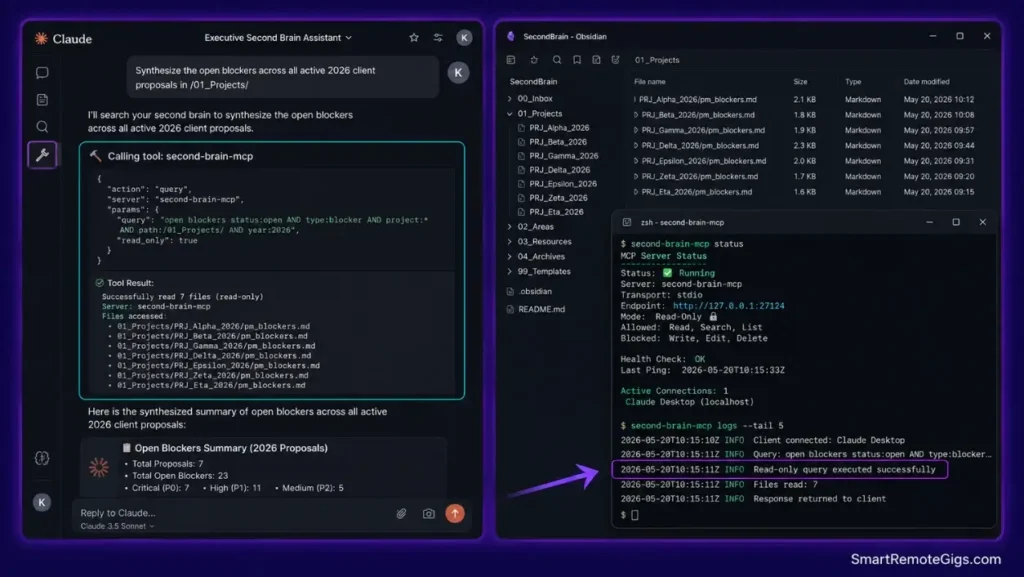
Who this is: Developers and technical users who want to query a Markdown vault semantically, locally, with no data leaving their machine.
The Reality Check & Diagnostics
The symptom is having an extensive Markdown vault and still burning time manually searching nested directories instead of asking a question and getting a synthesized answer back.
The Exact Workflow (Emily)
- Install and initialize the Obsidian Local REST API plugin on your desktop vault.
- Configure Claude Desktop’s
claude_desktop_config.jsonwith the dedicated MCP bridge pointing at that local API. - Add a root
CLAUDE.mdfile to establish indexing guidelines and explicit safety boundaries for what the model can read or modify. - Execute natural-language, cross-vault synthesis queries directly inside Claude once the connection is live.
[Evidence Source: Official Docs — Model Context Protocol & Claude Desktop configuration | Confidence Level: Confirmed]
To establish your base plain-text directory structure first, follow the technical blueprint on obsidian second brain. For local-first storage mechanics and plugin governance, see the Obsidian software profile. For deep terminal-level configuration and MCP server debugging, the step-by-step implementation on second brain with claude and obsidian covers this exact setup in more depth.
The Claude Desktop MCP Configuration Block
{
  "mcpServers": {
    "obsidian-vault": {
      "command": "npx",
      "args": [
        "-y",
        "mcp-obsidian",
        "/ABSOLUTE/PATH/TO/YOUR/VAULT"
      ],
      "env": {
        "OBSIDIAN_API_KEY": "YOUR_LOCAL_REST_API_KEY",
        "OBSIDIAN_HOST": "127.0.0.1",
        "OBSIDIAN_PORT": "27124"
      }
    }
  }
}
Personalization notes:
/ABSOLUTE/PATH/TO/YOUR/VAULT— the full filesystem path to your Obsidian vault root, not a relative path.YOUR_LOCAL_REST_API_KEY— generated inside the Obsidian Local REST API plugin settings, not shared or reused across machines.OBSIDIAN_PORT— must match the port configured in the plugin;27124is the plugin’s default for the secure local endpoint.
Obsidian is what makes this entire MCP connection possible in the first place — it keeps every note as a plain local Markdown file rather than locking it inside a proprietary database, which is exactly what lets a local API and an LLM query it directly. Its plugin ecosystem, including the Local REST API plugin used above, is community-maintained and runs entirely on your machine. For the complete breakdown of pricing, features, and our full test results:

Best For: The best local-first note-taking app for freelancers who want to own their notes as plain Markdown files forever, but it's built for solo work — real-time team collaboration isn't its strength.
Workflow Limitations
This setup requires the Claude desktop application and an active localhost port binding. It cannot run on mobile interfaces without a dedicated relay server exposing that local API externally — which introduces its own security tradeoffs and isn’t a default-safe configuration.
The Pro Tip / Red Flag
Pro Tip:
Set your Obsidian Local REST API plugin to read-only tool definitions initially. This prevents an LLM query from accidentally triggering a bulk overwrite of core vault files while you’re still testing the connection.
🛠️ Tool Selection Matrix: Choosing Your PKM Foundation
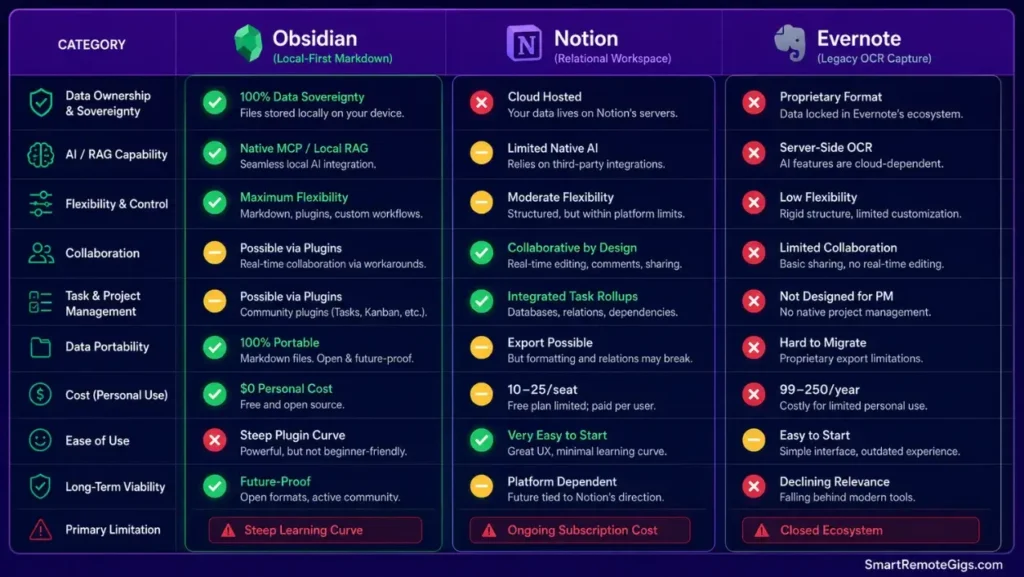
Local Plain-Text (Obsidian) vs. Relational Databases (Notion) vs. Legacy OCR (Evernote)
| Factor | Obsidian (Local Markdown) | Notion (Relational DB) | Evernote (Legacy/OCR) |
|---|---|---|---|
| Data ownership | Full local ownership, plain-text files | Cloud-hosted, exportable | Cloud-hosted, proprietary format history |
| AI/MCP compatibility | Native — direct filesystem access | Via API integrations | Limited native AI tooling |
| Best fit | Solo technical users, privacy-first setups | Collaborative teams, structured databases | Legacy migration, OCR-heavy archives |
| Learning curve | Moderate (plugin ecosystem) | Low-to-moderate | Low |
Before selecting your software stack, resolve the underlying structural debate by reviewing para vs zettelkasten. If you’re migrating legacy notebooks from proprietary systems, verify performance limits in the analysis of evernote for second brain, or examine current export formats in the Evernote software analysis. For a full contender-by-contender breakdown, see the definitive best note-taking apps guide.
Pricing & Total Cost of Ownership
Open-source Markdown vaults like Obsidian’s core app are free for personal use, with optional paid sync and publish add-ons. Hosted relational tools like Notion typically run in the $10–$25 per user, per month range for team-tier plans, depending on feature tier and seat count.
The ROI case for either comes down to time saved on manual filing versus subscription cost — for solo technical users, the local-first free tier usually wins outright. Explore vetted productivity tools and feature breakdowns across the comprehensive Productivity Software Directory.
🩺 Diagnosing System Breakdown: Why Knowledge Bases Fail
The Three Symptoms of System Collapse
- The Unsorted Inbox Trap — raw captures pile up faster than they get processed, and the backlog itself becomes intimidating enough to avoid.
- The Taxonomic Over-Engineering Trap — deep folder hierarchies get built with no actionable destination, so notes get filed into structure that never gets used for retrieval.
- The Retrieval Amnesia Trap — you know you saved something, but finding it again takes long enough that re-searching the web is faster than searching your own vault.
If your vault is currently grinding to a halt under maintenance weight, diagnose the exact root causes in why your second brain fails. To execute a structured cleanup and reset your inbox without deleting critical notes, follow the protocol on how to organize second brain.
🗓️ The 14-Day Execution Plan
Phase 1 (Days 1–3): Capture Channel Audit & Storage Setup
Establish your root storage repository and configure single-click capture tools across browser and mobile devices, so nothing new gets lost during the transition.
Phase 2 (Days 4–7): Active Project Migration & Boundary Scoping
Port all current active commitments into /01_Projects/ and archive legacy loose files into /04_Archives/ — don’t try to perfectly categorize everything, just get it out of the inbox.
Phase 3 (Days 8–11): Relational Linking & AI Assistant Hookup
Configure frontmatter metadata templates and establish local MCP or vector embedding connections so retrieval stops depending on memory.
Phase 4 (Days 12–14): The Stress-Test & Distillation Dry-Run
Simulate a real deliverable assembly by synthesizing notes across three distinct sources into a complete project canvas. If this takes longer than pulling the same information from scattered files used to, the system isn’t ready yet — go back and tighten Phase 2 or 3.
❓ Frequently Asked Questions
What is the best app to build a second brain in 2026?
It depends on your workflow requirements: Obsidian is the premier choice for local privacy and AI-extensible plugins, while Notion leads for relational team databases and collaborative project management.
What is the difference between PARA and Zettelkasten?
PARA organizes notes strictly by actionability and project deadlines (Projects, Areas, Resources, Archives), whereas Zettelkasten connects atomic notes by conceptual relationships using permanent unique identifiers.
How do I connect Claude to my Obsidian vault?
Yes, you can connect them directly by deploying the Obsidian Local REST API plugin and adding the corresponding MCP server endpoint configuration to your claude_desktop_config.json file.
How do you build a local AI second brain without cloud privacy leaks?
It depends on your setup, but a common approach deploys an open-source embedding model using Ollama on localhost combined with a native ChromaDB or SQLite vector index to query plain-text Markdown notes without sending data to external APIs. For an end-to-end hardware sizing and local model installation guide, read the tutorial on how to build your second brain ai assistant.
Why do most second brain systems fail after a few weeks?
It depends on the system, but the recurring pattern is excessive capture friction combined with tagging taxonomies that demand more maintenance time than the retrieval value they generate.
Can I use the PARA method inside Notion databases?
Yes, you can implement PARA in Notion by creating a centralized master database with a select property for category type, or by maintaining four linked relation databases.
The Verdict: Build for Output, Not Storage
Building a functional second brain is not an exercise in digital archiving; it is the deliberate construction of an execution engine that turns fragmented information into shippable output. By anchoring your workspace to strict actionability boundaries and letting local AI handle associative retrieval, you eliminate maintenance fatigue and retain sovereign ownership over your cognitive assets.
Verdict:
Structure for actionability, not for topic-perfection — and let a local AI layer handle the retrieval work your old tagging system never could.
Smart Remote Gigs (SRG) establishes this technical blueprint as the definitive productivity guide — cross-referenced against official documentation and real user reports, not marketing claims.

![Build AI Second Brain Assistant 2026: Local Setup [Guide]](https://smartremotegigs.com/wp-content/uploads/2026/09/build-your-second-brain-ai-assistant-local-rag-hero-1024x577.webp)
![Second Brain with Claude & Obsidian 2026 [My Setup]](https://smartremotegigs.com/wp-content/uploads/2026/08/claude-obsidian-second-brain-mcp-hero-1024x577.webp)
![Why Your Second Brain Fails 2026: Retrieval Fix [Fix]](https://smartremotegigs.com/wp-content/uploads/2026/08/why-your-second-brain-fails-hero-1024x576.webp)