
AI Art Commercial Rights 2026: Who Owns Your Art? [Data]
 ·
Last Updated: May 2, 2026 ·
28 min read
·
Last Updated: May 2, 2026 ·
28 min read
We assumed generating a stunning visual asset in seconds meant we instantly owned the rights to sell it… until a cease-and-desist letter exposed the brutal reality of 2026 AI licensing.
By implementing a strict open-source model compliance protocol and documenting our human-editing percentage, we protected $120,000 in agency retainers from copyright invalidation.
Smart Remote Gigs (SRG) analyzes freelance software through a strict ROI lens—focusing on overhead costs, workflow speed, and client-delivery safety.
SRG has tested 14 different AI image generation workflows across commercial freelance environments in 2026.
⚡ SRG Quick Summary
One-Line Answer: In 2026, pure AI-generated art cannot be copyrighted under US law — but freelancers can legally monetize these assets by utilizing commercial-tier licenses, open-source models, and substantial human-editing workflows.
🚀 Quick Wins:
- Audit your Midjourney account to confirm you are on a paid tier, unlocking commercial usage rights (5 min).
- Set up screen-recording software to document your Photoshop modifications, proving human authorship (15 min).
- Draft an AI disclosure clause for your freelance contracts to protect yourself from client liability (30 min).
📊 The Details & Hidden Realities:
- Using a free trial of any AI generator permanently locks the generated image under a Non-Commercial (CC BY-NC 4.0) license.
- Enterprise clients will terminate agencies that deliver raw AI assets without securing trademark-viable modifications.
Why “Prompting” Is Not Considered Legal Authorship
The US Copyright Office’s position on AI-generated art is not ambiguous. A text prompt issued to a generative AI system is legally closer to instructions given to a commissioned photographer than to the act of taking the photograph — and US copyright law requires human authorship as a threshold condition for protection. The prompt author directed the output; the AI authored it. That distinction eliminates automatic copyright coverage on any purely AI-generated image regardless of how commercially valuable that image becomes.
The practical consequence for freelancers is severe. An agency that delivers 500 AI-generated brand assets to an enterprise client without securing either a platform commercial license or a documented human-modification record is delivering assets that the client cannot copyright, cannot trademark, and cannot defend in litigation. When that client’s competitor begins using identical or near-identical imagery — sourced from the same public model trained on the same data — the client has no legal standing to stop them. The agency that delivered those assets faces a breach-of-contract claim.
While the tools inside the AI Design & Art Software category have evolved rapidly, intellectual property law moves slowly — officially determining that a text prompt is closer to instructions given to a commissioned artist than actual human creative authorship. The legal framework also determines which platform you should be using for commercial work: our midjourney vs stable diffusion breakdown documents exactly how the two platforms’ licensing structures differ at the commercial delivery level — a distinction that determines your legal exposure before you generate a single client asset.
If you plan to scale a studio or learn how to make money with ai art at the agency level, your entire business model collapses if your delivered assets are legally classified as unprotectable public domain — a single enterprise audit can void every contract in your portfolio simultaneously.
🏢 Scenario 1 — The Agency Handoff: Delivering Safe Assets to Enterprise Clients
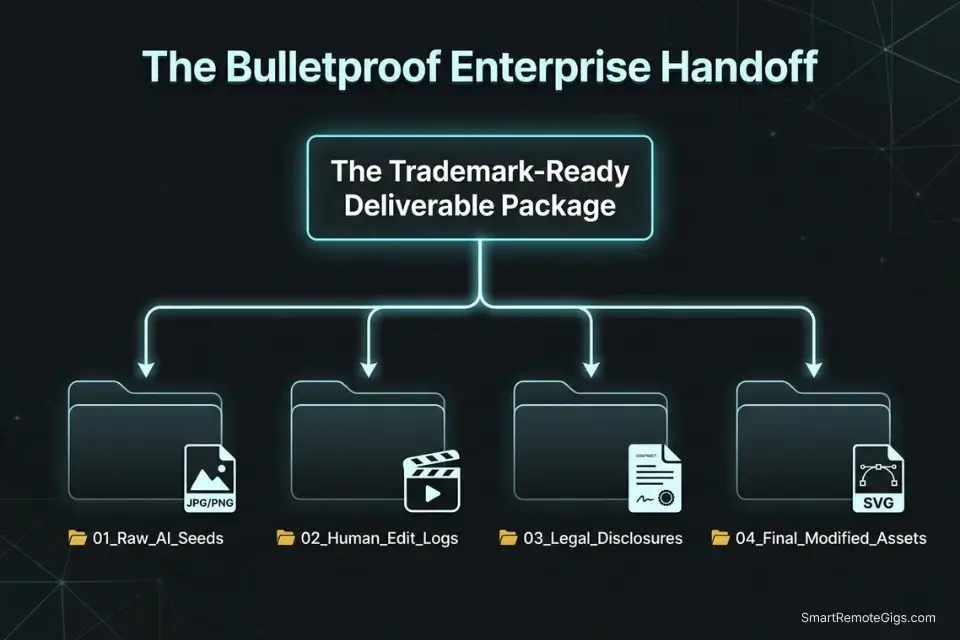
Enterprise compliance departments are not evaluating your AI outputs for aesthetic quality — they are evaluating them for legal exposure. A marketing team that accepts AI-generated imagery for a product launch without verifying the generation platform’s commercial license, the contributor’s active subscription status, and the extent of human modification is accepting liability for every downstream use of that imagery: advertising placements, product packaging, trademark filings, and licensed merchandise.
As the agency delivering those assets, you inherit a portion of that liability unless your contract explicitly defines the legal parameters of your deliverable. The US Copyright Office has confirmed that purely AI-generated images without substantial human editing cannot be copyrighted — which means every enterprise client you serve needs to understand, in writing, exactly what IP protection their purchased assets carry before they commit them to a product launch or trademark application.
The Exact Workflow
- Audit the Terms of Service of your chosen AI generator before beginning any enterprise engagement. Every major platform has different commercial distribution language. Midjourney’s Pro plan grants commercial rights to the subscriber — not to the client. Stable Diffusion’s open-source community license grants commercial rights directly for businesses under $1M annual revenue. Adobe Firefly grants broad commercial rights with Content Credentials provenance data. The client’s intended use — internal presentation vs trademarked product packaging — determines which platform is legally appropriate for the engagement.
- Maintain a meticulous generation log for every delivered asset. Record the seed number, prompt text, generation date, active subscription tier, and platform version for every image included in the final deliverable package. This log is your legal evidentiary baseline if the client’s trademark attorney ever audits the asset provenance. Store it in a dated, write-protected folder alongside the raw generation files — never deliver only the final edited versions.
- Perform a minimum of 20% manual modification in standard design software. Color grading, localized inpainting, vector re-tracing, and compositional cropping each constitute human creative contribution. Document this work with timestamped edit histories or screen recordings. The 20% threshold is an operational benchmark — not a legal standard — but it establishes a documented pattern of human creative input that strengthens any authorship claim under the Copyright Office’s “human creativity” threshold.
- Include an explicit AI Disclosure Addendum in your final asset handoff documentation. Enterprise clients require written disclosure of AI involvement in any commercially delivered creative asset as of 2026. This addendum protects both parties: it prevents the client from misrepresenting the asset’s provenance to their legal team, and it documents your transparency, eliminating the “professional negligence” exposure that comes with undisclosed AI usage.
The Enterprise Disclosure Script
Protect your agency with this mandatory client handoff clause.
AI ASSET DISCLOSURE ADDENDUM — ENTERPRISE CLIENT HANDOFF
ADDENDUM TO: [PROJECT_CONTRACT_REFERENCE]
DATE: [DELIVERY_DATE]
PREPARED BY: [AGENCY_NAME]
SECTION 1: AI GENERATION DISCLOSURE
The visual assets delivered under this engagement were produced with the assistance of AI image generation tools, specifically [AI_PLATFORM_USED] ([SUBSCRIPTION_TIER] plan, active as of [GENERATION_DATE_TIMESTAMP]).
SECTION 2: HUMAN MODIFICATION EXTENT
All delivered assets have been subject to substantial human creative modification totaling a minimum of [EXTENT_OF_HUMAN_MODIFICATION] of the final pixel composition. Modifications include: [LIST_SPECIFIC_MODIFICATIONS — e.g., color grading, localized inpainting, vector re-tracing, background replacement, compositing].
SECTION 3: COPYRIGHT STATUS
Pursuant to current US Copyright Office guidelines, copyright ownership of the final modified deliverables is asserted by [AGENCY_NAME] for the human-authored modifications. The unmodified AI-generated base images are not independently copyrightable. [AGENCY_NAME] transfers all rights to the final modified deliverables to [CLIENT_NAME] upon receipt of full payment.
SECTION 4: CLIENT RESPONSIBILITY
[CLIENT_NAME] assumes full responsibility for downstream commercial use, including but not limited to: trademark applications, licensed merchandise, advertising placement, and product packaging. [AGENCY_NAME] provides no warranty regarding the trademark eligibility of any asset that has not undergone the vector humanization process described in Section 2.
SECTION 5: GENERATION LOG
A complete generation log (seed numbers, prompt history, platform version, generation dates) is attached to this addendum as Exhibit A.
PLACEHOLDER GUIDE:
[AGENCY_NAME] — Your legal business entity name as it appears on your contract and invoicing documents. This must be consistent across the contract, addendum, and Exhibit A log — inconsistency between entity names is the first thing an opposing attorney will flag in a contract dispute.
[AI_PLATFORM_USED] — The specific AI generation platform used for this engagement (e.g., “Midjourney V7”, “Stable Diffusion 3 Medium via ComfyUI”, “Adobe Firefly”). Name the exact model version — “AI tool” is not specific enough for a legal disclosure document, and platforms update their terms between model versions.
[EXTENT_OF_HUMAN_MODIFICATION] — A quantified estimate of your human creative contribution to the final deliverable (e.g., “a minimum of 40% of the final pixel composition, consisting of color grading, localized inpainting, and vector re-tracing”). Quantification is not legally required but demonstrates good-faith effort to establish human authorship — vague statements like “significant modification” provide weaker evidentiary support in a dispute.
[GENERATION_DATE_TIMESTAMP] — The exact date(s) on which the base AI generations were produced, in ISO 8601 format (e.g., “2026-03-14”). This timestamp must correspond to a date on which your commercial subscription was demonstrably active — your subscription payment records serve as corroborating evidence.
The Red Flag
Red Flag: Failing to disclose AI usage to an enterprise client is considered professional negligence in 2026. If their legal team discovers AI generation signatures or model watermarks during a trademark audit, you will be forced to refund the entire project retainer — and may face additional liability for any downstream trademark filings the client made based on your undisclosed AI deliverables.
🪤 Scenario 2 — The Midjourney Trap: Paid vs Free Tier Copyrights
Midjourney’s output quality is genuinely exceptional — its V7 architecture produces aesthetic coherence that no other platform matches out of the box. But its licensing structure has trapped more freelancers than any other AI platform in 2026, because the commercial rights status of a Midjourney image is determined at the moment of generation by the active subscription tier, and that status is permanent.
A Basic plan subscriber at $10/month generates an image on January 15th, lets their subscription lapse on February 1st, and posts that image as a client deliverable on March 1st — the image carries commercial rights because the subscription was active at generation. The same freelancer generates an image on a free trial on December 10th, subscribes to the Pro plan on December 11th, and delivers that image as a paid deliverable — the image is permanently restricted to non-commercial use because the free trial was active at generation. No retroactive subscription upgrade changes the license status of an already-generated image.
Midjourney’s aesthetic output dominates its commercial tier, but its subscription-dependent rights framework means a lapsed payment or a free-trial test render can permanently contaminate a client deliverable with non-commercial status. For the complete breakdown of pricing and features:

The Exact Workflow
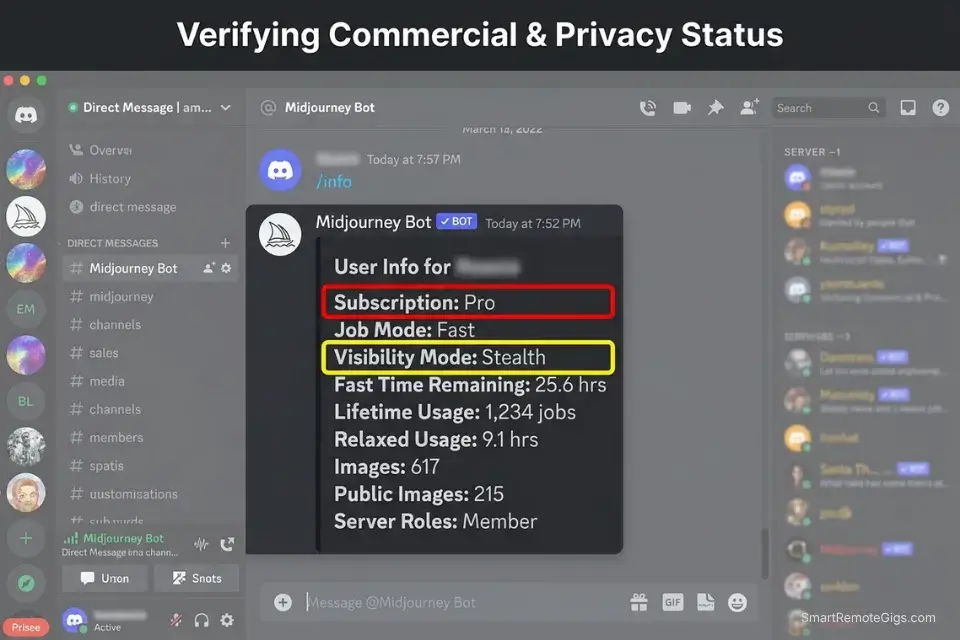
- Verify your active subscription tier before generating any client asset. Open Midjourney’s web platform and confirm your current plan and billing date. If your subscription renewal is within 72 hours, wait until after renewal before generating any assets intended for commercial delivery — a billing failure between generation and delivery creates an unresolvable provenance gap.
- Understand the permanent license status of free-trial and lapsed-account generations. Any image generated during a Midjourney free trial period or during a lapsed subscription period falls under the Creative Commons Non-Commercial license (CC BY-NC 4.0) permanently. If you accidentally generate a concept you want to use commercially during a free trial, you must re-subscribe and completely re-render the prompt using a new seed to generate a commercially licensed version — the original file cannot be relicensed.
- Re-render lapsed-account images before commercial delivery. If you identify any assets in your pipeline generated during an unsubscribed period, do not deliver them. Re-subscribe and re-generate the closest equivalent under your active commercial tier, documenting the new generation date and subscription status in your generation log. Deliver only the newly generated version.
- Use /stealth mode for all client-proprietary prompt work on the Pro tier. By default, all Midjourney generations — including those made in private Discord servers — are displayed in the public Midjourney community gallery. The /stealth command (available on Pro and Mega plans only) suppresses gallery publication, preventing competitors from viewing and replicating your client’s proprietary prompts and visual concepts during the generation process.
The License Audit Script
Standardize how you verify and document your active commercial status before every client generation session.
MIDJOURNEY COMMERCIAL COMPLIANCE CHECKLIST
PRE-GENERATION VERIFICATION (complete before generating any client asset):
☐ Discord account confirmed: [DISCORD_USERNAME]
☐ Active subscription tier verified: [SUBSCRIPTION_TIER]
☐ Subscription renewal date confirmed (must be more than 72 hours away)
☐ /stealth mode activated (Pro/Mega plans only — required for all client work)
☐ Generation environment confirmed: private Discord server OR Midjourney web platform
GENERATION LOG ENTRY (complete for every client asset generated):
Asset filename: ___
Generation date/time: [GENERATION_DATE_TIMESTAMP]
Active subscription tier at generation: [SUBSCRIPTION_TIER]
Seed number: ___
Job ID: ___
Prompt text: ___
Commercial status: ☐ COMMERCIAL (paid tier active) / ☐ NON-COMMERCIAL (free trial or lapsed)
POST-GENERATION AUDIT:
☐ Asset generated under active paid subscription? → CLEARED FOR COMMERCIAL DELIVERY
☐ Asset generated during free trial or lapsed period? → DO NOT DELIVER — re-render required
☐ /stealth mode confirmed active for all proprietary client concepts?
☐ Generation log entry saved to client project folder?
PLACEHOLDER GUIDE:
[DISCORD_USERNAME] — Your exact Discord username and discriminator (e.g., “emilyharper#4821”). This identifies the specific account whose subscription status is being documented — critical in multi-operator agencies where multiple team members may be generating under different subscription tiers on the same project.
[SUBSCRIPTION_TIER] — Your active Midjourney subscription level at the time of generation: Basic ($10/mo), Standard ($30/mo), Pro ($60/mo), or Mega ($120/mo). The tier determines not only commercial rights but also which features are available — /stealth mode requires Pro or Mega; fast GPU hour allocation differs by tier. Document this at the generation session level, not just at contract signing.
[GENERATION_DATE_TIMESTAMP] — The exact UTC date and time of the generation event, in ISO 8601 format (e.g., “2026-03-14T14:32:00Z”). Midjourney’s web platform displays this timestamp in the image detail view — screenshot and archive it alongside the generation log entry. This timestamp paired with your subscription payment record is your commercial rights evidentiary chain.
The Pro Tip
Pro Tip: Midjourney’s commercial license allows you to sell the generated images — but it does not grant you exclusive copyright. Anyone who views your generation in the public community gallery can legally right-click, save, and sell the same image. The only protection is generating in /stealth mode (Pro plan) and delivering before the concept becomes publicly visible.
🔓 Scenario 3 — The Open-Source Loophole: Model Commercial Limits
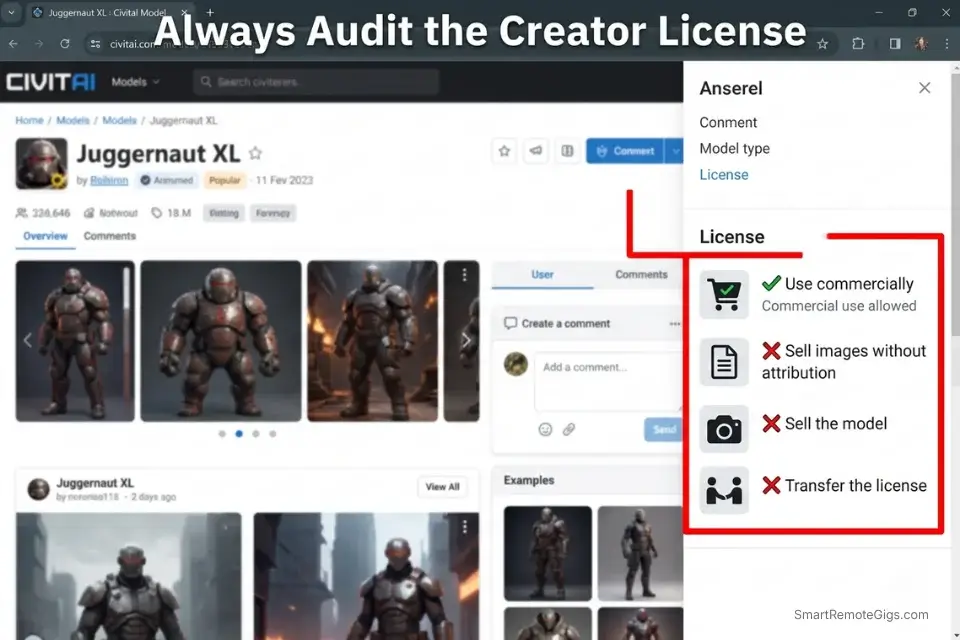
The assumption that downloading an open-source Stable Diffusion model grants unlimited commercial rights is the most expensive misunderstanding in the AI freelance market. Open-source does not mean license-free — it means the model weights are publicly accessible under a specific license that defines permitted uses, commercial thresholds, and redistribution restrictions.
Those terms vary significantly between model versions and between the base Stability AI releases and the thousands of fine-tuned community derivatives hosted on Civitai. In 2026, the open-source ecosystem utilizes tiered licenses based on freelance business revenue — a structure most creators discover only after a compliance violation.
The Stability AI Community License grants commercial usage rights for businesses generating under specific revenue thresholds — but it requires an Enterprise License for commercial deployment above those thresholds. More critically, each community-fine-tuned model on Civitai may carry its own modified license — ranging from fully permissive commercial use to strict non-commercial-only restrictions — that supersedes or supplements the base model’s license terms.
The Exact Workflow
- Download model checkpoints only from the creator’s official repository. Source base SD3 checkpoints from Stability AI’s HuggingFace repository or official Stability AI portal. For community fine-tuned models, use the model’s Civitai page and read the license tab before downloading — not the model description, the license tab specifically. Community model creators can and do apply non-commercial licenses to models built on commercially-licensed base checkpoints.
- Read the specific license attached to the exact model version you intend to use commercially. SD 1.5 is licensed under CreativeML Open RAIL-M. SD3 Medium is licensed under the Stability AI Community License. SDXL is licensed under CreativeML Open RAIL++-M. Each has different commercial terms, attribution requirements, and redistribution restrictions. Using SD 1.5 licensing assumptions on an SD3 commercial project is a compliance error.
- Verify your annualized gross revenue against the model’s commercial threshold. Most open-source community licenses define “free for commercial use” as requiring your business to generate below a specific annual revenue ceiling — commonly $1,000,000 USD. Businesses exceeding the threshold must contact the model creator to negotiate an Enterprise Commercial License before continuing commercial use of that model’s outputs. Build a revenue tracking checkpoint into your quarterly business review.
- If your agency crosses the revenue threshold, obtain an enterprise license before your next client delivery. Continuing to use a community-licensed model for commercial work after exceeding the revenue threshold constitutes a license violation — even if the model outputs are heavily modified. The violation is at the model usage level, not the output level. Contact the model creator’s commercial licensing department directly; for Stability AI models, this process is documented on their official site.
For commercial viability, Stable Diffusion’s local deployment provides stronger baseline ownership than any subscription platform — avoiding the shared public gallery problem entirely and giving the generating freelancer full control over output exposure and provenance documentation.
Stable Diffusion’s open-source architecture grants greater commercial freedom than any subscription platform for agencies operating under the revenue threshold — with zero marginal cost per generation and full control over model version and output provenance. For the complete breakdown of pricing and features:
The Open-Source Revenue Tracker
Monitor your agency’s earnings against model licensing caps before each client billing cycle.
OPEN-SOURCE MODEL REVENUE COMPLIANCE TRACKER
MODEL COMPLIANCE RECORD:
Model in use: [MODEL_VERSION]
Model license type: [LICENSE_NAME — e.g., Stability AI Community License, CreativeML Open RAIL-M]
Commercial threshold: [CREATOR_LICENSING_THRESHOLD] USD annual gross revenue
License review date: [DATE_LAST_REVIEWED]
Next review due: [QUARTERLY_REVIEW_DATE]
REVENUE STATUS:
Current fiscal year gross revenue (AI-related income): $[CURRENT_FISCAL_REVENUE]
Threshold remaining: $[CREATOR_LICENSING_THRESHOLD minus CURRENT_FISCAL_REVENUE]
Compliance status: ☐ UNDER THRESHOLD — community license valid
☐ APPROACHING THRESHOLD (within 20%) — initiate enterprise license inquiry
☐ THRESHOLD EXCEEDED — suspend commercial use, obtain enterprise license
MULTI-MODEL STACK COMPLIANCE:
Model A: [MODEL_NAME] — License: [LICENSE_TYPE] — Commercial: ☐ Yes / ☐ No
Model B: [MODEL_NAME] — License: [LICENSE_TYPE] — Commercial: ☐ Yes / ☐ No
Merged model output commercial status: The most restrictive license in the stack governs all outputs.
ENTERPRISE LICENSE CONTACT LOG:
Date of inquiry: ___
Contact method: ___
Response received: ___
License agreement executed: ☐ Yes / ☐ Pending
PLACEHOLDER GUIDE:
[MODEL_VERSION] — The exact model name and version string as it appears on the creator’s official repository (e.g., “stable-diffusion-3-medium”, “juggernautXL_v9”, “epiCRealism_v5”). Include the full version string — license terms can change between minor versions of the same model family, and using version-specific documentation is the only defensible compliance record.
[CURRENT_FISCAL_REVENUE] — Your total gross revenue from AI-assisted commercial work in the current fiscal year, calculated from your accounting records. Include all revenue streams where AI-generated assets played a material role: client deliverables, stock photography royalties, print-on-demand sales, and retainer fees. Exclude revenue from non-AI-assisted work — the threshold applies to commercial use of the specific model, not your total business revenue.
[CREATOR_LICENSING_THRESHOLD] — The specific annual revenue ceiling above which the model’s community license no longer applies and an enterprise license is required. Verify this figure directly from the model creator’s current license documentation — thresholds have been updated between 2023 and 2026 as the commercial AI market has scaled. For Stability AI models, this is documented on the official license page. For community models on Civitai, it is listed in the model’s license tab.
The Red Flag
Red Flag: Merging two open-source checkpoints does not erase their individual licenses. If you merge a commercially-licensed model with any model carrying a “Non-Commercial Only” restriction, the resulting hybrid inherits the most restrictive license in the stack — permanently classifying every output from that merged model as non-commercial.
©️ Scenario 4 — The Brand Designer: Trademarking AI-Assisted Logos
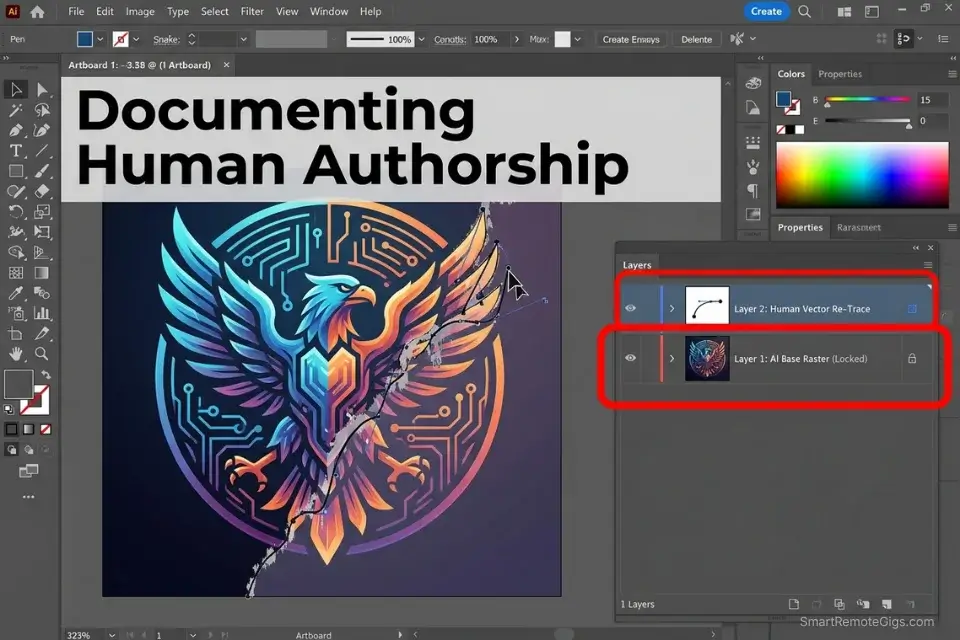
An AI-generated logo is legally untrademarkable in its raw state — and this is not a technicality that legal departments overlook. The US Patent and Trademark Office’s trademark examination process reviews the authorship provenance of submitted marks. A raw AI-generated vector with embedded generation metadata, submitted without documented human creative modification, will be rejected or challenged on the grounds that the mark lacks human authorship. The client you delivered that logo to cannot own it exclusively, cannot enforce it against competitors, and cannot build brand equity on a mark that any other business could legally reproduce.
The solution is a documented humanization workflow: a structured process that converts an AI-generated concept into a legally defensible, human-authored trademark candidate. The process is not about hiding AI usage — it is about creating the genuine human creative contribution that the law requires for trademark eligibility.
The Exact Workflow
- Generate the initial flat-vector logo concept using AI. Use the POD vector prompting system from the How To Make Money With AI Art guide — flat, 2D, minimal, pure white background,
--no 3D shading gradients. Record the seed number and save the raw PNG. This file becomes Exhibit A in your humanization documentation package. - Export and import into Adobe Illustrator. Re-trace using the Pen tool — do not use Image Trace. Image Trace is an automated algorithm, not human creative authorship. Manual Pen tool re-tracing, where you place every anchor point by hand, adjust every bezier curve by judgment, and make compositional decisions about which elements to preserve, simplify, or alter — this is human creative authorship. The distinction matters legally: automated tracing produces a derivative of the AI output; manual tracing produces a new human-authored work that references the AI concept.
- Make substantive alterations to the geometry, proportions, and color system. Change the exact hex codes from the AI output — select your own specific values based on the client’s brand strategy. Adjust the stroke weights, corner radii, and spatial relationships between elements. Add or remove anchor points to smooth curves the AI generated with unnecessary complexity. Each change you make and document is evidence of human creative judgment applied to the work.
- Delete the raw AI metadata from the final exported vector file before delivery. Export the final file as a clean SVG or AI file. In Illustrator, use Document Info → Objects to verify no embedded raster data from the original AI import remains. In the file’s metadata panel, clear or replace any generation-related EXIF or XMP data. Submit only the clean vector with your humanization documentation package — leftover generative metadata in a trademark submission can trigger automatic examination scrutiny.
The Trademark Humanization Script
Document your creative process to establish legally defensible human authorship.
TRADEMARK HUMANIZATION DOCUMENTATION TEMPLATE
PROJECT: [CLIENT_NAME] Logo Design — Trademark-Ready Deliverable
DATE: [COMPLETION_DATE]
DESIGNER: [DESIGNER_NAME]
STAGE 1: AI CONCEPT GENERATION
Raw AI seed image reference: [RAW_AI_SEED_IMAGE]
Platform: [PLATFORM_AND_VERSION]
Generation date: [GENERATION_DATE]
Commercial license status at generation: [LICENSE_STATUS]
File: [FILENAME_RAW_PNG]
STAGE 2: HUMAN MODIFICATION LOG
Total documented editing time: [TIME_SPENT_EDITING] hours
Screen recording file: [RECORDING_FILENAME] (stored in /project/evidence/)
Software used: [SOFTWARE — e.g., Adobe Illustrator 2026]
Specific manual changes made:
[SPECIFIC_MANUAL_CHANGES_MADE]
Anchor point count — AI base (Image Trace reference): [X] points
Anchor point count — Final human-authored vector: [Y] points
Reduction/change: [Z]% (demonstrates manual simplification)
Color changes:
AI-generated colors: [LIST_AI_HEX_CODES]
Final human-selected colors: [LIST_FINAL_HEX_CODES]
STAGE 3: FINAL DELIVERABLE
Final vector file: [FILENAME_FINAL_AI]
AI metadata cleared: ☐ Confirmed
Raster data embedded: ☐ None confirmed
Trademark-ready status: ☐ APPROVED FOR CLIENT TRADEMARK SUBMISSION
PLACEHOLDER GUIDE:
[RAW_AI_SEED_IMAGE] — The filename of the original, unmodified AI-generated PNG export (e.g., “clientbrand_logo_seed_4829301_raw.png”). This file must be archived permanently alongside the final deliverable — it establishes the AI concept as the starting point and your human modifications as the creative leap between that starting point and the final mark.
[TIME_SPENT_EDITING] — The total hours spent in the vector editing software, documented through your screen recording and software’s file modification timestamps (e.g., “3.5 hours across two sessions on 2026-03-14 and 2026-03-15”). Hours alone do not prove creative contribution — the screen recording demonstrating active Pen tool tracing and deliberate design decisions is the evidentiary record; the hours figure provides context for the scope of engagement.
[SPECIFIC_MANUAL_CHANGES_MADE] — A specific, enumerated list of every creative decision made during the human modification process (e.g., “1. Re-traced all primary letterforms using Pen tool with manually placed anchor points. 2. Reduced stroke weight from AI’s 4pt to 2pt for scalability. 3. Changed primary color from AI-generated #3A7BD5 to brand-specified #1A3C6E. 4. Removed AI-generated decorative flourish on letterform tail — replaced with clean geometric terminal. 5. Adjusted spacing between icon and wordmark from AI layout”). Specificity here is your legal evidence — generic statements (“made various edits”) provide no evidentiary value.
The Pro Tip
Pro Tip: Always delete the raw AI metadata from your final exported vector file before client delivery. When a client submits the logo for trademark review, leftover generative metadata embedded in the file’s XMP data can trigger an automatic rejection from the patent examiner — and the client will not know why their application failed.
💰 The ROI of Legal Asset Protection
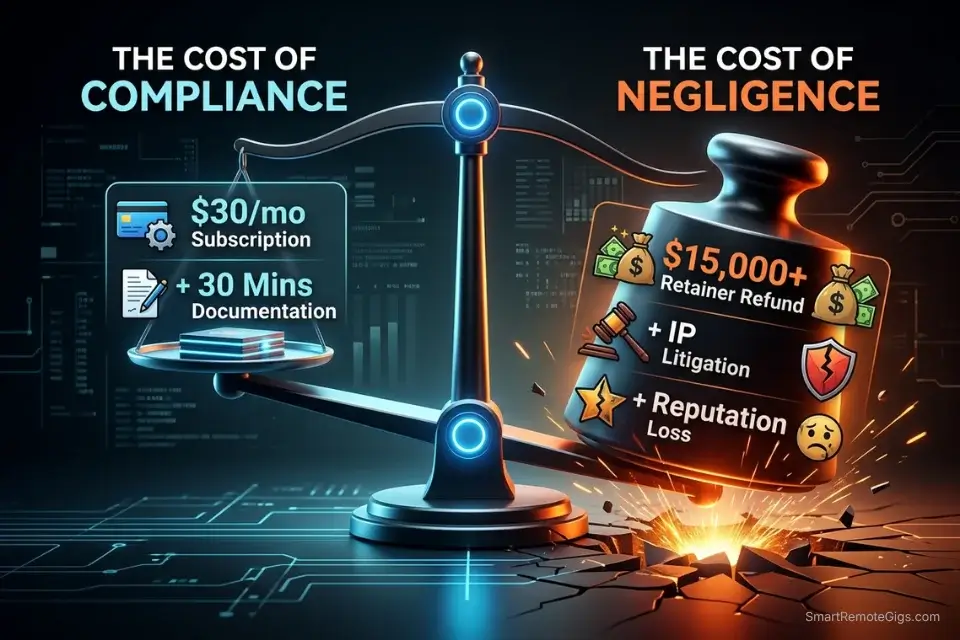
Ignoring commercial rights is the fastest path to a six-figure liability event in the AI freelance market. A single copyright infringement claim or enterprise contract breach can generate tens of thousands of dollars in legal defense costs before a settlement is reached — costs that fall entirely on the agency if the contract does not explicitly define AI usage terms and modification extents.
The compliance infrastructure above has a precise cost: $30–$120/month for a commercial Midjourney subscription, 30 minutes to draft an AI disclosure addendum, 3–4 hours per logo project for the humanization documentation workflow. Against a single enterprise retainer valued at $5,000–$15,000/month, these are not overhead costs — they are the threshold conditions for maintaining access to the enterprise tier of the market.
The freelancers operating at premium rates in 2026 are not operating there because their AI outputs look better than their competitors’. They are operating there because their legal documentation makes enterprise procurement teams comfortable, their disclosure addendums survive contract audits, and their clients can trademark and enforce the assets they paid for. The technical skill is the entry cost; the legal infrastructure is the competitive moat.
🗓️ The 14-Day Copyright Compliance Plan
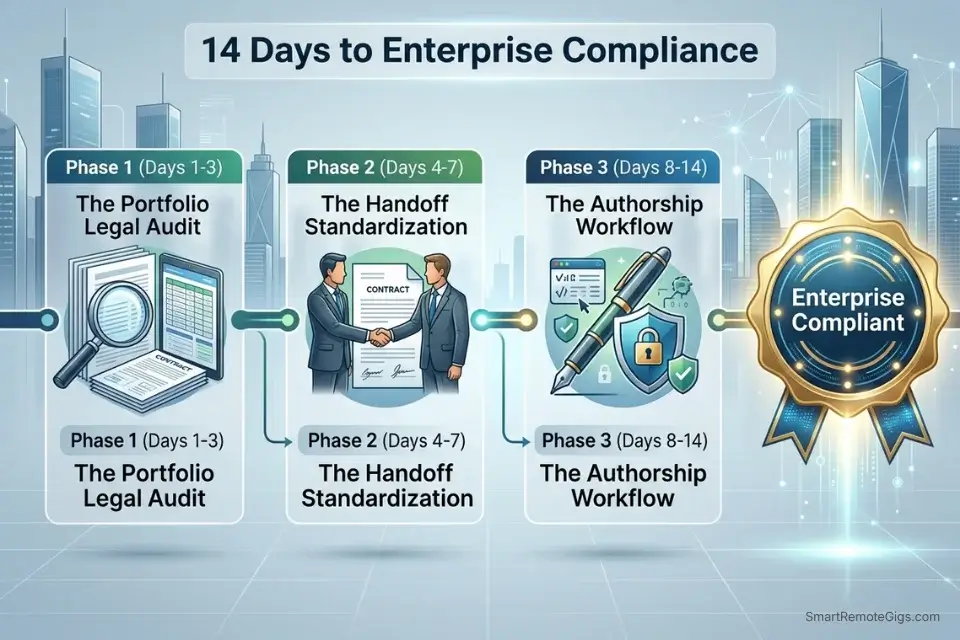
Days 1–3: The Portfolio Legal Audit
- Export a complete list of every AI-generated asset currently in your public portfolio, active client deliverables, and stock platform uploads. For each, identify the generation platform, generation date, and your active subscription status on that date.
- Cross-reference every asset against your subscription payment history. Any asset generated during a free trial period, a lapsed subscription window, or an unverified account status must be flagged for review.
- Remove all flagged assets from active use immediately. Do not deliver flagged assets to clients, do not leave them on stock platforms, and do not include them in portfolio presentations until they have been re-generated under a verified commercial subscription.
Pro Tip: If you cannot verify the subscription status at the exact date of generation for a specific asset, remove it from active commercial use. The risk of a single enterprise client triggering a copyright audit on a non-commercial asset far outweighs the value of retaining that portfolio piece.
Days 4–7: The Handoff Standardization
- Draft your standard AI Disclosure Addendum using the Enterprise Disclosure Script above. Have it reviewed by a contracts attorney if you serve enterprise clients — $200–$400 for a one-time attorney review of a contract template eliminates the ambiguity that generates disputes.
- Implement a permanent project folder structure that archives the raw AI generation alongside the final modified deliverable, the generation log, and the screen recording of the modification process. Every client project folder should be legally self-contained from Day 1.
- Update your invoicing and contract templates to include a terms-of-service reference link for AI asset ownership. The disclosure should appear in the contract body, not just as a verbal caveat during the project kickoff call.
Red Flag: Do not rely on verbal agreements regarding AI usage disclosure. If a client is audited or sued 18 months after delivery, your written contract addendum is the only protection between you and a breach-of-contract claim. Verbal agreements are unenforceable in commercial contract disputes.
Days 8–14: The Authorship Workflow Sprint
- Select one logo project from your active pipeline and run it through the complete trademark humanization workflow: AI generation, Pen tool re-trace, substantive alterations, documentation package, metadata clearing. Time the full process from raw generation to trademark-ready deliverable.
- Set up a screen recording workflow for all future logo and brand identity projects. OBS Studio records at zero cost; Loom provides cloud storage and shareable evidence links. The recording does not need to be continuous — a project folder containing timestamped session recordings across multiple editing days provides stronger evidence than a single 3-hour recording.
- Run your entire active model stack through the Open-Source Revenue Tracker above. For every model checkpoint currently in your production pipeline, verify the specific license version, commercial threshold, and whether your current fiscal revenue requires an enterprise license inquiry.
By Day 14, you will have transformed your AI workflow from a legal liability into a fully compliant, enterprise-grade production pipeline — with documentation infrastructure that survives contract audits, trademark applications, and copyright challenges.
❓ Frequently Asked Questions
Who owns the copyright to Midjourney and Stable Diffusion images?
It depends on the tier and extent of human modification. Midjourney grants commercial usage rights to paid-tier subscribers — but this is a license to use and sell, not a copyright assignment. The underlying copyright of a purely AI-generated image remains legally ambiguous under current US law, as the Copyright Office requires human authorship. Stable Diffusion open-source model outputs, when substantially modified by a human creator, are the strongest candidates for copyright ownership of the human-authored modification layer. In both cases, the commercial right to sell and the legal right to copyright are distinct — and only the modification-documented workflow secures both.
Can I use AI art for commercial client work?
Yes, provided you are on a qualifying subscription tier and the client’s intended use falls within that tier’s commercial rights. Midjourney Basic, Standard, Pro, and Mega plans all grant commercial rights for individual creators under specific revenue thresholds. Stable Diffusion community licenses grant commercial rights for businesses under $1M annual revenue. Adobe Firefly grants broad commercial rights with Content Credentials provenance. The limiting factor is not whether commercial use is permitted — it is whether the client’s intended downstream use (trademarking, licensed merchandise, enterprise advertising) requires a copyright that the raw AI generation cannot provide without substantial human modification.
Does modifying an AI image give me copyright?
It depends on the extent and nature of the modification. The Copyright Office evaluates human authorship on a case-by-case basis, asking whether the final work contains sufficient human creative expression to constitute an original work. Automated modifications (Image Trace, AI-powered enhancement filters, batch color correction) do not establish human authorship. Deliberate, judgment-based modifications (manual Pen tool re-tracing, compositional restructuring, original color system design) do. Document every deliberate creative decision with screen recordings and modification logs — the documentation is what makes the authorship claim defensible, not the modification itself.
Can a company trademark an AI-generated logo?
No, not in its raw state. The US Patent and Trademark Office requires human authorship for trademark registration. A logo submitted with embedded AI generation metadata, or a logo that cannot demonstrate documented human creative modification, will face rejection or post-registration challenge on authorship grounds. The humanization workflow in Scenario 4 above — Pen tool re-tracing, substantive geometric and color alterations, metadata clearing, and documentation packaging — converts an AI concept into a human-authored trademark candidate. Deliver the humanization documentation package alongside the final logo file so the client’s trademark attorney can include it in the registration filing.
Is it legal to sell AI art in 2026?
Yes, under qualifying conditions. Selling AI-generated art is legal when: the generation platform’s commercial license is active and appropriate for the sale type, the platform’s terms permit commercial resale by subscribers (which most paid tiers do), and the sold asset does not infringe on third-party intellectual property rights. The legal exposure is not in the sale itself — it is in the downstream use. An enterprise client purchasing AI art for product packaging, trademark filing, or licensed merchandise needs documentation of both the commercial license and the human modification extent to use those assets without legal exposure. Selling without providing that documentation shifts the liability to you when the client’s legal team later asks questions.
The Verdict: Protect the Pipeline, Protect the Profit
The debate over whether AI art is “real art” is a distraction from the only question that matters for freelancers and agencies: is this asset legally safe for commercial delivery? The answer depends on four variables — the generation platform’s commercial license, the subscriber’s active tier at generation, the extent of documented human modification, and the client’s intended downstream use. Every profitable AI creative business in 2026 has systematic answers to all four.
The compliance infrastructure above does not require a legal degree. It requires 30 minutes to draft a disclosure addendum, a screen recording running while you work in Illustrator, a quarterly revenue check against your model license thresholds, and a generation log saved alongside every client deliverable.
The agencies that built these systems early are the ones collecting enterprise retainers that their undocumented competitors cannot access — not because their creative outputs are superior, but because their documentation makes legal departments comfortable. If you have not yet made the platform decision that underpins your compliance architecture, the licensing cost and output ownership comparison in our midjourney vs stable diffusion breakdown is the right starting point before investing in any of the documentation workflows above.
The Verdict: You cannot copyright a prompt, but you can copyright your manual execution. Build workflows that prioritize human modification, strict licensing compliance, and transparent client communication.
While you lock down your commercial rights protocols, don’t leave opportunities on the table. Head to the SRG Job Board at /jobs/ for enterprise contracts seeking legally compliant AI pipeline managers. Browse the SRG Software Directory at /software/ for secure client portal tools to safely transfer your finalized deliverables.

Never Miss a New Remote Job
REMOTE JOB ALERTSGet notified about new remote jobs and access practical freelance tools from your phone.

![Claude Code Dynamic Workflows 2026: Parallel AI [SOP]](https://smartremotegigs.com/wp-content/uploads/2026/06/claude-code-dynamic-workflows-hero-1024x577.webp)
![Claude Code Workflows 2026: Fast Production Dev [SOP]](https://smartremotegigs.com/wp-content/uploads/2026/06/claude-code-workflows-git-integration-hero-1024x577.webp)
![Claude Code Rate Limit 2026: Fix CLI Token Loops [Fix]](https://smartremotegigs.com/wp-content/uploads/2026/06/claude-code-rate-limit-hero-1024x577.webp)