Breaking into the tech industry doesn’t require a coding bootcamp, a Computer Science degree, or the ability to explain what a neural network does. A remote tier 1 tech support role is the single most accessible entry point into the entire industry — and it pays you to learn while you’re there.
I’ve watched baristas and retail workers bypass four-year degrees and land $45k–$55k remote jobs in under 90 days. Not because they were exceptional. Because they understood something most people don’t: Tier 1 Support isn’t a tech job. It’s a communication job that sits inside a tech company. And communication is a skill you’ve already been building your entire working life.
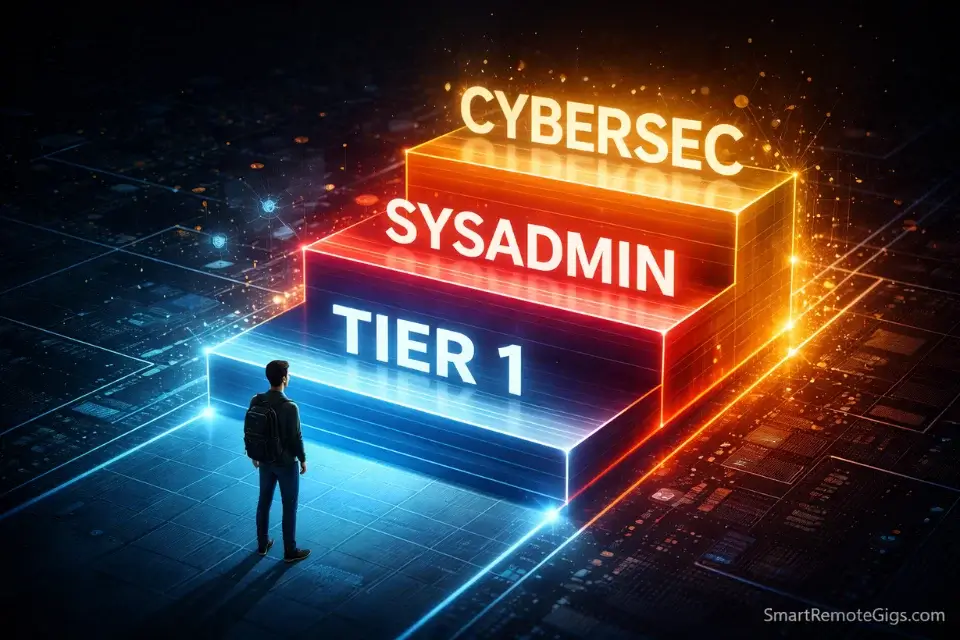
The people who treat this role as a dead-end are the ones who stay in it too long. The ones who treat it as a paid university — collecting certifications, building home labs, documenting every troubleshooting decision — are the ones who end up in SysAdmin, DevOps, or Cybersecurity roles making north of $100k within two years.
This guide is for the second group. Let’s build your plan.
⚡ Tier 1 Support Quick Stats (2026)
Avg. Starting Pay | $18–$24/hr remote (direct employer); $14–$18/hr via BPO |
Barrier to Entry | Low — certifications beat degrees at this level |
Top 3 Skills | Patience, Googling, Documentation |
Hidden Benefit | Many employers pay for your advanced certs (Network+, Security+) after 90 days |
Career Path | Tier 1 → Tier 2/SysAdmin → DevOps/Cybersecurity ($100k+) |
Timeline to $100k | 18–36 months with deliberate certification stacking |
Why Tier 1 Is the “Paid University” of Tech
Most people look at a Tier 1 Support role and see a help desk. They think: scripted responses, frustrated callers, minimal pay, no future.
That framing is completely wrong — and it’s the reason most people who take the job waste it.
Here’s what a Tier 1 Support role actually gives you access to every single day:
Real enterprise IT infrastructure. You’re working inside an actual company’s network, ticketing system, Active Directory environment, and escalation workflows. You’re not reading about these things in a textbook — you’re using them on live systems while being paid to do it.
A documented troubleshooting record. Every ticket you close is a data point. Every issue you escalate up the chain teaches you what Tier 2 and Tier 3 engineers actually do. After six months, you’ll understand the architecture of the company’s IT environment better than most people who’ve worked there for years.
Certification funding. This is the benefit nobody talks about loudly enough. Companies including Amazon, Dell, Concentrix, and dozens of mid-market IT firms have explicit policies to fund CompTIA Network+, Security+, and even cloud certifications for support staff after their initial probationary period. You are being paid to study for credentials that will double your salary.
The strategic play is simple: take the role, document everything, study constantly, and leave within 18–24 months with two additional certifications and a clear upward trajectory. That’s not a dead-end path. That’s the fastest legitimate on-ramp into enterprise IT.
The Verdict: If you’re still in Tier 1 Support after two years without a certification advancement plan, you’ve misused the role. This is a launchpad, not a landing pad. The people who treat it as permanent are the ones who end up resenting it. The ones who treat it as a 90-day paid orientation for an IT career are the ones who look back on it as the best decision they made.
The “Unfair Advantage”: Why Soft Skills Beat Tech Skills at Entry Level

Here’s the counterintuitive truth about Tier 1 hiring: the candidates who win interviews aren’t usually the ones who know the most about computers.
They’re the ones who can explain a DNS error to someone who doesn’t know what DNS is — without making that person feel stupid.
You can teach Linux commands in a week. You cannot teach patience in an onboarding session.
The hidden skill that separates a good Tier 1 technician from a great one is what I call the Translation Skill: the ability to take a technical problem, identify its human cause, and communicate a solution in plain language without condescension.
When a user says “the WiFi is broken,” they mean something specific. Maybe it’s a DHCP lease expiration. Maybe it’s a misconfigured DNS server. Maybe it’s a browser proxy setting that got corrupted on a Windows update. The technical diagnosis is learnable. Figuring out which question to ask the panicked user to narrow it down — that’s the skill.
If you’ve ever worked in retail, food service, hospitality, customer care, or any role where you de-escalated a frustrated person while solving a problem under pressure, you already have the core competency that Tier 1 hiring managers are screening for.
The interview question will be: “Tell me about a time you had to explain something complicated to someone who didn’t understand it.” Script your answer from your existing work history. The context doesn’t have to be technical. The skill is what they’re evaluating.
For a full breakdown of how to present these skills on camera — because most Tier 1 interviews are video-based — our guide to demonstrating soft skills on video covers the specific techniques that land remote tech roles.
The Portfolio Hack: Building a Home Lab
This is the section that separates the serious candidates from everyone else — and it’s the strategy almost nobody in the “no experience” job search conversation talks about.
If you don’t have enterprise IT experience, simulate it.
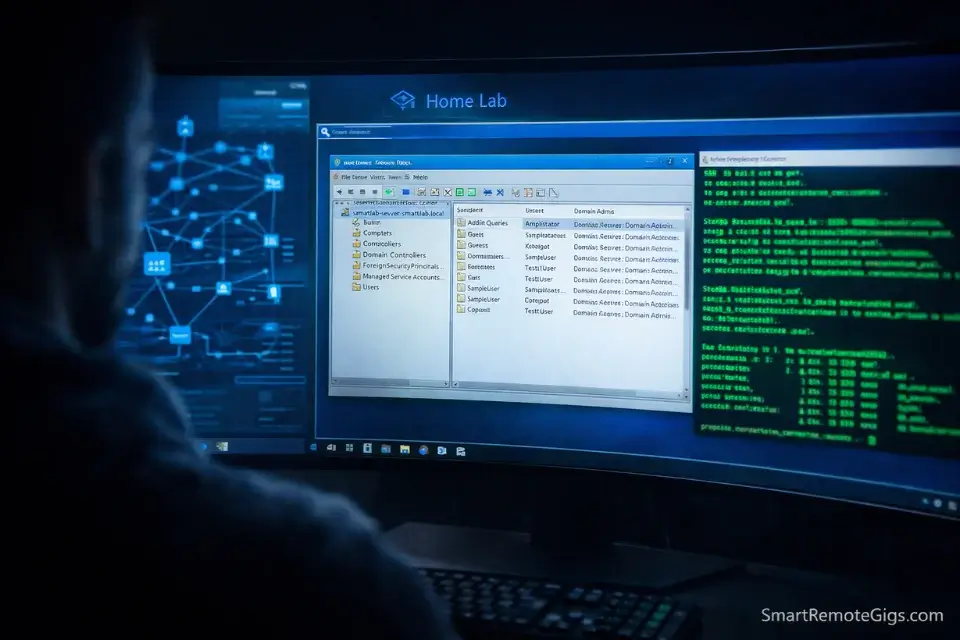
A Home Lab is a personal virtual IT environment you build on your own computer. It costs nothing but time, runs entirely on free software, and produces the same kind of hands-on experience that employers are looking for — because the tasks are identical to what you’d do in a real environment.
Here’s the setup:
Step 1 — Install VirtualBox (free). VirtualBox is a virtualization tool that lets you run multiple operating systems inside your main computer. It’s the standard platform for home lab environments.
Step 2 — Download the Microsoft Server Evaluation (free 180-day trial) from Microsoft’s Evaluation Center. You now have a fully functional Windows Server environment to practice on.
Step 3 — Build and document real tasks:
- Set up an Active Directory domain and create user accounts
- Reset a user password and document the ticket process
- Configure a shared network folder with permission levels
- Troubleshoot a deliberately broken network connection
- Install and uninstall software via Group Policy
Step 4 — Screenshot everything. Every task you complete is a portfolio piece. Create a simple PDF or Notion page titled “Home Lab Documentation” that walks through each task, the tool used, and the outcome.
That document is your technical Shadow Portfolio. When an interviewer asks “do you have experience with Active Directory?” the answer is no longer “no, but I’m a fast learner.” It’s “yes — here’s the environment I built and the tasks I’ve documented.”
Pro Tip: Download VirtualBox free and grab the Microsoft Server evaluation trial. Spend one weekend resetting passwords, creating user accounts, and troubleshooting a fake DNS misconfiguration. Screenshot every step. You now have documented, demonstrable experience with the exact environment most corporate IT departments run — and you got it for $0 in a single weekend.
The Home Lab is the Tier 1 Support equivalent of the Shadow Portfolio method we use for VA and writing roles. The principle is identical: don’t wait for a real environment to prove your skills. Build the environment yourself.
The Application: Certifications, Resumes, and What Actually Gets You Hired
The Certification Strategy: Skip the Degree, Get the A+
The CompTIA A+ is the single most recognized entry-level IT certification in the industry. It covers hardware, software, networking basics, operating systems, security fundamentals, and troubleshooting methodology — exactly the knowledge base a Tier 1 technician needs.
More importantly, CompTIA A+ is explicitly listed as a qualification (or strong preference) in the majority of Tier 1 remote job postings. A general associate’s degree in business is not. A vague “IT coursework” line on a resume is not.
The A+ consists of two exams (Core 1 and Core 2). Total preparation time for a dedicated self-studier with no background: 8–12 weeks. Total cost: approximately $250–$350 per exam, though employer reimbursement programs and voucher discounts frequently reduce this significantly.
For free and low-cost study resources to get you through the certification pathway, our guide to free IT certifications covers every legitimate no-cost option currently available.
The Resume: Mining Your Non-Tech Job History
This is where most career-changers undersell themselves badly.
You’ve troubleshot things your entire working life. You just haven’t described them in IT language.
Examples of resume reframes:
- “Fixed the POS system during peak hours when the payment terminal stopped processing” → Diagnosed and resolved point-of-sale hardware failure under time-sensitive conditions
- “Helped customers set up the store app on their phones” → Provided end-user technical support for mobile application installation and account configuration
- “Trained new staff on the inventory software” → Delivered onboarding instruction on proprietary inventory management systems for new personnel
None of these are exaggerations. They’re accurate technical descriptions of real things you did. The language shift is the entire point.
For a full framework on translating non-tech work history into IT-ready resume language, our guide to optimizing your resume for tech roles walks through the exact reframe process with before/after examples.
Acing the Interview: The STAR Method for Tech Support Roles
Tier 1 interviews are not technical tests. They are behavioral assessments with a light technical overlay.
The technical questions will be basic: What’s the difference between RAM and storage? What do you do first when a user says they can’t connect to the internet? What is a VPN? These are Googleable in 10 minutes and not the reason anyone fails.
The reason people fail is the behavioral questions — specifically, because they answer them vaguely.
The STAR Method fixes this:
- Situation — Set the scene briefly (one sentence)
- Task — What were you responsible for?
- Action — What specifically did YOU do? (not “we”)
- Result — What was the measurable or observable outcome?
The question you will almost certainly be asked: “Tell me about a time you dealt with a frustrated or difficult customer.”
A weak answer: “I’ve dealt with frustrated customers a lot. I always try to stay calm and listen.”
A STAR answer: “At my retail job, a customer came in extremely upset that a product they needed for an event wasn’t in stock. I was responsible for resolving the situation without management escalation. I found the item at a nearby location, called ahead to hold it, and offered to print directions. The customer left satisfied and came back two days later to thank me. My manager cited it in my quarterly review.”
Same story. Completely different impression. The second version demonstrates patience, problem-solving, initiative, and customer focus — in under 30 seconds.
Prepare three STAR stories from your existing work history before any Tier 1 interview. They don’t need to be tech stories. They need to be competency stories.
Where to Find Legitimate Tier 1 Remote Jobs
Direct Employer vs. BPO: Know What You’re Applying For
This distinction matters more than most guides acknowledge.
Direct employer roles — working for Apple, Dell, Microsoft, Amazon, or a mid-market SaaS company directly as a support technician — pay better ($20–$28/hr remote), offer benefits, and frequently include the certification funding mentioned earlier. They are also more competitive and have more rigorous screening.
BPO roles — working for a Business Process Outsource company like Teleperformance, Concentrix, TTEC, or Alorica, which contracts support work from major companies — are easier to get, move faster from application to offer, and are an excellent first placement. Pay is lower ($14–$18/hr), benefits are leaner, and the work environment is more regimented. But the experience is identical and fully transferable.
The strategic play for beginners: Get a BPO role first. Build your CompTIA A+ while you’re there. Use employer-funded or self-funded certification to pivot into a direct employer role 12–18 months later at a significantly higher rate.
Don’t be too proud for the BPO door. It opens the same building.
For a curated list of platforms where legitimate Tier 1 remote jobs are regularly posted, see our guide to tech-focused job boards.
Factor | Direct Employer (Apple, Dell, etc.) | BPO (Concentrix, TTEC, etc.) |
|---|---|---|
Starting Pay | $20–$28/hr | $14–$18/hr |
Application Difficulty | Moderate–High | Low–Moderate |
Time to Offer | 2–6 weeks | 1–2 weeks |
Cert Funding | Often included | Rare (some exceptions) |
Benefits | Full (health, 401k, PTO) | Basic or minimal |
Career Visibility | High — internal mobility exists | Low — advancement is lateral |
Best For | Candidates with A+ cert + home lab | True beginners, fastest entry |
One more thing before you start applying: the fake equipment check scam runs heavily through remote IT job postings because the “we ship you equipment” promise is both real and easily faked. Know what legitimate equipment provision looks like before you respond to any offer. Our guide to spotting fake equipment check scams covers every current variation of this fraud.
Frequently Asked Questions
Is remote tech support a dead-end job?
Only if you treat it that way. Tier 1 Support is the documented entry path for roughly 70% of Senior IT professionals currently working in enterprise environments. The ones who advance use every quiet moment on shift to study for the next certification. The ones who stagnate don’t. The role is identical — the outcome is determined entirely by what you do with the downtime.
Do I need a Computer Science degree for Tier 1 Support?
No. A CompTIA A+ certification is consistently more valued than a general four-year degree at the Tier 1 hiring level because it demonstrates practical, hands-on knowledge of the exact systems you’ll be supporting. Degrees get you past HR filters at some large companies; certifications get you past the technical screening at almost all of them.
What equipment do I need to work remote Tier 1 Support?
Legitimate employers — Apple, Dell, Amazon, and most BPOs — ship you a configured work computer. You provide a hardwired ethernet connection (not WiFi), a quiet workspace, and a noise-canceling headset. You should never pay for your own work equipment. Any “employer” asking you to purchase equipment or receive and forward a check for equipment is running a well-documented fraud scheme.
Conclusion: Your 90-Day Plan
The Verdict: Remote Tier 1 tech support is the smartest entry-level job in the remote economy — not because of what it pays today, but because of where it leads in 24 months. The career ceiling from this starting point is legitimately $100k+. The starting investment is a $250 exam voucher and one weekend building a home lab. No other entry-level remote role offers that ratio.
The people who lose are the ones who apply without preparation and treat the role as a permanent destination. The people who win are the ones with a documented 90-day plan before they submit a single application.
Here’s yours:
Month 1 — Certify: Begin studying for CompTIA A+ Core 1. Use Professor Messer’s free course at professormesser.com as your primary resource. Schedule the exam for the end of the month if you can study 1–2 hours daily.
Month 2 — Build: Set up your Home Lab using VirtualBox and the Microsoft Server evaluation trial. Complete and document five tasks: user creation, password reset, shared folder setup, Group Policy application, and network troubleshooting. Screenshot everything. Build your Home Lab PDF.
Month 3 — Apply: Start with BPO roles for speed (Concentrix, TTEC, Alorica). Apply to three direct employer roles simultaneously (Apple At Home, Dell Remote Support, Amazon AWS Support). Submit your resume with A+ certification listed and your Home Lab documentation linked.
You are not competing with Computer Science graduates. You are competing with other career-changers who haven’t done the certification and haven’t built the home lab. That bar is lower than you think — and you’re about to clear it.