
Asana vs Jira for Remote Teams 2026 [The Ultimate Winner]
 ·
Last Updated: April 4, 2026 ·
10 min read
·
Last Updated: April 4, 2026 ·
10 min read 
If you want to escape the trap of micromanagement, picking the right software is your first critical step. When comparing Asana vs Jira for remote teams in 2026, you aren’t just choosing a task tracker—you are choosing the “Async Brain” that will either automate your job or make your life miserable.
I learned this the hard way. When I ran a US-based agency, we used Asana for everything. The visual boards were clean, the team loved the UI, and it worked. Then I transitioned to managing a 100% globally distributed engineering team and those beautiful visual boards became a chaotic mess of untracked bottlenecks within three weeks. I had to learn that a tool built for “collaboration” isn’t always the right tool for “asynchronous automation.”
That exact operational trap is why we built Smart Remote Gigs—to help leaders choose the right async infrastructure before it breaks their team, and to connect those leaders with companies that value technical fluency.
Here is the ruthless, fluff-free breakdown.
Asana vs Jira: 2026 Async Feature Comparison
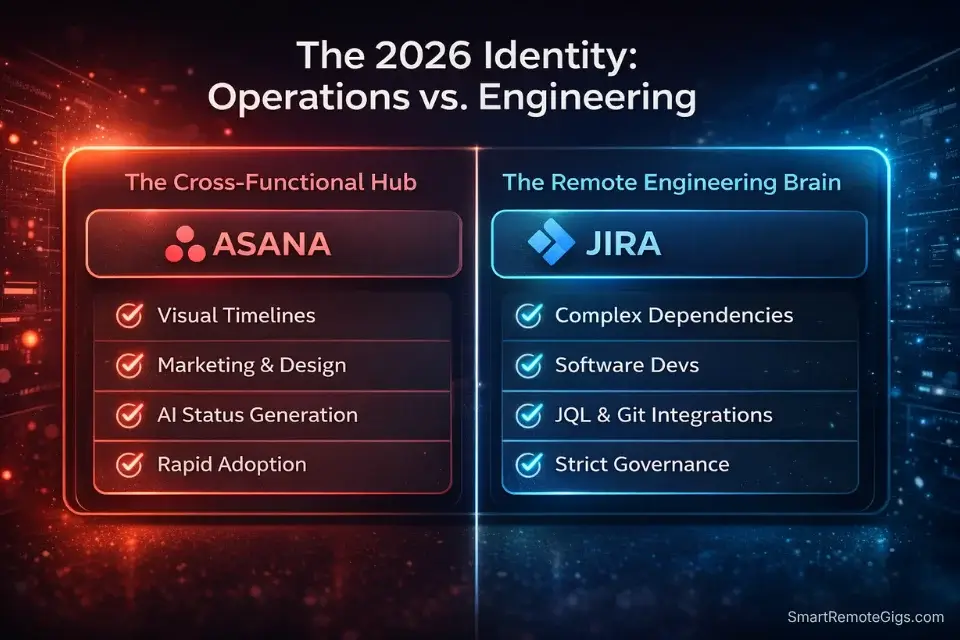
Feature | Asana | Jira |
|---|---|---|
2026 Identity | The Cross-Functional Hub | The Remote Engineering Brain |
Best Use Case | Marketing, Design, Operations | Software Dev, Agile Sprints, Bug Tracking |
AI Automation | AI Status Generation, Smart Workflows | AI Issue Ticketing, Code-Level Sprint Summaries |
Async Power | High — great for visual timelines | Extreme — unbeatable for complex dependencies |
Learning Curve | Low — rapid team adoption | High — significant configuration overhead |
The Verdict | Best for general remote operations | Best for distributed technical teams |
The 2026 Reality: Your Software Stack Is Your Resume
Senior remote PM roles at the companies worth working for in 2026 are not filled based on soft skill language. They are filled based on technical software fluency—specifically, whether you can demonstrate that you’ve configured these tools at a depth that actually automates work rather than just organizing it.
The difference matters more than most candidates realize. A PM who “uses Asana” and a PM who has built custom rules that automatically assign tasks, trigger status updates, and generate AI-powered stakeholder reports from sprint data are not interchangeable. The second PM eliminates 6 hours of manual overhead per week. The first PM creates it.
This is why tool fluency is increasingly the primary filter in technical PM interviews. To understand exactly how these technical configurations are tested during the hiring process, review our complete guide to landing high-paying remote project manager jobs and prepare your operational answers.
Warning: Do not force developers to use Asana, and do not force copywriters to use Jira. This seems obvious but it happens constantly—usually because the PM learned one tool and defaulted to it universally. Forcing the wrong tool on the wrong team creates friction that compounds into “quick sync” calls to explain tasks that a well-configured ticket would have made self-evident. Tool-team fit is an operational decision, not a preference.

Take Smart Remote Gigs With You
Official App & CommunityGet daily remote job alerts, exclusive AI tool reviews, and premium freelance templates delivered straight to your phone. Join our growing community of modern digital nomads.
Asana: The Cross-Functional Async Powerhouse
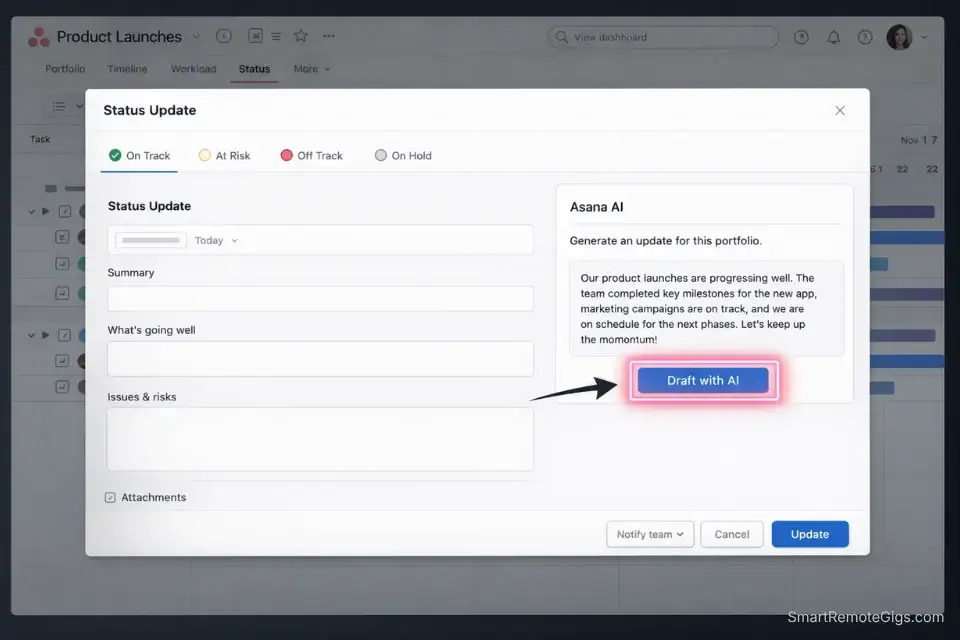
Asana’s core strength in 2026 is its accessibility—and that accessibility is not a weakness. For any team that includes non-technical members, the visual interface, intuitive task creation, and low configuration floor mean adoption happens fast and stays high. A marketing team that actually uses Asana consistently is infinitely more valuable than a marketing team that was forced into Jira and produces half-filled tickets nobody trusts.
The 2026 version of Asana is meaningfully more powerful than it was two years ago. Asana AI can generate status updates from task activity, flag capacity overloads before they become delivery failures, and summarize project health for stakeholder reports without any manual input. For a PM managing cross-functional operations, that AI layer removes the single most time-consuming part of the job—producing manual progress reports—and replaces it with an automated output that’s more current and more consistent than anything written by hand.
The timeline view is where Asana specifically excels for distributed teams. Seeing task dependencies mapped visually across a multi-week sprint—with clear ownership, due dates, and handoff points—gives every timezone a shared mental model of where the project is without requiring a sync call to explain it. That shared visibility is the foundation of effective global handoffs.
The honest operational drawback: Asana’s rule and automation engine requires strict governance or it becomes a bottleneck itself. Without enforced task ownership, mandatory due-date discipline, and regularly audited project structures, Asana workspaces accumulate stale tasks, zombie projects, and duplicated boards that nobody maintains. I’ve seen 20-person teams where Asana had become so chaotic that nobody trusted the data and the team had reverted to Slack threads for actual coordination. The tool is only as reliable as the PM’s discipline in maintaining it.

Best For: The cleanest project management tool for freelancers managing multi-client workflows — until you hit the per-seat pricing wall at scale.
Jira: The Remote Engineering Brain
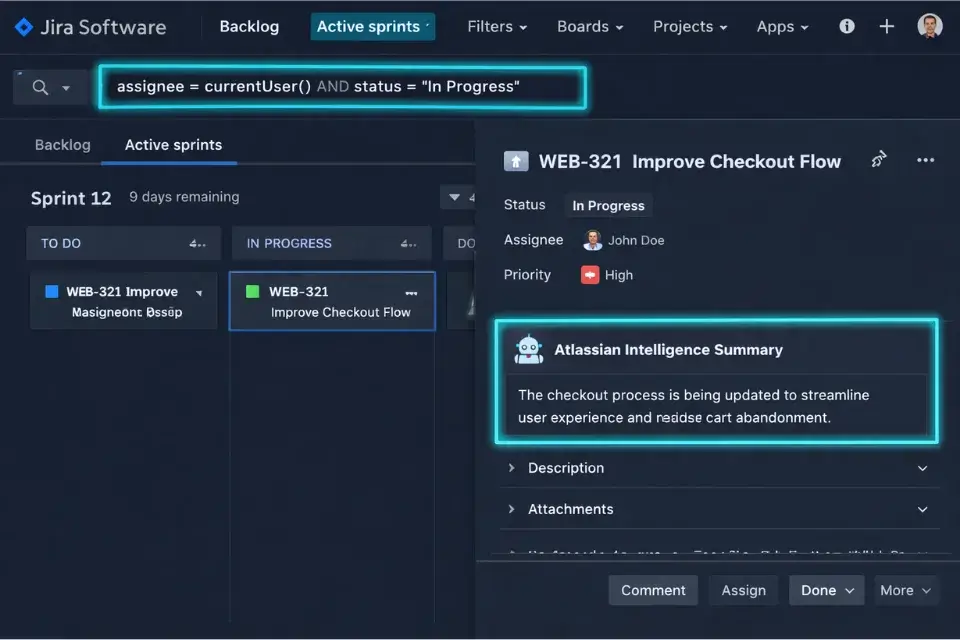
Jira is not the most elegant tool in the stack. The UI is dense, the configuration overhead is real, and non-technical team members will complain about it. None of that matters for engineering-heavy distributed teams, because no other tool comes close to what Jira does for async software delivery at scale.
The core Jira advantage for remote teams is its issue dependency architecture. When a developer in Singapore picks up a ticket, the entire context of that task—acceptance criteria, linked dependencies, blocked issues, previous comments, related code changes from GitHub—is in one place. They don’t need to ask anyone anything. They read the ticket and they build. That self-sufficiency is the foundation of async engineering culture, and Jira’s ticket structure is the most mature implementation of it in the industry.
JQL (Jira Query Language) is where advanced PMs separate themselves from basic users. The ability to write custom queries that surface exactly the information you need—blocked tickets with approaching due dates, issues assigned to developers who haven’t made a commit in 48 hours, high-priority bugs without an assignee—turns Jira from a task list into a self-monitoring delivery system. A PM who can write JQL is a PM who never needs to run a status meeting to find out where the sprint stands.
Atlassian Intelligence in 2026 has added AI-generated sprint forecasting, issue summarization, and backlog grooming assistance that meaningfully reduces the manual PM overhead that previously made Jira high-maintenance. The AI can flag sprint risk before the burndown chart makes it obvious—which is exactly the kind of early warning system that prevents 5 PM escalation calls on a Friday.
The honest drawback: Jira’s configuration complexity is a genuine barrier that kills adoption if you underestimate it. Getting custom workflows, automation rules, and sprint board views set up correctly requires significant upfront investment. Teams that deploy Jira without that investment end up with a disorganized backlog where nobody can find anything, ticket hygiene degrades within weeks, and the tool that was supposed to eliminate meetings becomes the subject of meetings. Budget the setup time properly—it pays back quickly once done right, but the cost of doing it badly is high.
According to Atlassian’s State of Teams research, high-performing engineering teams are significantly more likely to use structured async ticketing systems than low-performing teams—and the productivity gap between them has widened as distributed work has scaled. The data supports the investment.

Best For: Advanced Issue Tracking, Developer Deep-Work Protection & Agile Sprints
Bridging the Gap: Integrating Your Stack for Global Teams
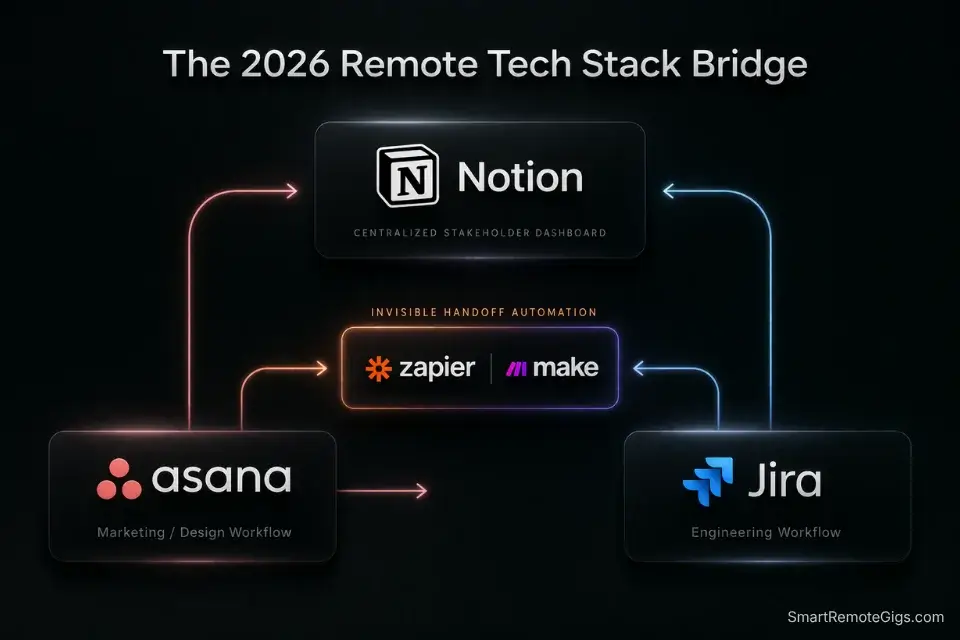
The most sophisticated remote PM setup in 2026 is not a single tool—it’s a connected ecosystem where Asana and Jira operate in parallel, each serving the team it’s built for, with a centralized documentation layer that makes the integration invisible to stakeholders.
The failure mode to avoid is the silo. When Marketing runs on Asana and Engineering runs on Jira with no structured integration between them, the PM becomes the human bridge—manually translating status from one tool to the other, fielding questions from stakeholders who don’t have visibility into either system, and spending time on information transfer that should be automated.
The solution is a two-layer approach. At the tool level, a Zapier or Make integration between Asana and Jira handles the mechanical handoffs: when a design task in Asana is marked complete, a corresponding development ticket in Jira is automatically created or updated. No manual transfer. No PM-as-messenger. The dependency resolves itself.
At the visibility layer, Notion serves as the stakeholder-facing dashboard—a single page that surfaces high-level sprint status, key decisions, and upcoming handoffs in plain language, without requiring anyone to log into Asana or Jira directly. Executives and clients see what they need. Engineers stay in Jira. Marketers stay in Asana. The PM manages the connections, not the communication.
If you want the exact playbook on how this integration works in a live, cross-continental context, check out our masterclass on managing teams across time zones to see how the Asana-Jira bridge powers continuous 24/7 output.
The caveat with Notion as the bridge layer: without strict page hierarchy and naming conventions enforced from the start, it becomes a disorganized archive of outdated sprint summaries faster than any other tool in the stack. The governance rules need to be built before the team starts populating the workspace, not retrofitted after it’s already a mess. One PM I worked with had to archive over 300 pages of outdated Notion content before they could rebuild it into a functional stakeholder dashboard. Build the structure first.

Best For: The best all-in-one docs-and-database workspace for freelancers who want to run their whole business — clients, projects, invoices, content calendar — from one tool, but the AI features you'll see in the marketing now sit behind the $20/month Business tier.

Managing a distributed team shouldn't mean spending six hours a day chained to a webcam asking, "So, what's the status on this?" If your team is drowning in Slack notifications...
Frequently Asked Questions
Is Jira or Asana better for Agile remote teams?
Jira is the definitive answer for Agile software development. It was natively built for Scrum and Kanban, its sprint tooling is more mature than any competitor, and its GitHub integration makes it the natural choice for distributed engineering teams running iterative delivery cycles.
Asana can mimic Agile workflows through its project templates, but it was architecturally designed for operational and waterfall-adjacent projects—and that origin shows at scale. For software development specifically, forcing Asana into an Agile workflow is a workaround, not a solution.
Can non-technical teams use Jira effectively?
Yes, via Jira Work Management—Atlassian’s dedicated product for business teams—but the learning curve is steep enough that adoption often fails without a PM actively managing the onboarding process.
The honest answer is that if your team consists primarily of non-technical creatives—design, HR, marketing, content—Asana’s UI will produce significantly better async adoption rates with less configuration overhead. The right question is not “can they use Jira” but “will they use Jira consistently enough for it to work.”
Which tool is better for managing multiple time zones?
Both are excellent for global async operations—provided you actually use their automation features rather than treating them as manual task lists. Jira excels at strict ticketing dependencies for global engineering handoffs, where the sequential nature of development work requires clear blocking relationships.
Asana is unmatched for visual timeline management across cross-functional global projects, where seeing the full scope of work mapped across time is more valuable than deep ticket granularity. For most distributed teams, the answer is both—with the integration layer described above connecting them.
The Verdict: There is no universally superior tool—only the right tool for your team’s specific composition. Engineering-heavy distributed teams need Jira’s dependency architecture and developer integrations. Operations, marketing, and design-heavy teams need Asana’s visual clarity and low adoption barrier. The highest-performing remote PMs in 2026 run both in parallel, integrated through a Notion dashboard that makes the complexity invisible.
At Smart Remote Gigs, we test and verify these exact tool stacks so you can architect a system that scales without burning out your team.
Once you master your software stack, skip the noisy LinkedIn aggregators and check the Smart Remote Job Board for vetted roles that actually value these technical skills. Finally, make sure you format these tools correctly on your application by using our ATS-beating remote PM resume template, and centralize your operations today by downloading the Remote PM Command Center.



![AI Content Writer Jobs: [My 2026 Survival Playbook]](https://smartremotegigs.com/wp-content/uploads/2026/04/ai-content-writer-jobs-survival-playbook-1024x577.webp)
![Remote Copywriting Jobs 2026: [High-Ticket Method]](https://smartremotegigs.com/wp-content/uploads/2026/04/remote-copywriting-jobs-high-ticket-method-guide-1024x577.webp)
![Remote Technical Writing Jobs: [The $80K/Yr Guide]](https://smartremotegigs.com/wp-content/uploads/2026/04/remote-technical-writing-jobs-hero.webp)