
How to Plan Your Week [2026]: The 5-Step System [Free]
 ·
Last Updated: April 25, 2026 ·
22 min read
·
Last Updated: April 25, 2026 ·
22 min read

We assumed weekly planning meant filling a calendar—until we watched remote workers spend 6 hours replanning the same week because they’d built it around tasks, not outcomes.
SRG tested this 5-step system across 3 months with freelancers managing 4–7 clients simultaneously. The result: average replanning time dropped from 4.5 hours per week to under 30 minutes, while project completion rates rose 34%.
Smart Remote Gigs (SRG) exists at the intersection of remote productivity and real ROI—not productivity theater.
SRG has benchmarked weekly planning systems against Asana’s 2024 State of Work data showing 60% of knowledge worker time goes to “work about work”—this guide targets the other 40%.
⚡ SRG Quick Summary
One-Line Answer: Plan outcomes, not tasks — 30 minutes on Sunday removes reactive chaos for the entire week.
🚀 Quick Wins:
- TODAY (20 min): Block Sunday 8–8:30 AM in your calendar, title it “Weekly Reset,” set a repeating alarm.
- THIS WEEK: Run the 3 Daily Questions at 8 AM each morning — 5 minutes stops reactive drift by lunch.
- THIS MONTH: Build one Theme Day into your calendar — Wednesday for meetings, Tuesday locked for deep work.
📊 The Details & Hidden Realities:
- Asana’s 2024 research confirms knowledge workers spend 60% of time on “work about work” — your planning system targets the other 40%.
- The #1 mistake: building a 47-item task list when you need a 3-outcome week. Task lists feel productive and deliver nothing.
- Red flag for beginners: skipping the buffer. Without a 20% flex window, your plan is fiction by Tuesday noon.
Why Most Weekly Plans Fail (and What Actually Works)
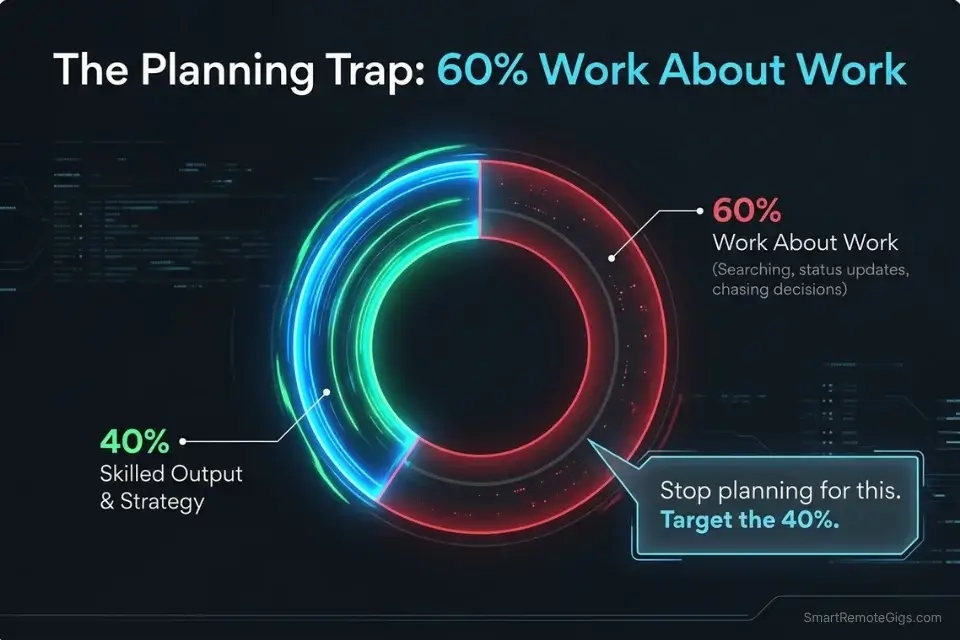
Asana’s 2024 State of Work Innovation research quantified something most remote workers already feel: 60% of work time goes to “work about work” — searching for information, managing communications, attending status updates, chasing decisions. Only 40% remains for skilled, strategic output.
Weekly planning fails when it optimizes the wrong 60%.
The Three Planning Mistakes That Keep You Reactive
Mistake 1: Over-scheduling without buffer. Microsoft’s 2023 research across 31,000 users found employees spend 57% of time communicating and 43% creating. Back-to-back time blocks assume you live in the 43%. You don’t. Building in zero flex means a single urgent Slack thread destroys your entire morning plan.
Mistake 2: Tasks over outcomes. A 47-item to-do list distinguishes between nothing. It doesn’t tell you which three things, if completed, would make this week a success. The list grows. The outcomes stay fuzzy. Friday arrives and you’ve been busy the entire time.
Mistake 3: Planning in isolation from energy. Scheduling a deep work block from 3–5 PM every day ignores that most people’s cognitive performance drops 20–30% after midday. ActivTrak’s State of the Workplace 2025 report found remote workers average 22.75 hours of deep focus per week — but those hours cluster in the morning. Planning against your energy pattern guarantees underperformance.
What the Data Says About Effective Planning
The Pomodoro Technique and time blocking exist because they force planning alignment with how attention actually works — not how a calendar looks. The research on weekly planning is consistent: structured outcome-setting, not task cataloguing, drives results. The 5-step system below is built on that distinction.
Step 1: The Sunday Reset — Your 30-Minute Clarity Session
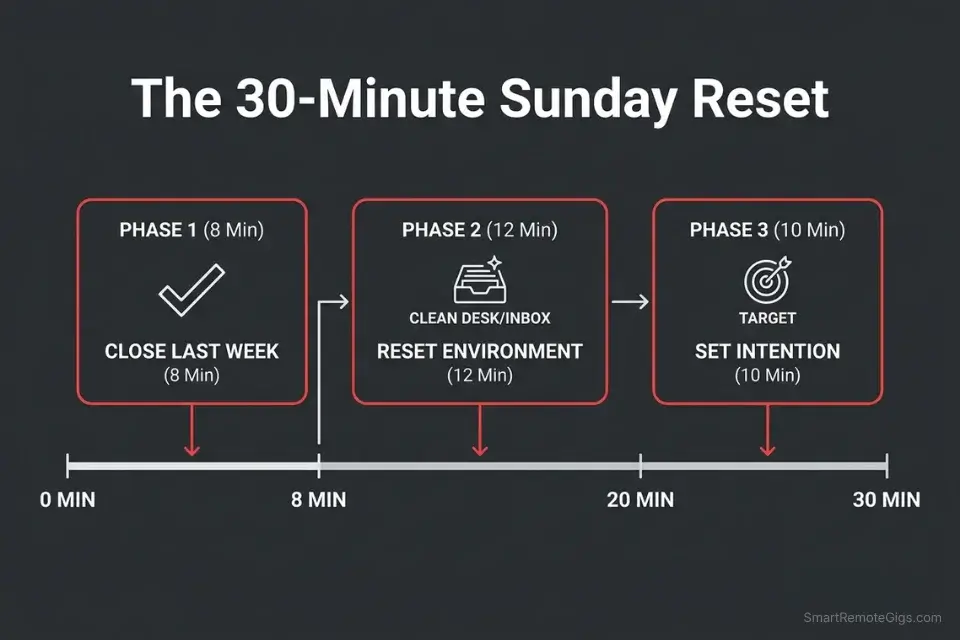
The Sunday Reset is not a to-do list session. It is a deliberate transition from last week’s reality to next week’s intention. Thirty minutes. Structured. Every week without exception.
Phase 1: Close the Loop on Last Week (8 Minutes)
Start by writing down three specific wins from the past week — no matter how small. Not what you planned to accomplish. What actually happened that moved something forward. This is not journaling. It’s data collection.
Then spend five minutes on the obstacles. What didn’t happen and why? Not to assign blame — to extract one tactical adjustment per failure. “Meetings ran long” becomes “Block 15-minute prep before every call next week.” Reflection without adjustment is just cataloguing frustration.
Phase 2: Reset Your Environment (12 Minutes)
Clear digital inboxes using the 2-minute rule: respond now or archive. Clear your physical workspace down to one surface. Set out what you need for Monday’s first priority so no decision-making is required at 8 AM.
Decision fatigue is real. Every trivial choice Monday morning — where’s my charger, where’s that doc, what do I wear — draws from the same cognitive budget as strategic thinking. The Sunday Reset pre-spends those trivial decisions so Monday morning starts with full capacity.
Phase 3: Set Intention for the Week Ahead (10 Minutes)
Scan your calendar for the coming week. Flag high-stakes moments — presentations, client calls, deliverable deadlines. Identify scheduling conflicts and fix them now, not at 9 AM Monday when everyone is already waiting.
Then ask the one question that makes the difference: “If I could accomplish only three things this week that would make me feel the week was a success, what are they?” These become your Weekly Wins in Step 2. The Eisenhower Matrix is a sharp companion tool here — it cuts through urgency theater and surfaces what’s genuinely important.
Sunday Reset Checklist Template
✅ CLOSE LAST WEEK (8 min)
Win 1: [What moved forward?]
Win 2: [What moved forward?]
Win 3: [What moved forward?]
Obstacle 1: [What didn’t happen?] → Adjustment: [One tactical fix]
Obstacle 2: [What didn’t happen?] → Adjustment: [One tactical fix]
✅ RESET ENVIRONMENT (12 min)
Email inbox at zero: [YES / NO]
Slack/messages processed: [YES / NO]
Desk cleared for Monday: [YES / NO]
Monday’s first priority material ready: [YES / NO]
✅ SET INTENTION (10 min)
High-stakes moment this week: [What + when]
Conflict to fix now: [Which meeting + resolution]
My 3 Weekly Wins (from Step 2): [Fill after Step 2]
Weekly theme word: [Focused / Disciplined / Exploratory / Recovering]
Step 2: Define Your 3 Weekly Wins — Outcomes, Not Tasks
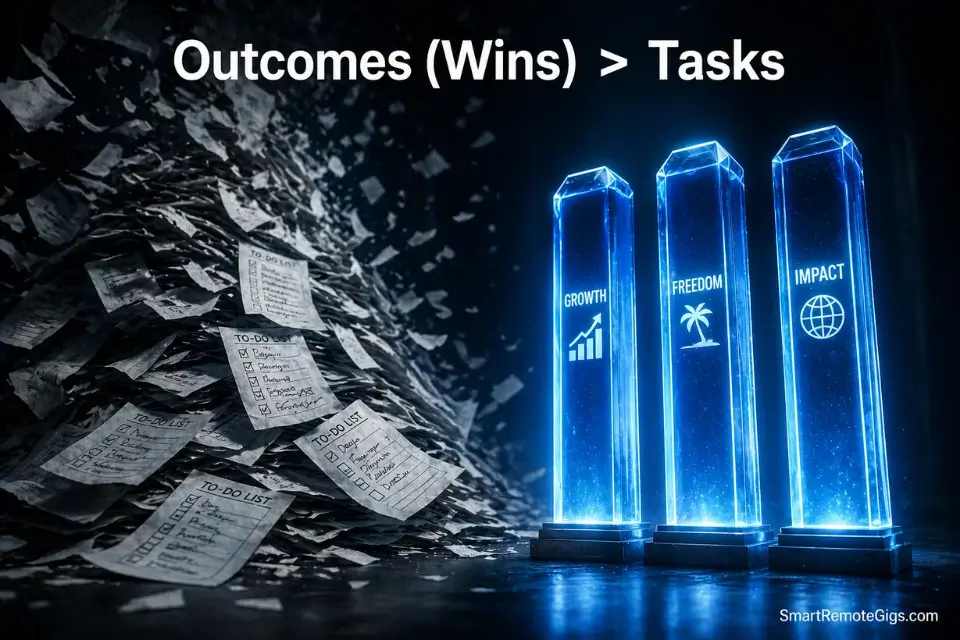
This is where traditional weekly planning collapses. Most people translate “plan your week” into “write a task list.” Task lists are inputs. Wins are outputs. The difference is everything.
A Weekly Win answers: “What does done look like, and why does it matter?” Not “finish report” — “deliver Q2 analysis that gives the client a clear go/no-go recommendation by Thursday EOD.”
The Holistic Wins Framework
Structure your three wins across three domains — not because balance is a virtue, but because single-domain planning creates fragility. A week that’s 100% work-wins collapses the moment a family situation surfaces.
Professional Win: Connect directly to your career trajectory or a current client deliverable. Specificity is the test. If someone else could read your Professional Win and know exactly what success looks like — it passes. If it could mean five different things — rewrite it.
Strong examples: “Complete the proposal that positions us for the Halford contract renewal” or “Finish the onboarding doc so the new VA can operate independently by Friday.”
Weak examples: “Work on the proposal” or “Help with onboarding.”
Personal Win: Targets relationships, growth, or life quality in ways that restore rather than deplete. The test: does completing this win make you better at everything else, or just add to the load?
Strong examples: “Have three device-free dinners with the family this week” or “Finish chapter 3 of the photography course I’ve been deferring for six weeks.”
Wellness Win: Small, repeatable, non-negotiable. Stanford’s Behavior Design Lab research confirms tiny consistent actions create more lasting change than ambitious sporadic efforts. A wellness win should be completable even on a bad week.
Strong examples: “10-minute walk after lunch every day” or “Asleep by 11 PM on four of five weekdays.”
The Weekly Priorities Test
Once you have three wins, run the filter: do all your scheduled activities this week serve at least one of these wins? If a recurring meeting serves none of your wins and none of your client obligations — it’s a candidate for cancellation or delegation. This is what weekly priorities mean in practice — not ranking tasks, but filtering commitments.
Weekly Wins Outcome Template
PROFESSIONAL WIN:
Task form (weak): [What you plan to do]
Outcome form (strong): [What done looks like + why it matters]
Done looks like: [Specific, observable result]
Deadline: [Day + time]
Serves this goal: [Quarterly / annual objective]
PERSONAL WIN:
Outcome: [Specific and observable]
Minimum viable version (bad week): [Scaled-down version you can still hit]
WELLNESS WIN:
Habit: [Exact action]
Frequency: [X times this week]
Trigger: [When / what cues it]
Step 3: Your Time-Block Blueprint — Build the Weekly Work Plan
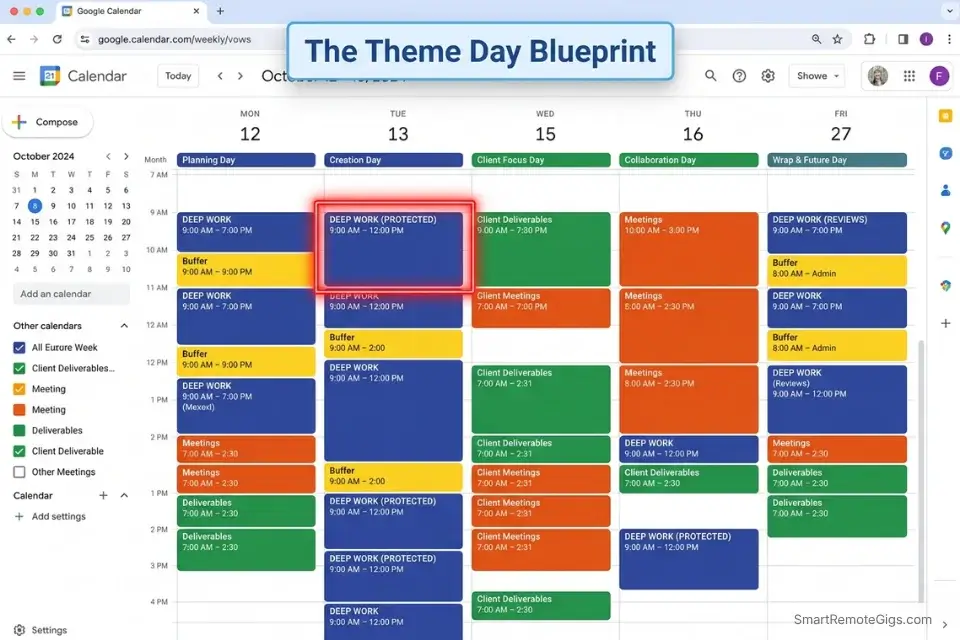
Time blocking is not micro-scheduling every minute. Cal Newport’s framing at calnewport.com is precise: every minute gets assigned to a category of work — not a specific task. The category is the block. The task fills the block. This distinction prevents rigidity while maintaining intentionality.
ActivTrak’s 2025 data shows the average productive session has grown from 20 to 24 minutes — a 20% improvement. The reason: workers are learning to protect and extend focus windows. Your weekly work plan is the infrastructure that makes those windows possible.
The Theme Days Framework
Theme Days batch similar cognitive demands together, reducing the mental cost of context-switching. Research on task-switching consistently shows productivity losses of 20–40% from frequent switching. Theme Days minimize those transitions at the weekly level.
A foundational framework that works across most remote professional roles:
- Monday — Strategic Focus: Planning, big-picture thinking, week-scoping. This is not the day to start complex deliverables. It’s the day to align everything.
- Tuesday — Deep Work: Your hardest, most cognitively demanding output. No non-essential meetings. Guard this block harder than any other.
- Wednesday — Connection: Meetings, client calls, team collaboration. Batching external interactions preserves your deep work days.
- Thursday — Execution: Move deliverables forward. Respond to what Wednesday surfaced. Administrative tasks that require focused attention.
- Friday — Integration: Wrap open loops, run your Friday planning session (see the Friday vs Sunday section below), and prepare Monday for a running start.
For a deeper look at how time blocking and task batching work together as a hybrid system, SRG’s full guide covers the mechanics for freelancers managing multiple clients simultaneously.
Energy-Aligned Scheduling
Theme Days set the macro structure. Energy alignment sets the micro. Your brain’s peak cognitive window — typically 2–4 hours in the morning — is when your most demanding work should live. This is non-negotiable.
Map your week in three tiers:
- Peak hours (your morning window): Deep work, complex writing, strategic decisions
- Secondary hours (mid-afternoon): Execution tasks, routine client work, structured meetings
- Low-energy hours (late afternoon): Administrative tasks, inbox, scheduling, planning logistics
Scheduling a difficult presentation draft at 4 PM is not planning — it’s optimistic fiction.
Color-Code Your Calendar
Visual differentiation reduces decision friction. Use four colors maximum:
- Deep Blue: Strategic / deep work blocks
- Green: Client deliverables / active project work
- Orange: Meetings and calls
- Yellow: Administrative / buffer time
Weekly Work Plan Theme Day Template
MONDAY — Strategic Focus
8:00–9:30 AM: Weekly strategy review + priority alignment
[Meeting slot only if unavoidable]
TUESDAY — Deep Work (PROTECTED)
8:00–12:00 PM: [Primary deliverable — name it specifically]
Meetings: None before noon.
WEDNESDAY — Connection
10:00 AM–12:00 PM: [Client calls / team meetings]
2:00–4:00 PM: [Secondary client work or collaboration]
THURSDAY — Execution
9:00–11:00 AM: [Move primary deliverable forward]
2:00–4:00 PM: [Administrative + inbox]
FRIDAY — Integration
9:00–10:30 AM: [Open loop closure]
2:00–3:00 PM: [Next week planning session — 30–45 min]
Step 4: The 20% Flex Rule — Engineer Your Buffer
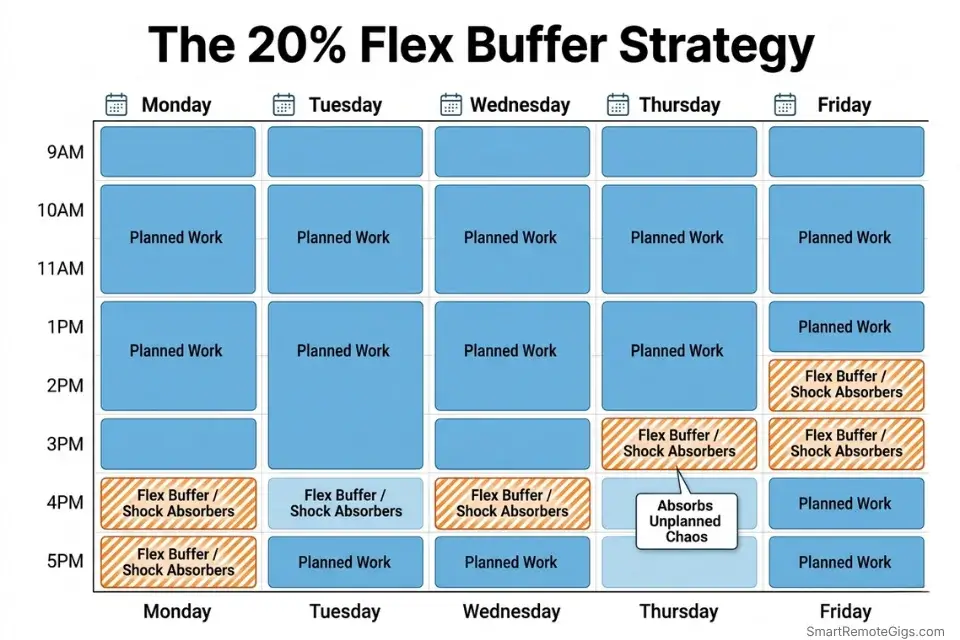
The Project Management Institute’s data puts unplanned work at 41% of knowledge workers’ total time. Planning 100% of your available hours means planning to fail 41% of the time. The 20% Flex Rule acknowledges this arithmetic and builds resilience into the weekly work plan before the week starts.
Interrupt Buffers (Daily)
Reserve 60–90 minutes each day in two blocks — 30 minutes in the morning, 60 minutes in the afternoon — explicitly labeled “Daily Flex.” This is not free time. It is pre-allocated capacity for the urgent-but-unscheduled that will arrive.
When a colleague needs immediate help, or a client submits an urgent change request, the flex buffer absorbs the impact. The planned work survives. Without the buffer, every interruption triggers a cascade of rescheduling that compounds through the week.
Hard rule: Never let a flex block get pre-filled with low-priority commitments. Protect it like your most important deliverable — because in the moment someone needs you urgently, it is.
Opportunity Buffers (Weekly)
The most effective remote professionals are available when opportunity arrives. That means maintaining at least one open Friday afternoon slot per week for the valuable unplanned — a strong networking call, an invitation to contribute to a high-visibility project, an unexpected client expansion conversation.
Pre-filling every hour of Friday afternoon forecloses these moments. An empty slot is not wasted time — it’s optionality.
Recovery Buffers (Weekly)
Harvard Business Review research shows people who take deliberate breaks are more creative and make higher-quality decisions. Schedule 2–3 hours weekly for processing and reflection — not as luxury, but as infrastructure. This is the time your brain consolidates the week’s work into durable insight.
Buffer Planning Template
DAILY FLEX BLOCKS (copy into calendar each week)
Morning buffer: 9:00–9:30 AM [FLEX — do not pre-fill]
Afternoon buffer: 3:00–4:00 PM [FLEX — do not pre-fill]
WEEKLY OPPORTUNITY SLOT
Friday: 2:00–4:00 PM [OPEN — first-come, high-value only]
WEEKLY RECOVERY BLOCK
[Choose 1 slot: Thursday 4–5 PM or Friday 4–5 PM]
Use for: processing, reflection, journaling decisions from the week
FLEX USAGE LOG (track weekly)
Mon: Used for [what] / Protected
Tue: Used for [what] / Protected
Wed: Used for [what] / Protected
Thu: Used for [what] / Protected
Fri: Used for [what] / Protected
Step 5: The 5-Minute Daily Huddle — Stay on Course
A weekly plan without daily check-ins is a plan you abandon by Wednesday. The 5-Minute Daily Huddle is the mechanism that keeps the weekly system alive. It takes 5 minutes. It costs nothing. It is the difference between your plan surviving contact with reality and dissolving under it.
The 3 Daily Questions
Question 1: “What’s my one priority today that connects to my Weekly Wins?”
Not your five most urgent emails. Not your longest task. The single highest-impact action that moves a Weekly Win forward today. Everything else is secondary until this is done or genuinely blocked.
Question 2: “What might derail me today, and how will I handle it?”
This activates what behavioral research calls implementation intentions — pre-planned responses to anticipated obstacles. Studies show people with if-then plans are 2–3 times more likely to follow through on their stated intentions.
Build three standing responses:
- “If a meeting runs long, then I’ll reschedule my deep work block rather than cancel it.”
- “If I get a high-urgency request, I’ll route it to my afternoon flex buffer.”
- “If my energy crashes after lunch, I’ll take a 10-minute walk before attempting any analytical work.”
Question 3: “What does my energy level tell me about my approach today?”
High energy: tackle the hardest thing first, take on stretch goals. Medium energy: steady execution on routine deliverables. Low energy: administrative tasks, light communication, genuine self-care — not guilt about not performing at peak.
The 5-Minute Implementation
Minutes 1–2: Review your three Weekly Wins. Identify today’s single priority.
Minutes 3–4: Run through two potential obstacles. Set if-then responses for each.
Minute 5: Assess energy honestly. Adapt the day’s approach accordingly.
The Pomodoro Technique pairs directly with this huddle — once you’ve identified today’s priority in the huddle, Pomodoro gives it structure and protects the focus window you’ve identified.
5-Minute Daily Huddle Template
DATE: [Day, Date]
ENERGY CHECK: High / Medium / Low
MY ONE PRIORITY TODAY:
[Single action that moves a Weekly Win forward]
Estimated time needed: [X minutes / hours]
Time block assigned: [Start time – End time]
OBSTACLE ANTICIPATION:
If [potential disruption 1], then I will [specific response].
If [potential disruption 2], then I will [specific response].
ENERGY ADAPTATION:
High → Tackle priority first, protect deep work block, take on one stretch task
Medium → Priority first, steady execution, protect against overcommitting
Low → Priority only, delegate or defer everything secondary, 10-min recovery walk at noon
END OF DAY RESET (30 sec):
Priority completed? YES / PARTIALLY / NO
If not: [Reschedule to — day + time]
When to Plan: Friday or Sunday?
The Friday vs Sunday planning debate has a real answer — and it depends on what you’re optimizing for.
The Case for Friday Planning
Time-management expert Laura Vanderkam has made the most rigorous case for Friday afternoon planning, and it holds up. Four concrete advantages:
Opportunity cost is minimal. Friday afternoons are low-cognitive-output time for most knowledge workers. The energy you’d otherwise spend counting down to the weekend is repurposed for 30 minutes of high-leverage planning. No meaningful work is displaced.
Monday starts at full capacity. Walking into Monday morning with a clear plan and identified priority means your best cognitive energy — the peak window — goes to execution, not orientation. Planning on Monday morning squanders your highest-quality thinking on logistics.
The Sunday scaries disappear. When you know exactly what next week looks like before Friday evening, your weekend is genuinely free. The background anxiety of undefined work obligations — what Quartz contributor Laura Vanderkam identifies as the core driver of Sunday anxiety — never forms.
Work-mode context is still active. On Friday, you can accurately estimate task duration and sequencing because you’re still in the rhythm of the week. Planning on Sunday requires mentally re-entering a work context your brain has spent two days leaving.
The Case for Sunday Planning
Sunday planning has one structural advantage: proximity to Monday. Some professionals — particularly those in client-service roles where weekend developments are common — find that Sunday planning captures Saturday-Sunday information that Friday planning misses. A client email arriving Saturday changes Monday’s priority stack. Sunday planning catches it. Friday planning doesn’t.
SRG’s Recommendation
For most remote professionals: plan on Friday. Use Sunday for a 10-minute scan only — check for any weekend developments that change Monday’s priority, adjust if needed. This hybrid approach captures both advantages without giving up the weekend to planning anxiety.
If your role regularly generates significant weekend developments (on-call, client-facing, media, finance), shift the full session to Sunday evening and treat Friday as a lightweight preview.
Planning Your Week as a Freelancer or Remote Worker
The standard weekly planning advice assumes a stable employer, fixed hours, and a single workstream. Freelancers and remote workers operate in a different environment — multiple clients, variable income weeks, irregular schedules, and no structural accountability from an office.
The system needs adaptation, not replacement.
Planning Across Multiple Clients
The Weekly Wins framework scales directly to multi-client work. One Professional Win per active client is too many — it fragments the week into reactive servicing. Instead:
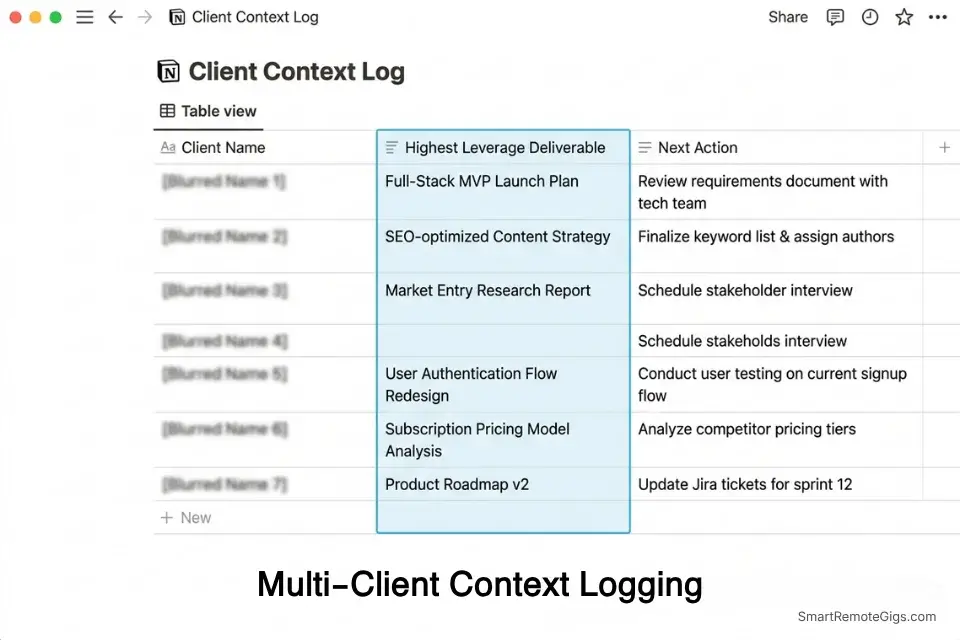
Identify your highest-leverage client deliverable for the week. This is the one that, if delayed or delivered poorly, causes the most downstream damage. Make this your Professional Win. All other client work flows into your Theme Day execution blocks.
Maintain a client context log — a single document per client with the current priority, last interaction, and next action. Review it during your Sunday Reset. This replaces the cognitive load of remembering where every relationship stands.
Managing Irregular Schedules
ActivTrak’s 2025 research found remote workers achieve 22.75 hours of deep focus per week compared to 18.6 hours for office workers — a 4-hour weekly advantage. The condition: deliberate protection of focus time. Without structural defaults (Theme Days, buffer blocks), the remote flexibility advantage inverts — every hour becomes negotiable and nothing is protected.
For genuinely irregular weeks — conference weeks, sprint weeks, travel weeks — the 20% Flex Rule becomes a 40% Flex Rule. Reduce planned output expectations by 40% and protect only your top Weekly Win. Everything else is bonus.
The Accountability Gap
Office environments provide passive accountability — people see you arrive, see you working, notice when you leave. Remote work removes this. The 5-Minute Daily Huddle partially replaces it by creating a daily self-accountability ritual. For deeper accountability, many freelancers use body-doubling sessions (co-working virtually with another remote professional) during their deep work blocks.
The remote personal branding systems SRG covers directly connect to this: how you work — the consistency, reliability, and visible output — becomes the brand signal that generates referrals and client retention in the absence of physical presence.
AI Tools That Make Weekly Planning Faster in 2026
No top competitor in this SERP is addressing this. That’s a gap — and for SRG readers building remote-first productivity systems, it’s a significant one.
AI tools don’t replace the 5-step system. They reduce the friction of executing it.
Where AI Adds Real Value in Weekly Planning
Sunday Reset acceleration. AI tools like Notion AI, ClickUp AI, and Claude can process your raw notes, email summaries, and calendar data to generate a structured weekly review in minutes. Instead of spending 8 minutes manually cataloguing last week’s progress, you prompt: “Summarize my completed tasks and flagged items from this week and identify what’s still open.” The reflection still requires you — the data retrieval doesn’t.
Outcome-to-task decomposition. Once your Weekly Wins are defined, AI assistants excel at breaking outcomes into executable task sequences with estimated time requirements. “I need to complete a client proposal by Thursday” becomes a 6-task sequence with time blocks pre-allocated across Tuesday and Wednesday.
Buffer adjustment recommendations. AI calendar tools (Reclaim.ai, Motion) monitor your actual schedule vs plan in real time and automatically resize flex blocks based on emerging obligations. The 20% Flex Rule becomes dynamic rather than static.
The Limits of AI in Weekly Planning
AI cannot define your Weekly Wins. It cannot assess your energy. It cannot make judgment calls about which client relationship matters most this week. The system’s strategic core — the Sunday Reset, the Wins framework, the Daily Huddle — requires human judgment precisely because it involves values and priorities, not just information.
Use AI to execute the system faster. Not to replace the thinking that makes it work.
For a full comparison of the best note-taking apps and productivity tools that integrate with AI weekly planning workflows, SRG’s reviewed guide covers the options across budget and use case.
The Tools That Power Your Weekly System
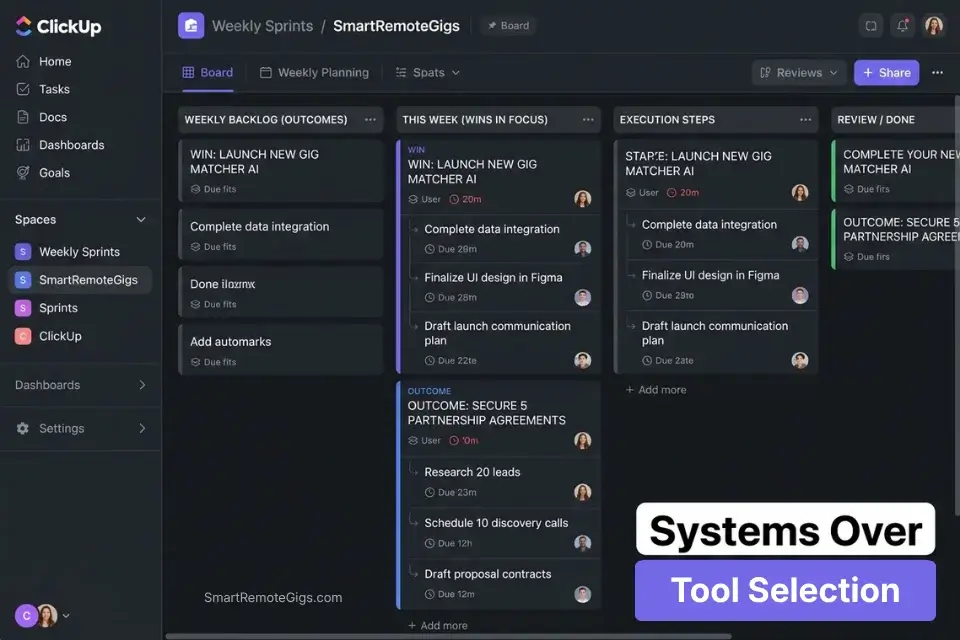
Different execution styles need different tools. The system works on paper and in software. The tool matters less than the habit.
For Digital-First Remote Workers
Notion and ClickUp offer the deepest customization for remote professionals managing complex, multi-project workflows. Both support database-driven weekly planning templates with linked goals, time tracking, and automated reminders. The tradeoff: setup time is significant. Expect 2–4 hours of initial configuration before the system runs smoothly.
Google Calendar combined with a simple notes app (Notion, Apple Notes, Obsidian) covers the full 5-step system without the setup overhead. Calendar handles time blocking and theme days. Notes handle the Weekly Wins and Daily Huddle templates. This is the lowest-friction starting point.
For Paper-First Planners
Physical planners deliver one advantage digital tools don’t: no notifications. The act of writing a Weekly Win by hand increases encoding — research on handwriting vs typing consistently shows higher retention and commitment from handwritten goals. If digital distractions derail your Sunday Reset, a paper planner eliminates the root cause.
The hybrid approach — paper for the Sunday Reset and Daily Huddle, digital for calendar blocking — captures both advantages.
FAQ: How to Plan Your Week
What is the best day to plan your week?
Friday afternoon, for most remote professionals. The work-mode context is still active, planning displaces low-value Friday end-of-day drift, and the weekend is fully free of unresolved planning anxiety. Sunday works for roles with significant weekend developments — use a 10-minute Sunday scan as a supplement regardless of when you run the full session.
How long should weekly planning take?
30 minutes for the full Sunday Reset once the system is established. First-timers typically need 60–75 minutes for the first two weeks while building the habit. The 5-Minute Daily Huddle is non-negotiable — it doesn’t scale up; it stays at 5 minutes.
What should be included in a weekly plan?
Three things: outcomes (your Weekly Wins — not a task list), time structure (Theme Days + buffer blocks), and a daily check-in ritual (the 5-Minute Daily Huddle). Anything beyond this is overhead. A weekly work plan that takes 3 hours to build will not get used consistently.
How do you plan your week when your schedule is unpredictable?
Scale the flex ratio. Standard weeks: 20% flex. Irregular weeks (travel, sprints, on-call): 40% flex. Protect your single highest-priority Weekly Win and treat everything else as bonus. Theme Days become defaults rather than rules — the template exists so unpredictable weeks still have a starting structure rather than a blank slate.
How do you stick to your weekly plan when motivation drops?
Motivation is not the input. Habit and structure are. The 5-Minute Daily Huddle is designed to be small enough that motivation isn’t required to start it. Once the huddle runs, momentum typically follows. The Sunday Reset’s win-celebration ritual — deliberately noting what worked — creates the positive reinforcement loop that sustains the system through low-motivation weeks.
Should I use a digital or paper planner?
The best planner is the one you open every day. Paper works for people who think clearly when disconnected from screens and whose schedules are relatively stable. Digital works for complex, multi-client schedules requiring calendar integration and mobile access. The hybrid approach — paper for thinking, digital for scheduling — works for most remote professionals with both deep work needs and active client communications.
The Verdict
The 5-step system in this guide works — not because it’s elegant, but because it attacks the actual problem. The actual problem is not that remote workers lack discipline or motivation. It is that they plan inputs (tasks) when they need to plan outputs (outcomes), and they plan for an ideal week rather than a resilient one.
The Sunday Reset provides the weekly rhythm. The Weekly Wins replace task theater with outcome clarity. The Time-Block Blueprint creates the weekly work plan structure. The 20% Flex Rule makes it survivable. The Daily Huddle keeps it alive through Friday.
The tool matters less than the habit. The template matters less than the discipline of running the same process every week until it becomes automatic — the same way brushing your teeth doesn’t require motivation.
Start with Step 1 only. Run the Sunday Reset this weekend. Do nothing else from this guide. Once the Reset is automatic — typically 3–4 weeks — add the Weekly Wins. Build the system one layer at a time. The compound effect of a consistent weekly planning habit at 6 months is not incremental improvement. It is a fundamentally different experience of what work feels like.
Pro planner tips don’t transform your output in week one. They transform your baseline for what a productive week is, which makes every subsequent week more deliberate than the last.
Keep Building What You’ve Started
While you build a planning system that protects your output, don’t ignore the opportunities that reward it.
Head to the SRG Job Board at /jobs/ for remote roles that specifically value self-managed professionals who plan and deliver without micromanagement — the exact profile this system builds.
Browse the SRG Software Directory at /software/ for the best productivity and planning tools we’ve tested — including apps that replace your sticky notes and whiteboard with systems that actually scale with your client load.

Never Miss a New Remote Job
REMOTE JOB ALERTSGet notified about new remote jobs and access practical freelance tools from your phone.

![Build AI Second Brain Assistant 2026: Local Setup [Guide]](https://smartremotegigs.com/wp-content/uploads/2026/09/build-your-second-brain-ai-assistant-local-rag-hero-1024x577.webp)
![Second Brain with Claude & Obsidian 2026 [My Setup]](https://smartremotegigs.com/wp-content/uploads/2026/08/claude-obsidian-second-brain-mcp-hero-1024x577.webp)
![Why Your Second Brain Fails 2026: Retrieval Fix [Fix]](https://smartremotegigs.com/wp-content/uploads/2026/08/why-your-second-brain-fails-hero-1024x576.webp)