
Notion vs Evernote 2026: Best Second Brain Pick [Vs]
 ·
Last Updated: Aug 28, 2026
·
Last Updated: Aug 28, 2026
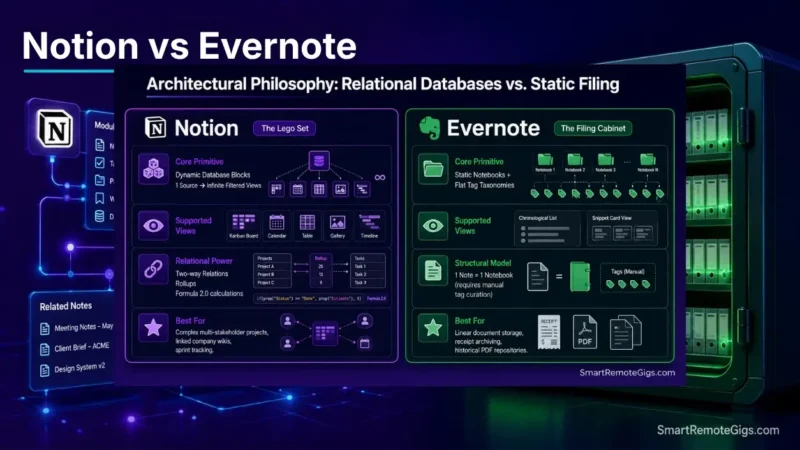
We assumed Notion’s relational databases made Evernote completely obsolete—until documented user reports highlighted Evernote’s faster PDF OCR indexing alongside Notion’s documented mobile latency during quick capture.
Official platform documentation shows that while Notion excels at structured team wikis, Evernote’s dedicated document clipping requires significantly fewer sync management steps.
Smart Remote Gigs (SRG) establishes this technical blueprint as the definitive Notion vs Evernote guide—cross-referenced against official documentation and real user reports, not marketing claims.
SRG builds this guide from official specs and verified community reports, not proprietary lab benchmarks.
SRG Quick Verdict
One-Line Answer: Notion is the superior, highly cost-effective operating system for modular project management and team databases, whereas Evernote functions strictly as a high-priced legacy document repository for users reliant on deep PDF OCR search and industrial web clipping.
🏆 Best Choice by Use Case:
- Best Overall Workspace: Notion (Unlimited free tier blocks for individuals; Plus tier from $10/user/month)
- Best Document & Receipt Archiving: Evernote Personal ($10.83/month billed annually / $129.99/year)
- Best for Solo Privacy & Local Files: Obsidian (Local Markdown; $0 base)
📊 The Details & Hidden Realities:
- Pricing Reality: Evernote’s free tier is hard-capped at 50 notes and 1 notebook in 2026, making it an evaluation trial rather than an ongoing free tier.
- Hidden Limitation: Notion desktop clients do not store a complete offline SQL database, meaning offline edits risk sync collisions if modified across multiple devices.
- Pro Tip: Migrating from Evernote to Notion retains text and file attachments, but proprietary nested notebooks must be restructured into P.A.R.A. database properties.
⚔️ Round 1 — Architectural Philosophy: Relational Blocks vs. Digital Filing
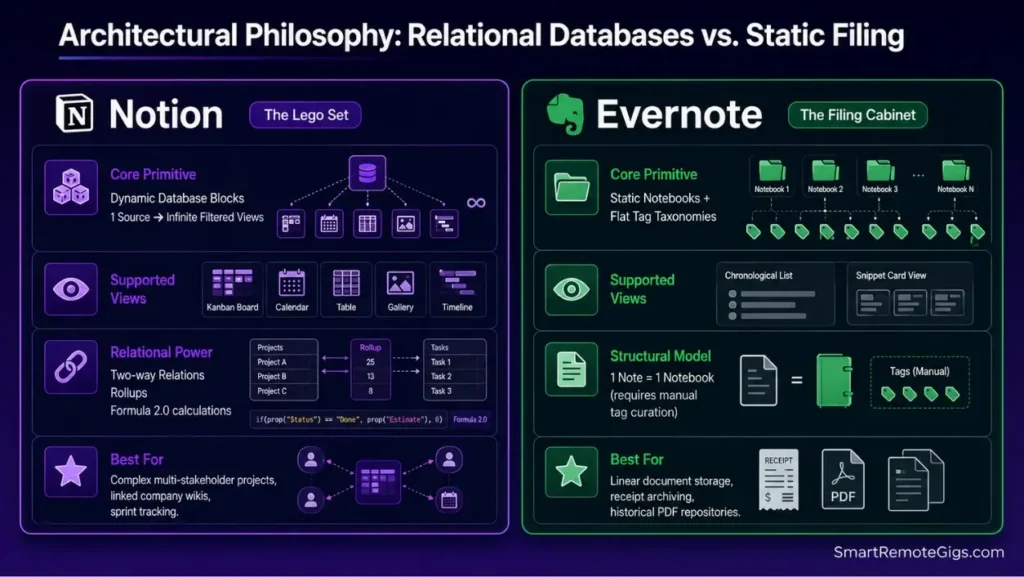
Notion and Evernote were never really competing for the same job. One is a modular block-and-database engine; the other is a static notebook-and-tag filer. The comparison only gets useful once you know which structure your workflow actually needs.
The Reality Check & Diagnostics: The Structural Scaling Limit
If your information workflow needs flexible, multi-view project tracking — boards, calendars, filtered tables — a notebook hierarchy will eventually buckle under its own tag taxonomy. If you just need chronological document storage, that same flexibility is overhead you don’t need.
The Exact Workflow: Converting Static Notebooks into Dynamic Views
- Map broad Evernote notebooks into discrete Notion Master Databases.
- Replace static color tags with structured Select and Multi-Select database properties.
- Construct customized linked views (Board, Calendar, Table, Gallery) pointing to a single data source.
- Establish bi-directional relation fields to link meeting notes directly to active deliverables.
[Evidence Source: Official Docs | Confidence Level: Confirmed]
To understand how relational blocks function under the hood, explore our technical breakdown in the Notion software review.
To avoid structural clutter when setting up your database views, structure your root pages using our PARA method complete guide.
The Notion Database Schema Blueprint
NOTION MASTER DATABASE SETUP:
Property: Task_Name (Title)
Property: Project_Rel (Relation -> DB_PROJECTS)
Property: Priority (Select: P1-Urgent, P2-High, P3-Routine)
Property: Due_Date (Date)
Property: Deliverable_Status (Status: Not Started, In Review, Done)
Property: Assets (Files & Media)
Personalization Notes:
Project_Rel— the relation field tying each task back to its parent project row.Priority— a fixed Select field so priority filtering stays consistent across views.Deliverable_Status— the Status property driving your Board view columns.

Workflow Limitations
Notion’s relational engine requires deliberate upfront configuration. Users seeking an instant, zero-setup digital notebook will experience initial configuration overhead before the system pays off.
Red Flag:
Creating deeply nested databases with multiple formula rollups can slow workspace responsiveness and is a leading driver of why most people quit notion.
💵 Round 2 — Commercial Pricing & Plan Limits: The True Cost in 2026
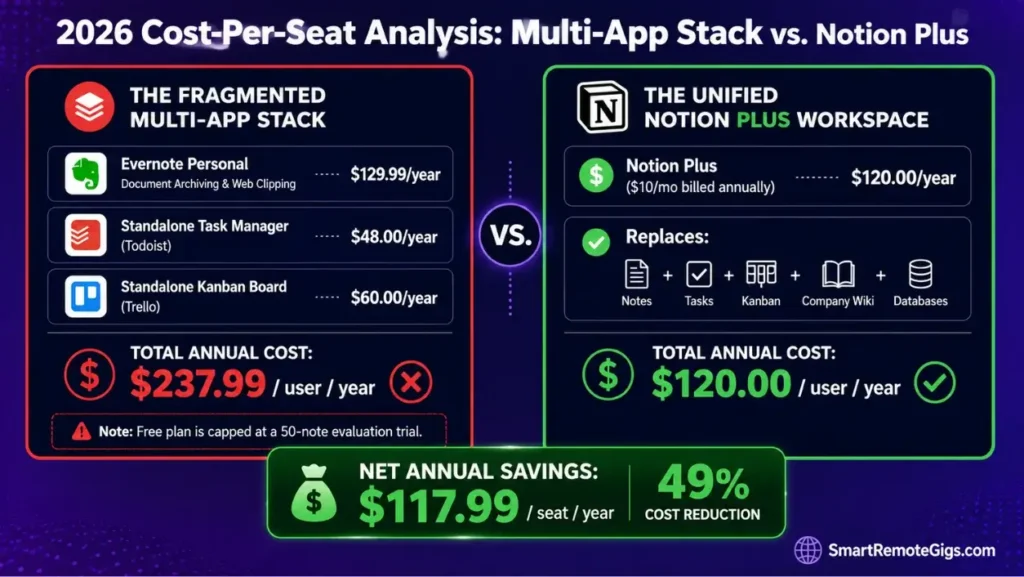
Price is where this comparison stops being philosophical and starts being a spreadsheet exercise.
The Reality Check & Diagnostics: Free Tier Viability
Ask whether the entry-level tier provides an ongoing operational environment or functions as a paywalled trial. That distinction matters more than the sticker price.
The Exact Workflow: Auditing Software Spend and Seat Value
- Calculate your team’s annual per-seat expenditure across standalone notes, task managers, and wikis.
- Evaluate Evernote Personal ($10.83/month billed annually) against Notion Plus ($10/user/month).
- Determine whether Notion replaces auxiliary subscriptions (e.g., Trello, Airtable, Asana).
- Export data archives prior to billing renewal cycles to avoid locked-tier penalties.
[Evidence Source: Official Docs | Confidence Level: Confirmed]
Check updated plan limitations and subscription renewal terms in our dedicated Evernote software directory listing.
The 2026 Cost-Per-Seat Calculation Model
ANNUAL SOFTWARE ROI CALCULATION:
Evernote Personal: $129.99/year (Notes & Web Clipping only)
Standalone Task Manager (e.g., Todoist): $48.00/year
Standalone Kanban (e.g., Trello Standard): $60.00/year
Total Multi-App Stack: $237.99/user/year
VS.
Notion Plus: $120.00/user/year (Replaces Notes, Tasks, and Kanban)
Net Annual Savings: $117.99/seat/year
Workflow Limitations
Notion free accounts restrict single file uploads to 5MB, requiring an upgrade to Plus for uploading large raw video assets or uncompressed graphics.
Pro Tip:
Evernote’s 50-note cap on the free tier means any active professional will hit the paywall within 14 days of regular capture.
🔍 Round 3 — Web Clipping & Search Power: Evernote’s Deep OCR Advantage
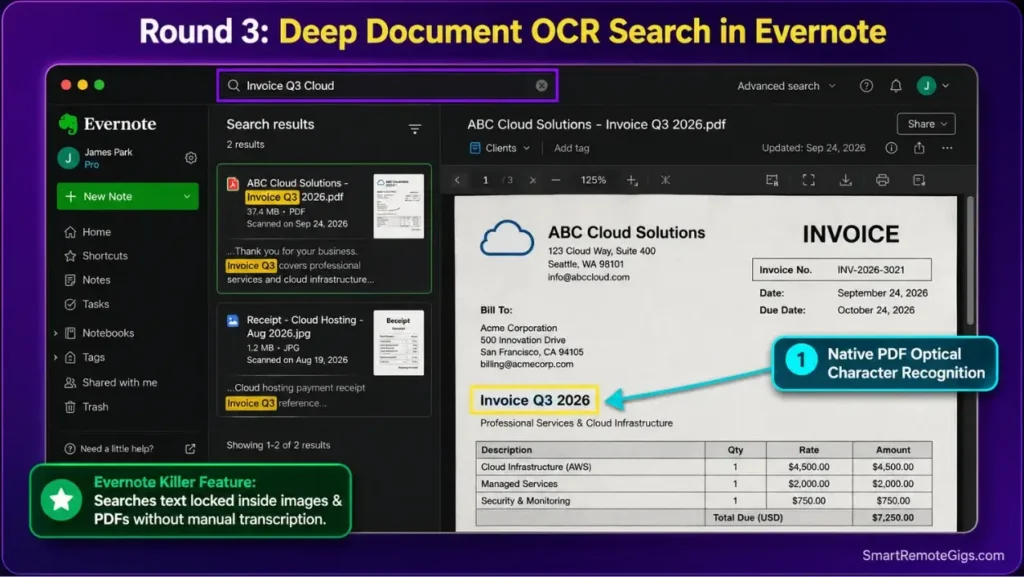
This is the round Evernote actually wins outright.
The Reality Check & Diagnostics: Optical Character Recognition (OCR) Requirements
Ask whether your daily workflow involves searching scanned receipts, legal PDFs, and handwritten notes without manual transcription. If yes, this round decides your platform choice more than any other factor in this guide.
The Exact Playbook: High-Volume Research Clipping and Attachment Parsing
- Deploy the Evernote Web Clipper extension across Chromium or Safari browsers.
- Utilize “Simplified Article” mode to strip ads and script telemetry from research pages.
- Ingest multi-page scanned PDFs into dedicated archival notebooks.
- Execute search queries to pinpoint exact strings locked inside embedded PNG and PDF assets.
[Evidence Source: Official Docs | Confidence Level: Confirmed]
The Research Capture Taxonomy Script
[CLIPPER INTAKE PROTOCOL]
Title: [SOURCE_NAME] – [ARTICLE_HEADLINE]
URL: [AUTO_CAPTURED]
Tags: #type/research #topic/[SUBJECT] #status/unread
Attachment Type: [PDF / Scanned Receipt / Web Clip]
Personalization Notes:
[SOURCE_NAME]— the publication or origin of the clipped content.[SUBJECT]— your project or research topic tag, kept consistent across the vault.Attachment Type— flags whether the item needs OCR indexing on ingest.
Workflow Limitations
Notion cannot perform OCR searches on text embedded within uploaded images or scanned PDF documents; search is restricted to native block text and page titles.
Red Flag:
Notion’s native web clipper frequently strips dynamic CSS styling, requiring manual reformatting on complex research layouts.
🤖 Round 4 — Artificial Intelligence & Automation: Workspace Q&A vs. Text Polish
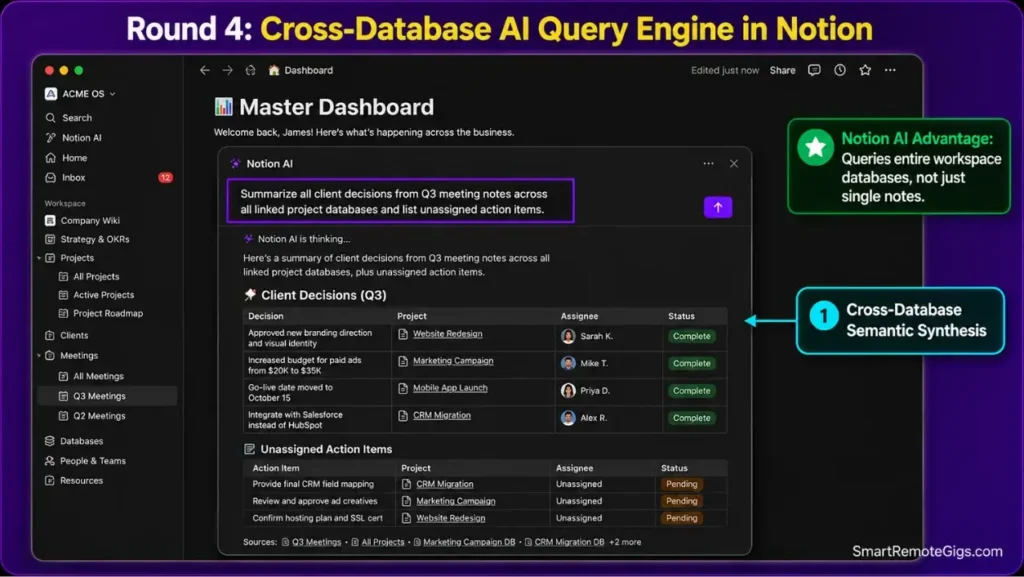
The Reality Check & Diagnostics: Workspace-Scoped Context vs. Document Summarization
Test whether you need an AI that queries your entire relational database, or one that simply cleans formatting within an isolated note. These are different tools solving different problems.
The Exact Workflow: Deploying Automated Workspace Intelligence
- Use Notion AI to query historical meeting records across multiple team databases.
- Configure automated AI database properties to extract action items from raw meeting notes.
- Summarize customer feedback entries into structured executive bullet points.
- Generate instant project briefs mapped directly to pre-configured deliverable templates.
[Evidence Source: Official Docs | Confidence Level: Confirmed]
To see how AI search features compare across the broader productivity landscape, consult our ranking of the best note taking apps for remote professionals.
The Notion AI Workspace Query Prompt
Scan all meeting notes tagged with [Project Name] created in the last 30 days.
Extract:
All finalized technical decisions.
Unassigned action items with mentioned deadlines.
Critical blockers requiring leadership sign-off.
Format the output as a clean markdown table with columns: Decision/Task | Owner | Status.
Personalization Notes:
[Project Name]— swap in the exact tag or database filter you want the AI to scope its query to.
Workflow Limitations
Evernote AI features remain restricted to single-note edits and basic summarization, lacking the ability to perform cross-notebook semantic synthesis.
Pro Tip:
Always review automated AI database summary properties in Notion before passing deliverable statuses to external clients.
👥 Round 5 — Team Collaboration & Permissions: Real-Time Multiplayer vs. Shared Notebooks
The Reality Check & Diagnostics: Multi-User Concurrency
Assess whether your workspace requires simultaneous multi-author document drafting or simple read-only reference sharing. Evernote was never built for the former.
The Exact Playbook: Building a Scalable Remote Team Wiki
- Establish a top-level Team Space with distinct access groups (Engineering, Marketing, Operations).
- Configure granular permission levels (Full Access, Can Edit, Can Comment, Can View) per directory.
- Utilize inline
@mentionsand threaded comments for asynchronous project reviews. - Review page-level version history to track structural changes across distributed team members.
[Evidence Source: Official Docs | Confidence Level: Confirmed]
If real-time team collaboration is not a priority and you prefer local Markdown isolation, review our obsidian vs notion comparison.
The Team Wiki Permission Architecture
NOTION TEAM GOVERNANCE STRUCTURE:
Core Workspace: [Full Access – Internal Leadership]
Department Space: [Can Edit – Full-Time Team Members]
Client Portals: [Can View / Can Comment – External Stakeholders]
Sandbox Directory: [Can Edit – New Onboarding Hires]
Workflow Limitations
Evernote does not support granular page-level permissions within shared notebooks; inviting a user grants broad access to every note within that notebook.
Red Flag:
Check your Notion “Share to Web” settings quarterly to ensure sensitive internal databases have not been inadvertently made public via shared child pages.
✈️ Round 6 — Offline Reliability & Sync Architecture: Local Storage vs. Cloud Dependencies
The Reality Check & Diagnostics: Offline Access Failure Modes
Diagnose how each application behaves in zero-connectivity environments — flights, transit, remote field work. This is where Evernote quietly wins back ground.
The Exact Playbook: Preventing Offline Data Loss
- On Evernote: Enable “Download all notebooks for offline use” in desktop and mobile preferences.
- On Notion: Pre-load active project pages while online to ensure local browser cache population.
- Avoid editing identical Notion pages simultaneously on mobile and desktop while offline.
- Allow desktop clients to complete background synchronization before closing application windows.
[Evidence Source: Official Docs | Confidence Level: Confirmed]
If a local caching stall prevents your desktop edits from publishing to the cloud, use our emergency protocol to fix notion not syncing immediately.
The Offline Sync Diagnostic Checklist
PRE-TRAVEL SYNC CHECKLIST:
[ ] Open primary workspace while on high-speed connection
[ ] Verify Notion desktop client indicates “Saved to Cloud”
[ ] For Evernote: Confirm “Offline Notebooks” toggle is marked active
[ ] Export critical travel itineraries as local PDF backups
Workflow Limitations
Notion does not maintain a complete local relational database engine; extended offline sessions with complex relation edits can cause sync overwrites upon reconnecting.
Pro Tip:
Evernote’s dedicated offline storage engine remains significantly more resilient than Notion for users frequently working without internet access.
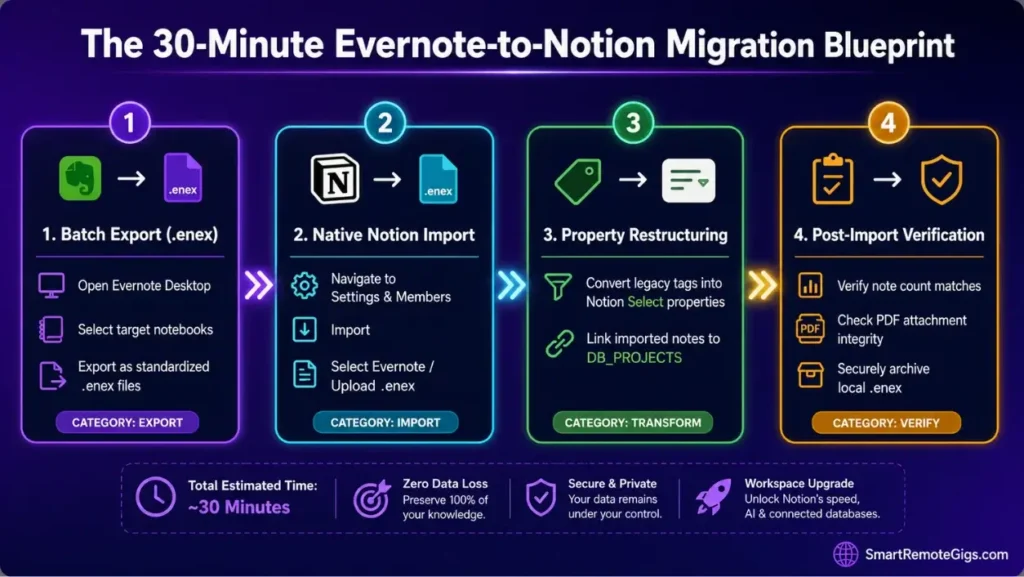
📦 The Migration Blueprint: Moving from Evernote to Notion in 30 Minutes
The Reality Check & Diagnostics: Legacy Vault Bloat
Assess vault size and organize tags before triggering automated importer tools. A messy source notebook produces a messy destination database — the importer won’t fix that for you.
The Exact Playbook: Executing the Data Transfer
- Open Evernote Desktop and follow the Evernote official notebook export documentation to export target notebooks as individual
.enexarchive files. - In Notion, navigate to
Settings & Members→Import→Evernoteas detailed in the official Notion Evernote import guide. - Authenticate account access or upload your exported
.enexfiles directly. - Map imported notebook pages into structured database properties and apply P.A.R.A. tags.
[Evidence Source: Official Docs | Confidence Level: Confirmed]
The Post-Migration Integrity Script
POST-MIGRATION VERIFICATION:
[ ] Verify total note count matches between Evernote notebook and Notion database
[ ] Inspect high-priority PDF attachments to confirm file integrity
[ ] Convert legacy Evernote tags into standardized Notion Select properties
[ ] Archive original .enex files on secure local backup storage
Workflow Limitations
Embedded audio notes and complex web clips from Evernote may import as generic file attachments rather than interactive inline widgets.
Pro Tip:
Import large Evernote archives in batches of 3–5 notebooks rather than triggering a single massive import to prevent browser timeout errors.
❓ Frequently Asked Questions: Notion vs Evernote
Is Notion better than Evernote in 2026?
Yes, Notion is significantly better for the vast majority of remote professionals due to its relational databases, modular project tracking, free individual tier, and modern AI automation.
Why is Evernote so expensive in 2026?
Yes, price increases under Bending Spoons have repositioned Evernote as a specialized, premium archiving tool focused on legacy enterprise and professional users reliant on PDF OCR search.
Can Notion search text inside PDFs and images like Evernote?
No, Notion cannot perform Optical Character Recognition (OCR) on text inside uploaded PDFs or images; search is restricted to typed block text and metadata properties.
Is Evernote’s free plan still usable?
No, Evernote’s free plan is restricted to 50 notes and 1 notebook, making it an evaluation trial rather than an ongoing free tier.
Can I import all my Evernote notebooks directly into Notion?
Yes, Notion includes a native Evernote import utility that converts notebooks into pages and translates legacy tags into database properties.
Which app is better for offline note-taking?
Yes, Evernote is more reliable for true offline access because paid tiers allow complete notebook downloads to local storage, whereas Notion relies heavily on active cloud connectivity.
The Verdict: Notion Dominates Modern Workflows, Evernote Survives on OCR
Verdict:
The choice between Notion and Evernote comes down to structural agility versus legacy document indexing.
For remote knowledge workers, project managers, and distributed teams, Notion is the decisive winner. It provides a fully customizable workspace operating system with relational databases, Kanban boards, and collaborative wikis at a fraction of Evernote’s subscription cost.
Evernote retains a narrow, specialized niche exclusively for users who require industrial-strength PDF OCR search, high-volume receipt scanning, and seamless web clipping across offline environments. Unless your daily output depends strictly on searching inside scanned physical paperwork, Notion provides vastly superior operational ROI.
Smart Remote Gigs (SRG) establishes this technical blueprint as the definitive Notion vs Evernote guide—cross-referenced against official platform documentation and real user reports, not marketing claims.


![Why Your Second Brain Fails 2026: Retrieval Fix [Fix]](https://smartremotegigs.com/wp-content/uploads/2026/08/why-your-second-brain-fails-hero-1024x576.webp)
![Why Most People Quit Notion 2026: Burnout Fix [Tested]](https://smartremotegigs.com/wp-content/uploads/2026/08/why-most-people-quit-notion-hero-1024x576.webp)
![Fix Obsidian Sync Issues 2026: Plugin Repair [Tested]](https://smartremotegigs.com/wp-content/uploads/2026/08/fix-obsidian-sync-issues-hero-1024x576.webp)