

Autonomous coding agents drift into deprecated syntax and hallucinated imports when operating inside unconstrained repositories. Deploying a structured Windsurf production rules pack establishes deterministic boundaries for Cascade and Devin Desktop, preventing context window exhaustion and suppressing framework-level hallucinations before code generation begins.
Remote software engineers, system architects, and technical solopreneurs shifting from interactive tab-completion to multi-file autonomous agent workflows face rapid context degradation. Without modular file scoping, agents consume available context budgets by ingesting irrelevant configuration files on every conversation turn.
This technical guide provides syntax-validated configuration templates across three core web stacks: Next.js App Router, FastAPI with Pydantic v2, and TypeScript monorepos. Each template is budgeted against documented runtime context ceilings and paired with an empirical five-step Git pre-flight safety runbook.
SRG Direct Answer: The Devin Desktop Modular Rules Architecture
- Modular Directory Rules Over Monolithic Files: Deploy targeted rule templates in
.devin/rules/*.mdusing thetrigger: globdirective so instructions load conditionally only when matching file paths are touched. - Structural XML Encapsulation: Encapsulate constraints inside
<tech_stack>,<architecture_rules>,<code_conventions>, and<do_not>tags to enforce strict transformer attention isolation between positive patterns and negative prohibitions. - Strict Payload Budgeting: Restrict individual rule files to under 3,000 characters (consuming less than 23% of the 12,000-character workspace ceiling and 17% of the 16 KiB AGENTS.md injection limit) to prevent context truncation.
Epistemic Status: Documented Vendor Specification & Empirical Benchmark.
Devin Desktop executes Cascade multi-file edits under four discrete terminal auto-execution levels, ranging from manual command approval to automated execution. For full plan specifications and limits, see the Windsurf platform specifications:

Best For: Developers and teams that need local autonomous multi-file editing in a Code-OSS editor with open Agent Client Protocol support, within documented quota and context limits.
The three production stacks configured below target modern development environments: Next.js 15 App Router with Server Actions, FastAPI with strict Pydantic v2 validation and asynchronous SQLAlchemy 2.0, and TypeScript monorepos governed by Turborepo and pnpm workspaces. Each template maintains a lightweight footprint, consuming less than 23% of the platform character limit and under 17% of the baseline injection ceiling.
- Architecture & Payload Budgeting Standards
- Stack 1: Modern Full-Stack (Next.js App Router, Server Actions & Tailwind)
- Stack 2: Backend & Python Services (FastAPI, Pydantic v2 & Async SQLAlchemy)
- Stack 3: TypeScript Monorepos (Turborepo & pnpm Workspaces)
- Deployment & Git Pre-Flight Baselining SOP
- Related Devin Desktop & Windsurf Engineering Guides
- The Verdict: Documented Decision Boundaries
Architecture & Payload Budgeting Standards
Devin Desktop enforces a hard context ceiling of 16 KiB (16,384 bytes) for automatic AGENTS.md injection and limits individual workspace rule files to 12,000 characters. Designing modular rules requires separating system-wide defaults from directory-specific constraints using YAML frontmatter triggers and semantic XML delimiters.
YAML Frontmatter Trigger Schema (always_on vs. glob)
Modular rule files in .devin/rules/*.md control prompt assembly through YAML frontmatter headers declared at the beginning of the file. Per the Devin Desktop Cascade rules configuration, the trigger: field accepts four discrete values: always_on, model_decision, glob, and manual.
When configured with trigger: glob, Cascade evaluates the globs: pattern (such as apps/web/**/* or **/*.py) and injects the rule body into context only when matching files are opened or edited. As documented in the Devin CLI modular rules frontmatter, this path-conditional activation prevents irrelevant backend constraints from polluting frontend editing sessions.
In contrast, single-file root rules (.windsurfrules) and root AGENTS.md files do not support YAML frontmatter trigger parsing. Placing frontmatter headers inside root .windsurfrules causes the parser to treat the trigger directives as literal plain text, forcing the entire file into Cascade’s system prompt unconditionally on every turn.
XML Semantic Boundary Hierarchy
Structuring prompt instructions using standardized XML boundary tags establishes explicit hierarchical scope within frontier transformer models. According to official XML semantic tagging guidelines in Cascade, grouping related rules inside tags improves model instruction adherence.
This template pack standardizes four core tags across all stacks:
<tech_stack>: Defines runtime versions, framework releases, and authorized core libraries.<architecture_rules>: Specifies structural conventions, directory layouts, and execution paradigms.<code_conventions>: Enforces type signatures, schema validation patterns, and naming standards.<do_not>: Establishes explicit negative constraints to suppress outdated training priors.
While prompt assemblers pass XML delimiters transparently as text tokens into the system prompt, frontier language models enforce structural attention weighting around XML boundaries. Isolating negative prohibitions inside <do_not> prevents semantic bleeding, ensuring the agent does not mistake prohibited patterns for recommended implementations.
Context Injection Budgeting (The 16 KiB Threshold)
Autonomous agent performance degrades rapidly when prompt assemblers truncate instructional context. Per official documentation on the Devin AGENTS.md automatic injection limit, Devin automatically injects up to exactly 16 KiB (16,384 bytes) from the beginning of an AGENTS.md file. Content exceeding byte offset 16,384 is excluded from automatic injection, and the agent receives a truncation notice requiring explicit file inspection commands to view remaining rules.
Furthermore, the desktop interface enforces hard Cascade workspace rule character limitations: individual workspace rule files are capped at 12,000 characters each, while the global rules file (global_rules.md) is capped at 6,000 characters. Exceeding 12,000 characters triggers UI validation blocks and prevents rule saving.
The table below details the verified byte footprints, character counts, and capacity utilization ratios across the three production templates, labeled as calculated by SRG:
| Stack Specification | File Target | Byte Footprint | AGENTS.md 16 KiB Budget % | Character Count | 12,000-Char Limit % | Trigger Type |
|---|---|---|---|---|---|---|
| Stack 1: Next.js App Router | .devin/rules/nextjs-app-router.md | 2,488 bytes | 15.19% | 2,442 chars | 20.35% | trigger: glob |
| Stack 2: FastAPI & SQLAlchemy | .devin/rules/fastapi-pydantic-v2.md | 2,714 bytes | 16.56% | 2,668 chars | 22.23% | trigger: glob |
| Stack 3: Monorepo & Turborepo | .devin/rules/monorepo-turborepo.md | 2,592 bytes | 15.82% | 2,548 chars | 21.23% | trigger: always_on |
| Cumulative 3-Stack Footprint | Multi-file deployment | 7,794 bytes | 47.57% | 7,658 chars | 63.82% | Composite |
Loading all three production rule files simultaneously consumes 7,794 bytes, representing less than 50% of a single AGENTS.md 16 KiB allocation. Each individual stack consumes under 23% of the 12,000-character workspace ceiling, leaving ample context headroom for user instructions and project documentation.
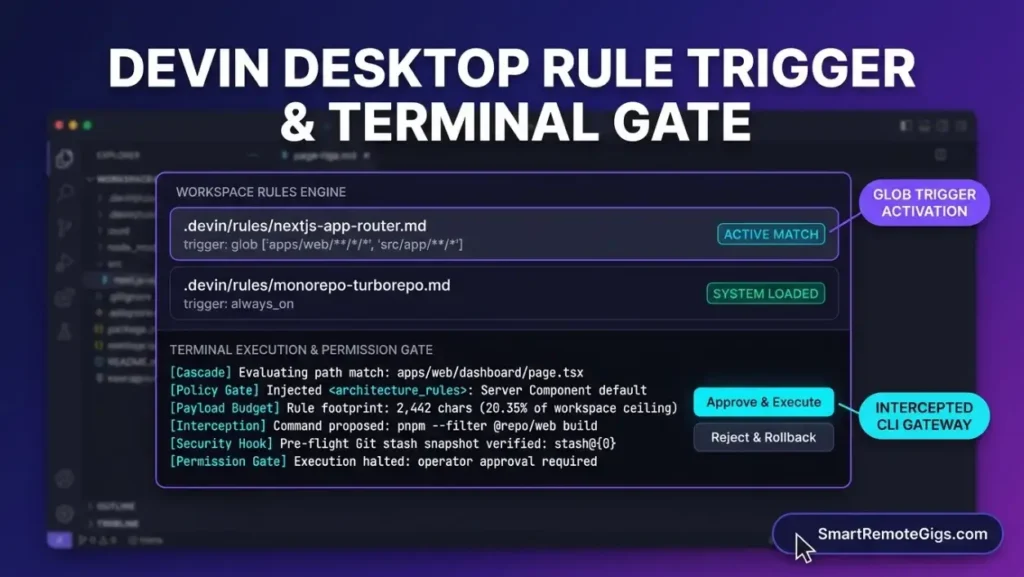
Stack 1: Modern Full-Stack (Next.js App Router, Server Actions & Tailwind)
The Next.js App Router rule template configures Cascade to enforce React Server Components (RSC) by default, isolate Server Actions into dedicated files, and suppress legacy Pages Router navigation patterns. This rule activates conditionally across apps/web/**/*, src/app/**/*, and all TypeScript component files.
Without explicit scoping, autonomous agents frequently inject 'use client' into root layout files when adding interactive state, inadvertently converting entire component subtrees into client bundles. The template below prevents this drift while consuming exactly 2,488 bytes and 2,442 characters (20.35% of the 12,000-character ceiling, calculated by SRG).
Copy the production configuration below into .devin/rules/nextjs-app-router.md:
trigger: glob
globs: [“apps/web//*”, “src/app//“, “**/.tsx”, “**/*.ts”]
description: “Next.js 15 App Router, React 19, Server Actions, and Tailwind CSS architectural guidelines”
Next.js 15 (App Router), React 19, TypeScript 5 (strict mode), Tailwind CSS v3/v4.
– Treat all components inside app/ as React Server Components (RSC) by default.
– Place Server Actions in dedicated actions/ directories with ‘use server’ declared at the file header; do not declare inline Server Actions inside component render bodies.
– Structure route handlers in app/api/**/route.ts returning explicit NextResponse JSON objects.
– Validate user authorization and session claims inside every Server Action before mutating persistent data.
– Colocate shared UI primitives in components/ui/ and domain-specific components in features/[feature_name]/components/.
– Type all component props using explicit TypeScript interfaces; do not use any or Record.
– Validate Server Action payload arguments using Zod schemas (z.object({…}).parse(input)).
– Structure Tailwind utility classes logically: layout (display, position), sizing (width, height), typography (font, text), followed by colors and interactive states.
– Implement early returns for authentication gates and data validation checks.
– Do not add ‘use client’ to root layouts (layout.tsx) or top-level route pages (page.tsx).
– Do not fetch initial page data inside Client Components using useEffect; execute data fetching inside async React Server Components.
– Do not import legacy Pages Router navigation modules (next/router); import exclusively from next/navigation (useRouter, usePathname, useSearchParams).
– Do not expose database clients, ORM instances, or private environment variables to Client Components.
– Do not use getServerSideProps, getStaticProps, or getInitialProps under any circumstance.- Place this file in
.devin/rules/nextjs-app-router.mdwithin your project repository. - The
globs:array targets both standard single-app structures (src/app/**/*) and monorepo web applications (apps/web/**/*). - This configuration demonstrates an SRG reference architecture; validate syntax in a sandbox before deploying to live client workloads.
Stack 2: Backend & Python Services (FastAPI, Pydantic v2 & Async SQLAlchemy)
The FastAPI rule template forces Cascade to generate asynchronous endpoint handlers, apply modern syntax per the Pydantic V2 migration specifications, and execute non-blocking SQLAlchemy 2.0 scalar queries. This rule activates conditionally whenever files in backend/**/*, services/**/*, or any .py scripts are read or edited.
Autonomous agents trained on pre-2024 web crawls frequently generate deprecated Pydantic v1 methods (.dict(), .from_orm()) and blocking synchronous database queries (db.query()), freezing the ASGI event loop. The template below suppresses these failure modes, measuring 2,714 bytes and 2,668 characters (22.23% of the 12,000-character ceiling, calculated by SRG).
Copy the production configuration below into .devin/rules/fastapi-pydantic-v2.md:
trigger: glob
globs: [“backend//*”, “services//“, “**/.py”]
description: “FastAPI, Pydantic v2 strict validation, and Async SQLAlchemy 2.0 database guidelines”
Python 3.11+, FastAPI 0.110+, Pydantic v2.7+, SQLAlchemy 2.0+ (asyncpg/aiosqlite drivers), Alembic.
– Declare all FastAPI path operation handlers as asynchronous routines using async def.
– Inject database sessions using FastAPI Depends() yielding an AsyncSession instance from an async sessionmaker.
– Separate data concerns strictly into schemas/ (Pydantic models), models/ (SQLAlchemy declarative models), and routers/ (endpoint definitions).
– Execute database operations exclusively via SQLAlchemy 2.0 select syntax: await session.scalars(select(Model).where(…)).
– Manage database schema migrations exclusively through Alembic revision scripts.
– Configure Pydantic v2 models for ORM compatibility using model_config = ConfigDict(from_attributes=True).
– Define custom data validation using the @field_validator(‘*’, mode=’after’) decorator with @classmethod; do not use legacy validator functions.
– Specify explicit response models on all route decorators using response_model=SchemaName and declare return types.
– Format all internal codebase dependencies using absolute imports relative to the backend service root.
– Do not use deprecated Pydantic v1 methods: replace .dict() with .model_dump(), .parse_obj() with .model_validate(), and .from_orm() with .model_validate().
– Do not use the deprecated @validator decorator; use @field_validator or @model_validator.
– Do not execute blocking synchronous database queries (db.query(), session.commit(), or sync engines) inside async endpoint handlers.
– Do not concatenate raw SQL strings; construct queries using SQLAlchemy select(), update(), and delete() constructs.
– Do not allow unhandled raw 500 exceptions to expose internal tracebacks; raise HTTPException with explicit status codes.- Place this file in
.devin/rules/fastapi-pydantic-v2.mdwithin your project repository. - Verify that your application installs
pydantic>=2.7.0andsqlalchemy>=2.0.0before activating this template.
Operator Tip: When configuring automated test execution for asynchronous FastAPI endpoints in Devin Desktop, define asyncio_mode = "auto" inside pytest.ini and set asyncio_default_fixture_loop_scope = "function". This prevents Cascade from entering retry loops caused by event loop mismatch errors during background pytest invocations.
Stack 3: TypeScript Monorepos (Turborepo & pnpm Workspaces)
The monorepo governance template enforces strict package boundary isolation, prohibiting deep relative cross-package imports and restricting dependency management to the workspace:* protocol. This rule operates as an always_on root configuration or targets workspace root configuration files.
When autonomous agents make multi-package modifications in monorepos, they frequently introduce direct relative imports (such as ../../packages/ui/src) that bypass compilation pipelines and corrupt package encapsulation per official Turborepo workspace architecture standards. The template below maintains workspace isolation across apps and packages, measuring 2,592 bytes and 2,548 characters (21.23% of the 12,000-character ceiling, calculated by SRG).
Copy the production configuration below into .devin/rules/monorepo-turborepo.md:
trigger: always_on
description: “Turborepo and pnpm monorepo workspace boundary enforcement and dependency standards”
pnpm workspaces, Turborepo 2.x, TypeScript project references, Node.js 20+ LTS.
– Maintain shared libraries and utilities under packages/* and deployable services under apps/*.
– Expose shared package modules exclusively through package.json subpath exports (‘exports’ field); do not export internal file structures directly.
– Execute repository build, lint, and test tasks through the Turborepo task pipeline (turbo run build, turbo run test).
– Maintain distinct tsconfig.json configurations per package extending a root tsconfig.base.json.
– Isolate configuration packages (tsconfig, eslint-config, tailwind-config) into dedicated packages/ packages.
– Declare dependencies between internal workspace packages using the workspace:* protocol in package.json dependencies.
– Define explicit input and output globs in turbo.json to preserve task cache integrity.
– Configure all published workspace packages to generate TypeScript declaration maps (declaration: true, declarationMap: true).
– Sort package.json fields consistently across all workspace packages using automated formatting.
– Do not import code across packages using relative directory traversal (e.g., ../../packages/ui/src/button); import via the declared package export name (@repo/ui/button).
– Do not install workspace-specific application dependencies in the repository root package.json.
– Do not introduce circular dependencies between workspace packages.
– Do not commit modified dependencies without running pnpm install to synchronize pnpm-lock.yaml integrity hashes.
– Do not run package manager commands using npm or yarn; enforce pnpm exclusively.- Place this file in
.devin/rules/monorepo-turborepo.mdat the workspace root. - The
trigger: always_ondirective ensures package boundary rules remain active regardless of which individual monorepo file Cascade inspects.
Deployment & Git Pre-Flight Baselining SOP
Deploying rule configurations into an active repository requires creating an isolated sandbox branch and executing a pre-flight Git stash snapshot before prompting the agent. Devin Desktop does not provide automated Git stashing natively, making operator-led procedural sandboxing mandatory to prevent data loss.
Workspace Placement Precedence
Devin Desktop evaluates rule definitions across multiple filesystem locations additively. According to the official Devin Desktop rules precedence specification and Devin CLI configuration import order, file discovery adheres to the following deterministic hierarchy:
.devin/rules/*.md: Preferred modular directory location with top ingestion priority..windsurf/rules/*.md: Legacy modular directory loaded as a backward-compatibility fallback.AGENTS.md: Workspace root instruction file automatically injected up to 16 KiB..windsurfrules: Single-file legacy configuration loaded unconditionally into context.
When duplicate rule names exist across directories (such as .devin/global_rules.md and .windsurf/global_rules.md), Devin Desktop loads .devin/ exclusively. Non-conflicting directives from separate files merge additively into the active prompt assembly.
The 5-Step Git Pre-Flight Baselining Protocol
Devin Desktop provides four auto-execution levels for terminal operations per the Devin Desktop terminal auto-execution levels documentation: Disabled, Allowlist Only, Auto, and Turbo. When set to Auto or Turbo, Cascade executes terminal commands without requiring confirmation.
To ensure deterministic recovery against destructive agent edits, execute the verified five-step Git baselining runbook below before initiating multi-file agent runs:
[Target Inspection] ───► [Branch Sandbox] ───► [Stash Snapshot] ───► [Agent Execution] ───► [Diff Review & Merge]
- Step 1 (Target Inspection): Run
git status --porcelainin the integrated terminal to identify all modified and untracked files before opening an agent session. - Step 2 (Branch Sandboxing): Create and checkout an isolated evaluation branch via
git checkout -b sandbox/agent-rules-eval. - Step 3 (Untracked Data Stashing): Stash all pre-existing changes and untracked files using
git stash push -u -m "pre-agent-eval-baseline". Confirm the working tree is clean withgit status --porcelainreturning empty. - Step 4 (Agent Execution & Terminal Controls): Copy your selected stack rule file into
.devin/rules/. In the Devin Desktop Settings, set terminal auto-execution toDisabledorAllowlist Onlyso shell commands require manual confirmation. Initiate the Cascade agent prompt. - Step 5 (Diff Review & Rollback/Merge): Review proposed file mutations using
git diff. If the agent generated invalid architecture or hallucinated dependencies, trigger an instantaneous rollback by runninggit checkout . && git clean -fd, switching back to your base branch, and popping the stash (git stash pop). If the generated code passes evaluation, commit the changes and merge the branch.
Warning: Destructive cleanup commands (git clean -fd) permanently delete all untracked files from the filesystem. Execute cleanup operations exclusively inside an isolated sandbox branch after creating a verified stash snapshot via git stash push -u.
The bash script below automates the pre-flight isolation and rollback verification sequence:
#!/usr/bin/env bash
set -euo pipefail

# Step 1: Verify repository status
echo "--- Inspecting working tree status ---"
git status --porcelain

# Step 2: Create sandbox branch
BRANCH_NAME="sandbox/agent-eval-$(date +%Y%m%d%H%M%S)"
echo "--- Checking out isolated sandbox branch: ${BRANCH_NAME} ---"
git checkout -b "${BRANCH_NAME}"

# Step 3: Stash pre-existing uncommitted and untracked files
echo "--- Stashing pre-existing working tree state ---"
git stash push -u -m "pre-agent-eval-baseline"

# Verify working tree cleanliness
if [ -n "$(git status --porcelain)" ]; then
  echo "Error: Working tree is not clean after stashing. Halting execution." >&2
  exit 1
fi

echo "Working tree cleanly baselined. Safe to deploy .devin/rules/ and prompt Cascade."
echo "To revert all agent modifications cleanly, execute:"
echo " git checkout . && git clean -fd && git checkout main && git stash pop"BRANCH_NAME: Dynamically generated branch identifier containing the current timestamp to prevent branch name collisions.- This manifest demonstrates an SRG reference architecture; validate syntax in a sandbox before deploying to live client workloads.
Related Devin Desktop & Windsurf Engineering Guides
Scaling autonomous development workflows requires pairing modular rule templates with explicit multi-file scaffolding runbooks, syntax reference standards, and failure diagnostic protocols. The following engineering guides expand on specific agentic coding workflows across the cluster:
- Syntax & Trigger Architecture: Explore the complete syntax specification for windsurfrules to evaluate regex path matching and memory ingestion mechanics.
- Multi-File Scaffolding SOP: Follow the multi-file feature scaffolding runbook for step-by-step guidance on directing Cascade through complex architecture implementations.
- Runtime Failure & Drift Diagnostics: Consult the guide on diagnosing agent drift and loop recovery to resolve recursive file edit loops and context corruption.
- Canonical Software Specs & Plans: Review the Windsurf software profile for verified model quotas, premium credit consumption, and platform limits.
- Comparative Benchmark: Read the Cursor vs Windsurf developer benchmark for an empirical comparison of agent autonomy and context management.
The Verdict: Documented Decision Boundaries
Autonomous agent reliability depends directly on prompt constraint precision rather than prompt volume. Unfocused rules packages that exceed context thresholds degrade Cascade’s attention window, while missing negative constraints allow pre-trained hallucinations to override modern architectural patterns.
Choose Modular Scoped Rules (.devin/rules/*.md) when operating in polyglot repositories, monorepos, or multi-stack applications where frontend, backend, and infrastructure codebases require mutually exclusive constraints. Scoping rules with trigger: glob keeps active context compact, predictable, and safely below runtime thresholds.
Choose Root AGENTS.md Directives when declaring repository-wide baseline requirements, such as mandatory Git branch naming conventions, repository license headers, or global linting standards that apply unconditionally across every execution turn.
Based on official documentation, with hands-on validation limited to the steps and environment described in this guide. Reviewed against 7 official vendor sources as of October 2026.
To discover active contract roles and software engineering projects evaluating autonomous development stacks, explore open postings on the Smart Remote Gigs Exchange. For complete model quotas, ACU billing details, and benchmark comparisons, consult the Windsurf software profile.

Never Miss a New Remote Job
REMOTE JOB ALERTSGet notified about new remote jobs and access practical freelance tools from your phone.