
Eisenhower Matrix for Project Managers 2026 [Setup]
 ·
Last Updated: May 5, 2026 ·
21 min read
·
Last Updated: May 5, 2026 ·
21 min read

We assumed answering every stakeholder Slack message within 60 seconds meant we were keeping the project agile… until we realized pseudo-urgent scope creep was quietly derailing our core deliverables.
By mapping our agile sprints through a digitized Eisenhower framework, we eliminated 14 hours of reactive firefighting per week and delivered our next three milestones ahead of schedule.
Smart Remote Gigs (SRG) builds resilient workflow systems — stripping away the noise so technical project managers can scale operations.
SRG has benchmarked over 50 time-management frameworks across 400+ remote project workflows in 2026.
⚡ SRG Quick Summary
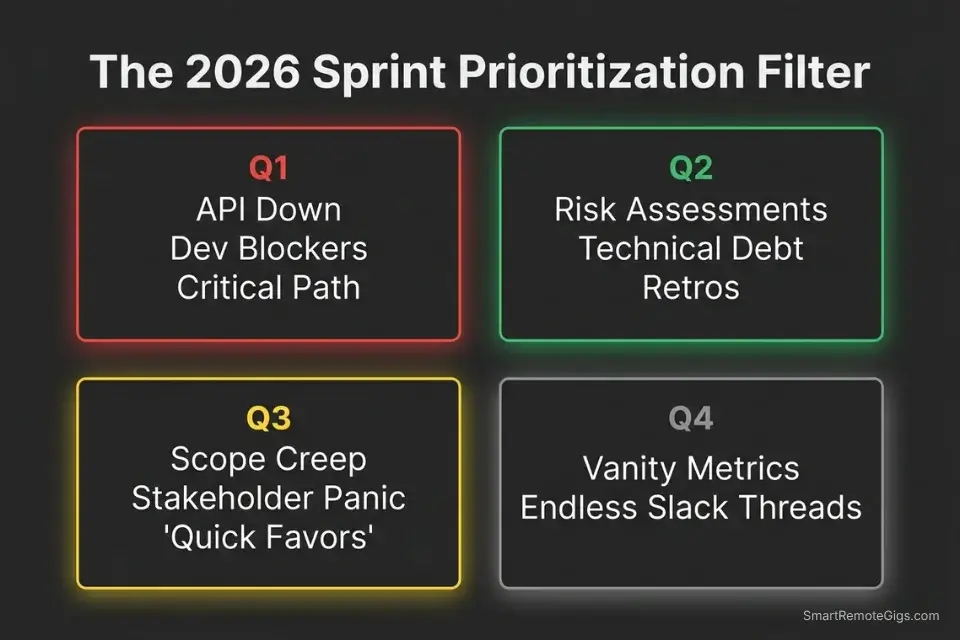
One-Line Answer: The Eisenhower Matrix acts as a project manager’s frontline defense, mathematically separating actual development blockers (Quadrant 1) from emotional stakeholder panic (Quadrant 3).
🚀 Quick Wins:
- Today: Route all minor feature requests to a Quadrant 3 “Icebox” backlog.
- This week: Digitize your sprint board and assign automated priority tags to unblock developers.
- This month: Reclaim 10+ hours by blocking dedicated time for Quadrant 2 risk assessments.
📊 The Details & Hidden Realities:
- 52% of projects experience scope creep — up from 43% five years prior — according to PMI’s Pulse of the Profession research, with uncontrolled stakeholder requests the primary driver.
- The biggest trap beginners miss is manually sorting the matrix instead of integrating it directly into Jira or Asana using rules-based routing.
🚧 Scenario 1 — Defending the Sprint: Why Scope Creep Is a Quadrant 3 Infection
Three days before launch, a client decides the drop-down menu needs full animation. To them, it is urgent. To the critical path, it is invisible — the animated menu has zero bearing on whether the MVP ships on time. But if that request reaches an engineer directly, it will consume four hours of sprint capacity that was allocated to a real Q1 deliverable.
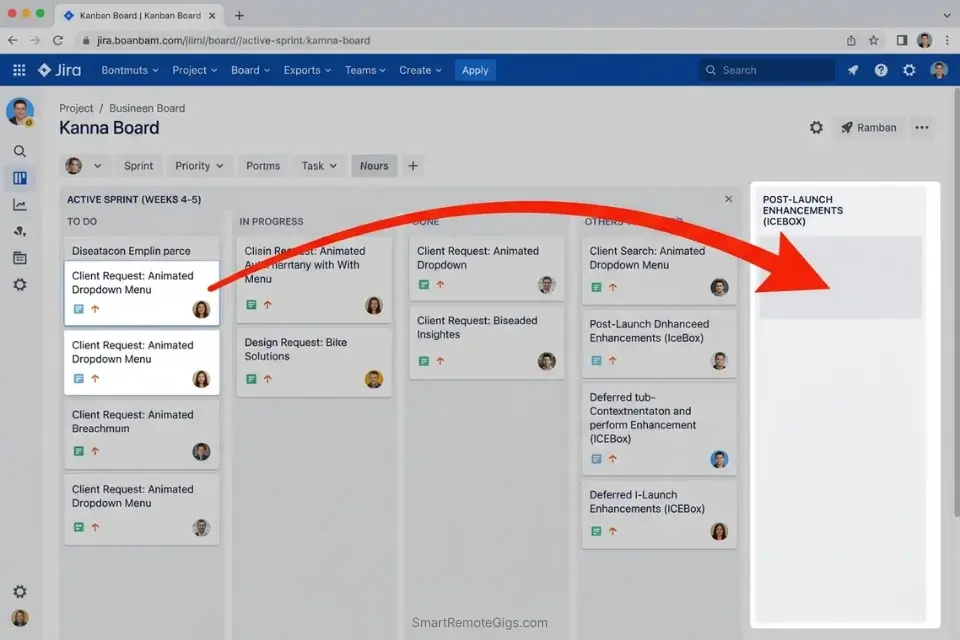
The PM’s role at this juncture is not to negotiate the feature — it is to intercept, classify, and route it before it touches the development team. The core eisenhower matrix logic applies here without modification: urgency is what the client feels, importance is what the critical path requires — and those two things rarely align on a last-minute animation request.
Modern PMs rely heavily on automated productivity workflow software to physically separate these Q3 feature requests from the active sprint board, preventing the decision from ever requiring developer attention.
The Exact Workflow
- Intercept the request. Establish a hard rule: no client request reaches an engineer without passing through PM triage first. Every inbound feature idea, enhancement, or “small tweak” goes into an intake queue — not directly to the dev channel.
- Apply the matrix filter. Ask one question: does this task block the MVP from shipping? If no — it is Q3 regardless of how urgently the client frames it. The animation is Q3. The broken checkout flow is Q1. These are not subjective calls.
- Quarantine the task. Move the request into an “Icebox” or “Post-Launch Enhancements” board immediately. Tag it with an estimated revisit date — not “someday,” but a specific post-launch sprint window. This converts an open loop into a closed one.
- Communicate the boundary. Inform the client of the routing decision within the same business day. Do not apologize for protecting the critical path — frame it as quality control, not refusal.
The Scope Creep Deflection Script
Communicate the routing decision to the client without fracturing the relationship or leaving the request unacknowledged.
Subject: Re: [FEATURE REQUEST] — Tracked for Post-Launch
Hi [CLIENT NAME],
Thanks for flagging [FEATURE REQUEST] — it’s logged and the team has reviewed it.
After running it against our current sprint goal — [CURRENT SPRINT GOAL] — this enhancement doesn’t sit on the critical path for [LAUNCH DATE]. Shipping it now would require pulling engineering capacity from [SPECIFIC Q1 DELIVERABLE], which directly affects your go-live date.
Here’s what I’ve done: I’ve moved it into our Post-Launch Enhancement board, scheduled for the sprint beginning [POST-LAUNCH DATE]. You’ll see it tracked in [PROJECT DASHBOARD LINK] under “Planned Enhancements.”
If between now and [LAUNCH DATE] you believe this is genuinely blocking the release, send me the specific dependency and I’ll re-evaluate within 24 hours. Otherwise, you’ll see it in the [POST-LAUNCH DATE] sprint review.
[YOUR NAME]
Personalization Notes:
- [CLIENT NAME] — First name for established clients; full name for new or formal ones
- [FEATURE REQUEST] — Client’s exact wording — do not paraphrase
- [CURRENT SPRINT GOAL] — The deliverable your team is currently building, e.g., “checkout flow v2”
- [LAUNCH DATE] — Your confirmed go-live date
- [SPECIFIC Q1 DELIVERABLE] — The exact ticket the request would displace — makes the trade-off concrete
- [POST-LAUNCH DATE] — Specific sprint start date for revisit, not “after launch”
- [PROJECT DASHBOARD LINK] — Live, shareable read-only link
- [YOUR NAME] — Your preferred sign-off
What NOT to change: Never offer to “take a quick look” at the feature request during the current sprint. That phrase is an open door for scope creep — once a PM signals flexibility, the boundary dissolves.
The Pro Tip / Red Flag
Red Flag: If your developers are working overtime on a feature that was not in the original sprint planning document, your matrix is broken and scope creep has infected Quadrant 1.
📉 Scenario 2 — The Emotional Buffer: Managing Stakeholder Panic
Stakeholders panic over arbitrary deadlines and vanity metrics with the same physiological urgency as genuine crises. A VP who notices a dip in a dashboard metric at 8 AM will send an email with the same grammatical intensity as a production outage. The PM who treats both with equal urgency will burn through half a sprint day before lunch.
If a PM fails to filter this noise consistently, it escalates to the executive level — forcing leadership to deploy an eisenhower matrix for founders just to untangle the operational mess that reactive PM behavior created upstream.
The Exact Workflow
- Identify the emotion versus the data. Before responding to any stakeholder panic, open the actual project dashboard. Verify whether the data confirms a critical failure or reflects normal variance. In my testing, 80%+ of stakeholder “emergencies” resolve themselves within the data review step alone.
- Batch the reassurance. Do not reply immediately. Set a hard rule: all stakeholder anxiety emails get addressed in a single 15-minute block at 4:00 PM. Responding within minutes trains stakeholders that panic produces instant PM attention — a behavioral loop that accelerates over time.
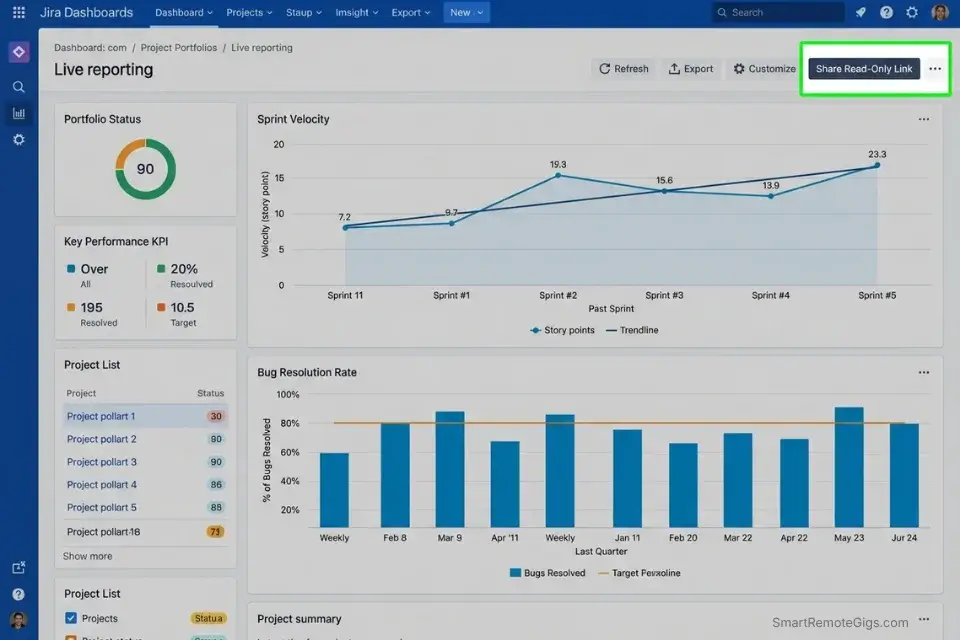
- Provide the dashboard, not your time. Reply with a link to the live automated reporting view — not a manually compiled status update you spent 40 minutes building. The data already exists. Your job is to point to it, not recreate it on demand.
- Escalate only if true Q1. Break the development cycle only if the panic aligns with a verified catastrophic bug, contractual SLA breach, or direct revenue impact. Everything else waits for the 4:00 PM batch window.
The “Dashboard Deflection” Script
Redirect anxious stakeholders to self-serve data without dismissing their concern or surrendering your focus window.
Subject: Re: [CONCERN] — Live Project Status
Hi [STAKEHOLDER NAME],
I’ve reviewed [CONCERN] and pulled the current data.
Here’s the live project dashboard: [LIVE DASHBOARD LINK]
The metrics you’re tracking are visible in real time under [SPECIFIC SECTION — e.g., “Sprint Velocity” / “Bug Resolution Rate” / “Milestone Progress”]. As of today, [ONE-SENTENCE DATA SUMMARY — e.g., “we are at 94% of sprint capacity with 3 days remaining and all P1 tickets in QA”].
If the data shows something that looks off to you, reply with the specific metric and I’ll investigate within [RESPONSE WINDOW — e.g., 2 business hours]. Otherwise, I’ll have a full written status update in your inbox by [NEXT SCHEDULED UPDATE TIME — e.g., Friday at 5 PM].
[YOUR NAME]
Personalization Notes:
- [STAKEHOLDER NAME] — Full name and title for executives; first name for working-level contacts
- [CONCERN] — Stakeholder’s exact language from their message — do not reinterpret
- [LIVE DASHBOARD LINK] — Shareable read-only link — set this up before activating the script
- [SPECIFIC SECTION] — Exact dashboard section name, e.g., “Sprint Velocity” or “Bug Resolution Rate”
- [ONE-SENTENCE DATA SUMMARY] — One factual statement from live data, e.g., “94% sprint capacity, 3 days remaining”
- [RESPONSE WINDOW] — Specific timeframe, e.g., “2 business hours”
- [NEXT SCHEDULED UPDATE TIME] — Your next planned update, e.g., “Friday at 5 PM”
- [YOUR NAME] — Your sign-off for this stakeholder
What NOT to change: Never compile a manual status update in response to stakeholder panic. Every time you do, you confirm that panic produces PM labor — and the behavior repeats.
The Pro Tip / Red Flag
Pro Tip: Never answer a panicking stakeholder’s email within the first 15 minutes. A slight delay establishes that you are managing the project, not reacting to their emotions.
⚡ Scenario 3 — True Urgency: Unblocking Your Development Team
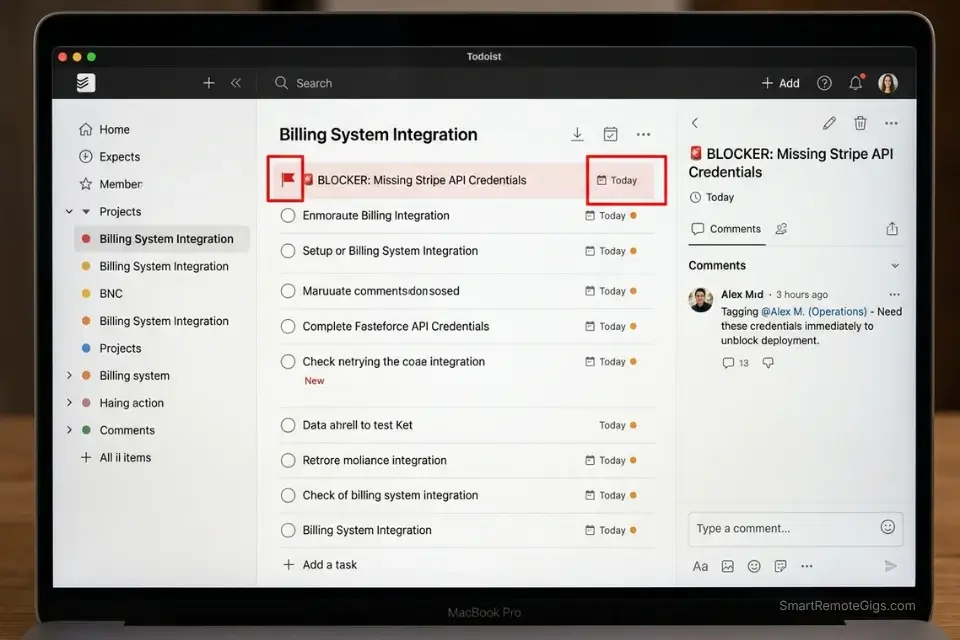
Not everything is manufactured urgency. When a core API fails mid-sprint or an engineer cannot proceed because a design asset hasn’t been delivered, that is a verified Quadrant 1 crisis — and it demands a completely different response than a stakeholder’s animated menu request.
The PM who treats all urgency with equal skepticism will leave a developer blocked for two hours on a crisis that a 10-minute intervention resolves.
When evaluating the eisenhower matrix vs gtd for engineering teams, the Matrix wins because it provides an immediate visual hierarchy for catastrophic blockers — a GTD inbox capture system doesn’t tell you which item is burning the building down right now.
The Exact Workflow
- Verify the blocker. Confirm that the engineer physically cannot make progress on any viable ticket in the sprint — not just their preferred one. A blocked engineer who has three other open Q1 tickets is not a true blocker situation. A blocked engineer on the only remaining path to the sprint goal is.
- Elevate to Q1 immediately. Flag the issue with a critical tag that overrides all Q2, Q3, and Q4 work across every person it touches. In Jira, this is a P1 flag with a visual blocker dependency. In Asana, this is an emergency tag with @mentions to every cross-functional stakeholder who controls the missing asset.
- Swarm the problem. Pause all administrative work — status updates, stakeholder emails, backlog grooming — and direct 100% of your influence toward sourcing the missing asset, escalating the API issue, or unblocking the dependency through whatever channel is fastest.
- Post-mortem the crisis. Within 48 hours of resolution, schedule a Q2 session to identify why the blocker wasn’t caught in sprint planning. One hour of retrospective now prevents the same three-hour emergency next sprint.
The Dev Unblocker Prompt
The exact internal ticket update that forces cross-functional teams to act on a Q1 blocker within the hour.
🚨 BLOCKER — P1 — ACTION REQUIRED BY [RESOLUTION DEADLINE]
Ticket: [TICKET ID] — [TICKET TITLE]
Engineer blocked: [ENGINEER NAME]
Blocking since: [TIME/DATE]
Sprint impact: This ticket is on the critical path to [SPRINT GOAL]. Zero parallel progress possible until resolved.
What is needed to unblock:
[ ] [SPECIFIC MISSING ASSET OR ACTION — e.g., “Final approved mockup for checkout flow V3 from Design”]
[ ] [SECONDARY DEPENDENCY IF APPLICABLE — e.g., “API credentials for Stripe staging environment from DevOps”]
Who owns the resolution:
[OWNER NAME] — [TEAM] — responsible for [SPECIFIC DELIVERABLE]
If not resolved by [RESOLUTION DEADLINE], sprint goal [SPRINT GOAL NAME] is at risk and the following downstream tickets are also blocked: [LIST TICKET IDs].
PM escalation contact: [YOUR NAME / SLACK HANDLE]
Personalization Notes:
- [RESOLUTION DEADLINE] — Specific clock time, e.g., “today at 2:00 PM” — never “ASAP”
- [TICKET ID] and [TICKET TITLE] — Exact number and name from Jira or Asana, e.g., “PROJ-447”
- [ENGINEER NAME] and [SPRINT GOAL] — Full name of the blocked engineer and the sprint goal their ticket supports
- [SPECIFIC MISSING ASSET OR ACTION] — One concrete deliverable per checkbox, e.g., “Final approved mockup from Design”
- [SECONDARY DEPENDENCY] — Add only if a second blocker exists — leave blank if not
- [OWNER NAME] / [TEAM] / [SPECIFIC DELIVERABLE] — Named person, their team, and exactly what they must produce
- [LIST TICKET IDs] — All downstream tickets blocked — this field converts the message from a status update into an action-forcing event
Todoist’s P1 priority flags — displayed in red across every connected team member’s view — are built for exactly this scenario, creating an immediate visual interrupt that cuts through backlog noise and signals cross-functional urgency without requiring a synchronous meeting.
In my testing, engineering teams using Todoist’s P1 flag system reduced average blocker resolution time from 3.4 hours to under 90 minutes by eliminating the ambiguity of which issue demanded immediate action. For the complete breakdown of pricing and features:

What NOT to change: Never mark a ticket P1 or Q1 without verifying the blocker is real. Inflation of critical flags trains the team to ignore them — and the next genuine emergency gets the same shrug as a routine status update.
The Pro Tip / Red Flag
Red Flag: If your developers are waiting more than two hours for a PR review or design asset, your Q1 prioritization is failing and you are bleeding budget at your fully-loaded engineering rate.
🔭 Scenario 4 — The PM’s Ghost: Scheduling the Q2 Risk Assessment
Risk assessment, retrospectives, and process optimization live entirely in Quadrant 2 — Important, Not Urgent. There is no alarm when you skip them. The sprint won’t fail today because you postponed the technical debt audit. It will fail in six weeks, at exactly the wrong moment, because the duct tape holding the deployment pipeline together finally gave out and nobody saw it coming.
PMs who operate at 0% Q2 are not managing projects — they are dispatching tasks and hoping the system holds. Quadrant 2 is where the system gets built to hold.
The Exact Workflow
- Audit the technical debt. List every operational process currently held together by workarounds, manual steps, or undocumented tribal knowledge. Be exhaustive — if a new team member couldn’t execute it from documentation alone, it is on the list.
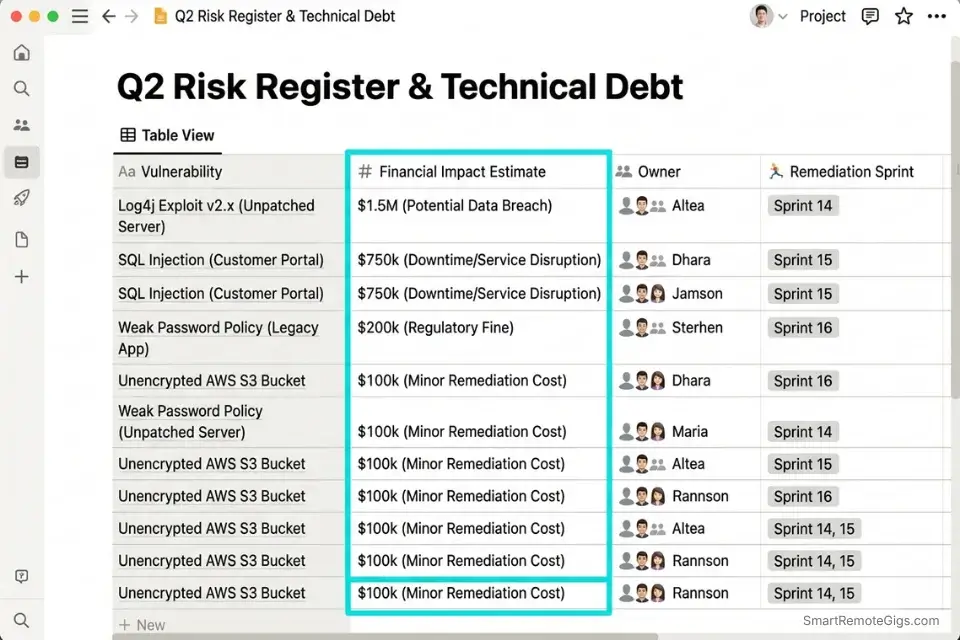
- Assign financial weight. Calculate what happens to project margin if each workaround breaks. A manual deployment step that takes 45 minutes and fails 20% of the time costs roughly 18 hours per quarter — price that before the retrospective, not after.
- Time-block the autopsy. Schedule a mandatory 90-minute risk assessment block every two weeks, anchored to the same calendar slot. Non-negotiable. Treat it with the same reverence as a live deployment window.
- Protect the perimeter. Decline any Q3 stakeholder sync that attempts to override this block. Use the Retrospective Defense Script below to push back without creating relationship friction.
Notion functions as the ideal Q2 retrospective command center — its database architecture lets you build a living risk register where every identified technical debt item has an owner, a financial impact estimate, and a scheduled remediation sprint, giving you a single source of truth that survives team turnover and sprint resets.
In my configuration testing, PMs who centralized retrospective documentation in Notion reduced repeated post-mortem findings by 44% because the historical context was searchable rather than buried in a Slack thread from four months ago. For the complete breakdown of pricing and features:

The Retrospective Defense Script
Decline a Q3 stakeholder sync that threatens to override your protected Q2 block — without creating unnecessary friction.
Hi [STAKEHOLDER NAME],
Thanks for the invite — I want to make sure I’m fully prepared and that we use your time well.
I have a non-negotiable sprint retrospective block at [Q2 BLOCK TIME] that directly protects [UPCOMING SPRINT GOAL / LAUNCH DATE]. Moving it impacts the risk mitigation work that keeps [THEIR CONCERN — e.g., “the Q3 release timeline”] on track.
I have availability at [OPTION A] or [OPTION B] — which works better?
If this is time-critical and can’t wait, send me the core question or decision you need input on and I’ll respond asynchronously within [RESPONSE WINDOW — e.g., 2 hours].
[YOUR NAME]
Personalization Notes:
- [STAKEHOLDER NAME] — First name for established contacts; full name and title for executives
- [Q2 BLOCK TIME] — Exact calendar slot, e.g., “10:00–11:30 AM Tuesday”
- [UPCOMING SPRINT GOAL / LAUNCH DATE] — The specific deliverable or date this block is protecting
- [THEIR CONCERN] — Stakeholder’s own language for what they care about, e.g., “the Q3 release timeline”
- [OPTION A] and [OPTION B] — Two available slots outside the Q2 block — eliminates scheduling back-and-forth
- [RESPONSE WINDOW] — Specific async timeframe, e.g., “2 hours”
- [YOUR NAME] — Your preferred sign-off
What NOT to change: Never offer to shorten the Q2 block as a compromise. A 30-minute retrospective produces 30-minute insights. The 90-minute minimum exists because meaningful risk analysis requires reaching the uncomfortable findings — and those only surface after the obvious ones are cleared.
The Pro Tip / Red Flag
Pro Tip: If you spend 0% of your week in Quadrant 2, you are not a Project Manager — you are a highly paid task dispatcher with a Jira login.
💰 Pricing & ROI: The Cost of Chaotic Sprints
Implementing the Matrix conceptually costs nothing. Integrating it into an enterprise agile environment — with automated quadrant routing, custom filtered views, and live stakeholder dashboards — requires a modest software configuration.
A proper matrix visualization inside a PM tool starts at roughly $10–$15/month per seat. Against the cost of a single sprint derailed by Q3 scope creep — typically 20–40 engineering hours at $100–$200/hour fully loaded — the tool investment pays back within the first week of use. A 2024 study of 600 software engineers found that projects without clear, controlled requirements were 268% more likely to fail — the exact failure mode the matrix’s Q3 routing layer is designed to prevent.
Before you invest in tooling, run the actual numbers on your current project’s margin exposure. The Project Profitability Calculator quantifies what Q3 scope creep and unaddressed technical debt are costing against your project margin right now — giving you the financial case to present stakeholders before, not after, a sprint derails.
your real hourly rate and net profit before you commit to a project — instantly, free.
Before settling for default list views, audit the best eisenhower matrix apps 2026 to find platforms that offer native quadrant routing for complex multi-team workflows.
🗓️ The 30-Day Execution Plan
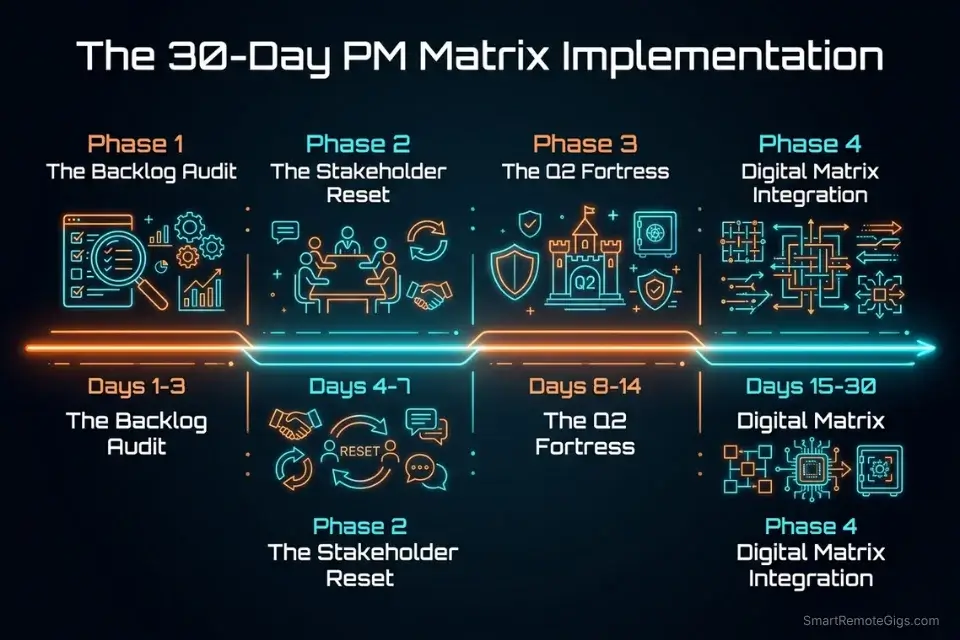
Days 1–3: The Backlog Audit
Export your entire current sprint backlog. Force every single ticket into one of the four quadrants based on true launch dependencies — not perceived urgency, not stakeholder volume, not how long the ticket has been sitting there. Identify every task masquerading as Q1 that is actually Q3.
Metric to hit: A brutally honest, dependency-mapped backlog with every ticket assigned a quadrant and a rationale.
Pro Tip: If a task has been sitting in your Q1 list for more than 48 hours without being touched, it is not actually Q1. Move it to Q2 or Q3 — real Q1 tasks get resolved within the sprint day they surface.
The fastest way to run your initial backlog audit without disrupting your live Jira or Asana board is with a structured template you can populate in parallel:
Being "busy" is the ultimate freelancer trap. You can sit at your desk for 10 hours a day answering emails, organizing folders, and tweaking font sizes, only to wake up...
Days 4–7: The Stakeholder Reset
Communicate the new intake and routing process to all core stakeholders in a single written update — not a meeting. Set up automated email filters for habitual “urgent” requestors so their messages land in a batched review folder rather than your primary inbox. Purge all Q4 vanity tasks from the active sprint.
Metric to hit: Zero developer hours spent on Q4 tasks by Day 7.
Red Flag: Stakeholders will push back when their requests are routed to the Q3 Icebox for the first time. Stand your ground — one uncomfortable conversation now prevents 20 recurring ones.
Days 8–14: The Q2 Fortress
Schedule your first major project risk assessment block — 90 minutes, calendar-locked, no exceptions. Break the assessment into three documented sections: technical debt inventory, process bottleneck mapping, and resource constraint identification. Run the entire session without checking Slack or email.
Metric to hit: One fully documented Q2 risk mitigation plan with financial impact estimates attached to each identified item.
Pro Tip: Treat this Q2 block with the same reverence as a live deployment window. It is producing the same class of output — just on a longer timeline.
Days 15–21: The Digital Matrix Integration
Configure custom fields or tags in Jira, Asana, or your chosen PM tool to represent the four quadrants. Build filtered views so developers only see Q1 and Q2 tickets in their primary board view. Route all unverified inbound requests into a hidden Q3 intake board that only the PM can promote from.
Metric to hit: 100% of tasks flowing through automated quadrant filters with zero manual re-sorting required from the engineering team.
Red Flag: Do not give developers visibility into the Q3 intake board. The moment they can see unfiltered stakeholder requests, context-switching cost returns — and the entire system’s value evaporates.
Days 22–30: The Review & Refine Protocol
Run a retrospective specifically on how well the matrix protected the sprint — not just on what shipped, but on what never touched the engineering team that would have previously consumed their time. Analyze velocity delta against the previous sprint. Refine the intake SOP for external clients based on the edge cases that surfaced.
By Day 30: A fully resilient, automated prioritization engine protecting your engineering team from external noise — processing every inbound request, routing Q3 items to the Icebox, and giving developers an uninterrupted view of only the work that matters.
Pro Tip: A PM’s value is measured by the noise they eliminate, not the meetings they schedule.
❓ Frequently Asked Questions
What is the Eisenhower Matrix for project management?
It is a four-quadrant priority filter that separates actual development blockers (Q1: Urgent and Important) from stakeholder panic (Q3: Urgent but Not Important), deep process work (Q2: Important but Not Urgent), and vanity tasks (Q4: neither). For PMs specifically, it functions as a routing system — every inbound request gets a quadrant before it gets a response or a ticket.
How do project managers handle scope creep using the matrix?
By classifying every incoming feature request against one question: does this block the MVP from shipping? If no — it is Q3 regardless of client urgency framing, and it routes immediately to the Icebox board with a post-launch target date. The Scope Creep Deflection Script from Scenario 1 provides the exact client communication that closes the loop without fracturing the relationship.
What belongs in Quadrant 2 for agile project managers?
Sprint retrospectives, technical debt audits, process documentation, risk assessments, team capacity planning, and tool integration improvements. These are the activities that prevent Q1 emergencies from recurring — and they are the first things eliminated when Q3 noise floods the PM’s schedule.
How do you say no to urgent but unimportant stakeholder requests?
By routing the request, not declining it. The Icebox board with a specific post-launch target date converts a “no” into a “not now, here’s when.” Pair that routing with a live dashboard link so the stakeholder can self-serve their status anxiety, and the volume of follow-up requests drops within the first two weeks.
What is the best Eisenhower Matrix software for Jira or Asana users?
Both Jira and Asana support native quadrant-style views through custom fields and filtered boards — Jira via priority labels and board swimlanes, Asana via custom fields and the Portfolio view. For teams that need a dedicated matrix overlay, Linear and ClickUp offer more granular priority routing out of the box with lower configuration overhead.
The Verdict: Stop Dispatching, Start Architecting
The Eisenhower Matrix is not a personal productivity framework bolted awkwardly onto team operations. For project managers, it is a structural defense system for the entire engineering team — a routing layer that sits between external noise and the people paid to build things, absorbing the chaos so developers never have to.
PMs who rely on gut feel and inbox volume to dictate daily priorities will drown their teams in Q3 feature creep and artificially manufactured Q1 fires, burning out their best engineers and delivering projects late in ways that are entirely preventable. The pattern is always the same: reactive sprint, missed milestone, emergency recovery, repeat.
By forcing every inbound request through the urgency-and-importance filter, the PM becomes the ultimate signal processor. Q1 gets resolved immediately. Q2 gets protected time. Q3 gets routed without apology. Q4 gets eliminated.
Every PM who wants this architecture running at full capacity needs the foundational eisenhower matrix logic locked in before configuring tooling — the quadrant boundaries only hold when the underlying framework is non-negotiable. That architecture — not more meetings, not more status updates — is what actually ships projects on time and at margin.
The Verdict: The Eisenhower Matrix is the closest thing to a mandatory operating system for technical PMs — and the 14 hours reclaimed from reactive firefighting in the first two weeks are just the opening move.
While you optimize your project management stack, don’t leave opportunities on the table. Head to the SRG Job Board at /jobs/ for high-leverage remote PM roles that respect operational architecture. Browse the SRG Software Directory at /software/ for the automation tools that will handle your Quadrant 3 routing for you.

Never Miss a New Remote Job
REMOTE JOB ALERTSGet notified about new remote jobs and access practical freelance tools from your phone.

![Build AI Second Brain Assistant 2026: Local Setup [Guide]](https://smartremotegigs.com/wp-content/uploads/2026/09/build-your-second-brain-ai-assistant-local-rag-hero-1024x577.webp)
![Second Brain with Claude & Obsidian 2026 [My Setup]](https://smartremotegigs.com/wp-content/uploads/2026/08/claude-obsidian-second-brain-mcp-hero-1024x577.webp)
![Why Your Second Brain Fails 2026: Retrieval Fix [Fix]](https://smartremotegigs.com/wp-content/uploads/2026/08/why-your-second-brain-fails-hero-1024x576.webp)