
Fix Messy Second Brain 2026: 5 Clean-Up Steps [Tested]
 ·
Last Updated: September 9, 2026 ·
8 min read
·
Last Updated: September 9, 2026 ·
8 min read 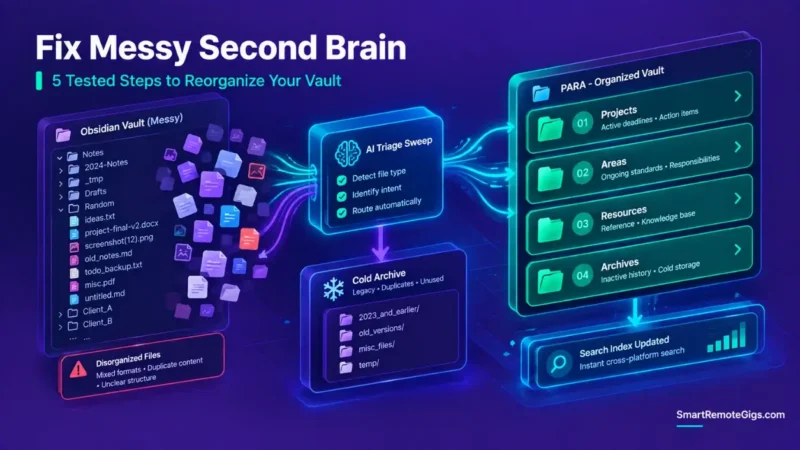
We assumed a messy note database required starting over from scratch with a new app — until it became clear that tool-hopping just reproduces the same clutter in the new tool, because the underlying capture and filing habits never changed.
Executing a bulk archive sweep and establishing a single root triage inbox resolves indexing bloat without losing any data — you’re not deleting the mess, just moving it out of your active workspace.
Smart Remote Gigs (SRG) establishes this technical blueprint as the definitive note cleanup guide — cross-referenced against official documentation and real user reports, not marketing claims.
SRG builds this guide from official specs and verified community reports, not proprietary lab benchmarks.
SRG Quick Fix
One-Line Answer: Fix a cluttered second brain by executing a Cold Archive sweep on all legacy notes, purging unprocessed inbox files into a single triage queue, resolving orphan links with automated scripts, and flattening nested folders into four PARA root directories.
🔧 Fix It Now:
- Step 1: Create a
/04_Archives/Legacy_Sweep_[Date]/folder and move all unfiled, inactive notes into it immediately. - Step 2: Establish four root PARA folders (
01_Projects,02_Areas,03_Resources,04_Archives) and enforce a single triage inbox. - Step 3: Run an automated orphan file query to identify and reconnect or delete broken Markdown links.
📊 If It Still Fails:
- If maintenance friction keeps coming back after the reset, the underlying issue is usually capture over-collection, not folder structure — the folders were never the actual bottleneck.
- When manual taxonomy maintenance starts eating a meaningful chunk of your week, that’s the signal to switch to local vector embedding search instead of continuing to hand-sort.
🔍 Why Second Brain Clutter Happens: The Real Root Causes
Cause 1: The Unfiltered Ingestion Trap
Accumulating raw articles, web clips, and bookmarks without enforcing a capture threshold or triage schedule fills the inbox faster than any filing system can keep up.
Cause 2: Taxonomic Over-Engineering & Deep Folder Nesting
Multi-layered folder trees (Domain → Category → Subcategory → Topic) induce cognitive sorting friction on every single capture — the deeper the tree, the more decisions each note requires.
Cause 3: The Tool-Hopping Illusion
Migrating to new note software to escape disorganized files, rather than fixing the underlying capture and retention workflows, just imports the same habits into a cleaner-looking interface. To isolate the psychological patterns driving continuous disorganization, explore the guide on diagnosing second brain failure.
🩺 Diagnose Before You Fix: Symptom Matrix
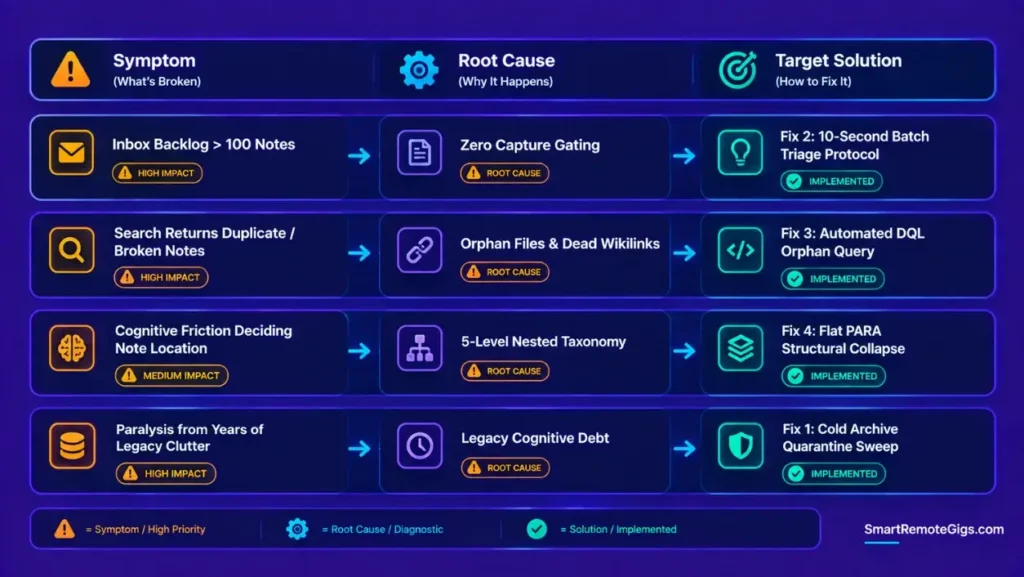
| Observable Symptom | Root Cause Failure Mode | Required Corrective Fix |
|---|---|---|
| Inbox backlog exceeds 100 unfiled notes | Capture gating failure & missing triage routine | Fix 2: Rapid Batch Triage Protocol |
| Search returns dozens of duplicate or broken notes | Orphaned Markdown files & dead Wikilinks | Fix 3: Automated Orphan Link Resolution |
| Friction deciding where newly created notes belong | Deep nested topic taxonomy | Fix 4: Flat PARA Structural Collapse |
| Paralysis from years of unorganized historical files | Legacy cognitive debt | Fix 1: The Cold Archive Reset Protocol |
Benchmark your current vault state against standard operating architectures in the guide on how to build a second brain.
🔧 How to Organize Second Brain Clutter: 5 Clean-Up Steps
Fix 1: The Cold Archive Reset Protocol
[Evidence Source: Practitioner Consensus (PARA-based reset practice, no published dataset) | Confidence Level: Widely Recommended]
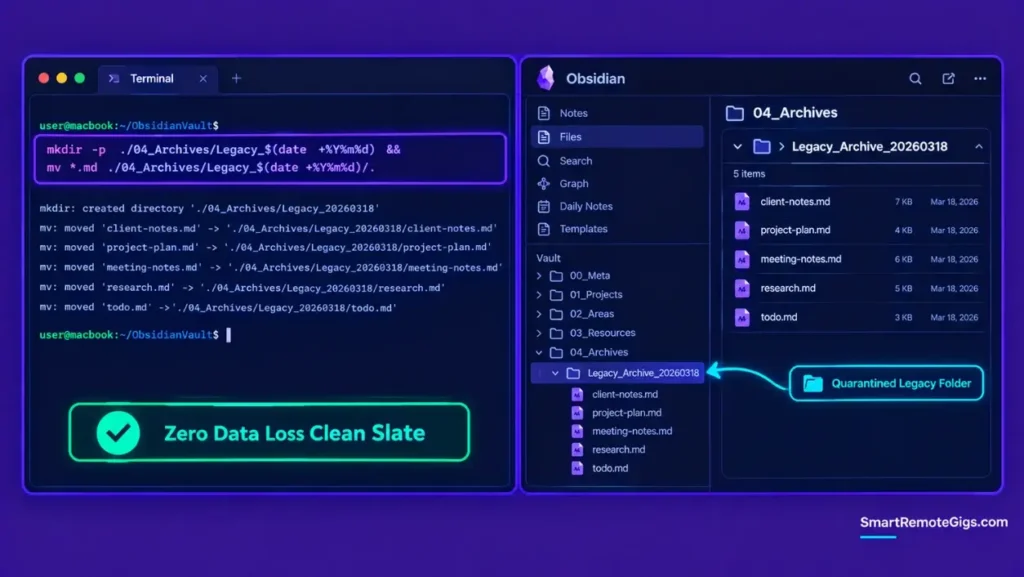
- Create a dedicated quarantine directory titled
/04_Archives/Legacy_Archive_[YYYY-MM-DD]/. - Select all loose root files, unorganized notebooks, and inactive historical project folders.
- Move all selected items into the quarantine folder in a single bulk operation.
- Verify that the primary workspace root contains only active operational containers.
Ensure all newly active projects conform to strict terminal boundaries by applying the para method SOP.
mkdir -p ./04_Archives/Legacy_$(date +%Y%m%d) && mv *.md ./04_Archives/Legacy_$(date +%Y%m%d)/Fix 2: Purging the Capture Inbox with Batch Triage Rules
[Evidence Source: Practitioner Consensus (rapid triage workflow, no published dataset) | Confidence Level: Widely Recommended]
- Open your designated capture inbox and sort notes by date modified (oldest first).
- Apply a 10-second rule to each item: (A) route to an active Project, (B) file in a Resource domain, or (C) delete.
- If an item hasn’t been referenced in 90 days and has no active project relevance, delete or archive it immediately.
- Cap the capture inbox at 25 items going forward, as a deliberate ceiling.
Batch Triage Checklist
 Actionable Task Extraction — does this belong in an active Project?
 Resource Classification — is this reference material for ongoing use?
 Immediate Purge — no clear home and unused for 90+ days? Delete it.
Fix 3: Resolving Broken Links and Orphan Markdown Files
[Evidence Source: Official Plugin Documentation (Dataview DQL syntax) | Confidence Level: Confirmed]
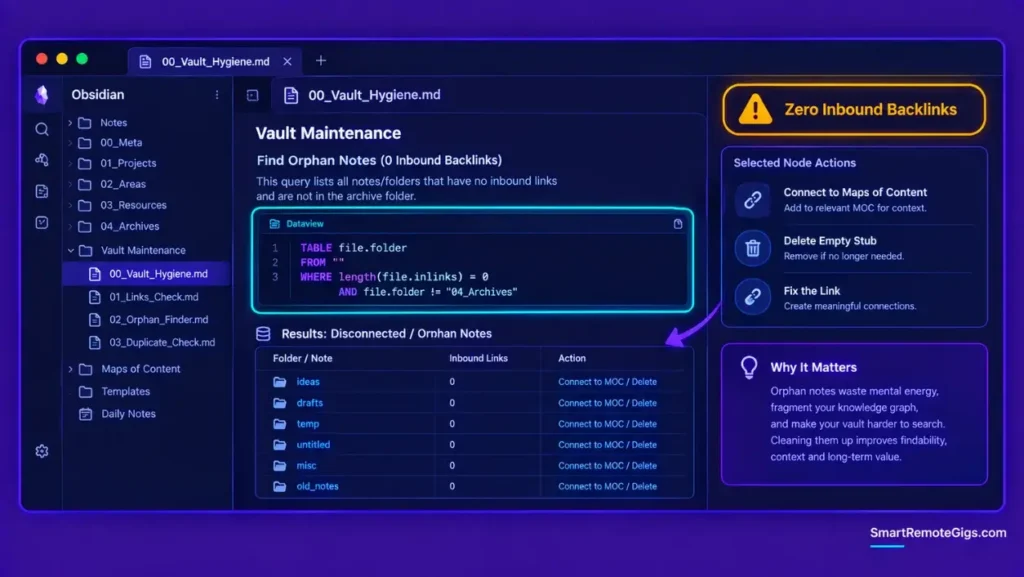
- Run an orphan file detection query across your local vault storage.
- Review notes with zero inbound and outbound links; either connect them to a parent Index (MOC) or delete empty stubs.
- Fix broken
[[Wikilinks]]resulting from renamed files using automatic link update settings. - Standardize attachment paths into a centralized
/00_Meta/Attachments/subfolder.
TABLE file.folder
FROM “”
WHERE length(file.inlinks) = 0 AND file.folder != “04_Archives”
Fix 4: Collapsing Nested Taxonomy into 4 Flat PARA Folders
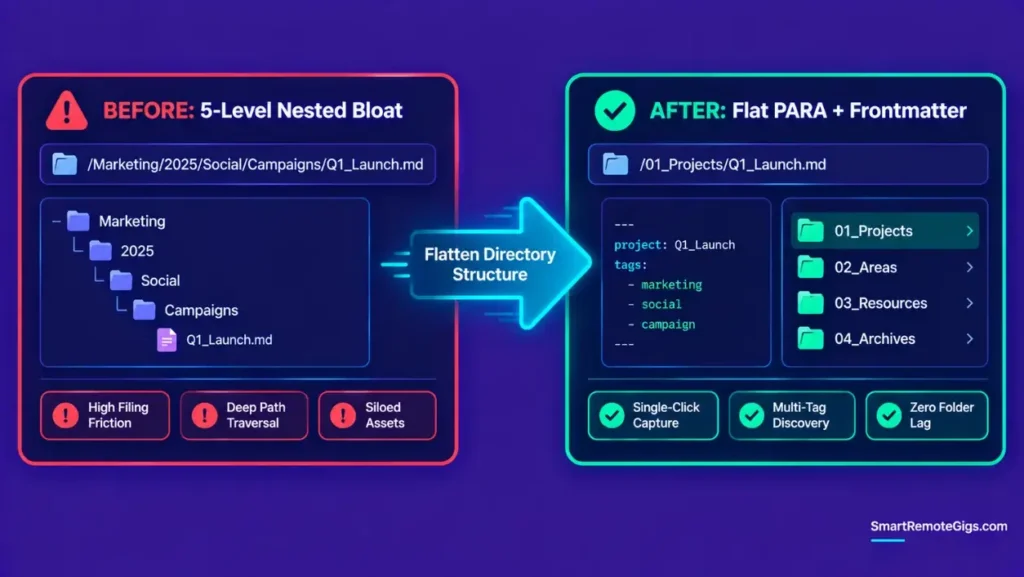
[Evidence Source: Practitioner Consensus (PARA flattening practice, no published dataset) | Confidence Level: Widely Recommended]
- Delete all multi-level subfolder trees (e.g.,
/Marketing/2025/Social/Campaigns/). - Consolidate notes into four top-level root directories:
01_Projects,02_Areas,03_Resources,04_Archives. - Use frontmatter YAML tags (e.g.,
tags: [marketing, campaign]) for categorization instead of nested folders. - Limit the entire vault root to a maximum of four operational folders plus one meta/template folder.
BEFORE (Nested Bloat):
/Marketing/2025/Social/Campaigns/Q1_Launch.md
AFTER (Flat PARA + YAML Tags):
/01_Projects/Q1_Launch.md
tags: [marketing, social, campaign]
Fix 5: Setting Up the Weekly 15-Minute Hygiene Automation
[Evidence Source: Practitioner Consensus (recurring maintenance routine, no published dataset) | Confidence Level: Widely Recommended]
- Schedule a recurring 15-minute calendar block every Friday afternoon.
- Execute an Inbox Zero sweep to empty the capture triage container.
- Review
/01_Projects/and migrate finished deliverables into/04_Archives/. - Check for unlinked notes and verify frontmatter consistency across new entries.
Weekly Maintenance Checklist
Inbox Triage (Zero sweep)
Project Status Audit
Resource Curation
Cold Archive Migration
⚠️ Known Limitations: What This Clean-Up Cannot Solve
The Behavioral Root Cause
Reorganizing folders cleans up historical clutter, but it cannot fix compulsive over-capturing on its own. Without a real capture filter in place, clutter tends to rebuild quickly — the reset buys you a clean starting point, not a permanent fix.
Broken Third-Party Integrations
Automated bulk file moves can temporarily break hardcoded paths in external scripts or third-party webhooks until index caches update.
🔄 The Permanent Alternative: Local Vector Search & Semantic RAG
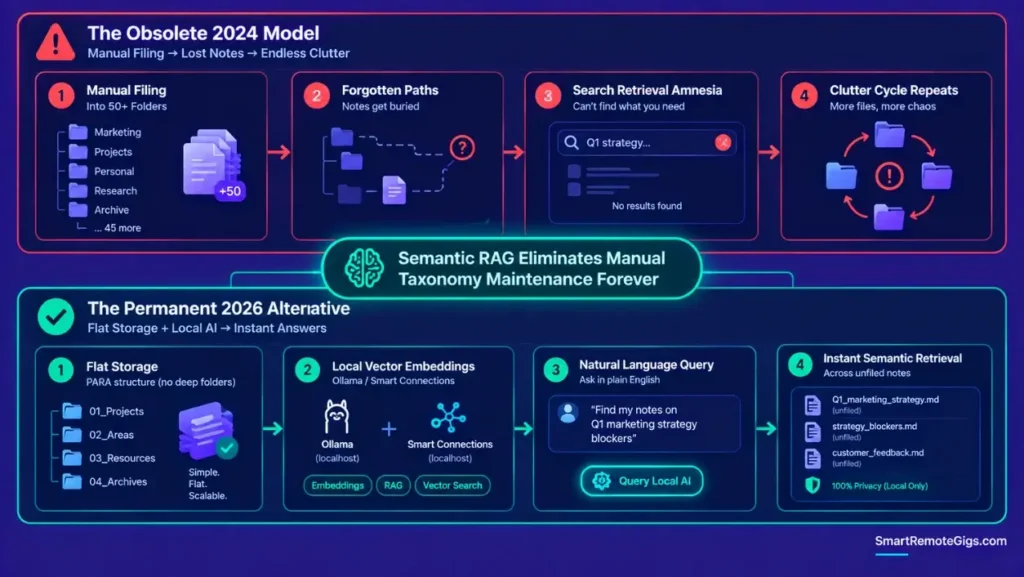
Manual folder filing puts the entire retrieval burden on you remembering where you put something. Local vector embeddings — through tools like Ollama or the Smart Connections plugin in Obsidian — index messy, unfiled notes semantically, so a natural-language query can surface the right note regardless of which folder it landed in.
This doesn’t replace PARA’s actionability boundaries for active project work, but it does remove the pressure to file every single Resource note perfectly, since retrieval no longer depends entirely on folder placement.

Best For: The best local-first note-taking app for freelancers who want to own their notes as plain Markdown files forever, but it's built for solo work — real-time team collaboration isn't its strength.
If your current software lacks automated indexing and local plugin extensibility, evaluate modern options in the best note taking tool selector.
❓ Frequently Asked Questions
How do I organize my second brain when it is completely overwhelmed?
Execute the Cold Archive Reset: create a single /04_Archives/Legacy_Archive_[Date]/ folder, move all unorganized files into it immediately, and start fresh with four clean PARA root folders.
Should I delete old notes when cleaning up my second brain?
No, don’t delete historical notes. Move them into cold archive folders so they stay accessible via search without cluttering your active project views.
How do I stop my second brain from becoming messy again?
Enforce a strict capture filter, cap your capture inbox at 25 items, and run a 15-minute weekly triage sweep every Friday.
How many folders should a second brain have?
A second brain should have no more than four operational root folders (Projects, Areas, Resources, Archives) plus an optional meta folder for templates.
Can AI organize my second brain notes automatically?
Yes, local embedding tools and semantic search plugins can index unorganized Markdown files automatically, letting you retrieve notes based on meaning rather than exact folder paths.
The Verdict: Reset, Restructure, and Enforce Boundaries
A messy second brain is not a personal failure; it is the natural consequence of applying obsolete topic-based filing systems to modern high-velocity digital inputs. Trying to clean thousands of historical notes one by one is an exercise in futility.
By executing a Cold Archive sweep, flattening your directory structure into four PARA containers, and establishing weekly triage discipline, you eliminate cognitive drag and restore your knowledge system to an active execution tool.
Smart Remote Gigs establishes this technical blueprint as the definitive note cleanup guide — cross-referenced against official documentation and real user reports, not marketing claims.

![Build AI Second Brain Assistant 2026: Local Setup [Guide]](https://smartremotegigs.com/wp-content/uploads/2026/09/build-your-second-brain-ai-assistant-local-rag-hero-1024x577.webp)
![Second Brain with Claude & Obsidian 2026 [My Setup]](https://smartremotegigs.com/wp-content/uploads/2026/08/claude-obsidian-second-brain-mcp-hero-1024x577.webp)
![Why Your Second Brain Fails 2026: Retrieval Fix [Fix]](https://smartremotegigs.com/wp-content/uploads/2026/08/why-your-second-brain-fails-hero-1024x576.webp)