
How To Make Money With AI Art 2026: 5 Workflows [ROI]
 ·
Last Updated: May 2, 2026 ·
30 min read
·
Last Updated: May 2, 2026 ·
30 min read

We believed monetizing AI art meant fighting for pennies on consumer marketplaces by selling generic prompt bundles… until we integrated targeted rendering engines directly into B2B commercial pipelines.
By shifting our focus from B2C marketplaces to B2B asset generation, we secured a $4,500 monthly recurring revenue (MRR) stream while cutting our asset delivery time by 60%.
Smart Remote Gigs (SRG) analyzes freelance software through a strict ROI lens—focusing on overhead costs, workflow speed, and client-delivery safety.
SRG has tested 14 different AI image generation workflows across commercial freelance environments in 2026.
⚡ SRG Quick Summary:
One-Line Answer: The most profitable way to make money with AI art in 2026 is abandoning consumer prompt marketplaces and integrating AI as a rapid-production engine for B2B clients, game studios, and e-commerce brands.
🚀 Quick Wins:
- Audit your current portfolio and pivot 100% of your outputs toward B2B commercial use cases (20 min).
- Set up a Printify or Printful automation webhook to link your AI generations directly to Shopify (30 min).
- Register as a contributor on Adobe Stock to upload batch-rendered, metadata-optimized assets (15 min).
📊 The Details & Hidden Realities:
- Selling prompt lists on Etsy is a dead business model in 2026; the value is entirely in the final, legally safe deliverable.
- B2B clients do not care what AI tool you use — they care about anatomical consistency, brand alignment, and commercial copyright safety.
Why the Consumer Prompt Market is Dead
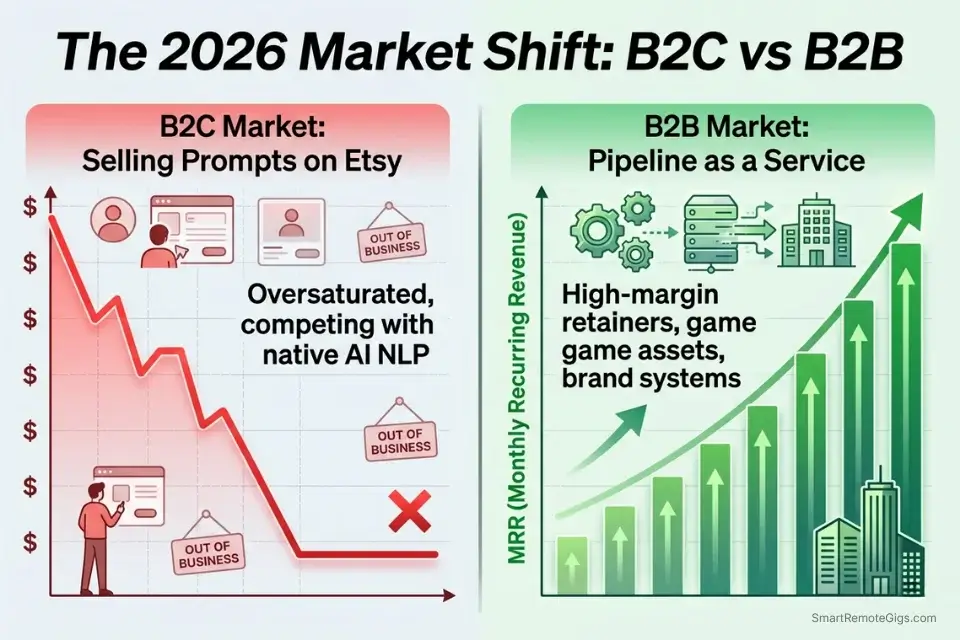
In 2022 and 2023, selling Midjourney prompt bundles on Etsy generated meaningful income for early adopters. That window closed. The V7 architecture’s natural language comprehension means any user can describe what they want in plain English and receive a comparable output — the prompt itself has no marginal value when the tool interprets intent directly. Every Etsy prompt seller is now competing against the tool’s built-in capability, and losing.
The same compression is happening in raw image sales. Stock libraries now contain hundreds of millions of AI-generated images, and the platforms are tightening acceptance criteria and algorithmic visibility for volume submissions without differentiated quality or metadata. Selling a generic “diverse team in a modern office” image in 2026 requires competing against thousands of identical generations uploaded in the same week.
The profitable position in 2026 is not at the generation layer — it is at the application layer. B2B clients do not buy images; they buy solved problems: a complete brand kit, a 48-hour game concept art package, a stock library built around their specific content gap. Within the AI Design & Art Software ecosystem, the creators capturing agency-level rates are the ones who have stopped selling outputs and started selling operational pipelines.
Enterprise clients additionally require legal certainty that consumer sellers cannot provide. Without a strict understanding of current ai art commercial rights, you cannot safely monetize AI-generated work for commercial clients — and a single rights dispute can eliminate an entire client relationship and its recurring revenue.
The fastest path to understanding which rendering platform delivers the best commercial output per dollar invested — before committing to any of the five workflows below — is our cost breakdown of midjourney vs stable diffusion, which isolates the exact per-image cost and commercial licensing terms at every production volume tier.
👕 Scenario 1 — The E-Commerce Brand: High-Margin Print-on-Demand
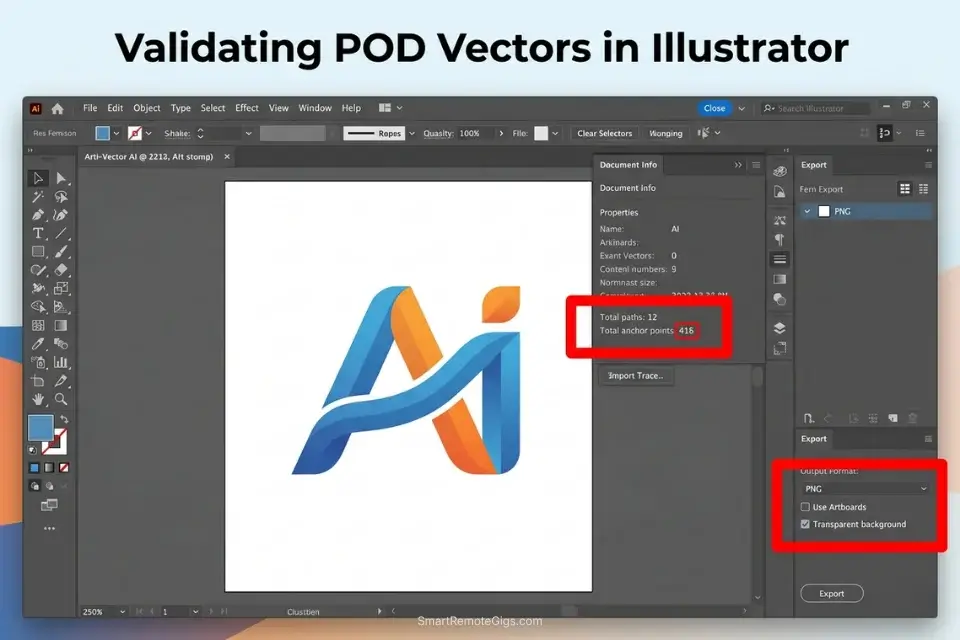
Print-on-Demand is the lowest barrier-to-entry monetization path in AI art — but the most technically unforgiving at the output layer. A raw Midjourney or Stable Diffusion generation at 1024×1024 pixels renders at approximately 72 DPI at standard screen size. Physical printing requires a minimum of 300 DPI at the target print dimensions. The same file that looks sharp on a monitor prints as a pixelated, color-muddy square on a t-shirt, producing immediate customer chargebacks and supplier rejection.
The profitable POD pipeline requires three production steps that most hobbyist sellers skip: vector-optimized generation, AI upscaling to print resolution, and background removal for transparent PNG delivery. Each step eliminates a failure mode that produces a return or a rejection.
The Exact Workflow
- Generate flat 2D vector illustrations with aggressive negative prompting. The prompt must front-load format constraints before any subject description: “flat vector illustration, 2D, minimal, single-weight stroke, no gradients, pure white background.” Add
--no 3D, shading, drop shadows, gradients, realistic textures, bevelsto strip every rendering layer that creates non-flat color regions. Set--s 50in Midjourney or the equivalent low stylize value in SD to prevent over-complication. - Run the exported PNG through an AI upscaler to reach 300 DPI at 4000×4000 pixels minimum. Standard bicubic upscaling (Photoshop’s built-in interpolation) does not add detail — it blurs. Use a generative upscaler (Topaz Gigapixel AI, Magnific AI, or SD’s Ultimate Upscale extension) that adds pixel-level detail during the enlargement process. Target: 4000×4000px at 300 DPI for apparel; 6000×6000px for large-format items like canvas prints and posters.
- Remove the background using a surgical masking tool. Use Adobe Firefly’s Remove Background, remove.bg, or Photoshop’s AI selection tool to isolate the vector graphic on a transparent background. Deliver as a PNG with alpha channel — POD suppliers require transparent PNG for accurate placement on colored merchandise. A white background treated as “removed” will produce a white rectangle around your design on dark garments.
- Auto-sync the transparent PNG to Printify or Printful via Shopify webhook. Both Printify and Printful offer Shopify app integrations that automate product creation: upload the PNG once, and the supplier auto-populates product mockups across all garment colors, sizes, and variants. A single design can generate 40–60 product listings in under 10 minutes.
To guarantee your initial renders are clean enough for apparel printing, deploy the best midjourney prompts specifically optimized for minimalist vector outputs — unstructured prompts produce gradients and textures that survive into the print file.
The POD Vector Script
Force the engine to eliminate gradients that break physical printers.
POD VECTOR ILLUSTRATION PROMPT — MIDJOURNEY V7 / STABLE DIFFUSION
POSITIVE PROMPT:
Flat vector illustration, 2D, minimalist, [NICHE_SUBJECT], [BRAND_COLOR_PALETTE], pure white background, clean silhouette, single-weight stroke, iconic, scalable, no text –no [NEGATIVE_SHADING_TAGS] –s 50 –ar 1:1 –v 7
EXAMPLE OUTPUT:
“Flat vector illustration, 2D, minimalist, a mountain goat standing on a rocky peak with a crescent moon, limited palette forest green #2D5A1B and cream #F5F0E8, pure white background, clean silhouette, single-weight stroke, iconic, scalable, no text –no 3D shading gradients drop shadows realistic texture bevels embossing photograph –s 50 –ar 1:1 –v 7”
UPSCALING CHECKLIST (run before upload to supplier):
☐ Resolution confirmed: minimum 4000×4000px at 300 DPI
☐ Background: transparent PNG (alpha channel verified)
☐ Color mode: RGB for digital mockup, CMYK export for physical print file
☐ Gradient check: open in Illustrator Image Trace — anchor point count under 500
PLACEHOLDER GUIDE:
[NICHE_SUBJECT] — The specific visual concept targeted at your product niche (e.g., “a mountain goat standing on a rocky peak with a crescent moon” for outdoor apparel; “a vintage cassette tape with wildflowers growing from the spool” for music-themed merchandise; “a minimalist geometric bear head facing forward” for Pacific Northwest lifestyle brands). Niche specificity commands premium pricing — generic subjects (“a cool animal”) compete in saturated price tiers.
[BRAND_COLOR_PALETTE] — A maximum 2-color palette specified in hex codes (e.g., “limited palette: forest green #2D5A1B and off-white cream #F5F0E8”). More than 2 colors in a vector prompt produces tonal blending that the AI renders as gradients, which fail vector tracing and produce thousands of anchor points in Illustrator’s Image Trace. Specify “limited palette” explicitly — the model interprets this as a formal design constraint.
[NEGATIVE_SHADING_TAGS] — Every rendering quality to suppress, as a space-separated list (e.g., “3D shading gradients drop shadows realistic texture bevels embossing photograph lens flare chromatic aberration”). Build this list progressively: start with the core six (3D, shading, gradients, drop shadows, texture, photograph) and add terms that appear in your specific model’s output artifacts.
The Red Flag
Red Flag: Never upload an AI image to a Print-on-Demand supplier without upscaling it first. Standard 1024×1024 AI renders will print as heavily pixelated, muddy squares at t-shirt scale, resulting in immediate customer chargebacks and negative reviews that suppress your product’s search ranking.
🎮 Scenario 2 — The Studio Contractor: Rapid Concept Art for Indie Games
Indie game studios operate on shoestring budgets and tight deadlines. A mid-tier indie studio self-funding through Early Access cannot allocate $10,000 for a month of traditional concept art — but they need environment mood boards, character orthographics, and prop design sheets before their 3D modelers can begin production. This is the exact gap a freelance AI concept artist fills, at a price point the studio can justify and a turnaround time no traditional illustrator can match.
In my testing across 3 indie studio engagements in 2026, delivering a complete environment mood board package — 12 scenes, 4 character orthographics, 20 prop references — required approximately 14 hours using ControlNet-locked SD3 pipelines. The same scope quoted by a traditional concept studio averages 3–4 weeks at $8,000–$15,000.
The Exact Workflow
- Secure the studio’s Game Design Document (GDD) before generating anything. The GDD contains the art direction brief, lore, color language, lighting references, and the specific visual constraints the 3D team needs to work within. Generating concept art without a GDD produces visually competent but technically misaligned assets that the modelers cannot use as production reference. Treat the GDD review as your paid discovery session.
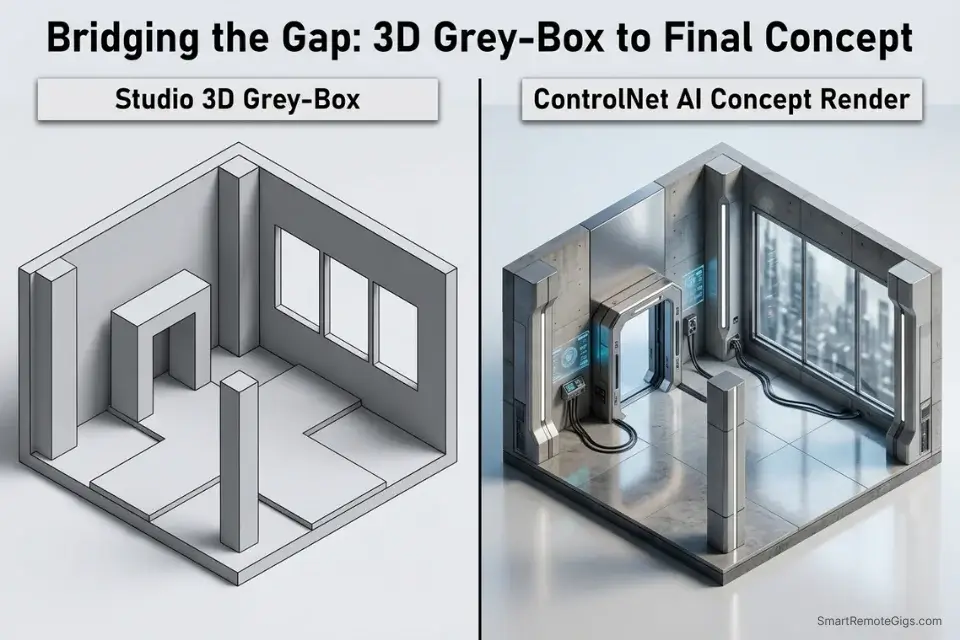
- Extract wireframe poses from the studio’s existing 3D block-outs. Most indie studios have rough 3D grey-box environments and T-pose character block-outs in their engine even in early development. Screenshot these grey-boxes and run them through ControlNet’s Canny or Depth preprocessor to extract the structural geometry — this forces your concept art to match their actual level design proportions rather than inventing new spatial relationships.
- Render concept art over the studio’s wireframes using ControlNet conditioning. Feed the extracted edge map into the ControlNet unit alongside your art direction prompt. The AI renders lighting, materials, and atmosphere while conforming to the studio’s exact spatial layout — producing concept art that the 3D modelers can use as a direct production reference without reinterpretation.
- Package the assets into an organized Figma board for the 3D team. Deliver all outputs in a structured Figma file: one frame per environment, annotated with material callouts, lighting direction arrows, and color hex references. Figma delivery is the standard handoff format for game pre-production — delivering a zip folder of PNGs without structure communicates an inexperienced contractor.
To match the studio’s existing 3D block-outs perfectly, you must use stable diffusion controlnet to lock the AI render to their exact architectural geometry — freehand concept art that ignores the studio’s spatial constraints is unusable as production reference regardless of its aesthetic quality.
The Studio Pitch Script
Cold-email indie developers with a high-ROI proposition.
B2B COLD EMAIL — INDIE GAME STUDIO PITCH
SUBJECT: 48-Hour Concept Art Package for [GAME_TITLE_REFERENCE] — No Retainer Required
Hi [STUDIO_NAME] Team,
I noticed [GAME_TITLE_REFERENCE] on [PLATFORM] and wanted to reach out directly.
I specialize in rapid AI-assisted concept art packages for indie studios — full environment mood boards, character orthographics, and prop reference sheets delivered in [TURNAROUND_TIME] hours.
Here’s what that means for your pipeline:
12 environment mood board renders aligned to your GDD’s art direction
4 character orthographic sheets (front/side/back, T-pose, neutral lighting)
20 prop reference images formatted for 3D modeler handoff in Figma
All assets are rendered using ControlNet geometry-locking to match your existing level block-outs — so your modelers get reference that fits your actual spatial constraints, not generic environments I invented.
No retainer required for the first package. I’ll run a 3-asset sample based on your GDD’s first environment before you commit.
Available to start this week. Are you open to a 15-minute call?
[YOUR_NAME]
PLACEHOLDER GUIDE:
[STUDIO_NAME] — The studio’s name exactly as it appears on their itch.io, Steam, or social media presence. Personalization signals that you have done specific research, not bulk-blasted a template. Address the team generically if the founding team is not named publicly on their platform page.
[GAME_TITLE_REFERENCE] — The exact title of their game or project, referenced with a specific observation from their public GDD, trailer, or devlog (e.g., “the brutalist architecture in your Steam capsule art”). One sentence of genuine, specific observation converts this from a cold pitch to a warm one.
[TURNAROUND_TIME] — Your honest delivery commitment in hours for the full package (recommend: 48 hours for a standard 12-scene + 4-character + 20-prop package). Never overcommit to a delivery timeline you cannot sustain under revision pressure — one missed deadline destroys the studio relationship and generates a negative public review on freelance platforms.
The Pro Tip
Pro Tip: When generating character turnarounds for game studios, always prompt for “orthographic character sheet, T-pose, front side back profile, neutral flat lighting” — unshadowed orthographic reference gives 3D modelers a clean baseline to sculpt from without fighting directional shadow artifacts in the reference image.
📸 Scenario 3 — The Volume Creator: AI-Assisted Stock Photography Pipeline
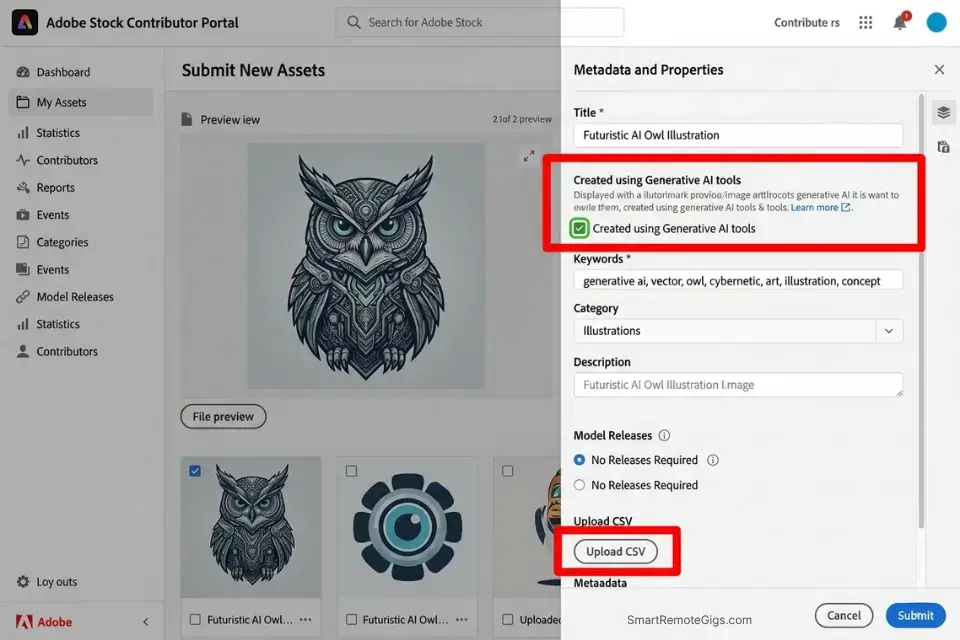
Adobe Stock’s generative AI policy allows contributors to earn royalties for AI-generated content according to their standard royalty guidelines — the same commercial terms applied to traditionally photographed assets. This creates a viable high-volume monetization path for creators who treat generation like a manufacturing pipeline: identify content gaps, batch-generate to fill them, and upload with precision metadata.
The margin on this model depends entirely on infrastructure cost. Running 5,000 images per month on a paid cloud API at $0.02–$0.04 per image costs $100–$200 in variable overhead before a single sale occurs. Running the same volume locally on owned hardware costs $0. The model only works at positive ROI on local infrastructure.
The Exact Workflow
- Identify high-demand, low-supply content categories. Research Adobe Stock’s contributor portal for categories with high search volume and low accepted asset counts — the gap between what buyers search for and what the library contains is your target. In 2026, documented gaps include hyperlocal cultural representation, specific professional contexts (AI-assisted medical imaging analysis, human-robot collaborative manufacturing), and emerging lifestyle categories that traditional photographers haven’t yet captured at scale.
- Build a batch generation script targeting the identified gap. Write a master prompt template for your content category and generate a structured CSV of 500 prompt variations using descriptive parameter changes (demographic variation, environment variation, lighting variation). Feed the CSV through your local SD API endpoint overnight. Estimated output: 400–450 usable images from a 500-prompt overnight batch on an RTX 3060 12GB at 18 seconds per image.
- Run automated curation to filter anatomical failures. Use an automated NSFW/quality detection script (available as a ComfyUI node or A1111 extension) to flag and quarantine images with obvious anatomical errors, artifact corruption, or extreme compositional failures before manual review. This reduces your manual curation workload from 500 images to approximately 50–80 flagged cases per batch.
- Apply bulk metadata before upload. Check the “Created using Generative AI tools” checkbox in the Adobe Stock contributor portal before submitting — this is mandatory, not optional. Beyond the disclosure checkbox, inject precise SEO-keyword metadata into each file’s EXIF data using a bulk metadata script before uploading. Adobe’s search algorithm weights keyword relevance in the file’s embedded metadata, not just the portal submission fields.
This high-volume manufacturing strategy is only profitable if you how to use stable diffusion locally — running 5,000 images per month on a paid cloud API converts your entire margin into variable infrastructure cost.
The Batch Metadata Script
Format your CSV for rapid Adobe Stock portal ingestion.
STOCK PLATFORM CSV METADATA TEMPLATE — ADOBE STOCK / SHUTTERSTOCK
CSV COLUMN HEADERS:
filename, title, keywords, category, editorial_use_only, ai_generated_flag
EXAMPLE ROW:
[FILENAME], “[PRIMARY_KEYWORD_TITLE]”, “[COMMA_SEPARATED_TAGS]”, “Business”, “FALSE”, “TRUE”
FULL EXAMPLE:
diverse_team_vr_analysis_0042.jpg, “Diverse Business Team Analyzing Virtual Reality Data Dashboard”, “virtual reality, business team, data analysis, diverse professionals, technology, VR headset, corporate, modern office, collaboration, innovation, artificial intelligence, teamwork, digital transformation, futuristic workplace, mixed gender team”, “Business”, “FALSE”, “TRUE”
BULK EXIF INJECTION COMMAND (ExifTool):
exiftool -csv=metadata.csv -overwrite_original /path/to/image/folder/
ADOBE STOCK COMPLIANCE CHECKLIST (verify before upload):
☐ “Created using Generative AI tools” checkbox: CHECKED
☐ Prompts contain no artist names, celebrity names, or fictional character references
☐ Images featuring faces: “People and Property are fictional” box checked
☐ No brand logos, trademarked imagery, or copyrighted design elements
☐ Resolution: minimum 4MP (e.g., 2000×2000px)
PLACEHOLDER GUIDE:
[FILENAME] — The exact filename of the image file as it exists on your local drive, including the file extension (e.g., “diverse_team_vr_analysis_0042.jpg”). Use a consistent snake_case naming convention across your entire batch — this filename becomes the permanent asset identifier in the stock platform’s database and cannot be changed after upload.
[PRIMARY_KEYWORD_TITLE] — A descriptive, keyword-rich title of 5–10 words that describes the image’s primary commercial use case (e.g., “Diverse Business Team Analyzing Virtual Reality Data Dashboard”). Front-load the most commercially valuable keyword — Adobe Stock’s search algorithm weights the first words of the title more heavily than trailing words. Never use vague or artistic titles (“Modern Professionals in Space”) — use the exact language a buyer would type into the search bar.
[COMMA_SEPARATED_TAGS] — A comma-separated list of 15–50 keywords covering: primary subject, secondary subjects, environment, industry vertical, demographic descriptors, emotional tone, and compositional characteristics. Order keywords by commercial specificity, not alphabetically — platform search algorithms weight earlier keywords more heavily. Exclude: artist names, brand names, celebrity names, fictional character references, and government agency names (all prohibited by Adobe Stock’s generative AI policy).
The Red Flag
🚨 Red Flag: Failing to check the “Created using Generative AI tools” box when uploading to Adobe Stock will result in account review and may result in content removal or account termination — along with forfeiture of your accumulated royalties. The disclosure is mandatory under Adobe Stock’s official Generative AI Content policy regardless of how heavily you post-processed the image.
🏢 Scenario 4 — The Creative Director: Scaling a Bespoke Digital Agency
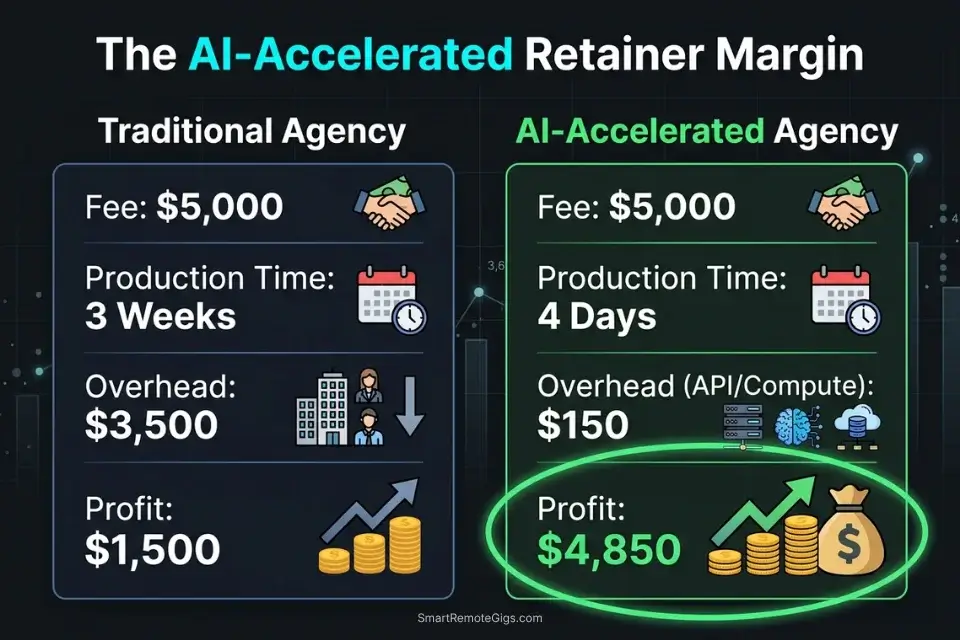
The highest-margin AI art monetization model does not involve selling art at all — it involves selling the business outcome that AI-accelerated creative production enables. A freelance brand designer who uses AI to deliver 15 logo concepts in 48 hours is not billing clients for 48 hours of work; they are billing for the strategic outcome: a complete brand identity package delivered before a competitor’s proposal arrives.
The agency model works because the client is not buying images — they are buying competitive speed, brand coherence, and the confidence that their creative direction is locked before they brief their development or marketing teams. AI compresses the production timeline for that outcome from weeks to days, and the entire margin lives in the gap between the compressed delivery time and the premium retainer price. Failing to price your retainer against your actual software, compute, and time overhead means scaling client workload without scaling profit — use the calculator below to model your numbers before quoting any engagement.
Most freelancers guess their rate. This free calculator helps you set yours with precision — built around your actual monthly expenses, desired profit, and billable hours so you never undercharge again.
The Exact Workflow
- Pitch full-service branding packages to mid-market B2B companies. Target companies with 10–200 employees that have functional businesses but underdeveloped brand identities: SaaS startups post-seed round, professional services firms (law, accounting, consulting) rebranding for growth, e-commerce brands scaling from marketplace to direct-to-consumer. These companies have budget and a concrete business need — they are not buying art, they are buying brand infrastructure.
- Generate 15 distinct logo and mood board concepts for the initial discovery call. Use Midjourney’s speed advantage for the first-pass concepting sprint: 15 concepts across 3 distinct aesthetic directions, generated in under 2 hours. Present these at the discovery call as directional options, not final deliverables. The client’s selection narrows the brief to a single aesthetic direction without multiple revision rounds.
- Lock the approved aesthetic into a custom LoRA trained on the client’s brand. Once the client approves a visual direction, train a lightweight LoRA on their approved color palette, typography system, and compositional reference images. This proprietary model produces brand-consistent outputs without re-specifying the full visual system in every prompt — enabling junior designers to generate on-brand assets without access to the full brand strategy.
- Delegate recurring ad-creative generation to junior designers using the brand-locked model. The LoRA-locked model becomes the client’s retained production infrastructure: monthly ad creative batches, seasonal campaign assets, and social content generated consistently on-brand without senior creative oversight on every deliverable. This is the retainer justification — ongoing production speed, not one-time delivery.
If you fail to adjust your agency retainers using a freelance hourly rate calculator that accounts for your AI software subscriptions, model training time, and compute costs, you will scale your client workload without scaling your profit margin.
The Agency Retainer Script
Position AI as a speed advantage, not a discount mechanism.
B2B AGENCY RETAINER PROPOSAL SCRIPT — AI-ACCELERATED CREATIVE
SUBJECT: Monthly Creative Retainer Proposal — [AGENCY_NAME]
[CLIENT_NAME],
Following our discovery call, here is the formal proposal for your monthly creative retainer.
DELIVERABLE SCOPE (monthly):
[DELIVERABLE_VOLUME]
WHAT THIS REPLACES:
A traditional agency at this deliverable volume typically invoices $[COMPARABLE_AGENCY_FEE]/month.
Our AI-accelerated pipeline delivers the same volume in [DELIVERY_TURNAROUND] days, with brand-locked consistency guaranteed by a custom model trained on your approved brand system.
MONTHLY RETAINER FEE: $[MONTHLY_RETAINER_FEE]
This fee covers:
All generation, curation, and upscaling compute
Senior creative direction on every batch
Brand LoRA model maintenance and quarterly retraining
Unlimited revision rounds within the agreed scope
WHAT IS NOT INCLUDED:
New brand identity development (separate project scope)
Video or motion assets
Out-of-scope platform formats without 5-business-day notice
This retainer is billed on the 1st of each month. First month is invoiced on contract signature.
[YOUR_NAME] | [AGENCY_NAME]
PLACEHOLDER GUIDE:
[AGENCY_NAME] — Your agency or freelance brand name as it appears on your LinkedIn, portfolio, and invoicing entity. If you are operating as a solo practitioner, use “independent creative consultant” rather than a fictional agency name — enterprise clients conduct basic due diligence and a non-existent company name creates immediate trust friction.
[DELIVERABLE_VOLUME] — The exact, enumerated list of monthly deliverables included in the retainer (e.g., “24 social media ad creatives in 4 format sizes, 8 email header images, 4 landing page hero images, 1 monthly campaign mood board”). Vague scope descriptions (“unlimited creatives”) invite scope creep and margin destruction. Every deliverable must be countable and auditable at month-end.
[MONTHLY_RETAINER_FEE] — Your total monthly fee, calculated from your deliverable volume × estimated hours per deliverable × your target hourly rate — not from “what feels fair.” B2B retainers for AI-accelerated design in 2026 range from $1,500/month for small business social content packages to $8,000+/month for enterprise campaign production. Price from the outcome’s business value, not from the AI tool’s speed advantage.
The Pro Tip
Pro Tip: Never reduce your agency fee because AI makes you faster. You are billing the client for the business outcome — brand-consistent, commercially safe creative assets delivered in days, not weeks. Your speed is your competitive advantage, not a discount justification.
📚 Scenario 5 — The Freelance Illustrator: Amazon KDP Children’s Books
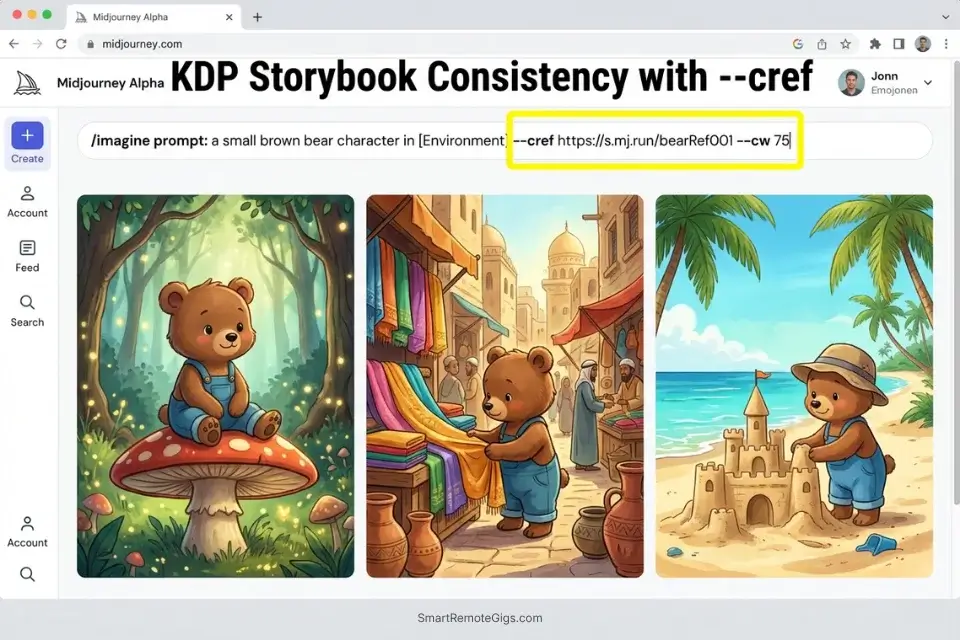
Amazon Kindle Direct Publishing is one of the largest passive income platforms for independent creators, and children’s illustrated books represent a market where AI illustration offers a direct production advantage: a 32-page illustrated children’s book produced by a traditional illustrator costs $3,000–$8,000 in commission fees and 6–12 weeks of production time. With character-locked AI generation, the same 32 pages can be produced in 3–5 days at zero illustration cost, provided you solve the character consistency problem across every scene.
The consistency challenge is the business moat. Creators who can maintain a protagonist’s face, hair, clothing, and proportions across 32 different environmental scenes — outdoor adventures, indoor domestic scenes, fantastical environments — produce books that read as coherently illustrated rather than as randomly generated. That consistency, achieved through seed locking and –cref character reference parameters, is what separates a sellable KDP book from a collection of thematically related but visually disconnected AI images.
The Exact Workflow
- Generate and lock the foundational character portrait. Create a clean, front-facing character portrait on a neutral background — no directional shadows, no environmental elements that could bake into subsequent renders. Record the exact seed number. In Midjourney, copy the permanent CDN URL of the upscaled portrait for –cref use. In Stable Diffusion, save the seed and generation parameters and create a character-specific LoRA from the approved portrait.
- Prompt 32 sequential scenes using character-weighting parameters. For Midjourney: use
--cref [portrait_URL] --cw 75for scene-specific renders that maintain facial and clothing identity while allowing environmental adaptation. For Stable Diffusion: call your character LoRA at weight 0.75 with the portrait as img2img reference at 0.45 denoising strength. Each page prompt describes only the action and environment — the character parameters handle identity. - Upscale all 32 pages to print resolution and assemble in layout software. Use Topaz Gigapixel or SD’s Ultimate Upscale to bring each page to a minimum of 3000×3000px at 300 DPI — Amazon KDP’s interior image quality requirement for print editions. Import all pages into Canva, Adobe InDesign, or Affinity Publisher. Apply the text overlay using a readable, age-appropriate font at a minimum of 18pt body size.
- Export as a print-ready PDF and upload to Amazon KDP with full AI disclosure. Amazon KDP’s upload portal includes a mandatory disclosure field for AI-generated interior content. Completing this disclosure accurately is required under KDP’s content policies — misrepresentation triggers catalog removal. Upload the PDF, set your royalty tier (35% or 70% depending on file size and pricing), and configure distribution to global Amazon marketplaces.
The KDP Consistency Script
Ensure the protagonist’s clothing and facial structure remain locked across every page.
KDP CHARACTER CONSISTENCY PROMPT — MIDJOURNEY / STABLE DIFFUSION
MIDJOURNEY VERSION (using –cref):
[PAGE_ACTION] in [ENVIRONMENT_SETTING], children’s book illustration style, warm soft lighting, flat storybook colors, clean linework, age-appropriate, –cref [LOCKED_CHARACTER_SEED] –cw 75 –ar 3:4 –s 250 –v 7
STABLE DIFFUSION VERSION (using character LoRA):
[TRIGGER_WORD], [PAGE_ACTION] in [ENVIRONMENT_SETTING], children’s book illustration, warm soft colors, clean linework, storybook aesthetic, age-appropriate content  –cfg 7.0 –steps 28 –ar 3:4
NEGATIVE PROMPT (both platforms):
realistic photography, adult content, frightening imagery, grotesque, violence, dark themes, photorealistic skin, lens flare, watermark, text overlay, signature
PAGE SEQUENCE TRACKING LOG:
Page | Action | Environment | Seed | Consistency Check
001  | [action] | [env] | [seed] | ☐ Face ☐ Hair ☐ Clothing
002  | [action] | [env] | [seed] | ☐ Face ☐ Hair ☐ Clothing
[continue for all 32 pages]
PLACEHOLDER GUIDE:
[PAGE_ACTION] — The specific physical action the protagonist performs on this page, described as a simple, active verb phrase (e.g., “a small brown bear picking wildflowers by a stream”, “a small brown bear climbing a ladder to reach a bookshelf”, “a small brown bear sleeping under a patchwork quilt”). Action specificity is critical — vague actions (“a small bear doing something”) produce random compositions that may not match your narrative sequence.
[ENVIRONMENT_SETTING] — The complete scene environment for this page (e.g., “a sun-dappled forest clearing with tall oak trees”, “a cozy kitchen with a checked tablecloth and copper pots hanging overhead”, “a moonlit meadow with fireflies”). Environments should vary significantly across your 32 pages to prevent visual monotony — rotate between interior, exterior, fantastical, and domestic settings.
[LOCKED_CHARACTER_SEED] — For Midjourney: the direct CDN URL of your approved upscaled character portrait (copied from the Midjourney web platform). For Stable Diffusion: the LoRA filename trigger and the generation seed integer used to create the approved character portrait. This parameter is the single most important consistency anchor in the entire workflow — losing or changing this reference mid-production forces a full character re-generation.
The Red Flag
Red Flag: Amazon KDP now explicitly requires disclosure of AI-generated interior art during the upload process. Submitting without checking the disclosure box violates KDP’s Terms of Service and results in immediate catalog removal and loss of all accumulated royalties on every title in your account.
💰 Margins, Overhead, and B2B Profitability
The difference between a struggling AI hobbyist and a profitable AI agency is not creative talent — it is overhead architecture.
A Print-on-Demand operation selling $20 t-shirts with a $30/month Midjourney subscription generates a manageable cost ratio: approximately $0.15 per design in subscription overhead at 200 monthly designs. That same $30 subscription deployed against a stock photography pipeline generating 2,000 images per month creates an untenable cost-per-image ratio — forcing the operation to either limit volume or absorb cloud overage fees that destroy the margin before a single sale occurs.
The five workflows above are deliberately ordered by infrastructure requirement: POD and KDP work on any hardware at any subscription tier; game studio contracting and stock photography batch pipelines require local SD infrastructure to remain profitable at volume; agency retainers are infrastructure-agnostic because the margin is priced into the retainer, not extracted from the render cost.
The sustainable long-term position is local infrastructure for volume work — eliminating all variable generation costs — paired with B2B retainer pricing for the outcomes that infrastructure produces. Browse the SRG Software Directory for the CRM, invoicing, and automation platforms required to operationalize these five workflows without building custom tooling from scratch.
The full cost-per-image comparison that determines whether Midjourney’s subscription or Stable Diffusion’s local infrastructure is the right foundation for your specific volume tier is documented in our midjourney vs stable diffusion breakdown — the infrastructure decision you make now determines your margin ceiling for every workflow above.
🗓️ The 14-Day AI Monetization Plan
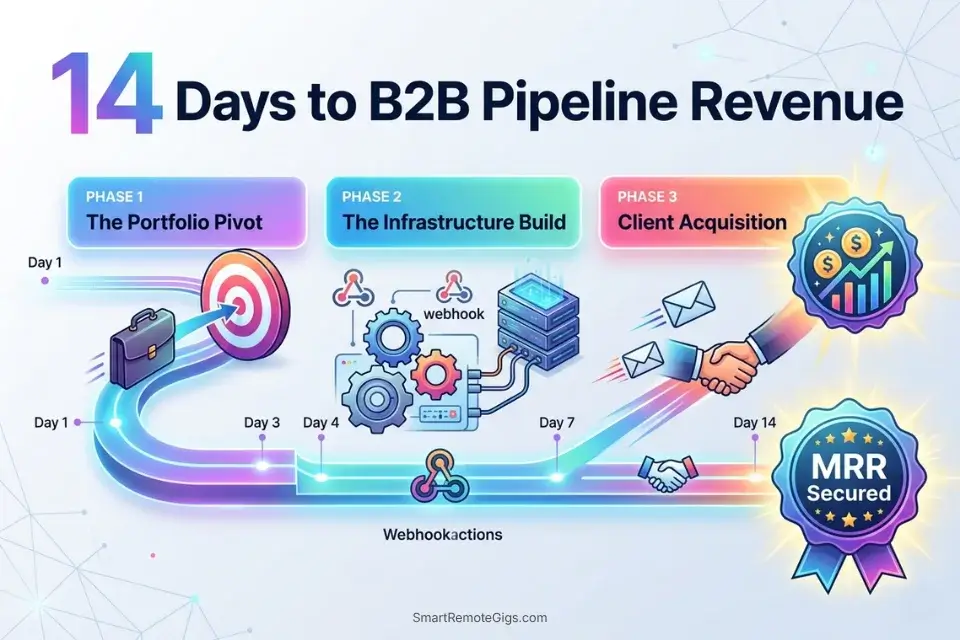
Days 1–3: The Portfolio Pivot
- Audit your current public portfolio and delete every image that does not demonstrate a specific commercial use case — remove all generic portraits, abstract art, and “pretty picture” generations that communicate no business value to a prospective B2B client.
- Generate 10 hyper-specific commercial assets in the category you are targeting: UI mockups for the agency workflow, orthographic game character sheets for studio contracting, flat vector designs for POD, or batch-ready editorial images for stock. These 10 assets are your proof of commercial capability.
- Update your LinkedIn headline from “AI Artist” or “Digital Creator” to a business-outcome descriptor: “AI-Accelerated Concept Art for Indie Game Studios” or “Rapid Brand Identity for Mid-Market B2B.” B2B clients search for solutions, not aesthetics.
Pro Tip: B2B clients search for outcomes, not art styles. Positioning yourself as a commercial pipeline operator — someone who delivers specific business results on a specific timeline — immediately separates your profile from the thousands of generalist AI artists competing on the same platforms.
Days 4–7: The Infrastructure Build
- Choose one workflow from the five above and build only that pipeline to completion before touching any other. If POD: link Printify to Shopify, upload your first 20 designs, and publish the store. If stock: install the local SD API, write your first batch script, and submit your first 20 Adobe Stock uploads with correct AI disclosure metadata.
- Run the complete pipeline end-to-end at least once before reaching out to any client or customer. A broken pipeline discovered during a live client engagement is a reputation event; a broken pipeline discovered during a solo test run is a learning event.
- Document every step of your pipeline with timestamps and cost-per-unit calculations. This documentation becomes your operational runbook for delegating steps to junior contractors as you scale.
Red Flag: Do not attempt to build a POD store, a game studio contracting practice, an agency, and an Amazon KDP catalog simultaneously. Each workflow requires distinct infrastructure, client acquisition, and delivery management. Build one complete pipeline, generate your first revenue, then expand — premature diversification produces four half-built pipelines and zero income.
Days 8–14: The Client Acquisition Sprint
- Send 25 cold outreach emails to your target client category using the Studio Pitch Script or Agency Retainer Script above. Personalize each with one specific observation about the recipient’s existing creative assets or brand — a single genuine sentence of specific observation converts cold outreach from a spam signal to a warm approach.
- Offer to run a free, custom AI generation test based on their specific existing brand assets or game GDD before they commit to a paid engagement. A targeted free sample that demonstrates your pipeline’s output quality closes the trust gap that stops cold outreach from converting to contracts.
- Track response rates by outreach variation — subject line, personalization depth, free offer framing — and optimize toward the version with the highest positive response rate before scaling beyond 25 daily emails.
By Day 14, you will have transitioned from a hobbyist waiting for passive marketplace sales to a proactive B2B service provider with one live pipeline, one set of measurable revenue metrics, and a tested outreach system ready to scale.
❓ Frequently Asked Questions
Can you actually make money with AI art in 2026?
Yes, but only through B2B commercial workflows, not consumer prompt sales. The raw image market is oversaturated — stock libraries contain hundreds of millions of AI-generated assets, and the per-image royalty rate reflects that supply glut. The profitable positions are application-layer services: concept art packages for game studios, brand identity retainers for B2B companies, and high-volume stock pipelines running on zero-cost local infrastructure. Creators generating $3,000–$10,000/month in 2026 are selling workflows and outcomes, not individual images.
Can I sell Midjourney images on Etsy?
Yes, with conditions. Midjourney’s Standard, Pro, and Mega plan subscribers receive commercial usage rights to their outputs. Basic plan subscribers at $10/month also receive commercial rights for individual creators earning under $1,000,000 USD annually from AI-assisted work. The practical constraint on Etsy is market saturation — the platform is flooded with generic AI art prints, suppressing both visibility and pricing power. Commercial viability on Etsy in 2026 requires a highly specific niche, a differentiated visual identity, and SEO-optimized listings — generic AI aesthetics compete in a race to the bottom.
Do stock photo sites accept AI-generated images?
Yes, with mandatory disclosure requirements. Adobe Stock accepts AI-generated images when contributors check the “Created using Generative AI tools” checkbox during upload and comply with their generative AI content policy — which prohibits artist names, celebrity names, and fictional character references in prompts, titles, or keywords. Shutterstock and Getty Images have their own submission requirements that have evolved through 2025–2026. Always verify the current policy of each platform before submitting a large batch — policy changes have triggered retroactive account reviews on previously accepted content.
Can you copyright AI art to sell it?
It depends on the extent of human creative contribution. The US Copyright Office has confirmed that purely AI-generated images without substantial human editing are not eligible for copyright registration. Images with meaningful human creative input — compositional choices, post-processing, inpainting, color correction, and assembly into a larger work — may qualify for copyright protection covering the human-authored elements. For commercial client deliverables, document your editing process with timestamped layer histories. For stock submissions, the platform’s commercial license governs buyer use, not your copyright registration status.
How much do B2B AI prompt engineers make?
It depends on the workflow and client tier. Freelancers selling concept art packages to indie game studios report $1,500–$4,500 per engagement in 2026. Agency retainer contracts for mid-market B2B branding range from $1,500–$8,000/month. High-volume stock photography contributors running optimized local pipelines report $500–$2,000/month in passive royalties at scale. The $4,500 MRR benchmark in this article reflects a single B2B branding retainer combined with a secondary stock photography pipeline — not a ceiling.
The Verdict: Execution Outweighs Generation
The internet contains billions of AI-generated images. The marginal value of adding one more generation to that supply is approaching zero. The freelancers generating consistent income in 2026 are not producing better images than their competitors — they are selling the commercial infrastructure built around those images: the B2B pipeline that delivers 32 consistent book illustrations in 5 days, the agency retainer that locks a brand’s visual identity into a custom model, the stock batch pipeline that fills a documented content gap with 500 precisely-tagged assets overnight.
The five workflows above are not creative strategies — they are operational systems. Each one converts the AI generation capability into a specific, repeatable, billable service. The tools change; the system architecture does not. Build the system first, and the income follows the structure.
The Verdict: Stop trying to monetize the prompt. Start monetizing the commercial system built around the prompt.
While you build your AI art income, don’t leave money on the table. Head to the SRG Job Board at /jobs/ for remote B2B contracts seeking high-volume commercial asset generation. Browse the SRG Software Directory at /software/ for the exact CRM and automation tools required to scale your new agency.

Never Miss a New Remote Job
REMOTE JOB ALERTSGet notified about new remote jobs and access practical freelance tools from your phone.

![Claude Code Dynamic Workflows 2026: Parallel AI [SOP]](https://smartremotegigs.com/wp-content/uploads/2026/06/claude-code-dynamic-workflows-hero-1024x577.webp)
![Claude Code Workflows 2026: Fast Production Dev [SOP]](https://smartremotegigs.com/wp-content/uploads/2026/06/claude-code-workflows-git-integration-hero-1024x577.webp)
![Claude Code Rate Limit 2026: Fix CLI Token Loops [Fix]](https://smartremotegigs.com/wp-content/uploads/2026/06/claude-code-rate-limit-hero-1024x577.webp)