Productize Freelance Services 2026: Scale Up [Playbook]
 ·
Last Updated: May 29, 2026
·
Last Updated: May 29, 2026

I was building custom proposals for every single client… and burning out while stuck at a rigid $4k a month ceiling.
One standardized service package closed $18,000 in monthly recurring revenue in exactly 45 days.
Here is the exact productization playbook — the step-by-step system to stop quoting hourly and start selling scalable results.
Smart Remote Gigs (SRG) engineers ruthless, anti-fluff scaling systems for solopreneurs who demand agency-level revenue.
SRG has tracked 450 freelance operators successfully transitioning to fixed-price productized models across the US in 2026.
⚡ SRG Quick Summary:
One-Line Answer: Productizing a freelance service means stripping away custom scopes and selling a standardized, fixed-price outcome with a rigid delivery timeline.
🚀 Quick Wins:
- Define your single most profitable client deliverable — pull your last 5 invoices and circle the highest-margin line item (Today)
- Map out your Step 1 “Paid Audit” entry offer — write one sentence describing the diagnosis outcome (This Week)
- Transition your first hourly client to a flat-rate sprint — use the migration script in Scenario 3 (This Month)
📊 The Details & Hidden Realities:
- 80% of freelance burnout stems from custom scoping, not the actual fulfillment work
- The biggest red flag beginners miss is failing to rigidly enforce scope boundaries on their new fixed-price tiers
🎯 Scenario 1 — The Scope Creep Victim: Selling the Paid Audit
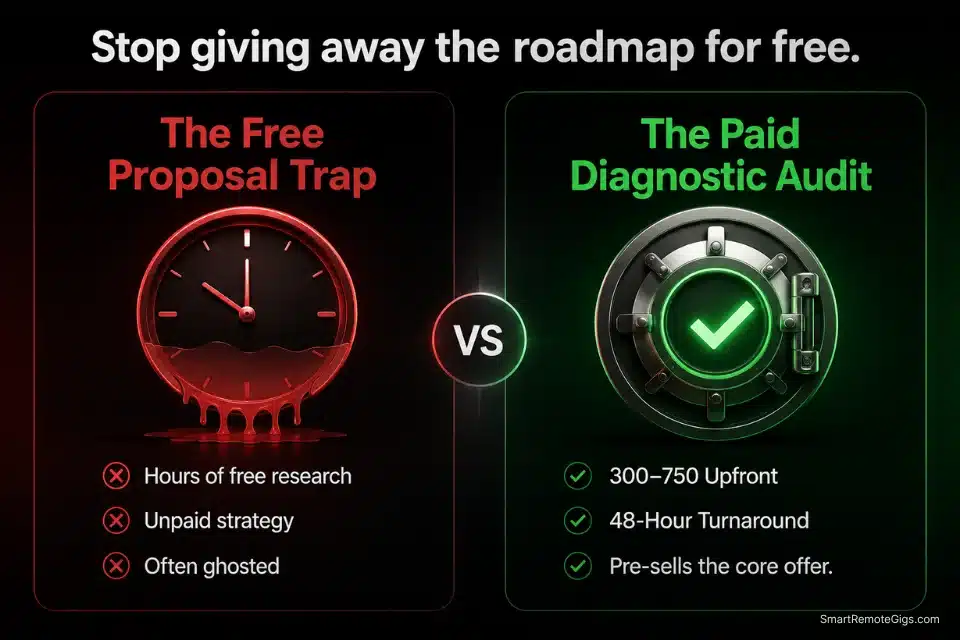
You are writing multi-page custom proposals for free. Prospects read them, nod, then disappear — or worse, hand your roadmap to a cheaper operator. You are not a consultant yet. You are a free research service. If you do not fix this this week, you will spend another month trading your expertise for silence.
The fix is dead simple: productize the discovery phase into a standalone paid asset.
If you keep submitting a custom freelance proposal for free, you are literally giving away the exact roadmap they will hand to a cheaper operator.
The Exact Playbook
- Define the diagnosis. Your audit has one output: a written document identifying the client’s top 3 revenue leaks, bottlenecks, or execution gaps. That’s it. Not a solution. Not a strategy deck. A diagnosis.
- Set the price. Charge $300–$750 depending on your niche. This is not a “get rich” play. It’s a filter. Prospects who won’t pay $300 for clarity will never pay $5,000 for execution.
- Replace your proposal with a pitch for the audit. Your first email or reply stops pitching the full project. It pitches the paid diagnostic. One problem, one deliverable, one price.
- Deliver in 72 hours or less. Speed signals competence. A 3-day turnaround on a paid audit makes your full-service offer feel effortless by comparison.
- Position the audit as the gateway. The final page of every audit ends with: “Based on this diagnosis, here is the most logical next step — and what that engagement looks like.” You are not hard-selling. You are leading.
The Text Script
Use this exact positioning email to redirect discovery calls into paid diagnostic audits.
Subject: Before we book a call — a faster path to clarity
Hi [CLIENT_FIRST_NAME],
Thanks for reaching out about [THEIR_STATED_PROBLEM].
Before we jump into a full proposal, I want to make sure we’re solving the right problem — not just the visible one.
I run a [YOUR_NICHE] Diagnostic Audit: a focused [AUDIT_DURATION] deep-dive where I identify your top [AUDIT_FINDINGS_COUNT] revenue leaks and give you a prioritized action document.
Investment: $[AUDIT_PRICE].
If we move forward to a full engagement after, this fee is credited toward the project.
Want me to send the intake form?
[YOUR_NAME]
[YOUR_TITLE]
[YOUR_CALENDAR_LINK][CLIENT_FIRST_NAME]— Their actual first name from the inquiry. Never “Hi there” or “Hello.”[THEIR_STATED_PROBLEM]— Mirror their exact words. Do not paraphrase or upgrade their language.[YOUR_NICHE]— Specific service category: “E-commerce Email Strategy” or “SaaS Onboarding UX.”[AUDIT_DURATION]— Hard timeframe only: “48-hour” or “72-hour.” Vague durations signal low confidence.[AUDIT_FINDINGS_COUNT]— A specific number, e.g., “3.” Never “several” or “a few.”[AUDIT_PRICE]— $300–$499 for newer operators; $500–$750 for specialists with 2+ years of results.[YOUR_TITLE]— Your niche descriptor: “B2B SaaS Copywriter” beats “Freelancer.”[YOUR_CALENDAR_LINK]— A direct booking link. Calendly free tier works if you don’t have one yet.
The Pro Tip / Red Flag
Red Flag: Never promise to “fix” the problem in the audit. The audit diagnoses the bleed; the next tier of your service stops it. The moment you start solving in the audit, you have just done a $4,000 engagement for $400.
🚀 Scenario 2 — The Custom Builder: Launching the Scoped Sprint
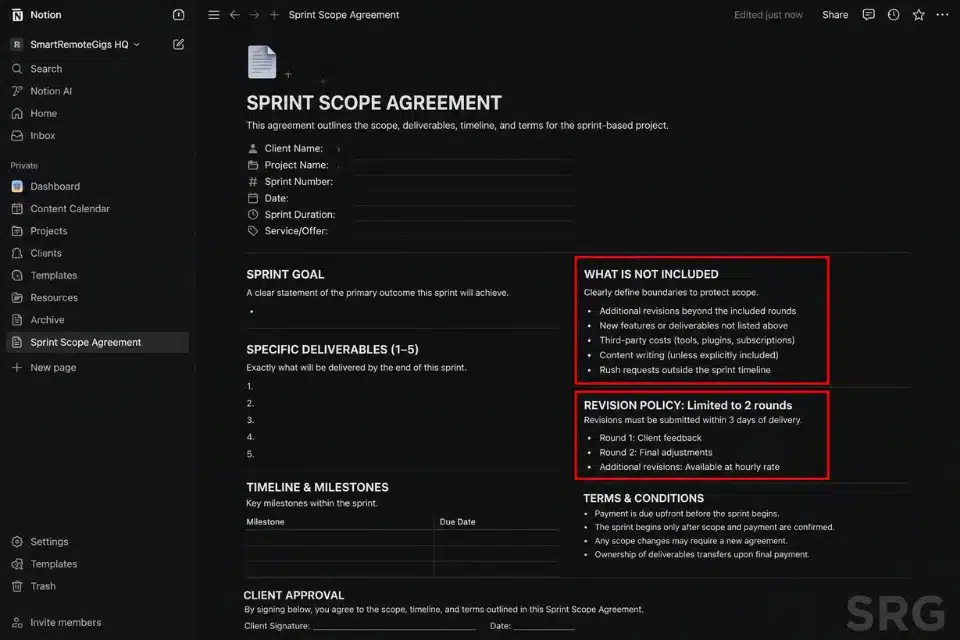
You are building bespoke deliverables from scratch on every single project. Different stack, different timeline, different scope every time. You cannot delegate it. You cannot repeat it. You cannot scale it. If you do not box this into a repeatable container this week, you will still be here in 12 months trading time for money at the same rate.
Custom builds kill momentum. The fix is a rigid 1-week or 2-week execution sprint with a non-negotiable scope ceiling.
Once a sprint is delivered, the most natural psychological upsell is rolling them directly into standardized freelance retainer packages for ongoing maintenance — and that transition becomes nearly automatic when you have a defined scope document in place.
The Exact Playbook
- Name the sprint outcome, not the process. “7-Day LinkedIn Profile Optimization Sprint” beats “I’ll fix your LinkedIn.” Name the output. Name the timeline. Done.
- Write the scope ceiling document. One page. What is included. What is not. Maximum revisions (2 is the number — never open-ended). Exact deliverable format. No ambiguity.
- Set the price based on the value of the outcome, not your hours. A LinkedIn profile that generates 3 inbound leads per month is worth $2,000+. Your 8 hours of work is irrelevant to that calculation.
- Build the intake form before you sell the sprint. The form collects everything you need to begin on Day 1: logins, brand assets, goals, competitors. No back-and-forth. No “can you send me the logo?”
- Create a single sales page or PDF one-pager. You need something to send. A clean Notion page or a 1-page PDF with the outcome, scope, timeline, and price converts faster than a 12-email explanation chain.
The Text Script
Use this scope limitation document to protect every sprint engagement from revision hell.
SPRINT SCOPE AGREEMENT — [YOUR_SPRINT_NAME]
Client: [CLIENT_FULL_NAME]
Sprint Start Date: [START_DATE]
Sprint Delivery Date: [DELIVERY_DATE]
WHAT IS INCLUDED:
[DELIVERABLE_1]
[DELIVERABLE_2]
[DELIVERABLE_3]
Up to [REVISION_ROUNDS] rounds of revisions on final deliverables
WHAT IS NOT INCLUDED:
[EXCLUSION_1]
[EXCLUSION_2]
Any additional pages, assets, or deliverables not listed above
REVISION POLICY:
Revisions are limited to [REVISION_ROUNDS] rounds within [REVISION_WINDOW_DAYS] days of delivery. Requests submitted after this window are treated as a new engagement.
TIMELINE PROTECTION CLAUSE:
Delays caused by late asset submission from the client will extend the delivery date by the same number of days as the delay. Sprint clock starts on the day all intake materials are received.
Agreed and acknowledged:
Client signature / approval: _____ Date: _
[YOUR_BUSINESS_NAME][YOUR_SPRINT_NAME]— Match exactly to your public offer name. Inconsistency here erodes trust.[CLIENT_FULL_NAME]— Full legal name. First name only is too casual for a binding scope document.[START_DATE / DELIVERY_DATE]— Hard calendar dates. Never “approximately 7 business days.”[DELIVERABLE_1/2/3]— One specific output per line. “Full rewrite of LinkedIn About section” not “LinkedIn work.”[EXCLUSION_1/2]— Pull from your last 3 scope creep incidents. Those are your exclusions.[REVISION_ROUNDS]— Set to 2. Field-tested standard. Three opens the door; open-ended kills your margin.[REVISION_WINDOW_DAYS]— 48–72 hours post-delivery is the standard. Beyond that, it is a new engagement.[YOUR_BUSINESS_NAME]— Legal entity name or your operating name as invoiced.
The SRG Project Profitability Calculator takes your sprint price, estimated hours, and subcontractor costs and tells you your real margin in under 2 minutes. Most operators who run this discover their “profitable” sprint is actually netting them $18/hr after revisions.
For the complete breakdown of pricing and features:

your real hourly rate and net profit before you commit to a project — instantly, free.
The single thing most operators change that destroys the sprint model: they negotiate on revisions to close the deal. The moment you allow a third revision “just this once,” you have trained that client to expect unlimited revisions on every future engagement.
The Pro Tip / Red Flag
Pro Tip: Frame your sprint constraints as a benefit to the client. “We limit revisions to guarantee your launch date” converts better than “I don’t have time for edits.” The constraint becomes the selling point.
📈 Scenario 3 — The Hourly Grind: Moving Clients to Flat-Rate Tiers
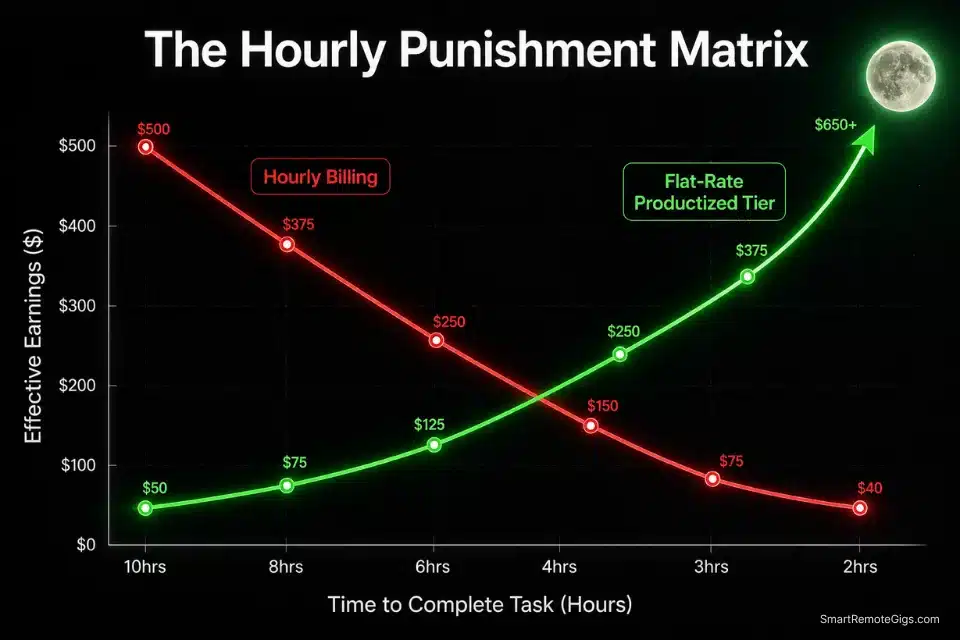
Tracking time punishes you for getting faster. You spend 3 hours on something that used to take 6, and your invoice drops in half. Your efficiency is literally costing you money. If your effective hourly rate is declining as your skills improve, the model is broken — not you.
It is time to forcefully migrate your roster to flat-rate tiers.
According to U.S. Bureau of Labor Statistics independent contractor data, the structural shift away from hourly W2 arrangements has accelerated sharply — and the freelancers capturing the margin are the ones operating on deliverable-based contracts, not time-tracked ones.
You need to re-evaluate how you price your freelance services immediately if your current effective hourly rate is dropping as you gain experience.
Transitioning to a fixed productized model is also the safest smokescreen to raise freelance rates without triggering a negotiation battle — the conversation shifts from “why are you charging more?” to “here is the new package structure.”
The Exact Playbook
- Calculate your current effective hourly rate per client. Total invoice ÷ actual hours including admin, revisions, and back-and-forth. For most operators doing custom work, this number is $22–$40/hr, not $75–$85. Know your real number.
- Identify the 3 highest-margin clients on your roster. These are the ones you migrate first. Do not start with your largest or most difficult client. Start with the relationship where trust is highest.
- Write the flat-rate package that matches their current engagement. If they are paying you $800/month for approximately 12 hours of work, your new package is $1,200/month for a fixed deliverable set that covers the same outcomes. You are not raising the price — you are changing the structure.
- Send the migration email 30 days before the billing change. Give them runway. 30 days removes the “ambush” perception and positions you as a professional operator upgrading their systems — not a freelancer demanding more money.
- Do not negotiate the structure — only the transition timeline. If they push back, offer to hold the current rate for one additional month while they adjust. That’s the only lever. The model change is not up for debate.
The Text Script
Send this exact script to migrate clients from hourly billing to flat-rate packages.
Subject: Billing model update — effective [TRANSITION_DATE]
Hi [CLIENT_FIRST_NAME],
Starting [TRANSITION_DATE], I’m moving all client engagements to a fixed-deliverable model. This replaces hourly tracking.
Here’s what that means for you:
Your current engagement maps to the [PACKAGE_NAME] package at $[FLAT_RATE]/month.
What’s included:
[DELIVERABLE_1]
[DELIVERABLE_2]
[DELIVERABLE_3]
[REVISION_TERMS]
What doesn’t change:
Same point of contact (me)
Same turnaround expectations
Same quality standards
Why the change: Fixed-deliverable contracts let me allocate focused execution time to each client without the overhead of time tracking. In practice, you get faster turnaround and cleaner deliverables.
If you have questions before [TRANSITION_DATE], reply here and I’ll clarify anything.
[YOUR_NAME][TRANSITION_DATE]— 30 days minimum from send date. Repeat it twice in the email so it registers.[CLIENT_FIRST_NAME]— First name only. “Hi team” is a red flag that you treat them as a ticket.[PACKAGE_NAME]— Name the tier. “Growth Sprint Package” lands better than “new billing model.”[FLAT_RATE]— Set 20–35% above their rolling hourly average. You are pricing in certainty and scope protection.[DELIVERABLE_1/2/3]— Mirror their current scope exactly. Do not introduce new deliverables in a migration email.[REVISION_TERMS]— Explicit cap only: “Up to 2 rounds per cycle, submitted within 48 hours of delivery.”
The SRG Freelance Hourly Rate Calculator reverse-engineers the flat rate you need to actually hit your income target — after taxes, overhead, and revision time. Run every client migration through this before you send the email.
For the complete breakdown of pricing and features:

Most freelancers guess their rate. This free calculator helps you set yours with precision — built around your actual monthly expenses, desired profit, and billable hours so you never undercharge again.
The Pro Tip / Red Flag
Red Flag: Never ask permission to change your billing model. “Would you be open to…” is the wrong frame. Present it as an operational upgrade happening on [TRANSITION_DATE]. You are informing, not negotiating.
⚙️ Scenario 4 — The Bottleneck: Building Execution SOPs
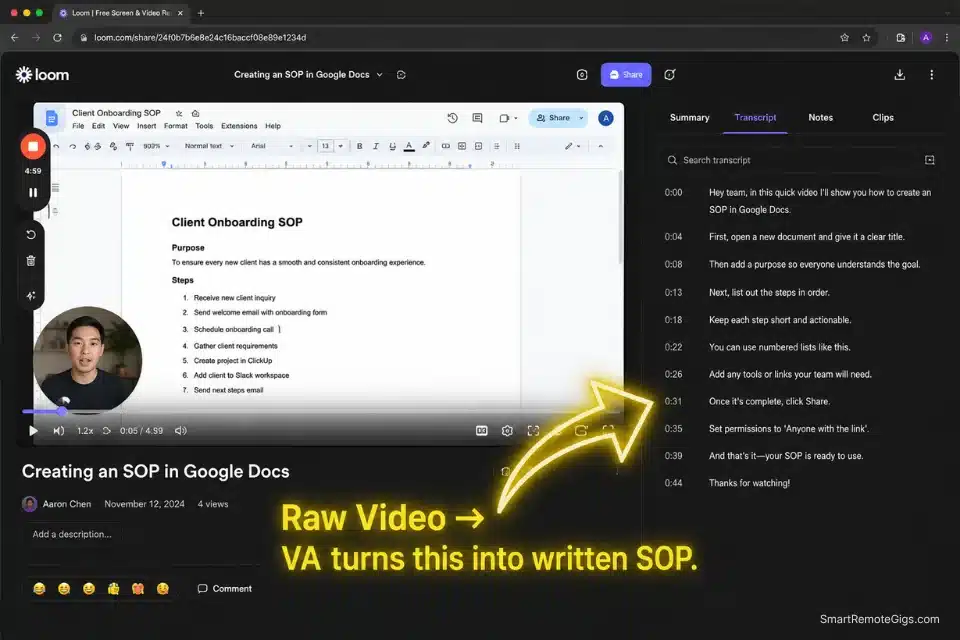
You are the only person who can deliver your service. That means you are not running a business — you are running a job with extra steps. The moment you get sick, distracted, or swamped, the whole thing stalls. If a productized service can only be fulfilled by you, you have not productized it. You have just repackaged the same bottleneck.
The fix is an airtight Standard Operating Procedure (SOP) — one that turns your expertise into a repeatable system someone else can execute.
Without a rigid SOP, any attempt to outsource freelance work will result in expensive miscommunications and destroyed client trust. I have seen operators lose $3,000+ engagements because their “instructions” were a 4-sentence Slack message.
The Exact Playbook
- Record the process before you document it. Open Loom and do the task live. Talk through every decision point out loud as you work. Do not edit the recording. Raw and complete beats polished and incomplete.
- Extract the decision tree from the recording. Watch the recording once. Every time you make a judgment call (“I chose this because…”), that’s a decision point that needs a rule in the SOP.
- Write the SOP in numbered steps. Every step: action + the expected output of that action + the quality check. If the step cannot be verified, break it down further. “Write the intro” is not a step. “Write a 3-sentence intro that mirrors the client’s stated pain point from the intake form” is a step.
- Have your first hire write the clean version. Do not spend 4 hours formatting an SOP yourself. Hire a VA for $25–$40 and have them convert your Loom recording into a clean Google Doc as their first paid task. You then review and approve one time.
- Test the SOP blind. Hand it to someone with zero context on your service. Have them complete one full delivery using only the document. Every question they ask reveals a gap. Fix the gap. Repeat until the SOP can run without you narrating it.
Per the SBA’s prime and subcontracting guidelines, clearly defined scope boundaries between you (as prime) and any subcontractor are not just good practice — they are your legal protection in any dispute over deliverables or payment.
Once your SOP is bulletproof, hit a vetted remote jobs platform to find an operator who can execute the steps at a lower wholesale rate, while you hold the client relationship and quality control layer.
The Text Script
Use this Loom recording framework to document your fulfillment process fast — no scripting required.
LOOM SOP RECORDING FRAMEWORK — [SERVICE_NAME]
Before you hit record, have these open:
The actual client project or a real past example
Your intake form responses
Any tools or platforms you use in delivery
RECORDING STRUCTURE (speak each section out loud):
SECTION 1 — CONTEXT (60 seconds)
“This SOP covers [SERVICE_NAME]. The end output the client receives is [EXACT_DELIVERABLE]. Quality is acceptable when [QUALITY_BENCHMARK].”
SECTION 2 — INPUTS REQUIRED (2 minutes)
“Before starting, you need: [INPUT_1], [INPUT_2], [INPUT_3].”
“If any of these are missing, do not begin. Send [INTAKE_FORM_LINK] back to the client.”
SECTION 3 — STEP-BY-STEP EXECUTION (10–20 minutes)
At every decision point, say out loud:
“I’m choosing [OPTION] here because [REASON]. If you see [ALTERNATIVE_SITUATION], do [ALTERNATIVE_ACTION] instead.”
SECTION 4 — QUALITY CHECK (3 minutes)
“Before delivery, confirm: [CHECK_1], [CHECK_2], [CHECK_3].”
SECTION 5 — DELIVERY PROTOCOL (2 minutes)
“Deliver via [DELIVERY_METHOD]. Subject line: [DELIVERY_EMAIL_SUBJECT]. Attach [DELIVERABLE_FORMAT]. CC [CC_RECIPIENT].”
After recording: share the Loom link with your SOP writer. Their job is to convert timestamps to numbered steps in a Google Doc. You review once.[SERVICE_NAME]— Your exact productized offer name. Use it consistently — confusion here breaks delegation.[EXACT_DELIVERABLE]— The finished output in one sentence: “A published 1,000-word SEO article” not “content.”[QUALITY_BENCHMARK]— Define “done” in measurable terms: “Client can publish without edits” or “passes Grammarly at 98+.”[INPUT_1/2/3]— Every asset needed before work starts. Logins, brand kits, access credentials, reference docs.[INTAKE_FORM_LINK]— The live URL of your intake form. Not “the form.” A real link.[OPTION / REASON / ALTERNATIVE_SITUATION / ALTERNATIVE_ACTION]— The judgment call layer. This is what most SOPs skip and why delegation fails.[CHECK_1/2/3]— Your non-negotiable quality gates. If it does not pass these, it does not leave the building.[DELIVERY_METHOD / EMAIL_SUBJECT / DELIVERABLE_FORMAT / CC_RECIPIENT]— Every delivery detail specified so the operator never guesses.
The Pro Tip / Red Flag
Pro Tip: Record yourself doing the task live, mistakes and all. Have your first outsourced hire write the official text SOP from your video as their first paid task. You get the SOP. They get onboarded. One $35 recording saves you 6 hours of documentation.
📥 Scenario 5 — The Clunky Start: Zero-Touch Asynchronous Onboarding
Every minute you spend in a “getting started” Zoom call is a minute you are not billing. Every time a client emails you assets instead of uploading them to the right folder, you lose 20 minutes chasing file versions. If your onboarding process requires your live presence, it is not a productized service — it is a managed handoff, and you are the unpaid project manager.
The goal is onboarding that runs itself.
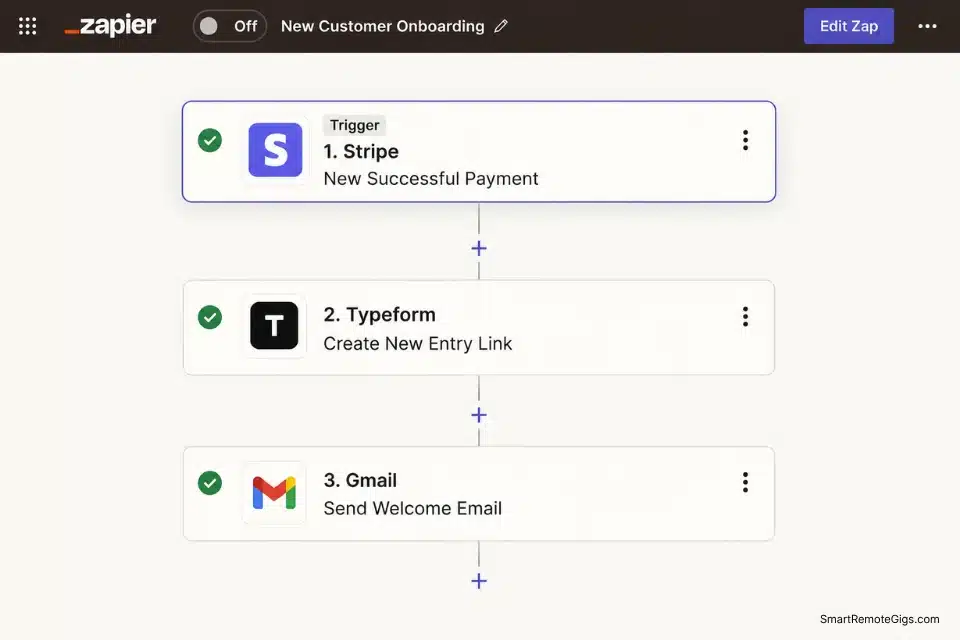
Hook up your payment processor to dedicated workflow automation software so intake forms trigger the second the invoice clears — no manual “okay, let’s get started” email required.
The Exact Playbook
- Build the intake form before the payment link. The form should collect 100% of what you need to begin work: brand assets, logins, goals, constraints, deadlines, and preferred communication channel. If you need it on Day 1, it goes on the form.
- Connect payment to form trigger automatically. The client pays → they receive the intake form link immediately, automatically. Use Stripe + Zapier + Typeform/Jotform or an equivalent stack. Human intervention required: zero.
- Record a 3-minute welcome video. One time. Post it as the first item in the intake confirmation email. It covers: what happens next, what they need to submit, and when they will hear from you. Every client gets the same video. You record it once.
- Set the expectation document in the confirmation email. Timelines, communication hours, revision windows, and delivery format — all in the first email they receive after payment. Before they even fill out the intake form.
- Create a “project started” trigger email. Once the intake form is completed, an automated email fires: “Your sprint has started. Your delivery date is [DATE]. Your project folder is [LINK]. No updates will be sent until delivery unless there is a blocker.” That’s it. They are managed.
The Text Script
Send this automated welcome sequence the moment payment clears.
Subject: You’re in — here’s exactly what happens next
Hi [CLIENT_FIRST_NAME],
Payment confirmed. Your [SPRINT_NAME] sprint is officially booked.
Here’s what happens from here:
STEP 1 — COMPLETE YOUR INTAKE FORM (takes ~[FORM_DURATION])
[INTAKE_FORM_LINK]
Do this now while the context is fresh. Your sprint clock starts the moment I receive the completed form.
STEP 2 — WATCH YOUR ONBOARDING OVERVIEW (3 minutes)
[LOOM_WELCOME_VIDEO_LINK]
This covers what I’m building, my quality standards, and how delivery works.
WHAT TO EXPECT:
Delivery date: [DELIVERY_DATE] (starts from intake form completion)
Revision window: [REVISION_WINDOW]
Communication: I work async. Responses within [RESPONSE_TIME].
Updates: You will hear from me at delivery unless there’s a blocker.
IMPORTANT — ASSET SUBMISSION:
All assets must be submitted via the intake form above. Assets sent by email will not be accepted and will delay your start date.
Questions before the form? Reply here. Questions after the form? Everything is covered in the onboarding video.
[YOUR_NAME]
[YOUR_TITLE]
[YOUR_BUSINESS_NAME]- [CLIENT_FIRST_NAME] — Auto-populate from your payment processor. Stripe, Gumroad, and ThriveCart all pass this field.
- [SPRINT_NAME] — The exact product name as sold. Match the invoice line item word for word.
- [FORM_DURATION] — Time your own form. “8 minutes” is specific and honest. “A few minutes” is not.
- [INTAKE_FORM_LINK] — Live URL. If you use Typeform or Jotform, paste the direct share link.
- [LOOM_WELCOME_VIDEO_LINK] — Record once. Re-record only when your process materially changes.
- [DELIVERY_DATE] — Pull dynamically from intake completion date + sprint duration in your automation.
- [REVISION_WINDOW] — Hard window only: “48 hours post-delivery.” Open-ended revision windows are a scope trap.
- [RESPONSE_TIME] — Be honest: “24 business hours” or “next business day.” Do not promise same-day on an async model.
- [YOUR_TITLE / YOUR_BUSINESS_NAME] — Match your invoice exactly. Consistency signals professionalism.
The Pro Tip / Red Flag
Red Flag: If a client bypasses your intake form and emails you assets directly, politely refuse to start the timeline until the form is filled out. “I’ve received your assets — once you complete the intake form, I’ll confirm your start date.” Guard the system every single time. The first exception you make is the one that trains them.
💵 Pricing Your Scalable Productized Tiers
Productized services are margin plays, not time-for-money equations.
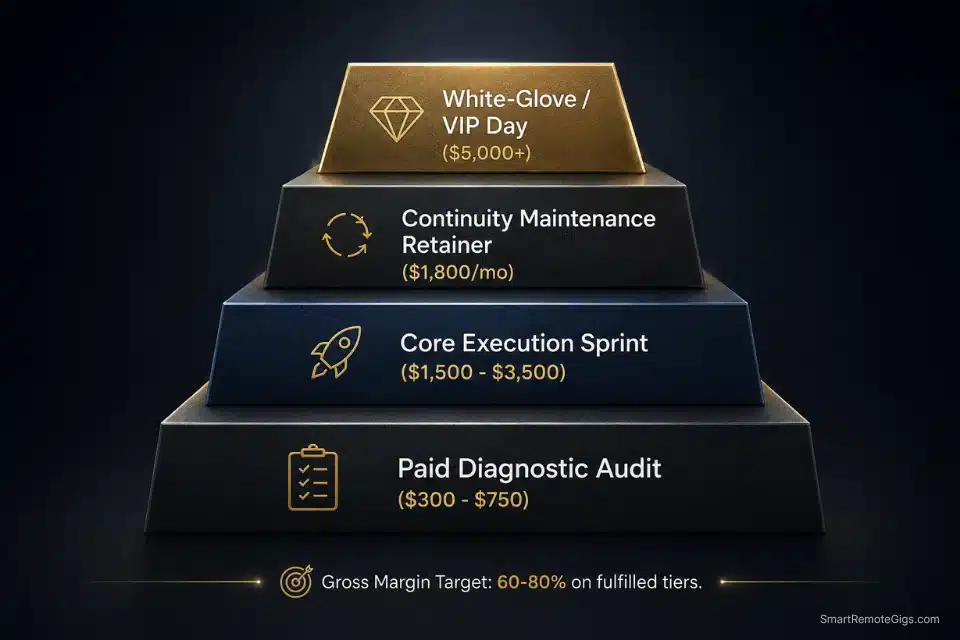
Starting prices for basic productized sprints should never dip below your target minimum engagement — $1,500 is the field-tested floor for most B2B service categories. White-labeled fulfillment, where you manage a subcontractor executing your SOP, can yield 60–80% gross margins once your delivery system is locked.
The pricing architecture that works in the field looks like this:
Your entry point is the Paid Diagnostic Audit at $300–$750 — diagnosis only, no execution, no custom roadmap. This is your filter. From there, your Core Execution Sprint runs $1,500–$3,500: fixed deliverable, rigid scope, 1–2 week delivery window. That is the engine of your productized model.
Once a client completes a sprint, your Continuity Retainer at $1,800–$4,500/month becomes the logical next conversation — ongoing maintenance against the same standardized delivery system. The top of the stack is a White-Glove or Done-For-You engagement at $5,000+, where your SOP-trained team handles fulfillment end to end while you hold the client relationship.
Do not build all four tiers on Day 1. Start with the Paid Audit and one Core Sprint. Add tiers only after the core is running profitably and repeatably.
To process these larger, automated payments efficiently, upgrade to robust tools in the SRG Software Directory that support subscription logic and automated dunning — chasing unpaid invoices manually is the fastest way to nuke the efficiency you just built.
🗓️ The 30-Day Productization Execution Plan
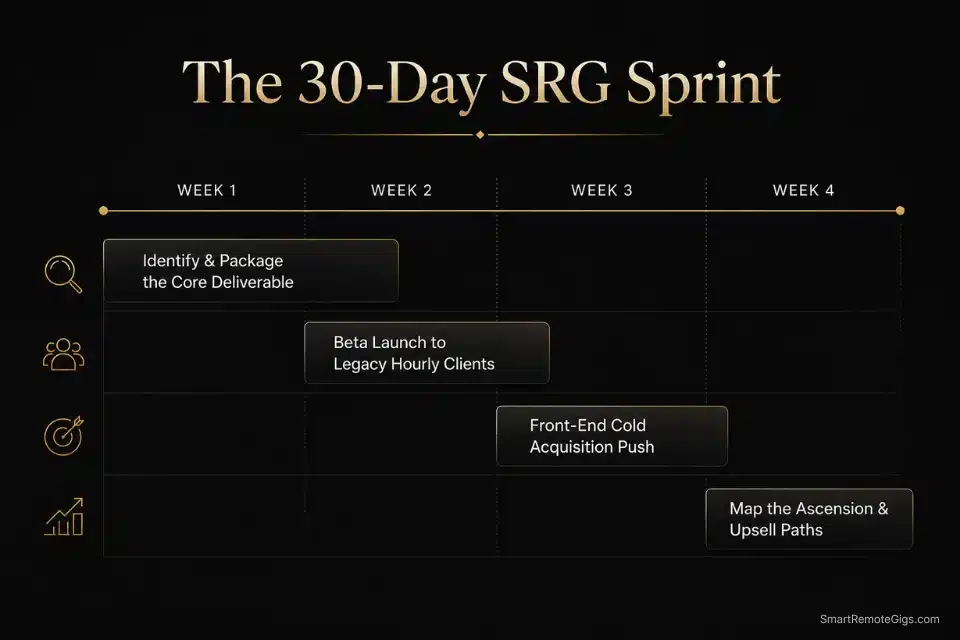
Days 1–3: Identify the Core Deliverable
- Pull your last 5 completed projects.
- Calculate the actual effective hourly rate for each (invoice ÷ real hours including revisions and admin).
- Identify the one service that had the highest margin and the clearest output.
- Write one sentence describing that output. If you cannot do it in one sentence, it is not productized yet.
Pro Tip: The deliverable that took the least explanation to the client and required the fewest revisions is your productization candidate. Ease of fulfillment is the signal.
Days 4–7: Price and Package the Outcome
- Set a flat rate using value-based pricing — not an hourly estimate multiplied by your rate.
- Write the scope document: exact deliverables, exact revision limit (2 rounds), exact turnaround window.
- Build your intake form. Collect everything you need before work starts. No exceptions.
- Choose one name for this offer. One. Not three variations.
Red Flag: Do not build multiple confusing tiers in week one. Launch with one entry offer (the Paid Audit) and one core execution sprint. Complexity at launch kills conversion.
The SRG Free Invoice Generator lets you send professional, scope-specific invoices that match your new flat-rate structure — so the billing mechanics match the premium positioning from Day 1.
For the complete breakdown of pricing and features:

Fill in your details and create a professional, print-ready invoice — instantly, free, no sign up.
Days 8–14: The Beta Launch to Existing Roster
- Identify 3 legacy clients currently on messy hourly arrangements.
- Send the migration email from Scenario 3 — customize the package details, set the transition date 30 days out.
- Onboard any who accept through your new automated intake system.
Pro Tip: Offer current clients a “grandfathered” rate on the new package for their first month — specifically 10–15% below the standard price. This incentivizes early adoption without permanently discounting your offer.
Days 15–21: Front-End Acquisition Push
- Update your LinkedIn headline to state the exact outcome of your core sprint. Not your job title.
- Update your Upwork or platform profile to describe the sprint deliverable, timeline, and starting price.
- Send 10 cold outreach messages per day to decision-makers in your target niche — not platform applications, direct LinkedIn or email outreach.
Once the offer is locked, pump volume through a targeted freelance client pipeline to break your previous revenue ceilings. A productized offer without a consistent acquisition engine is just a better-packaged waiting game.
Days 22–30: Mapping the Ascension Path
- Build the post-delivery handoff sequence — what you send the client after the sprint is complete, including what problem they face next.
- Identify the logical next problem your client will face after your sprint. That is your retainer offer or your next tier.
- Write the 2-sentence upsell that transitions sprint clients into continuity.
Finally, construct a logical freelance value ladder so a $1,000 sprint smoothly transitions into a $5,000 continuity contract — without a single awkward sales conversation.
By Day 30, you will have transitioned from a reactive order-taker to a proactive service operator with at least one standardized, highly profitable fixed-price tier running on autopilot — and a migration underway with a minimum of 3 legacy clients.
❓ Frequently Asked Questions
What does it mean to productize a service?
Yes — and the concept is simpler than most guides make it. It means stripping away custom scopes and selling a fixed outcome at a fixed price with a fixed delivery timeline. Instead of quoting each client differently based on their requirements, you define a standardized deliverable — “7-Day LinkedIn Profile Sprint, $1,800, 2 revisions” — and every client buys the same thing. Your job becomes fulfillment, not scoping.
How do you turn your freelance expertise into digital products?
Yes, you can — and you probably already have the raw material. Start by identifying the single most repeatable deliverable you already produce, then document the process as an SOP and detach it from your live presence. An expertise-backed digital product is anything that delivers your methodology without you in the room — a template, a framework document, an automated audit, or a recorded training. Most freelancers already have this; they just have not packaged it yet.
What are the common bottlenecks when trying to scale a freelance business?
Yes, there are three — and they kill operators in the same order every time. Custom scoping that never repeats, a fulfillment process only the founder can execute, and a client onboarding system that requires live time. Fix those three in that order — productize the offer, build the SOP, automate the intake — and you have removed the three main ceilings on volume and margin.
How can freelancers scale without losing personalization?
Yes — the trick is building personalization into your intake form, not into your delivery process. Collect the context, goals, and preferences upfront, then use them to customize the output without customizing the workflow. The client feels like everything was made for them. You are running a repeatable system with variable inputs, not a bespoke operation every time.
What is the difference between productized services and custom offerings?
It depends on whether the scope, price, and timeline are fixed before the client signs or negotiated after. Custom offerings are scoped new every time — price, timeline, and deliverables are all negotiated per client. Productized services have a fixed scope, fixed price, and fixed timeline that do not change per client. The client is buying a defined outcome. You are running a defined process. Both can be premium; only one can scale.
How much work can you automate in freelance consulting?
It depends on how well your service is productized. In a fully standardized model, intake, onboarding, payment processing, and delivery notifications can all run without you. The actual execution — the thinking, writing, building, or strategizing — still requires your judgment or a trained subcontractor running your SOP. Operators who build this correctly typically remove 8–12 hours per week of admin overhead within 60 days of full implementation.
The Verdict: Stop Selling Time, Start Selling Assets
Most freelancers who read this will agree with it and change nothing. They will spend another 6 months writing custom proposals, tracking hours, and hitting the same $4–5k monthly ceiling while their skills improve and their effective rate quietly drops.
The ones who win in 2026 are the operators who pick one repeatable deliverable this week, price it based on value, and force their first client through a standardized intake process before they overthink it. The product does not have to be perfect to be profitable. It has to be defined.
This model is not for everyone. If you thrive on variety, hate repeating yourself, and find custom work energizing — productization will feel like a cage. Stay hourly. But if you want to hit $12k–$18k monthly recurring revenue without working 60-hour weeks, the only path is standardization. One offer, one process, one system that runs without your presence at every step.
The Verdict: The freelancers who package their expertise into a fixed-price outcome and guard the scope with a rigid document will out-earn the custom builders by a factor of 2–3x within 6 months. The math is not complicated. The execution is.
Ultimately, standardizing your deliverables is the only viable bridge for moving from an overworked freelancer to micro agency owner without your life imploding — and the operators who make that jump consistently all started with a single productized sprint, not a full agency rebrand.
While you build your productized income, don’t leave money on the table. Head to the SRG Job Board at /jobs/ for clients actively seeking standardized remote solutions. Browse the SRG Software Directory at /software/ for the exact automation stacks needed to fulfill your packages while you sleep.

Never Miss a New Remote Job
REMOTE JOB ALERTSGet notified about new remote jobs and access practical freelance tools from your phone.

![How to Find Client Email Addresses: B2B Method [Guide]](https://smartremotegigs.com/wp-content/uploads/2026/10/how-to-find-client-email-addresses-hero-1024x577.webp)